习惯养成塔应用
欢迎加入开源鸿蒙跨平台社区:
https://openharmonycrossplatform.csdn.net
一、项目概述
运行效果图
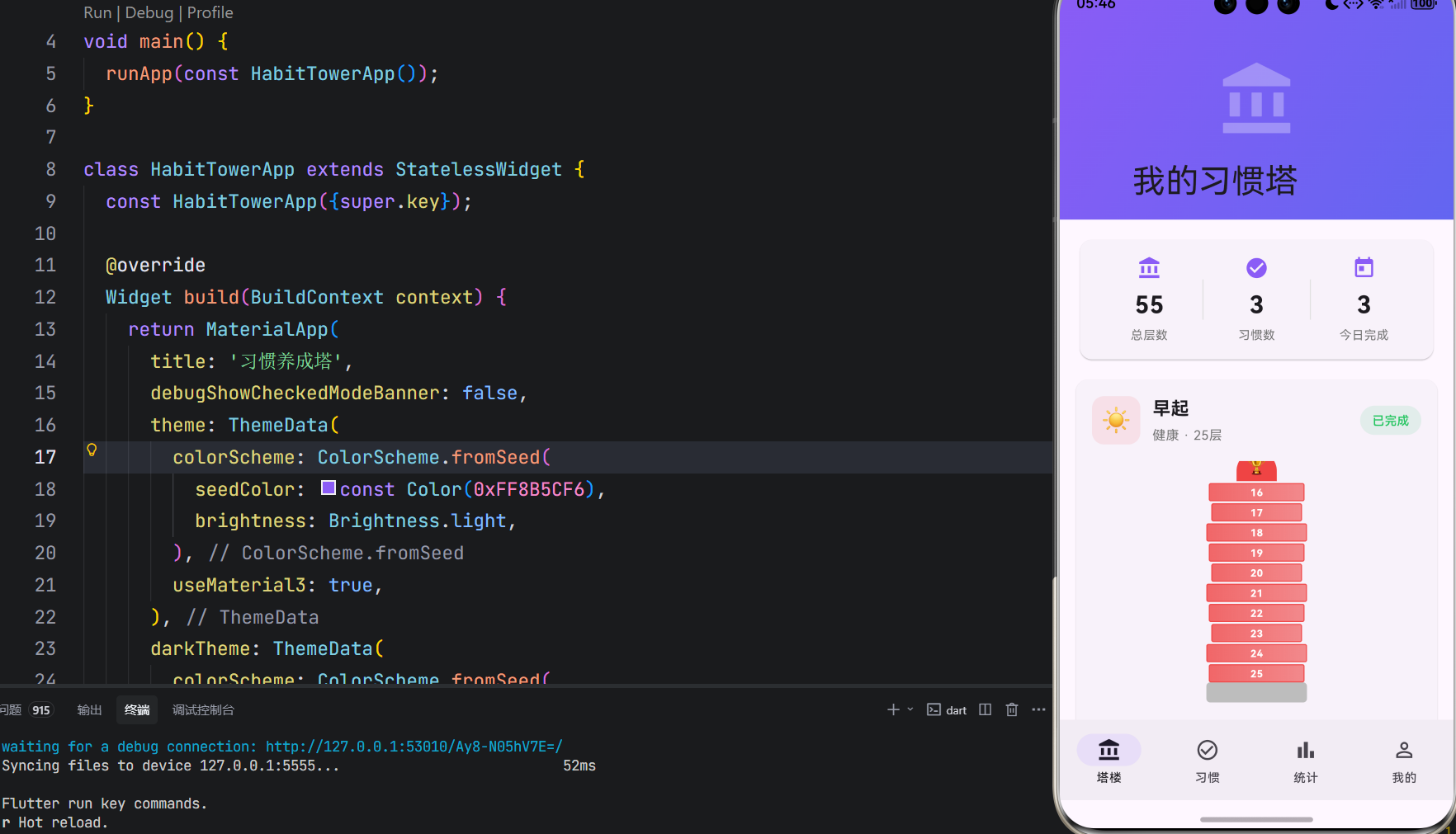
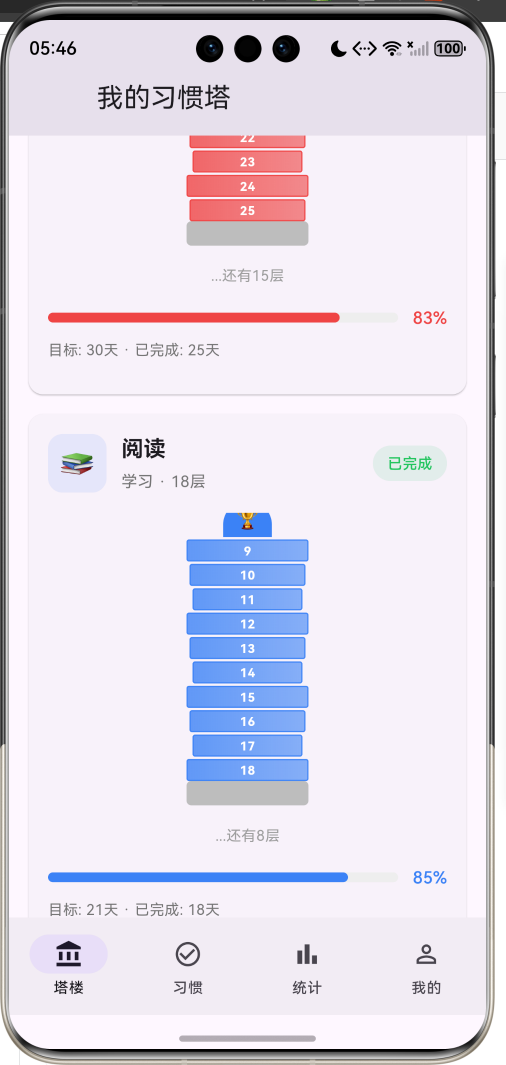
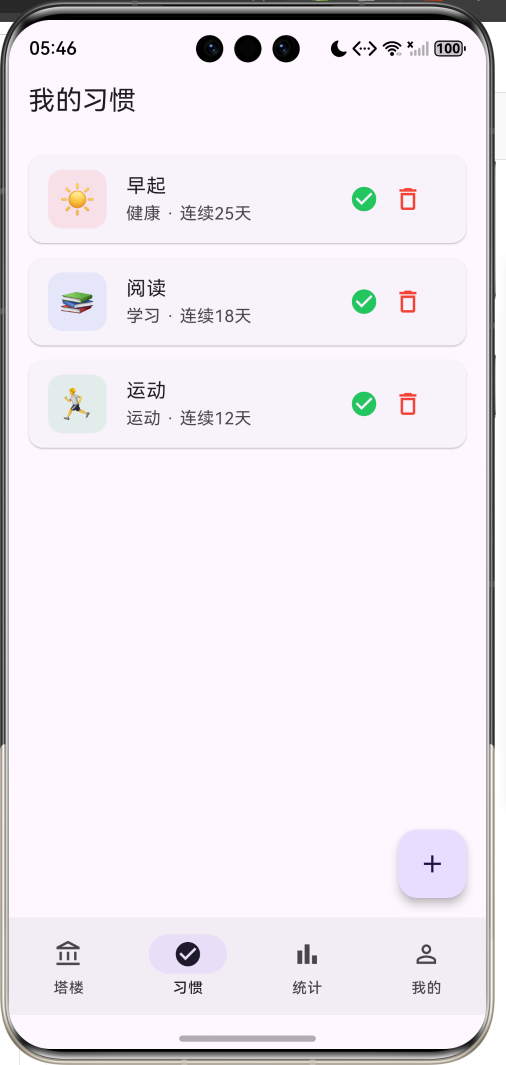
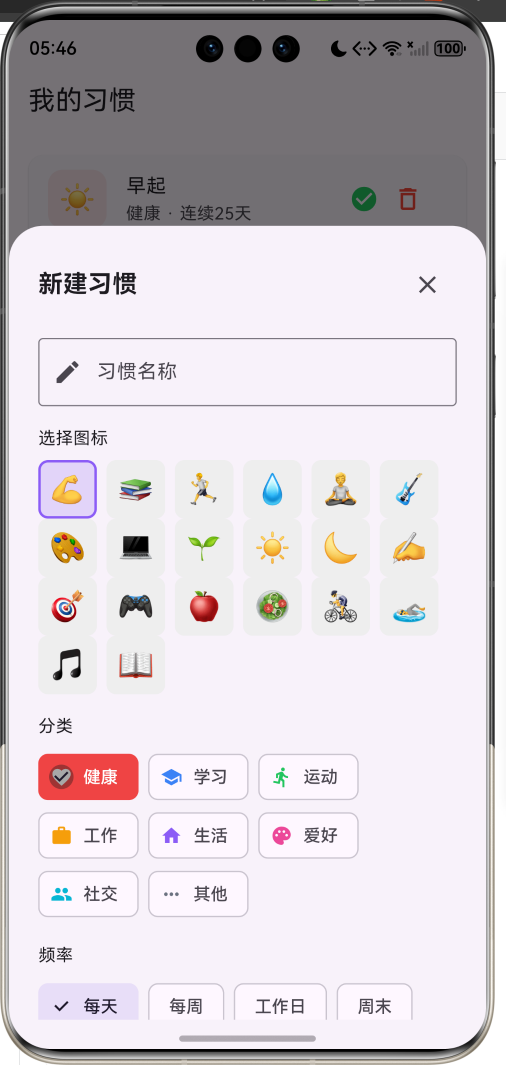
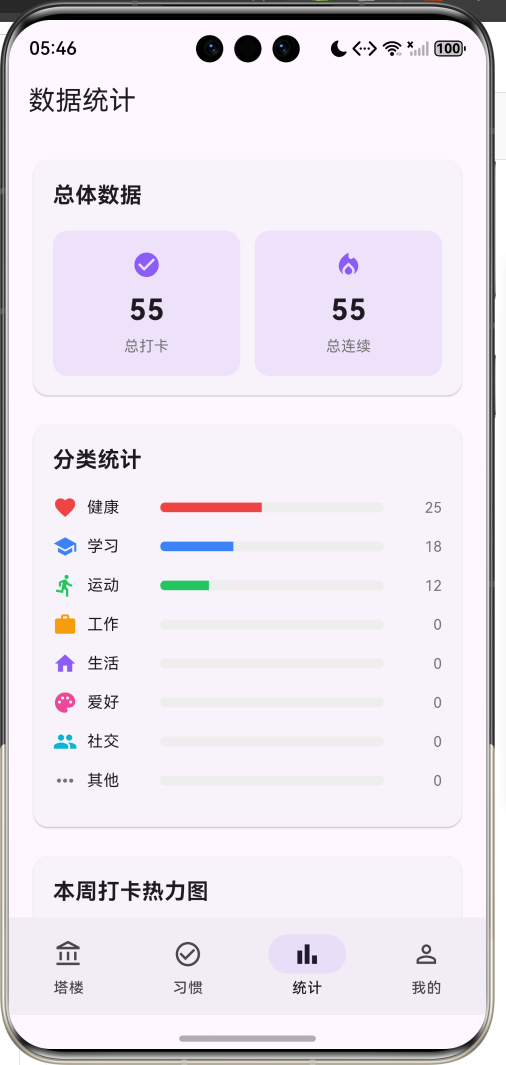
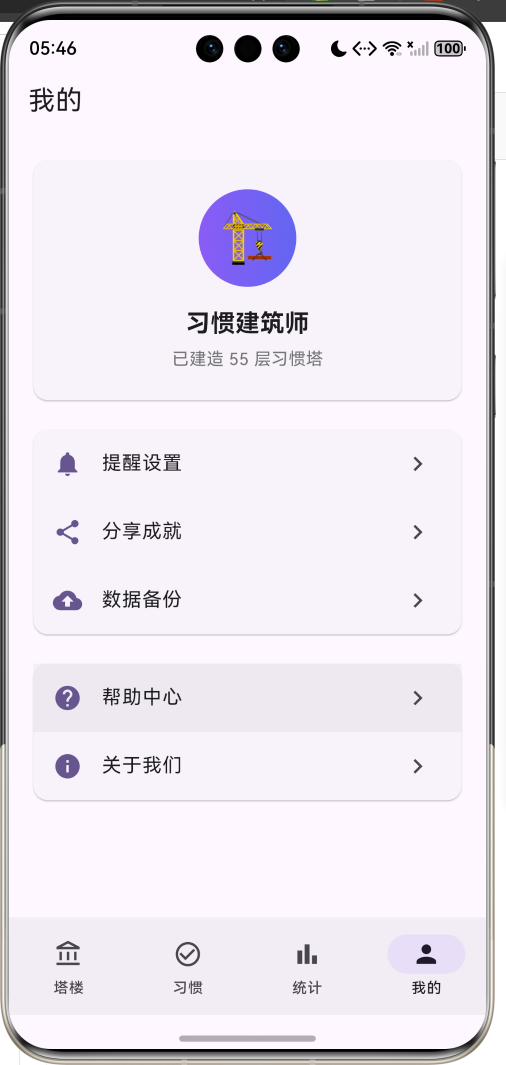
1.1 应用简介
"习惯养成塔"是一款游戏化的习惯养成应用,核心理念是每坚持一天,塔就盖高一层。通过将习惯养成与建造塔楼相结合,让用户在坚持习惯的过程中获得视觉成就感和持续动力。
应用以紫色为主色调,传递神秘、梦幻、成长的游戏氛围。用户创建习惯后,每完成一天打卡,就会为对应的塔楼添加一层。塔楼越高,代表习惯坚持得越久,用户可以看到自己"建造"的成果,增强坚持的动力。
1.2 核心功能
| 功能模块 | 功能描述 | 实现方式 |
|---|---|---|
| 习惯创建 | 创建新的习惯目标 | 底部弹窗表单 |
| 每日打卡 | 完成习惯后打卡 | 按钮点击 + 状态更新 |
| 塔楼建造 | 每打卡一天塔楼增高一层 | Stack + Positioned |
| 习惯管理 | 查看和管理所有习惯 | ListView列表 |
| 数据统计 | 查看打卡统计和分类图表 | 卡片 + 进度条 |
| 热力图 | 本周打卡可视化 | GridView |
1.3 习惯分类
| 序号 | 分类名称 | 图标 | 颜色 | 示例习惯 |
|---|---|---|---|---|
| 1 | 健康 | favorite | 红色 #EF4444 | 早起、喝水、冥想 |
| 2 | 学习 | school | 蓝色 #3B82F6 | 阅读、背单词、写作 |
| 3 | 运动 | directions_run | 绿色 #22C55E | 跑步、健身、游泳 |
| 4 | 工作 | work | 橙色 #F59E0B | 专注工作、复盘 |
| 5 | 生活 | home | 紫色 #8B5CF6 | 整理房间、做饭 |
| 6 | 爱好 | palette | 粉色 #EC4899 | 画画、弹吉他 |
| 7 | 社交 | people | 青色 #06B6D4 | 联系朋友、社交 |
| 8 | 其他 | more_horiz | 灰色 #6B7280 | 自定义习惯 |
1.4 习惯频率
| 频率 | 说明 | 每周天数 |
|---|---|---|
| 每天 | 每天都需要完成 | 7天 |
| 每周 | 每周完成一次 | 1天 |
| 工作日 | 周一至周五 | 5天 |
| 周末 | 周六周日 | 2天 |
1.5 技术栈
| 技术领域 | 技术选型 | 版本要求 |
|---|---|---|
| 开发框架 | Flutter | >= 3.0.0 |
| 编程语言 | Dart | >= 2.17.0 |
| 设计规范 | Material Design 3 | - |
| 状态管理 | setState | - |
| 目标平台 | 鸿蒙OS / Android / iOS | API 21+ |
二、系统架构
2.1 整体架构图
Data Layer
Presentation Layer
主页面
HabitTowerHomePage
塔楼页面
习惯列表
数据统计
个人中心
塔楼卡片
总层数统计
塔楼可视化
打卡按钮
Habit
习惯
TowerFloor
塔楼层
HabitTower
习惯塔
HabitCategory
分类
2.2 类图设计
manages
manages
uses
has
has
has
HabitTowerApp
+Widget build()
<<enumeration>>
HabitCategory
+String label
+IconData icon
+Color color
+health
+study
+exercise
+work
+life
+hobby
+social
+other
<<enumeration>>
HabitFrequency
+String label
+int daysPerWeek
+daily
+weekly
+weekdays
+weekends
Habit
+String id
+String name
+HabitCategory category
+HabitFrequency frequency
+String emoji
+DateTime createdAt
+List<DateTime> completedDates
+int targetDays
+int currentStreak
+int totalCompleted
+double progress
+bool isCompletedToday
+Habit copyWith()
TowerFloor
+int floorNumber
+String habitId
+DateTime builtAt
+String note
HabitTower
+String id
+String name
+List<TowerFloor> floors
+DateTime createdAt
+int height
+double progress
HabitTowerHomePage
-int _selectedIndex
-List<Habit> _habits
-List<HabitTower> _towers
+void _addHabit()
+void _completeHabit()
+void _deleteHabit()
2.3 页面导航流程
塔楼
习惯
统计
我的
应用启动
塔楼页面
底部导航
查看塔楼
习惯列表
数据统计
个人中心
点击打卡
添加塔楼层
更新塔楼高度
点击添加
新建习惯弹窗
创建习惯
生成新塔楼
点击习惯
查看详情
2.4 打卡流程图
塔楼数据 习惯数据 塔楼页面 用户 塔楼数据 习惯数据 塔楼页面 用户 alt 已打卡 未打卡 点击打卡按钮 检查今日是否已打卡 提示"今天已经完成" 添加今日完成记录 更新习惯状态 创建新楼层 更新塔楼高度 显示"塔楼又盖高了一层"
三、核心模块设计
3.1 数据模型设计
3.1.1 习惯分类枚举 (HabitCategory)
dart
enum HabitCategory {
  health('健康', Icons.favorite, Color(0xFFEF4444)),
  study('学习', Icons.school, Color(0xFF3B82F6)),
  exercise('运动', Icons.directions_run, Color(0xFF22C55E)),
  work('工作', Icons.work, Color(0xFFF59E0B)),
  life('生活', Icons.home, Color(0xFF8B5CF6)),
  hobby('爱好', Icons.palette, Color(0xFFEC4899)),
  social('社交', Icons.people, Color(0xFF06B6D4)),
  other('其他', Icons.more_horiz, Color(0xFF6B7280));

  final String label;
  final IconData icon;
  final Color color;
  const HabitCategory(this.label, this.icon, this.color);
}
3.1.2 习惯频率枚举 (HabitFrequency)
dart
enum HabitFrequency {
  daily('每天', 1),
  weekly('每周', 7),
  weekdays('工作日', 5),
  weekends('周末', 2);

  final String label;
  final int daysPerWeek;
  const HabitFrequency(this.label, this.daysPerWeek);
}
3.1.3 习惯模型 (Habit)
dart
class Habit {
  final String id;
  final String name;
  final HabitCategory category;
  final HabitFrequency frequency;
  final String emoji;
  final DateTime createdAt;
  final List<DateTime> completedDates;
  final int targetDays;

  Habit({
    required this.id,
    required this.name,
    required this.category,
    required this.frequency,
    required this.emoji,
    required this.createdAt,
    this.completedDates = const [],
    this.targetDays = 21,
  });

  int get currentStreak {
    if (completedDates.isEmpty) return 0;

    final sorted = completedDates.toList()..sort((a, b) => b.compareTo(a));
    int streak = 0;
    DateTime checkDate = DateTime.now();

    for (final date in sorted) {
      if (_isSameDay(date, checkDate) ||
          (_isSameDay(date, checkDate.subtract(const Duration(days: 1))))) {
        streak++;
        checkDate = date.subtract(const Duration(days: 1));
      } else {
        break;
      }
    }
    return streak;
  }

  int get totalCompleted => completedDates.length;
  double get progress => totalCompleted / targetDays;
  bool get isCompletedToday => completedDates.any((d) => _isSameDay(d, DateTime.now()));
}
3.1.4 塔楼层模型 (TowerFloor)
dart
class TowerFloor {
  final int floorNumber;
  final String habitId;
  final DateTime builtAt;
  final String? note;

  TowerFloor({
    required this.floorNumber,
    required this.habitId,
    required this.builtAt,
    this.note,
  });
}
3.1.5 习惯塔模型 (HabitTower)
dart
class HabitTower {
  final String id;
  final String name;
  final List<TowerFloor> floors;
  final DateTime createdAt;

  HabitTower({
    required this.id,
    required this.name,
    this.floors = const [],
    required this.createdAt,
  });

  int get height => floors.length;
  double get maxHeight => 100.0;
  double get progress => height / maxHeight;
}
3.2 页面结构设计
3.2.1 塔楼页面布局
塔楼页面
SliverAppBar
总层数统计
塔楼卡片列表
紫色渐变背景
应用标题
总层数
习惯数
今日完成
习惯信息
塔楼可视化
地基
楼层堆叠
顶部奖杯
进度条
打卡按钮
3.2.2 塔楼可视化结构
塔楼可视化
Stack组件
地基
楼层1
楼层2
...
楼层N
顶部奖杯
灰色矩形
渐变色矩形
楼层编号
分类颜色屋顶
奖杯图标
3.3 连续天数计算
是
否
获取完成日期列表
按日期倒序排序
初始化连续天数=0
设置检查日期=今天
遍历日期列表
日期匹配检查日期?
连续天数+1
检查日期-1天
中断循环
返回连续天数
四、UI设计规范
4.1 配色方案
应用采用紫色为主色调,传递神秘、梦幻、成长的游戏氛围:
| 颜色类型 | 色值 | 用途 |
|---|---|---|
| 主色 | #8B5CF6 (Purple) | 导航、强调元素 |
| 辅色 | #6366F1 (Indigo) | 渐变背景 |
| 健康 | #EF4444 (Red) | 健康类习惯 |
| 学习 | #3B82F6 (Blue) | 学习类习惯 |
| 运动 | #22C55E (Green) | 运动类习惯 |
| 完成 | #22C55E (Green) | 完成状态 |
| 待打卡 | #F59E0B (Amber) | 待打卡状态 |
4.2 字体规范
| 元素 | 字号 | 字重 | 颜色 |
|---|---|---|---|
| 应用标题 | 20px | Bold | #FFFFFF |
| 习惯名称 | 18px | Bold | #000000 |
| 分类标签 | 13px | Regular | #666666 |
| 楼层编号 | 10px | Bold | #FFFFFF |
| 统计数据 | 24px | Bold | #000000 |
| 进度百分比 | 14px | Medium | 分类色 |
4.3 组件规范
4.3.1 塔楼卡片
┌─────────────────────────────────────────┐
│  ┌────┐                                 │
│  │ ☀️ │  早起                            │
│  └────┘  健康 · 25层                     │
│                                         │
│         ┌─────────┐                    │
│         │   🏆    │  顶部奖杯           │
│         ├─────────┤                    │
│         │   25    │  第25层             │
│         ├─────────┤                    │
│         │   24    │                     │
│         ├─────────┤                    │
│         │  ...    │  中间楼层           │
│         ├─────────┤                    │
│         │    1    │  第1层              │
│         ├─────────┤                    │
│         │  地基   │                     │
│         └─────────┘                    │
│                                         │
│  [==========>    ]  83%                │
│  目标: 30天 · 已完成: 25天              │
│                                         │
│  [    打卡盖楼    ]                     │
└─────────────────────────────────────────┘
4.3.2 楼层组件
┌─────────────────┐
│      25         │  楼层编号居中
│                 │
└─────────────────┘
  渐变色背景
  边框高亮
五、核心功能实现
5.1 打卡功能
dart
void _completeHabit(Habit habit) {
  final now = DateTime.now();

  if (habit.isCompletedToday) {
    ScaffoldMessenger.of(context).showSnackBar(
      const SnackBar(content: Text('今天已经完成这个习惯啦!')),
    );
    return;
  }

  setState(() {
    final index = _habits.indexWhere((h) => h.id == habit.id);
    if (index != -1) {
      final updatedDates = [..._habits[index].completedDates, now];
      _habits[index] = _habits[index].copyWith(completedDates: updatedDates);

      // 添加塔楼层
      final towerIndex = _towers.indexWhere((t) => t.id == 'tower_${habit.id}');
      if (towerIndex != -1) {
        final newFloor = TowerFloor(
          floorNumber: _towers[towerIndex].height + 1,
          habitId: habit.id,
          builtAt: now,
        );
        _towers[towerIndex] = HabitTower(
          id: _towers[towerIndex].id,
          name: _towers[towerIndex].name,
          floors: [..._towers[towerIndex].floors, newFloor],
          createdAt: _towers[towerIndex].createdAt,
        );
      }
    }
  });

  ScaffoldMessenger.of(context).showSnackBar(
    SnackBar(content: Text('太棒了!${habit.name}习惯塔又盖高了一层!')),
  );
}
5.2 连续天数计算
dart
int get currentStreak {
  if (completedDates.isEmpty) return 0;

  final sorted = completedDates.toList()..sort((a, b) => b.compareTo(a));
  int streak = 0;
  DateTime checkDate = DateTime.now();

  for (final date in sorted) {
    if (_isSameDay(date, checkDate) ||
        (_isSameDay(date, checkDate.subtract(const Duration(days: 1))))) {
      streak++;
      checkDate = date.subtract(const Duration(days: 1));
    } else {
      break;
    }
  }
  return streak;
}

bool _isSameDay(DateTime a, DateTime b) {
  return a.year == b.year && a.month == b.month && a.day == b.day;
}
5.3 塔楼可视化
dart
Widget _buildTowerCard(HabitTower tower) {
  final habit = _habits.firstWhere((h) => h.id == tower.id.replaceFirst('tower_', ''));
  final height = tower.height;
  final maxVisibleFloors = 10;
  final displayFloors = height > maxVisibleFloors ? maxVisibleFloors : height;

  return Stack(
    alignment: Alignment.bottomCenter,
    children: [
      // 地基
      Container(
        width: 100,
        height: 20,
        decoration: BoxDecoration(
          color: Colors.grey[400],
          borderRadius: BorderRadius.circular(4),
        ),
      ),
      // 楼层
      ...List.generate(displayFloors, (index) {
        final floorIndex = displayFloors - index - 1;
        final actualFloor = height - displayFloors + floorIndex + 1;
        return Positioned(
          bottom: 20 + index * 20,
          child: _buildFloor(actualFloor, habit.category.color),
        );
      }),
      // 顶部装饰
      if (height > 0)
        Positioned(
          bottom: 20 + displayFloors * 20,
          child: Container(
            width: 40,
            height: 30,
            decoration: BoxDecoration(
              color: habit.category.color,
              borderRadius: const BorderRadius.only(
                topLeft: Radius.circular(20),
                topRight: Radius.circular(20),
              ),
            ),
            child: const Center(
              child: Text('🏆', style: TextStyle(fontSize: 16)),
            ),
          ),
        ),
    ],
  );
}

Widget _buildFloor(int floorNumber, Color color) {
  return Container(
    width: 100 - (floorNumber % 3) * 5,
    height: 18,
    decoration: BoxDecoration(
      gradient: LinearGradient(
        colors: [
          color.withValues(alpha: 0.8),
          color.withValues(alpha: 0.6),
        ],
      ),
      borderRadius: BorderRadius.circular(2),
      border: Border.all(color: color.withValues(alpha: 0.9), width: 1),
    ),
    child: Center(
      child: Text(
        '$floorNumber',
        style: const TextStyle(
          fontSize: 10,
          color: Colors.white,
          fontWeight: FontWeight.bold,
        ),
      ),
    ),
  );
}
5.4 新建习惯弹窗
dart
void _showAddHabitDialog() {
  final nameController = TextEditingController();
  HabitCategory selectedCategory = HabitCategory.health;
  HabitFrequency selectedFrequency = HabitFrequency.daily;
  String selectedEmoji = '💪';

  showModalBottomSheet(
    context: context,
    isScrollControlled: true,
    builder: (context) => StatefulBuilder(
      builder: (context, setModalState) => DraggableScrollableSheet(
        initialChildSize: 0.8,
        maxChildSize: 0.95,
        minChildSize: 0.5,
        expand: false,
        builder: (context, scrollController) => Container(
          padding: const EdgeInsets.all(24),
          child: ListView(
            controller: scrollController,
            children: [
              TextField(
                controller: nameController,
                decoration: const InputDecoration(
                  labelText: '习惯名称',
                  border: OutlineInputBorder(),
                ),
              ),
              const Text('选择图标'),
              Wrap(
                children: _emojis.map((emoji) {
                  return GestureDetector(
                    onTap: () => setModalState(() => selectedEmoji = emoji),
                    child: Container(
                      width: 48,
                      height: 48,
                      decoration: BoxDecoration(
                        color: selectedEmoji == emoji
                            ? const Color(0xFF8B5CF6).withValues(alpha: 0.2)
                            : Colors.grey[200],
                        border: selectedEmoji == emoji
                            ? Border.all(color: const Color(0xFF8B5CF6), width: 2)
                            : null,
                      ),
                      child: Center(child: Text(emoji)),
                    ),
                  );
                }).toList(),
              ),
              const Text('分类'),
              Wrap(
                children: HabitCategory.values.map((category) {
                  return ChoiceChip(
                    label: Text(category.label),
                    selected: selectedCategory == category,
                    selectedColor: category.color,
                    onSelected: (selected) {
                      if (selected) setModalState(() => selectedCategory = category);
                    },
                  );
                }).toList(),
              ),
              FilledButton(
                onPressed: () {
                  if (nameController.text.isNotEmpty) {
                    final habit = Habit(
                      id: DateTime.now().millisecondsSinceEpoch.toString(),
                      name: nameController.text,
                      category: selectedCategory,
                      frequency: selectedFrequency,
                      emoji: selectedEmoji,
                      createdAt: DateTime.now(),
                    );
                    _addHabit(habit);
                    Navigator.pop(context);
                  }
                },
                child: const Text('创建习惯'),
              ),
            ],
          ),
        ),
      ),
    ),
  );
}
六、状态管理流程
6.1 习惯状态流转
应用启动
创建习惯
新的一天
点击打卡
第二天
未创建
显示塔楼(0层)
显示"待打卡"标签
显示"已完成"标签
6.2 塔楼建造流程
创建习惯
生成空塔楼
每日打卡
添加新楼层
塔楼增高
更新进度条
七、扩展功能规划
7.1 后续版本规划
2024-01-07 2024-01-14 2024-01-21 2024-01-28 2024-02-04 2024-02-11 2024-02-18 2024-02-25 2024-03-03 2024-03-10 2024-03-17 2024-03-24 习惯创建 每日打卡 塔楼建造 数据统计 提醒通知 成就系统 数据同步 好友PK 习惯小组 3D塔楼 V1.0 基础版本 V1.1 增强版本 V1.2 进阶版本 习惯养成塔应用开发计划
7.2 功能扩展建议
7.2.1 成就系统
- 连续打卡成就(7天、30天、100天)
- 塔楼高度成就(10层、50层、100层)
- 分类成就(健康达人、学习之星)
7.2.2 好友PK
- 查看好友塔楼
- 排行榜功能
- 互相点赞鼓励
7.2.3 3D塔楼
- 使用Flutter 3D渲染
- 可旋转查看塔楼
- 楼层点击交互
八、注意事项
8.1 开发注意事项
- 日期比较 :使用
_isSameDay方法比较日期,忽略时间部分 - 状态更新:打卡后需要同时更新习惯和塔楼数据
- 楼层显示:最多显示10层,超出显示省略提示
- 连续计算:考虑跨天情况,今天打卡也算连续
8.2 常见问题
| 问题 | 原因 | 解决方案 |
|---|---|---|
| 连续天数计算错误 | 日期比较包含时间 | 使用 _isSameDay 方法 |
| 塔楼不更新 | 状态未刷新 | 检查 setState 调用 |
| 楼层重叠 | Stack 定位错误 | 检查 bottom 计算 |
九、运行说明
9.1 环境要求
| 环境 | 版本要求 |
|---|---|
| Flutter SDK | >= 3.0.0 |
| Dart SDK | >= 2.17.0 |
| 鸿蒙OS | API 21+ |
9.2 运行命令
bash
# 查看可用设备
flutter devices

# 运行到Web服务器
flutter run -d web-server -t lib/main_habit_tower.dart --web-port 8098

# 运行到鸿蒙设备
flutter run -d 127.0.0.1:5555 lib/main_habit_tower.dart

# 运行到Windows
flutter run -d windows -t lib/main_habit_tower.dart

# 代码分析
flutter analyze lib/main_habit_tower.dart
十、总结
"习惯养成塔"应用通过游戏化的方式,让习惯养成变得有趣。每坚持一天,塔楼就增高一层,给用户带来即时的视觉反馈和成就感。应用采用 Flutter + Material Design 3 技术栈,具有精美的塔楼可视化效果和流畅的交互体验。
技术亮点
- 游戏化设计:塔楼建造机制增强用户动力
- 精美的可视化:Stack + Positioned 实现楼层堆叠
- 智能计算:连续天数算法准确计算打卡记录
- 丰富的分类:8大分类,20个图标可选
- 完整的数据:统计图表、热力图、进度追踪
核心代码文件
- main_habit_tower.dart(file:///f:/Flutter/flutter_harmonyos/lib/main_habit_tower.dart) - 完整应用代码
每天打卡,建造属于你的习惯塔