背景与目标
- 在不改 DOM 层级前提下,为任意视图提供放大/还原能力。
- 放大态对齐指定目标容器,支持平滑过渡动画。
- 保证复杂页面中不串层、不透出、不污染布局。
- 支持用户偏好持久化(自动恢复上次放大状态)。
收益
- 高复用:业务接入成本低,适配任意 slot 内容。
- 低侵入:不依赖 Teleport,不改页面结构。
- 稳定性:放大/还原具备完整样式回滚机制。
方案概览
- 交互层:hover 时在右上角显示放大按钮,放大后始终显示还原按钮。
- 几何层:
- 记录源容器相对
offsetParent的矩形。 - 计算目标容器相对同一参照系的矩形。
- 将源容器的布局切换到
absolute。 - 样式动画:
top/left/width/height过渡。
- 记录源容器相对
- 布局隔离层:
- 锁定目标容器当前高度,避免父布局变化。
- 将目标容器内其他兄弟子视图压缩为
height: 0+overflow: hidden。 - 还原时恢复目标容器与兄弟子视图原始样式。
- 持久化层:
- 设置
storageKey。 - 放大写入
1,还原写入0。 - 挂载时读取并自动决定是否展开。
- 设置
关键问题
- 放大态遮挡背景异常透出:
- 锁定目标容器当前宽高,保持外层布局稳定。
- 再对目标容器内其他兄弟子视图做压缩处理(height 设为 0),避免视觉干扰。
- 还原时逐项恢复原始样式,确保无副作用。
- 子视图放大后需要动态分配高度:仅让源容器放大并不够,内部区块也要可伸缩。将源容器的布局改为
flex可分配结构,让子视图可随着缩放来动态分配源容器的空间。
具体实现
通用缩放组件代码:
html
<!-- ZoomableContainer: 通用缩放容器,支持展开、收起、记录用户缩放状态等功能,展示时会将嵌入的组件覆盖传入的目标容器,同时将目标容器中的其他子视图的高度变为0,并展示过渡动画 -->
<template>
  <div
    ref="rootRef"
    class="zoomable-container"
    :class="{ 'is-expanded': isExpanded, 'is-animating': isAnimating }"
    :style="rootStyle"
    @mouseenter="handleMouseEnter"
    @mouseleave="handleMouseLeave"
    @transitionend="handleTransitionEnd"
  >
    <slot :is-expanded="isExpanded"></slot>
    <div
      v-show="isHovering || isExpanded"
      class="zoomable-container__action"
      @click.stop="toggle"
    >
      <span
        class="iconfont"
        :class="isExpanded ? 'icon--recover' : 'icon--maximize'"
      ></span>
    </div>
  </div>
</template>

<script setup lang="ts">
  import { computed, nextTick, onBeforeUnmount, onMounted, ref, type CSSProperties } from 'vue';

  interface Props {
    targetSelector: string;
    disabled?: boolean;
    zIndex?: number;
    transitionDuration?: number;
    /** localStorage key,传入后会持久化展开状态,下次显示时自动恢复 */
    storageKey?: string;
  }

const emit = defineEmits<{
    /** 展开时触发 */
    expand: [];
    /** 恢复时触发 */
    restore: [];
    /** 当目标元素不存在时触发 */
    'target-missing': [];
  }>();

const props = withDefaults(defineProps<Props>(), {
    disabled: false,
    zIndex: 10,
    transitionDuration: 300,
    storageKey: '',
  });
let targetEl: HTMLElement | null = null;
let targetOriginalHeight = '';
let targetOriginalOverflow = '';
const collapsedSiblings: { el: HTMLElement; height: string; overflow: string }[] = [];
const STORAGE_PREFIX = 'zoomable-container:';

const rootRef = ref<HTMLElement>();
const isExpanded = ref(false);
const isHovering = ref(false);
const isAnimating = ref(false);
const originalRect = ref<{ top: number; left: number; width: number; height: number } | null>(
    null,
  );
const animatingStyle = ref<CSSProperties | null>(null);

const rootStyle = computed<CSSProperties>(() => {
    const base: CSSProperties = {};
    if (animatingStyle.value) {
      Object.assign(base, animatingStyle.value);
    }
    if (isExpanded.value || isAnimating.value) {
      base.zIndex = props.zIndex;
      base.transitionProperty = 'top, left, width, height';
      base.transitionDuration = `${props.transitionDuration}ms`;
      base.transitionTimingFunction = 'ease';
    }
    return base;
  });

onMounted(() => {
    if (loadExpandState()) {
      expand();
    }
  });
onBeforeUnmount(() => {
    if (isExpanded.value) {
      // Synchronously reset without animation
      isExpanded.value = false;
      isAnimating.value = false;
      animatingStyle.value = null;
      restoreTargetHeight();
    }
  });

function saveExpandState(expanded: boolean): void {
    if (!props.storageKey) return;
    localStorage.setItem(`${STORAGE_PREFIX}${props.storageKey}`, expanded ? '1' : '0');
  }
function loadExpandState(): boolean {
    if (!props.storageKey) return false;
    return localStorage.getItem(`${STORAGE_PREFIX}${props.storageKey}`) === '1';
  }
function handleMouseEnter(): void {
    if (!props.disabled) {
      isHovering.value = true;
    }
  }
function handleMouseLeave(): void {
    if (!isExpanded.value) {
      isHovering.value = false;
    }
  }
function resolveTarget(): HTMLElement | null {
    const el = document.querySelector<HTMLElement>(props.targetSelector);
    if (!el) {
      emit('target-missing');
    }
    return el;
  }
function getOffsetParentRect(): DOMRect {
    const op = rootRef.value?.offsetParent as HTMLElement | null;
    return op
      ? op.getBoundingClientRect()
      : new DOMRect(0, 0, window.innerWidth, window.innerHeight);
  }
function captureOriginalRect(): { top: number; left: number; width: number; height: number } {
    const elRect = rootRef.value!.getBoundingClientRect();
    const opRect = getOffsetParentRect();
    return {
      top: elRect.top - opRect.top,
      left: elRect.left - opRect.left,
      width: elRect.width,
      height: elRect.height,
    };
  }
function computeExpandedRect(target: HTMLElement): {
    top: number;
    left: number;
    width: number;
    height: number;
  } {
    const tRect = target.getBoundingClientRect();
    const opRect = getOffsetParentRect();
    return {
      top: tRect.top - opRect.top,
      left: tRect.left - opRect.left,
      width: tRect.width,
      height: tRect.height,
    };
  }
function toPx(rect: { top: number; left: number; width: number; height: number }): CSSProperties {
    return {
      position: 'absolute',
      top: `${rect.top}px`,
      left: `${rect.left}px`,
      width: `${rect.width}px`,
      height: `${rect.height}px`,
    };
  }
async function expand(): Promise<void> {
    if (isExpanded.value || isAnimating.value || props.disabled) return;
    const target = resolveTarget();
    if (!target) return;
    // 缓存初始位置
    const origin = captureOriginalRect();
    originalRect.value = origin;
    const dest = computeExpandedRect(target);
    // Start frame: absolute at original position (no visible jump)
    animatingStyle.value = toPx(origin);
    isAnimating.value = true;
    await nextTick();
    // End frame: animate to target position
    animatingStyle.value = toPx(dest);
    isExpanded.value = true;
    saveExpandState(true);
    // 锁定目标容器当前高度,维持父层布局不变
    targetEl = target;
    targetOriginalHeight = target.style.height;
    targetOriginalOverflow = target.style.overflow;
    target.style.height = `${dest.height}px`;
    target.style.overflow = 'hidden';
    // 将目标容器内其他子元素高度设为 0,防止透出
    const selfRoot = rootRef.value;
    for (const child of Array.from(target.children) as HTMLElement[]) {
      if (child === selfRoot || child.contains(selfRoot!)) continue;
      collapsedSiblings.push({
        el: child,
        height: child.style.height,
        overflow: child.style.overflow,
      });
      child.style.height = '0';
      child.style.overflow = 'hidden';
    }
    emit('expand');
  }
function restoreTargetHeight(): void {
    // 恢复兄弟元素
    for (const { el, height, overflow } of collapsedSiblings) {
      el.style.height = height;
      el.style.overflow = overflow;
    }
    collapsedSiblings.length = 0;
    // 恢复目标容器样式
    if (targetEl) {
      targetEl.style.height = targetOriginalHeight;
      targetEl.style.overflow = targetOriginalOverflow;
      targetEl = null;
      targetOriginalHeight = '';
      targetOriginalOverflow = '';
    }
  }
async function restore(): Promise<void> {
    if (!isExpanded.value || isAnimating.value || !originalRect.value) return;
    isAnimating.value = true;
    // Animate back to original rect
    animatingStyle.value = toPx(originalRect.value);
    isExpanded.value = false;
    saveExpandState(false);
    emit('restore');
  }
function handleTransitionEnd(e: TransitionEvent): void {
    isAnimating.value = false;
    if (!isExpanded.value) {
      // Restore complete: remove inline styles to return to document flow
      animatingStyle.value = null;
      originalRect.value = null;
      restoreTargetHeight();
    }
  }
function toggle(): void {
    if (isExpanded.value) {
      restore();
    } else {
      expand();
    }
  }

defineExpose({ toggle, isExpanded });
</script>

<style scoped>
.zoomable-container {
  position: relative;
}

.zoomable-container.is-expanded,
.zoomable-container.is-animating {
  overflow: hidden;
}

.zoomable-container__action {
  display: flex;
  position: absolute;
  z-index: 1;
  top: 4px;
  right: 4px;
  align-items: center;
  justify-content: center;
  width: 28px;
  height: 28px;
  transition: opacity 0.2s;
  border-radius: 4px;
  opacity: 0.85;
  background: rgb(0 0 0 / 45%);
  cursor: pointer;
}

.zoomable-container__action:hover {
  opacity: 1;
}

.zoomable-container__action .iconfont {
  color: #fff;
  font-size: 16px;
}

.icon--maximize::before {
  content: "□";
}

.icon--recover::before {
  content: "■";
}
</style>核心行为:
- 默认
position: relative,hover 时右上角浮现放大按钮 - 点击放大:记录原始位置 → 切到
position: absolute在原位 →nextTick动画过渡到targetSelector指定容器的坐标和尺寸 - 点击缩小:动画回到原始位置 →
transitionend后移除absolute恢复文档流 - 放大/缩小均有
transition: top/left/width/height 0.3s ease过渡动画 - 不改 DOM 层级,插槽内容实例和状态完整保留
接入示例:
html
<ZoomableContainer target-selector="#my-target-container">
  <YourComponent />
</ZoomableContainer>
演示效果:
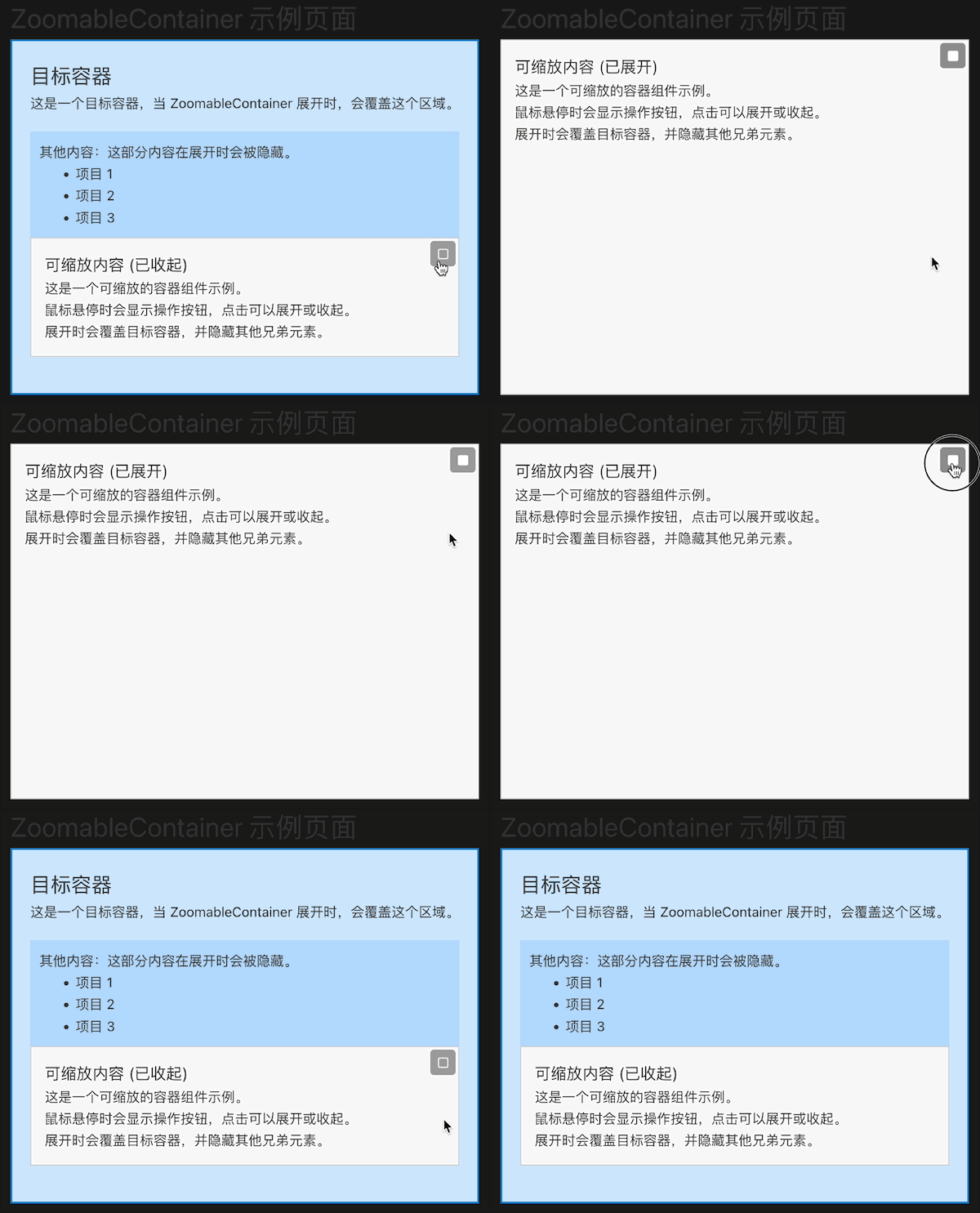
风险与约束
offsetParent约束:需要可覆盖源与目标位置,否则定位偏差。- 目标容器策略:压缩兄弟子视图可能影响它们内部动画或懒渲染逻辑。
- 内部自适应:子组件若固定高度,放大后视觉不会"等比增长",需业务配合改 flex。
- 多实例并发:多个放大容器同时作用同一目标容器时需冲突策略(当前未做互斥管理)。