丹青幻境实操手册:添加'揭榜'水印嵌入与版权区块链存证对接模块
"见微知著,凝光成影。执笔入画,神游万象。"
丹青幻境 是一款基于 Z-Image 架构与 Cosplay LoRA 历练卷轴打造的数字艺术终端。它告别了冷硬的科技感,将 4090 的磅礴算力隐于宣纸墨色之中,旨在为画师提供一个静谧、沉浸的"灵感实验室"。
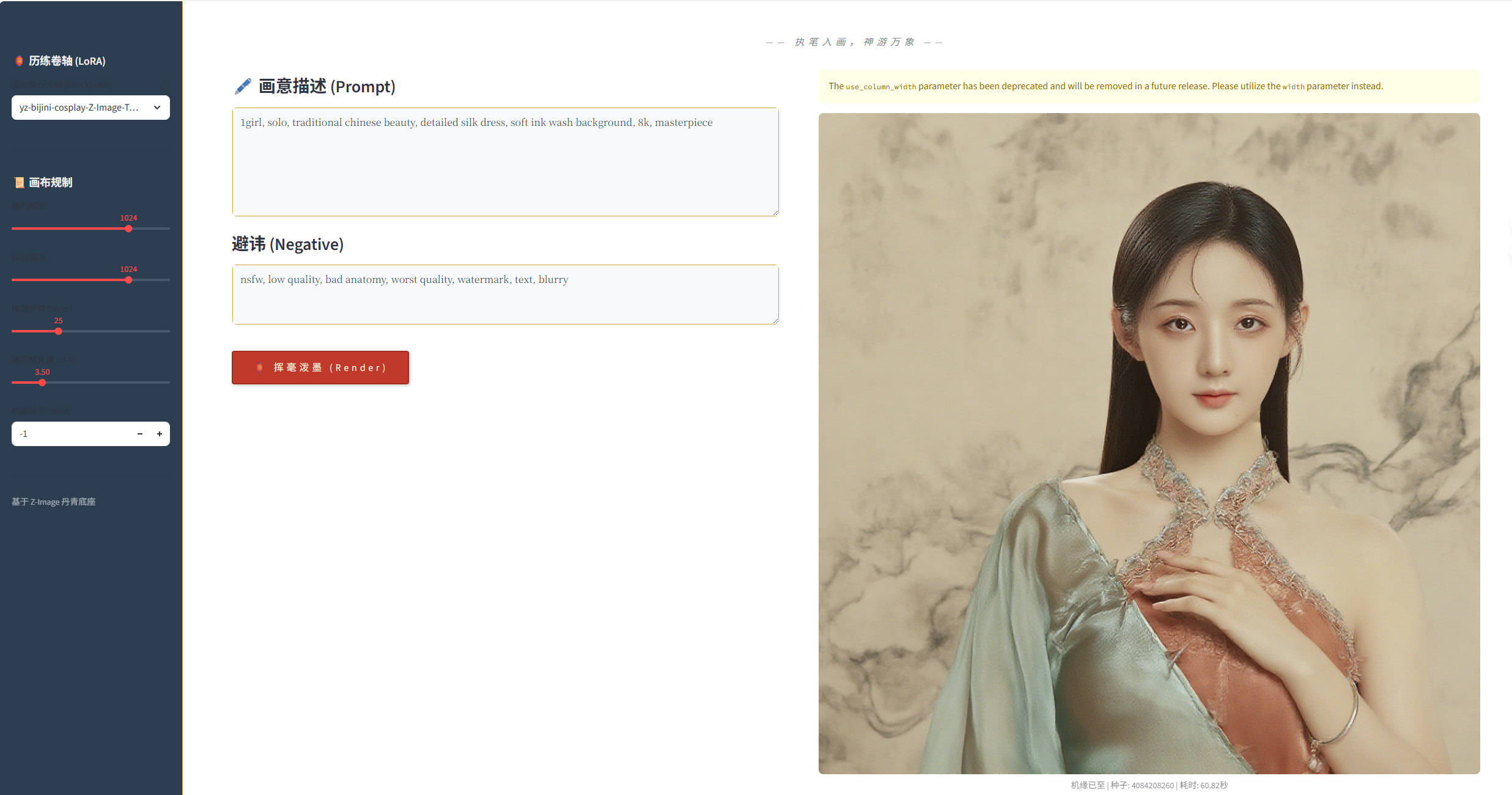
1. 功能概述:为何需要'揭榜'与存证
在数字艺术创作领域,作品的版权保护和身份认证一直是创作者关注的焦点。丹青幻境新增的'揭榜'水印嵌入与版权区块链存证模块,正是为了解决这一痛点。
核心价值:
- 身份认证:为每幅生成的作品嵌入唯一创作者标识
- 版权保护:通过区块链技术实现不可篡改的创作时间证明
- 便捷操作:一键完成水印添加和存证,不打断创作流程
- 永久记录:区块链存证确保创作记录永久保存,可随时验证
这个功能模块让数字艺术创作不再是"匿名产出",而是有据可查、有源可溯的正式作品。
2. 环境准备与依赖安装
在开始使用'揭榜'功能前,需要确保环境已正确配置相关依赖。
2.1 新增依赖包
bash
# 安装水印处理相关库
pip install Pillow opencv-python

# 安装区块链存证SDK(以某主流平台为例)
pip install blockchain-sdk cryptography

# 安装时间戳服务客户端
pip install rfc3161ng
2.2 配置文件更新
在丹青幻境主目录下创建或更新配置文件 config.py:
python
# 水印配置
WATERMARK_CONFIG = {
    'position': 'bottom-right',  # 水印位置:top-left, top-right, bottom-left, bottom-right
    'opacity': 0.3,             # 水印透明度
    'size_ratio': 0.05,         # 水印大小相对于图像宽度的比例
    'default_text': '丹青幻境·创作',  # 默认水印文本
}

# 区块链存证配置
BLOCKCHAIN_CONFIG = {
    'api_key': 'your_api_key_here',      # 区块链平台API密钥
    'network': 'mainnet',                # 网络类型:mainnet或testnet
    'contract_address': '0x...',         # 智能合约地址
    'gas_limit': 200000,                 # 交易gas限制
}

# 时间戳服务配置
TIMESTAMP_CONFIG = {
    'service_url': 'https://tsa.example.com',  # 时间戳权威服务地址
    'cert_path': './tsa_cert.pem',             # TSA证书路径
}
3. '揭榜'水印嵌入实现详解
'揭榜'水印模块采用半透明文字水印技术,既保护版权又不影响作品观赏性。
3.1 水印生成核心代码
在丹青幻境主程序 app.py 中添加水印处理模块:
python
import cv2
import numpy as np
from PIL import Image, ImageDraw, ImageFont
import os

class WatermarkGenerator:
    def __init__(self, config):
        self.config = config
        # 尝试加载中文字体,如果不存在则使用默认字体
        try:
            self.font = ImageFont.truetype("SimHei.ttf", 40)
        except:
            self.font = ImageFont.load_default()

    def add_text_watermark(self, image_path, output_path, text=None):
        """添加文字水印到图像"""
        if text is None:
            text = self.config['default_text']

        # 打开原始图像
        original_image = Image.open(image_path).convert("RGBA")
        width, height = original_image.size

        # 创建透明水印层
        watermark = Image.new("RGBA", original_image.size, (0, 0, 0, 0))
        draw = ImageDraw.Draw(watermark)

        # 计算水印位置和大小
        text_bbox = draw.textbbox((0, 0), text, font=self.font)
        text_width = text_bbox[2] - text_bbox[0]
        text_height = text_bbox[3] - text_bbox[1]

        # 根据配置确定水印位置
        position = self._calculate_position(width, height, text_width, text_height)

        # 绘制水印文字
        draw.text(position, text, font=self.font, fill=(255, 255, 255, int(255 * self.config['opacity'])))

        # 合并图像和水印
        watermarked = Image.alpha_composite(original_image, watermark)

        # 保存结果
        watermarked.convert("RGB").save(output_path)
        return output_path

    def _calculate_position(self, img_width, img_height, text_width, text_height):
        """计算水印位置"""
        margin = 20  # 边距
        position_config = self.config['position']

        if position_config == 'top-left':
            return (margin, margin)
        elif position_config == 'top-right':
            return (img_width - text_width - margin, margin)
        elif position_config == 'bottom-left':
            return (margin, img_height - text_height - margin)
        elif position_config == 'bottom-right':
            return (img_width - text_width - margin, img_height - text_height - margin)
        else:
            return (margin, margin)  # 默认左上角
3.2 水印功能集成到主界面
在Streamlit界面中添加'揭榜'功能按钮和配置选项:
python
# 在app.py的界面部分添加以下代码
def main():
    # ... 原有代码 ...

    # 在生成按钮后添加揭榜按钮
    if st.button("🏮 挥毫泼墨"):
        # ... 图像生成代码 ...
        generated_image_path = "path/to/generated/image.png"

        # 显示揭榜选项
        st.session_state['generated_image'] = generated_image_path

    # 显示揭榜区域
    if 'generated_image' in st.session_state and st.session_state['generated_image']:
        st.markdown("---")
        st.subheader("🎯 揭榜留存")

        col1, col2 = st.columns(2)

        with col1:
            watermark_text = st.text_input("水印文字", value="丹青幻境·创作")
            watermark_position = st.selectbox(
                "水印位置",
                options=['bottom-right', 'bottom-left', 'top-right', 'top-left'],
                index=0
            )

        with col2:
            do_blockchain = st.checkbox("启用区块链存证", value=True)
            custom_filename = st.text_input("保存文件名", value="丹青作品")

        if st.button("📜 揭榜保存", type="primary"):
            with st.spinner("正在添加水印并存证..."):
                # 添加水印
                watermark_config = {
                    'position': watermark_position,
                    'opacity': 0.3,
                    'default_text': watermark_text
                }

                watermarker = WatermarkGenerator(watermark_config)
                output_path = f"./output/{custom_filename}.png"
                watermarked_path = watermarker.add_text_watermark(
                    st.session_state['generated_image'],
                    output_path
                )

                # 区块链存证
                if do_blockchain:
                    blockchain_proof = blockchain_register(watermarked_path, watermark_text)
                    st.session_state['blockchain_proof'] = blockchain_proof

                st.success(f"作品已保存并存证: {output_path}")
                st.image(watermarked_path, caption="带水印的作品")
4. 区块链存证对接实现
区块链存证模块为每幅作品生成唯一的数字指纹,并记录到区块链上。
4.1 数字指纹生成与存证
python
import hashlib
from datetime import datetime
import json
from blockchain_sdk import BlockchainClient  # 假设的区块链SDK

class BlockchainRegister:
    def __init__(self, config):
        self.config = config
        self.client = BlockchainClient(
            api_key=config['api_key'],
            network=config['network']
        )

    def generate_digital_fingerprint(self, image_path):
        """生成图像的数字指纹"""
        with open(image_path, 'rb') as f:
            image_data = f.read()

        # 计算SHA-256哈希值
        hash_sha256 = hashlib.sha256(image_data).hexdigest()

        # 获取图像元数据
        image = Image.open(image_path)
        metadata = {
            'hash': hash_sha256,
            'timestamp': datetime.utcnow().isoformat(),
            'size': image.size,
            'mode': image.mode,
            'format': image.format
        }

        return metadata

    def register_to_blockchain(self, metadata, additional_info=None):
        """将元数据注册到区块链"""
        if additional_info:
            metadata.update(additional_info)

        # 创建存证交易
        transaction = {
            'type': 'ARTWORK_REGISTRATION',
            'metadata': metadata,
            'timestamp': datetime.utcnow().isoformat()
        }

        # 发送到区块链
        try:
            tx_hash = self.client.register_asset(transaction)
            return {
                'success': True,
                'transaction_hash': tx_hash,
                'metadata': metadata,
                'timestamp': transaction['timestamp']
            }
        except Exception as e:
            return {
                'success': False,
                'error': str(e)
            }

def blockchain_register(image_path, watermark_text):
    """区块链存证入口函数"""
    # 初始化区块链客户端
    registrar = BlockchainRegister(BLOCKCHAIN_CONFIG)

    # 生成数字指纹
    metadata = registrar.generate_digital_fingerprint(image_path)
    metadata['watermark_text'] = watermark_text
    metadata['tool'] = '丹青幻境'

    # 注册到区块链
    result = registrar.register_to_blockchain(metadata)
    return result
4.2 存证验证功能
python
def verify_registration(tx_hash):
    """验证区块链存证"""
    client = BlockchainClient(
        api_key=BLOCKCHAIN_CONFIG['api_key'],
        network=BLOCKCHAIN_CONFIG['network']
    )

    try:
        # 查询交易
        transaction = client.get_transaction(tx_hash)

        if transaction and transaction['type'] == 'ARTWORK_REGISTRATION':
            # 验证交易有效性
            is_valid = client.verify_transaction(tx_hash)
            return {
                'exists': True,
                'valid': is_valid,
                'transaction': transaction,
                'timestamp': transaction['timestamp']
            }
        else:
            return {
                'exists': False,
                'valid': False
            }
    except Exception as e:
        return {
            'error': str(e)
        }

# 在界面中添加验证功能
def add_verification_ui():
    """添加存证验证界面"""
    st.subheader("🔍 存证验证")

    tx_hash = st.text_input("输入交易哈希值", placeholder="0x...")

    if st.button("验证存证"):
        if tx_hash:
            with st.spinner("正在查询区块链..."):
                result = verify_registration(tx_hash)

            if 'error' in result:
                st.error(f"查询错误: {result['error']}")
            elif not result['exists']:
                st.warning("未找到对应的存证记录")
            elif result['valid']:
                st.success("存证验证有效!")
                st.json(result['transaction'])
            else:
                st.error("存证记录无效或已被篡改")
        else:
            st.warning("请输入交易哈希值")
5. 完整集成与使用流程
5.1 模块集成到主程序
将上述模块集成到丹青幻境主程序 app.py 中:
python
# 在文件开头导入新增模块
from watermark_module import WatermarkGenerator
from blockchain_module import BlockchainRegister, verify_registration

# 在适当位置初始化组件
watermarker = WatermarkGenerator(WATERMARK_CONFIG)
blockchain_registrar = BlockchainRegister(BLOCKCHAIN_CONFIG)

# 在主函数中添加存证验证界面
if st.sidebar.checkbox("显示存证验证"):
    add_verification_ui()
5.2 使用流程示例
- 生成作品:使用丹青幻境正常生成图像作品
- 揭榜保存 :点击"揭榜保存"按钮,系统会:
- 自动添加半透明水印
- 生成图像的数字指纹
- 将存证信息上传到区块链
- 返回交易哈希供后续验证
- 验证存证:任何时候都可以通过交易哈希验证作品存证
5.3 批量处理功能
对于需要批量添加水印和存证的情况:
python
def batch_watermark_and_register(image_folder, output_folder, watermark_text):
    """批量处理图像水印和存证"""
    os.makedirs(output_folder, exist_ok=True)

    image_files = [f for f in os.listdir(image_folder)
                  if f.lower().endswith(('.png', '.jpg', '.jpeg'))]

    results = []
    for image_file in image_files:
        input_path = os.path.join(image_folder, image_file)
        output_path = os.path.join(output_folder, f"watermarked_{image_file}")

        # 添加水印
        watermarked_path = watermarker.add_text_watermark(
            input_path, output_path, watermark_text
        )

        # 区块链存证
        registration_result = blockchain_register(watermarked_path, watermark_text)

        results.append({
            'filename': image_file,
            'output_path': watermarked_path,
            'transaction_hash': registration_result.get('transaction_hash'),
            'success': registration_result.get('success', False)
        })

    return results
6. 总结与最佳实践
通过本文介绍的'揭榜'水印嵌入与版权区块链存证模块,丹青幻境为数字艺术创作者提供了完整的版权保护解决方案。
6.1 功能优势总结
- 无缝集成:水印和存证功能与原有创作流程完美融合
- 灵活配置:水印文字、位置、透明度均可自定义
- 安全可靠:基于区块链技术,存证记录不可篡改
- 易于验证:提供简单的验证界面,随时确认作品权属
- 批量支持:支持批量处理,适合大量作品产出场景
6.2 实践建议
- 水印设计:建议使用半透明(0.2-0.4透明度)水印,既保护版权又不影响观赏
- 存证策略:重要作品建议立即存证,普通作品可批量处理
- 备份管理:保存好交易哈希值,这是验证版权的关键凭证
- 成本考虑:区块链存证可能涉及费用,可根据作品价值选择使用
6.3 扩展可能性
当前实现为基础版本,还可以进一步扩展:
- 支持多种水印样式(图形水印、数字水印)
- 集成多个区块链平台选择
- 添加版权交易和转让功能
- 实现跨平台验证服务
丹青幻境通过'揭榜'模块,不仅保护了创作者的劳动成果,也为数字艺术作品的商业化应用奠定了坚实基础。
获取更多AI镜像
想探索更多AI镜像和应用场景?访问 CSDN星图镜像广场,提供丰富的预置镜像,覆盖大模型推理、图像生成、视频生成、模型微调等多个领域,支持一键部署。