ArcGIS JS 基础教程(2):地图切换底图(天地图)
零、写在前面
📌 本系列教程完整目录 :ArcGIS JS 系列基础教程(100个项目常用热门功能)
💡 在线示例 :完整可运行的 HTML 示例,无需任何环境配置,可直接在浏览器中打开体验
🗂️ 专栏导航 :收藏 + 关注,专栏文章第一时间送达
❤️ 一键三连:点赞(给教程充电)+ 评论(提问必回)+ 收藏(下次再看)
一、功能介绍
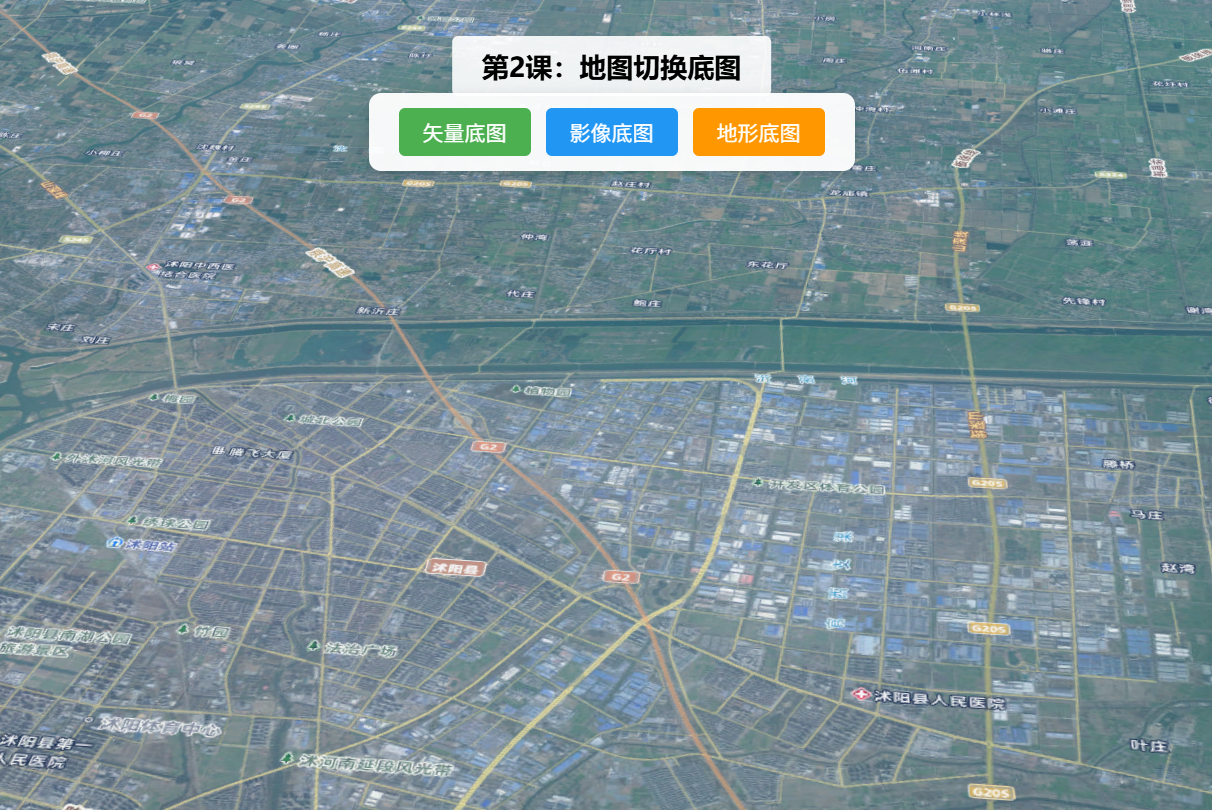
实现天地图底图(街道图、卫星图、地形图标)之间的切换,同时支持加载自定义底图(如本地瓦片底图、第三方底图服务),满足不同项目的可视化需求。
二、功能实现
利用Map的basemap属性切换官方底图;自定义底图通过TileLayer加载瓦片服务,配置url、opacity等参数,添加到地图实例中实现切换。
三、功能应用
地图可视化项目中,用户根据需求切换不同底图(如卫星图查看实际地形、街道图查看道路分布),如国土测绘、城市规划类项目。
四、核心代码
html
<!DOCTYPE html>
<html lang="zh-CN">
<head>
    <meta charset="UTF-8">
    <meta name="viewport" content="width=device-width, initial-scale=1.0">
    <title>第2课:地图切换底图</title>
    <link rel="stylesheet" href="https://js.arcgis.com/5.0/esri/themes/light/main.css">
    <script type="module" src="https://js.arcgis.com/5.0/"></script>
    <style>
        body { margin: 0; padding: 0; font-family: "Microsoft YaHei", sans-serif; }
        #mapContainer { width: 100vw; height: 100vh; }
        .page-title {
            position: absolute;
            top: 20px;
            left: 50%;
            transform: translateX(-50%);
            background: rgba(255,255,255,0.9);
            padding: 8px 20px;
            border-radius: 4px;
            font-size: 18px;
            font-weight: bold;
            z-index: 100;
        }
        .toolbar {
            position: absolute;
            top: 70px;
            left: 50%;
            transform: translateX(-50%);
            background: rgba(255,255,255,0.95);
            padding: 10px 20px;
            border-radius: 8px;
            display: flex;
            gap: 10px;
            z-index: 100;
            box-shadow: 0 2px 8px rgba(0,0,0,0.15);
        }
        .toolbar button {
            padding: 6px 16px;
            border: none;
            border-radius: 4px;
            cursor: pointer;
            font-size: 14px;
            transition: all 0.3s;
        }
        .btn-vec { background: #4CAF50; color: white; }
        .btn-img { background: #2196F3; color: white; }
        .btn-ter { background: #FF9800; color: white; }
        .btn-sdt { background: #9C27B0; color: white; }
        .toolbar button:hover { opacity: 0.85; transform: scale(1.05); }
        .info {
            position: absolute;
            bottom: 20px;
            left: 20px;
            background: rgba(255,255,255,0.9);
            padding: 10px 16px;
            border-radius: 6px;
            font-size: 13px;
            z-index: 100;
            max-width: 300px;
        }
    </style>
</head>
<body>
<h1 class="page-title">第2课:地图切换底图</h1>
<div class="toolbar">
    <button class="btn-vec" id="switchVec">矢量底图</button>
    <button class="btn-img" id="switchImg">影像底图</button>
    <button class="btn-ter" id="switchTer">地形底图</button>
    <button class="btn-sdt" id="switchSdt">自定义天地图</button>
</div>
<div id="mapContainer"></div>
<div class="info" id="info">当前底图:<span id="currentBasemap">矢量底图</span></div>

<script type="module">
    const Map = await $arcgis.import("@arcgis/core/Map.js");
    const SceneView = await $arcgis.import("@arcgis/core/views/SceneView.js");
    const getTianditu = await $arcgis.import("https://openlayers.vip/examples/resources/tianditu.js");

    // 初始矢量底图
    const vecLayers = getTianditu.default({ type: "vec_w" });
    const map = new Map({
        basemap: { baseLayers: [vecLayers.base, vecLayers.anno] },
        ground: {
            surface: {
                elevationLayers: [{
                    url: "https://www.geosceneonline.cn/image/rest/services/OpenData/ChinaTerrain3D/ImageServer/"
                }]
            }
        }
    });

    const view = new SceneView({
        container: "mapContainer",
        map: map,
        center: [118.805, 34.027],
        zoom: 13,
        tilt: 45
    });

    // 底图切换函数
    const switchBasemap = (type, label) => {
        const layers = getTianditu.default({ type });
        map.basemap = { baseLayers: [layers.base, layers.anno] };
        document.getElementById("currentBasemap").textContent = label;
    };

    document.getElementById("switchVec").onclick = () => switchBasemap("vec_w", "矢量底图");
    document.getElementById("switchImg").onclick = () => switchBasemap("img_w", "影像底图");
    document.getElementById("switchTer").onclick = () => switchBasemap("ter_w", "地形底图");

    view.when(() => console.log("地图切换底图示例加载完成!"));
</script>
</body>
</html>
五、在线示例
🔗 在线体验地址(GitHub资源,等待时间较长,或者架梯子) :https://southjor.github.io/arcgis-examples/lessons/lesson2.html
六、底图类型速查
| type 参数 | 说明 | 应用场景 |
|---|---|---|
vec_w |
矢量底图 | 默认导航、街道路网展示 |
img_w |
影像底图 | 卫星图、地形查看 |
ter_w |
地形底图 | 山体走势、高程可视化 |