1.应用程序中的主窗口
- 主窗口是与用户进行长时间交互的顶层窗口
- 程序的绝大多数功能直接由主窗口提供
- 主窗口通常是应用程序启动后显示的第一个窗口
- 整个程序由一个主窗口和多个对话框组成
2.Qt中的主窗口
- Qt开发平台中直接支持主窗口的概念
- QMainWindow是Qt中主窗口的基类
- QMainWindow继承于QWidget是一种容器类型的组件
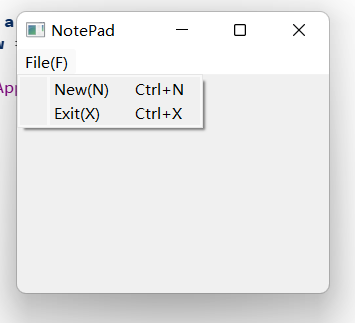
示例:记事本
MainWindow.h
#include <QMainWindow>
#include <QKeySequence> //快捷键
#include <QMenuBar> //菜单栏
#include <QAction> //菜单动作

class MainWindow : public QMainWindow
{
    Q_OBJECT

private:
    MainWindow();
    MainWindow(const MainWindow&); //拷贝构造函数
    MainWindow& operator= (const MainWindow&);

    bool construct();

    bool initMenuBar(); //初始化菜单栏
    bool initFileMenu(QMenuBar* mb); //初始化文件菜单
    bool makeAction(QAction*& action, QString text, int key);

public:
    static MainWindow* NewInstance();
    ~MainWindow();
};

#endif // MAINWINDOW_H
MainWindow.cpp
#include "MainWindow.h"
#include <QMenu>

MainWindow::MainWindow()
{

}
MainWindow* MainWindow::NewInstance()
{
    MainWindow* ret = new MainWindow(); //创建对象
    if( (ret == NULL) || !ret->construct() )
    {
        delete ret;
        ret = NULL;
    }
    return ret;
}

bool MainWindow::construct() //初始化
{
    bool ret = true;
    ret = ret && initMenuBar();
    return ret;
}
bool MainWindow::initMenuBar()
{
    bool ret = true;
    QMenuBar* mb = menuBar(); //获取Qt自带的菜单栏
    ret = ret && initFileMenu(mb);
    return ret;

}
bool MainWindow::initFileMenu(QMenuBar* mb)
{
    QMenu* menu = new QMenu("File(&F)"); //创建菜单File(F),&F表示使用快捷键Alt+F快速打开菜单
    bool ret = (menu != NULL);

    if( ret )
    {
        QAction* action = NULL;
        ret = ret && makeAction(action, "New(N)", Qt::CTRL + Qt::Key_N); //创建菜单项New,用快捷键Ctrl+N打开New
        if( ret )
        {
            menu->addAction(action); // 把菜单项New放进File菜单中
        }
        ret = ret && makeAction(action, "Exit(X)", Qt::CTRL + Qt::Key_X); //创建菜单项New,用快捷键Ctrl+N打开New
        if( ret )
        {
            menu->addAction(action); // 把菜单项New放进File菜单中
        }
        menu->addSeparator();
    }
    if( ret )
    {
        mb->addMenu(menu); //把File菜单加到菜单栏
    }
    else
    {
        delete menu;
    }
    return ret;
}
bool MainWindow::makeAction(QAction*& action, QString text, int key)
{
    bool ret = true;
    action = new QAction(text, NULL);
    if( action != NULL )
    {
        action->setShortcut(QKeySequence(key));
    }
    else{
        ret = false;
    }
    return ret;
}
MainWindow::~MainWindow()
{

}
main.cpp
#include "MainWindow.h"

#include <QApplication>

int main(int argc, char *argv[])
{
    QApplication a(argc, argv);
    MainWindow* w = MainWindow::NewInstance();
    w->show();
    return QCoreApplication::exec();
}