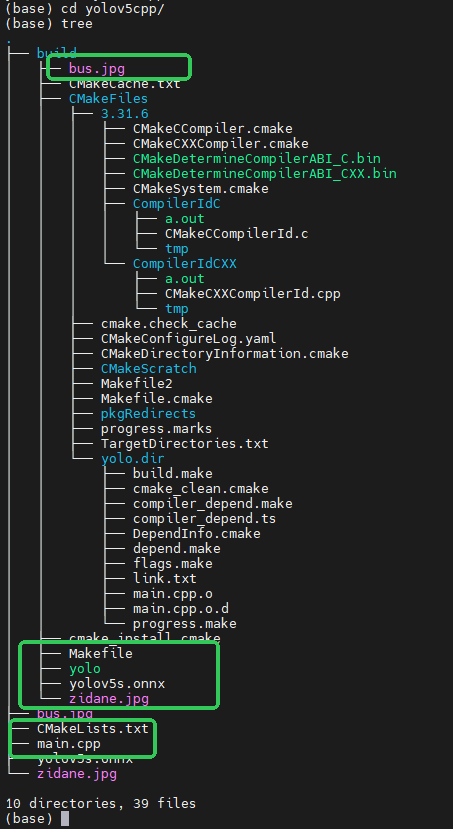
安装依赖包:
pip install onnx
模型转化:
python export.py --weights yolov5s.pt --include onnx
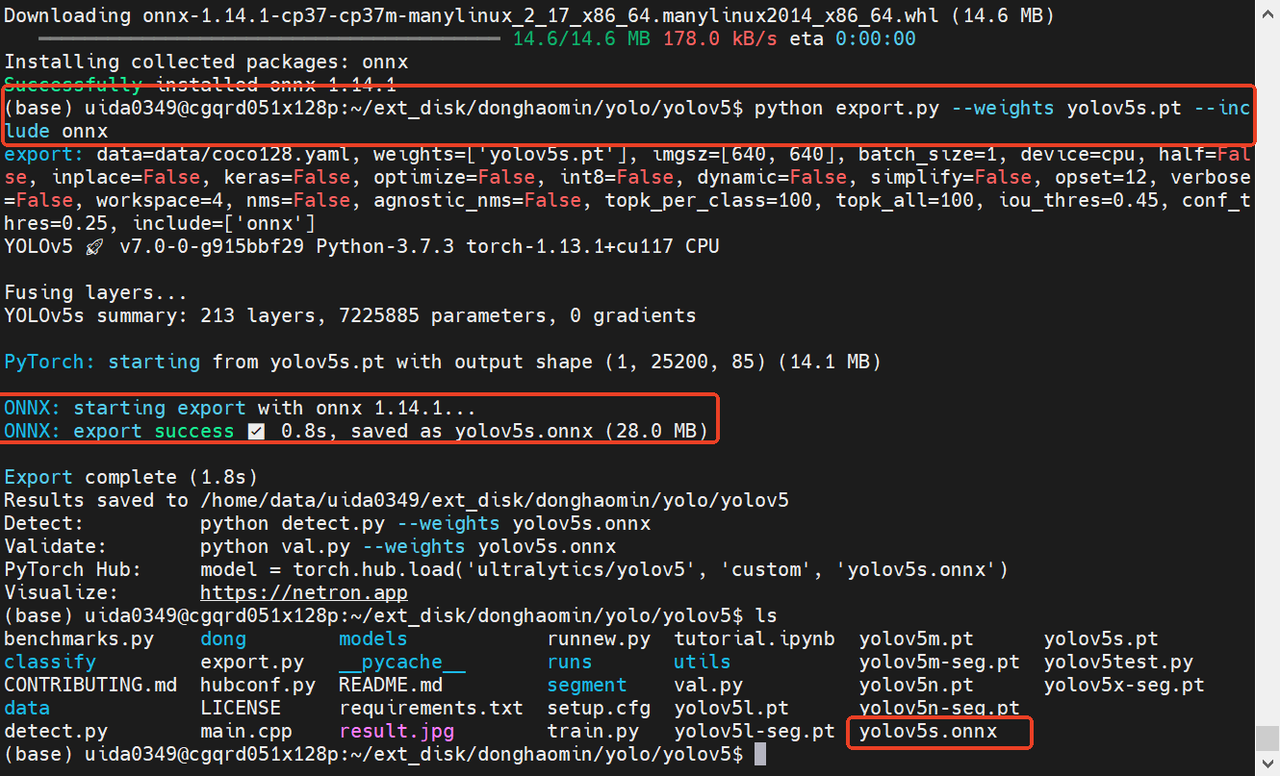
opencv版本要求:4.5以上
安装部署器:opencv 4.8.0
opencv编译下载:
git clone https://github.com/opencv/opencv.git
bash
cd opencv

git checkout 4.8.0

mkdir build

cd build

cmake -D CMAKE_BUILD_TYPE=Release \

-D CMAKE_INSTALL_PREFIX=/usr/local \

-D OPENCV_GENERATE_PKGCONFIG=ON \

-D BUILD_EXAMPLES=OFF \

-D BUILD_TESTS=OFF \

-D BUILD_PERF_TESTS=OFF \

..

make -j$(nproc)


sudo make install
代码:
CMakeLists.txt
bash
cmake_minimum_required(VERSION 3.10)
project(yolov5_cpp)

set(CMAKE_CXX_STANDARD 11)
set(OpenCV_DIR /usr/local/lib/cmake/opencv4)

find_package(OpenCV REQUIRED)

include_directories(${OpenCV_INCLUDE_DIRS})
add_executable(yolo main.cpp)
target_link_libraries(yolo ${OpenCV_LIBS})
main.cpp
cpp
#include <opencv2/opencv.hpp>
#include <vector>
#include <string>

using namespace cv;
using namespace cv::dnn;
using namespace std;

const float CONF_THRESHOLD = 0.25f;
const float NMS_THRESHOLD = 0.45f;  // 去重框关键

vector<string> class_names = {
    "person", "bicycle", "car", "motorcycle", "airplane", "bus", "train", "truck",
    "boat", "traffic light", "fire hydrant", "stop sign", "parking meter", "bench",
    "bird", "cat", "dog", "horse", "sheep", "cow", "elephant", "bear", "zebra",
    "giraffe", "backpack", "umbrella", "handbag", "tie", "suitcase", "frisbee",
    "skis", "snowboard", "sports ball", "kite", "baseball bat", "baseball glove",
    "skateboard", "surfboard", "tennis racket", "bottle", "wine glass", "cup",
    "fork", "knife", "spoon", "bowl", "banana", "apple", "sandwich", "orange",
    "broccoli", "carrot", "hot dog", "pizza", "donut", "cake", "chair", "couch",
    "potted plant", "bed", "dining table", "toilet", "tv", "laptop", "mouse",
    "remote", "keyboard", "cell phone", "microwave", "oven", "toaster", "sink",
    "refrigerator", "book", "clock", "vase", "scissors", "teddy bear", "hair drier",
    "toothbrush"
};

int main() {
    string model_path = "yolov5s.onnx";
    Net net = readNet(model_path);

    Mat img = imread("bus.jpg");
    int h = img.rows;
    int w = img.cols;

    Mat blob = blobFromImage(img, 1 / 255.0, Size(640, 640), Scalar(), true, false);
    net.setInput(blob);

    Mat pred;
    net.forward(pred, net.getUnconnectedOutLayersNames()[0]);

    vector<Rect> boxes;
    vector<float> confs;
    vector<int> classIds;

    float* data = (float*)pred.data;
    for (int i = 0; i < 25200; i++) {
        float conf = data[4];
        if (conf < CONF_THRESHOLD) {
            data += 85;
            continue;
        }

        Mat scores(1, class_names.size(), CV_32FC1, data + 5);
        double maxScore;
        Point maxClassPoint;
        minMaxLoc(scores, 0, &maxScore, 0, &maxClassPoint);
        int classId = maxClassPoint.x;

        float x = data[0];
        float y = data[1];
        float ww = data[2];
        float hh = data[3];

        int x1 = (x - ww / 2) * w / 640;
        int y1 = (y - hh / 2) * h / 640;
        int w2 = ww * w / 640;
        int h2 = hh * h / 640;

        boxes.push_back(Rect(x1, y1, w2, h2));
        confs.push_back(conf);
        classIds.push_back(classId);

        data += 85;
    }

    // ✅ NMS 去重框(关键!!!)
    vector<int> indices;
    NMSBoxes(boxes, confs, CONF_THRESHOLD, NMS_THRESHOLD, indices);

    // ✅ 最终干净画框
    for (int idx : indices) {
        Rect box = boxes[idx];
        int cid = classIds[idx];
        float cf = confs[idx];

        rectangle(img, box, Scalar(0, 255, 0), 2);
        string label = class_names[cid] + " " + to_string(cf).substr(0, 4);
        putText(img, label, Point(box.x, box.y - 10), FONT_HERSHEY_SIMPLEX, 0.5, Scalar(0, 255, 0), 2);
    }

    imshow("YOLOv5 C++ 干净版", img);
    waitKey(0);

    return 0;
}
编译运行
bash
mkdir build
cd build
cmake ..
make
./yolo
把图片和onnx都放到build的文件夹里,与可执行文件yolo一个目录。