欢迎加入开源鸿蒙跨平台社区:https://openharmonycrossplatform.csdn.net
一、url_launcher 库简介
url_launcher 是 Flutter 官方维护的 URL 启动器插件,用于在应用中打开各种 URL。无论是打开网页、拨打电话、发送邮件、还是启动其他应用,url_launcher 都提供了统一的 API 接口。
📋 url_launcher 核心特点
| 特点 | 说明 |
|---|---|
| 网页打开 | 支持在外部浏览器或内置 WebView 中打开网页 |
| 电话拨打 | 支持调用系统拨号功能 |
| 邮件发送 | 支持打开系统邮件客户端 |
| 短信发送 | 支持打开系统短信应用 |
| 地图导航 | 支持打开地图应用进行导航 |
| 应用跳转 | 支持打开其他已安装应用 |
| 跨平台兼容 | 支持 Android、iOS、Web、Windows、Linux、macOS、OpenHarmony |
平台功能支持对比
| 功能 | Android | iOS | Web | OpenHarmony |
|---|---|---|---|---|
| 打开网页(外部) | ✔️ | ✔️ | ✔️ | ✔️ |
| 打开网页(内置 WebView) | ✔️ | ✔️ | ❌ | ✔️ |
| 拨打电话 | ✔️ | ✔️ | ❌ | ✔️ |
| 发送邮件 | ✔️ | ✔️ | ❌ | ✔️ |
| 发送短信 | ✔️ | ✔️ | ❌ | ✔️ |
| 打开地图 | ✔️ | ✔️ | ❌ | ✔️ |
| 检查 URL 是否可用 | ✔️ | ✔️ | ❌ | ✔️ |
| 关闭内置 WebView | ✔️ | ✔️ | ❌ | ✔️ |
使用场景
- 用户协议/隐私政策跳转
- 客服联系方式(电话/邮件)
- 社交媒体分享
- 应用内打开外部链接
- 地图导航集成
- 应用商店跳转
二、OpenHarmony 适配版本
2.1 环境说明
| 组件 | 版本 |
|---|---|
| Flutter | 3.27.5 |
| HarmonyOS | 6.0 |
| url_launcher | 6.3.1 (OpenHarmony 适配版本) |
2.2 引入方式
在 pubspec.yaml 文件中添加以下依赖配置:
yaml
dependencies:
  flutter:
    sdk: flutter

  # url_launcher OpenHarmony 适配版本
  url_launcher:
    git:
      url: https://atomgit.com/openharmony-tpc/flutter_packages
      path: packages/url_launcher/url_launcher
      ref: br_url_launcher_v6.3.1_ohos
2.3 获取依赖
配置完成后,在项目根目录执行:
bash
flutter pub get2.4 权限配置
url_launcher 使用系统原生的 URL 处理机制,一般不需要额外权限。但如果需要访问网络资源,建议配置网络权限:
打开 ohos/entry/src/main/module.json5,在 requestPermissions 中添加:
json
"requestPermissions": [
  {
    "name": "ohos.permission.INTERNET",
    "reason": "$string:network_reason",
    "usedScene": {
      "abilities": ["EntryAbility"],
      "when": "inuse"
    }
  }
]
在 ohos/entry/src/main/resources/base/element/string.json 中添加:
json
{
  "name": "network_reason",
  "value": "使用网络访问外部链接"
}
三、核心 API 讲解
3.1 launchUrl - 启动 URL
dart
Future<bool> launchUrl(
  Uri url, {
  LaunchMode mode = LaunchMode.platformDefault,
  WebViewConfiguration webViewConfiguration = const WebViewConfiguration(),
  String? webOnlyWindowName,
})
参数说明:
| 参数 | 类型 | 必填 | 默认值 | 说明 |
|---|---|---|---|---|
| url | Uri | 是 | - | 要打开的 URL |
| mode | LaunchMode | 否 | LaunchMode.platformDefault | 打开模式 |
| webViewConfiguration | WebViewConfiguration | 否 | 默认配置 | WebView 配置(仅 inAppWebView 模式有效) |
| webOnlyWindowName | String? | 否 | null | Web 平台窗口名称 |
返回值: Future<bool> - 成功返回 true,失败返回 false
3.2 LaunchMode 枚举
dart
enum LaunchMode {
  platformDefault,           // 平台默认模式
  inAppWebView,              // 内置 WebView 模式
  externalApplication,       // 外部应用模式
  externalNonBrowserApplication,  // 外部非浏览器应用模式
}
各模式说明:
| 模式 | 说明 | 适用场景 |
|---|---|---|
| platformDefault | 平台默认行为,网页使用内置 WebView,其他使用外部应用 | 通用场景 |
| inAppWebView | 在应用内 WebView 中打开网页 | 需要保持在应用内的网页浏览 |
| externalApplication | 使用系统默认应用打开 URL | 浏览器、邮件、电话等 |
| externalNonBrowserApplication | 使用非浏览器应用打开(iOS 10+) | 打开其他应用 |
3.3 WebViewConfiguration 类
dart
const WebViewConfiguration({
  this.enableJavaScript = true,
  this.enableDomStorage = true,
  this.headers = const <String, String>{},
})
参数说明:
| 参数 | 类型 | 必填 | 默认值 | 说明 |
|---|---|---|---|---|
| enableJavaScript | bool | 否 | true | 是否启用 JavaScript |
| enableDomStorage | bool | 否 | true | 是否启用 DOM 存储 |
| headers | Map<String, String> | 否 | {} | 自定义请求头 |
3.4 canLaunchUrl - 检查 URL 是否可用
dart
Future<bool> canLaunchUrl(Uri url)说明: 检查设备上是否有应用可以处理指定的 URL。
返回值: Future<bool> - 有可用应用返回 true,否则返回 false
注意:
- 在 Android 和 iOS 上,需要配置查询权限才能正常工作
- 在 Web 平台上,除了 http(s) 外,其他 scheme 通常返回 false
3.5 closeInAppWebView - 关闭内置 WebView
dart
Future<void> closeInAppWebView()说明: 关闭之前通过 launchUrl 打开的内置 WebView。
注意: 只有在使用 LaunchMode.inAppWebView 模式打开网页后,此方法才有效。
3.6 Link 组件
Link 是一个可点击的链接组件,类似于 HTML 中的 <a> 标签。
dart
Link(
  uri: Uri.parse('https://flutter.dev'),
  target: LinkTarget.defaultTarget,
  builder: (BuildContext context, FollowLink? followLink) {
    return ElevatedButton(
      onPressed: followLink,
      child: const Text('点击打开链接'),
    );
  },
)
参数说明:
| 参数 | 类型 | 必填 | 默认值 | 说明 |
|---|---|---|---|---|
| uri | Uri? | 是 | - | 链接目标 URL |
| target | LinkTarget | 否 | LinkTarget.defaultTarget | 链接打开目标 |
| builder | LinkWidgetBuilder | 是 | - | 构建链接 UI 的回调 |
LinkTarget 枚举:
dart
enum LinkTarget {
  defaultTarget,  // 平台默认
  self,           // 在当前窗口打开(使用 WebView)
  blank,          // 在新窗口打开
}
四、完整使用示例
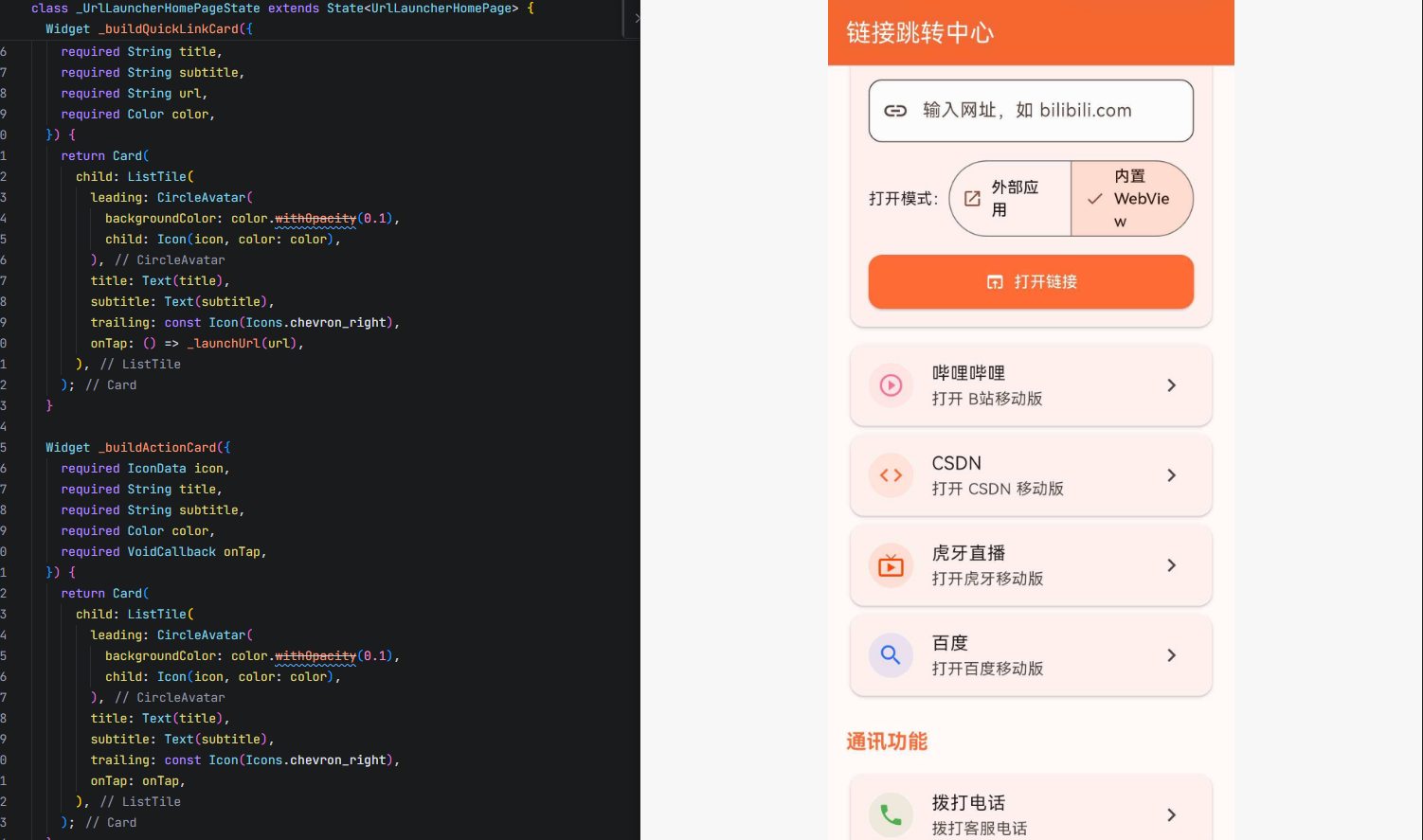
dart
import 'package:flutter/material.dart';
import 'package:url_launcher/url_launcher.dart';

void main() {
  runApp(const UrlLauncherApp());
}

class UrlLauncherApp extends StatelessWidget {
  const UrlLauncherApp({super.key});

  @override
  Widget build(BuildContext context) {
    return MaterialApp(
      title: '链接跳转中心',
      debugShowCheckedModeBanner: false,
      theme: ThemeData(
        colorScheme: ColorScheme.fromSeed(seedColor: const Color(0xFFFF6B35)),
        useMaterial3: true,
      ),
      home: const UrlLauncherHomePage(),
    );
  }
}

class UrlLauncherHomePage extends StatefulWidget {
  const UrlLauncherHomePage({super.key});

  @override
  State<UrlLauncherHomePage> createState() => _UrlLauncherHomePageState();
}

class _UrlLauncherHomePageState extends State<UrlLauncherHomePage> {
  final TextEditingController _urlController = TextEditingController();
  bool _isWebViewMode = false;
  String _lastAction = '';

  @override
  void dispose() {
    _urlController.dispose();
    super.dispose();
  }

  Future<void> _launchUrl(String url, {LaunchMode mode = LaunchMode.externalApplication}) async {
    final Uri uri = Uri.parse(url);

    if (!await canLaunchUrl(uri)) {
      if (mounted) {
        ScaffoldMessenger.of(context).showSnackBar(
          SnackBar(
            content: Text('无法打开链接: $url'),
            backgroundColor: Colors.red,
          ),
        );
      }
      return;
    }

    try {
      final bool launched = await launchUrl(
        uri,
        mode: mode,
        webViewConfiguration: const WebViewConfiguration(
          enableJavaScript: true,
          enableDomStorage: true,
        ),
      );

      if (mounted) {
        if (launched) {
          setState(() {
            _lastAction = '已打开: $url';
          });
        } else {
          ScaffoldMessenger.of(context).showSnackBar(
            SnackBar(
              content: Text('打开链接失败: $url'),
              backgroundColor: Colors.orange,
            ),
          );
        }
      }
    } catch (e) {
      if (mounted) {
        ScaffoldMessenger.of(context).showSnackBar(
          SnackBar(
            content: Text('错误: $e'),
            backgroundColor: Colors.red,
          ),
        );
      }
    }
  }

  Future<void> _launchCustomUrl() async {
    String url = _urlController.text.trim();
    if (url.isEmpty) {
      ScaffoldMessenger.of(context).showSnackBar(
        const SnackBar(
          content: Text('请输入 URL'),
          backgroundColor: Colors.orange,
        ),
      );
      return;
    }

    if (!url.startsWith('http://') && !url.startsWith('https://') &&
        !url.startsWith('tel:') && !url.startsWith('mailto:') &&
        !url.startsWith('sms:')) {
      url = 'https://$url';
    }

    final mode = _isWebViewMode ? LaunchMode.inAppWebView : LaunchMode.externalApplication;
    await _launchUrl(url, mode: mode);
  }

  @override
  Widget build(BuildContext context) {
    return Scaffold(
      appBar: AppBar(
        title: const Text('链接跳转中心'),
        backgroundColor: const Color(0xFFFF6B35),
        foregroundColor: Colors.white,
      ),
      body: ListView(
        padding: const EdgeInsets.all(16),
        children: [
          _buildSectionTitle('网页浏览'),
          _buildUrlInputCard(),
          const SizedBox(height: 8),
          _buildQuickLinkCard(
            icon: Icons.play_circle_outline,
            title: '哔哩哔哩',
            subtitle: '打开 B站移动版',
            url: 'https://m.bilibili.com',
            color: const Color(0xFFFB7299),
          ),
          _buildQuickLinkCard(
            icon: Icons.code,
            title: 'CSDN',
            subtitle: '打开 CSDN 移动版',
            url: 'https://m.csdn.net',
            color: const Color(0xFFFF6633),
          ),
          _buildQuickLinkCard(
            icon: Icons.live_tv,
            title: '虎牙直播',
            subtitle: '打开虎牙移动版',
            url: 'https://m.huya.com',
            color: const Color(0xFFFF4500),
          ),
          _buildQuickLinkCard(
            icon: Icons.search,
            title: '百度',
            subtitle: '打开百度移动版',
            url: 'https://m.baidu.com',
            color: const Color(0xFF306CFF),
          ),

          const SizedBox(height: 24),
          _buildSectionTitle('通讯功能'),
          _buildActionCard(
            icon: Icons.phone,
            title: '拨打电话',
            subtitle: '拨打客服电话',
            color: const Color(0xFF4CAF50),
            onTap: () => _launchUrl('tel:+8613800138000'),
          ),
          _buildActionCard(
            icon: Icons.email,
            title: '发送邮件',
            subtitle: '发送邮件到客服邮箱',
            color: const Color(0xFF2196F3),
            onTap: () => _launchUrl('mailto:support@example.com?subject=咨询&body=您好,'),
          ),
          _buildActionCard(
            icon: Icons.sms,
            title: '发送短信',
            subtitle: '发送短信到客服号码',
            color: const Color(0xFFFF9800),
            onTap: () => _launchUrl('sms:+8613800138000?body=您好,我需要帮助'),
          ),

          const SizedBox(height: 24),
          _buildSectionTitle('其他功能'),
          _buildActionCard(
            icon: Icons.map,
            title: '地图导航',
            subtitle: '打开地图查看位置',
            color: const Color(0xFF9C27B0),
            onTap: () => _launchUrl('https://uri.amap.com/marker?position=116.4074,39.9042&name=北京市&callnative=1'),
          ),
          _buildActionCard(
            icon: Icons.language,
            title: 'Flutter 官网',
            subtitle: '使用内置 WebView 打开',
            color: const Color(0xFF00B4FF),
            onTap: () => _launchUrl(
              'https://flutter.dev',
              mode: LaunchMode.inAppWebView,
            ),
          ),

          if (_lastAction.isNotEmpty) ...[
            const SizedBox(height: 24),
            _buildLastActionCard(),
          ],

          const SizedBox(height: 32),
        ],
      ),
    );
  }

  Widget _buildSectionTitle(String title) {
    return Padding(
      padding: const EdgeInsets.only(bottom: 12),
      child: Text(
        title,
        style: const TextStyle(
          fontSize: 18,
          fontWeight: FontWeight.bold,
          color: Color(0xFFFF6B35),
        ),
      ),
    );
  }

  Widget _buildUrlInputCard() {
    return Card(
      child: Padding(
        padding: const EdgeInsets.all(16),
        child: Column(
          crossAxisAlignment: CrossAxisAlignment.start,
          children: [
            const Text(
              '自定义 URL',
              style: TextStyle(fontWeight: FontWeight.w600, fontSize: 16),
            ),
            const SizedBox(height: 12),
            TextField(
              controller: _urlController,
              decoration: InputDecoration(
                hintText: '输入网址,如 bilibili.com',
                prefixIcon: const Icon(Icons.link),
                border: OutlineInputBorder(
                  borderRadius: BorderRadius.circular(12),
                ),
                filled: true,
                fillColor: Colors.grey[50],
              ),
              onSubmitted: (_) => _launchCustomUrl(),
            ),
            const SizedBox(height: 12),
            Row(
              children: [
                const Text('打开模式:'),
                Expanded(
                  child: SegmentedButton<bool>(
                    segments: const [
                      ButtonSegment<bool>(
                        value: false,
                        label: Text('外部应用'),
                        icon: Icon(Icons.open_in_new),
                      ),
                      ButtonSegment<bool>(
                        value: true,
                        label: Text('内置 WebView'),
                        icon: Icon(Icons.web),
                      ),
                    ],
                    selected: {_isWebViewMode},
                    onSelectionChanged: (Set<bool> selected) {
                      setState(() {
                        _isWebViewMode = selected.first;
                      });
                    },
                  ),
                ),
              ],
            ),
            const SizedBox(height: 12),
            SizedBox(
              width: double.infinity,
              child: ElevatedButton.icon(
                onPressed: _launchCustomUrl,
                icon: const Icon(Icons.open_in_browser, color: Colors.white),
                label: const Text('打开链接'),
                style: ElevatedButton.styleFrom(
                  backgroundColor: const Color(0xFFFF6B35),
                  foregroundColor: Colors.white,
                  padding: const EdgeInsets.symmetric(vertical: 14),
                  shape: RoundedRectangleBorder(
                    borderRadius: BorderRadius.circular(12),
                  ),
                ),
              ),
            ),
          ],
        ),
      ),
    );
  }

  Widget _buildQuickLinkCard({
    required IconData icon,
    required String title,
    required String subtitle,
    required String url,
    required Color color,
  }) {
    return Card(
      child: ListTile(
        leading: CircleAvatar(
          backgroundColor: color.withOpacity(0.1),
          child: Icon(icon, color: color),
        ),
        title: Text(title),
        subtitle: Text(subtitle),
        trailing: const Icon(Icons.chevron_right),
        onTap: () => _launchUrl(url),
      ),
    );
  }

  Widget _buildActionCard({
    required IconData icon,
    required String title,
    required String subtitle,
    required Color color,
    required VoidCallback onTap,
  }) {
    return Card(
      child: ListTile(
        leading: CircleAvatar(
          backgroundColor: color.withOpacity(0.1),
          child: Icon(icon, color: color),
        ),
        title: Text(title),
        subtitle: Text(subtitle),
        trailing: const Icon(Icons.chevron_right),
        onTap: onTap,
      ),
    );
  }

  Widget _buildLastActionCard() {
    return Card(
      color: Colors.green[50],
      child: Padding(
        padding: const EdgeInsets.all(16),
        child: Row(
          children: [
            const Icon(Icons.check_circle, color: Colors.green),
            const SizedBox(width: 12),
            Expanded(
              child: Text(
                _lastAction,
                style: const TextStyle(color: Colors.green),
              ),
            ),
          ],
        ),
      ),
    );
  }
}
五、适配要点
5.1 OpenHarmony 平台特性
-
URL Scheme 支持
- OpenHarmony 平台支持常见的 URL Scheme(http、https、tel、mailto、sms 等)
- 系统会自动识别 URL 类型并调用相应的应用处理
-
WebView 模式
LaunchMode.inAppWebView在 OpenHarmony 平台完全支持- 内置 WebView 会保持在应用内,不会跳转到外部浏览器
- 可以通过
closeInAppWebView()关闭内置 WebView
-
权限处理
- 打开网页需要网络权限
- 拨打电话、发送邮件等功能需要系统支持
- 部分功能可能需要用户在系统设置中授权
-
URL 检查
- 使用
canLaunchUrl()可以预先检查 URL 是否可用 - 建议在调用
launchUrl()前先进行检查
- 使用
5.2 与 Android/iOS 的差异
| 差异点 | Android/iOS | OpenHarmony |
|---|---|---|
| URL Scheme 支持 | 完整支持 | 支持常见 Scheme |
| 内置 WebView | 完整支持 | 支持 |
| 应用间跳转 | 支持 | 支持,但需要系统配置 |
| 查询权限配置 | 需要配置 queries | 无需特殊配置 |
| 邮件客户端 | 多个可选 | 取决于系统安装的应用 |
| 地图应用 | Google Maps/Apple Maps | 系统地图应用 |
5.3 注意事项
-
URL 格式
- 确保 URL 包含正确的 Scheme(http://、https://、tel: 等)
- 用户输入的 URL 可能需要自动补全 Scheme
-
错误处理
launchUrl()可能返回 false 或抛出异常- 建议使用 try-catch 包裹调用代码
- 提供友好的错误提示给用户
-
用户体验
- 使用
canLaunchUrl()预先检查可避免无效调用 - 对于重要操作,提供确认对话框
- 内置 WebView 模式适合需要保持在应用内的场景
- 使用
-
安全性
- 不要打开不可信的 URL
- 对于用户输入的 URL 进行验证
- 敏感操作建议使用 HTTPS
六、常见问题
Q1: launchUrl 返回 false 怎么办?
原因: 没有应用可以处理该 URL 或权限不足。
解决方案:
dart
final Uri uri = Uri.parse(url);
if (await canLaunchUrl(uri)) {
  await launchUrl(uri);
} else {
  // 提示用户没有可用的应用
  ScaffoldMessenger.of(context).showSnackBar(
    const SnackBar(content: Text('没有可用的应用处理此链接')),
  );
}
Q2: 如何区分内置 WebView 和外部浏览器?
解决方案:
dart
// 内置 WebView(保持在应用内)
await launchUrl(
  Uri.parse('https://example.com'),
  mode: LaunchMode.inAppWebView,
);

// 外部浏览器(跳转到系统浏览器)
await launchUrl(
  Uri.parse('https://example.com'),
  mode: LaunchMode.externalApplication,
);
Q3: 如何关闭内置 WebView?
解决方案:
dart
// 在适当的时候调用
await closeInAppWebView();

// 例如:在返回按钮中
AppBar(
  leading: IconButton(
    icon: const Icon(Icons.close),
    onPressed: () async {
      await closeInAppWebView();
      Navigator.pop(context);
    },
  ),
)
Q4: 如何构建完整的邮件 URL?
解决方案:
dart
// 基本格式
final Uri emailUri = Uri(
  scheme: 'mailto',
  path: 'user@example.com',
  query: 'subject=邮件主题&body=邮件正文',
);

await launchUrl(emailUri);

// 或者使用字符串
await launchUrl(Uri.parse('mailto:user@example.com?subject=主题&body=正文'));
Q5: 如何构建完整的电话 URL?
解决方案:
dart
// 基本格式
final Uri phoneUri = Uri(
  scheme: 'tel',
  path: '+8613800138000',
);

await launchUrl(phoneUri);

// 或者使用字符串
await launchUrl(Uri.parse('tel:+8613800138000'));
Q8: geo: 协议无法打开怎么办?
原因: OpenHarmony 平台可能不支持 geo: 协议直接调用地图应用。
解决方案: 使用地图服务的 Web URL 代替:
dart
// 使用高德地图 Web URL
await launchUrl(
  Uri.parse('https://uri.amap.com/marker?position=116.4074,39.9042&name=北京市&callnative=1'),
);

// 使用百度地图 Web URL
await launchUrl(
  Uri.parse('https://api.map.baidu.com/marker?location=39.9042,116.4074&title=北京市'),
);

// 这些 URL 会在浏览器中打开,并提供跳转到原生地图的选项
Q6: Link 组件如何使用?
解决方案:
dart
Link(
  uri: Uri.parse('https://flutter.dev'),
  builder: (BuildContext context, FollowLink? followLink) {
    return TextButton(
      onPressed: followLink,
      child: const Text('访问 Flutter 官网'),
    );
  },
)
Q7: 如何处理用户输入的 URL?
解决方案:
dart
Future<void> launchUserInput(String input) async {
  String url = input.trim();

  // 自动补全 Scheme
  if (!url.startsWith('http://') &&
      !url.startsWith('https://') &&
      !url.startsWith('tel:') &&
      !url.startsWith('mailto:')) {
    url = 'https://$url';
  }

  final Uri uri = Uri.parse(url);

  if (await canLaunchUrl(uri)) {
    await launchUrl(uri);
  } else {
    // 处理错误
    print('无法打开: $url');
  }
}
七、总结
url_launcher 是 Flutter 生态中最常用的 URL 启动器插件,在 OpenHarmony 平台的适配已经非常成熟。本文内容:
- url_launcher 的核心 API 和使用方法
- LaunchMode 的各种模式及其适用场景
- WebViewConfiguration 的配置选项
- Link 组件的使用方法
- 完整的应用级别链接跳转中心实现
- OpenHarmony 平台的权限配置和适配要点
- 常见问题和解决方案
在实际开发中,建议根据具体需求选择合适的 LaunchMode,并使用 canLaunchUrl() 进行预先检查。对于需要保持在应用内的网页浏览场景,使用 inAppWebView 模式;对于需要调用系统功能的场景(如拨号、发邮件),使用 externalApplication 模式。
💡 提示: 更多 OpenHarmony 适配的 Flutter 三方库信息,请访问 开源鸿蒙跨平台开发者社区 获取最新资源和技术支持。