一、属性透传attribute
- 指的是传递给一个组件,但没有通过props或emits接收,常见的如class、style、id
- 透传的样式会自动被添加到子组件根元素上,如果子组件已经有一个样式,透传的样式会和已有样式合并。
- 如果透传的是一个点击事件,也会自动被添加到子组件根元素上,如果子组件自身也有点击事件,点击时透传过来的事件和其本身的事件都会触发。
- 透传的属性可以通过{{$attrs}}拿到
- 属性透传只会透传到根元素上,如果有多个根节点,vue不知道要透传到哪个节点,需要通过v-bind="$attrs"绑定到要透传到的那个节点上,否则会抛出警告。
- 属性透传是可以禁用的,通过inheritAttrs: false可以阻止透传
例:
目录
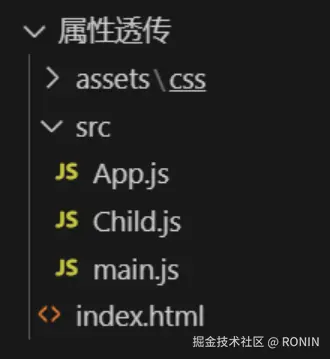
1.新建assets样式文件夹,样式文件style.css
css
.large{
    color: red;
}
.small{
    background-color: pink;
}
2.在index.html中引入样式文件
xml
<!DOCTYPE html>
<html lang="en">
<head>
    <meta charset="UTF-8">
    <meta http-equiv="X-UA-Compatible" content="IE=edge">
    <meta name="viewport" content="width=device-width, initial-scale=1.0">
    <title>首页</title>
    <link rel="stylesheet" href="./assets/css/style.css">
</head>

<body>
    <div id="app"></div>
    <script type="module" src="./src/main.js"></script>
</body>
</html>
父组件App.js
arduino
import Child from "./Child.js";
export default {
  components: {
    Child,
  },

  data() {
    return {
      title: "attribute属性透传",
      count:0
    };
  },

  /*html*/
  template: `<div style="width:400px;height:400px;background-color:skyblue;">
                <h2>{{title}}</h2>
                <p>{{count}}</p>
                 <Child class="large" @click="count++" ></Child>
            </div>`,
};
子组件Child.js
dart
export default {
  data() {
    return {
      num: 10,
    };
  },

  inheritAttrs: true, // 阻止透传

  /*html*/
  template: `
              <button @click="num++" class="small">子按钮{{num}}</button>
              <main v-bind="$attrs">多个根节点</main>
          `,
};
二、性能优化组件
详细介绍六个性能优化组件,其他组件官网自行学习
1.动态组件(<component :is=""></component>改变is属性绑定的值即可)
例如tab栏切换
父组件App.js
kotlin
import Home from "./Home.js";
import Category from "./Category.js";
import Cart from "./Cart.js";
import My from "./My.js";
/*
 *  点击tab选项 内容区域切换为对应组件
 *    1. tab选项绑定点击事件
 *    2. 切换组件
 */

export default {
  components: {
    Home,
    Category,
    Cart,
    My,
  },

  data() {
    return {
      title: "动态组件",
      currentTab:'home',
      list:[
        {name:'home',title:'首页'},
        {name:'category',title:'分类'},
        {name:'cart',title:'购物车'},
        {name:'my',title:'我的'},
      ]
    };
  },

  methods: {
    onTabChange(tabName){
      this.currentTab = tabName
    }
  },

  /*html*/
  template: `<div class="g-container">
                 <div class="g-content">
                      <component :is="currentTab"></component>
                 </div>

                 <ul class="g-footer">
                    <li v-for="item in list" @click="onTabChange(item.name)" :class="{active:currentTab==item.name}">{{item.title}}</li>
                 </ul>
            </div>`,
};
样式文件style.css
css
*{padding: 0;margin: 0;}

ul,li{
    list-style: none;
}

.g-container{
    height: 100vh;
    width: 100%;
    display: flex;
    flex-direction: column;
}

.g-container .g-content{
    flex:1
}

.g-container .g-footer{
    height: 60px;
    background-color: skyblue;
    display: flex;
    justify-content: space-around;
    align-items: center;
}

.active{
   color: red;
}
子组件Home.js(其他子组件同此组件)
javascript
export default {
  data() {
    return {
      title: "首页",
    };
  },

  /*html*/
  template: `<div>
                  <h2>{{title}}</h2>
              </div>`,
};
2.异步组件(服务端定义的组件,通过网络异步获取到前端,再注册使用。通过defineAsyncComponent方法获取组件)
App.js
javascript
import { defineAsyncComponent } from "https://unpkg.com/vue@3/dist/vue.esm-browser.js";

/**
 *   异步组件: 服务端定义的组件,通过网络异步获取到前端,再注册使用
 *   同步组件: 前端客户端定义组件
 */

const AsyncChild = defineAsyncComponent(() => {
  return new Promise((resolve, reject) => {
    //模拟网络接口
    setTimeout(() => {
      //异步获取后端定义的异步组件
      const asyncComponent = {
        template: `<p>我是异步组件</p>`,
      };

      resolve(asyncComponent);
    }, 2000);
  });
});

export default {
  components: {
    AsyncChild,
  },

  data() {
    return {
      title: "异步组件",
    };
  },

  methods: {},

  /*html*/
  template: `<div style="width:400px;height:400px;background-color:skyblue;">
                <h2>{{title}}</h2>

                <p>---异步组件----</p>
                <async-child></async-child>
            </div>`,
};
3.内置组件--缓存组件keep-alive/Suspense/传送门Teleport/过渡动画Transition
直接使用,无需注册
1>. 缓存组件,结合动态组件使用(<keep-alive include=""></keep-alive> 通过 include可以配置哪些组件需要缓存,需要注意的是,include中填写的并不是组件注册时的名称,是定义组件时name选项定义的组件名称)
注:存组件添加之后组件生命周期钩子函数也不会执行了,但是有另外两个钩子函数会执行:activated激活deactivated失活
使用示例:b组件,a组件会销毁,再次切换到a组件时组件会重新创建,但有时是不需要重新创建的,即切换回来原数据还存在。
父组件App.js
xml
import Home from "./components/Home.js";
import Category from "./components/Category.js";
import Cart from "./components/Cart.js";
import My from "./components/My.js";
/**
 *  点击tab选项 内容区域切换为对应组件
 *    1. tab选项绑定点击事件
 *    2. 切换组件
 */
export default {
  name:'App',
  components: {
    Home,
    Category,
    Cart,
    My,
  },

  data() {
    return {
      title: "动态组件",
      currentTab: "home",
      list: [
        { name: "home", title: "首页" },
        { name: "category", title: "分类" },
        { name: "cart", title: "购物车" },
        { name: "my", title: "我的" },
      ],
    };
  },

  methods: {
    onTabChange(tabName) {
      this.currentTab = tabName;
    },
  },

  /*html*/
  template: `<div class="g-container">
                 <div class="g-content">
                      <!--数组写法-->
                      <!--<keep-alive :include="['Home','Category','Cart']">-->

                      <!--字符串写法-->
                      <keep-alive include="Home,Category,Cart">
                          <component :is="currentTab"></component>
                      </keep-alive>
                 </div>

                 <ul class="g-footer">
                    <li v-for="item in list" @click="onTabChange(item.name)" :class="{active:currentTab==item.name}">{{item.title}}</li>
                 </ul>
            </div>`,
};
子组件Home.js
javascript
export default {
  name:'Home',
  data() {
    return {
      title: "首页",
    };
  },

  created() {
    console.log("home created ");
  },

  mounted() {
    console.log("home mounted ");
  },

  activated() {
    console.log("home activated ");
  },

  deactivated() {
    console.log("home deactivated ");
  },

  unmounted() {
    console.log("home unmounted ");
  },

  /*html*/

  template: `<div>
                  <h2>{{title}}</h2>
                  <input type="text" name="message">
              </div>`,

};
子组件Category.js
javascript
export default {
  name:'Category',
  data() {
    return {
      title: "分类",
      list: [],
    };
  },

  created() {
    console.log("category created ");
  },

  mounted() {
    console.log("category mounted ");
  },

  activated() {
    console.log("category activated ");

    // 调用接口获取分类列表数据 fetch返回promise对象,

    fetch("https://api.yuguoxy.com/api/shop/list?pageSize=4")
      .then((response) => {
        return response.json();
      })
      .then((data) => {
        console.log(data);
        this.list = data.resultInfo.list;
      });
  },

  deactivated() {
    console.log("category deactivated ");
  },

  unmounted() {
    console.log("category unmounted ");
  },

  /*html*/
  template: `<div>
                  <h2>{{title}}</h2>
                  <ul>
                    <li v-for="item in list">
                       <img :src="item.picture" style="width:100px;"/>
                       <p>{{item.shop}}</p>
                    </li>
                  </ul>
              </div>`,
};
2>.Suspense组件,结合插槽使用。(当网络请求时间较长,请求的内容暂时没有获取到。等待时渲染一个加载状态,获取到之后展示获取到的内容)
App.js
xml
import { defineAsyncComponent } from "https://unpkg.com/vue@3/dist/vue.esm-browser.js";

/**
 *   异步组件: 服务端定义的组件,通过网络异步获取到前端,再注册使用
 *   同步组件: 前端客户端定义组件
 */

const AsyncChild = defineAsyncComponent(() => {
  return new Promise((resolve, reject) => {
    //模拟网络接口
    setTimeout(() => {
      //异步获取后端定义的异步组件
      const asyncComponent = {
        template: `<p>我是异步组件</p>`,
      };
      resolve(asyncComponent);
    }, 2000);
  });
});

export default {
  components: {
    AsyncChild,
  },

  data() {
    return {
      title: "异步组件",
    };
  },

  methods: {},
  /*html*/
  template: `<div style="width:400px;height:400px;background-color:skyblue;">
                <h2>{{title}}</h2>

                <p>---异步组件----</p>
                <!-- Suspense 作用: 首先显示 名为fallback的插槽内容,当异步组件加载完成后,显示异步组件  -->

                <Suspense>
                     <async-child></async-child>

                     <template #fallback>
                         <p>加载中...</p>
                     </template>
                </Suspense>
            </div>`,
};
3>.传送门Teleport
实际应用场景:没有传送门时嵌套的css样式太深(#app div box model),可以使用传送门减少嵌套层数(#app model)
父组件App.js
xml
import Dialog from "./Dialog.js";

export default {
  components: {
    Dialog,
  },

  data() {
    return {
      title: "父组件",
      show: false, // 控制对话框隐藏显示
    };
  },

  /*html*/
  template: `<div style="width:400px;height:400px;background-color:skyblue;">
                <h2>{{title}}</h2>
                <button @click="show=true">添加用户</button>

                <!--传送到body标签下面-->
                <Teleport to="body">
                    <Dialog v-if="show" @closeDialog="show=false"></Dialog>
                </Teleport>
            </div>
            `,
};
子组件Dialog.js
xml
export default {
  emits: ["closeDialog"], // 接收事件
  data() {
    return {};
  },

  methods: {
    bindConfirm(){
       // 1. 获取表单输入框内容
       // 2. 调用添加用户接口,保存用户数据到服务端
       // 3. 保存用户成功,关闭对话框
          this.$emit('closeDialog')
    }
  },

  /*html*/
  template: `<div class="box">
              <div class="modal">
                  <!-- header -->
                  <div class="header">
                      <p class="title">标题</p>
                      <p class="close" @click="$emit('closeDialog')">x</p>
                  </div>

                  <!-- 内容区域 -->
                  <div class="content">
                      <form>
                          <input type="text" name="username" placeholder="请输入用户名">
                          <input type="text" name="password" placeholder="请输入密码">
                      </form>
                  </div>

                  <!-- 底部区域 -->
                  <div class="footer">
                      <button @click="bindConfirm">确定</button>
                  </div>
              </div>
            </div>`,
};4>.过渡动画<Transition name="">
没有定义name,样式默认v-;定义了name="a",样式为a-
.v-enter-active,
.v-leave-active {transition: opacity 0.5s ease;}
.v-enter-from,
.v-leave-to {opacity: 0;}
父组件App.js
xml
import Dialog from "./Dialog.js";

export default {
  components: {
    Dialog,
  },

  data() {
    return {
      title: "父组件",
      show: true, // 控制对话框隐藏显示
    };
  },

  /*html*/
  template: `<div style="width:400px;height:400px;background-color:skyblue;">
                <h2>{{title}}</h2>
                <button @click="show=!show">切换</button>

                <!--过渡动画效果-->
                <Transition>
                   <p v-if="show">过度动画效果</p>
                </Transition>

                <Transition name="fade">
                   <Dialog v-if="show" @closeDialog="show=false"></Dialog>
                </Transition>
            </div>
            `,
};
子组件Dialog.js
xml
export default {
  emits: ["closeDialog"], // 接收事件
  data() {
    return {};
  },

  methods: {
    bindConfirm(){
       // 1. 获取表单输入框内容
       // 2. 调用添加用户接口,保存用户数据到服务端
       // 3. 保存用户成功,关闭对话框
          this.$emit('closeDialog')
    }
  },

  /*html*/
  template: `<div class="box">
              <div class="modal">

                  <!-- header -->
                  <div class="header">
                      <p class="title">标题</p>
                      <p class="close" @click="$emit('closeDialog')">x</p>
                  </div>

                  <!-- 内容区域 -->

                  <div class="content">
                      <form>
                          <input type="text" name="username" placeholder="请输入用户名">
                          <input type="text" name="password" placeholder="请输入密码">
                      </form>

                  </div>

                  <!-- 底部区域 -->
                  <div class="footer">
                      <button @click="bindConfirm">确定</button>
                  </div>
              </div>
            </div>`,
};
样式style.css
css
/* 下面我们会解释这些 class 是做什么的 */

.v-enter-active,

.v-leave-active {
  transition: opacity 0.5s ease;
}

.v-enter-from,

.v-leave-to {
  opacity: 0;
}


.fade-enter-active,

.fade-leave-active {
  transition: opacity 1s ease;
}

.fade-enter-from,

.fade-leave-to {
  opacity: 0;
}