背景
当我们在一个特性分支进行开发时,有时候会需要需要合并若干个 <math xmlns="http://www.w3.org/1998/Math/MathML"> commit \text{commit} </math>commit 的场景(例如在提 <math xmlns="http://www.w3.org/1998/Math/MathML"> Pull Request \text{Pull Request} </math>Pull Request 前,可以将该特性分支的所有 <math xmlns="http://www.w3.org/1998/Math/MathML"> commit \text{commit} </math>commit 合并为一个 <math xmlns="http://www.w3.org/1998/Math/MathML"> commit \text{commit} </math>commit,以便将来查看这个 <math xmlns="http://www.w3.org/1998/Math/MathML"> Pull Request \text{Pull Request} </math>Pull Request 的变更)
要点
借助以下两个命令,可以将当前分支的最近 <math xmlns="http://www.w3.org/1998/Math/MathML"> n \text{n} </math>n 个 <math xmlns="http://www.w3.org/1998/Math/MathML"> commit \text{commit} </math>commit 合并成一个 <math xmlns="http://www.w3.org/1998/Math/MathML"> commit \text{commit} </math>commit
bash
git reset --soft HEAD~n
git commit -m "Please write your commit message here"
请注意
- 执行第一个命令时,需要将 <math xmlns="http://www.w3.org/1998/Math/MathML"> n \text{n} </math>n 替换为您需要的数字(例如 <math xmlns="http://www.w3.org/1998/Math/MathML"> 5 \text{5} </math>5)
- 执行第二个命令时,请将
"Please write your commit message here"替换为合适的内容
正文
为了便于讨论,我们来杜撰一个例子 ⬇️
示例
准备工作
请将以下代码保存为 main.sh (具体的名称并不重要)
bash
mkdir temp
cd temp
git init
echo "nothing here" >> README.txt
git add README.txt
git commit -m "initial commit"
BOUND=5
for ((i=1; i<=BOUND; i++))
do
FILE_NAME="file_$i.txt"
touch "$FILE_NAME"
echo "This is file number $i" > "$FILE_NAME"
echo "Created file: $FILE_NAME"
git add "$FILE_NAME"
git commit -m "Created file: $FILE_NAME"
done
echo "All files created successfully!"
通过执行下方的命令就可以运行 main.sh ⬇️
bash
bash main.sh
运行完 main.sh 之后,当前目录中会多出一个 temp 目录。在当前目录执行 tree temp 后,应该可以看到如下的内容
text
temp
├── file_1.txt
├── file_2.txt
├── file_3.txt
├── file_4.txt
├── file_5.txt
└── README.txt
1 directory, 6 files
如果用 IntelliJ IDEA (Community Edition) 打开 temp 目录,应该可以看到类似这样的效果 ⬇️
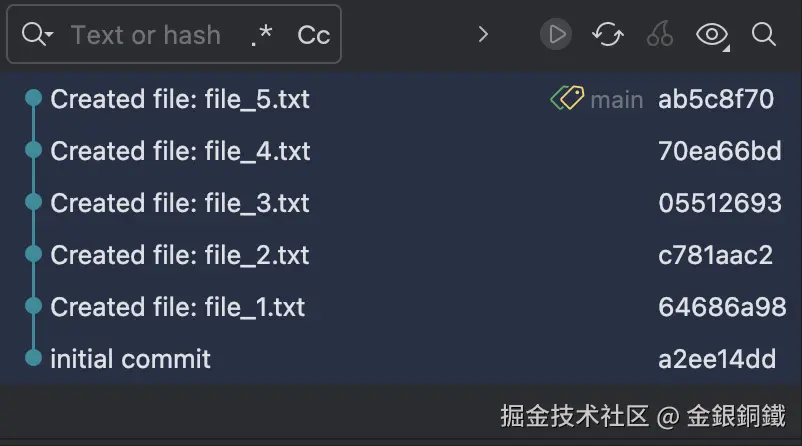
从图中可以看到,我们一共创建了 <math xmlns="http://www.w3.org/1998/Math/MathML"> 6 \text{6} </math>6 个 <math xmlns="http://www.w3.org/1998/Math/MathML"> commit \text{commit} </math>commit。如果我们想把最近的 <math xmlns="http://www.w3.org/1998/Math/MathML"> 5 \text{5} </math>5 个 <math xmlns="http://www.w3.org/1998/Math/MathML"> commit \text{commit} </math>commit 合并在一起,那么至少有两种方案 ⬇️
方案一:基于 <math xmlns="http://www.w3.org/1998/Math/MathML"> git reset \text{git reset} </math>git reset 命令的解决方案
通过执行如下命令,可以切换到 temp 目录中 ⬇️
bash
cd temp
执行如下命令,就可以将最近的 <math xmlns="http://www.w3.org/1998/Math/MathML"> 5 \text{5} </math>5 个 <math xmlns="http://www.w3.org/1998/Math/MathML"> commit \text{commit} </math>commit 合并为一个
bash
git reset --soft HEAD~5
git commit -m "Please write your commit message here"
请注意
- 在第一个命令中,数字 <math xmlns="http://www.w3.org/1998/Math/MathML"> 5 \text{5} </math>5 并没有特殊之处,您可以使用数字 <math xmlns="http://www.w3.org/1998/Math/MathML"> n \text{n} </math>n 以合并最近的 <math xmlns="http://www.w3.org/1998/Math/MathML"> n \text{n} </math>n 个 <math xmlns="http://www.w3.org/1998/Math/MathML"> commit \text{commit} </math>commit
- <math xmlns="http://www.w3.org/1998/Math/MathML"> git commit \text{git commit} </math>git commit 命令的 <math xmlns="http://www.w3.org/1998/Math/MathML"> - m \text{-{}m} </math>-m 选项之后,需要提供对应的 <math xmlns="http://www.w3.org/1998/Math/MathML"> message \text{message} </math>message
执行完上述两个命令后,借助 IntelliJ IDEA (Community Edition) 再次观察,结果符合预期 ⬇️

参考资料
关于 <math xmlns="http://www.w3.org/1998/Math/MathML"> git reset \text{git reset} </math>git reset 命令的详细介绍,可以参考以下两个链接(两个链接来自同一个网站,第一个链接的内容是简体中文,第二个链接的内容是英文)