SSE 流式响应(Server-Sent Events) 是一种基于 HTTP 协议、服务器主动向客户端单向推送数据流 的实时通信技术,核心是长连接 + 分块传输,让数据像水流一样源源不断推到前端,不用等全部生成完再返回。
AI 大模型回答需要边生成边输出(流式),SSE 完美匹配:
- 纯文本流、单向推送
- 浏览器原生支持、无依赖
- 部署简单、兼容所有后端 / 云服务
- 比长轮询延迟低、比 WebSocket 轻量
核心特点
- 单向流 :只能 服务器 → 客户端 推送
- HTTP 原生:不用升级协议、不用 WebSocket 握手
- 自动重连:断网后浏览器自动重试(默认 3 秒)
- 文本流 :
text/event-stream格式,UTF-8 文本 - 轻量简单:比 WebSocket 更轻、更易部署
SSE vs WebSocket(关键区别)
| 特性 | SSE | WebSocket |
|---|---|---|
| 方向 | 单向(服务→客户端) | 双向全双工 |
| 协议 | HTTP | 独立 WebSocket 协议 |
| 重连 | 浏览器自动 | 需自己实现 |
| 复杂度 | 极低 | 较高 |
| 跨域 | 支持 CORS | 需额外配置 |
| 适用 | 单向流、AI、日志 | 聊天室、游戏、强交互 |
SSE 完整示例
npm install express新建:server.js
javascript
const express = require('express');
const app = express();

// 允许跨域(方便前端单独开页面调用)
app.use((req, res, next) => {
  res.header('Access-Control-Allow-Origin', '*');
  res.header('Access-Control-Allow-Headers', '*');
  next();
});

// SSE 接口
app.get('/api/sse', (req, res) => {
  // SSE 必须的响应头
  res.setHeader('Content-Type', 'text/event-stream');
  res.setHeader('Cache-Control', 'no-cache');
  res.setHeader('Connection', 'keep-alive');
  // 解决 nginx 反向代理时缓冲问题
  res.setHeader('X-Accel-Buffering', 'no');

  // 模拟逐字输出:每隔 300ms 发一段
  const text = '大家好,这是一段 SSE 流式响应,逐字推送给你~';
  let index = 0;

  const timer = setInterval(() => {
    if (index >= text.length) {
      // 结束标志
      res.write(`data: [DONE]\n\n`);
      clearInterval(timer);
      res.end();
      return;
    }

    const char = text[index++];
    // SSE 格式必须:data:xxx\n\n
    res.write(`data: ${char}\n\n`);
  }, 300);

  // 客户端断开连接
  req.on('close', () => {
    clearInterval(timer);
  });
});

app.listen(3000, () => {
  console.log('SSE 服务已启动:http://localhost:3000');
});
启动: node server.js
idnex.vue:
javascript
<template>
  <div class="sse-container" style="padding: 20px;">
    <h3>SSE 流式响应(Vue2 版)</h3>

    <!-- 按钮控制 -->
    <div style="margin-bottom: 15px;">
      <button
        @click="startSSE"
        :disabled="isConnecting"
        style="padding: 6px 12px; margin-right: 10px;"
      >
        {{ isConnecting ? '连接中...' : '开始接收流式数据' }}
      </button>
      <button
        @click="closeSSE"
        style="padding: 6px 12px;"
      >
        关闭连接
      </button>
    </div>

    <!-- 流式内容展示区 -->
    <div
      class="content"
      style="
        border: 1px solid #eee;
        padding: 15px;
        min-height: 200px;
        white-space: pre-wrap;
        font-size: 16px;
        line-height: 1.6;
      "
    >
      {{ result }}
    </div>
  </div>
</template>

<script>
export default {
  name: "SseDemo",
  data() {
    return {
      result: "", // 接收的流式内容
      isConnecting: false, // 是否正在连接
      eventSource: null, // SSE 实例
    };
  },
  methods: {
    // 启动 SSE 连接
    startSSE() {
      // 避免重复连接
      if (this.eventSource) return;

      this.result = "";
      this.isConnecting = true;

      // 创建 SSE 连接(后端地址)
      const es = new EventSource("http://localhost:3000/api/sse");
      this.eventSource = es;

      // 连接成功
      es.onopen = () => {
        console.log("✅ SSE 连接成功");
      };

      // 接收服务器推送的消息
      es.onmessage = (e) => {
        const data = e.data;

        // 收到结束标记
        if (data === "[DONE]") {
          this.result += "\n\n✅ 推送完成!";
          this.closeSSE();
          return;
        }

        // 追加内容(打字机效果)
        this.result += data;
      };

      // 错误处理
      es.onerror = (err) => {
        console.error("❌ SSE 错误:", err);
        this.result += "\n❌ 连接异常断开";
        this.closeSSE();
      };
    },

    // 关闭 SSE 连接
    closeSSE() {
      if (this.eventSource) {
        this.eventSource.close();
        this.eventSource = null;
      }
      this.isConnecting = false;
      console.log("🔌 SSE 连接已关闭");
    },
  },

  // 页面销毁时自动关闭连接
  beforeDestroy() {
    this.closeSSE();
  },
};
</script>
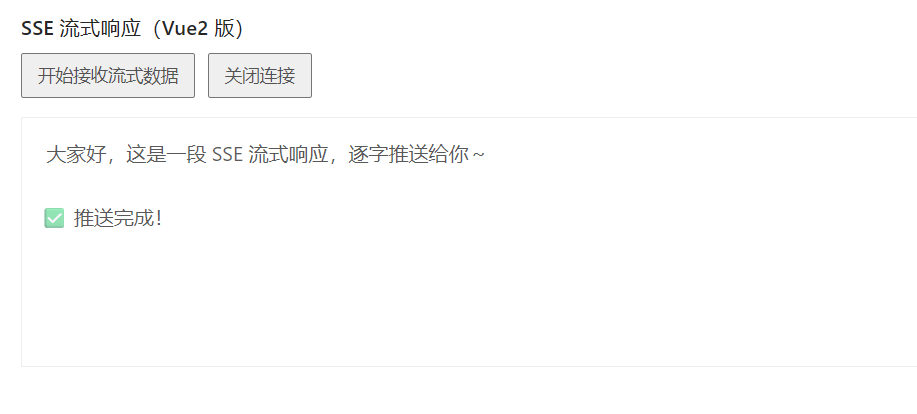
实现效果: