nginx版本 1.29.1
问题
10.20.4.1 访问这个10.20.4.2:5000服务跨域了,麻烦处理一下
跨域报错

根据您图片中的错误信息,前端运行在 http://10.20.4.1,试图向 http://10.20.4.2:50000/upload发送 POST 请求,但被 CORS 策略阻止,因为响应中没有 Access-Control-Allow-Origin头部。
应该5000是python端口
我采用了nginx代理,添加允许跨域
bash
user nginx;
worker_processes auto;
error_log /var/log/nginx/error.log warn;
pid /var/run/nginx.pid;

events {
    worker_connections 1024;
}

http {
    include /etc/nginx/mime.types;
    default_type application/octet-stream;

    log_format main '$remote_addr - $remote_user [$time_local] "$request" '
                    '$status $body_bytes_sent "$http_referer" '
                    '"$http_user_agent" "$http_x_forwarded_for"';
    access_log /var/log/nginx/access.log main;

    sendfile on;
    keepalive_timeout 65;

    # 动态设置允许的CORS源
    # 1. 检查 map 块:确保包含 http://10.20.4.1
    map $http_origin $cors_allowed_origin {
        default "";
        "http://10.20.4.1" "http://10.20.4.1"; # 必须存在这一行
        "http://10.20.4.2" "http://10.20.4.2"; # 必须存在这一行
        # ... 其他允许的来源
    }

    server {
        listen 50000;
        server_name 10.20.4.2;

        # 2. 检查 server 或 location 块:确保添加了 CORS 头
        location / {
            # 处理 OPTIONS 预检请求
            if ($request_method = 'OPTIONS') {
                add_header 'Access-Control-Allow-Origin' $cors_allowed_origin;
                add_header 'Access-Control-Allow-Methods' 'GET, POST, PUT, DELETE, OPTIONS';
                add_header 'Access-Control-Allow-Headers' '*';
                add_header 'Access-Control-Max-Age' 1728000;
                add_header 'Content-Length' 0;
                add_header 'Content-Type' 'text/plain; charset=utf-8';
                return 204;
            }

            # 反向代理到后端
            proxy_pass http://10.20.4.2:5000;
            # ... 其他 proxy_set_header ...

            # 为实际响应添加 CORS 头,使用 always 确保任何状态码都添加
            add_header 'Access-Control-Allow-Origin' $cors_allowed_origin always;
            add_header 'Access-Control-Allow-Methods' 'GET, POST, PUT, DELETE, OPTIONS' always;
            add_header 'Access-Control-Allow-Headers' '*' always;
        }
    }
}
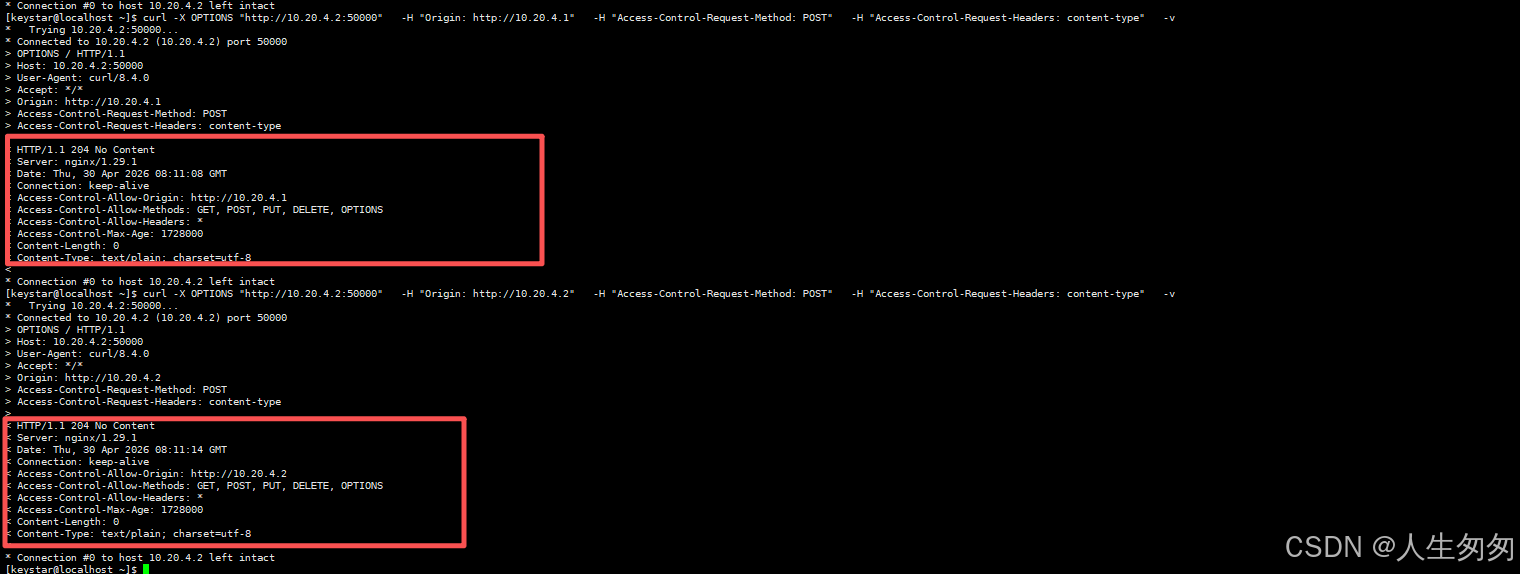
测试实际 POST 请求
此命令模拟前端实际发送的 POST 请求,检查响应是否包含 CORS 头部。
bash
curl -X OPTIONS "http://10.20.4.2:50000" \
  -H "Origin: http://10.20.4.1" \
  -H "Access-Control-Request-Method: POST" \
  -H "Access-Control-Request-Headers: content-type" \
  -v