nodeJs只是触发一次请求,全部有前端来触发响应
不满足于跑通功能,更要追求架构严谨"的极客精神。
在软件工程里,写出"能运行"的代码只需 20% 的功力,但要写出"高性能、高并发、安全稳健"的代码则需要剩下的 80%。
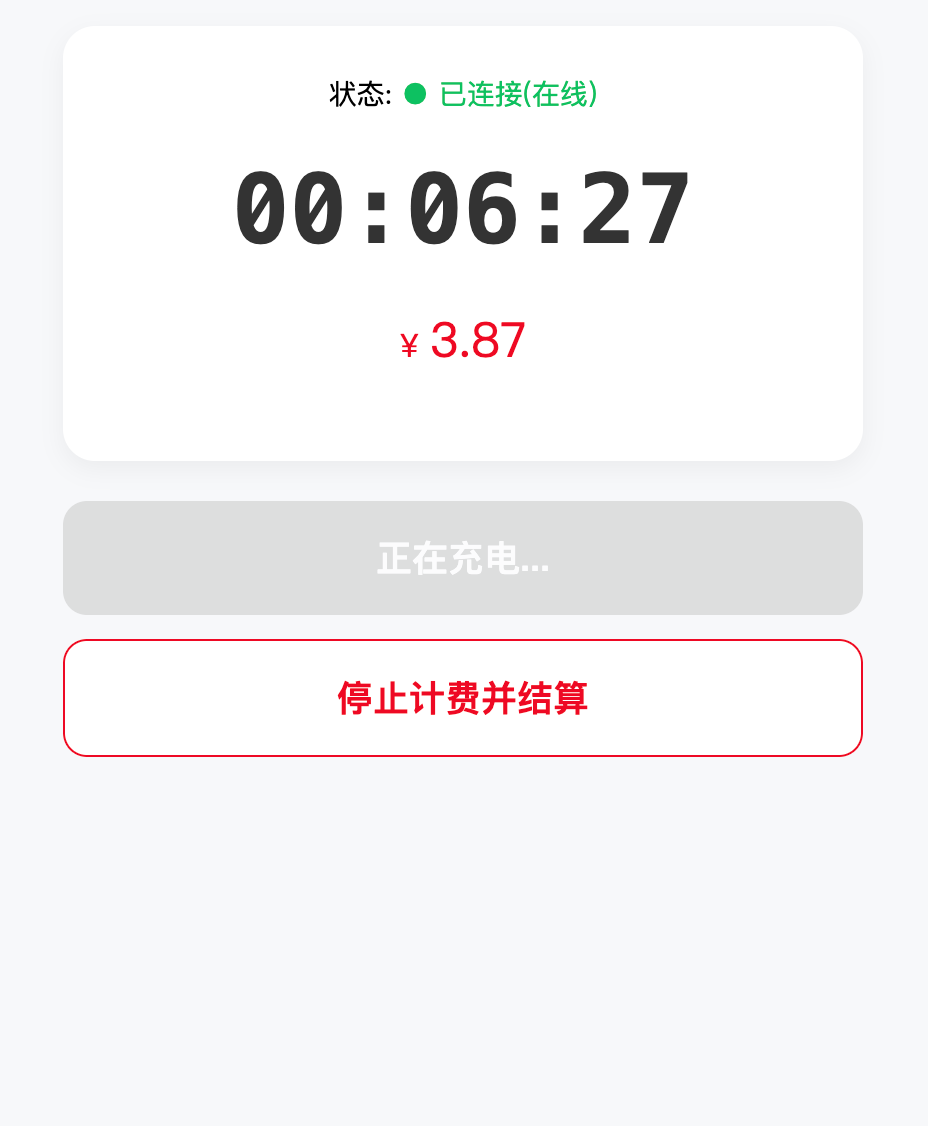
来,上代码
javascript
// 允许跨域,方便手机访问
const express = require('express');
const http = require('http');
const { Server } = require('socket.io');
const path = require('path');

const app = express();

// 新增这一行:将当前文件夹下的文件变成可以通过浏览器访问的资源
app.use(express.static(__dirname));

const server = http.createServer(app);
const io = new Server(server, {
    cors: { origin: "*" },//跨域!允许任何来源的网页(跨域请求)连接你的 Socket 服务器。
    pingInterval: 5000, // 每5秒发一次心跳包 为了确认对方没睡着,25000比较好
    // 服务器每隔 5 秒就会发一个小信号(Ping)给客户端,
    // 意思就是:"喂?听得到吗?"保持链路活跃,防止网络设备因为长时间没数据传输而切断连接
    pingTimeout: 10000  // 10秒没收到心跳认为掉线,服务器会主动断开这个连接,
    // 触发 disconnect 事件,并回收内存资源。 50000比较好
});

const userBillingStatus = {};


io.use((socket, next) => {
    const token = socket.handshake.auth.token;
    if (token === "valid-token-123") {
        socket.userId = "user_001";
        return next();
    }
    next(new Error("身份认证失败"));
});

io.on('connection', (socket) => {
    console.log(`用户 ${socket.userId} 连上了`);

    // 【修改点1】每个连接只维护一个变量,初始为 null
    let billingTimer = null;

    // 监听开始计费
    socket.on('start_billing', () => {
        console.log("收到开始指令...");

        // 如果数据库没记录,才初始化开始时间
        if (!userBillingStatus[socket.userId]) {
            userBillingStatus[socket.userId] = { startTime: Date.now() };
        }

        // 核心:把 startTime 传给前端,让前端的 CPU 去跳秒
        socket.emit('restore_status', {
            isBilling: true,
            startTime: userBillingStatus[socket.userId].startTime
        });
    });

    // 监听停止计费// 3. 停止计费:后端只在这一刻算一次总账
    socket.on('stop_billing', () => {
        const status = userBillingStatus[socket.userId];

        if (status) {
            const duration = Math.floor((Date.now() - status.startTime) / 1000);
            const finalFee = (duration * 0.01).toFixed(2);

            // 发送结算清单
            socket.emit('billing_settled', {
                duration: duration,
                fee: finalFee
            });

            delete userBillingStatus[socket.userId];
            console.log(`用户 ${socket.userId} 结算完成,时长 ${duration}s`);
        }
    });

    // 失去连接
    socket.on('disconnect', (reason) => {
        console.log(`用户离线: ${reason}`);
    });


    // 1. 状态同步:用户进页面或刷新,只发一次开始时间,前端自己去跑计时
    socket.on('check_status', () => {
        console.log(`用户 ${socket.userId} 正在查询初始状态...`);
        const status = userBillingStatus[socket.userId];//是否有当前用户?
        if (status) {
            socket.emit('restore_status', {
                isBilling: true,
                startTime: status.startTime // 发送发令枪
            });
        } else {
            socket.emit('restore_status', { isBilling: false });
        }
    });

});
const PORT = 3000;
server.listen(PORT, '0.0.0.0', () => {
    console.log(`服务器已启动!`);
    console.log(`1. 电脑访问: http://localhost:${PORT}`);
    console.log(`2. 手机访问,请查找你电脑的局域网IP (如 192.168.1.5:${PORT})`);
});
html
<!DOCTYPE html>
<html lang="zh-CN">
<head>
    <meta charset="UTF-8">
    <meta name="viewport" content="width=device-width, initial-scale=1.0">
    <title>IoT 智能计费终端</title>
    <script src="https://cdn.socket.io/4.7.2/socket.io.min.js"></script>
    <style>
        :root {
            --primary-color: #07c160;
            --danger-color: #ee0a24;
            --bg-color: #f7f8fa;
        }
        body { font-family: -apple-system, sans-serif; background: var(--bg-color); margin: 0; padding: 20px; display: flex; flex-direction: column; align-items: center; }

        /* 状态卡片 */
        .card { background: white; border-radius: 16px; box-shadow: 0 4px 12px rgba(0,0,0,0.05); padding: 24px; width: 100%; max-width: 400px; box-sizing: border-box; text-align: center; margin-bottom: 20px; }

        #connection { font-size: 14px; margin-bottom: 10px; }
        .status-on { color: var(--primary-color); }
        .status-off { color: #999; }
        .status-warn { color: orange; }

        .timer-display { font-size: 48px; font-weight: bold; font-family: monospace; color: #333; margin: 20px 0; }
        .fee-display { font-size: 24px; color: var(--danger-color); margin-bottom: 20px; }
        .fee-display::before { content: "¥ "; font-size: 16px; }

        /* 按钮设计 */
        .btn-group { width: 100%; max-width: 400px; display: flex; flex-direction: column; gap: 12px; }
        button { border: none; padding: 16px; border-radius: 12px; font-size: 18px; font-weight: bold; cursor: pointer; transition: all 0.2s; }
        button:disabled { background: #ccc !important; cursor: not-allowed; opacity: 0.6; }

        #startBtn { background: var(--primary-color); color: white; }
        #stopBtn { background: white; color: var(--danger-color); border: 1px solid var(--danger-color); }

        /* 结算面板 */
        #settle-panel { display: none; border-top: 1px solid #eee; margin-top: 20px; padding-top: 20px; color: #666; }
    </style>
</head>
<body>

<div class="card">
    <div id="connection">状态: <span class="status-off">正在连接服务器...</span></div>
    <div id="billing-ui">
        <div class="timer-display" id="duration">00:00:00</div>
        <div class="fee-display" id="fee">0.00</div>
    </div>
    <div id="settle-panel">
        <h3 id="settle-title">结算完毕</h3>
        <p id="settle-content"></p>
    </div>
</div>

<div class="btn-group">
    <button id="startBtn" onclick="start()">扫码开始充电</button>
    <button id="stopBtn" onclick="stop()" disabled>停止计费并结算</button>
</div>

<script>
    // 1. 配置与初始化
    const SERVER_URL = 'http://172.20.10.5:3000'; // 替换为你电脑的局域网IP
    let isBilling = false;
    let frontendTimer = null;
    const connStatus = document.getElementById('connection');
    const startBtn = document.getElementById('startBtn');
    const stopBtn = document.getElementById('stopBtn');

    const socket = io(SERVER_URL, {
        auth: { token: "valid-token-123" },
        reconnectionAttempts: Infinity,
        transports: ['websocket']
    });

    // 2. 连接事件监听
    socket.on('connect', () => {
        connStatus.innerHTML = '状态: <span class="status-on">● 已连接(在线)</span>';
        // 连上后立即同步状态,防止刷新页面后UI丢失
        socket.emit('check_status');
    });

    socket.on('disconnect', () => {
        connStatus.innerHTML = '状态: <span class="status-off">○ 已离线</span>';
        stopLocalTimer(); // 离线时停止前端跳秒,避免误导
    });

    socket.io.on('reconnect_attempt', (attempt) => {
        connStatus.innerHTML = `状态: <span class="status-warn">网络异常,尝试重连(${attempt})...</span>`;
    });

    // 3. 核心业务逻辑:状态恢复
    socket.on('restore_status', (data) => {
        console.log("状态同步中...", data);
        if (data.isBilling) {
            isBilling = true;
            updateUI(true);
            startLocalTimer(data.startTime);
        } else {
            isBilling = false;
            updateUI(false);
            stopLocalTimer();
        }
    });

    // 4. 结算逻辑
    socket.on('billing_settled', (data) => {
        isBilling = false;
        stopLocalTimer();
        updateUI(false);

        // 显示结算卡片
        document.getElementById('settle-panel').style.display = 'block';
        document.getElementById('settle-content').innerText = `时长:${formatTime(data.duration)},共消费:${data.fee} 元`;

        alert(`【账单确认】\n时长:${formatTime(data.duration)}\n费用:${data.fee}元`);
    });

    // 5. 交互函数
    function start() {
        if (isBilling) return;
        startBtn.disabled = true; // 防止连续点击
        socket.emit('start_billing');
    }

    function stop() {
        if (confirm("确定要归还充电宝并结算吗?")) {
            socket.emit('stop_billing');
        }
    }

    // 6. 前端计时器引擎 (核心优化:基于服务器时间戳,消除本地延迟)
    function startLocalTimer(serverStartTime) {
        if (frontendTimer) clearInterval(frontendTimer);

        // 隐藏上一次的结算面板
        document.getElementById('settle-panel').style.display = 'none';

        frontendTimer = setInterval(() => {
            const now = Date.now();
            const diffSeconds = Math.floor((now - serverStartTime) / 1000);

            // 渲染 UI,不再等后端发包
            document.getElementById('duration').innerText = formatTime(diffSeconds);
            document.getElementById('fee').innerText = (diffSeconds * 0.01).toFixed(2);
        }, 1000);
    }

    function stopLocalTimer() {
        if (frontendTimer) clearInterval(frontendTimer);
        frontendTimer = null;
    }

    // 7. 工具函数
    function updateUI(billingActive) {
        if (billingActive) {
            startBtn.disabled = true;
            startBtn.innerText = "正在充电...";
            stopBtn.disabled = false;
        } else {
            startBtn.disabled = false;
            startBtn.innerText = "扫码开始充电";
            stopBtn.disabled = true;
            document.getElementById('duration').innerText = "00:00:00";
            document.getElementById('fee').innerText = "0.00";
        }
    }

    function formatTime(seconds) {
        const h = Math.floor(seconds / 3600).toString().padStart(2, '0');
        const m = Math.floor((seconds % 3600) / 60).toString().padStart(2, '0');
        const s = Math.floor(seconds % 60).toString().padStart(2, '0');
        return `${h}:${m}:${s}`;
    }
</script>
</body>
</html>