在工单回复、用户反馈、FAQ 问答这类后台系统里,普通 textarea 很快就不够用了:用户希望能插入图片,客服希望能上传附件,FAQ 需要支持图文混排,视频内容还要能预览。本文结合一个 Vue + vue-quill-editor + Quill 1.3.7 的实际封装,介绍富文本从"添加"到"传输"再到"展示"的完整逻辑,并给出 csReplyQuill 组件代码和使用方式。
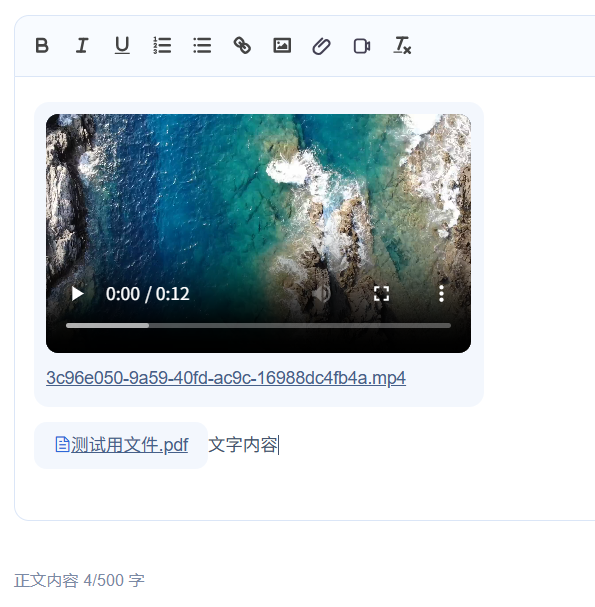
一、整体思路
富文本不是把一段字符串直接塞给后端那么简单,它通常有三条链路:
- 添加链路:用户在编辑器里输入文字,或选择图片、附件、视频。组件负责上传文件,拿到服务端返回的地址后,再把图片或自定义附件节点插入 Quill。
- 传输链路 :父组件通过
v-model拿到 HTML 字符串。提交前可以把公网地址转成服务端相对路径,减少环境耦合。 - 展示链路 :详情页通过
v-html渲染 HTML。展示前可以把相对路径补成完整访问地址,同时补齐.ql-attachment、视频等自定义节点样式。
也就是说,数据库里保存的核心字段可以就是一段 HTML:
html
<p>您好,问题已处理。</p>
<p><img src="/upload/image/demo.png"></p>
<span class="ql-attachment" data-url="/upload/file/demo.pdf" data-name="demo.pdf">
  <a class="ql-attachment__name" href="/upload/file/demo.pdf">demo.pdf</a>
</span>
前端编辑时把文件上传为 URL,提交时保存 HTML,展示时再把 HTML 还原为可访问、可点击、样式一致的内容。
二、为什么要封装 csReplyQuill
项目里如果每个页面都直接写 quill-editor,很快会遇到重复代码:
- 每个页面都要写 toolbar 配置。
- 图片上传、附件上传、视频上传逻辑重复。
- Quill 默认没有"附件"这种格式,需要自定义 blot。
- 每个父组件都要判断空内容、字数、上传状态。
- 回显时图片和附件的 URL 处理逻辑容易不一致。
所以这里把"编辑器能力"收敛到 csReplyQuill:
- 对外只暴露
v-model、placeholder、disabled、maxLength。 - 内部负责 Quill 初始化、toolbar、上传、插入节点。
- 通过
state-change通知父组件当前字数和是否有有效内容。 - 图片使用 Quill 内置
imageembed。 - 附件、视频、视频上传进度使用自定义 blot。
三、完整组件代码:csReplyQuill.vue
依赖:
quill@1.3.7、vue-quill-editor@3.x、axios。上传接口示例:图片上传
/file/upload/image,附件和视频上传/file/upload。接口返回约定为{ code: 200, data: { url, name, ext, fileId, size } },如果你的接口字段不同,只需要调整getUploadField里的字段优先级。
vue
<template>
<div class="cs-reply-quill">
<quill-editor
ref="editor"
v-model="innerValue"
:options="editorOption"
@change="handleEditorChange"
/>
<input
ref="imageInput"
type="file"
accept=".jpg,.jpeg,.png,image/png,image/jpg,image/jpeg"
class="cs-reply-quill__input"
@change="handleImageSelect"
/>
<input
ref="attachmentInput"
type="file"
accept=".pdf,.xls,.xlsx,.doc,.docx"
class="cs-reply-quill__input"
@change="handleAttachmentSelect"
/>
<input
ref="videoInput"
type="file"
accept=".mp4,.mov,.avi,.wmv,.flv,.mkv,video/mp4,video/quicktime,video/x-msvideo,video/x-ms-wmv,video/x-flv,video/x-matroska"
class="cs-reply-quill__input"
@change="handleVideoSelect"
/>
</div>
</template>
<script>
import axios from "axios";
import Quill from "quill";
import "quill/dist/quill.core.css";
import "quill/dist/quill.snow.css";
import "quill/dist/quill.bubble.css";
import { quillEditor } from "vue-quill-editor";
import { getToken } from "@/utils/auth";
const Embed = Quill.import("blots/embed");
const BlockEmbed = Quill.import("blots/block/embed");
function escapeHtml(value) {
return String(value || "").replace(/[&<>"']/g, char => {
const map = {
"&": "&",
"<": "<",
">": ">",
'"': """,
"'": "'"
};
return map[char];
});
}
function getUploadField(uploadData, keys = []) {
if (typeof uploadData === "string") {
return uploadData;
}
if (!uploadData || typeof uploadData !== "object") {
return "";
}
for (const key of keys) {
if (uploadData[key]) {
return uploadData[key];
}
}
return "";
}
class AttachmentBlot extends Embed {
static create(value) {
const node = super.create();
const fileName = value.name || "附件";
const fileUrl = value.url || "";
node.setAttribute("contenteditable", "false");
node.setAttribute("data-url", fileUrl);
node.setAttribute("data-name", fileName);
node.setAttribute("data-ext", value.ext || "");
node.setAttribute("data-file-id", value.fileId || "");
node.setAttribute("data-size", value.size ? String(value.size) : "");
node.innerHTML =
'<span class="ql-attachment__icon"><i class="el-icon-document"></i></span>' +
`<a class="ql-attachment__name" target="_blank" rel="noopener noreferrer" href="${fileUrl || "javascript:void(0)"}">${escapeHtml(fileName)}</a>`;
return node;
}
static value(node) {
return {
url: node.getAttribute("data-url") || "",
name: node.getAttribute("data-name") || "",
ext: node.getAttribute("data-ext") || "",
fileId: node.getAttribute("data-file-id") || "",
size: node.getAttribute("data-size") || ""
};
}
}
AttachmentBlot.blotName = "attachment";
AttachmentBlot.tagName = "span";
AttachmentBlot.className = "ql-attachment";
class VideoAttachmentBlot extends BlockEmbed {
static create(value) {
const node = super.create();
const fileName = value.name || "视频";
const fileUrl = value.url || "";
node.setAttribute("contenteditable", "false");
node.setAttribute("data-url", fileUrl);
node.setAttribute("data-name", fileName);
node.setAttribute("data-ext", value.ext || "");
node.setAttribute("data-file-id", value.fileId || "");
node.setAttribute("data-size", value.size ? String(value.size) : "");
node.innerHTML =
`<video class="ql-video-attachment__player" controls src="${fileUrl}"></video>` +
`<a class="ql-video-attachment__name" target="_blank" rel="noopener noreferrer" href="${fileUrl || "javascript:void(0)"}">${escapeHtml(fileName)}</a>`;
return node;
}
static value(node) {
return {
url: node.getAttribute("data-url") || "",
name: node.getAttribute("data-name") || "",
ext: node.getAttribute("data-ext") || "",
fileId: node.getAttribute("data-file-id") || "",
size: node.getAttribute("data-size") || ""
};
}
}
VideoAttachmentBlot.blotName = "videoAttachment";
VideoAttachmentBlot.tagName = "div";
VideoAttachmentBlot.className = "ql-video-attachment";
class VideoUploadBlot extends BlockEmbed {
static create(value) {
const node = super.create();
const fileName = value.name || "视频";
const uploadId = value.uploadId || "";
const progress = Number(value.progress || 0);
node.setAttribute("contenteditable", "false");
node.setAttribute("data-upload-id", uploadId);
node.setAttribute("data-name", fileName);
node.setAttribute("data-progress", String(progress));
node.innerHTML = VideoUploadBlot.render(escapeHtml(fileName), progress, uploadId);
return node;
}
static render(safeName, progress, uploadId) {
return (
'<div class="ql-video-upload__head">' +
'<span class="ql-video-upload__icon"><i class="el-icon-video-camera"></i></span>' +
'<span class="ql-video-upload__name">' +
safeName +
"</span>" +
`<button class="ql-video-upload__cancel" type="button" data-upload-id="${uploadId}">取消</button>` +
"</div>" +
'<div class="ql-video-upload__bar">' +
`<span class="ql-video-upload__bar-inner" style="width: ${progress}%"></span>` +
"</div>" +
`<div class="ql-video-upload__meta">视频上传中 ${progress}%</div>`
);
}
static value(node) {
return {
uploadId: node.getAttribute("data-upload-id") || "",
name: node.getAttribute("data-name") || "",
progress: node.getAttribute("data-progress") || 0
};
}
}
VideoUploadBlot.blotName = "videoUpload";
VideoUploadBlot.tagName = "div";
VideoUploadBlot.className = "ql-video-upload";
Quill.register(
{
"formats/attachment": AttachmentBlot,
"formats/videoAttachment": VideoAttachmentBlot,
"formats/videoUpload": VideoUploadBlot
},
true
);
export default {
name: "CsReplyQuill",
components: {
quillEditor
},
props: {
value: {
type: String,
default: ""
},
placeholder: {
type: String,
default: ""
},
disabled: {
type: Boolean,
default: false
},
maxLength: {
type: Number,
default: 500
}
},
data() {
return {
innerValue: "",
imageUploadUrl: import.meta.env.VITE_APP_BASE_API + "/file/upload/image",
fileUploadUrl: import.meta.env.VITE_APP_BASE_API + "/file/upload",
videoUploadUrl: import.meta.env.VITE_APP_BASE_API + "/file/upload",
videoUploadTasks: {},
editorOption: {
theme: "snow",
placeholder: this.placeholder,
readOnly: this.disabled,
modules: {
toolbar: {
container: [
["bold", "italic", "underline"],
[{ list: "ordered" }, { list: "bullet" }],
["link", "image", "attachment", "videoAttachment"],
["clean"]
],
handlers: {
image: () => this.triggerImageSelect(),
attachment: () => this.triggerAttachmentSelect(),
videoAttachment: () => this.triggerVideoSelect()
}
}
}
}
};
},
watch: {
value: {
immediate: true,
handler(value) {
const normalizedValue = this.normalizeHtml(value);
if (normalizedValue !== this.normalizeHtml(this.innerValue)) {
this.innerValue = normalizedValue;
}
}
},
disabled(value) {
const quill = this.getQuill();
if (quill) {
quill.enable(!value);
}
}
},
mounted() {
const quill = this.getQuill();
if (!quill) {
return;
}
quill.enable(!this.disabled);
quill.root.addEventListener("paste", this.handlePaste);
quill.root.addEventListener("click", this.handleEditorClick);
quill.on("text-change", this.handleTextChange);
this.emitState();
},
beforeDestroy() {
const quill = this.getQuill();
if (quill) {
quill.root.removeEventListener("paste", this.handlePaste);
quill.root.removeEventListener("click", this.handleEditorClick);
quill.off("text-change", this.handleTextChange);
}
Object.keys(this.videoUploadTasks).forEach(uploadId => {
const task = this.videoUploadTasks[uploadId];
if (task && task.cancel) {
task.cancel("组件销毁,取消视频上传");
}
});
},
methods: {
getQuill() {
return this.$refs.editor ? this.$refs.editor.quill : null;
},
normalizeHtml(html) {
if (!html || html === "<p><br></p>") {
return "";
}
return html;
},
getPlainTextLength() {
const quill = this.getQuill();
if (!quill) {
return 0;
}
return (quill.getContents().ops || []).reduce((total, op) => {
if (typeof op.insert !== "string") {
return total;
}
return total + op.insert.replace(/\n/g, "").length;
}, 0);
},
hasContent() {
const quill = this.getQuill();
if (!quill) {
return false;
}
return (quill.getContents().ops || []).some(op => {
if (typeof op.insert === "string") {
return !!op.insert.replace(/\s|\n/g, "");
}
return !!(
op.insert &&
(op.insert.image || op.insert.attachment || op.insert.videoAttachment || op.insert.videoUpload)
);
});
},
emitState() {
const html = this.normalizeHtml(this.innerValue);
this.$emit("state-change", {
html,
textLength: this.getPlainTextLength(),
hasContent: this.hasContent()
});
},
handleEditorChange({ html }) {
const normalizedHtml = this.normalizeHtml(html);
this.innerValue = normalizedHtml;
this.$emit("input", normalizedHtml);
this.emitState();
},
handleTextChange(delta, oldDelta, source) {
if (source !== "user") {
this.emitState();
return;
}
if (this.getPlainTextLength() > this.maxLength) {
const quill = this.getQuill();
if (quill) {
quill.history.undo();
this.$message.warning(`文字内容最多输入 ${this.maxLength} 字`);
}
}
this.emitState();
},
triggerImageSelect() {
if (!this.disabled) {
this.$refs.imageInput.click();
}
},
triggerAttachmentSelect() {
if (!this.disabled) {
this.$refs.attachmentInput.click();
}
},
triggerVideoSelect() {
if (!this.disabled) {
this.$refs.videoInput.click();
}
},
async handlePaste(event) {
const clipboardItems = Array.from((event.clipboardData && event.clipboardData.items) || []);
const imageItems = clipboardItems.filter(item => item.type && item.type.indexOf("image/") === 0);
if (!imageItems.length) {
return;
}
event.preventDefault();
for (const item of imageItems) {
const file = item.getAsFile();
if (file) {
await this.insertImage(file);
}
}
},
async handleImageSelect(event) {
const file = event.target.files && event.target.files[0];
if (file) {
await this.insertImage(file);
}
event.target.value = "";
},
async handleAttachmentSelect(event) {
const file = event.target.files && event.target.files[0];
if (file) {
await this.insertAttachment(file);
}
event.target.value = "";
},
async handleVideoSelect(event) {
const file = event.target.files && event.target.files[0];
if (file) {
await this.insertVideo(file);
}
event.target.value = "";
},
async uploadFile(file, url, options = {}) {
const formData = new FormData();
formData.append("file", file);
const response = await axios({
method: "post",
baseURL: import.meta.env.VITE_APP_BASE_API,
url: url.replace(import.meta.env.VITE_APP_BASE_API, ""),
headers: {
Authorization: "Bearer " + getToken(),
"Content-Type": "multipart/form-data"
},
data: formData,
cancelToken: options.cancelToken,
onUploadProgress: options.onProgress
});
const result = response.data || {};
if (result.code !== 200) {
throw new Error(result.msg || "上传失败");
}
return result.data || {};
},
handleEditorClick(event) {
const cancelButton = event.target.closest && event.target.closest(".ql-video-upload__cancel");
if (!cancelButton) {
return;
}
this.cancelVideoUpload(cancelButton.getAttribute("data-upload-id"));
},
createUploadId() {
return `video-upload-${Date.now()}-${Math.random().toString(16).slice(2)}`;
},
insertVideoUploadPlaceholder(file) {
const quill = this.getQuill();
if (!quill) {
return "";
}
const uploadId = this.createUploadId();
const range = quill.getSelection(true);
const index = range ? range.index : quill.getLength();
quill.insertEmbed(index, "videoUpload", { uploadId, name: file.name, progress: 0 }, "user");
quill.insertText(index + 1, "\n", "user");
quill.setSelection(index + 2, 0, "silent");
this.emitState();
return uploadId;
},
getVideoUploadNode(uploadId) {
const quill = this.getQuill();
if (!quill || !uploadId) {
return null;
}
return quill.root.querySelector(`.ql-video-upload[data-upload-id="${uploadId}"]`);
},
getVideoUploadIndex(uploadId) {
const quill = this.getQuill();
const node = this.getVideoUploadNode(uploadId);
if (!quill || !node) {
return -1;
}
const blot = Quill.find(node);
return blot ? quill.getIndex(blot) : -1;
},
updateVideoUploadProgress(uploadId, progress) {
const node = this.getVideoUploadNode(uploadId);
if (!node) {
return;
}
const safeProgress = Math.max(0, Math.min(99, Math.round(progress)));
const bar = node.querySelector(".ql-video-upload__bar-inner");
const meta = node.querySelector(".ql-video-upload__meta");
node.setAttribute("data-progress", String(safeProgress));
if (bar) {
bar.style.width = `${safeProgress}%`;
}
if (meta) {
meta.textContent = `视频上传中 ${safeProgress}%`;
}
},
removeVideoUploadPlaceholder(uploadId) {
const quill = this.getQuill();
const index = this.getVideoUploadIndex(uploadId);
if (!quill || index < 0) {
return;
}
quill.deleteText(index, 1, "user");
this.emitState();
},
replaceVideoUploadPlaceholder(uploadId, videoData) {
const quill = this.getQuill();
if (!quill) {
return;
}
const index = this.getVideoUploadIndex(uploadId);
const insertIndex = index >= 0 ? index : quill.getLength();
if (index >= 0) {
quill.deleteText(index, 1, "silent");
}
quill.insertEmbed(insertIndex, "videoAttachment", videoData, "user");
quill.setSelection(insertIndex + 1, 0, "silent");
this.emitState();
},
cancelVideoUpload(uploadId) {
const task = this.videoUploadTasks[uploadId];
if (!task) {
return;
}
task.cancel("视频上传已取消");
this.removeVideoUploadPlaceholder(uploadId);
this.$delete(this.videoUploadTasks, uploadId);
this.$message.info("已取消视频上传");
},
resolveAssetUrl(url) {
const rawUrl = String(url || "").trim();
if (!rawUrl) {
return "";
}
if (/^(https?:|blob:|data:)/.test(rawUrl)) {
return rawUrl;
}
const baseUrl = import.meta.env.VITE_APP_BASE_API || "";
if (!baseUrl) {
return rawUrl;
}
if (/^https?:/.test(baseUrl)) {
return new URL(rawUrl, baseUrl.endsWith("/") ? baseUrl : baseUrl + "/").href;
}
return window.location.origin + baseUrl.replace(/\/+$/, "/") + rawUrl.replace(/^\/+/, "");
},
async insertImage(file) {
try {
const uploadData = await this.uploadFile(file, this.imageUploadUrl);
const imageUrl = this.resolveAssetUrl(getUploadField(uploadData, ["imgUrl", "url", "fileUrl"]));
if (!imageUrl) {
throw new Error("图片地址无效");
}
const quill = this.getQuill();
const range = quill.getSelection(true);
const index = range ? range.index : quill.getLength();
quill.insertEmbed(index, "image", imageUrl, "user");
quill.setSelection(index + 1, 0, "silent");
this.emitState();
} catch (error) {
this.$message.error(error.message || "图片上传失败");
}
},
async insertAttachment(file) {
try {
const uploadData = await this.uploadFile(file, this.fileUploadUrl);
const fileUrl = this.resolveAssetUrl(getUploadField(uploadData, ["url", "fileUrl", "imgUrl"]));
if (!fileUrl) {
throw new Error("附件地址无效");
}
const quill = this.getQuill();
const range = quill.getSelection(true);
const index = range ? range.index : quill.getLength();
quill.insertEmbed(
index,
"attachment",
{
name: uploadData.name || file.name,
url: fileUrl,
ext: uploadData.ext || (file.name.split(".").pop() || ""),
fileId: uploadData.fileId || uploadData.id || "",
size: uploadData.size || file.size || ""
},
"user"
);
quill.insertText(index + 1, "\n", "user");
quill.setSelection(index + 2, 0, "silent");
this.emitState();
} catch (error) {
this.$message.error(error.message || "附件上传失败");
}
},
async insertVideo(file) {
const uploadId = this.insertVideoUploadPlaceholder(file);
if (!uploadId) {
return;
}
const source = axios.CancelToken.source();
this.$set(this.videoUploadTasks, uploadId, { cancel: source.cancel });
try {
const uploadData = await this.uploadFile(file, this.videoUploadUrl, {
cancelToken: source.token,
onProgress: event => {
if (event.total) {
this.updateVideoUploadProgress(uploadId, (event.loaded / event.total) * 100);
}
}
});
const videoUrl = this.resolveAssetUrl(getUploadField(uploadData, ["url", "fileUrl", "imgUrl"]));
if (!videoUrl) {
throw new Error("视频地址无效");
}
this.replaceVideoUploadPlaceholder(uploadId, {
name: uploadData.name || file.name,
url: videoUrl,
ext: uploadData.ext || (file.name.split(".").pop() || ""),
fileId: uploadData.fileId || uploadData.id || "",
size: uploadData.size || file.size || ""
});
} catch (error) {
if (!axios.isCancel(error)) {
this.removeVideoUploadPlaceholder(uploadId);
this.$message.error(error.message || "视频上传失败");
}
} finally {
this.$delete(this.videoUploadTasks, uploadId);
}
}
}
};
</script>
<style lang="scss" scoped>
.cs-reply-quill__input {
display: none;
}
::v-deep .ql-toolbar.ql-snow {
border: 1px solid #dbe6f7;
border-radius: 12px 12px 0 0;
background: #f8fbff;
}
::v-deep .ql-container.ql-snow {
border: 1px solid #dbe6f7;
border-top: 0;
border-radius: 0 0 12px 12px;
background: #fff;
}
::v-deep .ql-editor {
min-height: 120px;
font-size: 14px;
line-height: 1.8;
color: #44536d;
white-space: pre-wrap;
word-break: break-word;
overflow-wrap: anywhere;
}
::v-deep .ql-editor img {
max-width: 180px;
border-radius: 12px;
}
::v-deep .ql-toolbar .ql-attachment,
::v-deep .ql-toolbar .ql-videoAttachment {
width: 28px;
padding: 0;
}
::v-deep .ql-toolbar .ql-attachment::before {
content: "📎";
}
::v-deep .ql-toolbar .ql-videoAttachment::before {
content: "🎬";
}
::v-deep .ql-attachment {
display: inline-flex;
align-items: center;
gap: 6px;
max-width: 100%;
margin: 4px 0;
padding: 6px 10px;
border-radius: 10px;
background: #f3f7fd;
color: #466089;
}
::v-deep .ql-attachment__name {
color: inherit;
text-decoration: none;
word-break: break-all;
}
::v-deep .ql-video-attachment {
display: grid;
gap: 8px;
max-width: 360px;
margin: 8px 0;
padding: 10px;
border-radius: 12px;
background: #f3f7fd;
color: #466089;
}
::v-deep .ql-video-attachment__player {
width: 100%;
max-height: 220px;
border-radius: 10px;
background: #0f172a;
}
::v-deep .ql-video-attachment__name {
color: inherit;
text-decoration: none;
word-break: break-all;
}
::v-deep .ql-video-upload {
display: grid;
gap: 10px;
max-width: 360px;
margin: 8px 0;
padding: 12px;
border: 1px solid #dbe6f7;
border-radius: 12px;
background: #f8fbff;
color: #466089;
}
::v-deep .ql-video-upload__head {
display: grid;
grid-template-columns: 20px minmax(0, 1fr) auto;
align-items: center;
gap: 8px;
}
::v-deep .ql-video-upload__name {
overflow: hidden;
color: #24364f;
font-weight: 500;
text-overflow: ellipsis;
white-space: nowrap;
}
::v-deep .ql-video-upload__cancel {
height: 24px;
padding: 0 8px;
border: 1px solid #d6dfed;
border-radius: 6px;
background: #fff;
color: #6b7890;
cursor: pointer;
font-size: 12px;
}
::v-deep .ql-video-upload__bar {
height: 6px;
overflow: hidden;
border-radius: 999px;
background: #e7edf6;
}
::v-deep .ql-video-upload__bar-inner {
display: block;
height: 100%;
border-radius: inherit;
background: linear-gradient(90deg, #2f80ed 0%, #17c3b2 100%);
transition: width 0.2s ease;
}
::v-deep .ql-video-upload__meta {
color: #8a97ad;
font-size: 12px;
line-height: 1;
}
</style>四、父组件如何使用
1. 引入并注册组件
js
import csReplyQuill from "@/components/biz/csReplyQuill.vue";

export default {
  components: {
    csReplyQuill
  }
};
2. 编辑区使用 v-model
vue
<cs-reply-quill
  ref="replyEditor"
  v-model="replyForm.content"
  placeholder="输入回复内容..."
  :max-length="500"
  @state-change="handleReplyEditorState"
/>

<div class="reply-actions">
  <span>正文内容 {{ replyTextLength }}/500 字</span>
  <el-button type="primary" @click="submitReply">发送回复</el-button>
</div>
3. 父组件状态和提交逻辑
js
export default {
  data() {
    return {
      replyForm: {
        content: ""
      },
      replyTextLength: 0,
      replyHasContent: false
    };
  },
  methods: {
    handleReplyEditorState(state) {
      this.replyTextLength = state && state.textLength ? state.textLength : 0;
      this.replyHasContent = !!(state && state.hasContent);
    },
    submitReply() {
      if (!this.replyHasContent) {
        this.$message.warning("请输入回复内容后再发送");
        return;
      }

      const payload = {
        content: this.transformReplyContentForSubmit(this.replyForm.content)
      };

      // 调接口保存
      // await answerFeedback(payload)

      this.replyForm.content = "";
      this.replyTextLength = 0;
      this.replyHasContent = false;
      this.$message.success("回复已发送");
    }
  }
};
五、提交前和展示前的 HTML 转换
实际项目经常分开发环境、测试环境、生产环境。编辑器里插入的图片可能是完整地址:
html
<img src="https://example.com/prod-api/upload/image/a.png">但保存到数据库时,我们更希望保存成相对路径:
html
<img src="/upload/image/a.png">这样部署域名或网关前缀变化时,历史数据不用迁移。
js
methods: {
  resolveAssetUrl(url) {
    const rawUrl = String(url || "").trim();
    if (!rawUrl) {
      return "";
    }
    if (/^(https?:|blob:|data:|javascript:)/.test(rawUrl)) {
      return rawUrl;
    }

    const assetBaseUrl = String(this.imgUrl || "").trim();
    if (!assetBaseUrl) {
      return rawUrl;
    }

    return assetBaseUrl.replace(/\/+$/, "/") + rawUrl.replace(/^\/+/, "");
  },
  extractAssetPath(url) {
    const rawUrl = String(url || "").trim();
    if (!rawUrl) {
      return "";
    }
    if (/^(blob:|data:|javascript:)/.test(rawUrl)) {
      return rawUrl;
    }

    const assetBaseUrl = String(this.imgUrl || "").trim().replace(/\/+$/, "/");
    if (assetBaseUrl && rawUrl.startsWith(assetBaseUrl)) {
      return rawUrl.slice(assetBaseUrl.length).replace(/^\/+/, "");
    }

    return rawUrl;
  },
  transformReplyContentForSubmit(content) {
    const container = document.createElement("div");
    container.innerHTML = content || "";

    container.querySelectorAll("img").forEach(image => {
      image.setAttribute("src", this.extractAssetPath(image.getAttribute("src")));
    });

    container.querySelectorAll(".ql-attachment").forEach(attachment => {
      const dataUrl = attachment.getAttribute("data-url");
      attachment.setAttribute("data-url", this.extractAssetPath(dataUrl));

      const link = attachment.querySelector(".ql-attachment__name");
      if (link) {
        link.setAttribute("href", this.extractAssetPath(link.getAttribute("href")));
      }
    });

    return container.innerHTML;
  },
  transformReplyContentForDisplay(content) {
    const container = document.createElement("div");
    container.innerHTML = content || "";

    container.querySelectorAll("img").forEach(image => {
      image.setAttribute("src", this.resolveAssetUrl(image.getAttribute("src")));
    });

    container.querySelectorAll(".ql-attachment").forEach(attachment => {
      const dataUrl = attachment.getAttribute("data-url");
      attachment.setAttribute("data-url", this.resolveAssetUrl(dataUrl));

      const link = attachment.querySelector(".ql-attachment__name");
      if (link) {
        link.setAttribute("href", this.resolveAssetUrl(link.getAttribute("href")));
      }
    });

    return container.innerHTML;
  },
  renderReplyContent(content) {
    return this.transformReplyContentForDisplay(content);
  }
}
展示时使用:
vue
<div class="reply-rich-text" v-html="renderReplyContent(reply.content)"></div>六、展示区样式
编辑器里的样式是 scoped 在组件内部的,详情页用 v-html 渲染时不会自动继承,所以展示容器也需要补一份富文本样式。
scss
.reply-rich-text {
  word-break: break-word;
}

::v-deep .reply-rich-text p {
  margin: 0 0 8px;
}

::v-deep .reply-rich-text p:last-child {
  margin-bottom: 0;
}

::v-deep .reply-rich-text img {
  display: block;
  max-width: 180px;
  border-radius: 12px;
}

::v-deep .reply-rich-text .ql-attachment {
  display: inline-flex;
  align-items: center;
  gap: 6px;
  max-width: 100%;
  padding: 6px 10px;
  border-radius: 10px;
  background: #f3f7fd;
  color: #466089;
}

::v-deep .reply-rich-text .ql-attachment__name {
  color: inherit;
  text-decoration: none;
  word-break: break-all;
}

::v-deep .reply-rich-text .ql-video-attachment {
  display: grid;
  gap: 8px;
  max-width: 360px;
  margin: 8px 0;
  padding: 10px;
  border-radius: 12px;
  background: #f3f7fd;
}

::v-deep .reply-rich-text .ql-video-attachment__player {
  width: 100%;
  max-height: 220px;
  border-radius: 10px;
  background: #0f172a;
}
七、关键点总结
csReplyQuill 的核心不是"套一层 Quill",而是把富文本的业务闭环封装起来:
- 输入文字时,组件通过
text-change统计纯文本长度,超长就history.undo()。 - 上传图片后,使用
quill.insertEmbed(index, "image", imageUrl, "user")插入图片。 - 上传附件时,通过自定义
AttachmentBlot把文件渲染成可点击节点。 - 上传视频时,先插入
VideoUploadBlot占位节点显示进度,上传成功后替换成VideoAttachmentBlot。 - 父组件只关心
v-model里的 HTML 和state-change返回的状态。 - 提交前处理 URL,展示前还原 URL,保证多环境下数据稳定。
最后提醒一句:如果内容来自用户输入,使用 v-html 前最好在后端或前端做 HTML 白名单清洗,避免 XSS。富文本的本质是 HTML,体验做起来很顺手,安全边界也要一起补上。