效果图
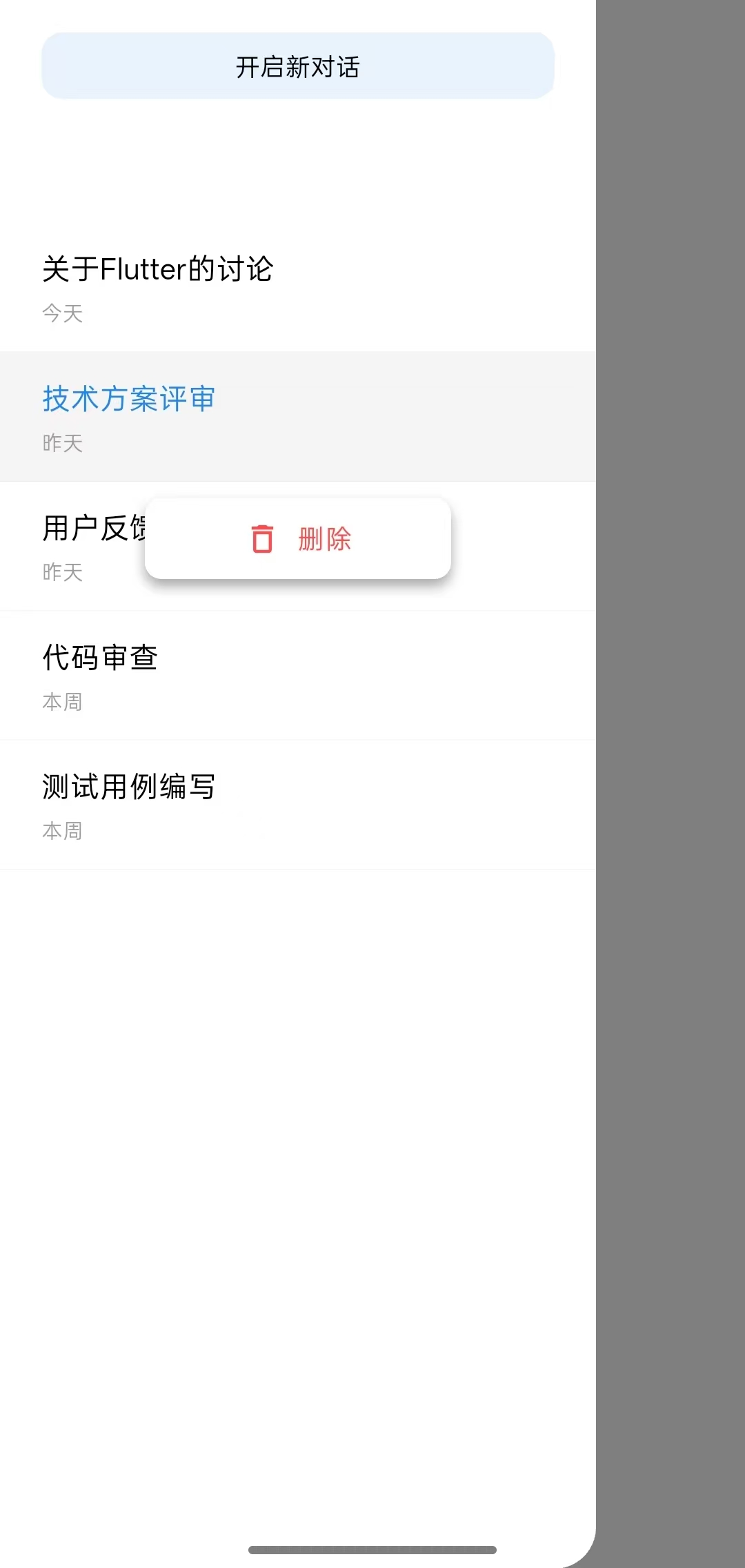
关键技术
Overlay层:实现浮在最上面
动画系统:实现平滑滑入滑出
这个例子里面有很多细节没有搞懂,需要再次学习
代码实例
demo_page
Dart
import 'package:flutter/material.dart';
import 'package:flutter/scheduler.dart';
import 'package:my_flutter/side_menu_manager.dart';

class DemoPage extends StatefulWidget {
  const DemoPage({super.key});

  @override
  State<DemoPage> createState() => _DemoPageState();
}

class _DemoPageState extends State<DemoPage> with TickerProviderStateMixin {

  late SideMenuManager _sideMenuManager;//管理侧边栏的实例
  StateSetter? _menuStateSetter;// 侧边栏内部的状态更新函数,用于在侧边栏关闭时刷新菜单
  String? _longPressedSessionId;// 当前长按的会话ID
  final Map<String, GlobalKey> _itemKeys = {};// 存储每个列表项的 GlobalKey
  double? _buttonTop;// 悬浮按钮的位置

  //会话数据
  final List<Map<String, String>> _sessions = [
    {'id': '1', 'title': '关于Flutter的讨论', 'date': '今天'},
    {'id': '2', 'title': '项目进度汇报', 'date': '今天'},
    {'id': '3', 'title': '技术方案评审', 'date': '昨天'},
    {'id': '4', 'title': '用户反馈收集', 'date': '昨天'},
    {'id': '5', 'title': '代码审查', 'date': '本周'},
    {'id': '6', 'title': '测试用例编写', 'date': '本周'},
  ];

  @override
  void initState() {
    super.initState();

    //创建侧边栏管理器
    _sideMenuManager = SideMenuManager(
      context: context,
      vsync: this,
      menuContentBuilder: _buildMenuContent,
    );

    // 注册关闭回调:当侧边栏关闭时,清除删除按钮状态
    _sideMenuManager.onClosed = () {
      if (mounted) {
        _longPressedSessionId = null; //清除长按状态
        _buttonTop = null; //清除删除按钮位置
        _menuStateSetter?.call(() {}); //刷新菜单UI
      }
    };

    // 为每个会话创建 GlobalKey,用于获取位置
    for (var session in _sessions) {
      _itemKeys[session['id']!] = GlobalKey();
    }
  }

  @override
  void dispose() {
    _sideMenuManager.dispose();
    super.dispose();
  }

  @override
  Widget build(BuildContext context) {
    return Scaffold(
      appBar: AppBar(
        title: const Text("侧边栏"),
        leading: IconButton(
          icon: const Icon(Icons.menu),
          onPressed: () { //打开侧边栏
            _sideMenuManager.show();
          },
        ),
      ),
      body: const Center(
        child: Text('点击左上角菜单按钮打开侧边栏'),
      ),
    );
  }

  // 侧边栏内容
  Widget _buildMenuContent(BuildContext context) {
    return StatefulBuilder(
      builder: (context, setStateMenu) {
        // 保存 setStateMenu 的引用
        _menuStateSetter = setStateMenu;

        return Stack(
          children: [
            Column(
              children: [
                const SizedBox(height: 50),
                // 开启新对话按钮
                GestureDetector(
                  onTap: () {
                    // 更新数据
                    setState(() {
                      final newId = DateTime.now().millisecondsSinceEpoch.toString();
                      _sessions.insert(0, {
                        'id': newId,
                        'title': '新对话 ${_sessions.length + 1}',
                        'date': '今天',
                      });
                      _itemKeys[newId] = GlobalKey();
                    });
                    // 刷新菜单
                    setStateMenu(() {});
                  },
                  child: Container(
                    height: 32,
                    width: 290,
                    decoration: BoxDecoration(
                      color: const Color(0xFF2187EF).withOpacity(0.1),
                      borderRadius: BorderRadius.circular(10),
                    ),
                    margin: const EdgeInsets.symmetric(horizontal: 20),
                    child: const Center(
                      child: Text(
                        "开启新对话",
                        style: TextStyle(color: Colors.black, fontSize: 12),
                      ),
                    ),
                  ),
                ),
                const SizedBox(height: 20),
                // 会话列表
                Expanded(
                  child: ListView.builder(
                    itemCount: _sessions.length,
                    itemBuilder: (context, index) {
                      final session = _sessions[index];
                      final isLongPressed = _longPressedSessionId == session['id'];
                      return _buildSessionItem(
                        session,
                        index,
                        isLongPressed,
                        setStateMenu,  // 传递 setStateMenu
                      );
                    },
                  ),
                ),
              ],
            ),
            // 悬浮删除按钮
            if (_longPressedSessionId != null && _buttonTop != null)
              Positioned(
                left: 70,
                right: 70,
                top: _buttonTop!,
                child: _buildFloatingDeleteButton(setStateMenu),
              ),
          ],
        );
      },
    );
  }

  //列表子项
  Widget _buildSessionItem(
      Map<String, String> session,
      int index,
      bool isLongPressed,
      StateSetter setStateMenu,
      ) {
    final itemKey = _itemKeys[session['id']!];

    return Container(
      key: itemKey,
      child: InkWell(

        //单击
        onTap: () {
          if (isLongPressed) {
            // 如果处于长按状态,点击取消选中
            setState(() {
              _longPressedSessionId = null;
              _buttonTop = null;
            });
            setStateMenu(() {}); // 刷新菜单
          } else {
            // 正常点击切换会话
            ScaffoldMessenger.of(context).showSnackBar(
              SnackBar(content: Text('切换到: ${session['title']}')),
            );
            _sideMenuManager.close();
          }
        },

        //长按
        onLongPress: () {
          // 长按显示删除按钮
          setState(() {
            _longPressedSessionId = session['id'];
          });
          setStateMenu(() {}); // 立即刷新显示删除按钮

          // 计算删除按钮的位置
          SchedulerBinding.instance.addPostFrameCallback((_) {
            Future.delayed(const Duration(milliseconds: 100), () {
              if (mounted && _longPressedSessionId == session['id']) {
                final RenderBox? renderBox = itemKey?.currentContext?.findRenderObject() as RenderBox?;
                if (renderBox != null) {

                  //获取列表项在屏幕上的位置
                  final position = renderBox.localToGlobal(Offset.zero);
                  final itemBottom = position.dy + renderBox.size.height;
                  setStateMenu(() {
                    _buttonTop = itemBottom + 8; //设置在项目下方8像素处
                  });
                } else {
                  setStateMenu(() {
                    _buttonTop = index * 60.0 + 100;
                  });
                }
              }
            });
          });
        },
        child: Container(
          padding: const EdgeInsets.symmetric(horizontal: 20, vertical: 12),
          decoration: BoxDecoration(
            color: isLongPressed ? Colors.grey.withOpacity(0.1) : Colors.transparent,
            border: Border(
              bottom: BorderSide(color: Colors.grey.withOpacity(0.1), width: 0.5),
            ),
          ),
          child: Row(
            children: [
              Expanded(
                child: Column(
                  crossAxisAlignment: CrossAxisAlignment.start,
                  children: [
                    Text(
                      session['title']!,
                      style: TextStyle(
                        fontSize: 14,
                        color: isLongPressed ? const Color(0xFF2187EF) : Colors.black,
                      ),
                    ),
                    const SizedBox(height: 4),
                    Text(
                      session['date']!,
                      style: const TextStyle(fontSize: 10, color: Colors.grey),
                    ),
                  ],
                ),
              ),
            ],
          ),
        ),
      ),
    );
  }
  //=============================悬浮删除按钮=================================
  Widget _buildFloatingDeleteButton(StateSetter setStateMenu) {
    return Material(
      elevation: 4,
      borderRadius: BorderRadius.circular(8),
      child: Container(
        decoration: BoxDecoration(
          color: Colors.white,
          borderRadius: BorderRadius.circular(8),
          boxShadow: [
            BoxShadow(
              color: Colors.black.withOpacity(0.1),
              blurRadius: 4,
              offset: const Offset(0, 2),
            ),
          ],
        ),
        child: InkWell(

          //删除事件
          onTap: () {
            final sessionId = _longPressedSessionId;
            if (sessionId != null) {
              setState(() {
                _itemKeys.remove(sessionId); //移除GlobalKey
                _sessions.removeWhere((session) => session['id'] == sessionId); //列表中删除
                _longPressedSessionId = null;
                _buttonTop = null;
              });
              setStateMenu(() {}); // 刷新菜单
            }
          },
          borderRadius: BorderRadius.circular(8),
          child: Container(
            padding: const EdgeInsets.symmetric(vertical: 10, horizontal: 16),
            child: const Row(
              mainAxisAlignment: MainAxisAlignment.center,
              children: [
                Icon(Icons.delete_outline, size: 18, color: Color(0xFFFF4D4F)),
                SizedBox(width: 8),
                Text(
                  '删除',
                  style: TextStyle(color: Color(0xFFFF4D4F), fontSize: 13),
                ),
              ],
            ),
          ),
        ),
      ),
    );
  }

}
side_menu_manager
Dart
import 'package:flutter/material.dart';


///侧边栏管理类
class SideMenuManager {


  //实例
  OverlayEntry? _overlayEntry;//overLay 层条目,用于显示/移除菜单


  //标志位
  bool _isMenuOpen = false; //菜单是否打开

  //动画
  late AnimationController _slideController; //动画控制器
  late Animation<Offset> _slideAnimation; //滑动动画

  //变量
  final BuildContext context; //构建上下文
  final TickerProvider vsync;  // 添加 vsync 参数
  late final Widget Function(BuildContext) menuContentBuilder; //菜单内容构建器

  //回调
  VoidCallback? onClosed;  // 添加关闭回调

  //构造函数
  SideMenuManager({
    required this.context,
    required this.vsync,
    required this.menuContentBuilder,
  }) {
    _initAnimation(); //初始化动画
  }


  //============================初始化动画=================================
  void _initAnimation() {

    //创建动画控制器
    _slideController = AnimationController(
      vsync: vsync,
      duration: const Duration(milliseconds: 300),
    );

    //创建滑动动画
    _slideAnimation = Tween<Offset>(
      begin: const Offset(-1, 0),
      end: Offset.zero,
    ).animate(CurvedAnimation(
      parent: _slideController,
      curve: Curves.easeOutCubic,
    ));
  }


  //============================显示菜单==================================
  void show() {

    //防止重复打开
    if (_isMenuOpen) return;

    _isMenuOpen = true;

    //创建overlayEntry
    _overlayEntry = OverlayEntry(
      builder: (context) => Stack(
        children: [

          // 背景遮罩
          Positioned.fill(
            child: GestureDetector(
              onTap: close,
              child: AnimatedOpacity(
                opacity: _isMenuOpen ? 1.0 : 0.0,
                duration: const Duration(milliseconds: 300),
                child: Container(
                  color: Colors.black.withOpacity(0.5),
                ),
              ),
            ),
          ),

          // 侧边菜单
          SlideTransition(
            position: _slideAnimation, //动画
            child: Align(
              alignment: Alignment.centerLeft,
              child: Container(
                width: MediaQuery.of(context).size.width * 0.8, //屏幕宽度
                height: double.infinity,
                decoration: const BoxDecoration(
                  color: Colors.white,
                  borderRadius: BorderRadius.only(
                    topRight: Radius.circular(20),
                    bottomRight: Radius.circular(20),
                  ),
                ),
                child: menuContentBuilder(context), //填充外部传入的菜单内容
              ),
            ),
          ),
        ],
      ),
    );

    //插入到overlay层
    Overlay.of(context).insert(_overlayEntry!);
    _slideController.forward();
  }

  //==============================关闭菜单=================================
  void close() async {
    if (!_isMenuOpen) return;

    await _slideController.reverse();
    _overlayEntry?.remove();
    _overlayEntry = null;
    _isMenuOpen = false;

    // 触发关闭回调
    onClosed?.call();
  }

  void dispose() {
    _slideController.dispose();
    _overlayEntry?.remove();
    _overlayEntry = null;
  }

  bool get isOpen => _isMenuOpen;


  //==========================更新侧边栏内容=====================================
  void updateContent(Widget Function(BuildContext) newContentBuilder) {
    // 更新构建器
    menuContentBuilder = newContentBuilder;

    // 如果菜单是打开的,刷新显示
    if (_isMenuOpen) {
      // 重新构建 overlay 内容
      _overlayEntry?.markNeedsBuild();
    }
  }
}