问题
由于公司在内网环境开发,没有网络,安装了 opencode 后发现用 @ 无法自动索引出项目文件,导致每次要指定项目文件的时候都得复制全路径。
环境
opencode=1.3.6
原因
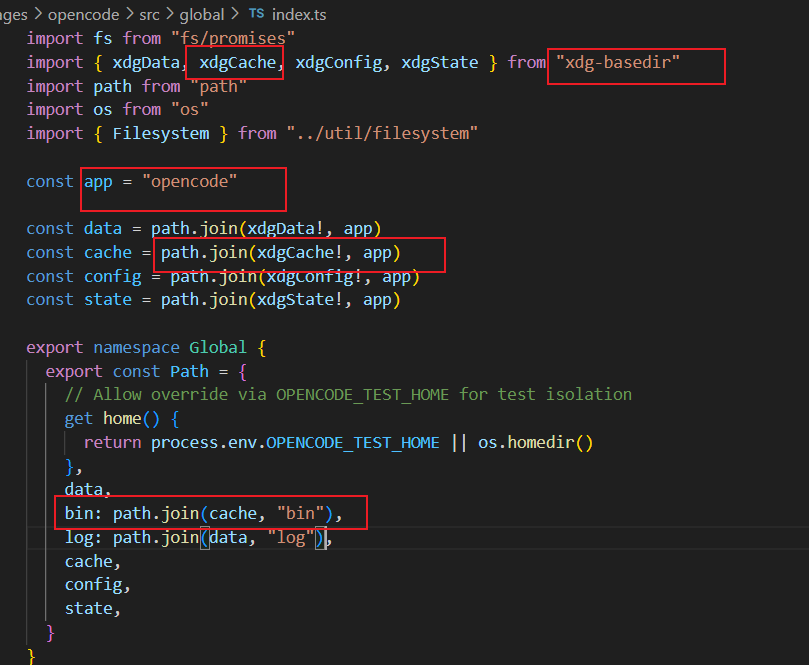
opencode 是用 ripgrep 扫描和索引文件系统的,启动 opencode 的时候会从网上自动下载 ripgrep 并进行安装,会安装到 ${xdgCache}/opencode/bin 里
我1.3.6 window版放的目录是 %USERPROFILE%/.cache/opencode/bin 里即 c:/Users/${username}/.cache/opencode/bin ,相关代码在 packages\opencode\src\global\index.ts 里
最新版的 dev 相关代码在 packages\opencode\src\file\ripgrep.ts
解压路径的代码如下图所示
解决
自己从网上下载 ripgrep,下面为下载链接,我下载的是 ripgrep-15.1.0-x86_64-pc-windows-msvc.zip
https://github.com/BurntSushi/ripgrep/releases
下载完后有两种配置方法
方法1
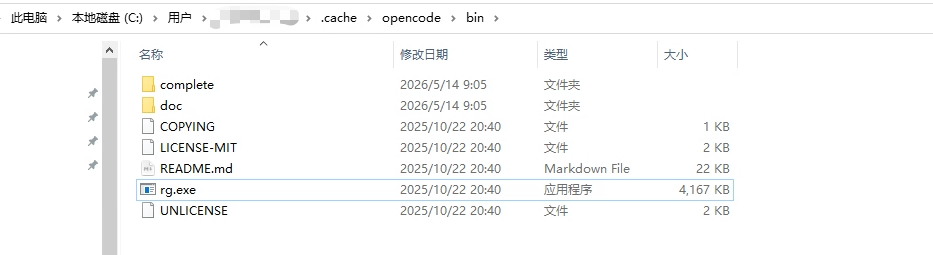
解压到上面提到的 %USERPROFILE%/.cache/opencode/bin 目录下,如下图所示,然后重启opencode 就可以搜索引用项目文件了。
方法2
解压到自己想要的文件夹,然后在环境变量 path 配置解压文件夹的路径,怎么配我就不多说了,懂的都懂。
注意: 如果用 opencode 桌面版的,配完环境变量需要重启电脑才能生效,可能任务管理器结束某个进程也行,但我没找到