我开源了一个 HTML 实时预览工具 ------ 粘贴代码即刻预览,支持设备模拟和拖拽分栏
一个基于 React + CodeMirror 的轻量级 HTML 预览器,无需后端,打开即用。支持语法高亮、实时预览、设备模拟、拖放加载文件等实用功能。大家可以用这个来预览任何东西,比如说我之前用html演示的动画都可以整过来自用,网址已经放在下面了,然后如果要学习具体代码逻辑的话可以往下看。(其实没啥看的)
目录
- 效果展示
- 功能特性
- 技术栈
- 项目结构
- 核心实现详解
- [1. 整体布局架构](#1. 整体布局架构)
- [2. CodeMirror 编辑器集成](#2. CodeMirror 编辑器集成)
- [3. iframe 实时预览机制](#3. iframe 实时预览机制)
- [4. 响应式 SplitPane 分栏](#4. 响应式 SplitPane 分栏)
- [5. 设备模拟切换](#5. 设备模拟切换)
- [6. 拖放文件加载](#6. 拖放文件加载)
- [7. 极暗主题 UI 设计](#7. 极暗主题 UI 设计)
- 完整代码
- 本地运行
- 总结
效果展示
打开工具后,页面分为左右两栏:左侧是代码编辑器,右侧是预览窗口。在左侧粘贴 HTML 代码,右侧会即时渲染出对应的网页效果。
功能特性
| 功能 | 说明 |
|---|---|
| 实时预览 | 编辑器输入即刻同步到预览窗口,无需手动刷新 |
| 语法高亮 | 基于 CodeMirror 6 的 HTML 语法高亮、行号、活动行高亮 |
| 可拖拽分栏 | 自由调整编辑器与预览区的比例,支持横向/纵向布局切换 |
| 设备模拟 | 一键切换桌面(100%)、平板(768px)、手机(375px)三种视口 |
| 拖放加载 | 直接将本地 .html 文件拖入编辑器区域即可加载 |
| 示例模板 | 内置 3 个示例:HTML5 骨架、响应式卡片、表单布局 |
| 代码格式化 | 自动对 HTML 进行缩进格式化 |
| 一键复制 | 快速复制编辑器中的全部代码到剪贴板 |
| 光标状态 | 底部状态栏实时显示行号、列号、字符计数 |
| 纯前端 | 无需后端服务,所有逻辑在浏览器端完成 |
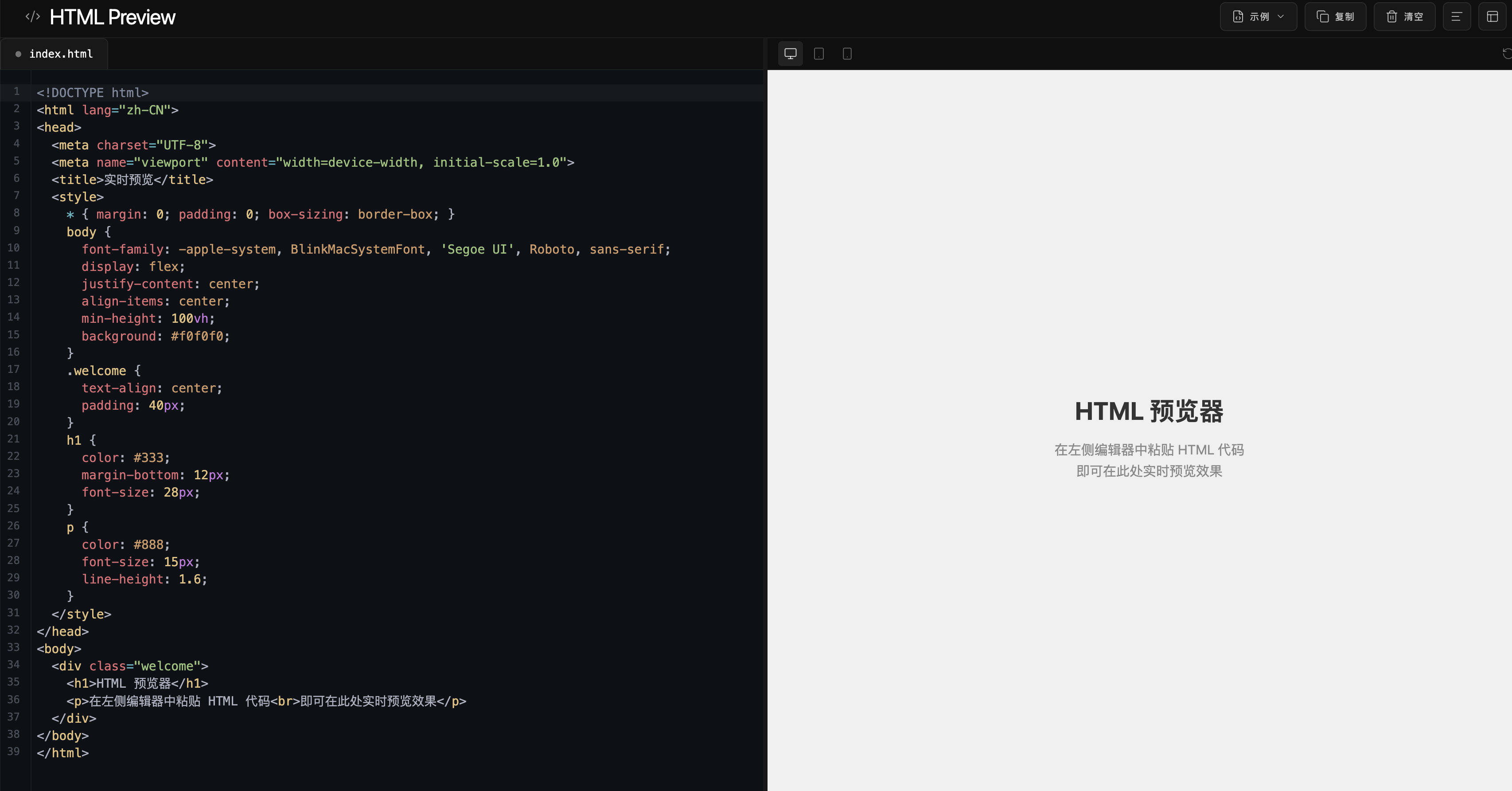
技术栈
- React 19 + TypeScript ------ UI 框架与类型安全
- Vite ------ 构建工具,极速 HMR
- Tailwind CSS ------ 原子化 CSS 样式
- CodeMirror 6 (
@uiw/react-codemirror) ------ 代码编辑器,支持 HTML 语法高亮 - react-resizable-panels ------ 可拖拽调整大小的分栏面板
- Framer Motion ------ 布局切换、按钮反馈等微动画
- Lucide React ------ 轻量级图标库
项目结构
html-previewer/
├── index.html
├── package.json
├── vite.config.ts
├── tsconfig.json
├── tailwind.config.js
├── src/
│   ├── main.tsx              # 应用入口
│   ├── App.tsx               # 根组件,管理全局状态
│   ├── index.css             # 全局样式 + CodeMirror 主题定制
│   ├── data/
│   │   └── examples.ts       # 3 个示例代码数据
│   └── sections/
│       ├── Header.tsx        # 顶部工具栏
│       ├── EditorPanel.tsx   # 代码编辑器面板
│       ├── PreviewPanel.tsx  # 预览面板
│       └── StatusBar.tsx     # 底部状态栏
└── dist/                     # 构建输出
核心实现详解
1. 整体布局架构
整个应用采用三栏式固定布局:Header(顶部工具栏) + Main Workspace(主工作区) + StatusBar(底部状态栏) 。主工作区使用 react-resizable-panels 实现 Editor 与 Preview 的分栏。
状态管理 非常简单,全部使用 React 的 useState:
tsx
function App() {
  const [code, setCode] = useState(defaultCode);           // 编辑器代码
  const [layout, setLayout] = useState<'horizontal' | 'vertical'>('horizontal');
  const [cursorPos, setCursorPos] = useState({ line: 1, col: 1 });
  // ...
}
2. CodeMirror 编辑器集成
编辑器基于 @uiw/react-codemirror,加载了 @codemirror/lang-html 扩展实现 HTML 语法高亮,使用 oneDark 主题作为基础并进行深度定制:
tsx
import CodeMirror from '@uiw/react-codemirror';
import { html } from '@codemirror/lang-html';
import { oneDark } from '@codemirror/theme-one-dark';

<CodeMirror
  value={code}
  height="100%"
  extensions={[html()]}
  theme={oneDark}
  onChange={onChange}
  onUpdate={handleCursorActivity}
  basicSetup={{
    lineNumbers: true,
    highlightActiveLineGutter: true,
    highlightActiveLine: true,
    bracketMatching: true,
    closeBrackets: true,
    highlightSelectionMatches: true,
  }}
/>
通过自定义 CSS 覆盖了 CodeMirror 的默认配色,使其与整体 #0a0a0a 极暗风格保持一致:
css
.cm-editor { background: #0d1117 !important; }
.cm-gutters { background: #0d1117 !important; border-right: 1px solid rgba(255,255,255,0.06) !important; }
.cm-lineNumbers .cm-gutterElement { color: #484f58 !important; }
.cm-activeLineGutter { background: rgba(255,255,255,0.04) !important; }
.cm-activeLine { background: rgba(255,255,255,0.03) !important; }
.cm-cursor { border-left: 2px solid #ffffff !important; }
.cm-selectionBackground { background: rgba(255,255,255,0.12) !important; }
3. iframe 实时预览机制
预览功能通过一个 sandbox 属性的 iframe 实现。核心原理是:将编辑器中的 HTML 代码通过 srcdoc 属性直接注入 iframe:
tsx
<iframe
  key={refreshKey}      // 改变 key 强制刷新
  srcDoc={code}          // 直接注入 HTML 代码
  sandbox="allow-scripts allow-same-origin allow-popups allow-forms allow-modals"
  style={{ width: '100%', height: '100%', border: 'none' }}
/>
为什么用 srcdoc 而不是 src?
srcdoc允许直接传入 HTML 字符串,无需服务器托管- 配合
sandbox属性,预览代码在隔离环境中运行,无法访问父页面数据 - 修改代码后 iframe 自动重新渲染,实现"实时"效果
刷新机制 :通过改变 iframe 的 key 属性强制 React 重新挂载组件,实现预览刷新。
4. 响应式 SplitPane 分栏
使用 react-resizable-panels 的 Group、Panel、Separator 三个组件实现分栏:
tsx
import { Panel, Group, Separator } from 'react-resizable-panels';

<Group orientation={layout}>  {/* "horizontal" 或 "vertical" */}
  <Panel defaultSize={50} minSize={20}>
    <EditorPanel />
  </Panel>
  <Separator />
  <Panel defaultSize={50} minSize={20}>
    <PreviewPanel />
  </Panel>
</Group>
分隔线(Separator)添加了 hover 效果:鼠标悬停时变宽并变亮,拖拽时更明显。通过 onMouseEnter/onMouseLeave 动态修改样式实现。
布局切换使用 Framer Motion 的 AnimatePresence 包裹,实现淡入淡出过渡动画。
5. 设备模拟切换
预览面板顶部有一组设备切换按钮(桌面/平板/手机),通过改变包裹 iframe 的外部容器的 width 来模拟不同设备宽度:
tsx
const deviceWidths = {
  desktop: '100%',
  tablet: '768px',
  mobile: '375px',
};

<div style={{ width: deviceWidths[device], margin: '0 auto', transition: 'width 0.3s' }}>
  <iframe srcDoc={code} ... />
</div>
CSS transition 让宽度变化有平滑动画效果。
6. 拖放文件加载
在编辑器面板区域监听 dragover、dragleave、drop 三个事件:
tsx
const handleDrop = (e: React.DragEvent) => {
  e.preventDefault();
  const file = e.dataTransfer.files[0];

  // 仅接受 .html / .htm 文件
  if (!file.name.endsWith('.html') && !file.name.endsWith('.htm')) {
    setDragError('请拖放 .html 文件');
    return;
  }

  const reader = new FileReader();
  reader.onload = (event) => {
    onChange(event.target?.result as string);
  };
  reader.readAsText(file);
};
拖入文件时显示半透明遮罩层提示,非法文件格式会显示错误提示。
7. 极暗主题 UI 设计
整个界面采用极暗风格(#0a0a0a),核心设计原则:
- 无阴影层级 :所有面板不依赖
box-shadow,而是通过半透明填充rgba(255,255,255,0.02~0.04)和极淡边框rgba(255,255,255,0.06~0.08)区分层级 - 液态玻璃材质 :Header 和 Status Bar 使用
backdrop-filter: blur(16px)营造透光感 - 克制的强调色 :不使用高饱和色彩,交互反馈使用白色半透明
rgba(255,255,255,0.75),错误状态使用淡红色rgba(255,100,100,0.8) - 纤细图标 :所有 Lucide 图标统一
strokeWidth={1.5},保持轻盈感 - 按钮标签 :操作按钮使用
text-transform: uppercase+ 宽字距letter-spacing: 0.08em,营造精致感
完整代码
以下是项目的全部源代码,复制即可运行。
package.json
json
{
  "name": "html-previewer",
  "private": true,
  "version": "1.0.0",
  "type": "module",
  "scripts": {
    "dev": "vite",
    "build": "tsc -b && vite build",
    "preview": "vite preview"
  },
  "dependencies": {
    "@codemirror/commands": "^6.8.1",
    "@codemirror/lang-html": "^6.4.9",
    "@codemirror/search": "^6.5.10",
    "@codemirror/state": "^6.5.2",
    "@codemirror/theme-one-dark": "^6.1.2",
    "@codemirror/view": "^6.36.5",
    "@uiw/react-codemirror": "^4.23.10",
    "framer-motion": "^12.7.4",
    "lucide-react": "^0.511.0",
    "react": "^19.0.0",
    "react-dom": "^19.0.0",
    "react-resizable-panels": "^3.0.1"
  },
  "devDependencies": {
    "@tailwindcss/vite": "^4.1.4",
    "@types/react": "^19.0.0",
    "@types/react-dom": "^19.0.0",
    "@vitejs/plugin-react": "^4.4.1",
    "tailwindcss": "^3.4.19",
    "typescript": "^5.7.0",
    "vite": "^7.2.4"
  }
}
vite.config.ts
ts
import { defineConfig } from 'vite'
import react from '@vitejs/plugin-react'
import tailwindcss from '@tailwindcss/vite'
import path from 'path'

export default defineConfig({
  plugins: [react(), tailwindcss()],
  resolve: {
    alias: {
      '@': path.resolve(__dirname, './src'),
    },
  },
})
tsconfig.json
json
{
  "files": [],
  "references": [
    { "path": "./tsconfig.app.json" },
    { "path": "./tsconfig.node.json" }
  ],
  "compilerOptions": {
    "baseUrl": ".",
    "paths": {
      "@/*": ["./src/*"]
    }
  }
}
tsconfig.app.json
json
{
  "compilerOptions": {
    "tsBuildInfoFile": "./node_modules/.tmp/tsconfig.app.tsbuildinfo",
    "target": "ES2022",
    "useDefineForClassFields": true,
    "lib": ["ES2022", "DOM", "DOM.Iterable"],
    "module": "ESNext",
    "types": ["vite/client"],
    "skipLibCheck": true,
    "baseUrl": ".",
    "paths": { "@/*": ["./src/*"] },
    "moduleResolution": "bundler",
    "allowImportingTsExtensions": true,
    "verbatimModuleSyntax": true,
    "moduleDetection": "force",
    "noEmit": true,
    "jsx": "react-jsx",
    "strict": true,
    "noUnusedLocals": true,
    "noUnusedParameters": true,
    "noFallthroughCasesInSwitch": true
  },
  "include": ["src"]
}
tailwind.config.js
js
/** @type {import('tailwindcss').Config} */
export default {
  darkMode: ["class"],
  content: ["./index.html", "./src/**/*.{ts,tsx,js,jsx}"],
  theme: {
    extend: {
      borderRadius: {
        lg: "var(--radius)",
        md: "calc(var(--radius) - 2px)",
        sm: "calc(var(--radius) - 4px)",
      },
      colors: {
        background: "hsl(var(--background))",
        foreground: "hsl(var(--foreground))",
        card: { DEFAULT: "hsl(var(--card))", foreground: "hsl(var(--card-foreground))" },
        popover: { DEFAULT: "hsl(var(--popover))", foreground: "hsl(var(--popover-foreground))" },
        primary: { DEFAULT: "hsl(var(--primary))", foreground: "hsl(var(--primary-foreground))" },
        secondary: { DEFAULT: "hsl(var(--secondary))", foreground: "hsl(var(--secondary-foreground))" },
        muted: { DEFAULT: "hsl(var(--muted))", foreground: "hsl(var(--muted-foreground))" },
        accent: { DEFAULT: "hsl(var(--accent))", foreground: "hsl(var(--accent-foreground))" },
        destructive: { DEFAULT: "hsl(var(--destructive))", foreground: "hsl(var(--destructive-foreground))" },
        border: "hsl(var(--border))",
        input: "hsl(var(--input))",
        ring: "hsl(var(--ring))",
      },
    },
  },
  plugins: [require("tailwindcss-animate")],
}
index.html
html
<!doctype html>
<html lang="zh-CN">
<head>
<meta charset="UTF-8" />
<link rel="icon" type="image/svg+xml" href="data:image/svg+xml,<svg xmlns='http://www.w3.org/2000/svg' viewBox='0 0 100 100'><text y='.9em' font-size='90'></></text></svg>" />
<meta name="viewport" content="width=device-width, initial-scale=1.0" />
<title>HTML Preview - 实时预览工具</title>
</head>
<body>
<div id="root"></div>
<script type="module" src="/src/main.tsx"></script>
</body>
</html>src/main.tsx
tsx
import { StrictMode } from 'react'
import { createRoot } from 'react-dom/client'
import './index.css'
import App from './App.tsx'

createRoot(document.getElementById('root')!).render(
  <StrictMode>
    <App />
  </StrictMode>,
)
src/index.css
css
@tailwind base;
@tailwind components;
@tailwind utilities;

@layer base {
  :root {
    --background: 0 0% 4%;
    --foreground: 0 0% 100%;
    --card: 0 0% 4%;
    --card-foreground: 0 0% 100%;
    --popover: 0 0% 6%;
    --popover-foreground: 0 0% 100%;
    --primary: 0 0% 100%;
    --primary-foreground: 0 0% 4%;
    --secondary: 0 0% 10%;
    --secondary-foreground: 0 0% 100%;
    --muted: 0 0% 12%;
    --muted-foreground: 0 0% 55%;
    --accent: 0 0% 14%;
    --accent-foreground: 0 0% 100%;
    --destructive: 0 70% 50%;
    --destructive-foreground: 0 0% 100%;
    --border: 0 0% 12%;
    --input: 0 0% 14%;
    --ring: 0 0% 80%;
    --radius: 0.5rem;
  }

  * {
    @apply border-border;
  }

  body {
    background: #0a0a0a;
    color: #ffffff;
    font-family: ui-sans-serif, system-ui, -apple-system, 'Segoe UI', sans-serif;
    overflow: hidden;
  }
}

/* CodeMirror Custom Theme - Dark Clarity */
.cm-editor {
  background: #0d1117 !important;
  font-family: 'Menlo', 'Monaco', 'Courier New', monospace !important;
  font-size: 14px !important;
  line-height: 1.6 !important;
}

.cm-editor.cm-focused {
  outline: none !important;
}

.cm-gutters {
  background: #0d1117 !important;
  border-right: 1px solid rgba(255, 255, 255, 0.06) !important;
}

.cm-lineNumbers .cm-gutterElement {
  color: #484f58 !important;
  font-size: 12px !important;
  padding: 0 12px 0 8px !important;
}

.cm-activeLineGutter {
  background: rgba(255, 255, 255, 0.04) !important;
}

.cm-activeLineGutter .cm-gutterElement {
  color: #8b949e !important;
}

.cm-activeLine {
  background: rgba(255, 255, 255, 0.03) !important;
}

.cm-cursor {
  border-left: 2px solid #ffffff !important;
}

.cm-selectionBackground {
  background: rgba(255, 255, 255, 0.12) !important;
}

.cm-focused .cm-selectionBackground {
  background: rgba(255, 255, 255, 0.16) !important;
}

.cm-scroller {
  overflow: auto !important;
}

.cm-content {
  padding: 16px 0 !important;
  caret-color: #ffffff !important;
}

/* Scrollbar Styling */
::-webkit-scrollbar {
  width: 6px;
  height: 6px;
}

::-webkit-scrollbar-track {
  background: transparent;
}

::-webkit-scrollbar-thumb {
  background: rgba(255, 255, 255, 0.1);
  border-radius: 3px;
}

::-webkit-scrollbar-thumb:hover {
  background: rgba(255, 255, 255, 0.2);
}

/* Resizable Panel Gutter */
[data-panel-resize-handle-id] {
  background: rgba(255, 255, 255, 0.06) !important;
  transition: all 0.2s ease !important;
}

[data-panel-resize-handle-id]:hover {
  background: rgba(255, 255, 255, 0.2) !important;
}

[data-panel-resize-handle-id][data-resize-handle-active] {
  background: rgba(255, 255, 255, 0.3) !important;
}

/* Liquid Glass Button Base */
.btn-glass {
  background: rgba(255, 255, 255, 0.04);
  border: 1px solid rgba(255, 255, 255, 0.08);
  border-radius: 6px;
  color: rgba(255, 255, 255, 0.7);
  transition: all 0.3s cubic-bezier(0.4, 0, 0.2, 1);
  cursor: pointer;
  display: inline-flex;
  align-items: center;
  justify-content: center;
  gap: 6px;
}

.btn-glass:hover {
  background: rgba(255, 255, 255, 0.08);
  border-color: rgba(255, 255, 255, 0.15);
  color: rgba(255, 255, 255, 0.85);
}

.btn-glass:active {
  background: rgba(255, 255, 255, 0.06);
}

/* Liquid Glass Panel */
.panel-glass {
  background: rgba(255, 255, 255, 0.02);
  backdrop-filter: blur(16px);
  -webkit-backdrop-filter: blur(16px);
  border: 1px solid rgba(255, 255, 255, 0.06);
}

/* Dropdown Panel */
.dropdown-glass {
  background: rgba(15, 15, 15, 0.95);
  backdrop-filter: blur(20px);
  -webkit-backdrop-filter: blur(20px);
  border: 1px solid rgba(255, 255, 255, 0.1);
  border-radius: 8px;
  box-shadow: 0 8px 32px rgba(0, 0, 0, 0.3);
}

/* Device Button */
.btn-device {
  width: 28px;
  height: 28px;
  border-radius: 4px;
  display: inline-flex;
  align-items: center;
  justify-content: center;
  background: transparent;
  color: rgba(255, 255, 255, 0.35);
  transition: all 0.2s ease;
  cursor: pointer;
  border: none;
}

.btn-device:hover {
  background: rgba(255, 255, 255, 0.05);
  color: rgba(255, 255, 255, 0.6);
}

.btn-device.active {
  background: rgba(255, 255, 255, 0.08);
  color: rgba(255, 255, 255, 0.85);
}

/* Drag Overlay */
.drag-overlay {
  background: rgba(255, 255, 255, 0.02);
  border: 1px dashed rgba(255, 255, 255, 0.15);
}

/* Error Bar */
.error-bar {
  background: rgba(255, 50, 50, 0.08);
  border-top: 1px solid rgba(255, 100, 100, 0.15);
  color: rgba(255, 120, 120, 0.85);
}

/* Mobile adjustments */
@media (max-width: 768px) {
  .cm-editor {
    font-size: 12px !important;
  }
}
src/data/examples.ts
ts
export interface Example {
id: string;
name: string;
code: string;
}
export const examples: Example[] = [
{
id: 'skeleton',
name: 'HTML5 骨架',
code: `<!DOCTYPE html>
<html lang="zh-CN">
<head>
<meta charset="UTF-8">
<meta name="viewport" content="width=device-width, initial-scale=1.0">
<title>我的第一个网页</title>
<style>
* { margin: 0; padding: 0; box-sizing: border-box; }
body {
font-family: -apple-system, BlinkMacSystemFont, 'Segoe UI', Roboto, sans-serif;
display: flex;
justify-content: center;
align-items: center;
min-height: 100vh;
background: linear-gradient(135deg, #667eea 0%, #764ba2 100%);
}
.card {
background: white;
padding: 40px;
border-radius: 16px;
box-shadow: 0 20px 60px rgba(0,0,0,0.3);
text-align: center;
max-width: 400px;
}
h1 { color: #333; margin-bottom: 16px; }
p { color: #666; line-height: 1.6; }
</style>
</head>
<body>
<div class="card">
<h1>Hello World</h1>
<p>这是一个简单的 HTML 示例。你可以修改代码并实时预览效果。</p>
</div>
</body>
</html>`,
},
{
id: 'cards',
name: '响应式卡片',
code: `<!DOCTYPE html>
<html lang="zh-CN">
<head>
<meta charset="UTF-8">
<meta name="viewport" content="width=device-width, initial-scale=1.0">
<title>响应式卡片</title>
<style>
* { margin: 0; padding: 0; box-sizing: border-box; }
body {
font-family: system-ui, -apple-system, sans-serif;
background: #f5f5f5;
padding: 40px 20px;
}
.container {
max-width: 1200px;
margin: 0 auto;
display: grid;
grid-template-columns: repeat(auto-fit, minmax(280px, 1fr));
gap: 24px;
}
.card {
background: white;
border-radius: 12px;
padding: 32px;
box-shadow: 0 2px 8px rgba(0,0,0,0.08);
transition: transform 0.2s, box-shadow 0.2s;
}
.card:hover {
transform: translateY(-4px);
box-shadow: 0 8px 24px rgba(0,0,0,0.12);
}
.card h2 { color: #1a1a1a; margin-bottom: 12px; font-size: 20px; }
.card p { color: #666; line-height: 1.6; font-size: 14px; }
.icon {
width: 48px; height: 48px;
background: #4f46e5;
border-radius: 12px;
margin-bottom: 16px;
display: flex;
align-items: center;
justify-content: center;
color: white;
font-size: 24px;
}
</style>
</head>
<body>
<div class="container">
<div class="card">
<div class="icon">⚡</div>
<h2>快速开始</h2>
<p>无需配置,粘贴代码即可预览。支持拖放加载本地 HTML 文件。</p>
</div>
<div class="card">
<div class="icon">📱</div>
<h2>响应式预览</h2>
<p>一键切换桌面、平板、手机视图,验证你的响应式布局。</p>
</div>
<div class="card">
<div class="icon">🔒</div>
<h2>安全沙箱</h2>
<p>预览在 iframe 沙箱中运行,代码不会访问你的本地数据。</p>
</div>
</div>
</body>
</html>`,
},
{
id: 'form',
name: '表单布局',
code: `<!DOCTYPE html>
<html lang="zh-CN">
<head>
<meta charset="UTF-8">
<meta name="viewport" content="width=device-width, initial-scale=1.0">
<title>表单示例</title>
<style>
* { margin: 0; padding: 0; box-sizing: border-box; }
body {
font-family: system-ui, -apple-system, sans-serif;
background: #fafafa;
display: flex;
justify-content: center;
align-items: center;
min-height: 100vh;
padding: 20px;
}
.form-container {
background: white;
padding: 48px;
border-radius: 16px;
box-shadow: 0 4px 20px rgba(0,0,0,0.08);
width: 100%;
max-width: 440px;
}
h1 { font-size: 24px; margin-bottom: 8px; color: #111; }
.subtitle { color: #888; margin-bottom: 32px; font-size: 14px; }
.form-group { margin-bottom: 20px; }
label {
display: block;
margin-bottom: 6px;
font-size: 14px;
font-weight: 500;
color: #444;
}
input, textarea {
width: 100%;
padding: 12px 16px;
border: 1px solid #e0e0e0;
border-radius: 8px;
font-size: 15px;
font-family: inherit;
transition: border-color 0.2s;
}
input:focus, textarea:focus {
outline: none;
border-color: #4f46e5;
}
textarea { resize: vertical; min-height: 100px; }
button {
width: 100%;
padding: 14px;
background: #4f46e5;
color: white;
border: none;
border-radius: 8px;
font-size: 16px;
font-weight: 500;
cursor: pointer;
transition: background 0.2s;
}
button:hover { background: #4338ca; }
</style>
</head>
<body>
<div class="form-container">
<h1>联系我们</h1>
<p class="subtitle">填写以下信息,我们会尽快回复。</p>
<form>
<div class="form-group">
<label>姓名</label>
<input type="text" placeholder="请输入你的姓名">
</div>
<div class="form-group">
<label>邮箱</label>
<input type="email" placeholder="your@email.com">
</div>
<div class="form-group">
<label>留言</label>
<textarea placeholder="请输入你的留言..."></textarea>
</div>
<button type="submit">提交</button>
</form>
</div>
</body>
</html>`,
},
];
export const defaultCode = `<!DOCTYPE html>
<html lang="zh-CN">
<head>
<meta charset="UTF-8">
<meta name="viewport" content="width=device-width, initial-scale=1.0">
<title>实时预览</title>
<style>
* { margin: 0; padding: 0; box-sizing: border-box; }
body {
font-family: -apple-system, BlinkMacSystemFont, 'Segoe UI', Roboto, sans-serif;
display: flex;
justify-content: center;
align-items: center;
min-height: 100vh;
background: #f0f0f0;
}
.welcome {
text-align: center;
padding: 40px;
}
h1 { color: #333; margin-bottom: 12px; font-size: 28px; }
p { color: #888; font-size: 15px; line-height: 1.6; }
</style>
</head>
<body>
<div class="welcome">
<h1>HTML 预览器</h1>
<p>在左侧编辑器中粘贴 HTML 代码<br>即可在此处实时预览效果</p>
</div>
</body>
</html>`;src/sections/Header.tsx
tsx
import { useState, useRef, useEffect } from 'react';
import { motion, AnimatePresence } from 'framer-motion';
import {
  Code2,
  FileCode,
  Copy,
  Check,
  Trash2,
  AlignLeft,
  Layout,
  LayoutTemplate,
  ChevronDown,
} from 'lucide-react';
import { examples } from '@/data/examples';

interface HeaderProps {
  code: string;
  onCodeChange: (code: string) => void;
  layout: 'horizontal' | 'vertical';
  onLayoutToggle: () => void;
  onFormat: () => void;
}

export default function Header({
  code,
  onCodeChange,
  layout,
  onLayoutToggle,
  onFormat,
}: HeaderProps) {
  const [showExamples, setShowExamples] = useState(false);
  const [copyState, setCopyState] = useState<'idle' | 'success' | 'error'>('idle');
  const dropdownRef = useRef<HTMLDivElement>(null);

  // Close dropdown on outside click
  useEffect(() => {
    function handleClickOutside(e: MouseEvent) {
      if (dropdownRef.current && !dropdownRef.current.contains(e.target as Node)) {
        setShowExamples(false);
      }
    }
    document.addEventListener('mousedown', handleClickOutside);
    return () => document.removeEventListener('mousedown', handleClickOutside);
  }, []);

  const handleCopy = async () => {
    try {
      await navigator.clipboard.writeText(code);
      setCopyState('success');
      setTimeout(() => setCopyState('idle'), 1500);
    } catch {
      setCopyState('error');
      setTimeout(() => setCopyState('idle'), 2000);
    }
  };

  const handleClear = () => {
    onCodeChange('');
  };

  const handleLoadExample = (exampleCode: string) => {
    onCodeChange(exampleCode);
    setShowExamples(false);
  };

  const copyIcon = copyState === 'success'
    ? <Check size={15} strokeWidth={1.5} style={{ color: 'rgba(150,255,150,0.8)' }} />
    : copyState === 'error'
    ? <AlignLeft size={15} strokeWidth={1.5} style={{ color: 'rgba(255,100,100,0.8)' }} />
    : <Copy size={15} strokeWidth={1.5} />;

  return (
    <header
      className="panel-glass flex items-center justify-between select-none"
      style={{
        height: 48,
        padding: '0 28px',
        borderBottom: '1px solid rgba(255,255,255,0.06)',
        borderTop: 'none',
        borderLeft: 'none',
        borderRight: 'none',
      }}
    >
      {/* Left: Logo + Title */}
      <div className="flex items-center gap-2.5">
        <Code2 size={18} strokeWidth={1.5} style={{ color: 'rgba(255,255,255,0.55)' }} />
        <h1
          style={{
            fontSize: 'clamp(1.25rem, 2.5vw, 1.5rem)',
            fontWeight: 400,
            letterSpacing: '-0.03em',
            color: '#ffffff',
            lineHeight: 1,
          }}
        >
          HTML Preview
        </h1>
      </div>

      {/* Right: Action Buttons */}
      <div className="flex items-center" style={{ gap: 8 }}>
        {/* Load Example Button */}
        <div className="relative" ref={dropdownRef}>
          <button
            className="btn-glass"
            style={{ padding: '7px 12px' }}
            onClick={() => setShowExamples(!showExamples)}
          >
            <FileCode size={15} strokeWidth={1.5} />
            <span
              className="hidden sm:inline"
              style={{
                fontSize: 11,
                letterSpacing: '0.08em',
                textTransform: 'uppercase',
              }}
            >
              示例
            </span>
            <ChevronDown
              size={12}
              strokeWidth={1.5}
              style={{
                transform: showExamples ? 'rotate(180deg)' : 'rotate(0deg)',
                transition: 'transform 0.2s ease',
              }}
            />
          </button>

          <AnimatePresence>
            {showExamples && (
              <motion.div
                initial={{ opacity: 0, y: -4 }}
                animate={{ opacity: 1, y: 0 }}
                exit={{ opacity: 0, y: -4 }}
                transition={{ duration: 0.15, ease: [0.4, 0, 0.2, 1] }}
                className="dropdown-glass absolute right-0 top-full mt-1 overflow-hidden"
                style={{ zIndex: 50, minWidth: 160 }}
              >
                {examples.map((ex) => (
                  <button
                    key={ex.id}
                    className="w-full text-left"
                    style={{
                      padding: '8px 16px',
                      fontSize: 13,
                      color: 'rgba(255,255,255,0.7)',
                      transition: 'all 0.15s ease',
                      background: 'transparent',
                      border: 'none',
                      cursor: 'pointer',
                      display: 'block',
                    }}
                    onMouseEnter={(e) => {
                      e.currentTarget.style.background = 'rgba(255,255,255,0.06)';
                      e.currentTarget.style.color = '#ffffff';
                    }}
                    onMouseLeave={(e) => {
                      e.currentTarget.style.background = 'transparent';
                      e.currentTarget.style.color = 'rgba(255,255,255,0.7)';
                    }}
                    onClick={() => handleLoadExample(ex.code)}
                  >
                    {ex.name}
                  </button>
                ))}
              </motion.div>
            )}
          </AnimatePresence>
        </div>

        {/* Copy Button */}
        <button className="btn-glass" style={{ padding: '7px 12px' }} onClick={handleCopy}>
          <motion.div
            key={copyState}
            initial={{ scale: 0.8, opacity: 0 }}
            animate={{ scale: 1, opacity: 1 }}
            transition={{ duration: 0.2 }}
          >
            {copyIcon}
          </motion.div>
          <span
            className="hidden sm:inline"
            style={{
              fontSize: 11,
              letterSpacing: '0.08em',
              textTransform: 'uppercase',
            }}
          >
            {copyState === 'success' ? '已复制' : copyState === 'error' ? '失败' : '复制'}
          </span>
        </button>

        {/* Clear Button */}
        <button
          className="btn-glass group"
          style={{ padding: '7px 12px' }}
          onClick={handleClear}
          onMouseEnter={(e) => {
            const icon = e.currentTarget.querySelector('.trash-icon') as HTMLElement;
            const text = e.currentTarget.querySelector('.trash-text') as HTMLElement;
            if (icon) icon.style.color = 'rgba(255,100,100,0.8)';
            if (text) text.style.color = 'rgba(255,100,100,0.8)';
          }}
          onMouseLeave={(e) => {
            const icon = e.currentTarget.querySelector('.trash-icon') as HTMLElement;
            const text = e.currentTarget.querySelector('.trash-text') as HTMLElement;
            if (icon) icon.style.color = '';
            if (text) text.style.color = '';
          }}
        >
          <Trash2 size={15} strokeWidth={1.5} className="trash-icon transition-colors duration-300" />
          <span
            className="trash-text hidden sm:inline transition-colors duration-300"
            style={{
              fontSize: 11,
              letterSpacing: '0.08em',
              textTransform: 'uppercase',
            }}
          >
            清空
          </span>
        </button>

        {/* Format Button */}
        <button className="btn-glass" style={{ width: 32, height: 32 }} onClick={onFormat} title="格式化">
          <AlignLeft size={15} strokeWidth={1.5} />
        </button>

        {/* Layout Toggle Button */}
        <button
          className="btn-glass"
          style={{ width: 32, height: 32 }}
          onClick={onLayoutToggle}
          title={layout === 'horizontal' ? '切换上下布局' : '切换左右布局'}
        >
          <motion.div
            animate={{ rotate: layout === 'horizontal' ? 0 : 90 }}
            transition={{ duration: 0.2 }}
          >
            {layout === 'horizontal' ? (
              <Layout size={15} strokeWidth={1.5} />
            ) : (
              <LayoutTemplate size={15} strokeWidth={1.5} />
            )}
          </motion.div>
        </button>
      </div>
    </header>
  );
}
src/sections/EditorPanel.tsx
tsx
import { useState, useCallback } from 'react';
import { motion, AnimatePresence } from 'framer-motion';
import CodeMirror from '@uiw/react-codemirror';
import { html } from '@codemirror/lang-html';
import { oneDark } from '@codemirror/theme-one-dark';
import { Upload, AlertCircle } from 'lucide-react';
interface EditorPanelProps {
code: string;
onChange: (value: string) => void;
onCursorChange?: (line: number, col: number) => void;
}
export default function EditorPanel({ code, onChange, onCursorChange }: EditorPanelProps) {
const [isDragOver, setIsDragOver] = useState(false);
const [dragError, setDragError] = useState<string | null>(null);
const handleDragOver = useCallback((e: React.DragEvent) => {
e.preventDefault();
e.stopPropagation();
setIsDragOver(true);
}, []);
const handleDragLeave = useCallback((e: React.DragEvent) => {
e.preventDefault();
e.stopPropagation();
setIsDragOver(false);
setDragError(null);
}, []);
const handleDrop = useCallback(
(e: React.DragEvent) => {
e.preventDefault();
e.stopPropagation();
setIsDragOver(false);
const file = e.dataTransfer.files[0];
if (!file) return;
if (!file.name.endsWith('.html') && !file.name.endsWith('.htm')) {
setDragError('请拖放 .html 文件');
setTimeout(() => setDragError(null), 2000);
return;
}
const reader = new FileReader();
reader.onload = (event) => {
const text = event.target?.result as string;
if (text) onChange(text);
};
reader.readAsText(file);
},
[onChange]
);
const handleCursorActivity = useCallback(
(viewUpdate: any) => {
if (viewUpdate.state && onCursorChange) {
const { head } = viewUpdate.state.selection.main;
const line = viewUpdate.state.doc.lineAt(head);
const col = head - line.from;
onCursorChange(line.number, col + 1);
}
},
[onCursorChange]
);
return (
<div
className="relative flex flex-col h-full"
style={{ borderRight: '1px solid rgba(255,255,255,0.06)' }}
onDragOver={handleDragOver}
onDragLeave={handleDragLeave}
onDrop={handleDrop}
>
{/* Tab Bar */}
<div
className="flex items-end"
style={{
height: 36,
background: 'rgba(255,255,255,0.02)',
borderBottom: '1px solid rgba(255,255,255,0.06)',
}}
>
<div
className="flex items-center gap-2"
style={{
padding: '0 16px',
height: 35,
background: 'rgba(255,255,255,0.04)',
borderTop: '1px solid rgba(255,255,255,0.06)',
borderLeft: '1px solid rgba(255,255,255,0.06)',
borderRight: '1px solid rgba(255,255,255,0.06)',
borderRadius: '6px 6px 0 0',
}}
>
<span style={{ color: 'rgba(255,255,255,0.4)', fontSize: 8 }}>●</span>
<span
style={{
fontSize: 12,
fontWeight: 500,
color: '#ffffff',
fontFamily: 'Menlo, Monaco, monospace',
}}
>
index.html
</span>
</div>
</div>
{/* CodeMirror Editor */}
<div className="flex-1 relative overflow-hidden">
<CodeMirror
value={code}
height="100%"
extensions={[html()]}
theme={oneDark}
onChange={onChange}
onUpdate={handleCursorActivity}
basicSetup={{
lineNumbers: true,
highlightActiveLineGutter: true,
highlightActiveLine: true,
foldGutter: false,
dropCursor: false,
allowMultipleSelections: false,
indentOnInput: true,
bracketMatching: true,
closeBrackets: true,
autocompletion: false,
highlightSelectionMatches: true,
searchKeymap: true,
}}
style={{
height: '100%',
fontSize: 14,
fontFamily: "'Menlo', 'Monaco', 'Courier New', monospace",
}}
/>
{/* Drag Overlay */}
<AnimatePresence>
{isDragOver && (
<motion.div
initial={{ opacity: 0 }}
animate={{ opacity: 1 }}
exit={{ opacity: 0 }}
transition={{ duration: 0.15 }}
className="drag-overlay absolute inset-0 flex flex-col items-center justify-center"
style={{ zIndex: 10 }}
>
<Upload size={24} strokeWidth={1.5} style={{ color: 'rgba(255,255,255,0.25)', marginBottom: 12 }} />
<span style={{ fontSize: 14, color: 'rgba(255,255,255,0.4)', letterSpacing: '0.04em' }}>
拖放 HTML 文件到此处
</span>
</motion.div>
)}
</AnimatePresence>
{/* Drag Error */}
<AnimatePresence>
{dragError && (
<motion.div
initial={{ opacity: 0, y: 10 }}
animate={{ opacity: 1, y: 0 }}
exit={{ opacity: 0 }}
transition={{ duration: 0.2 }}
className="absolute inset-0 flex items-center justify-center"
style={{ zIndex: 10, background: 'rgba(10,10,10,0.7)' }}
>
<div className="flex items-center gap-2" style={{ color: 'rgba(255,100,100,0.8)' }}>
<AlertCircle size={18} strokeWidth={1.5} />
<span style={{ fontSize: 14 }}>{dragError}</span>
</div>
</motion.div>
)}
</AnimatePresence>
</div>
</div>
);
}src/sections/PreviewPanel.tsx
tsx
import { useState, useCallback, useEffect } from 'react';
import { motion } from 'framer-motion';
import { Monitor, Tablet, Smartphone, RotateCcw, AlertCircle } from 'lucide-react';

type DeviceType = 'desktop' | 'tablet' | 'mobile';

interface PreviewPanelProps {
  code: string;
}

const deviceWidths: Record<DeviceType, string> = {
  desktop: '100%',
  tablet: '768px',
  mobile: '375px',
};

export default function PreviewPanel({ code }: PreviewPanelProps) {
  const [device, setDevice] = useState<DeviceType>('desktop');
  const [refreshKey, setRefreshKey] = useState(0);
  const [isRefreshing, setIsRefreshing] = useState(false);
  const [error, setError] = useState<string | null>(null);

  const handleRefresh = useCallback(() => {
    setIsRefreshing(true);
    setRefreshKey((prev) => prev + 1);
    setTimeout(() => setIsRefreshing(false), 400);
  }, []);

  useEffect(() => {
    const handleMessage = (event: MessageEvent) => {
      if (event.data?.type === 'iframe-error') {
        setError(event.data.message);
      }
    };
    window.addEventListener('message', handleMessage);
    return () => window.removeEventListener('message', handleMessage);
  }, []);

  useEffect(() => {
    setError(null);
  }, [code]);

  const devices: { type: DeviceType; icon: typeof Monitor; label: string }[] = [
    { type: 'desktop', icon: Monitor, label: '桌面' },
    { type: 'tablet', icon: Tablet, label: '平板' },
    { type: 'mobile', icon: Smartphone, label: '手机' },
  ];

  return (
    <div className="flex flex-col h-full">
      {/* Toolbar */}
      <div
        className="flex items-center justify-between"
        style={{
          height: 36,
          padding: '0 12px',
          background: 'rgba(255,255,255,0.02)',
          borderBottom: '1px solid rgba(255,255,255,0.06)',
        }}
      >
        <div className="flex items-center" style={{ gap: 4 }}>
          {devices.map(({ type, icon: Icon, label }) => (
            <button
              key={type}
              className={`btn-device ${device === type ? 'active' : ''}`}
              onClick={() => setDevice(type)}
              title={label}
            >
              <Icon size={15} strokeWidth={1.5} />
            </button>
          ))}
        </div>
        <button className="btn-device" onClick={handleRefresh} title="刷新预览">
          <motion.div
            animate={isRefreshing ? { rotate: -360 } : { rotate: 0 }}
            transition={{ duration: 0.4, ease: [0.4, 0, 0.2, 1] }}
          >
            <RotateCcw size={15} strokeWidth={1.5} />
          </motion.div>
        </button>
      </div>

      {/* Preview Viewport */}
      <div className="flex-1 relative" style={{ background: '#0a0a0a', overflow: 'auto' }}>
        <div
          style={{
            width: deviceWidths[device],
            maxWidth: '100%',
            height: '100%',
            margin: '0 auto',
            transition: 'width 0.3s cubic-bezier(0.4, 0, 0.2, 1)',
            background: '#ffffff',
          }}
        >
          <iframe
            key={refreshKey}
            srcDoc={code}
            sandbox="allow-scripts allow-same-origin allow-popups allow-forms allow-modals"
            style={{ width: '100%', height: '100%', border: 'none', display: 'block' }}
            title="HTML Preview"
          />
        </div>

        {error && (
          <motion.div
            initial={{ y: '100%' }}
            animate={{ y: 0 }}
            transition={{ duration: 0.2 }}
            className="error-bar absolute bottom-0 left-0 right-0 flex items-center gap-2"
            style={{ height: 32, padding: '0 12px', fontSize: 12 }}
          >
            <AlertCircle size={14} strokeWidth={1.5} />
            <span>JavaScript Error: {error}</span>
          </motion.div>
        )}
      </div>
    </div>
  );
}
src/sections/StatusBar.tsx
tsx
interface StatusBarProps {
line: number;
col: number;
charCount: number;
}
export default function StatusBar({ line, col, charCount }: StatusBarProps) {
return (
<footer
className="panel-glass flex items-center justify-between"
style={{
height: 32,
padding: '0 28px',
borderTop: '1px solid rgba(255,255,255,0.06)',
borderBottom: 'none',
borderLeft: 'none',
borderRight: 'none',
}}
>
<div
className="flex items-center gap-1"
style={{
fontSize: 12,
color: 'rgba(255,255,255,0.4)',
fontFamily: "'Menlo', 'Monaco', 'Courier New', monospace",
}}
>
<span>Ln {line}</span>
<span style={{ color: 'rgba(255,255,255,0.15)' }}>|</span>
<span>Col {col}</span>
</div>
<div
style={{
fontSize: 12,
color: 'rgba(255,255,255,0.4)',
fontFamily: "'Menlo', 'Monaco', 'Courier New', monospace",
}}
>
{charCount.toLocaleString()} characters
</div>
</footer>
);
}src/App.tsx
tsx
import { useState, useCallback, useMemo } from 'react';
import { motion, AnimatePresence } from 'framer-motion';
import { Panel, Group, Separator } from 'react-resizable-panels';
import Header from '@/sections/Header';
import EditorPanel from '@/sections/EditorPanel';
import PreviewPanel from '@/sections/PreviewPanel';
import StatusBar from '@/sections/StatusBar';
import { defaultCode } from '@/data/examples';

function App() {
  const [code, setCode] = useState(defaultCode);
  const [layout, setLayout] = useState<'horizontal' | 'vertical'>('horizontal');
  const [cursorPos, setCursorPos] = useState({ line: 1, col: 1 });

  const handleCodeChange = useCallback((value: string) => {
    setCode(value);
  }, []);

  const handleLayoutToggle = useCallback(() => {
    setLayout((prev) => (prev === 'horizontal' ? 'vertical' : 'horizontal'));
  }, []);

  const handleCursorChange = useCallback((line: number, col: number) => {
    setCursorPos({ line, col });
  }, []);

  const handleFormat = useCallback(() => {
    let formatted = '';
    let indent = 0;
    const lines = code.split('\n');
    const trimmedLines = lines.map((l) => l.trim());

    for (let i = 0; i < trimmedLines.length; i++) {
      const line = trimmedLines[i];
      if (!line) {
        formatted += '\n';
        continue;
      }
      if (line.startsWith('</')) {
        indent = Math.max(0, indent - 1);
      }
      formatted += '  '.repeat(indent) + line + '\n';
      if (
        line.startsWith('<') &&
        !line.startsWith('</') &&
        !line.endsWith('/>') &&
        !line.startsWith('<!') &&
        !line.startsWith('<?') &&
        !line.startsWith('<meta') &&
        !line.startsWith('<link') &&
        !line.startsWith('<img') &&
        !line.startsWith('<input') &&
        !line.startsWith('<br') &&
        !line.startsWith('<hr')
      ) {
        const tagMatch = line.match(/<(\w+)/);
        if (tagMatch) {
          const tagName = tagMatch[1];
          const hasClosingTag = line.includes(`</${tagName}>`);
          if (!hasClosingTag) indent++;
        }
      }
    }
    setCode(formatted.trim() + '\n');
  }, [code]);

  const charCount = useMemo(() => code.length, [code]);

  return (
    <div
      className="flex flex-col"
      style={{ width: '100vw', height: '100vh', background: '#0a0a0a', overflow: 'hidden' }}
    >
      <Header
        code={code}
        onCodeChange={handleCodeChange}
        layout={layout}
        onLayoutToggle={handleLayoutToggle}
        onFormat={handleFormat}
      />
      <div className="flex-1" style={{ minHeight: 0 }}>
        <AnimatePresence mode="wait">
          <motion.div
            key={layout}
            initial={{ opacity: 0 }}
            animate={{ opacity: 1 }}
            exit={{ opacity: 0 }}
            transition={{ duration: 0.2 }}
            className="h-full"
          >
            <Group orientation={layout} style={{ height: '100%' }}>
              <Panel defaultSize={50} minSize={20} style={{ minHeight: 0 }}>
                <EditorPanel
                  code={code}
                  onChange={handleCodeChange}
                  onCursorChange={handleCursorChange}
                />
              </Panel>
              <Separator
                style={{
                  ...(layout === 'horizontal' ? { width: 4 } : { height: 4 }),
                  background: 'rgba(255,255,255,0.06)',
                  transition: 'all 0.2s ease',
                  flexShrink: 0,
                }}
                onMouseEnter={(e: React.MouseEvent<HTMLDivElement>) => {
                  const el = e.currentTarget;
                  el.style.background = 'rgba(255,255,255,0.2)';
                  if (layout === 'horizontal') el.style.width = '6px';
                  else el.style.height = '6px';
                }}
                onMouseLeave={(e: React.MouseEvent<HTMLDivElement>) => {
                  const el = e.currentTarget;
                  el.style.background = 'rgba(255,255,255,0.06)';
                  if (layout === 'horizontal') el.style.width = '4px';
                  else el.style.height = '4px';
                }}
              />
              <Panel defaultSize={50} minSize={20} style={{ minHeight: 0 }}>
                <PreviewPanel code={code} />
              </Panel>
            </Group>
          </motion.div>
        </AnimatePresence>
      </div>
      <StatusBar line={cursorPos.line} col={cursorPos.col} charCount={charCount} />
    </div>
  );
}

export default App;
本地运行
bash
# 克隆项目后
cd html-previewer
npm install
npm run dev
浏览器打开 http://localhost:5173 即可使用。
总结
这个 HTML 预览器是一个纯前端工具,无需任何后端服务,适合嵌入到各种开发工具链中。核心实现思路非常简单:CodeMirror 负责编辑,iframe + srcdoc 负责预览,react-resizable-panels 负责布局。整个项目代码量不到 1000 行,但覆盖了代码编辑、实时预览、文件拖放、设备模拟、布局切换等完整功能。
如果你有类似的需求(在线代码演示、教学工具、快速原型验证),可以直接基于这个项目进行二次开发。比如添加 CSS/JS 编辑面板、支持多文件、集成本地存储保存代码历史等。
在线体验:https://loavebstyqay6.ok.kimi.link
如果这篇文章对你有帮助,欢迎点赞收藏,也欢迎在评论区交流讨论!