需求:
我司一直期望有自己的建筑模型,比如识别墙体裂缝,但由于没有相关人才及数据所以一直搁置,今天收到领导发来的三十多张带有颜色框框标记的图片,目的训练裂缝检测模型,我对此展开了调研,文末有我自己搜到的开源数据集,大家可以到文末进行下载
前言:
我收到一些已经标注好的图片,图片上面有颜色框,但是没有对应的txt标签文件,也是一脸懵逼的开始研究看能不能用,结果搜索了一番发现如果要用于训练还需要对应的标签文件,我这也没有啊,就让豆包给了个脚本生成对应的YOLO标签
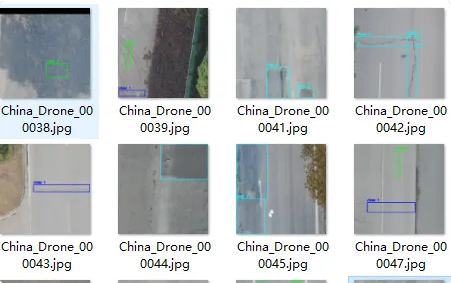
彩色框图生成YOLO 标注 txt
自动识别图片里的彩色方框 → 自动分类 0/1/2 → 自动生成 labels 文件夹所有 YOLO 标注 txt
● 绿色框 → 类别 0 纵向裂缝
● 蓝色框 → 类别 1 横向裂缝
● 红色框 → 类别 2 网状 / 细微裂缝
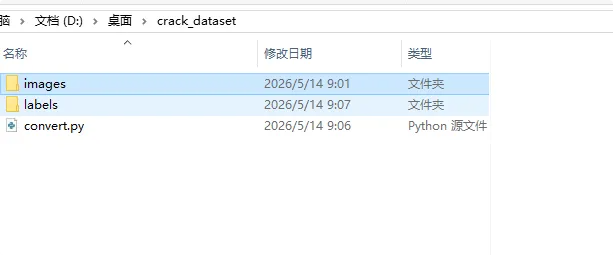
新建文件夹 images 将标注好的图片放入
然后新建一个生成 labels 的脚本
安装相关的依赖
bash
pip install opencv-python numpy创建convert.py脚本用于生成 txt
bash
import cv2
import numpy as np
import os

# ========== 只改这里路径 ==========
IMG_DIR = "images"
LABEL_DIR = "labels"
# 颜色阈值 BGR
COLORS = {
    0: (0, 255, 0),    # 绿色 类别0
    1: (255, 0, 0),    # 蓝色 类别1
    2: (0, 0, 255)     # 红色 类别2
}
# ==================================

os.makedirs(LABEL_DIR, exist_ok=True)

def get_box_from_color(img, target_bgr, tol=40):
    h, w = img.shape[:2]
    lower = np.array([max(0, x-tol) for x in target_bgr])
    upper = np.array([min(255, x+tol) for x in target_bgr])
    mask = cv2.inRange(img, lower, upper)

    contours, _ = cv2.findContours(mask, cv2.RETR_EXTERNAL, cv2.CHAIN_APPROX_SIMPLE)
    boxes = []
    for cnt in contours:
        x, y, bw, bh = cv2.boundingRect(cnt)
        # 过滤太小的噪点框
        if bw > 20 and bh > 20:
            boxes.append((x, y, x+bw, y+bh))
    return boxes, h, w

for img_name in os.listdir(IMG_DIR):
    if not img_name.lower().endswith(('.jpg','.png','.jpeg')):
        continue
    img_path = os.path.join(IMG_DIR, img_name)
    img = cv2.imread(img_path)
    if img is None:
        continue

    yolo_lines = []
    for cls_id, bgr in COLORS.items():
        boxes, h, w = get_box_from_color(img, bgr)
        for (xmin, ymin, xmax, ymax) in boxes:
            # 转YOLO归一化
            cx = (xmin + xmax) / 2.0 / w
            cy = (ymin + ymax) / 2.0 / h
            bw = (xmax - xmin) / 2.0 / w
            bh = (ymax - ymin) / 2.0 / h
            yolo_lines.append(f"{cls_id} {cx:.6f} {cy:.6f} {bw:.6f} {bh:.6f}")

    # 保存同文件名txt
    txt_name = os.path.splitext(img_name)[0] + ".txt"
    txt_path = os.path.join(LABEL_DIR, txt_name)
    with open(txt_path, "w", encoding="utf-8") as f:
        f.write("\n".join(yolo_lines))

print("✅ 全部自动识别方框,生成YOLO标签完成!")
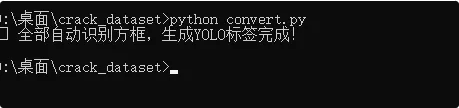
执行
首次训练模型(含自动下载Yolo模型)
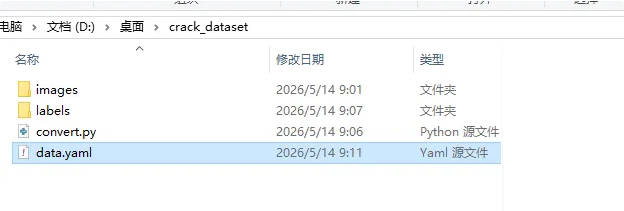
新建 data.yaml
bash
path: .
train: images
val: images

nc: 3
names:
  0: vertical_crack
  1: horizontal_crack
  2: mesh_crack
nc代表有几个类型,names就是对应的类型
安装训练依赖
bash
pip install ultralytics训练
● 自动下载 yolov8s.pt 模型(很小,几秒就好)
● 自动加载你的 39 张图片 + 自动生成的 labels
● 自动开始训练
● 训练完自动保存在 runs/train/exp 里面
bash
yolo train data=data.yaml model=yolov8s.pt epochs=50 imgsz=640 batch=2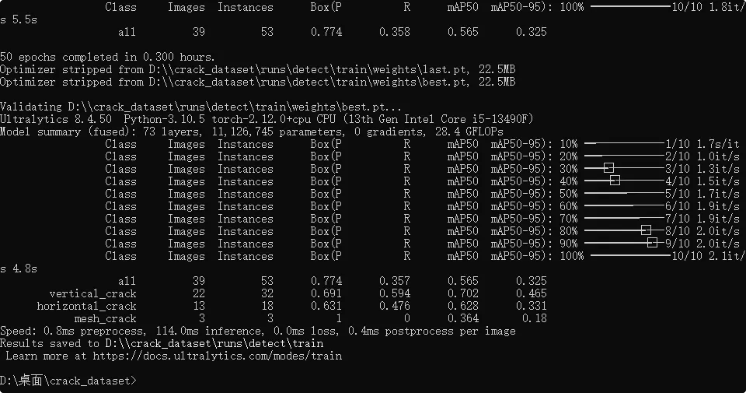
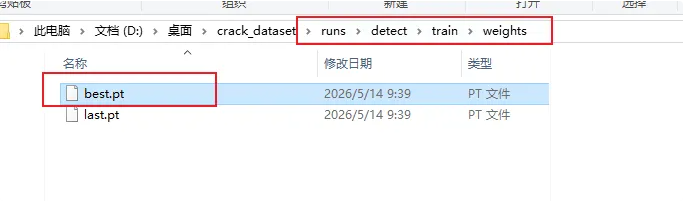
best.pt 就是训练好的模型
如果有新的数据要训练之前的模型
bash
yolo train data=data.yaml model=上一次的best.pt路径 epochs=50验证训练集
bash
yolo val data=data.yaml model=runs/detect/train/weights/best.pt imgsz=640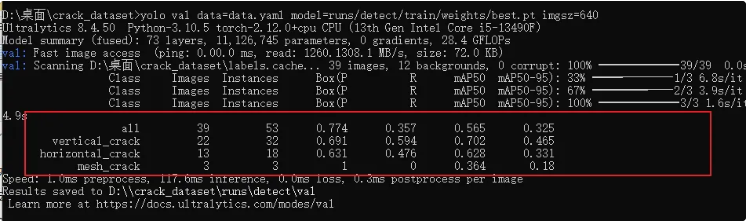
all 39张图 53个裂缝 mAP50 = 0.565
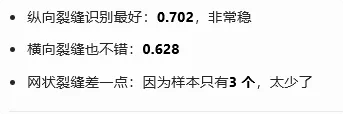
predict 文件夹就是识别的结果
创建 python脚本detect_crack.py验证使用模型检测
bash
from ultralytics import YOLO
import cv2

# 1. 加载你训练好的模型
model_path = r"runs\detect\train\weights\best.pt"
model = YOLO(model_path)

# 2. 随便拿一张裂缝图片
img_path = "test.jpg"   # 改成你要检测的图片路径

# 3. 开始检测
results = model.predict(
    source=img_path,
    imgsz=640,
    save=True,        # 保存画好框的图
    save_txt=True     # 保存识别坐标
)

# 4. 打印识别结果
for r in results:
    boxes = r.boxes
    for box in boxes:
        # 类别id、置信度、坐标
        cls_id = int(box.cls[0])
        conf = float(box.conf[0])
        xyxy = box.xyxy[0].tolist()

        print("类别ID:", cls_id)
        print("置信度:", round(conf,2))
        print("框坐标 xmin,ymin,xmax,ymax:", xyxy)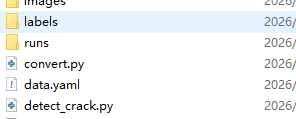
test.jpg也放到脚本同级目录
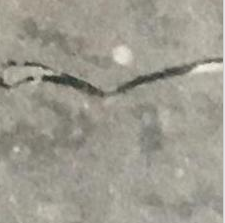
运行脚本
bash
python detect_crack.py没有识别,训练的数据源太少了

因为我训练的三十多张图中没有这个图片,我本意是想验证下这个没有颜色框标记的裂缝图能否识别,结果没有识别到,刚好我用这个图片进行标注训练
标注
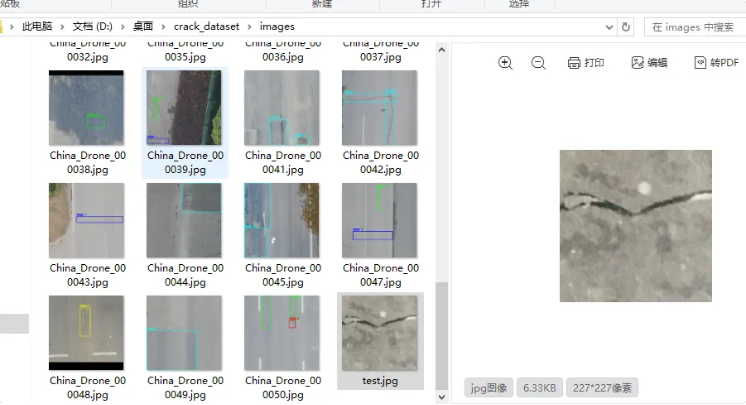
因为这个图片是没有进行标注的,我们先进行标准
将test.jpg复制到images下
安装标注工具
bash
pip install labelImg打开标注工具
bash
python -m labelImg.labelImg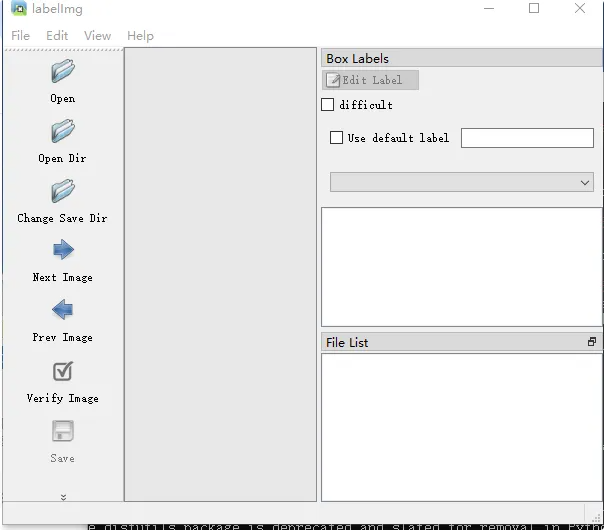
配置
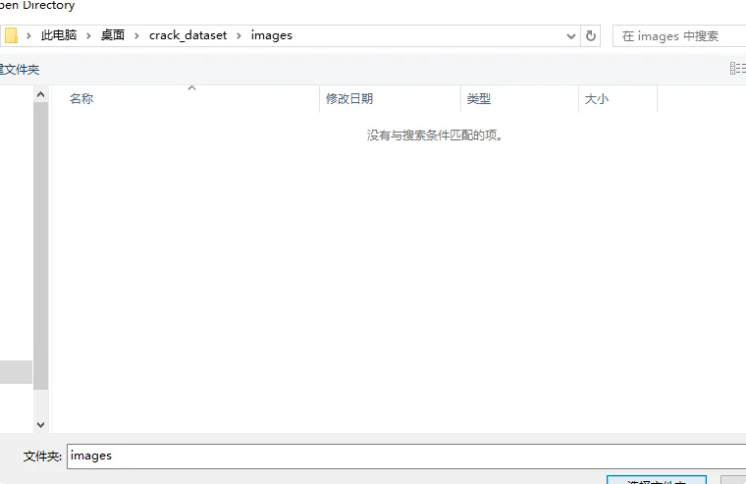
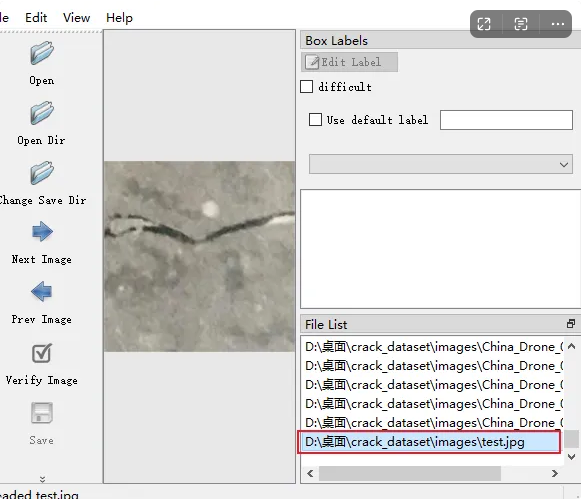
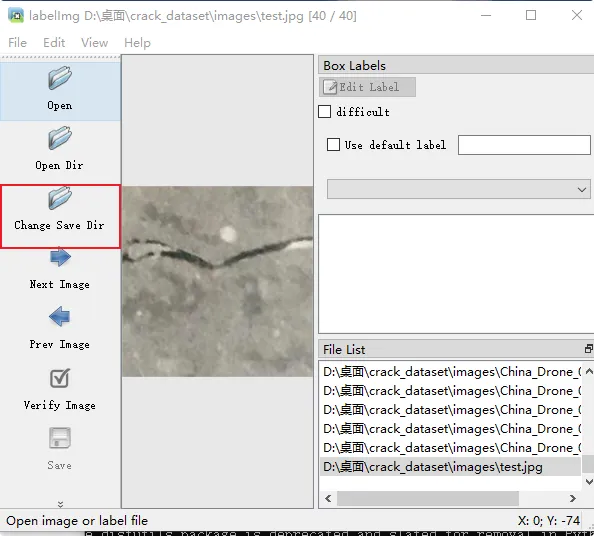
点 Open Dir → 选 images
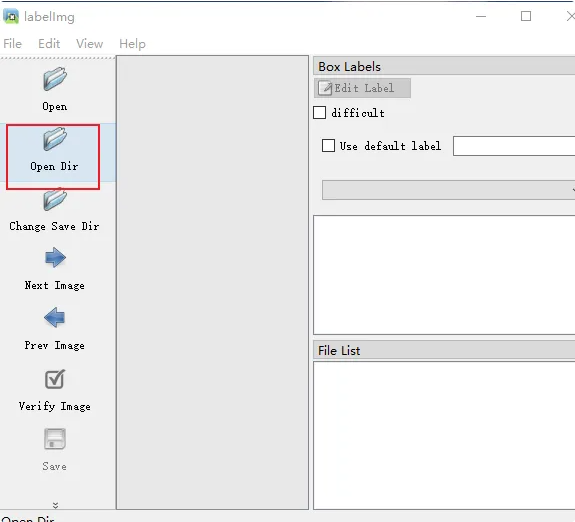
选择 images 文件夹
选择 test.jpg文件
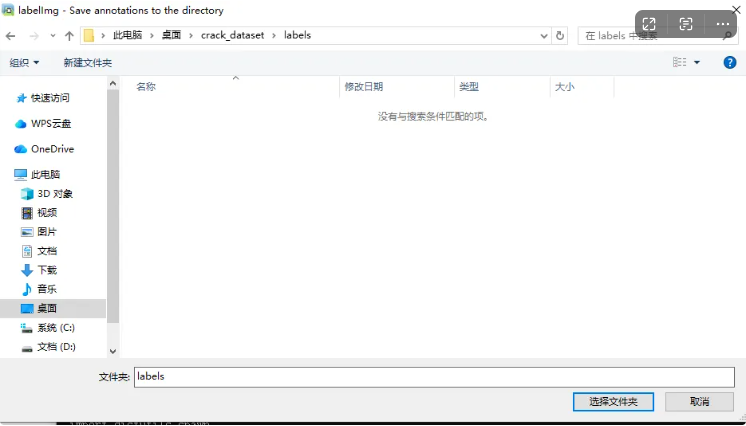
点 Change Save Dir → 选 labels
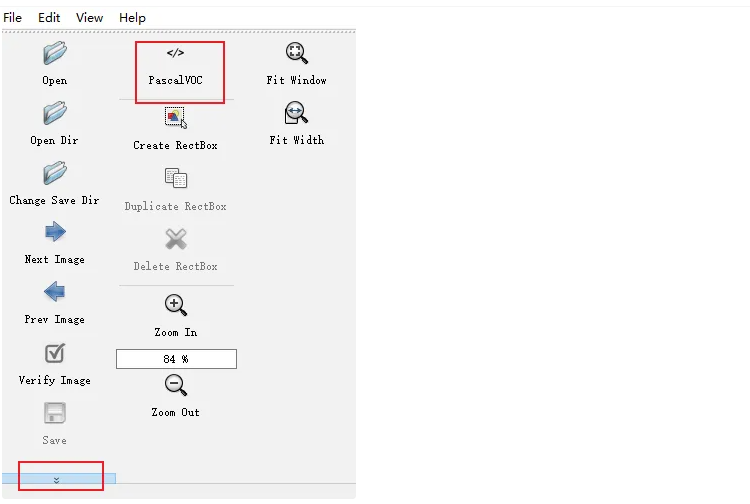
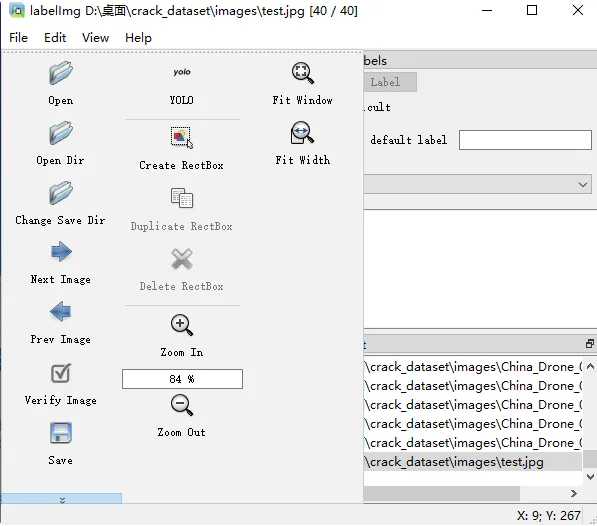
左下角把 PascalVOC 改成 YOLO
标注闪退问题1
按 W → 用鼠标框住裂缝
结果突然闪退了
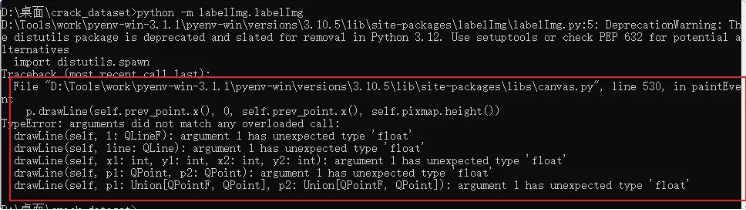
解决方案:哪里报错改哪里
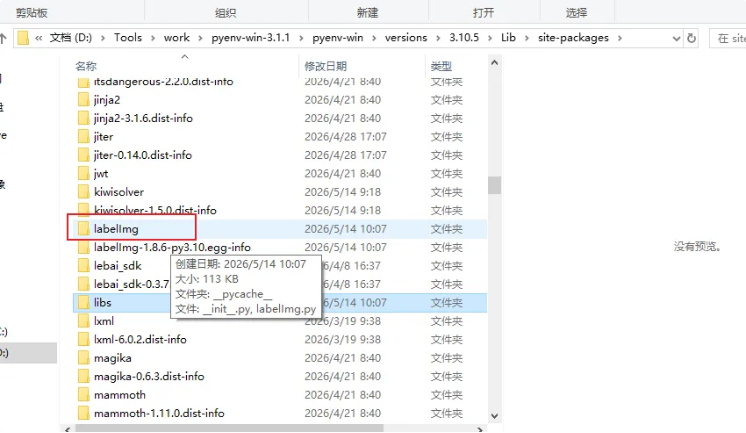
这里报错是 D:\Tools\work\pyenv-win-3.1.1\pyenv-win\versions\3.10.5\lib\site-packages\libs\canvas.py 文件
找到文件
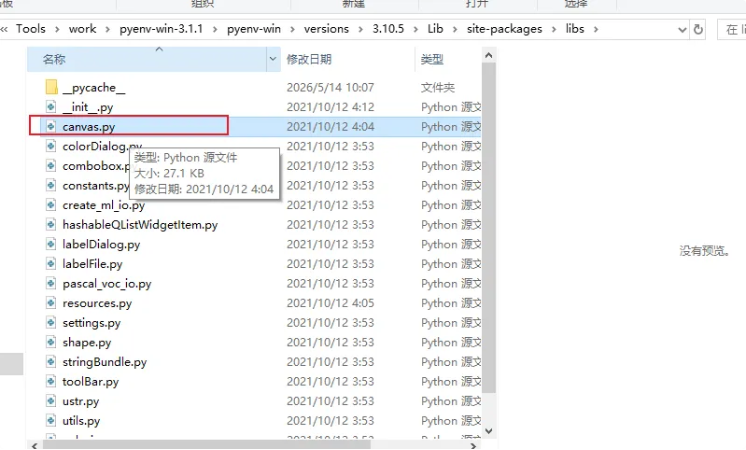
将canvas.py文件 526、530、531行的float改为int。
修改 canvas.py
526行
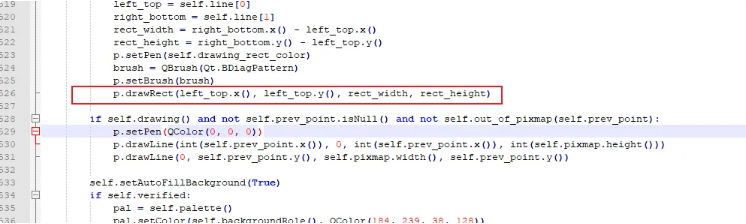
将
bash
p.drawRect(left_top.x(), left_top.y(), rect_width, rect_height)改为:
bash
p.drawRect(int(left_top.x()), int(left_top.y()), int(rect_width), int(rect_height))530行
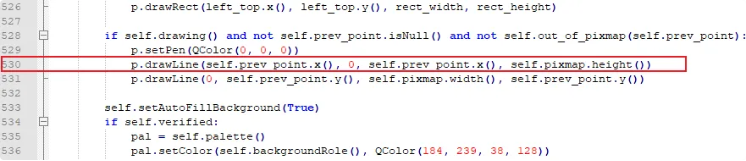
将
bash
p.drawLine(self.prev_point.x(), 0, self.prev_point.x(), self.pixmap.height())改为:
bash
p.drawLine(int(self.prev_point.x()), 0, int(self.prev_point.x()), int(self.pixmap.height()))531行
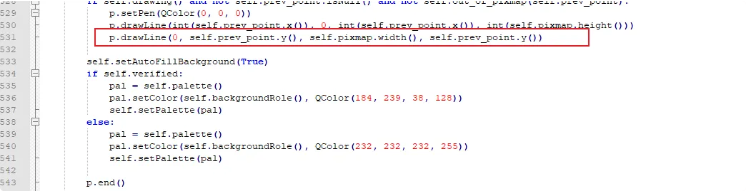
将
bash
p.drawLine(0, self.prev_point.y(), self.pixmap.width(), self.prev_point.y())改为:
bash
p.drawLine( 0, int(self.prev_point.y()), int(self.pixmap.width()), int(self.prev_point.y()))修改后完整版的 canvas.py
bash
try:
from PyQt5.QtGui import *
from PyQt5.QtCore import *
from PyQt5.QtWidgets import *
except ImportError:
from PyQt4.QtGui import *
from PyQt4.QtCore import *
# from PyQt4.QtOpenGL import *
from libs.shape import Shape
from libs.utils import distance
CURSOR_DEFAULT = Qt.ArrowCursor
CURSOR_POINT = Qt.PointingHandCursor
CURSOR_DRAW = Qt.CrossCursor
CURSOR_MOVE = Qt.ClosedHandCursor
CURSOR_GRAB = Qt.OpenHandCursor
# class Canvas(QGLWidget):
class Canvas(QWidget):
zoomRequest = pyqtSignal(int)
scrollRequest = pyqtSignal(int, int)
newShape = pyqtSignal()
selectionChanged = pyqtSignal(bool)
shapeMoved = pyqtSignal()
drawingPolygon = pyqtSignal(bool)
CREATE, EDIT = list(range(2))
epsilon = 11.0
def __init__(self, *args, **kwargs):
super(Canvas, self).__init__(*args, **kwargs)
# Initialise local state.
self.mode = self.EDIT
self.shapes = []
self.current = None
self.selected_shape = None # save the selected shape here
self.selected_shape_copy = None
self.drawing_line_color = QColor(0, 0, 255)
self.drawing_rect_color = QColor(0, 0, 255)
self.line = Shape(line_color=self.drawing_line_color)
self.prev_point = QPointF()
self.offsets = QPointF(), QPointF()
self.scale = 1.0
self.label_font_size = 8
self.pixmap = QPixmap()
self.visible = {}
self._hide_background = False
self.hide_background = False
self.h_shape = None
self.h_vertex = None
self._painter = QPainter()
self._cursor = CURSOR_DEFAULT
# Menus:
self.menus = (QMenu(), QMenu())
# Set widget options.
self.setMouseTracking(True)
self.setFocusPolicy(Qt.WheelFocus)
self.verified = False
self.draw_square = False
# initialisation for panning
self.pan_initial_pos = QPoint()
def set_drawing_color(self, qcolor):
self.drawing_line_color = qcolor
self.drawing_rect_color = qcolor
def enterEvent(self, ev):
self.override_cursor(self._cursor)
def leaveEvent(self, ev):
self.restore_cursor()
def focusOutEvent(self, ev):
self.restore_cursor()
def isVisible(self, shape):
return self.visible.get(shape, True)
def drawing(self):
return self.mode == self.CREATE
def editing(self):
return self.mode == self.EDIT
def set_editing(self, value=True):
self.mode = self.EDIT if value else self.CREATE
if not value: # Create
self.un_highlight()
self.de_select_shape()
self.prev_point = QPointF()
self.repaint()
def un_highlight(self):
if self.h_shape:
self.h_shape.highlight_clear()
self.h_vertex = self.h_shape = None
def selected_vertex(self):
return self.h_vertex is not None
def mouseMoveEvent(self, ev):
"""Update line with last point and current coordinates."""
pos = self.transform_pos(ev.pos())
# Update coordinates in status bar if image is opened
window = self.parent().window()
if window.file_path is not None:
self.parent().window().label_coordinates.setText(
'X: %d; Y: %d' % (pos.x(), pos.y()))
# Polygon drawing.
if self.drawing():
self.override_cursor(CURSOR_DRAW)
if self.current:
# Display annotation width and height while drawing
current_width = abs(self.current[0].x() - pos.x())
current_height = abs(self.current[0].y() - pos.y())
self.parent().window().label_coordinates.setText(
'Width: %d, Height: %d / X: %d; Y: %d' % (current_width, current_height, pos.x(), pos.y()))
color = self.drawing_line_color
if self.out_of_pixmap(pos):
# Don't allow the user to draw outside the pixmap.
# Clip the coordinates to 0 or max,
# if they are outside the range [0, max]
size = self.pixmap.size()
clipped_x = min(max(0, pos.x()), size.width())
clipped_y = min(max(0, pos.y()), size.height())
pos = QPointF(clipped_x, clipped_y)
elif len(self.current) > 1 and self.close_enough(pos, self.current[0]):
# Attract line to starting point and colorise to alert the
# user:
pos = self.current[0]
color = self.current.line_color
self.override_cursor(CURSOR_POINT)
self.current.highlight_vertex(0, Shape.NEAR_VERTEX)
if self.draw_square:
init_pos = self.current[0]
min_x = init_pos.x()
min_y = init_pos.y()
min_size = min(abs(pos.x() - min_x), abs(pos.y() - min_y))
direction_x = -1 if pos.x() - min_x < 0 else 1
direction_y = -1 if pos.y() - min_y < 0 else 1
self.line[1] = QPointF(min_x + direction_x * min_size, min_y + direction_y * min_size)
else:
self.line[1] = pos
self.line.line_color = color
self.prev_point = QPointF()
self.current.highlight_clear()
else:
self.prev_point = pos
self.repaint()
return
# Polygon copy moving.
if Qt.RightButton & ev.buttons():
if self.selected_shape_copy and self.prev_point:
self.override_cursor(CURSOR_MOVE)
self.bounded_move_shape(self.selected_shape_copy, pos)
self.repaint()
elif self.selected_shape:
self.selected_shape_copy = self.selected_shape.copy()
self.repaint()
return
# Polygon/Vertex moving.
if Qt.LeftButton & ev.buttons():
if self.selected_vertex():
self.bounded_move_vertex(pos)
self.shapeMoved.emit()
self.repaint()
# Display annotation width and height while moving vertex
point1 = self.h_shape[1]
point3 = self.h_shape[3]
current_width = abs(point1.x() - point3.x())
current_height = abs(point1.y() - point3.y())
self.parent().window().label_coordinates.setText(
'Width: %d, Height: %d / X: %d; Y: %d' % (current_width, current_height, pos.x(), pos.y()))
elif self.selected_shape and self.prev_point:
self.override_cursor(CURSOR_MOVE)
self.bounded_move_shape(self.selected_shape, pos)
self.shapeMoved.emit()
self.repaint()
# Display annotation width and height while moving shape
point1 = self.selected_shape[1]
point3 = self.selected_shape[3]
current_width = abs(point1.x() - point3.x())
current_height = abs(point1.y() - point3.y())
self.parent().window().label_coordinates.setText(
'Width: %d, Height: %d / X: %d; Y: %d' % (current_width, current_height, pos.x(), pos.y()))
else:
# pan
delta_x = pos.x() - self.pan_initial_pos.x()
delta_y = pos.y() - self.pan_initial_pos.y()
self.scrollRequest.emit(delta_x, Qt.Horizontal)
self.scrollRequest.emit(delta_y, Qt.Vertical)
self.update()
return
# Just hovering over the canvas, 2 possibilities:
# - Highlight shapes
# - Highlight vertex
# Update shape/vertex fill and tooltip value accordingly.
self.setToolTip("Image")
for shape in reversed([s for s in self.shapes if self.isVisible(s)]):
# Look for a nearby vertex to highlight. If that fails,
# check if we happen to be inside a shape.
index = shape.nearest_vertex(pos, self.epsilon)
if index is not None:
if self.selected_vertex():
self.h_shape.highlight_clear()
self.h_vertex, self.h_shape = index, shape
shape.highlight_vertex(index, shape.MOVE_VERTEX)
self.override_cursor(CURSOR_POINT)
self.setToolTip("Click & drag to move point")
self.setStatusTip(self.toolTip())
self.update()
break
elif shape.contains_point(pos):
if self.selected_vertex():
self.h_shape.highlight_clear()
self.h_vertex, self.h_shape = None, shape
self.setToolTip(
"Click & drag to move shape '%s'" % shape.label)
self.setStatusTip(self.toolTip())
self.override_cursor(CURSOR_GRAB)
self.update()
# Display annotation width and height while hovering inside
point1 = self.h_shape[1]
point3 = self.h_shape[3]
current_width = abs(point1.x() - point3.x())
current_height = abs(point1.y() - point3.y())
self.parent().window().label_coordinates.setText(
'Width: %d, Height: %d / X: %d; Y: %d' % (current_width, current_height, pos.x(), pos.y()))
break
else: # Nothing found, clear highlights, reset state.
if self.h_shape:
self.h_shape.highlight_clear()
self.update()
self.h_vertex, self.h_shape = None, None
self.override_cursor(CURSOR_DEFAULT)
def mousePressEvent(self, ev):
pos = self.transform_pos(ev.pos())
if ev.button() == Qt.LeftButton:
if self.drawing():
self.handle_drawing(pos)
else:
selection = self.select_shape_point(pos)
self.prev_point = pos
if selection is None:
# pan
QApplication.setOverrideCursor(QCursor(Qt.OpenHandCursor))
self.pan_initial_pos = pos
elif ev.button() == Qt.RightButton and self.editing():
self.select_shape_point(pos)
self.prev_point = pos
self.update()
def mouseReleaseEvent(self, ev):
if ev.button() == Qt.RightButton:
menu = self.menus[bool(self.selected_shape_copy)]
self.restore_cursor()
if not menu.exec_(self.mapToGlobal(ev.pos()))\
and self.selected_shape_copy:
# Cancel the move by deleting the shadow copy.
self.selected_shape_copy = None
self.repaint()
elif ev.button() == Qt.LeftButton and self.selected_shape:
if self.selected_vertex():
self.override_cursor(CURSOR_POINT)
else:
self.override_cursor(CURSOR_GRAB)
elif ev.button() == Qt.LeftButton:
pos = self.transform_pos(ev.pos())
if self.drawing():
self.handle_drawing(pos)
else:
# pan
QApplication.restoreOverrideCursor()
def end_move(self, copy=False):
assert self.selected_shape and self.selected_shape_copy
shape = self.selected_shape_copy
# del shape.fill_color
# del shape.line_color
if copy:
self.shapes.append(shape)
self.selected_shape.selected = False
self.selected_shape = shape
self.repaint()
else:
self.selected_shape.points = [p for p in shape.points]
self.selected_shape_copy = None
def hide_background_shapes(self, value):
self.hide_background = value
if self.selected_shape:
# Only hide other shapes if there is a current selection.
# Otherwise the user will not be able to select a shape.
self.set_hiding(True)
self.repaint()
def handle_drawing(self, pos):
if self.current and self.current.reach_max_points() is False:
init_pos = self.current[0]
min_x = init_pos.x()
min_y = init_pos.y()
target_pos = self.line[1]
max_x = target_pos.x()
max_y = target_pos.y()
self.current.add_point(QPointF(max_x, min_y))
self.current.add_point(target_pos)
self.current.add_point(QPointF(min_x, max_y))
self.finalise()
elif not self.out_of_pixmap(pos):
self.current = Shape()
self.current.add_point(pos)
self.line.points = [pos, pos]
self.set_hiding()
self.drawingPolygon.emit(True)
self.update()
def set_hiding(self, enable=True):
self._hide_background = self.hide_background if enable else False
def can_close_shape(self):
return self.drawing() and self.current and len(self.current) > 2
def mouseDoubleClickEvent(self, ev):
# We need at least 4 points here, since the mousePress handler
# adds an extra one before this handler is called.
if self.can_close_shape() and len(self.current) > 3:
self.current.pop_point()
self.finalise()
def select_shape(self, shape):
self.de_select_shape()
shape.selected = True
self.selected_shape = shape
self.set_hiding()
self.selectionChanged.emit(True)
self.update()
def select_shape_point(self, point):
"""Select the first shape created which contains this point."""
self.de_select_shape()
if self.selected_vertex(): # A vertex is marked for selection.
index, shape = self.h_vertex, self.h_shape
shape.highlight_vertex(index, shape.MOVE_VERTEX)
self.select_shape(shape)
return self.h_vertex
for shape in reversed(self.shapes):
if self.isVisible(shape) and shape.contains_point(point):
self.select_shape(shape)
self.calculate_offsets(shape, point)
return self.selected_shape
return None
def calculate_offsets(self, shape, point):
rect = shape.bounding_rect()
x1 = rect.x() - point.x()
y1 = rect.y() - point.y()
x2 = (rect.x() + rect.width()) - point.x()
y2 = (rect.y() + rect.height()) - point.y()
self.offsets = QPointF(x1, y1), QPointF(x2, y2)
def snap_point_to_canvas(self, x, y):
"""
Moves a point x,y to within the boundaries of the canvas.
:return: (x,y,snapped) where snapped is True if x or y were changed, False if not.
"""
if x < 0 or x > self.pixmap.width() or y < 0 or y > self.pixmap.height():
x = max(x, 0)
y = max(y, 0)
x = min(x, self.pixmap.width())
y = min(y, self.pixmap.height())
return x, y, True
return x, y, False
def bounded_move_vertex(self, pos):
index, shape = self.h_vertex, self.h_shape
point = shape[index]
if self.out_of_pixmap(pos):
size = self.pixmap.size()
clipped_x = min(max(0, pos.x()), size.width())
clipped_y = min(max(0, pos.y()), size.height())
pos = QPointF(clipped_x, clipped_y)
if self.draw_square:
opposite_point_index = (index + 2) % 4
opposite_point = shape[opposite_point_index]
min_size = min(abs(pos.x() - opposite_point.x()), abs(pos.y() - opposite_point.y()))
direction_x = -1 if pos.x() - opposite_point.x() < 0 else 1
direction_y = -1 if pos.y() - opposite_point.y() < 0 else 1
shift_pos = QPointF(opposite_point.x() + direction_x * min_size - point.x(),
opposite_point.y() + direction_y * min_size - point.y())
else:
shift_pos = pos - point
shape.move_vertex_by(index, shift_pos)
left_index = (index + 1) % 4
right_index = (index + 3) % 4
left_shift = None
right_shift = None
if index % 2 == 0:
right_shift = QPointF(shift_pos.x(), 0)
left_shift = QPointF(0, shift_pos.y())
else:
left_shift = QPointF(shift_pos.x(), 0)
right_shift = QPointF(0, shift_pos.y())
shape.move_vertex_by(right_index, right_shift)
shape.move_vertex_by(left_index, left_shift)
def bounded_move_shape(self, shape, pos):
if self.out_of_pixmap(pos):
return False # No need to move
o1 = pos + self.offsets[0]
if self.out_of_pixmap(o1):
pos -= QPointF(min(0, o1.x()), min(0, o1.y()))
o2 = pos + self.offsets[1]
if self.out_of_pixmap(o2):
pos += QPointF(min(0, self.pixmap.width() - o2.x()),
min(0, self.pixmap.height() - o2.y()))
# The next line tracks the new position of the cursor
# relative to the shape, but also results in making it
# a bit "shaky" when nearing the border and allows it to
# go outside of the shape's area for some reason. XXX
# self.calculateOffsets(self.selectedShape, pos)
dp = pos - self.prev_point
if dp:
shape.move_by(dp)
self.prev_point = pos
return True
return False
def de_select_shape(self):
if self.selected_shape:
self.selected_shape.selected = False
self.selected_shape = None
self.set_hiding(False)
self.selectionChanged.emit(False)
self.update()
def delete_selected(self):
if self.selected_shape:
shape = self.selected_shape
self.shapes.remove(self.selected_shape)
self.selected_shape = None
self.update()
return shape
def copy_selected_shape(self):
if self.selected_shape:
shape = self.selected_shape.copy()
self.de_select_shape()
self.shapes.append(shape)
shape.selected = True
self.selected_shape = shape
self.bounded_shift_shape(shape)
return shape
def bounded_shift_shape(self, shape):
# Try to move in one direction, and if it fails in another.
# Give up if both fail.
point = shape[0]
offset = QPointF(2.0, 2.0)
self.calculate_offsets(shape, point)
self.prev_point = point
if not self.bounded_move_shape(shape, point - offset):
self.bounded_move_shape(shape, point + offset)
def paintEvent(self, event):
if not self.pixmap:
return super(Canvas, self).paintEvent(event)
p = self._painter
p.begin(self)
p.setRenderHint(QPainter.Antialiasing)
p.setRenderHint(QPainter.HighQualityAntialiasing)
p.setRenderHint(QPainter.SmoothPixmapTransform)
p.scale(self.scale, self.scale)
p.translate(self.offset_to_center())
p.drawPixmap(0, 0, self.pixmap)
Shape.scale = self.scale
Shape.label_font_size = self.label_font_size
for shape in self.shapes:
if (shape.selected or not self._hide_background) and self.isVisible(shape):
shape.fill = shape.selected or shape == self.h_shape
shape.paint(p)
if self.current:
self.current.paint(p)
self.line.paint(p)
if self.selected_shape_copy:
self.selected_shape_copy.paint(p)
# Paint rect
if self.current is not None and len(self.line) == 2:
left_top = self.line[0]
right_bottom = self.line[1]
rect_width = right_bottom.x() - left_top.x()
rect_height = right_bottom.y() - left_top.y()
p.setPen(self.drawing_rect_color)
brush = QBrush(Qt.BDiagPattern)
p.setBrush(brush)
p.drawRect(int(left_top.x()), int(left_top.y()), int(rect_width), int(rect_height))
if self.drawing() and not self.prev_point.isNull() and not self.out_of_pixmap(self.prev_point):
p.setPen(QColor(0, 0, 0))
p.drawLine(int(self.prev_point.x()), 0, int(self.prev_point.x()), int(self.pixmap.height()))
p.drawLine( 0, int(self.prev_point.y()), int(self.pixmap.width()), int(self.prev_point.y()))
self.setAutoFillBackground(True)
if self.verified:
pal = self.palette()
pal.setColor(self.backgroundRole(), QColor(184, 239, 38, 128))
self.setPalette(pal)
else:
pal = self.palette()
pal.setColor(self.backgroundRole(), QColor(232, 232, 232, 255))
self.setPalette(pal)
p.end()
def transform_pos(self, point):
"""Convert from widget-logical coordinates to painter-logical coordinates."""
return point / self.scale - self.offset_to_center()
def offset_to_center(self):
s = self.scale
area = super(Canvas, self).size()
w, h = self.pixmap.width() * s, self.pixmap.height() * s
aw, ah = area.width(), area.height()
x = (aw - w) / (2 * s) if aw > w else 0
y = (ah - h) / (2 * s) if ah > h else 0
return QPointF(x, y)
def out_of_pixmap(self, p):
w, h = self.pixmap.width(), self.pixmap.height()
return not (0 <= p.x() <= w and 0 <= p.y() <= h)
def finalise(self):
assert self.current
if self.current.points[0] == self.current.points[-1]:
self.current = None
self.drawingPolygon.emit(False)
self.update()
return
self.current.close()
self.shapes.append(self.current)
self.current = None
self.set_hiding(False)
self.newShape.emit()
self.update()
def close_enough(self, p1, p2):
# d = distance(p1 - p2)
# m = (p1-p2).manhattanLength()
# print "d %.2f, m %d, %.2f" % (d, m, d - m)
return distance(p1 - p2) < self.epsilon
# These two, along with a call to adjustSize are required for the
# scroll area.
def sizeHint(self):
return self.minimumSizeHint()
def minimumSizeHint(self):
if self.pixmap:
return self.scale * self.pixmap.size()
return super(Canvas, self).minimumSizeHint()
def wheelEvent(self, ev):
qt_version = 4 if hasattr(ev, "delta") else 5
if qt_version == 4:
if ev.orientation() == Qt.Vertical:
v_delta = ev.delta()
h_delta = 0
else:
h_delta = ev.delta()
v_delta = 0
else:
delta = ev.angleDelta()
h_delta = delta.x()
v_delta = delta.y()
mods = ev.modifiers()
if Qt.ControlModifier == int(mods) and v_delta:
self.zoomRequest.emit(v_delta)
else:
v_delta and self.scrollRequest.emit(v_delta, Qt.Vertical)
h_delta and self.scrollRequest.emit(h_delta, Qt.Horizontal)
ev.accept()
def keyPressEvent(self, ev):
key = ev.key()
if key == Qt.Key_Escape and self.current:
print('ESC press')
self.current = None
self.drawingPolygon.emit(False)
self.update()
elif key == Qt.Key_Return and self.can_close_shape():
self.finalise()
elif key == Qt.Key_Left and self.selected_shape:
self.move_one_pixel('Left')
elif key == Qt.Key_Right and self.selected_shape:
self.move_one_pixel('Right')
elif key == Qt.Key_Up and self.selected_shape:
self.move_one_pixel('Up')
elif key == Qt.Key_Down and self.selected_shape:
self.move_one_pixel('Down')
def move_one_pixel(self, direction):
# print(self.selectedShape.points)
if direction == 'Left' and not self.move_out_of_bound(QPointF(-1.0, 0)):
# print("move Left one pixel")
self.selected_shape.points[0] += QPointF(-1.0, 0)
self.selected_shape.points[1] += QPointF(-1.0, 0)
self.selected_shape.points[2] += QPointF(-1.0, 0)
self.selected_shape.points[3] += QPointF(-1.0, 0)
elif direction == 'Right' and not self.move_out_of_bound(QPointF(1.0, 0)):
# print("move Right one pixel")
self.selected_shape.points[0] += QPointF(1.0, 0)
self.selected_shape.points[1] += QPointF(1.0, 0)
self.selected_shape.points[2] += QPointF(1.0, 0)
self.selected_shape.points[3] += QPointF(1.0, 0)
elif direction == 'Up' and not self.move_out_of_bound(QPointF(0, -1.0)):
# print("move Up one pixel")
self.selected_shape.points[0] += QPointF(0, -1.0)
self.selected_shape.points[1] += QPointF(0, -1.0)
self.selected_shape.points[2] += QPointF(0, -1.0)
self.selected_shape.points[3] += QPointF(0, -1.0)
elif direction == 'Down' and not self.move_out_of_bound(QPointF(0, 1.0)):
# print("move Down one pixel")
self.selected_shape.points[0] += QPointF(0, 1.0)
self.selected_shape.points[1] += QPointF(0, 1.0)
self.selected_shape.points[2] += QPointF(0, 1.0)
self.selected_shape.points[3] += QPointF(0, 1.0)
self.shapeMoved.emit()
self.repaint()
def move_out_of_bound(self, step):
points = [p1 + p2 for p1, p2 in zip(self.selected_shape.points, [step] * 4)]
return True in map(self.out_of_pixmap, points)
def set_last_label(self, text, line_color=None, fill_color=None):
assert text
self.shapes[-1].label = text
if line_color:
self.shapes[-1].line_color = line_color
if fill_color:
self.shapes[-1].fill_color = fill_color
return self.shapes[-1]
def undo_last_line(self):
assert self.shapes
self.current = self.shapes.pop()
self.current.set_open()
self.line.points = [self.current[-1], self.current[0]]
self.drawingPolygon.emit(True)
def reset_all_lines(self):
assert self.shapes
self.current = self.shapes.pop()
self.current.set_open()
self.line.points = [self.current[-1], self.current[0]]
self.drawingPolygon.emit(True)
self.current = None
self.drawingPolygon.emit(False)
self.update()
def load_pixmap(self, pixmap):
self.pixmap = pixmap
self.shapes = []
self.repaint()
def load_shapes(self, shapes):
self.shapes = list(shapes)
self.current = None
self.repaint()
def set_shape_visible(self, shape, value):
self.visible[shape] = value
self.repaint()
def current_cursor(self):
cursor = QApplication.overrideCursor()
if cursor is not None:
cursor = cursor.shape()
return cursor
def override_cursor(self, cursor):
self._cursor = cursor
if self.current_cursor() is None:
QApplication.setOverrideCursor(cursor)
else:
QApplication.changeOverrideCursor(cursor)
def restore_cursor(self):
QApplication.restoreOverrideCursor()
def reset_state(self):
self.restore_cursor()
self.pixmap = None
self.update()
def set_drawing_shape_to_square(self, status):
self.draw_square = status修改labelImg.py文件
这个文件不在libs目录下 在 labelImg 目录下
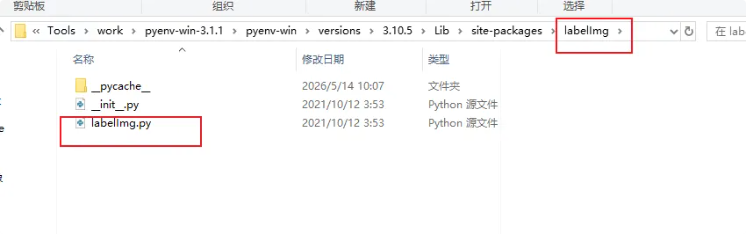
修改第965行
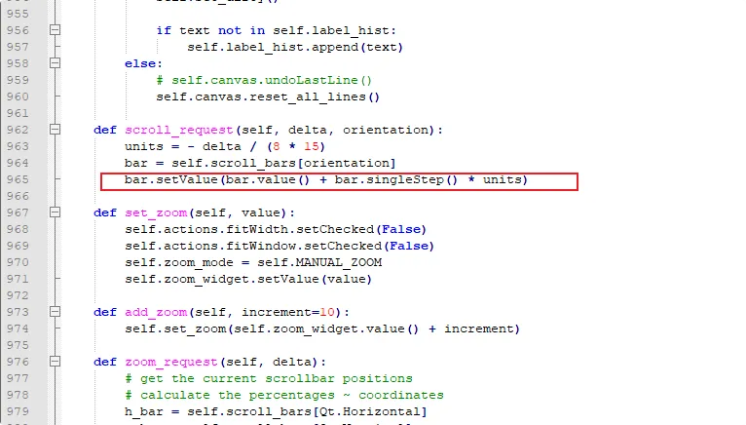
将
bash
bar.setValue(bar.value() + bar.singleStep() * units)改为:
bash
bar.setValue(int(bar.value() + bar.singleStep() * units))完整版labelImg.py
bash
#!/usr/bin/env python
# -*- coding: utf-8 -*-
import argparse
import codecs
import distutils.spawn
import os.path
import platform
import re
import sys
import subprocess
import shutil
import webbrowser as wb
from functools import partial
from collections import defaultdict
try:
from PyQt5.QtGui import *
from PyQt5.QtCore import *
from PyQt5.QtWidgets import *
except ImportError:
# needed for py3+qt4
# Ref:
# http://pyqt.sourceforge.net/Docs/PyQt4/incompatible_apis.html
# http://stackoverflow.com/questions/21217399/pyqt4-qtcore-qvariant-object-instead-of-a-string
if sys.version_info.major >= 3:
import sip
sip.setapi('QVariant', 2)
from PyQt4.QtGui import *
from PyQt4.QtCore import *
from libs.combobox import ComboBox
from libs.resources import *
from libs.constants import *
from libs.utils import *
from libs.settings import Settings
from libs.shape import Shape, DEFAULT_LINE_COLOR, DEFAULT_FILL_COLOR
from libs.stringBundle import StringBundle
from libs.canvas import Canvas
from libs.zoomWidget import ZoomWidget
from libs.labelDialog import LabelDialog
from libs.colorDialog import ColorDialog
from libs.labelFile import LabelFile, LabelFileError, LabelFileFormat
from libs.toolBar import ToolBar
from libs.pascal_voc_io import PascalVocReader
from libs.pascal_voc_io import XML_EXT
from libs.yolo_io import YoloReader
from libs.yolo_io import TXT_EXT
from libs.create_ml_io import CreateMLReader
from libs.create_ml_io import JSON_EXT
from libs.ustr import ustr
from libs.hashableQListWidgetItem import HashableQListWidgetItem
__appname__ = 'labelImg'
class WindowMixin(object):
def menu(self, title, actions=None):
menu = self.menuBar().addMenu(title)
if actions:
add_actions(menu, actions)
return menu
def toolbar(self, title, actions=None):
toolbar = ToolBar(title)
toolbar.setObjectName(u'%sToolBar' % title)
# toolbar.setOrientation(Qt.Vertical)
toolbar.setToolButtonStyle(Qt.ToolButtonTextUnderIcon)
if actions:
add_actions(toolbar, actions)
self.addToolBar(Qt.LeftToolBarArea, toolbar)
return toolbar
class MainWindow(QMainWindow, WindowMixin):
FIT_WINDOW, FIT_WIDTH, MANUAL_ZOOM = list(range(3))
def __init__(self, default_filename=None, default_prefdef_class_file=None, default_save_dir=None):
super(MainWindow, self).__init__()
self.setWindowTitle(__appname__)
# Load setting in the main thread
self.settings = Settings()
self.settings.load()
settings = self.settings
self.os_name = platform.system()
# Load string bundle for i18n
self.string_bundle = StringBundle.get_bundle()
get_str = lambda str_id: self.string_bundle.get_string(str_id)
# Save as Pascal voc xml
self.default_save_dir = default_save_dir
self.label_file_format = settings.get(SETTING_LABEL_FILE_FORMAT, LabelFileFormat.PASCAL_VOC)
# For loading all image under a directory
self.m_img_list = []
self.dir_name = None
self.label_hist = []
self.last_open_dir = None
self.cur_img_idx = 0
self.img_count = 1
# Whether we need to save or not.
self.dirty = False
self._no_selection_slot = False
self._beginner = True
self.screencast = "https://youtu.be/p0nR2YsCY_U"
# Load predefined classes to the list
self.load_predefined_classes(default_prefdef_class_file)
# Main widgets and related state.
self.label_dialog = LabelDialog(parent=self, list_item=self.label_hist)
self.items_to_shapes = {}
self.shapes_to_items = {}
self.prev_label_text = ''
list_layout = QVBoxLayout()
list_layout.setContentsMargins(0, 0, 0, 0)
# Create a widget for using default label
self.use_default_label_checkbox = QCheckBox(get_str('useDefaultLabel'))
self.use_default_label_checkbox.setChecked(False)
self.default_label_text_line = QLineEdit()
use_default_label_qhbox_layout = QHBoxLayout()
use_default_label_qhbox_layout.addWidget(self.use_default_label_checkbox)
use_default_label_qhbox_layout.addWidget(self.default_label_text_line)
use_default_label_container = QWidget()
use_default_label_container.setLayout(use_default_label_qhbox_layout)
# Create a widget for edit and diffc button
self.diffc_button = QCheckBox(get_str('useDifficult'))
self.diffc_button.setChecked(False)
self.diffc_button.stateChanged.connect(self.button_state)
self.edit_button = QToolButton()
self.edit_button.setToolButtonStyle(Qt.ToolButtonTextBesideIcon)
# Add some of widgets to list_layout
list_layout.addWidget(self.edit_button)
list_layout.addWidget(self.diffc_button)
list_layout.addWidget(use_default_label_container)
# Create and add combobox for showing unique labels in group
self.combo_box = ComboBox(self)
list_layout.addWidget(self.combo_box)
# Create and add a widget for showing current label items
self.label_list = QListWidget()
label_list_container = QWidget()
label_list_container.setLayout(list_layout)
self.label_list.itemActivated.connect(self.label_selection_changed)
self.label_list.itemSelectionChanged.connect(self.label_selection_changed)
self.label_list.itemDoubleClicked.connect(self.edit_label)
# Connect to itemChanged to detect checkbox changes.
self.label_list.itemChanged.connect(self.label_item_changed)
list_layout.addWidget(self.label_list)
self.dock = QDockWidget(get_str('boxLabelText'), self)
self.dock.setObjectName(get_str('labels'))
self.dock.setWidget(label_list_container)
self.file_list_widget = QListWidget()
self.file_list_widget.itemDoubleClicked.connect(self.file_item_double_clicked)
file_list_layout = QVBoxLayout()
file_list_layout.setContentsMargins(0, 0, 0, 0)
file_list_layout.addWidget(self.file_list_widget)
file_list_container = QWidget()
file_list_container.setLayout(file_list_layout)
self.file_dock = QDockWidget(get_str('fileList'), self)
self.file_dock.setObjectName(get_str('files'))
self.file_dock.setWidget(file_list_container)
self.zoom_widget = ZoomWidget()
self.color_dialog = ColorDialog(parent=self)
self.canvas = Canvas(parent=self)
self.canvas.zoomRequest.connect(self.zoom_request)
self.canvas.set_drawing_shape_to_square(settings.get(SETTING_DRAW_SQUARE, False))
scroll = QScrollArea()
scroll.setWidget(self.canvas)
scroll.setWidgetResizable(True)
self.scroll_bars = {
Qt.Vertical: scroll.verticalScrollBar(),
Qt.Horizontal: scroll.horizontalScrollBar()
}
self.scroll_area = scroll
self.canvas.scrollRequest.connect(self.scroll_request)
self.canvas.newShape.connect(self.new_shape)
self.canvas.shapeMoved.connect(self.set_dirty)
self.canvas.selectionChanged.connect(self.shape_selection_changed)
self.canvas.drawingPolygon.connect(self.toggle_drawing_sensitive)
self.setCentralWidget(scroll)
self.addDockWidget(Qt.RightDockWidgetArea, self.dock)
self.addDockWidget(Qt.RightDockWidgetArea, self.file_dock)
self.file_dock.setFeatures(QDockWidget.DockWidgetFloatable)
self.dock_features = QDockWidget.DockWidgetClosable | QDockWidget.DockWidgetFloatable
self.dock.setFeatures(self.dock.features() ^ self.dock_features)
# Actions
action = partial(new_action, self)
quit = action(get_str('quit'), self.close,
'Ctrl+Q', 'quit', get_str('quitApp'))
open = action(get_str('openFile'), self.open_file,
'Ctrl+O', 'open', get_str('openFileDetail'))
open_dir = action(get_str('openDir'), self.open_dir_dialog,
'Ctrl+u', 'open', get_str('openDir'))
change_save_dir = action(get_str('changeSaveDir'), self.change_save_dir_dialog,
'Ctrl+r', 'open', get_str('changeSavedAnnotationDir'))
open_annotation = action(get_str('openAnnotation'), self.open_annotation_dialog,
'Ctrl+Shift+O', 'open', get_str('openAnnotationDetail'))
copy_prev_bounding = action(get_str('copyPrevBounding'), self.copy_previous_bounding_boxes, 'Ctrl+v', 'copy', get_str('copyPrevBounding'))
open_next_image = action(get_str('nextImg'), self.open_next_image,
'd', 'next', get_str('nextImgDetail'))
open_prev_image = action(get_str('prevImg'), self.open_prev_image,
'a', 'prev', get_str('prevImgDetail'))
verify = action(get_str('verifyImg'), self.verify_image,
'space', 'verify', get_str('verifyImgDetail'))
save = action(get_str('save'), self.save_file,
'Ctrl+S', 'save', get_str('saveDetail'), enabled=False)
def get_format_meta(format):
"""
returns a tuple containing (title, icon_name) of the selected format
"""
if format == LabelFileFormat.PASCAL_VOC:
return '&PascalVOC', 'format_voc'
elif format == LabelFileFormat.YOLO:
return '&YOLO', 'format_yolo'
elif format == LabelFileFormat.CREATE_ML:
return '&CreateML', 'format_createml'
save_format = action(get_format_meta(self.label_file_format)[0],
self.change_format, 'Ctrl+',
get_format_meta(self.label_file_format)[1],
get_str('changeSaveFormat'), enabled=True)
save_as = action(get_str('saveAs'), self.save_file_as,
'Ctrl+Shift+S', 'save-as', get_str('saveAsDetail'), enabled=False)
close = action(get_str('closeCur'), self.close_file, 'Ctrl+W', 'close', get_str('closeCurDetail'))
delete_image = action(get_str('deleteImg'), self.delete_image, 'Ctrl+Shift+D', 'close', get_str('deleteImgDetail'))
reset_all = action(get_str('resetAll'), self.reset_all, None, 'resetall', get_str('resetAllDetail'))
color1 = action(get_str('boxLineColor'), self.choose_color1,
'Ctrl+L', 'color_line', get_str('boxLineColorDetail'))
create_mode = action(get_str('crtBox'), self.set_create_mode,
'w', 'new', get_str('crtBoxDetail'), enabled=False)
edit_mode = action(get_str('editBox'), self.set_edit_mode,
'Ctrl+J', 'edit', get_str('editBoxDetail'), enabled=False)
create = action(get_str('crtBox'), self.create_shape,
'w', 'new', get_str('crtBoxDetail'), enabled=False)
delete = action(get_str('delBox'), self.delete_selected_shape,
'Delete', 'delete', get_str('delBoxDetail'), enabled=False)
copy = action(get_str('dupBox'), self.copy_selected_shape,
'Ctrl+D', 'copy', get_str('dupBoxDetail'),
enabled=False)
advanced_mode = action(get_str('advancedMode'), self.toggle_advanced_mode,
'Ctrl+Shift+A', 'expert', get_str('advancedModeDetail'),
checkable=True)
hide_all = action(get_str('hideAllBox'), partial(self.toggle_polygons, False),
'Ctrl+H', 'hide', get_str('hideAllBoxDetail'),
enabled=False)
show_all = action(get_str('showAllBox'), partial(self.toggle_polygons, True),
'Ctrl+A', 'hide', get_str('showAllBoxDetail'),
enabled=False)
help_default = action(get_str('tutorialDefault'), self.show_default_tutorial_dialog, None, 'help', get_str('tutorialDetail'))
show_info = action(get_str('info'), self.show_info_dialog, None, 'help', get_str('info'))
show_shortcut = action(get_str('shortcut'), self.show_shortcuts_dialog, None, 'help', get_str('shortcut'))
zoom = QWidgetAction(self)
zoom.setDefaultWidget(self.zoom_widget)
self.zoom_widget.setWhatsThis(
u"Zoom in or out of the image. Also accessible with"
" %s and %s from the canvas." % (format_shortcut("Ctrl+[-+]"),
format_shortcut("Ctrl+Wheel")))
self.zoom_widget.setEnabled(False)
zoom_in = action(get_str('zoomin'), partial(self.add_zoom, 10),
'Ctrl++', 'zoom-in', get_str('zoominDetail'), enabled=False)
zoom_out = action(get_str('zoomout'), partial(self.add_zoom, -10),
'Ctrl+-', 'zoom-out', get_str('zoomoutDetail'), enabled=False)
zoom_org = action(get_str('originalsize'), partial(self.set_zoom, 100),
'Ctrl+=', 'zoom', get_str('originalsizeDetail'), enabled=False)
fit_window = action(get_str('fitWin'), self.set_fit_window,
'Ctrl+F', 'fit-window', get_str('fitWinDetail'),
checkable=True, enabled=False)
fit_width = action(get_str('fitWidth'), self.set_fit_width,
'Ctrl+Shift+F', 'fit-width', get_str('fitWidthDetail'),
checkable=True, enabled=False)
# Group zoom controls into a list for easier toggling.
zoom_actions = (self.zoom_widget, zoom_in, zoom_out,
zoom_org, fit_window, fit_width)
self.zoom_mode = self.MANUAL_ZOOM
self.scalers = {
self.FIT_WINDOW: self.scale_fit_window,
self.FIT_WIDTH: self.scale_fit_width,
# Set to one to scale to 100% when loading files.
self.MANUAL_ZOOM: lambda: 1,
}
edit = action(get_str('editLabel'), self.edit_label,
'Ctrl+E', 'edit', get_str('editLabelDetail'),
enabled=False)
self.edit_button.setDefaultAction(edit)
shape_line_color = action(get_str('shapeLineColor'), self.choose_shape_line_color,
icon='color_line', tip=get_str('shapeLineColorDetail'),
enabled=False)
shape_fill_color = action(get_str('shapeFillColor'), self.choose_shape_fill_color,
icon='color', tip=get_str('shapeFillColorDetail'),
enabled=False)
labels = self.dock.toggleViewAction()
labels.setText(get_str('showHide'))
labels.setShortcut('Ctrl+Shift+L')
# Label list context menu.
label_menu = QMenu()
add_actions(label_menu, (edit, delete))
self.label_list.setContextMenuPolicy(Qt.CustomContextMenu)
self.label_list.customContextMenuRequested.connect(
self.pop_label_list_menu)
# Draw squares/rectangles
self.draw_squares_option = QAction(get_str('drawSquares'), self)
self.draw_squares_option.setShortcut('Ctrl+Shift+R')
self.draw_squares_option.setCheckable(True)
self.draw_squares_option.setChecked(settings.get(SETTING_DRAW_SQUARE, False))
self.draw_squares_option.triggered.connect(self.toggle_draw_square)
# Store actions for further handling.
self.actions = Struct(save=save, save_format=save_format, saveAs=save_as, open=open, close=close, resetAll=reset_all, deleteImg=delete_image,
lineColor=color1, create=create, delete=delete, edit=edit, copy=copy,
createMode=create_mode, editMode=edit_mode, advancedMode=advanced_mode,
shapeLineColor=shape_line_color, shapeFillColor=shape_fill_color,
zoom=zoom, zoomIn=zoom_in, zoomOut=zoom_out, zoomOrg=zoom_org,
fitWindow=fit_window, fitWidth=fit_width,
zoomActions=zoom_actions,
fileMenuActions=(
open, open_dir, save, save_as, close, reset_all, quit),
beginner=(), advanced=(),
editMenu=(edit, copy, delete,
None, color1, self.draw_squares_option),
beginnerContext=(create, edit, copy, delete),
advancedContext=(create_mode, edit_mode, edit, copy,
delete, shape_line_color, shape_fill_color),
onLoadActive=(
close, create, create_mode, edit_mode),
onShapesPresent=(save_as, hide_all, show_all))
self.menus = Struct(
file=self.menu(get_str('menu_file')),
edit=self.menu(get_str('menu_edit')),
view=self.menu(get_str('menu_view')),
help=self.menu(get_str('menu_help')),
recentFiles=QMenu(get_str('menu_openRecent')),
labelList=label_menu)
# Auto saving : Enable auto saving if pressing next
self.auto_saving = QAction(get_str('autoSaveMode'), self)
self.auto_saving.setCheckable(True)
self.auto_saving.setChecked(settings.get(SETTING_AUTO_SAVE, False))
# Sync single class mode from PR#106
self.single_class_mode = QAction(get_str('singleClsMode'), self)
self.single_class_mode.setShortcut("Ctrl+Shift+S")
self.single_class_mode.setCheckable(True)
self.single_class_mode.setChecked(settings.get(SETTING_SINGLE_CLASS, False))
self.lastLabel = None
# Add option to enable/disable labels being displayed at the top of bounding boxes
self.display_label_option = QAction(get_str('displayLabel'), self)
self.display_label_option.setShortcut("Ctrl+Shift+P")
self.display_label_option.setCheckable(True)
self.display_label_option.setChecked(settings.get(SETTING_PAINT_LABEL, False))
self.display_label_option.triggered.connect(self.toggle_paint_labels_option)
add_actions(self.menus.file,
(open, open_dir, change_save_dir, open_annotation, copy_prev_bounding, self.menus.recentFiles, save, save_format, save_as, close, reset_all, delete_image, quit))
add_actions(self.menus.help, (help_default, show_info, show_shortcut))
add_actions(self.menus.view, (
self.auto_saving,
self.single_class_mode,
self.display_label_option,
labels, advanced_mode, None,
hide_all, show_all, None,
zoom_in, zoom_out, zoom_org, None,
fit_window, fit_width))
self.menus.file.aboutToShow.connect(self.update_file_menu)
# Custom context menu for the canvas widget:
add_actions(self.canvas.menus[0], self.actions.beginnerContext)
add_actions(self.canvas.menus[1], (
action('&Copy here', self.copy_shape),
action('&Move here', self.move_shape)))
self.tools = self.toolbar('Tools')
self.actions.beginner = (
open, open_dir, change_save_dir, open_next_image, open_prev_image, verify, save, save_format, None, create, copy, delete, None,
zoom_in, zoom, zoom_out, fit_window, fit_width)
self.actions.advanced = (
open, open_dir, change_save_dir, open_next_image, open_prev_image, save, save_format, None,
create_mode, edit_mode, None,
hide_all, show_all)
self.statusBar().showMessage('%s started.' % __appname__)
self.statusBar().show()
# Application state.
self.image = QImage()
self.file_path = ustr(default_filename)
self.last_open_dir = None
self.recent_files = []
self.max_recent = 7
self.line_color = None
self.fill_color = None
self.zoom_level = 100
self.fit_window = False
# Add Chris
self.difficult = False
# Fix the compatible issue for qt4 and qt5. Convert the QStringList to python list
if settings.get(SETTING_RECENT_FILES):
if have_qstring():
recent_file_qstring_list = settings.get(SETTING_RECENT_FILES)
self.recent_files = [ustr(i) for i in recent_file_qstring_list]
else:
self.recent_files = recent_file_qstring_list = settings.get(SETTING_RECENT_FILES)
size = settings.get(SETTING_WIN_SIZE, QSize(600, 500))
position = QPoint(0, 0)
saved_position = settings.get(SETTING_WIN_POSE, position)
# Fix the multiple monitors issue
for i in range(QApplication.desktop().screenCount()):
if QApplication.desktop().availableGeometry(i).contains(saved_position):
position = saved_position
break
self.resize(size)
self.move(position)
save_dir = ustr(settings.get(SETTING_SAVE_DIR, None))
self.last_open_dir = ustr(settings.get(SETTING_LAST_OPEN_DIR, None))
if self.default_save_dir is None and save_dir is not None and os.path.exists(save_dir):
self.default_save_dir = save_dir
self.statusBar().showMessage('%s started. Annotation will be saved to %s' %
(__appname__, self.default_save_dir))
self.statusBar().show()
self.restoreState(settings.get(SETTING_WIN_STATE, QByteArray()))
Shape.line_color = self.line_color = QColor(settings.get(SETTING_LINE_COLOR, DEFAULT_LINE_COLOR))
Shape.fill_color = self.fill_color = QColor(settings.get(SETTING_FILL_COLOR, DEFAULT_FILL_COLOR))
self.canvas.set_drawing_color(self.line_color)
# Add chris
Shape.difficult = self.difficult
def xbool(x):
if isinstance(x, QVariant):
return x.toBool()
return bool(x)
if xbool(settings.get(SETTING_ADVANCE_MODE, False)):
self.actions.advancedMode.setChecked(True)
self.toggle_advanced_mode()
# Populate the File menu dynamically.
self.update_file_menu()
# Since loading the file may take some time, make sure it runs in the background.
if self.file_path and os.path.isdir(self.file_path):
self.queue_event(partial(self.import_dir_images, self.file_path or ""))
elif self.file_path:
self.queue_event(partial(self.load_file, self.file_path or ""))
# Callbacks:
self.zoom_widget.valueChanged.connect(self.paint_canvas)
self.populate_mode_actions()
# Display cursor coordinates at the right of status bar
self.label_coordinates = QLabel('')
self.statusBar().addPermanentWidget(self.label_coordinates)
# Open Dir if default file
if self.file_path and os.path.isdir(self.file_path):
self.open_dir_dialog(dir_path=self.file_path, silent=True)
def keyReleaseEvent(self, event):
if event.key() == Qt.Key_Control:
self.canvas.set_drawing_shape_to_square(False)
def keyPressEvent(self, event):
if event.key() == Qt.Key_Control:
# Draw rectangle if Ctrl is pressed
self.canvas.set_drawing_shape_to_square(True)
# Support Functions #
def set_format(self, save_format):
if save_format == FORMAT_PASCALVOC:
self.actions.save_format.setText(FORMAT_PASCALVOC)
self.actions.save_format.setIcon(new_icon("format_voc"))
self.label_file_format = LabelFileFormat.PASCAL_VOC
LabelFile.suffix = XML_EXT
elif save_format == FORMAT_YOLO:
self.actions.save_format.setText(FORMAT_YOLO)
self.actions.save_format.setIcon(new_icon("format_yolo"))
self.label_file_format = LabelFileFormat.YOLO
LabelFile.suffix = TXT_EXT
elif save_format == FORMAT_CREATEML:
self.actions.save_format.setText(FORMAT_CREATEML)
self.actions.save_format.setIcon(new_icon("format_createml"))
self.label_file_format = LabelFileFormat.CREATE_ML
LabelFile.suffix = JSON_EXT
def change_format(self):
if self.label_file_format == LabelFileFormat.PASCAL_VOC:
self.set_format(FORMAT_YOLO)
elif self.label_file_format == LabelFileFormat.YOLO:
self.set_format(FORMAT_CREATEML)
elif self.label_file_format == LabelFileFormat.CREATE_ML:
self.set_format(FORMAT_PASCALVOC)
else:
raise ValueError('Unknown label file format.')
self.set_dirty()
def no_shapes(self):
return not self.items_to_shapes
def toggle_advanced_mode(self, value=True):
self._beginner = not value
self.canvas.set_editing(True)
self.populate_mode_actions()
self.edit_button.setVisible(not value)
if value:
self.actions.createMode.setEnabled(True)
self.actions.editMode.setEnabled(False)
self.dock.setFeatures(self.dock.features() | self.dock_features)
else:
self.dock.setFeatures(self.dock.features() ^ self.dock_features)
def populate_mode_actions(self):
if self.beginner():
tool, menu = self.actions.beginner, self.actions.beginnerContext
else:
tool, menu = self.actions.advanced, self.actions.advancedContext
self.tools.clear()
add_actions(self.tools, tool)
self.canvas.menus[0].clear()
add_actions(self.canvas.menus[0], menu)
self.menus.edit.clear()
actions = (self.actions.create,) if self.beginner()\
else (self.actions.createMode, self.actions.editMode)
add_actions(self.menus.edit, actions + self.actions.editMenu)
def set_beginner(self):
self.tools.clear()
add_actions(self.tools, self.actions.beginner)
def set_advanced(self):
self.tools.clear()
add_actions(self.tools, self.actions.advanced)
def set_dirty(self):
self.dirty = True
self.actions.save.setEnabled(True)
def set_clean(self):
self.dirty = False
self.actions.save.setEnabled(False)
self.actions.create.setEnabled(True)
def toggle_actions(self, value=True):
"""Enable/Disable widgets which depend on an opened image."""
for z in self.actions.zoomActions:
z.setEnabled(value)
for action in self.actions.onLoadActive:
action.setEnabled(value)
def queue_event(self, function):
QTimer.singleShot(0, function)
def status(self, message, delay=5000):
self.statusBar().showMessage(message, delay)
def reset_state(self):
self.items_to_shapes.clear()
self.shapes_to_items.clear()
self.label_list.clear()
self.file_path = None
self.image_data = None
self.label_file = None
self.canvas.reset_state()
self.label_coordinates.clear()
self.combo_box.cb.clear()
def current_item(self):
items = self.label_list.selectedItems()
if items:
return items[0]
return None
def add_recent_file(self, file_path):
if file_path in self.recent_files:
self.recent_files.remove(file_path)
elif len(self.recent_files) >= self.max_recent:
self.recent_files.pop()
self.recent_files.insert(0, file_path)
def beginner(self):
return self._beginner
def advanced(self):
return not self.beginner()
def show_tutorial_dialog(self, browser='default', link=None):
if link is None:
link = self.screencast
if browser.lower() == 'default':
wb.open(link, new=2)
elif browser.lower() == 'chrome' and self.os_name == 'Windows':
if shutil.which(browser.lower()): # 'chrome' not in wb._browsers in windows
wb.register('chrome', None, wb.BackgroundBrowser('chrome'))
else:
chrome_path="D:\\Program Files (x86)\\Google\\Chrome\\Application\\chrome.exe"
if os.path.isfile(chrome_path):
wb.register('chrome', None, wb.BackgroundBrowser(chrome_path))
try:
wb.get('chrome').open(link, new=2)
except:
wb.open(link, new=2)
elif browser.lower() in wb._browsers:
wb.get(browser.lower()).open(link, new=2)
def show_default_tutorial_dialog(self):
self.show_tutorial_dialog(browser='default')
def show_info_dialog(self):
from libs.__init__ import __version__
msg = u'Name:{0} \nApp Version:{1} \n{2} '.format(__appname__, __version__, sys.version_info)
QMessageBox.information(self, u'Information', msg)
def show_shortcuts_dialog(self):
self.show_tutorial_dialog(browser='default', link='https://github.com/tzutalin/labelImg#Hotkeys')
def create_shape(self):
assert self.beginner()
self.canvas.set_editing(False)
self.actions.create.setEnabled(False)
def toggle_drawing_sensitive(self, drawing=True):
"""In the middle of drawing, toggling between modes should be disabled."""
self.actions.editMode.setEnabled(not drawing)
if not drawing and self.beginner():
# Cancel creation.
print('Cancel creation.')
self.canvas.set_editing(True)
self.canvas.restore_cursor()
self.actions.create.setEnabled(True)
def toggle_draw_mode(self, edit=True):
self.canvas.set_editing(edit)
self.actions.createMode.setEnabled(edit)
self.actions.editMode.setEnabled(not edit)
def set_create_mode(self):
assert self.advanced()
self.toggle_draw_mode(False)
def set_edit_mode(self):
assert self.advanced()
self.toggle_draw_mode(True)
self.label_selection_changed()
def update_file_menu(self):
curr_file_path = self.file_path
def exists(filename):
return os.path.exists(filename)
menu = self.menus.recentFiles
menu.clear()
files = [f for f in self.recent_files if f !=
curr_file_path and exists(f)]
for i, f in enumerate(files):
icon = new_icon('labels')
action = QAction(
icon, '&%d %s' % (i + 1, QFileInfo(f).fileName()), self)
action.triggered.connect(partial(self.load_recent, f))
menu.addAction(action)
def pop_label_list_menu(self, point):
self.menus.labelList.exec_(self.label_list.mapToGlobal(point))
def edit_label(self):
if not self.canvas.editing():
return
item = self.current_item()
if not item:
return
text = self.label_dialog.pop_up(item.text())
if text is not None:
item.setText(text)
item.setBackground(generate_color_by_text(text))
self.set_dirty()
self.update_combo_box()
# Tzutalin 20160906 : Add file list and dock to move faster
def file_item_double_clicked(self, item=None):
self.cur_img_idx = self.m_img_list.index(ustr(item.text()))
filename = self.m_img_list[self.cur_img_idx]
if filename:
self.load_file(filename)
# Add chris
def button_state(self, item=None):
""" Function to handle difficult examples
Update on each object """
if not self.canvas.editing():
return
item = self.current_item()
if not item: # If not selected Item, take the first one
item = self.label_list.item(self.label_list.count() - 1)
difficult = self.diffc_button.isChecked()
try:
shape = self.items_to_shapes[item]
except:
pass
# Checked and Update
try:
if difficult != shape.difficult:
shape.difficult = difficult
self.set_dirty()
else: # User probably changed item visibility
self.canvas.set_shape_visible(shape, item.checkState() == Qt.Checked)
except:
pass
# React to canvas signals.
def shape_selection_changed(self, selected=False):
if self._no_selection_slot:
self._no_selection_slot = False
else:
shape = self.canvas.selected_shape
if shape:
self.shapes_to_items[shape].setSelected(True)
else:
self.label_list.clearSelection()
self.actions.delete.setEnabled(selected)
self.actions.copy.setEnabled(selected)
self.actions.edit.setEnabled(selected)
self.actions.shapeLineColor.setEnabled(selected)
self.actions.shapeFillColor.setEnabled(selected)
def add_label(self, shape):
shape.paint_label = self.display_label_option.isChecked()
item = HashableQListWidgetItem(shape.label)
item.setFlags(item.flags() | Qt.ItemIsUserCheckable)
item.setCheckState(Qt.Checked)
item.setBackground(generate_color_by_text(shape.label))
self.items_to_shapes[item] = shape
self.shapes_to_items[shape] = item
self.label_list.addItem(item)
for action in self.actions.onShapesPresent:
action.setEnabled(True)
self.update_combo_box()
def remove_label(self, shape):
if shape is None:
# print('rm empty label')
return
item = self.shapes_to_items[shape]
self.label_list.takeItem(self.label_list.row(item))
del self.shapes_to_items[shape]
del self.items_to_shapes[item]
self.update_combo_box()
def load_labels(self, shapes):
s = []
for label, points, line_color, fill_color, difficult in shapes:
shape = Shape(label=label)
for x, y in points:
# Ensure the labels are within the bounds of the image. If not, fix them.
x, y, snapped = self.canvas.snap_point_to_canvas(x, y)
if snapped:
self.set_dirty()
shape.add_point(QPointF(x, y))
shape.difficult = difficult
shape.close()
s.append(shape)
if line_color:
shape.line_color = QColor(*line_color)
else:
shape.line_color = generate_color_by_text(label)
if fill_color:
shape.fill_color = QColor(*fill_color)
else:
shape.fill_color = generate_color_by_text(label)
self.add_label(shape)
self.update_combo_box()
self.canvas.load_shapes(s)
def update_combo_box(self):
# Get the unique labels and add them to the Combobox.
items_text_list = [str(self.label_list.item(i).text()) for i in range(self.label_list.count())]
unique_text_list = list(set(items_text_list))
# Add a null row for showing all the labels
unique_text_list.append("")
unique_text_list.sort()
self.combo_box.update_items(unique_text_list)
def save_labels(self, annotation_file_path):
annotation_file_path = ustr(annotation_file_path)
if self.label_file is None:
self.label_file = LabelFile()
self.label_file.verified = self.canvas.verified
def format_shape(s):
return dict(label=s.label,
line_color=s.line_color.getRgb(),
fill_color=s.fill_color.getRgb(),
points=[(p.x(), p.y()) for p in s.points],
# add chris
difficult=s.difficult)
shapes = [format_shape(shape) for shape in self.canvas.shapes]
# Can add different annotation formats here
try:
if self.label_file_format == LabelFileFormat.PASCAL_VOC:
if annotation_file_path[-4:].lower() != ".xml":
annotation_file_path += XML_EXT
self.label_file.save_pascal_voc_format(annotation_file_path, shapes, self.file_path, self.image_data,
self.line_color.getRgb(), self.fill_color.getRgb())
elif self.label_file_format == LabelFileFormat.YOLO:
if annotation_file_path[-4:].lower() != ".txt":
annotation_file_path += TXT_EXT
self.label_file.save_yolo_format(annotation_file_path, shapes, self.file_path, self.image_data, self.label_hist,
self.line_color.getRgb(), self.fill_color.getRgb())
elif self.label_file_format == LabelFileFormat.CREATE_ML:
if annotation_file_path[-5:].lower() != ".json":
annotation_file_path += JSON_EXT
self.label_file.save_create_ml_format(annotation_file_path, shapes, self.file_path, self.image_data,
self.label_hist, self.line_color.getRgb(), self.fill_color.getRgb())
else:
self.label_file.save(annotation_file_path, shapes, self.file_path, self.image_data,
self.line_color.getRgb(), self.fill_color.getRgb())
print('Image:{0} -> Annotation:{1}'.format(self.file_path, annotation_file_path))
return True
except LabelFileError as e:
self.error_message(u'Error saving label data', u'<b>%s</b>' % e)
return False
def copy_selected_shape(self):
self.add_label(self.canvas.copy_selected_shape())
# fix copy and delete
self.shape_selection_changed(True)
def combo_selection_changed(self, index):
text = self.combo_box.cb.itemText(index)
for i in range(self.label_list.count()):
if text == "":
self.label_list.item(i).setCheckState(2)
elif text != self.label_list.item(i).text():
self.label_list.item(i).setCheckState(0)
else:
self.label_list.item(i).setCheckState(2)
def label_selection_changed(self):
item = self.current_item()
if item and self.canvas.editing():
self._no_selection_slot = True
self.canvas.select_shape(self.items_to_shapes[item])
shape = self.items_to_shapes[item]
# Add Chris
self.diffc_button.setChecked(shape.difficult)
def label_item_changed(self, item):
shape = self.items_to_shapes[item]
label = item.text()
if label != shape.label:
shape.label = item.text()
shape.line_color = generate_color_by_text(shape.label)
self.set_dirty()
else: # User probably changed item visibility
self.canvas.set_shape_visible(shape, item.checkState() == Qt.Checked)
# Callback functions:
def new_shape(self):
"""Pop-up and give focus to the label editor.
position MUST be in global coordinates.
"""
if not self.use_default_label_checkbox.isChecked() or not self.default_label_text_line.text():
if len(self.label_hist) > 0:
self.label_dialog = LabelDialog(
parent=self, list_item=self.label_hist)
# Sync single class mode from PR#106
if self.single_class_mode.isChecked() and self.lastLabel:
text = self.lastLabel
else:
text = self.label_dialog.pop_up(text=self.prev_label_text)
self.lastLabel = text
else:
text = self.default_label_text_line.text()
# Add Chris
self.diffc_button.setChecked(False)
if text is not None:
self.prev_label_text = text
generate_color = generate_color_by_text(text)
shape = self.canvas.set_last_label(text, generate_color, generate_color)
self.add_label(shape)
if self.beginner(): # Switch to edit mode.
self.canvas.set_editing(True)
self.actions.create.setEnabled(True)
else:
self.actions.editMode.setEnabled(True)
self.set_dirty()
if text not in self.label_hist:
self.label_hist.append(text)
else:
# self.canvas.undoLastLine()
self.canvas.reset_all_lines()
def scroll_request(self, delta, orientation):
units = - delta / (8 * 15)
bar = self.scroll_bars[orientation]
bar.setValue(int(bar.value() + bar.singleStep() * units))
def set_zoom(self, value):
self.actions.fitWidth.setChecked(False)
self.actions.fitWindow.setChecked(False)
self.zoom_mode = self.MANUAL_ZOOM
self.zoom_widget.setValue(value)
def add_zoom(self, increment=10):
self.set_zoom(self.zoom_widget.value() + increment)
def zoom_request(self, delta):
# get the current scrollbar positions
# calculate the percentages ~ coordinates
h_bar = self.scroll_bars[Qt.Horizontal]
v_bar = self.scroll_bars[Qt.Vertical]
# get the current maximum, to know the difference after zooming
h_bar_max = h_bar.maximum()
v_bar_max = v_bar.maximum()
# get the cursor position and canvas size
# calculate the desired movement from 0 to 1
# where 0 = move left
# 1 = move right
# up and down analogous
cursor = QCursor()
pos = cursor.pos()
relative_pos = QWidget.mapFromGlobal(self, pos)
cursor_x = relative_pos.x()
cursor_y = relative_pos.y()
w = self.scroll_area.width()
h = self.scroll_area.height()
# the scaling from 0 to 1 has some padding
# you don't have to hit the very leftmost pixel for a maximum-left movement
margin = 0.1
move_x = (cursor_x - margin * w) / (w - 2 * margin * w)
move_y = (cursor_y - margin * h) / (h - 2 * margin * h)
# clamp the values from 0 to 1
move_x = min(max(move_x, 0), 1)
move_y = min(max(move_y, 0), 1)
# zoom in
units = delta / (8 * 15)
scale = 10
self.add_zoom(scale * units)
# get the difference in scrollbar values
# this is how far we can move
d_h_bar_max = h_bar.maximum() - h_bar_max
d_v_bar_max = v_bar.maximum() - v_bar_max
# get the new scrollbar values
new_h_bar_value = h_bar.value() + move_x * d_h_bar_max
new_v_bar_value = v_bar.value() + move_y * d_v_bar_max
h_bar.setValue(new_h_bar_value)
v_bar.setValue(new_v_bar_value)
def set_fit_window(self, value=True):
if value:
self.actions.fitWidth.setChecked(False)
self.zoom_mode = self.FIT_WINDOW if value else self.MANUAL_ZOOM
self.adjust_scale()
def set_fit_width(self, value=True):
if value:
self.actions.fitWindow.setChecked(False)
self.zoom_mode = self.FIT_WIDTH if value else self.MANUAL_ZOOM
self.adjust_scale()
def toggle_polygons(self, value):
for item, shape in self.items_to_shapes.items():
item.setCheckState(Qt.Checked if value else Qt.Unchecked)
def load_file(self, file_path=None):
"""Load the specified file, or the last opened file if None."""
self.reset_state()
self.canvas.setEnabled(False)
if file_path is None:
file_path = self.settings.get(SETTING_FILENAME)
# Make sure that filePath is a regular python string, rather than QString
file_path = ustr(file_path)
# Fix bug: An index error after select a directory when open a new file.
unicode_file_path = ustr(file_path)
unicode_file_path = os.path.abspath(unicode_file_path)
# Tzutalin 20160906 : Add file list and dock to move faster
# Highlight the file item
if unicode_file_path and self.file_list_widget.count() > 0:
if unicode_file_path in self.m_img_list:
index = self.m_img_list.index(unicode_file_path)
file_widget_item = self.file_list_widget.item(index)
file_widget_item.setSelected(True)
else:
self.file_list_widget.clear()
self.m_img_list.clear()
if unicode_file_path and os.path.exists(unicode_file_path):
if LabelFile.is_label_file(unicode_file_path):
try:
self.label_file = LabelFile(unicode_file_path)
except LabelFileError as e:
self.error_message(u'Error opening file',
(u"<p><b>%s</b></p>"
u"<p>Make sure <i>%s</i> is a valid label file.")
% (e, unicode_file_path))
self.status("Error reading %s" % unicode_file_path)
return False
self.image_data = self.label_file.image_data
self.line_color = QColor(*self.label_file.lineColor)
self.fill_color = QColor(*self.label_file.fillColor)
self.canvas.verified = self.label_file.verified
else:
# Load image:
# read data first and store for saving into label file.
self.image_data = read(unicode_file_path, None)
self.label_file = None
self.canvas.verified = False
if isinstance(self.image_data, QImage):
image = self.image_data
else:
image = QImage.fromData(self.image_data)
if image.isNull():
self.error_message(u'Error opening file',
u"<p>Make sure <i>%s</i> is a valid image file." % unicode_file_path)
self.status("Error reading %s" % unicode_file_path)
return False
self.status("Loaded %s" % os.path.basename(unicode_file_path))
self.image = image
self.file_path = unicode_file_path
self.canvas.load_pixmap(QPixmap.fromImage(image))
if self.label_file:
self.load_labels(self.label_file.shapes)
self.set_clean()
self.canvas.setEnabled(True)
self.adjust_scale(initial=True)
self.paint_canvas()
self.add_recent_file(self.file_path)
self.toggle_actions(True)
self.show_bounding_box_from_annotation_file(file_path)
counter = self.counter_str()
self.setWindowTitle(__appname__ + ' ' + file_path + ' ' + counter)
# Default : select last item if there is at least one item
if self.label_list.count():
self.label_list.setCurrentItem(self.label_list.item(self.label_list.count() - 1))
self.label_list.item(self.label_list.count() - 1).setSelected(True)
self.canvas.setFocus(True)
return True
return False
def counter_str(self):
"""
Converts image counter to string representation.
"""
return '[{} / {}]'.format(self.cur_img_idx + 1, self.img_count)
def show_bounding_box_from_annotation_file(self, file_path):
if self.default_save_dir is not None:
basename = os.path.basename(os.path.splitext(file_path)[0])
xml_path = os.path.join(self.default_save_dir, basename + XML_EXT)
txt_path = os.path.join(self.default_save_dir, basename + TXT_EXT)
json_path = os.path.join(self.default_save_dir, basename + JSON_EXT)
"""Annotation file priority:
PascalXML > YOLO
"""
if os.path.isfile(xml_path):
self.load_pascal_xml_by_filename(xml_path)
elif os.path.isfile(txt_path):
self.load_yolo_txt_by_filename(txt_path)
elif os.path.isfile(json_path):
self.load_create_ml_json_by_filename(json_path, file_path)
else:
xml_path = os.path.splitext(file_path)[0] + XML_EXT
txt_path = os.path.splitext(file_path)[0] + TXT_EXT
if os.path.isfile(xml_path):
self.load_pascal_xml_by_filename(xml_path)
elif os.path.isfile(txt_path):
self.load_yolo_txt_by_filename(txt_path)
def resizeEvent(self, event):
if self.canvas and not self.image.isNull()\
and self.zoom_mode != self.MANUAL_ZOOM:
self.adjust_scale()
super(MainWindow, self).resizeEvent(event)
def paint_canvas(self):
assert not self.image.isNull(), "cannot paint null image"
self.canvas.scale = 0.01 * self.zoom_widget.value()
self.canvas.label_font_size = int(0.02 * max(self.image.width(), self.image.height()))
self.canvas.adjustSize()
self.canvas.update()
def adjust_scale(self, initial=False):
value = self.scalers[self.FIT_WINDOW if initial else self.zoom_mode]()
self.zoom_widget.setValue(int(100 * value))
def scale_fit_window(self):
"""Figure out the size of the pixmap in order to fit the main widget."""
e = 2.0 # So that no scrollbars are generated.
w1 = self.centralWidget().width() - e
h1 = self.centralWidget().height() - e
a1 = w1 / h1
# Calculate a new scale value based on the pixmap's aspect ratio.
w2 = self.canvas.pixmap.width() - 0.0
h2 = self.canvas.pixmap.height() - 0.0
a2 = w2 / h2
return w1 / w2 if a2 >= a1 else h1 / h2
def scale_fit_width(self):
# The epsilon does not seem to work too well here.
w = self.centralWidget().width() - 2.0
return w / self.canvas.pixmap.width()
def closeEvent(self, event):
if not self.may_continue():
event.ignore()
settings = self.settings
# If it loads images from dir, don't load it at the beginning
if self.dir_name is None:
settings[SETTING_FILENAME] = self.file_path if self.file_path else ''
else:
settings[SETTING_FILENAME] = ''
settings[SETTING_WIN_SIZE] = self.size()
settings[SETTING_WIN_POSE] = self.pos()
settings[SETTING_WIN_STATE] = self.saveState()
settings[SETTING_LINE_COLOR] = self.line_color
settings[SETTING_FILL_COLOR] = self.fill_color
settings[SETTING_RECENT_FILES] = self.recent_files
settings[SETTING_ADVANCE_MODE] = not self._beginner
if self.default_save_dir and os.path.exists(self.default_save_dir):
settings[SETTING_SAVE_DIR] = ustr(self.default_save_dir)
else:
settings[SETTING_SAVE_DIR] = ''
if self.last_open_dir and os.path.exists(self.last_open_dir):
settings[SETTING_LAST_OPEN_DIR] = self.last_open_dir
else:
settings[SETTING_LAST_OPEN_DIR] = ''
settings[SETTING_AUTO_SAVE] = self.auto_saving.isChecked()
settings[SETTING_SINGLE_CLASS] = self.single_class_mode.isChecked()
settings[SETTING_PAINT_LABEL] = self.display_label_option.isChecked()
settings[SETTING_DRAW_SQUARE] = self.draw_squares_option.isChecked()
settings[SETTING_LABEL_FILE_FORMAT] = self.label_file_format
settings.save()
def load_recent(self, filename):
if self.may_continue():
self.load_file(filename)
def scan_all_images(self, folder_path):
extensions = ['.%s' % fmt.data().decode("ascii").lower() for fmt in QImageReader.supportedImageFormats()]
images = []
for root, dirs, files in os.walk(folder_path):
for file in files:
if file.lower().endswith(tuple(extensions)):
relative_path = os.path.join(root, file)
path = ustr(os.path.abspath(relative_path))
images.append(path)
natural_sort(images, key=lambda x: x.lower())
return images
def change_save_dir_dialog(self, _value=False):
if self.default_save_dir is not None:
path = ustr(self.default_save_dir)
else:
path = '.'
dir_path = ustr(QFileDialog.getExistingDirectory(self,
'%s - Save annotations to the directory' % __appname__, path, QFileDialog.ShowDirsOnly
| QFileDialog.DontResolveSymlinks))
if dir_path is not None and len(dir_path) > 1:
self.default_save_dir = dir_path
self.statusBar().showMessage('%s . Annotation will be saved to %s' %
('Change saved folder', self.default_save_dir))
self.statusBar().show()
def open_annotation_dialog(self, _value=False):
if self.file_path is None:
self.statusBar().showMessage('Please select image first')
self.statusBar().show()
return
path = os.path.dirname(ustr(self.file_path))\
if self.file_path else '.'
if self.label_file_format == LabelFileFormat.PASCAL_VOC:
filters = "Open Annotation XML file (%s)" % ' '.join(['*.xml'])
filename = ustr(QFileDialog.getOpenFileName(self, '%s - Choose a xml file' % __appname__, path, filters))
if filename:
if isinstance(filename, (tuple, list)):
filename = filename[0]
self.load_pascal_xml_by_filename(filename)
def open_dir_dialog(self, _value=False, dir_path=None, silent=False):
if not self.may_continue():
return
default_open_dir_path = dir_path if dir_path else '.'
if self.last_open_dir and os.path.exists(self.last_open_dir):
default_open_dir_path = self.last_open_dir
else:
default_open_dir_path = os.path.dirname(self.file_path) if self.file_path else '.'
if silent != True:
target_dir_path = ustr(QFileDialog.getExistingDirectory(self,
'%s - Open Directory' % __appname__, default_open_dir_path,
QFileDialog.ShowDirsOnly | QFileDialog.DontResolveSymlinks))
else:
target_dir_path = ustr(default_open_dir_path)
self.last_open_dir = target_dir_path
self.import_dir_images(target_dir_path)
def import_dir_images(self, dir_path):
if not self.may_continue() or not dir_path:
return
self.last_open_dir = dir_path
self.dir_name = dir_path
self.file_path = None
self.file_list_widget.clear()
self.m_img_list = self.scan_all_images(dir_path)
self.img_count = len(self.m_img_list)
self.open_next_image()
for imgPath in self.m_img_list:
item = QListWidgetItem(imgPath)
self.file_list_widget.addItem(item)
def verify_image(self, _value=False):
# Proceeding next image without dialog if having any label
if self.file_path is not None:
try:
self.label_file.toggle_verify()
except AttributeError:
# If the labelling file does not exist yet, create if and
# re-save it with the verified attribute.
self.save_file()
if self.label_file is not None:
self.label_file.toggle_verify()
else:
return
self.canvas.verified = self.label_file.verified
self.paint_canvas()
self.save_file()
def open_prev_image(self, _value=False):
# Proceeding prev image without dialog if having any label
if self.auto_saving.isChecked():
if self.default_save_dir is not None:
if self.dirty is True:
self.save_file()
else:
self.change_save_dir_dialog()
return
if not self.may_continue():
return
if self.img_count <= 0:
return
if self.file_path is None:
return
if self.cur_img_idx - 1 >= 0:
self.cur_img_idx -= 1
filename = self.m_img_list[self.cur_img_idx]
if filename:
self.load_file(filename)
def open_next_image(self, _value=False):
# Proceeding prev image without dialog if having any label
if self.auto_saving.isChecked():
if self.default_save_dir is not None:
if self.dirty is True:
self.save_file()
else:
self.change_save_dir_dialog()
return
if not self.may_continue():
return
if self.img_count <= 0:
return
filename = None
if self.file_path is None:
filename = self.m_img_list[0]
self.cur_img_idx = 0
else:
if self.cur_img_idx + 1 < self.img_count:
self.cur_img_idx += 1
filename = self.m_img_list[self.cur_img_idx]
if filename:
self.load_file(filename)
def open_file(self, _value=False):
if not self.may_continue():
return
path = os.path.dirname(ustr(self.file_path)) if self.file_path else '.'
formats = ['*.%s' % fmt.data().decode("ascii").lower() for fmt in QImageReader.supportedImageFormats()]
filters = "Image & Label files (%s)" % ' '.join(formats + ['*%s' % LabelFile.suffix])
filename = QFileDialog.getOpenFileName(self, '%s - Choose Image or Label file' % __appname__, path, filters)
if filename:
if isinstance(filename, (tuple, list)):
filename = filename[0]
self.cur_img_idx = 0
self.img_count = 1
self.load_file(filename)
def save_file(self, _value=False):
if self.default_save_dir is not None and len(ustr(self.default_save_dir)):
if self.file_path:
image_file_name = os.path.basename(self.file_path)
saved_file_name = os.path.splitext(image_file_name)[0]
saved_path = os.path.join(ustr(self.default_save_dir), saved_file_name)
self._save_file(saved_path)
else:
image_file_dir = os.path.dirname(self.file_path)
image_file_name = os.path.basename(self.file_path)
saved_file_name = os.path.splitext(image_file_name)[0]
saved_path = os.path.join(image_file_dir, saved_file_name)
self._save_file(saved_path if self.label_file
else self.save_file_dialog(remove_ext=False))
def save_file_as(self, _value=False):
assert not self.image.isNull(), "cannot save empty image"
self._save_file(self.save_file_dialog())
def save_file_dialog(self, remove_ext=True):
caption = '%s - Choose File' % __appname__
filters = 'File (*%s)' % LabelFile.suffix
open_dialog_path = self.current_path()
dlg = QFileDialog(self, caption, open_dialog_path, filters)
dlg.setDefaultSuffix(LabelFile.suffix[1:])
dlg.setAcceptMode(QFileDialog.AcceptSave)
filename_without_extension = os.path.splitext(self.file_path)[0]
dlg.selectFile(filename_without_extension)
dlg.setOption(QFileDialog.DontUseNativeDialog, False)
if dlg.exec_():
full_file_path = ustr(dlg.selectedFiles()[0])
if remove_ext:
return os.path.splitext(full_file_path)[0] # Return file path without the extension.
else:
return full_file_path
return ''
def _save_file(self, annotation_file_path):
if annotation_file_path and self.save_labels(annotation_file_path):
self.set_clean()
self.statusBar().showMessage('Saved to %s' % annotation_file_path)
self.statusBar().show()
def close_file(self, _value=False):
if not self.may_continue():
return
self.reset_state()
self.set_clean()
self.toggle_actions(False)
self.canvas.setEnabled(False)
self.actions.saveAs.setEnabled(False)
def delete_image(self):
delete_path = self.file_path
if delete_path is not None:
self.open_next_image()
self.cur_img_idx -= 1
self.img_count -= 1
if os.path.exists(delete_path):
os.remove(delete_path)
self.import_dir_images(self.last_open_dir)
def reset_all(self):
self.settings.reset()
self.close()
process = QProcess()
process.startDetached(os.path.abspath(__file__))
def may_continue(self):
if not self.dirty:
return True
else:
discard_changes = self.discard_changes_dialog()
if discard_changes == QMessageBox.No:
return True
elif discard_changes == QMessageBox.Yes:
self.save_file()
return True
else:
return False
def discard_changes_dialog(self):
yes, no, cancel = QMessageBox.Yes, QMessageBox.No, QMessageBox.Cancel
msg = u'You have unsaved changes, would you like to save them and proceed?\nClick "No" to undo all changes.'
return QMessageBox.warning(self, u'Attention', msg, yes | no | cancel)
def error_message(self, title, message):
return QMessageBox.critical(self, title,
'<p><b>%s</b></p>%s' % (title, message))
def current_path(self):
return os.path.dirname(self.file_path) if self.file_path else '.'
def choose_color1(self):
color = self.color_dialog.getColor(self.line_color, u'Choose line color',
default=DEFAULT_LINE_COLOR)
if color:
self.line_color = color
Shape.line_color = color
self.canvas.set_drawing_color(color)
self.canvas.update()
self.set_dirty()
def delete_selected_shape(self):
self.remove_label(self.canvas.delete_selected())
self.set_dirty()
if self.no_shapes():
for action in self.actions.onShapesPresent:
action.setEnabled(False)
def choose_shape_line_color(self):
color = self.color_dialog.getColor(self.line_color, u'Choose Line Color',
default=DEFAULT_LINE_COLOR)
if color:
self.canvas.selected_shape.line_color = color
self.canvas.update()
self.set_dirty()
def choose_shape_fill_color(self):
color = self.color_dialog.getColor(self.fill_color, u'Choose Fill Color',
default=DEFAULT_FILL_COLOR)
if color:
self.canvas.selected_shape.fill_color = color
self.canvas.update()
self.set_dirty()
def copy_shape(self):
self.canvas.end_move(copy=True)
self.add_label(self.canvas.selected_shape)
self.set_dirty()
def move_shape(self):
self.canvas.end_move(copy=False)
self.set_dirty()
def load_predefined_classes(self, predef_classes_file):
if os.path.exists(predef_classes_file) is True:
with codecs.open(predef_classes_file, 'r', 'utf8') as f:
for line in f:
line = line.strip()
if self.label_hist is None:
self.label_hist = [line]
else:
self.label_hist.append(line)
def load_pascal_xml_by_filename(self, xml_path):
if self.file_path is None:
return
if os.path.isfile(xml_path) is False:
return
self.set_format(FORMAT_PASCALVOC)
t_voc_parse_reader = PascalVocReader(xml_path)
shapes = t_voc_parse_reader.get_shapes()
self.load_labels(shapes)
self.canvas.verified = t_voc_parse_reader.verified
def load_yolo_txt_by_filename(self, txt_path):
if self.file_path is None:
return
if os.path.isfile(txt_path) is False:
return
self.set_format(FORMAT_YOLO)
t_yolo_parse_reader = YoloReader(txt_path, self.image)
shapes = t_yolo_parse_reader.get_shapes()
print(shapes)
self.load_labels(shapes)
self.canvas.verified = t_yolo_parse_reader.verified
def load_create_ml_json_by_filename(self, json_path, file_path):
if self.file_path is None:
return
if os.path.isfile(json_path) is False:
return
self.set_format(FORMAT_CREATEML)
create_ml_parse_reader = CreateMLReader(json_path, file_path)
shapes = create_ml_parse_reader.get_shapes()
self.load_labels(shapes)
self.canvas.verified = create_ml_parse_reader.verified
def copy_previous_bounding_boxes(self):
current_index = self.m_img_list.index(self.file_path)
if current_index - 1 >= 0:
prev_file_path = self.m_img_list[current_index - 1]
self.show_bounding_box_from_annotation_file(prev_file_path)
self.save_file()
def toggle_paint_labels_option(self):
for shape in self.canvas.shapes:
shape.paint_label = self.display_label_option.isChecked()
def toggle_draw_square(self):
self.canvas.set_drawing_shape_to_square(self.draw_squares_option.isChecked())
def inverted(color):
return QColor(*[255 - v for v in color.getRgb()])
def read(filename, default=None):
try:
reader = QImageReader(filename)
reader.setAutoTransform(True)
return reader.read()
except:
return default
def get_main_app(argv=[]):
"""
Standard boilerplate Qt application code.
Do everything but app.exec_() -- so that we can test the application in one thread
"""
app = QApplication(argv)
app.setApplicationName(__appname__)
app.setWindowIcon(new_icon("app"))
# Tzutalin 201705+: Accept extra agruments to change predefined class file
argparser = argparse.ArgumentParser()
argparser.add_argument("image_dir", nargs="?")
argparser.add_argument("class_file",
default=os.path.join(os.path.dirname(__file__), "data", "predefined_classes.txt"),
nargs="?")
argparser.add_argument("save_dir", nargs="?")
args = argparser.parse_args(argv[1:])
args.image_dir = args.image_dir and os.path.normpath(args.image_dir)
args.class_file = args.class_file and os.path.normpath(args.class_file)
args.save_dir = args.save_dir and os.path.normpath(args.save_dir)
# Usage : labelImg.py image classFile saveDir
win = MainWindow(args.image_dir,
args.class_file,
args.save_dir)
win.show()
return app, win
def main():
"""construct main app and run it"""
app, _win = get_main_app(sys.argv)
return app.exec_()
if __name__ == '__main__':
sys.exit(main())标注闪退问题2
重启 python -m labelImg.labelImg 进行标注
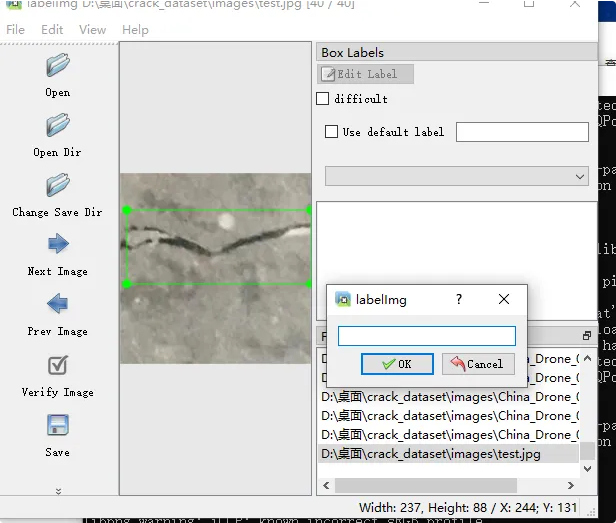
这里这张裂缝是横向的,直接输入 1(如果是纵向就输 0,网状输 2) ,这里的 0/1/2 对应的是我们 data.yaml 中配置的 0/1/2 ,我配置的是1 代表横向
然后点击Save进行保存
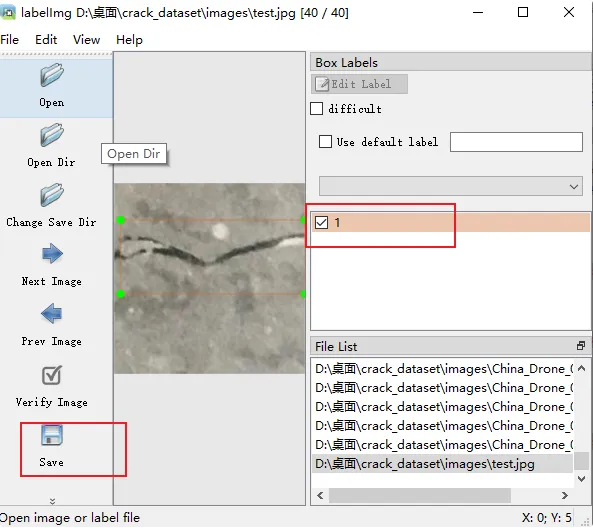
这样,labels 文件夹里就会自动生成 test.txt 文件,标注就完成了!
我们再去训练一下,基于刚才的模型再次训练
bash
yolo train data=data.yaml model=runs/detect/train/weights/best.pt epochs=30 imgsz=640 batch=2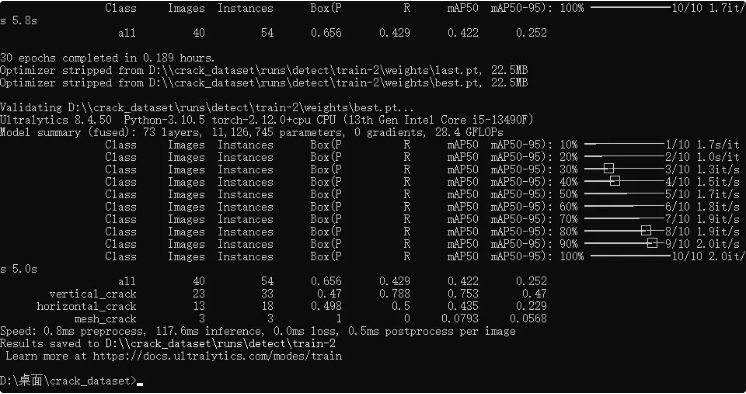
训练完之后的模型放在了 \runs\detect\train-2 目录下
我们用最新的模型验证
bash
yolo predict model=runs/detect/train-2/weights/best.pt source=test.jpg我发现还是识别不了,
我找到了 labels 下面 的classes.txt发现这个文件是空的
我手动维护了内容 与data.yaml中的names做了个对应
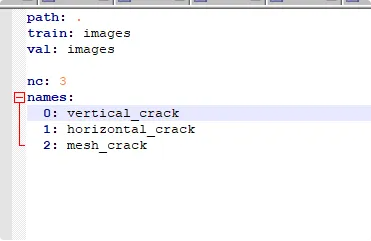
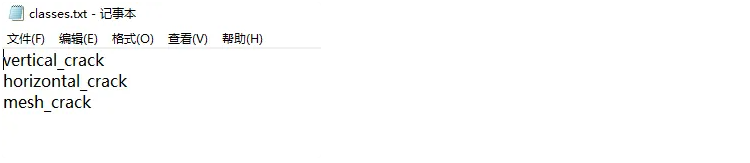
然后我再次重新标注数据
结果一打开数据就闪退了 给我整不会了
解决:
网上有个教程如下解决(我不是这个原因):
找到labelImg文件夹
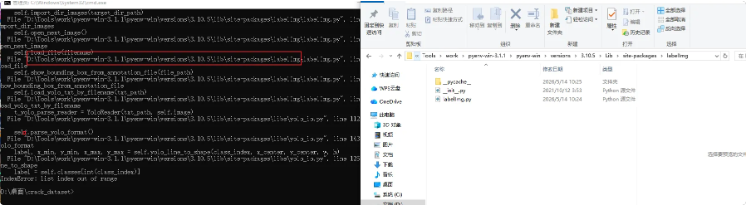
创建一个Data文件夹
在Data下建一个 predefined_classes.txt 文件,将我们标注的那三个类型放进来
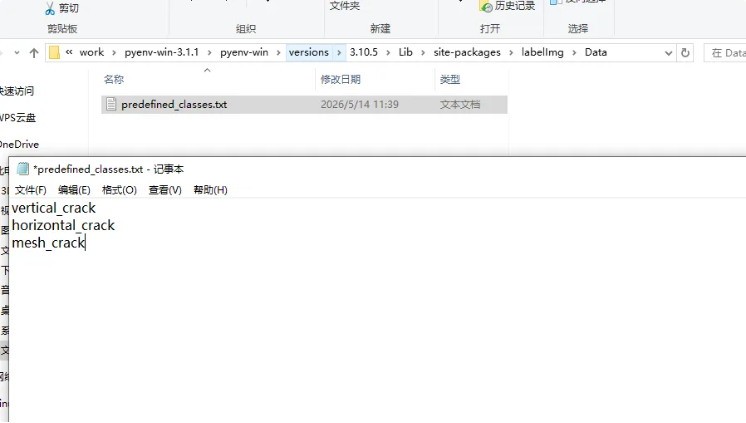
还是不行,结果查了一下发现是因为每次重新打开labelimg就会重置classes.txt文件,同时其中不正确的标签顺序,会导致所画的框图范围超出图片大小而报错,我打开一看果然不一样了,我将我的三个类型复制进去后保存,发现可以打开了
总结:检查classes.txt文件中的类别是否与我们已经标注的类别一直,不然会报错,建议标注前先检查并维护,label的txt文件中的首位数字代表的就是classes.txt文件索引数据,如果缺少了就会异常
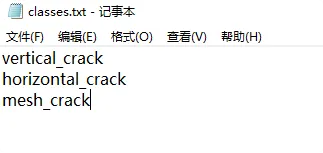
然后重新开始标注
标注
我发现这次进来标注后右侧可选列表将我的三个分类展示出来了,这里选择横向
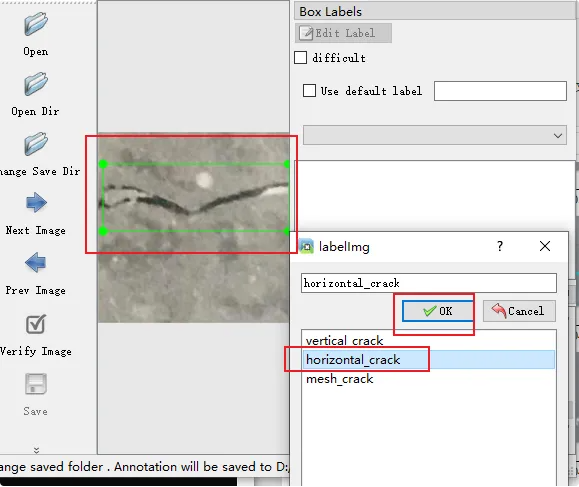
保存
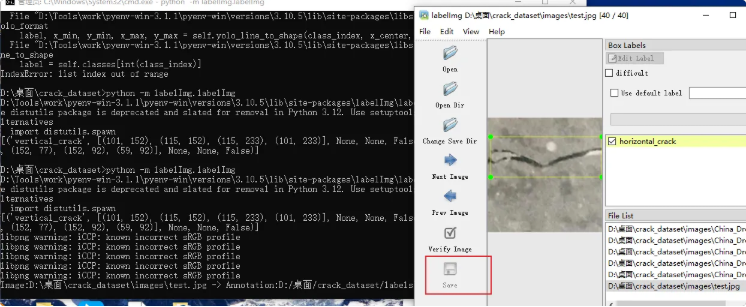
基于现有的Yolo模型进行训练
基于现有模型进行训练命令
bash
yolo train data=data.yaml model=runs/detect/train/weights/best.pt epochs=30 imgsz=640 batch=2再次测试
bash
yolo predict model=runs/detect/train-4/weights/best.pt source=test.jpg结果还是不行 ,百度之后还是因为数据太少 ,我想重复多训练几次,应该能识别出来
我基于 runs/detect/train-4/weights/best.pt 下的模型再次训练
bash
yolo train model=runs/detect/train-4/weights/best.pt data=data.yaml epochs=100 imgsz=640训练出来的 runs/detect/train-5/weights/best.pt 检测还是没有识别
我再次用uns/detect/train-5/weights/best.pt 下的模型训练
bash
yolo train model=runs/detect/train-5/weights/best.pt data=data.yaml epochs=100 imgsz=640得到了 runs/detect/train-6/weights/best.pt
还是没有识别出来,

训练的太慢了,我查看了训练后得到的所有文件,我在想一次训练好多遍就不用这样处理了,
查询发现训练模型的命令中的 epochs 参数就是训练多少遍的意思,比如我这里epochs=100 ,然后我的数据集是40张图片,这命令就是将40张图训练100次, 40 张 × 100 遍 = 4000 次学习 ,而且还发现一个误区,继续训练不是用 best.pt 模型训练,而是用 last.pt 模型训练,
● best.pt 是训练过程中效果最好的那一版模型,训练记忆停在以前, 用来识别、预测、测试 ,不是用来继续训练的
● last.pt 是最新状态,训练到最后一轮停下来的模型 ,拥有最新的学习记忆 ,接着上次学到的地方继续学,专门用来继续训练
学习啥之前还是得先了解理论知识再开始,这弯路走的还挺多
得,用last.pt模型继续训练
bash
yolo train model=runs/detect/train-7/weights/last.pt data=data.yaml epochs=100 imgsz=640我这没有GPU 训练太慢了,优化了一版训练命令
bash
yolo train model=runs/detect/train-8/weights/last.pt data=data.yaml epochs=100 imgsz=640 batch=8 workers=4 cache=ram val=False豆包给的参数解释:
- yolo train
● 作用:启动 YOLO 训练模式
● 意思:告诉程序,我现在要训练模型 - model=runs/detect/train-8/weights/last.pt
● 作用:加载你上一次训练的模型
● 意思:从第 8 次训练的最新权重继续训练,不是从头开始 - data=data.yaml
● 作用:指定你的数据集配置文件
● 意思:告诉 YOLO 你的图片在哪、标签有几类 - epochs=100
● 作用:训练轮数
● 意思:把整个数据集完整看 100 遍 - imgsz=640
● 作用:训练图片尺寸
● 意思:把所有图片缩放到 640×640 训练
● 特点:精度高,但速度比 416 慢一点
❌ 缺点
● 比 416 计算量大很多,训练耗时明显增加。
● 更容易显存吃紧,batch 不能设太大。 - batch=8
● 作用:一次喂给 GPU 8 张图片
● 意思:提高 GPU 利用率,训练速度大幅提升
● 越大越快,但不能超过显存
❌ 缺点 / 副作用
● batch 太大学习率没跟上:容易收敛慢、局部最优、精度微微掉一点。
● 显存紧张时会降频、偶尔卡顿,甚至莫名 loss 震荡。
● 续训(加载 last.pt)突然改 batch,分布偏移,前期几轮会震荡。 - workers=4
● 作用:4 个线程同时加载图片
● 意思:解决 "GPU 等图片" 的问题,速度再快一截
❌ 缺点 / 副作用
● CPU 占用拉高,后台别开别的软件,容易卡。
● Windows 下 workers 设太高容易爆进程、数据加载卡死、报错。
● 小数据集下多线程优势不大,甚至有额外开销。 - cache=ram
● 作用:把数据集全部读到内存里
● 意思:不用反复读硬盘,读取速度提升 10 倍
● 这是提速最大的参数之一
❌ 缺点 / 风险
● 占用大量内存,数据集大的时候容易内存爆满、电脑卡顿、甚至闪退。
● 重启训练就要重新加载一次缓存,开局会卡一小会。
● 内存不够时反而会虚拟内存兜底,速度变慢、还伤硬盘。 - val=False
● 作用:关闭验证环节
● 意思:训练时不做测试,节省 30%~50% 时间
● 适合快速训练、调试模型
❌ 缺点 / 风险
● 你看不到每轮 mAP、精确率、召回率,不知道模型什么时候过拟合、什么时候收敛。
● 只能看 loss,没法判断实际检测效果。
● 容易训到后面过拟合了你都不知道,白白浪费轮数。
先试一试看看效果
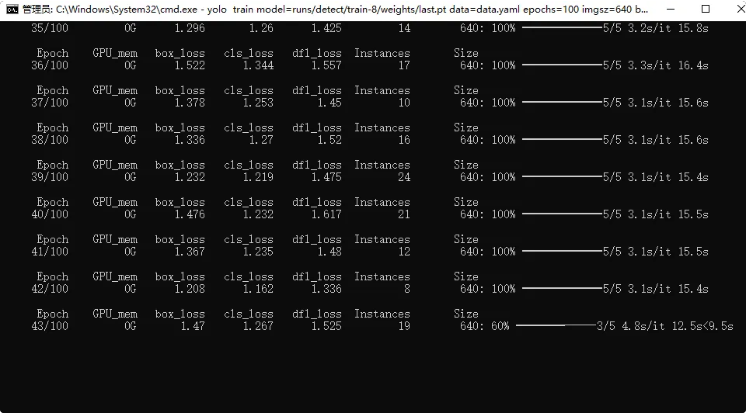
完事开始检测
bash
yolo predict model=runs/detect/train-9/weights/best.pt source=images/test.jpg检测出来了
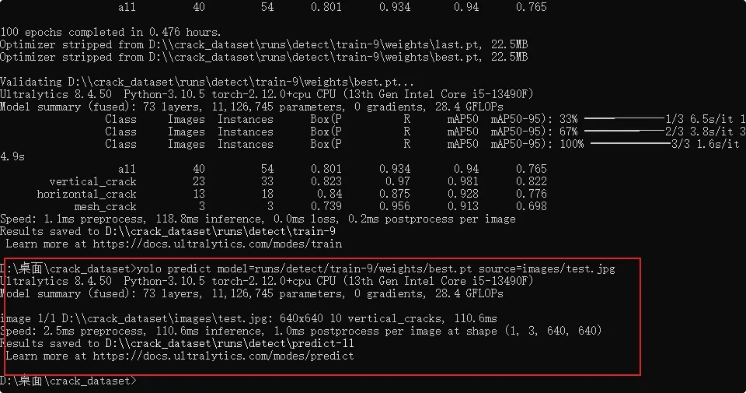
就是怎么一下检测出来10条裂缝呢,检测重叠了的感觉
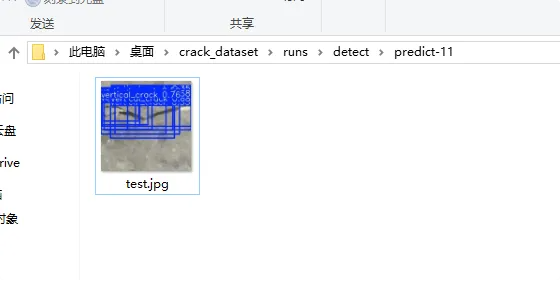
AI给我的答复是因为我检测使用的命令需要调整下
bash
yolo predict model=runs/detect/train-9/weights/best.pt source=images/test.jpg conf=0.6 iou=0.4我试了下发现 识别出了3条裂缝
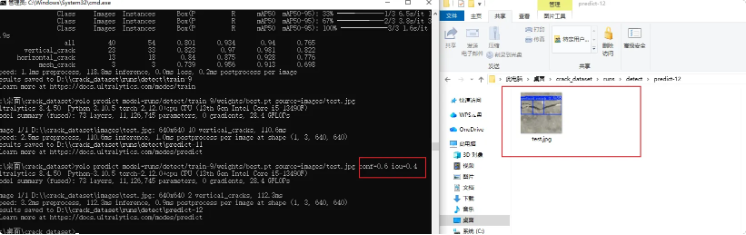
但是还是没有达到我想要的效果,我们用python脚本进行处理验证
创建 merge_crack.py 脚本
bash
from ultralytics import YOLO
import cv2
import numpy as np

# 加载你的模型
model = YOLO("runs/detect/train-9/weights/best.pt")

# 预测图片
img_path = "images/test.jpg"
results = model.predict(img_path, conf=0.6, iou=0.4)

img = cv2.imread(img_path)
h, w = img.shape[:2]

# ==================== 核心:连续裂缝合并算法 ====================
def boxes_to_contours(boxes):
    contours = []
    for box in boxes:
        x1, y1, x2, y2 = box
        cnt = np.array([[x1,y1], [x2,y1], [x2,y2], [x1,y2]], dtype=np.int32).reshape(-1,1,2)
        contours.append(cnt)
    return contours

def merge_connected_boxes(boxes, threshold=30):
    if len(boxes) == 0:
        return []

    # 创建掩码
    mask = np.zeros((h, w), dtype=np.uint8)
    contours = boxes_to_contours(boxes)
    cv2.drawContours(mask, contours, -1, 255, thickness=cv2.FILLED)

    # 膨胀连接靠近的框(裂缝专用!)
    kernel = cv2.getStructuringElement(cv2.MORPH_RECT, (threshold, threshold))
    mask = cv2.dilate(mask, kernel, iterations=1)

    # 找连通域
    num_labels, labels, stats, centroids = cv2.connectedComponentsWithStats(mask, connectivity=4)

    merged_boxes = []
    for i in range(1, num_labels):
        x = stats[i, cv2.CC_STAT_LEFT]
        y = stats[i, cv2.CC_STAT_TOP]
        ww = stats[i, cv2.CC_STAT_WIDTH]
        hh = stats[i, cv2.CC_STAT_HEIGHT]
        merged_boxes.append([x, y, x+ww, y+hh])

    return merged_boxes
# =================================================================

# 获取预测框
boxes = results[0].boxes.xyxy.cpu().numpy().tolist()

# 合并连续裂缝(关键!)
merged_boxes = merge_connected_boxes(boxes, threshold=30)

# 画结果
for (x1, y1, x2, y2) in merged_boxes:
    cv2.rectangle(img, (int(x1), int(y1)), (int(x2), int(y2)), (0, 255, 0), 2)
    cv2.putText(img, "crack", (int(x1), int(y1)-10), cv2.FONT_HERSHEY_SIMPLEX, 0.6, (0,255,0), 2)

# 保存
cv2.imwrite("result_merged.jpg", img)
print(f"✅ 合并完成!最终检测到 {len(merged_boxes)} 个裂缝(连续已合并)")
执行 :
bash
python merge_crack.py合并了,只有一条裂缝,完美
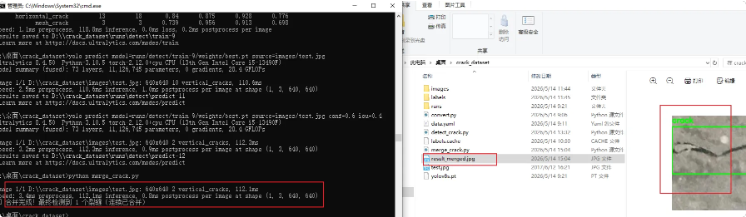
开源数据集
已经标注好的数据集:
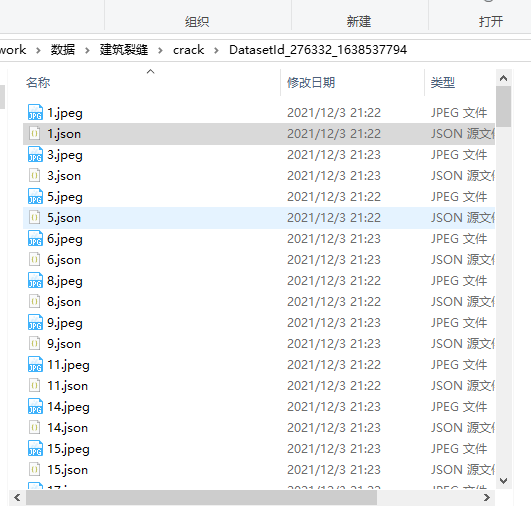
用这个数据训练yolo是需要转换的,但是这个数据不能用来连我之前的模型,因为标注类不同,需要自己修改重新按照原分类进行标注兼容后才能继续训练,我这里为了方便拿新的模型做的
转换脚本:convert_json_to_yolo.py
bash
import json
import os

def convert_json_to_yolo(json_path, img_size=(1024, 1024), class_names=["crack"]):
    try:
        with open(json_path, 'r', encoding='utf-8') as f:
            data = json.load(f)
    except Exception as e:
        print(f"❌ 读取失败 {json_path}: {e}")
        return

    img_w, img_h = img_size
    yolo_lines = []

    for label in data.get("labels", []):
        try:
            name = label["name"]
            class_id = class_names.index(name)
            x1, y1, x2, y2 = label["x1"], label["y1"], label["x2"], label["y2"]

            x_center = (x1 + x2) / 2.0
            y_center = (y1 + y2) / 2.0
            w = x2 - x1
            h = y2 - y1

            x_center_norm = x_center / img_w
            y_center_norm = y_center / img_h
            w_norm = w / img_w
            h_norm = h / img_h

            x_center_norm = max(0.0, min(1.0, x_center_norm))
            y_center_norm = max(0.0, min(1.0, y_center_norm))
            w_norm = max(0.0, min(1.0, w_norm))
            h_norm = max(0.0, min(1.0, h_norm))

            line = f"{class_id} {x_center_norm:.6f} {y_center_norm:.6f} {w_norm:.6f} {h_norm:.6f}"
            yolo_lines.append(line)
        except Exception as e:
            print(f"❌ 解析标签失败: {e}")

    txt_path = os.path.splitext(json_path)[0] + ".txt"
    with open(txt_path, 'w', encoding='utf-8') as f:
        f.write("\n".join(yolo_lines))
    print(f"✅ 转换成功: {txt_path}")

def batch_convert(folder_path, img_size=(1024, 1024), class_names=["crack"]):
    print(f"🔍 正在扫描文件夹: {folder_path}")
    found_json = False

    for root, _, files in os.walk(folder_path):
        for file in files:
            if file.lower().endswith(".json"):
                found_json = True
                json_path = os.path.join(root, file)
                print(f"找到JSON文件: {json_path}")
                convert_json_to_yolo(json_path, img_size, class_names)

    if not found_json:
        print("❌ 错误:当前文件夹里没有找到任何 .json 文件!")

if __name__ == "__main__":
    # ✅ 这一行必须改成你自己的路径!
    data_folder = r"D:\桌面\work\数据\建筑裂缝\crack\DatasetId_276332_1638537794"
    batch_convert(data_folder)
执行脚本转换完成会生成txt文件
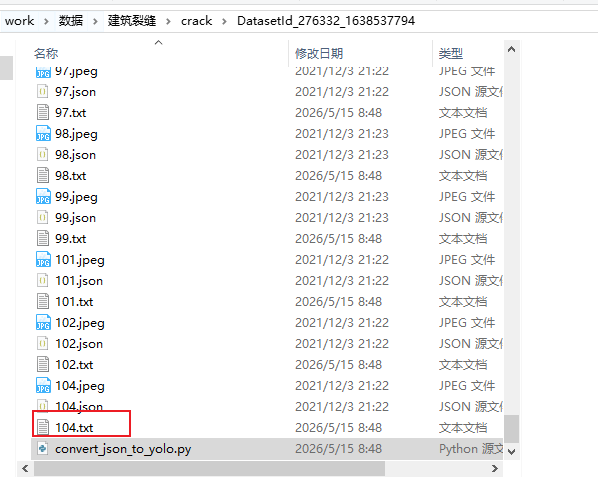
训练 前我们还要将数据进行分组划分训练集和验证集(按 8:2 比例)
我们新建crack_dataset 文件夹用来存储,创建split_dataset.py分组脚本
bash
import os
import random
import shutil

# ====================== 你只需要改这2个路径 ======================
# 你的原始图片+txt所在文件夹
src_dir = r"D:\桌面\work\数据\建筑裂缝\crack\DatasetId_276332_1638537794"
# 自动生成的YOLO数据集存放位置
dataset_root = r"D:\桌面\work\数据\建筑裂缝\crack_dataset"
# ==============================================================

# 自动创建文件夹
os.makedirs(f"{dataset_root}/images/train", exist_ok=True)
os.makedirs(f"{dataset_root}/images/val", exist_ok=True)
os.makedirs(f"{dataset_root}/labels/train", exist_ok=True)
os.makedirs(f"{dataset_root}/labels/val", exist_ok=True)

# 获取所有图片
images = [f for f in os.listdir(src_dir) if f.endswith(".jpeg")]
random.shuffle(images)

# 8:2 划分训练集/验证集
split_idx = int(len(images) * 0.8)
train_imgs = images[:split_idx]
val_imgs = images[split_idx:]

# 复制文件
for img in train_imgs:
    shutil.copy(os.path.join(src_dir, img), f"{dataset_root}/images/train/{img}")
    txt_file = img.replace(".jpeg", ".txt")
    shutil.copy(os.path.join(src_dir, txt_file), f"{dataset_root}/labels/train/{txt_file}")

for img in val_imgs:
    shutil.copy(os.path.join(src_dir, img), f"{dataset_root}/images/val/{img}")
    txt_file = img.replace(".jpeg", ".txt")
    shutil.copy(os.path.join(src_dir, txt_file), f"{dataset_root}/labels/val/{txt_file}")

print(f"✅ 划分完成!")
print(f"训练集:{len(train_imgs)} 张")
print(f"验证集:{len(val_imgs)} 张")
print(f"数据集路径:{dataset_root}")
input("按回车键退出...")
创建 crack.yaml 用来训练
bash
path: .
train: images/train
val: images/val

nc: 1
names:
  0: crack
训练
bash
yolo detect train model=yolov8s.pt data=crack.yaml epochs=100 imgsz=640无标注数据
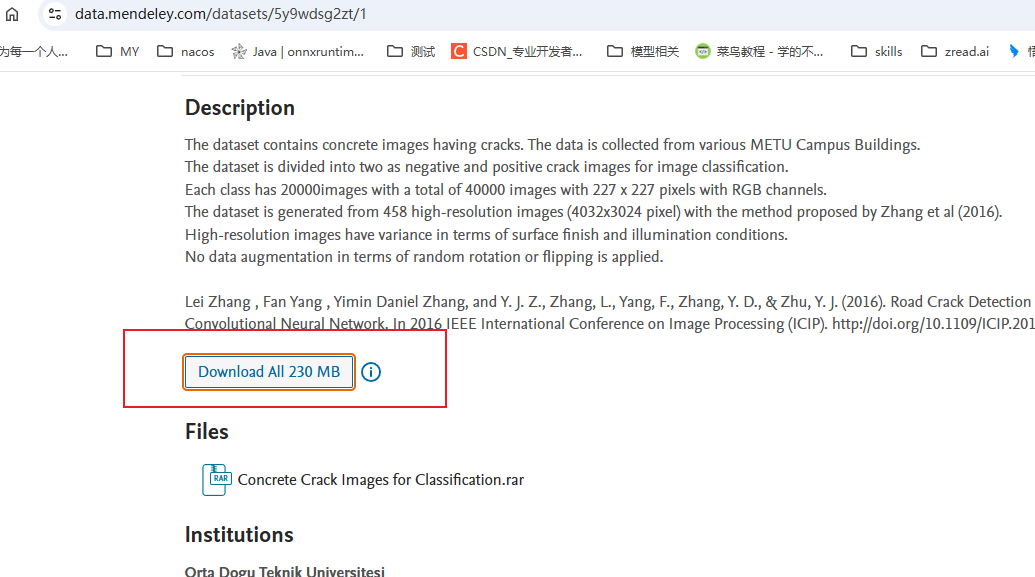
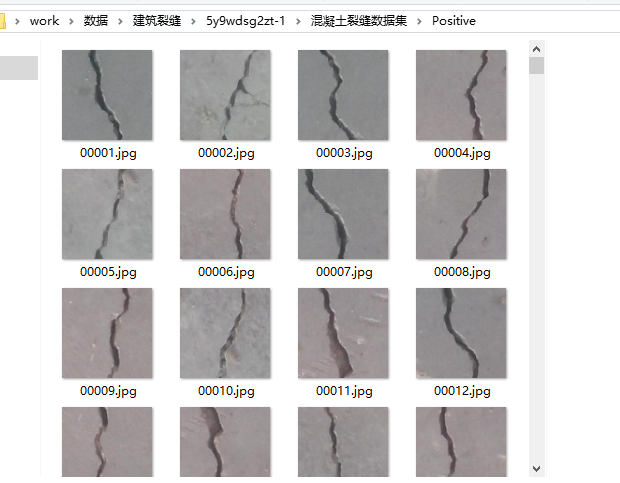
这些数据可以下载下来自己标注