文章目录
winscope在机器中的路径为/data/misc/wmtrace,关于截图如下所示
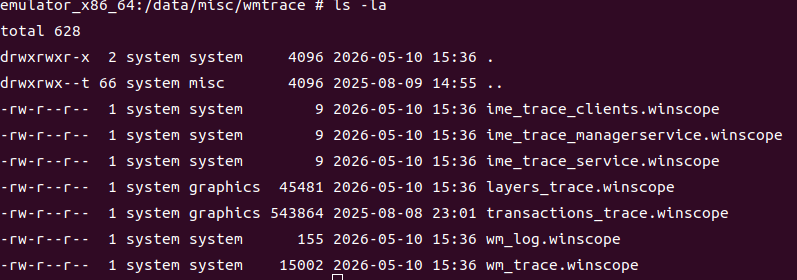
这里重点关注下wm_trace.winscope和layers_trace.winscope。
针对生成的文件的加载需要使用源码路径为
bash
prebuilts/misc/common/winscope/winscope.htmlwm_trace.winscope
抓取的是window信息
java
		private IWindowManager mWindowManager;
		mWindowManager = WindowManagerGlobal.getWindowManagerService();
		// 调用方法 isEnabled true->startWindowTrace,false->stopWindowTrace
        private void setWindowTraceEnabled(boolean isEnabled) {
            try {
                if (isEnabled) {
                    mWindowManager.startWindowTrace();
                } else {
                    mWindowManager.stopWindowTrace();
                }
            } catch (RemoteException e) {
                Log.e(TAG, "Could not set window trace status." + e.toString());
            }
        }
layers_trace.winscope
抓取的是SurfaceFlinger信息
java
        @VisibleForTesting
        static final int SURFACE_FLINGER_LAYER_TRACE_CONTROL_CODE = 1025;
        private IBinder mSurfaceFlinger;
        private void setLayerTraceEnabled(boolean isEnabled) {
            Parcel data = null;
            try {
                if (mSurfaceFlinger != null) {
                    data = Parcel.obtain();
                    data.writeInterfaceToken("android.ui.ISurfaceComposer");
                    data.writeInt(isEnabled ? 1 : 0);
                    mSurfaceFlinger.transact(SURFACE_FLINGER_LAYER_TRACE_CONTROL_CODE,
                            data, null, 0 /* flags */);
                }
            } catch (RemoteException e) {
                Log.e(TAG, "Could not set layer tracing." + e.toString());
            } finally {
                if (data != null) {
                    data.recycle();
                }
            }
        }
adb 命令抓取
bash
# 开始抓取
adb shell su root service call SurfaceFlinger 1025 i32 1
# 结束抓取
adb shell su root service call SurfaceFlinger 1025 i32 0