OpenStack块存储管理-cinder
cinder的配置文件位置:/etc/cinder
cinder的日志文件位置:/var/log/cidner
openstack存储类型
从数据保存时间的角度分为两类:临时存储(非持久存储)和持久存储
Cinder作用
Cinder在虚拟机与具体存储设备之间引入了一层"逻辑存储卷"的抽象,Cinder本身不是一种存储技术,并
没有实现对块设备的实际管理和服务
Cinder只是提供了一个中间的抽象层,为后端不同的存储技术,提供了统一的接口
Cinder架构
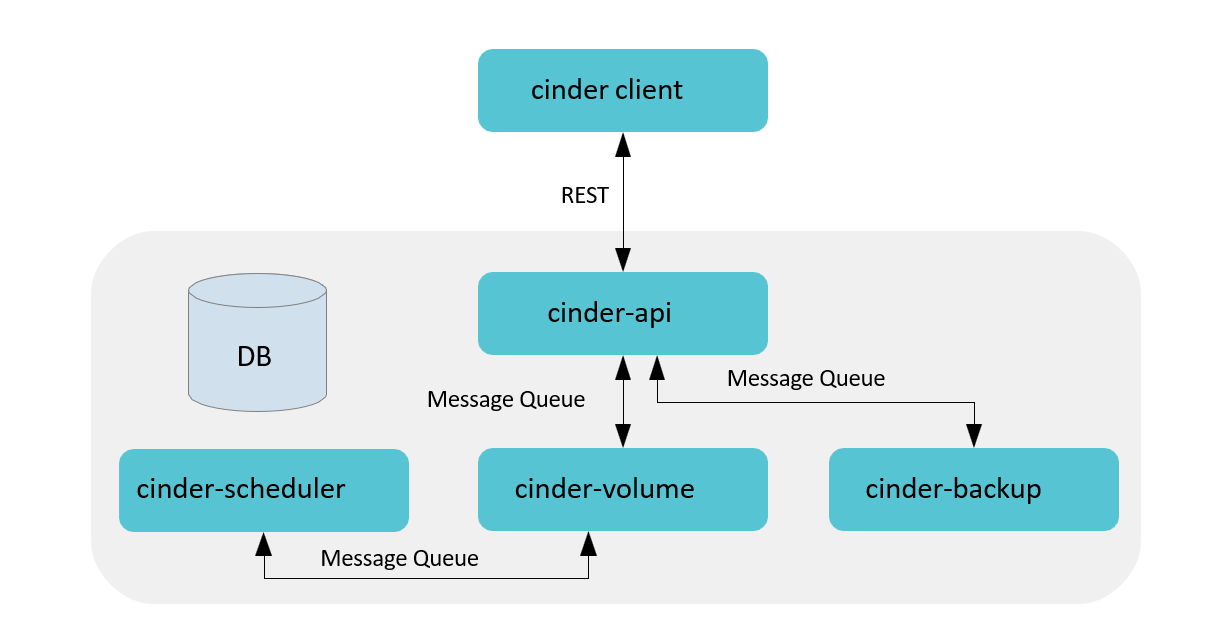
•Cinder Client封装Cinder提供的rest接口,以CLI形式供用户使用。
•Cinder API对外提供rest API,对操作需求进行解析,对API进行路由寻找相应的处理方法。包含卷的增
删改查(包括从源卷、镜像、快照创建)、快照增删改查、备份、volume type管理、挂载/卸载(Nova
调用)等。
•Cinder Scheduler负责收集backend上报的容量、能力信息,根据设定的算法完成卷到指定cinder-volume的调度。
•Cinder Volume多节点部署,使用不同的配置文件、接入不同的backend设备,由各存储厂商插入
driver代码与设备交互完成设备容量和能力信息收集、卷操作。
•Cinder Backup实现将卷的数据备份到其他存储介质(目前SWIFT/Ceph/TSM提供了驱动)。
•SQL DB提供存储卷、快照、备份、service等数据,支持MySQL、PG、MSSQL等SQL数据库。
查看cinder-volume默认支持的存储设备:
bash
[root@controller ~]# cd /usr/lib/python3.6/site-packages/cinder/volume/drivers/
[root@controller drivers]# ls
datera huawei lenovo nfs.py rbd.py
storpool.py windows
dell_emc ibm linstordrv.py nimble.py remotefs.py stx
zadara.py
fujitsu infinidat.py lvm.py prophetstor rsd.py synology
fusionstorage infortrend macrosan pure.py san
veritas_access
hedvig __init__.py nec __pycache__ sandstone
veritas_cnfs.py
hitachi inspur netapp qnap.py solidfire.py vmware
hpe kaminario nexenta quobyte.py spdk.py
vzstorage.py
Cinder默认使用LVM作为后端存储),而LVM通过在操作系统与物理存储资源之间引入逻辑卷(Logical Volume)的抽象来解决传统磁盘分区管理工具的问题。
LVM将众多不同的物理存储资源(物理卷、Physical Volume,如磁盘分区)组成卷组。LVM从卷组中
创建一个逻辑卷,然后将ext3、ReiserFS等文件系统安装在这个逻辑卷上。
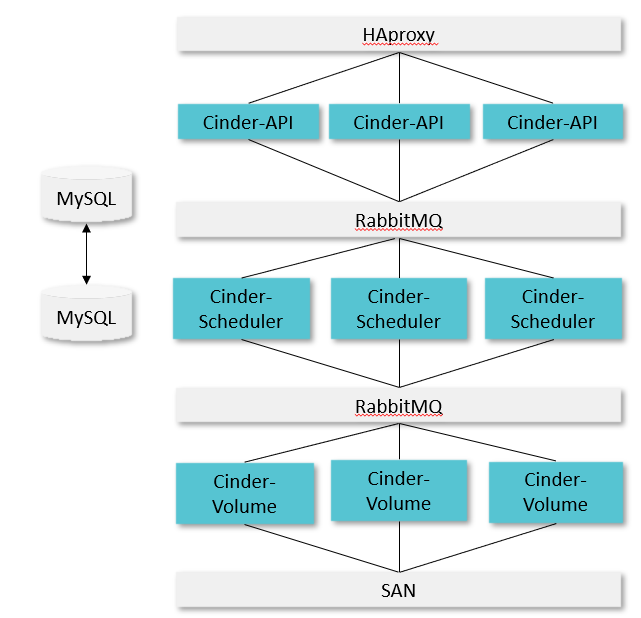
Cinder架构部署:以SAN存储为例
Cinder-api
检查参数合法性(用户输入,权限,资源是否存在等)
准备创建的参数字典,预留和提交配额
在数据库中创建对应的数据记录
通过消息队列将请求和参数发送到Scheduler
查看cinder API服务状态:
bash
[root@controller ~]# systemctl status openstack-cinder-api.serviceCinder-scheduler
Cinder Scheduler服务
通过配置的filter和输入参数对后端进行过滤
Weigher计算后端进行权重
查看配置文件:
bash
[root@controller ~]# cd /etc/cinder/
[root@controller cinder]# ls
api-paste.ini cinder.conf resource_filters.json rootwrap.conf rootwrap.d
volumes
[root@controller cinder]# vim cinder.conf
592 #scheduler_default_filters =
AvailabilityZoneFilter,CapacityFilter,CapabilitiesFilter
593
595 #scheduler_default_weighers = CapacityWeigher
596
601 # Default scheduler driver to use (string value)
602 #scheduler_driver = cinder.scheduler.filter_scheduler.FilterScheduler
AvailabilityZoneFilter
为提高容灾性和提供隔离服务,可以将存储节点和计算节点划分到不同的 Availability Zone 中。例如把
一个机架上的机器划分在一个 Availability Zone 中。
配置cinder配置文件cinder.conf
bash
[root@controller ~]# cd /etc/cinder/
[root@controller cinder]# ls
api-paste.ini cinder.conf resource_filters.json rootwrap.conf rootwrap.d
volumes
[root@controller cinder]# vim cinder.conf
592 scheduler_default_filters =
AvailabilityZoneFilter,CapacityFilter,CapabilitiesFilter
#该配置文件的节点的AZ设置为az1
395 storage_availability_zone=az1
#创建卷时,不指定az默认使用nova AZ
401 default_availability_zone=nova
[root@controller cinder]# systemctl restart openstack-cinder*
验证AZ实验:
bash
#cinder.conf配置文件配置401 default_availability_zone=nova,创建卷时不指定AZ则使用nova
AZ,而该节点属于az1 AZ,创建失败
[root@controller ~]# source keystonerc_admin
[root@controller ~(keystone_admin)]# openstack volume create --size 1 volume1
Availability zone 'nova' is invalid. (HTTP 400) (Request-ID: req-c4e2d4d1-d299-
4267-b2a1-22fcd676a6ea)
#cinder配置文件配置395 storage_availability_zone=az1,该节点属于AZ az1节点,创建AZ az2
卷,被AvailabilityZoneFilter过滤
[root@controller ~(keystone_admin)]# openstack volume create --size 1 --
availability-zone az2 volume1
Availability zone 'az2' is invalid. (HTTP 400) (Request-ID: req-749dad9d-d5fb-
4122-95aa-ab03d0c5a955)
#cinder配置文件配置395 storage_availability_zone=az1,该节点属于AZ az1节点,创建AZ az1
卷,创建成功
[root@controller ~(keystone_admin)]# openstack volume create --size 1 --
availability-zone az1 volume1
+---------------------+--------------------------------------+
| Field | Value |
+---------------------+--------------------------------------+
| attachments | [] |
| availability_zone | az1 |
| bootable | false |
| consistencygroup_id | None |
| created_at | 2024-09-27T06:02:35.368543 |
| description | None |
| encrypted | False |
| id | 43746d03-a0c5-4232-8f1b-6023ffe83545 |
| migration_status | None |
| multiattach | False |
| name | volume1 |
| properties | |
| replication_status | None |
| size | 1 |
| snapshot_id | None |
| source_volid | None |
| status | creating |
| type | iscsi |
| updated_at | None |
| user_id | 7ef9147a8abe485889ece90dce340ab1 |
+---------------------+--------------------------------------+
CapacityFilter
创建 Volume 时,用户会指定 Volume 的大小。CapacityFilter 的作用是将存储空间不能满足 Volume 创
建需求的存储节点过滤掉。
CapabilitiesFilter
不同的 Volume Provider 有自己的特性(Capabilities),比如是否支持 thin provision 等。Cinder 允
许用户创建 Volume 时通过 Volume Type 指定需要的 Capabilities。
Cinder-volume
Cinder Volume服务
提取接收到的请求参数
调用对应的Driver在后端创建实际的卷
使用Driver返回的模型更新数据库中的记录
Cinder挂载流程
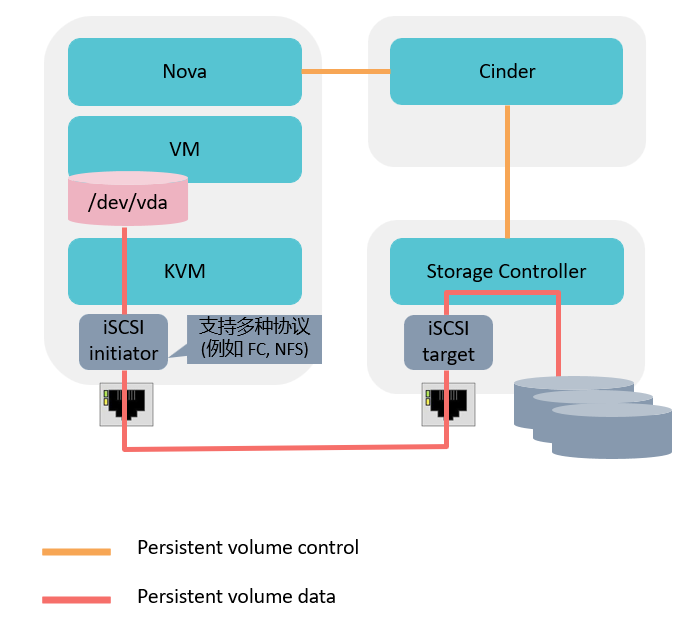
挂卷流程: 挂卷是通过Nova和Cinder的配合最终将远端的卷连接到虚拟机所在的Host节点上,并最终
通过虚拟机管理程序映射到内部的虚拟机中
•Nova调用Cinder API创建卷,传递主机的信息。
•Cinder API将该信息传递给Cinder Volume。
•Cinder Volume通过创建卷时保存的host信息找到对应的Cinder Driver。
•Cinder Driver通知存储允许该主机访问该卷,并返回该存储的连接信息。
•Nova调用针对于不同存储类型进行主机识别磁盘的代码,实现识别磁盘或者文件设备。
•Nova通知Cinder已经进行了挂载。
•Nova将主机的设备信息传递给hypervisor来实现虚拟机挂载磁盘。
OpenStack对象存储-Swift
Swift并不是文件系统或者实时的数据存储系统,它称为对象存储,用于永久类型的静态数据的长期
存储,这些数据可以检索、调整,必要时进行更新
最适合存储的数据类型的例子是虚拟机镜像、图片存储、邮件存储和存档备份
因为没有中心单元或主控结点,Swift提供了更强的扩展性、冗余和持久性
Swift实验
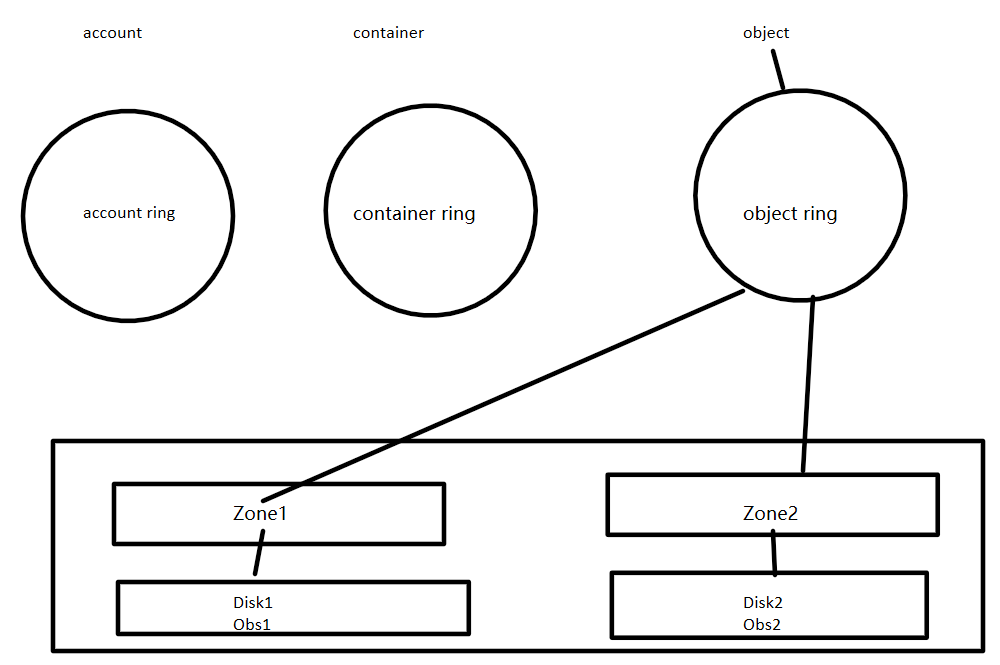
控制节点新添加一块20GB磁盘
一。新添磁盘分成两个区,并格式化
分区一:挂载到obs1目录
分区二:挂载到obs2目录
bash
[root@controller ~]# lsblk
NAME                                          MAJ:MIN RM   SIZE RO TYPE MOUNTPOINT
loop0                                           7:0    0     2G  0 loop /srv/node/swiftloopback
loop1                                           7:1    0  20.6G  0 loop
├─cinder--volumes-cinder--volumes--pool_tmeta 253:3    0    20M  0 lvm
│ └─cinder--volumes-cinder--volumes--pool     253:5    0  19.6G  0 lvm
└─cinder--volumes-cinder--volumes--pool_tdata 253:4    0  19.6G  0 lvm
  └─cinder--volumes-cinder--volumes--pool     253:5    0  19.6G  0 lvm
sda                                             8:0    0   200G  0 disk
├─sda1                                          8:1    0     1G  0 part /boot
└─sda2                                          8:2    0   199G  0 part
  ├─cs-root                                   253:0    0    70G  0 lvm  /
  ├─cs-swap                                   253:1    0   3.9G  0 lvm  [SWAP]
  └─cs-home                                   253:2    0 125.1G  0 lvm  /home
sdb                                             8:16   0    20G  0 disk
sr0                                            11:0    1  1024M  0 rom
##创建分区
[root@controller ~]# fdisk /dev/sdb

Welcome to fdisk (util-linux 2.32.1).
Changes will remain in memory only, until you decide to write them.
Be careful before using the write command.

Device does not contain a recognized partition table.
Created a new DOS disklabel with disk identifier 0xe4458203.

Command (m for help): n
Partition type
   p   primary (0 primary, 0 extended, 4 free)
   e   extended (container for logical partitions)
Select (default p): p
Partition number (1-4, default 1): 1
First sector (2048-41943039, default 2048):
Last sector, +sectors or +size{K,M,G,T,P} (2048-41943039, default 41943039): +10G

Created a new partition 1 of type 'Linux' and of size 10 GiB.

Command (m for help): n
Partition type
   p   primary (1 primary, 0 extended, 3 free)
   e   extended (container for logical partitions)
Select (default p): p
Partition number (2-4, default 2): 2
First sector (20973568-41943039, default 20973568):
Last sector, +sectors or +size{K,M,G,T,P} (20973568-41943039, default 41943039):

Created a new partition 2 of type 'Linux' and of size 10 GiB.

Command (m for help): w
The partition table has been altered.
Calling ioctl() to re-read partition table.
Syncing disks.

[root@controller ~]# lsblk
NAME                                          MAJ:MIN RM   SIZE RO TYPE MOUNTPOINT
loop0                                           7:0    0     2G  0 loop /srv/node/swiftloopback
loop1                                           7:1    0  20.6G  0 loop
├─cinder--volumes-cinder--volumes--pool_tmeta 253:3    0    20M  0 lvm
│ └─cinder--volumes-cinder--volumes--pool     253:5    0  19.6G  0 lvm
└─cinder--volumes-cinder--volumes--pool_tdata 253:4    0  19.6G  0 lvm
  └─cinder--volumes-cinder--volumes--pool     253:5    0  19.6G  0 lvm
sda                                             8:0    0   200G  0 disk
├─sda1                                          8:1    0     1G  0 part /boot
└─sda2                                          8:2    0   199G  0 part
  ├─cs-root                                   253:0    0    70G  0 lvm  /
  ├─cs-swap                                   253:1    0   3.9G  0 lvm  [SWAP]
  └─cs-home                                   253:2    0 125.1G  0 lvm  /home
sdb                                             8:16   0    20G  0 disk
├─sdb1                                          8:17   0    10G  0 part
└─sdb2                                          8:18   0    10G  0 part
sr0                                            11:0    1  1024M  0 rom
##格式化
[root@controller ~]# mkfs.xfs /dev/sdb1
meta-data=/dev/sdb1              isize=512    agcount=4, agsize=655360 blks
         =                       sectsz=512   attr=2, projid32bit=1
         =                       crc=1        finobt=1, sparse=1, rmapbt=0
         =                       reflink=1    bigtime=0 inobtcount=0
data     =                       bsize=4096   blocks=2621440, imaxpct=25
         =                       sunit=0      swidth=0 blks
naming   =version 2              bsize=4096   ascii-ci=0, ftype=1
log      =internal log           bsize=4096   blocks=2560, version=2
         =                       sectsz=512   sunit=0 blks, lazy-count=1
realtime =none                   extsz=4096   blocks=0, rtextents=0
[root@controller ~]# mkfs.xfs /dev/sdb2
meta-data=/dev/sdb2              isize=512    agcount=4, agsize=655296 blks
         =                       sectsz=512   attr=2, projid32bit=1
         =                       crc=1        finobt=1, sparse=1, rmapbt=0
         =                       reflink=1    bigtime=0 inobtcount=0
data     =                       bsize=4096   blocks=2621184, imaxpct=25
         =                       sunit=0      swidth=0 blks
naming   =version 2              bsize=4096   ascii-ci=0, ftype=1
log      =internal log           bsize=4096   blocks=2560, version=2
         =                       sectsz=512   sunit=0 blks, lazy-count=1
realtime =none                   extsz=4096   blocks=0, rtextents=0
##下面为默认挂给swift的虚拟设备分区,将其卸载
[root@controller ~]# umount /srv/node/swiftloopback
[root@controller ~]# lsblk
NAME                                          MAJ:MIN RM   SIZE RO TYPE MOUNTPOINT
loop1                                           7:1    0  20.6G  0 loop
├─cinder--volumes-cinder--volumes--pool_tmeta 253:3    0    20M  0 lvm
│ └─cinder--volumes-cinder--volumes--pool     253:5    0  19.6G  0 lvm
└─cinder--volumes-cinder--volumes--pool_tdata 253:4    0  19.6G  0 lvm
  └─cinder--volumes-cinder--volumes--pool     253:5    0  19.6G  0 lvm
sda                                             8:0    0   200G  0 disk
├─sda1                                          8:1    0     1G  0 part /boot
└─sda2                                          8:2    0   199G  0 part
  ├─cs-root                                   253:0    0    70G  0 lvm  /
  ├─cs-swap                                   253:1    0   3.9G  0 lvm  [SWAP]
  └─cs-home                                   253:2    0 125.1G  0 lvm  /home
sdb                                             8:16   0    20G  0 disk
├─sdb1                                          8:17   0    10G  0 part
└─sdb2                                          8:18   0    10G  0 part
sr0                                            11:0    1  1024M  0 rom
[root@controller ~]# cd /srv/node/
[root@controller node]# ls
swiftloopback
[root@controller node]# rm -rf swiftloopback/
[root@controller node]# mkdir obs1 obs2
##配置挂载文件,将obs1--sdb1,obs2--sdb2分别挂载关联
[root@controller node]# vim /etc/fstab
[root@controller node]# mount -a
mount: /srv/node/swiftloopback: mount point does not exist.
mount: (hint) your fstab has been modified, but systemd still uses
       the old version; use 'systemctl daemon-reload' to reload.
[root@controller node]# lsblk
NAME                                          MAJ:MIN RM   SIZE RO TYPE MOUNTPOINT
loop1                                           7:1    0  20.6G  0 loop
├─cinder--volumes-cinder--volumes--pool_tmeta 253:3    0    20M  0 lvm
│ └─cinder--volumes-cinder--volumes--pool     253:5    0  19.6G  0 lvm
└─cinder--volumes-cinder--volumes--pool_tdata 253:4    0  19.6G  0 lvm
  └─cinder--volumes-cinder--volumes--pool     253:5    0  19.6G  0 lvm
sda                                             8:0    0   200G  0 disk
├─sda1                                          8:1    0     1G  0 part /boot
└─sda2                                          8:2    0   199G  0 part
  ├─cs-root                                   253:0    0    70G  0 lvm  /
  ├─cs-swap                                   253:1    0   3.9G  0 lvm  [SWAP]
  └─cs-home                                   253:2    0 125.1G  0 lvm  /home
sdb                                             8:16   0    20G  0 disk
├─sdb1                                          8:17   0    10G  0 part /srv/node/obs1
└─sdb2                                          8:18   0    10G  0 part /srv/node/obs2
sr0                                            11:0    1  1024M  0 rom

##修改obs1目录和obs2目录权限
[root@controller node]# chown swift:swift obs1
[root@controller node]# chown swift:swift obs2
[root@controller node]# ll
total 0
drwxr-xr-x 2 swift swift 6 May 20 11:44 obs1
drwxr-xr-x 2 swift swift 6 May 20 11:44 obs2


##创建swfit ring:
[root@controller node]# cd /etc/swift/
[root@controller swift]# ls
account.builder      backups                    container-server       object-expirer.conf  proxy-server
account.ring.gz      container.builder          container-server.conf  object.ring.gz       proxy-server.conf
account-server       container-reconciler.conf  internal-client.conf   object-server        swift.conf
account-server.conf  container.ring.gz          object.builder         object-server.conf

##创建ring映射关系:
[root@controller swift]# swift-ring-builder container.builder create 12 2 1
[root@controller swift]# swift-ring-builder account.builder create 12 2 1
[root@controller swift]# swift-ring-builder object.builder create 12 2 1
[root@controller swift]# cat account-server.conf | grep bind_port
bind_port = 6002
[root@controller swift]# cat container-server.conf | grep bind_port
bind_port = 6001
[root@controller swift]# cat object-server.conf | grep bind_port
bind_port = 6000
[root@controller swift]# swift-ring-builder account.builder add z1-192.168.108.10:6002/obs1 100
WARNING: No region specified for z1-192.168.108.10:6002/obs1. Defaulting to region 1.
Device d0r1z1-192.168.108.10:6002R192.168.108.10:6002/obs1_"" with 100.0 weight got id 0
[root@controller swift]# swift-ring-builder account.builder add z2-192.168.108.10:6002/obs2 100
WARNING: No region specified for z2-192.168.108.10:6002/obs2. Defaulting to region 1.
Device d1r1z2-192.168.108.10:6002R192.168.108.10:6002/obs2_"" with 100.0 weight got id 1
[root@controller swift]# swift-ring-builder container.builder add z1-192.168.108.10:6001/obs1 100
WARNING: No region specified for z1-192.168.108.10:6001/obs1. Defaulting to region 1.
Device d0r1z1-192.168.108.10:6001R192.168.108.10:6001/obs1_"" with 100.0 weight got id 0
[root@controller swift]# swift-ring-builder container.builder add z2-192.168.108.10:6001/obs2 100
WARNING: No region specified for z2-192.168.108.10:6001/obs2. Defaulting to region 1.
Device d1r1z2-192.168.108.10:6001R192.168.108.10:6001/obs2_"" with 100.0 weight got id 1
[root@controller swift]# swift-ring-builder object.builder add z1-192.168.108.10:6000/obs1 100
WARNING: No region specified for z1-192.168.108.10:6000/obs1. Defaulting to region 1.
Device d0r1z1-192.168.108.10:6000R192.168.108.10:6000/obs1_"" with 100.0 weight got id 0
[root@controller swift]# swift-ring-builder object.builder add z2-192.168.108.10:6000/obs2 100
WARNING: No region specified for z2-192.168.108.10:6000/obs2. Defaulting to region 1.
Device d1r1z2-192.168.108.10:6000R192.168.108.10:6000/obs2_"" with 100.0 weight got id 1

##再平衡:
[root@controller swift]# swift-ring-builder account.builder rebalance
Reassigned 8192 (200.00%) partitions. Balance is now 0.00.  Dispersion is now 0.00
[root@controller swift]# swift-ring-builder object.builder rebalance
Reassigned 8192 (200.00%) partitions. Balance is now 0.00.  Dispersion is now 0.00
[root@controller swift]# swift-ring-builder container.builder rebalance
Reassigned 8192 (200.00%) partitions. Balance is now 0.00.  Dispersion is now 0.00
[root@controller swift]# lsblk
NAME                                          MAJ:MIN RM   SIZE RO TYPE MOUNTPOINT
loop1                                           7:1    0  20.6G  0 loop
├─cinder--volumes-cinder--volumes--pool_tmeta 253:3    0    20M  0 lvm
│ └─cinder--volumes-cinder--volumes--pool     253:5    0  19.6G  0 lvm
└─cinder--volumes-cinder--volumes--pool_tdata 253:4    0  19.6G  0 lvm
  └─cinder--volumes-cinder--volumes--pool     253:5    0  19.6G  0 lvm
sda                                             8:0    0   200G  0 disk
├─sda1                                          8:1    0     1G  0 part /boot
└─sda2                                          8:2    0   199G  0 part
  ├─cs-root                                   253:0    0    70G  0 lvm  /
  ├─cs-swap                                   253:1    0   3.9G  0 lvm  [SWAP]
  └─cs-home                                   253:2    0 125.1G  0 lvm  /home
sdb                                             8:16   0    20G  0 disk
├─sdb1                                          8:17   0    10G  0 part /srv/node/obs1
└─sdb2                                          8:18   0    10G  0 part /srv/node/obs2
sr0                                            11:0    1  1024M  0 rom
[root@controller swift]# yum install -y tree

[root@controller ~]# cd /srv
[root@controller srv]# tree
├── loopback-device
│   └── swiftloopback
└── node
    ├── obs1
    │   ├── accounts
    │   │   └── 305
    │   │       └── 9cd
    │   │           └── 13150f67bf0effacec94c061f86c69cd
    │   │               ├── 13150f67bf0effacec94c061f86c69cd.db
    │   │               └── 13150f67bf0effacec94c061f86c69cd.db.pending
    │   ├── containers
    │   │   └── 1573
    │   │       └── 39a
    │   │           └── 6251b9a6b736f3c8f0475748ae38639a
    │   │               ├── 6251b9a6b736f3c8f0475748ae38639a.db
    │   │               └── 6251b9a6b736f3c8f0475748ae38639a.db.pending
    │   ├── objects
    │   │   └── 300
    │   │       ├── c08
    │   │       │   └── 12c70f0a8de8c32ac0813d6150e1fc08
    │   │       │       └── 1779249079.27106.data
    │   │       ├── hashes.invalid
    │   │       └── hashes.pkl
    │   └── tmp
    └── obs2
        ├── accounts
        │   └── 305
        │       └── 9cd
        │           └── 13150f67bf0effacec94c061f86c69cd
        │               ├── 13150f67bf0effacec94c061f86c69cd.db
        │               └── 13150f67bf0effacec94c061f86c69cd.db.pending
        ├── containers
        │   └── 1573
        │       └── 39a
        │           └── 6251b9a6b736f3c8f0475748ae38639a
        │               ├── 6251b9a6b736f3c8f0475748ae38639a.db
        │               └── 6251b9a6b736f3c8f0475748ae38639a.db.pending
        ├── objects
        │   └── 300
        │       ├── c08
        │       │   └── 12c70f0a8de8c32ac0813d6150e1fc08
        │       │       └── 1779249079.27106.data
        │       ├── hashes.invalid
        │       └── hashes.pkl
        └── tmp
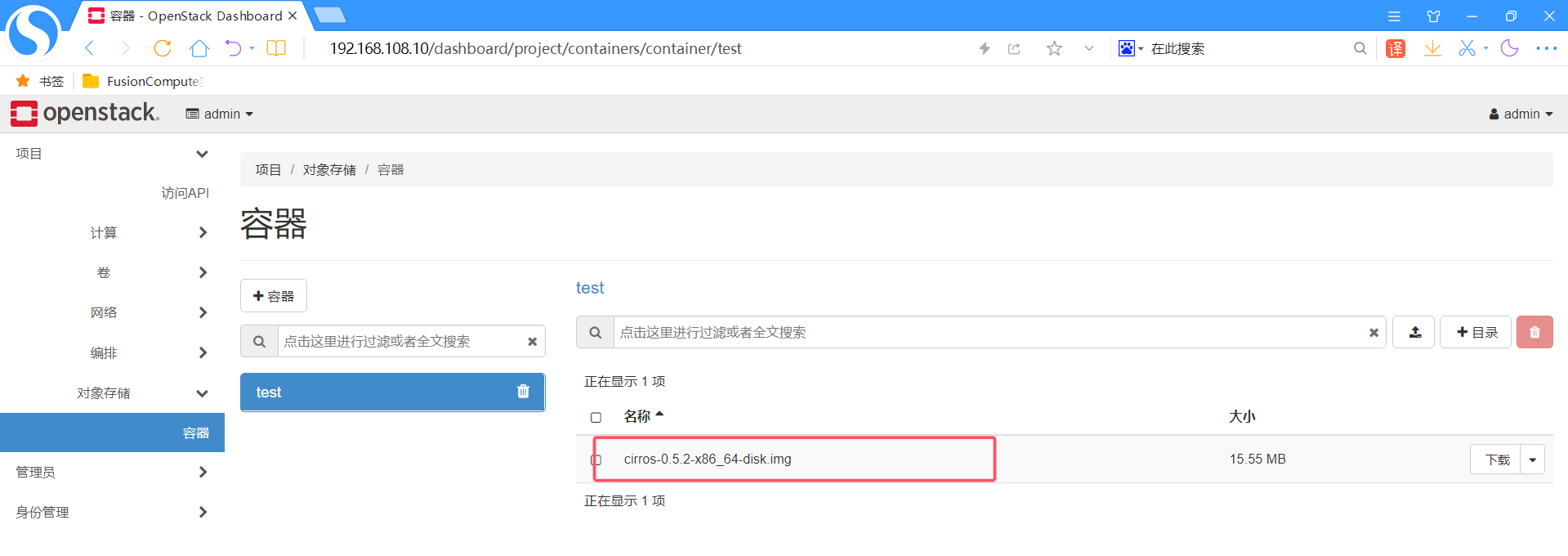
##上传文件之后观察,发现目录下都有一个1779249079.27106.data文件
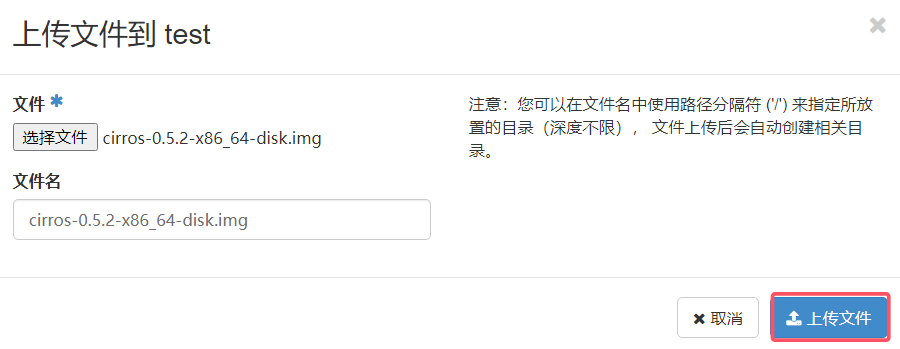
上传文件