00. 目录
文章目录
-
- [00. 目录](#00. 目录)
- [01. 问题描述](#01. 问题描述)
- [02. 问题分析](#02. 问题分析)
- [03. 问题解决](#03. 问题解决)
- [04. 结果验证](#04. 结果验证)
- [05. 附录](#05. 附录)
- [04. 结果验证](#04. 结果验证)
- [05. 附录](#05. 附录)
01. 问题描述
由于意外错误,无法打开编辑器。有关详细信息,请参阅日志。

log信息
shell
Please use a userland alternative instead.
(Use `Code --trace-deprecation ...` to show where the warning was created)
2026-05-22 09:51:33.541 [info] [窗口] [AccountPolicyGate] apply: state=inactive, reason=undefined, isRestricted=false
2026-05-22 09:51:33.855 [info] [窗口] Settings Sync: Account status changed from uninitialized to unavailable
2026-05-22 09:51:34.185 [info] [云更改] Prompting to enable cloud changes, has application previously launched from Continue On flow: false
2026-05-22 09:51:34.933 [error] [窗口] [Extension Host] (node:22444) ExperimentalWarning: SQLite is an experimental feature and might change at any time
2026-05-22 09:51:35.534 [info] [窗口] [perf] Render performance baseline is 21ms
2026-05-22 09:51:38.550 [info] [窗口] [AccountPolicyGate] apply: state=inactive, reason=undefined, isRestricted=false
2026-05-22 09:51:45.953 [error] [窗口] Error: 无法读取文件'\\192.168.236.128\Home\gr5526\components\libraries\fault_trace\fault_trace.c' (Unknown (FileSystemError): UNC host '192.168.236.128' access is not allowed. Please update the 'security.allowedUNCHosts' setting if you want to allow this host.)

2026-05-22 09:51:45.985 [error] [窗口] [File Watcher (node.js)] Error [ERR_UNC_HOST_NOT_ALLOWED]: UNC host '192.168.236.128' access is not allowed
2026-05-22 09:51:45.985 [warning] [窗口] [File Watcher (node.js)] fs.watchFile() failed with error Error [ERR_UNC_HOST_NOT_ALLOWED]: UNC host '192.168.236.128' access is not allowed on path \\192.168.236.128\Home\gr5526\components\libraries\fault_trace\fault_trace.c (correlationId: undefined)
02. 问题分析
这个错误是 Visual Studio Code 一项重要的安全机制在起作用,它在 1.78.1 版本后被引入了 UNC 路径安全白名单机制,旨在防止通过 UNC 路径进行潜在的恶意访问。
UNC Host:即你试图访问的远程服务器地址(也就是192.168.236.128)。- security.allowedUNCHosts:VS Code 中用来管理上述白名单的设置项。
因此,解决这个问题的核心思路就是将 192.168.236.128 这个 IP 地址手动添加到 VS Code 的安全白名单中。
03. 问题解决
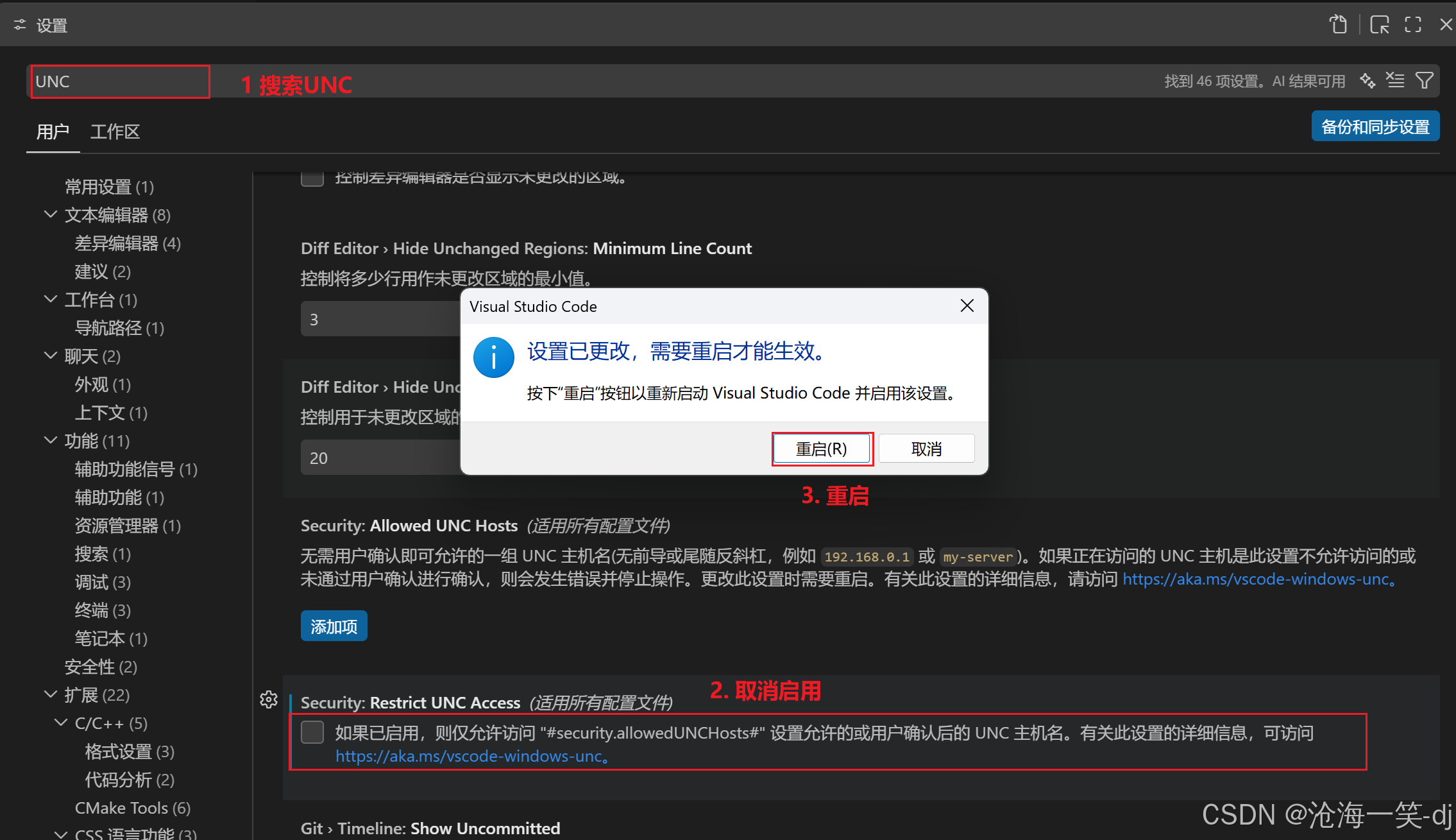
需要在vs code中打开设置-搜索UNC-下拉找到security:restrict UNCAccess将勾选删除
04. 结果验证
取消之后,重启OK。
05. 附录
04. 结果验证
取消之后,重启OK。