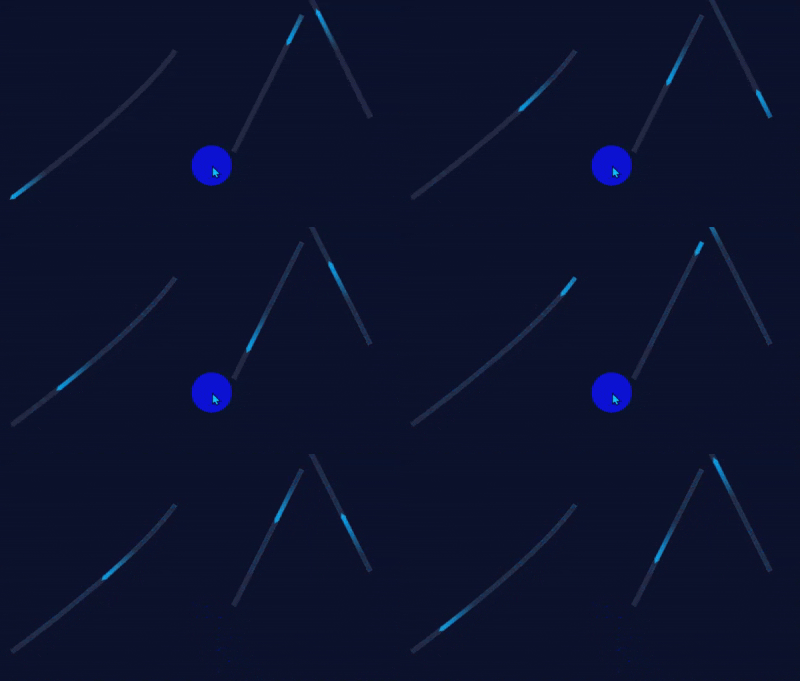
svg 实现如图飞功能,具体代码如下:
vue 中使用
html
<template>
  <div>
   <span id="dv-1">测试</span>

   <span id="dv-2" style="margin:100px;">测试</span>
  </div>
  <fly-line2 :fly-list="flyLineList"></fly-line2>
</template>

<script lang="ts">

import Flyline2 from '@/components/FlylineChartEnhanced/FlyLine2.vue'
import {type FlyLineItem } from '@/api/types/RespTypes'

export default {
  name: 'home',
  components: {
    Flyline2
  },
  setup() {

    const flyLineList = ref<FlyLineItem[]>([])

    function getCenter(el: HTMLElement) {
      const rect = el.getBoundingClientRect()
      return {
        x: rect.left + rect.width / 2,
        y: rect.top + rect.height / 2
      }
    }

    function test(){
      nextTick(()=>{
        const el  = document.getElementById("dv-1")
        const el2 = document.getElementById("dv-2")
        const form = getCenter(el)
        const to = getCenter(el2)
        flyLineList.value.push({
          id: "line_1",
          from: [form.x, form.y],
          to: [to.x, to.y]
        })
      })
    }

    onMounted(() => {
      test()
    })

    return {
      flyLineList
    }
  },
}
</script>

<style lang="scss" scoped>

</style>
组件 FlyLine2.vue
html
<template>
  <svg  class="svg-fly-line" width="100%" height="100%" xmlns="http://www.w3.org/2000/svg">
    <defs>
      <radialGradient id="lineGradient" cx="50%" cy="50%" r="50%">
        <stop offset="0%" stop-color="#fff" stop-opacity="1"></stop>
        <stop offset="100%" stop-color="#fff" stop-opacity="0"></stop>
      </radialGradient>

      <linearGradient id="lineGradient1" x1="91.93%" y1="77.23%" x2="8.07%" y2="22.77%">
        <!-- 12.37% 处为透明蓝色 -->
        <stop offset="12.37%" stop-color="#00A0E9" stop-opacity="0" />
        <!-- 86.15% 处为不透明蓝色 -->
        <stop offset="86.15%" stop-color="#00A0E9" stop-opacity="1" />
      </linearGradient>

    </defs>

    <!-- 遍历多条飞线路径 -->
    <g v-for="(item, index) in lineLst" :key="index" :data-index="index">
      <!-- 动态路径 -->
      <path :id="`flyPath${index}`" :d="getFlyPath(item)" fill="transparent"></path>
      <!-- 遮罩 -->
      <mask :id="`flyMask${index}`">
        <!-- 拖尾 r 长度  -->
        <circle cx="0" cy="0" r="60" fill="url(#lineGradient)">
          <animateMotion :dur="`${item.speed || 5000}ms`" :path="getFlyPath(item)" rotate="auto" repeatCount="indefinite"></animateMotion>
        </circle>
      </mask>
      <!-- 底层轨迹线 -->
      <use :xlink:href="`#flyPath${index}`" stroke-width="8" stroke="rgba(255, 255, 255, .1)"></use>
      <!-- 渐变流光拖尾 → from/to 自动计算 -->
      <use :xlink:href="`#flyPath${index}`" stroke-width="6" stroke="#00A0E9" :mask="`url(#flyMask${index})`">
        <animate
          attributeName="stroke-dasharray"
          :from="`0, ${item.pathLength}`"
          :to="`${item.pathLength}, 0`"
          :dur="`${item.speed || 5000}ms`"
          repeatCount="indefinite"
        ></animate>
      </use>

      <!-- 箭头 -->
      <path d="M0,-4 L8,0 L0,4 Z" fill="#00A0E9">
        <animateMotion
          :dur="`${item.speed || 5000}ms`"
          :path="getFlyPath(item)"
          rotate="auto"
          repeatCount="indefinite"
        />
      </path>
    </g>
  </svg>
</template>

<script setup lang="ts">
import { defineProps ,getCurrentInstance} from 'vue'

// 单条飞线类型
export interface FlyLineItem {
  from: number[] // 起点 x,y坐标
  to: number[] // 终点 x
  curve?: number // 弧线偏移 正负控制上下弯曲
  lineColor?: string // 轨迹颜色
  lineWidth?: number // 轨迹宽度
  arrowFill?: string // 箭头填充色
  arrowScale?: number // 箭头缩放大小
  speed?: number // 飞行时长 ms
  pathLength?:number
}

//@ts-ignore
const { ctx: that } = getCurrentInstance()

const props = defineProps<{
  flyList: FlyLineItem[]
}>()

const lineLst =ref<FlyLineItem[]>([])

watch(()=>props.flyList,async (nVal,oVal)=>{
  await nextTick()
  lineLst.value = props.flyList
  lineLst.value.forEach((item, index) => {
    const path = document.getElementById(`flyPath${index}`)
    if (path) {
      //@ts-ignore
      const length= path.getTotalLength()
      console.log('[FlyLine2#getPathLength:72]:', `${length}`)
      item.pathLength = length
    }
  })
},{deep:true,immediate:true})

// 生成贝塞尔曲线路径
const getFlyPath = (item: FlyLineItem) => {
  const { from, to, curve = -70 } = item
  const centerX = (from[0] + to[0]) / 2
  const centerY = (from[1] + to[1]) / 2 + curve
  //d="M 起点X 起点Y Q 控制点X 控制点Y 终点X 终点Y"
  return `M${from[0]},${from[1]} Q${centerX},${centerY} ${to[0]},${to[1]}`
}

async function getPathLength(idx: number) {
  await nextTick()
  //@ts-ignore
  const path:SVGPathElement|null = document.getElementById(`flyPath${idx}`)
  if (path) {
    const length= path.getTotalLength()
    console.log('[FlyLine2#getPathLength:108]:', `${length}`)
    return length
  }
  return 0
}

// 生成贝塞尔路径
// function getPathD(p1: { x: number, y: number }, p2: { x: number, y: number }, curveOffset = -80) {
//   const mx = (p1.x + p2.x) / 2
//   const my = (p1.y + p2.y) / 2 + curveOffset
//   return `M ${p1.x} ${p1.y} Q ${mx} ${my} ${p2.x} ${p2.y}`
// }

// 获取元素中心点
function getCenter(el: HTMLElement) {
  const rect = el.getBoundingClientRect()
  return {
    x: rect.left + rect.width / 2,
    y: rect.top + rect.height / 2,
  }
}

function handleResize() {
  lineLst.value.forEach((item, index) => {
    //@ts-ignore
    const path:SVGPathElement|null = document.getElementById(`flyPath${index}`)
    if (path) {
      const length= path.getTotalLength()
      item.pathLength = length
    }
  })
  that.$forceUpdate()
}

// 挂载
onMounted(() => {
  window.addEventListener('resize', handleResize)
})
// 销毁
onUnmounted(() => {
  window.removeEventListener('resize', handleResize)
})
</script>

<style scoped lang="scss">
.svg-fly-line {
  position: fixed;
  top: 0;
  left: 0;
  width: 100vw;
  height: 100vh;
  pointer-events: none;
  z-index: 1;
}
</style>