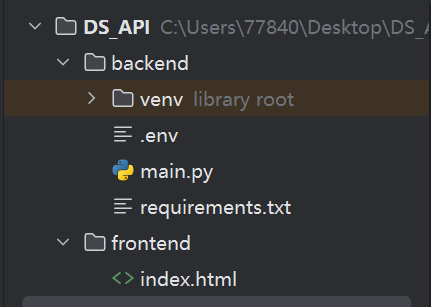
1、工程目录结构如下
2、后端设计
step1: backend/main.py
python
import os
from pathlib import Path
from datetime import datetime, timezone, timedelta

from dotenv import load_dotenv
from fastapi import FastAPI
from fastapi.middleware.cors import CORSMiddleware
from fastapi.responses import FileResponse
from pydantic import BaseModel
from openai import OpenAI

# 从项目根目录下的 `.env` 文件中读取环境变量,并将其加载到系统的环境变量中,方便后续通过 `os.getenv()` 调用
load_dotenv()

app = FastAPI(title="DeepSeek文字问答系统")

# 允许前端跨域访问
app.add_middleware(
    CORSMiddleware,
    allow_origins=["*"],
    allow_credentials=True,
    allow_methods=["*"],
    allow_headers=["*"],
)

client = OpenAI(
    api_key=os.getenv("DEEPSEEK_API_KEY"),
    base_url="https://api.deepseek.com"
)


class ChatRequest(BaseModel):
    text: str

def ask_deepseek(user_text: str) -> str:
    """
    调用 DeepSeek API,只处理文字输入。
    """

    system_prompt = """
        你是一个智能助手。
        请根据用户输入的问题进行回答。
        回答要求:
        1. 如果用户问技术问题,请尽量给出清晰、分步骤的解释。
        2. 如果用户问学习或项目问题,请尽量结合高职教学场景回答。
        3. 如果用户问相关编程的问题,请给出准确可运行的程序,及所需运行环境。
        4. 回答要准确、简洁、结构清楚。
        """

    user_prompt = f"""【用户输入的问题】{user_text}请回答用户的问题。"""

    response = client.chat.completions.create(
        model="deepseek-v4-flash",
        messages=[
            {"role": "system", "content": system_prompt},
            {"role": "user", "content": user_prompt}
        ],
        stream=False,
        extra_body={
            "thinking": {"type": "disabled"}
        }
    )

    return response.choices[0].message.content


@app.get("/")
def home():
    """
    访问首页时直接打开前端页面。
    """
    frontend_path = Path(__file__).resolve().parent.parent / "frontend" / "index.html"
    return FileResponse(frontend_path)


@app.get("/web")
def web_page():
    """
    兼容原来的 /web 访问方式。
    """
    frontend_path = Path(__file__).resolve().parent.parent / "frontend" / "index.html"
    return FileResponse(frontend_path)


@app.get("/api/chat")
def chat_get_tip():
    return {
        "message": "该接口只支持 POST 请求,请通过网页输入问题后点击提交。",
        "usage": "访问 / 或 /web 打开前端页面"
    }


@app.post("/api/chat")
def chat(request: ChatRequest):
    """
    接收前端文字问题,并调用 DeepSeek 返回回答。
    """
    user_text = request.text.strip()

    if not user_text:
        return {
            "success": False,
            "message": "请输入问题。"
        }

    try:
        answer = ask_deepseek(user_text)

        return {
            "success": True,
            "user_text": user_text,
            "answer": answer
        }

    except Exception as e:
        return {
            "success": False,
            "message": f"DeepSeek调用失败:{str(e)}"
        }
step2: backend/requirements.txt
python
fastapi
uvicorn
openai
python-dotenv
step3: 本工程下创建虚拟环境venv并安装requirements.txt
python
pip install -r requirements.txtstep4: deepseek密钥配置
创建文件 .env
XML
DEEPSEEK_API_KEY= 你的deepseek密钥3、前端设计
frontend/index.html
XML
<!DOCTYPE html>
<html lang="zh-CN">
<head>
    <meta charset="UTF-8">
    <title>DeepSeek问答系统</title>
    <style>
        body { margin: 0; padding: 0; background: #f5f7fb; font-family: "Microsoft YaHei", sans-serif; }
        .container { width: 760px; margin: 40px auto; background: #fff; border-radius: 16px; padding: 28px; box-shadow: 0 8px 24px rgba(0, 0, 0, 0.08); }
        h1 { text-align: center; color: #222; }
        textarea { width: 100%; height: 150px; border: 1px solid #dcdfe6; border-radius: 10px; padding: 12px; font-size: 16px; box-sizing: border-box; outline: none; }
        textarea:focus { border-color: #409eff; }
        button { width: 100%; margin-top: 22px; padding: 13px; background: #2563eb; color: white; border: none; border-radius: 10px; font-size: 17px; cursor: pointer; }
        button:hover { background: #1d4ed8; }
        button:disabled { background: #9ca3af; cursor: not-allowed; }
        .result { margin-top: 24px; background: #f8fafc; border-radius: 12px; padding: 18px; border: 1px solid #e5e7eb; white-space: pre-wrap; line-height: 1.8; min-height: 180px; }
        .tip { font-size: 14px; color: #6b7280; margin-top: 8px; }
    </style>
</head>
<body>
<div class="container">
    <h1>基于DeepSeek API的问答系统</h1>
    <textarea id="question" placeholder="请输入问题..."></textarea>
    <div class="tip">仅支持文字输入。</div>
    <button id="submitBtn" onclick="submitQuestion()">提交提问</button>
    <div class="result" id="result">等待提问...</div>
</div>

<script>
    const API_URL = "/api/chat";
    const submitBtn = document.getElementById("submitBtn");
    const resultDiv = document.getElementById("result");

    async function submitQuestion() {
        const question = document.getElementById("question").value.trim();
        if (!question) {
            alert("请先输入问题。");
            return;
        }

        submitBtn.disabled = true;
        submitBtn.innerText = "正在回答...";
        resultDiv.innerText = "正在调用 DeepSeek...";

        try {
            const response = await fetch(API_URL, {
                method: "POST",
                headers: { "Content-Type": "application/json" },
                body: JSON.stringify({ text: question })
            });

            if (!response.ok) throw new Error("服务器响应异常,状态码:" + response.status);

            const data = await response.json();
            if (!data.success) {
                resultDiv.innerText = "请求失败:\n" + data.message;
            } else {
                resultDiv.innerText = "【用户输入】\n" + data.user_text + "\n\n【DeepSeek回答】\n" + data.answer;
            }
        } catch (error) {
            resultDiv.innerText = "请求失败:\n" + error.message;
        } finally {
            submitBtn.disabled = false;
            submitBtn.innerText = "提交提问";
        }
    }
</script>
</body>
</html>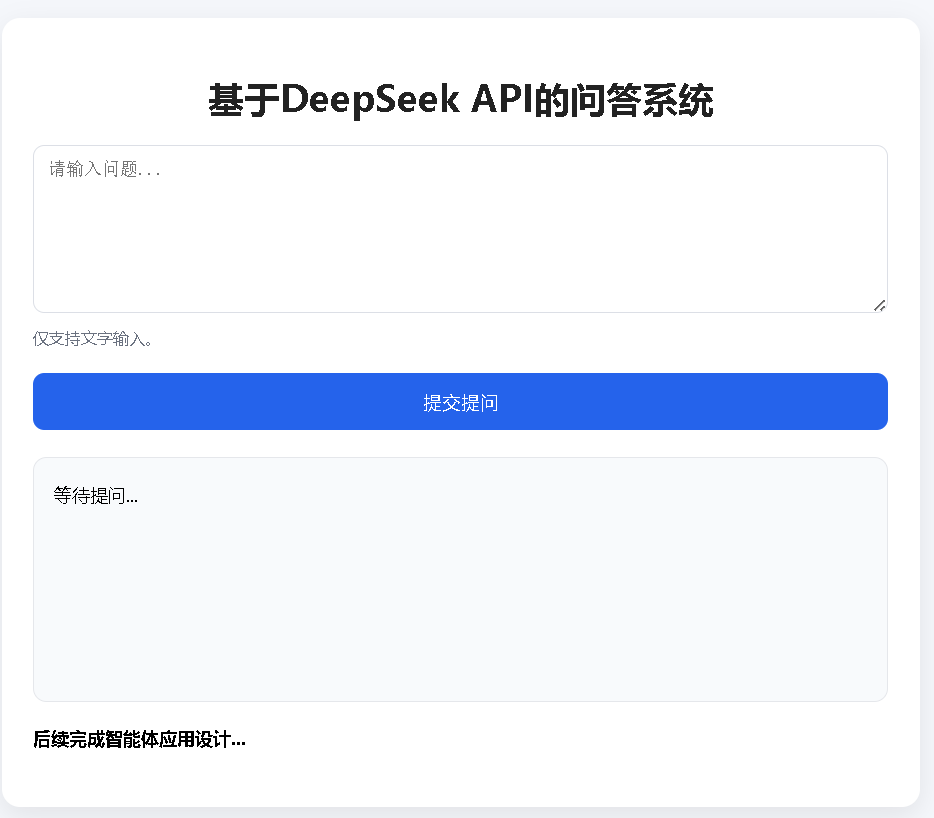
4、启动后端
uvicorn main:app --host 0.0.0.0 --port 8000 --reload5、前端访问:
http://127.0.0.1:8000/