codex
CodeGraph
安装
1、在 Windows 左下角搜索:PowerShell ,然后点开 Windows PowerShell。
2、安装:
irm https://raw.githubusercontent.com/colbymchenry/codegraph/main/install.ps1 | iex这是 CodeGraph 官方 README 给的 Windows 安装命令。官方也说明:这个方式不要求你提前安装 Node.js。
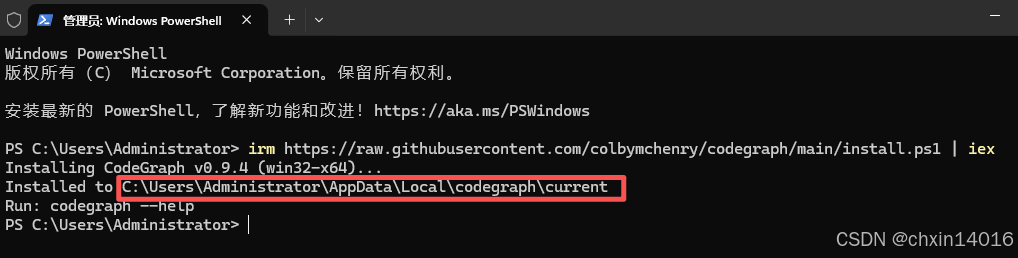
CodeGraph 已经安装成功了,只是没有加入 PATH,所以 PowerShell 找不到 codegraph 命令。
它已经装在这里:C:\Users\Administrator\AppData\Local\codegraph\current
测试:
& "C:\Users\Administrator\AppData\Local\codegraph\current\codegraph.exe" --help如果能显示帮助信息,说明程序没问题。
3、永久加入 PATH :
安装成功后,把 CodeGraph 加到环境变量 PATH:
$cgBin = "C:\Users\Administrator\AppData\Local\codegraph\current\bin"
$userPath = [Environment]::GetEnvironmentVariable("Path", "User")

if (($userPath -split ";") -notcontains $cgBin) {
    [Environment]::SetEnvironmentVariable("Path", "$cgBin;$userPath", "User")
}执行完以后,关闭 PowerShell,重新打开一个新的 PowerShell。
然后测试:
codegraph --help若能显示一堆命令,则说明 PATH 修好了。
安装成功后在对应项目使用
- 全程在 PowerShell 中输入。
1、确认可用:
codegraph --help2、如果成功,再进入项目目录:
Set-Location "你的项目路径"
例如:
Set-Location "E:\GalbanoCalibration"
或:
cd /d "E:\GalbanoCalibration"
3、初始化项目索引:
codegraph init -i成功后,项目目录里会多一个文件夹:.codegraph 。
这就说明 CodeGraph 已经给你的项目建立索引了。
4、确认索引状态:
codegraph status5、最后执行,配置给 Codex 用:
codegraph install --target=codex --yes完成后,关闭 Codex,再重新打开 Codex。