目录
-
- 以下是关于Lottie-Web的中文文献和技术资源整理,涵盖官方文档、教程及社区文章:
-
- [1、Lottie-Web 官方文档与工具](#1、Lottie-Web 官方文档与工具)
- 2、动画制作与导出指南
- 3、性能优化建议
- 4、国内开发者社区案例
- [5、Lottie-web 提供了丰富的 API,控制动画的播放、暂停、重置、改变速度等操作,常见api](#5、Lottie-web 提供了丰富的 API,控制动画的播放、暂停、重置、改变速度等操作,常见api)
- 6、一个超简单的抽奖效果代码
想让网页元素跳舞、渐变、变形?CSS动画关键帧动画、过渡魔法、3D变换等
创意动画库推荐
Animate.css:开箱即用的CSS动画库
Motion One:高性能动画工具包
一些更为复杂的动画可以使用lottie-web,比如转盘滚动、老虎机抽奖、人物走路、天气雾动效等
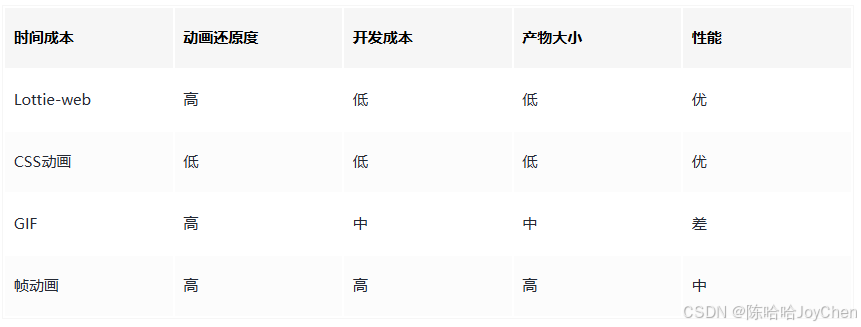
lottie-web 是一个用于在 Web 上渲染 After Effects (AE) 动画的解析器。设计师通过 AE 插件 Bodymovin 将动画导出为 JSON 文件,lottie-web 读取该文件并将其还原为 SVG、Canvas 或 HTML 元素,从而实现跨平台、高保真且文件体积小巧的动画效果
以下是关于Lottie-Web的中文文献和技术资源整理,涵盖官方文档、教程及社区文章:
1、Lottie-Web 官方文档与工具
Airbnb 官方提供的 Lottie-Web 库及中文文档
GitHub 仓库:airbnb/lottie-web
核心功能:解析 Adobe After Effects 动画导出的 JSON 文件,通过 SVG/Canvas/HTML 渲染动画。
Lottie-Web 在 Web 端的集成与实践
详细步骤包括安装、基础用法和性能优化:
bash
npm install lottie-web示例代码:
javascript
import lottie from 'lottie-web';
const animation = lottie.loadAnimation({
  container: document.getElementById('anim-container'),
  path: 'data.json',
  renderer: 'svg'
});
2、动画制作与导出指南
使用 Adobe After Effects 制作动画并导出为 Lottie 兼容格式
需安装 Bodymovin 插件,导出时注意关键帧精简和图层命名规范。
3、性能优化建议
减少复杂路径节点数量,避免高频属性变化
使用 autoplay: false 手动控制播放时机,复用动画实例以降低内存占用。
4、国内开发者社区案例
掘金、CSDN 等平台有前端团队分享的落地案例,包含 Vue/React 封装组件的实现方案。
搜索关键词:"Lottie-Web 中文教程"、"Lottie 动画性能优化"。
如需具体文献标题或论文,建议通过中国知网(CNKI)搜索"Lottie-Web"或"动画渲染技术"获取学术文献。
5、Lottie-web 提供了丰富的 API,控制动画的播放、暂停、重置、改变速度等操作,常见api
lottie.loadAnimation:加载动画文件并返回一个动画实例。 animation.play: 播放动画。
animation.stop: 停止动画。 animation.setSpeed:设置动画的播放速度。
animation.setDirection:设置动画的播放方向。
animation.goToAndStop:跳转到指定时间点或帧,并暂停。 animation.destroy:销毁动画实例。
一些lottie动画库
https://lottiefiles.com/free-animations/lottery
Lottie-Web的官方文档
https://lottie.airbnb.tech/#/web
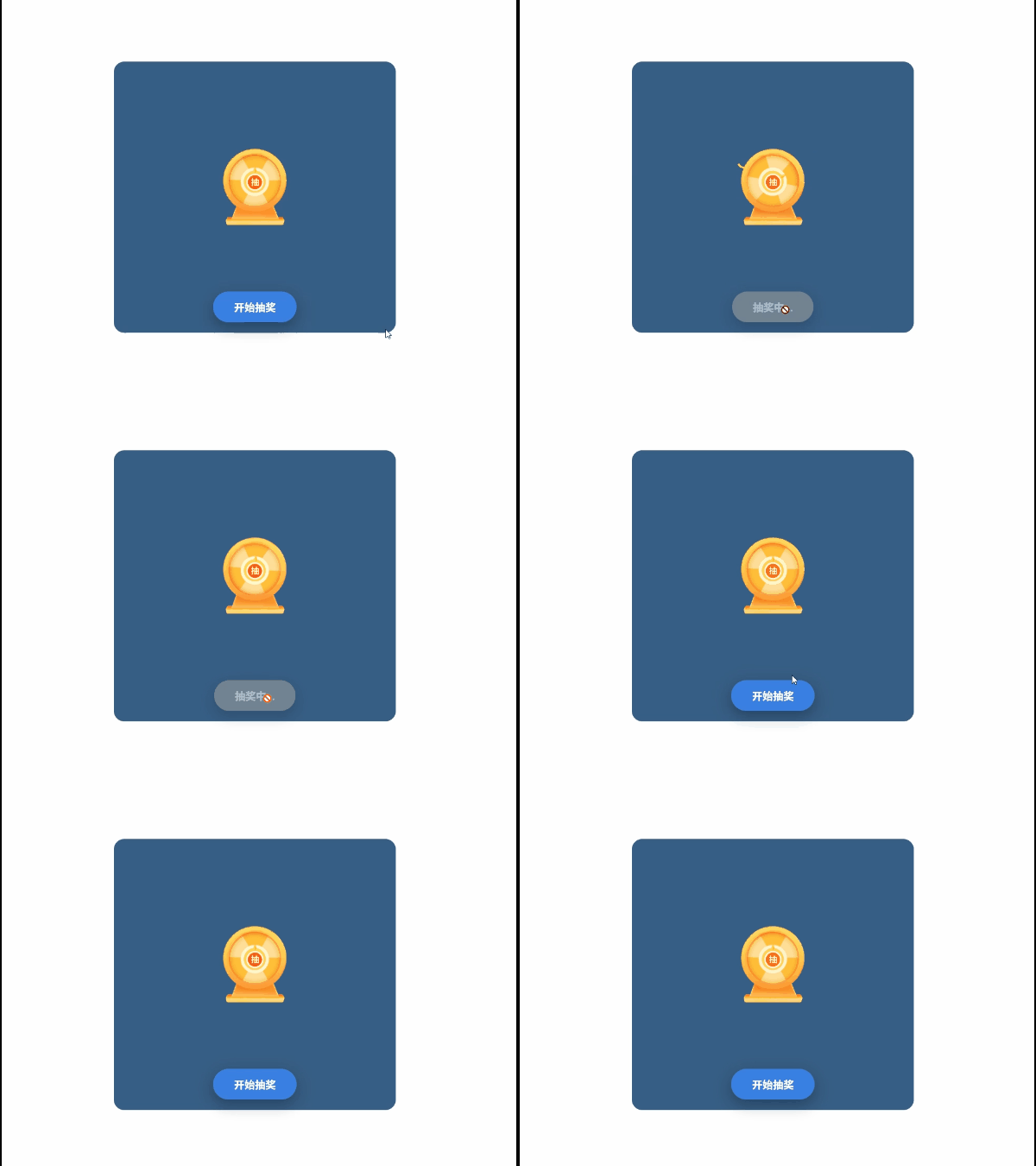
6、一个超简单的抽奖效果代码
Lottie-web 的基本用法分为两步:加载动画数据和播放动画
bash
<!DOCTYPE html>
<html>
  <head>
    <meta charset="utf-8">
    <title>轮盘抽奖游戏</title>
    <style>
        * {
          margin: 0;
          padding: 0;
          box-sizing: border-box;
        }

        body {
          display: flex;
          flex-direction: column;
          justify-content: center;
          align-items: center;
          min-height: 100vh;
          background-size: 100% 100%;
          font-family: 'Microsoft YaHei', Arial, sans-serif;
        }

        .lottery-container {
          text-align: center;
          background-color: #375e85;
          padding: 20px;
          border-radius: 20px;
        }

        #animation {
          width: 500px;
          height: 400px;
          margin: 20px auto;
        }

        .lottery-btn {
          padding: 15px 40px;
          font-size: 20px;
          font-weight: bold;
          color: #fff;
          background: #3980e2;
          border: none;
          border-radius: 50px;
          cursor: pointer;
          box-shadow: 0 10px 30px rgba(0, 0, 0, 0.3);
          transition: all 0.3s ease;
          margin-top: -20px;
        }

        .lottery-btn:hover:not(:disabled) {
          transform: translateY(-2px);
          box-shadow: 0 15px 40px rgba(0, 0, 0, 0.4);
        }

        .lottery-btn:active:not(:disabled) {
          transform: translateY(0);
        }

        .lottery-btn:disabled {
          opacity: 0.6;
          cursor: not-allowed;
          background: #999;
        }

        /* 弹窗遮罩 */
        .modal-overlay {
          display: none;
          position: fixed;
          top: 0;
          left: 0;
          width: 100%;
          height: 100%;
          background: rgba(0, 0, 0, 0.6);
          z-index: 1000;
          justify-content: center;
          align-items: center;
        }

        .modal-overlay.show {
          display: flex;
        }

        /* 弹窗内容 */
        .modal-content {
          background: #fff;
          border-radius: 20px;
          padding: 40px;
          max-width: 400px;
          width: 90%;
          text-align: center;
          box-shadow: 0 20px 60px rgba(0, 0, 0, 0.5);
          animation: modalShow 0.3s ease;
        }

        @keyframes modalShow {
          from {
            transform: scale(0.7);
            opacity: 0;
          }
          to {
            transform: scale(1);
            opacity: 1;
          }
        }

        .modal-title {
          font-size: 28px;
          color: #f5576c;
          margin-bottom: 20px;
          font-weight: bold;
        }

        .modal-prize {
          font-size: 36px;
          color: #333;
          margin: 20px 0;
          font-weight: bold;
          min-height: 50px;
        }

        .modal-close {
          padding: 12px 30px;
          font-size: 16px;
          color: #fff;
          background: linear-gradient(135deg, #667eea 0%, #764ba2 100%);
          border: none;
          border-radius: 25px;
          cursor: pointer;
          margin-top: 20px;
          transition: all 0.3s ease;
        }

        .modal-close:hover {
          transform: translateY(-2px);
          box-shadow: 0 5px 15px rgba(0, 0, 0, 0.3);
        }

        .celebration {
          font-size: 60px;
          margin-bottom: 10px;
        }
    </style>
  </head>
  <body>
    <div class="lottery-container">
      <div id="animation"></div>
      <button id="lotteryBtn" class="lottery-btn">开始抽奖</button>
    </div>

    <!-- 中奖弹窗 -->
    <div id="modalOverlay" class="modal-overlay">
      <div class="modal-content">
        <div class="celebration">🎉</div>
        <div class="modal-title">恭喜中奖!</div>
        <div class="modal-prize" id="prizeText"></div>
        <button class="modal-close" onclick="closeModal()">确定</button>
      </div>
    </div>

    <script src="./lottie.min.js"></script>
    <script>
      // 奖品列表
      const prizes = [
        '一等奖:iPhone 15 Pro',
        '二等奖:iPad Air',
        '三等奖:AirPods Pro',
        '四等奖:100元现金',
        '五等奖:50元现金',
        '六等奖:20元现金',
        '七等奖:10元现金',
        '八等奖:谢谢参与'
      ];

      // 初始化动画(不自动播放)
      var animation = bodymovin.loadAnimation({
        container: document.getElementById('animation'),
        renderer: 'svg',
        loop: true,
        autoplay: false,
        path: './lottery.json'
      });

      const lotteryBtn = document.getElementById('lotteryBtn');
      const modalOverlay = document.getElementById('modalOverlay');
      const prizeText = document.getElementById('prizeText');

      // 抽奖函数
      function startLottery() {
        // 禁用按钮
        lotteryBtn.disabled = true;
        lotteryBtn.textContent = '抽奖中...';

        // 开始播放动画
        animation.play();

        // 随机抽奖时长(3-5秒)
        const duration = 3000 + Math.random() * 2000;

        // 动画结束后
        setTimeout(() => {
          // 停止动画
          animation.stop();

          // 随机选择奖品
          const randomIndex = Math.floor(Math.random() * prizes.length);
          const prize = prizes[randomIndex];

          // 显示弹窗
          prizeText.textContent = prize;
          modalOverlay.classList.add('show');
        }, duration);
      }

      // 关闭弹窗
      function closeModal() {
        modalOverlay.classList.remove('show');

        // 恢复按钮状态
        lotteryBtn.disabled = false;
        lotteryBtn.textContent = '开始抽奖';
      }

      // 点击抽奖按钮
      lotteryBtn.addEventListener('click', startLottery);

      // 点击遮罩层关闭弹窗
      modalOverlay.addEventListener('click', function(e) {
        if (e.target === modalOverlay) {
          closeModal();
        }
      });
    </script>
  </body>
</html>