大家好,我是鸿蒙Jack。本期以我的《时光旅记》APP 为例,聊一下我怎么把 AR Engine Kit 接到照片预览里,用前置摄像头识别人脸表情和头部姿态,再把它变成"下一张、上一张、退出全屏"这些照片浏览操作。
《时光旅记》中使用Face AR的场景是:用户在"瞬间"里翻看旅行照片时,手可能正在拿咖啡、扶行李箱、或者手机放在桌面上看图。这时候用挑眉、皱眉、转头这类轻动作切照片,比再去点屏幕更顺手。
我在《时光旅记》里的使用场景
《时光旅记》里照片不是独立存在的,它们和瞬间、地点、旅行计划、环境声音放在一起。用户点开照片后,会进入全屏预览;如果设置里开启了"微表情辅助瞬间照片",这个预览层会在背后启动一个非常低透明度的 ARView,调用前置摄像头做人脸跟踪。
这里我刻意没有把摄像头预览盖在照片上。照片浏览仍然是主体验,AR Engine 只是隐藏在后面的输入通道。用户能看到的只有右上角一个"微表情辅助"的状态胶囊,以及识别成功后的"下一张""上一张""退出全屏"反馈。
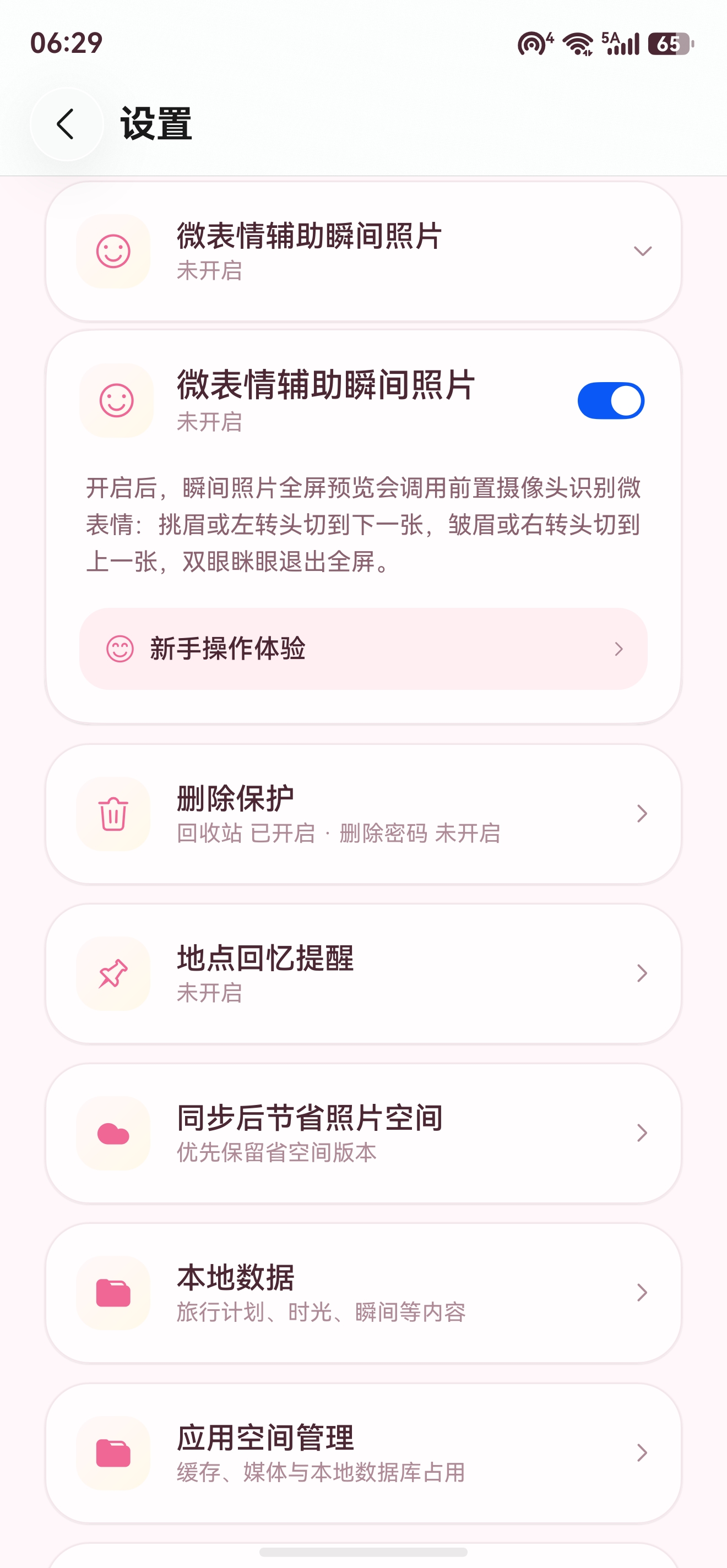
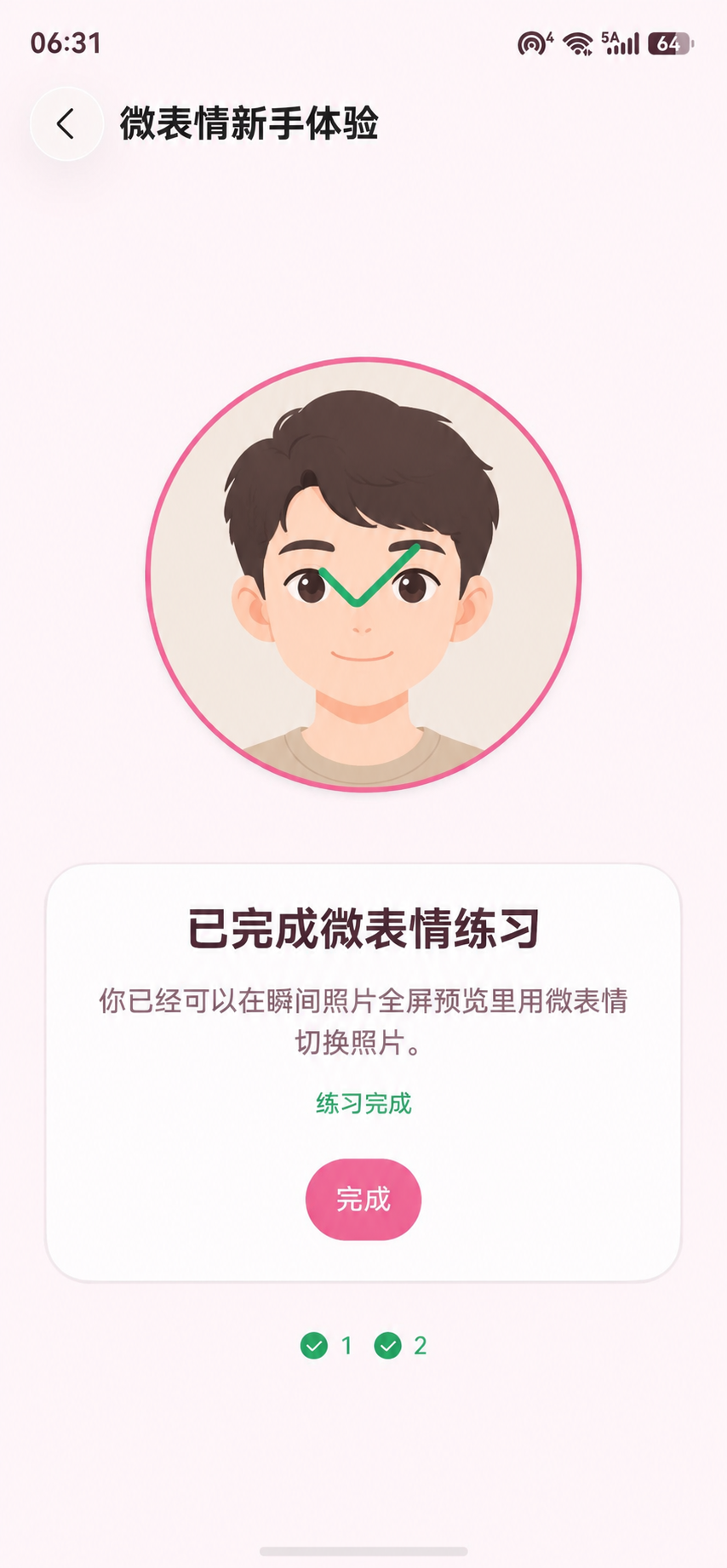
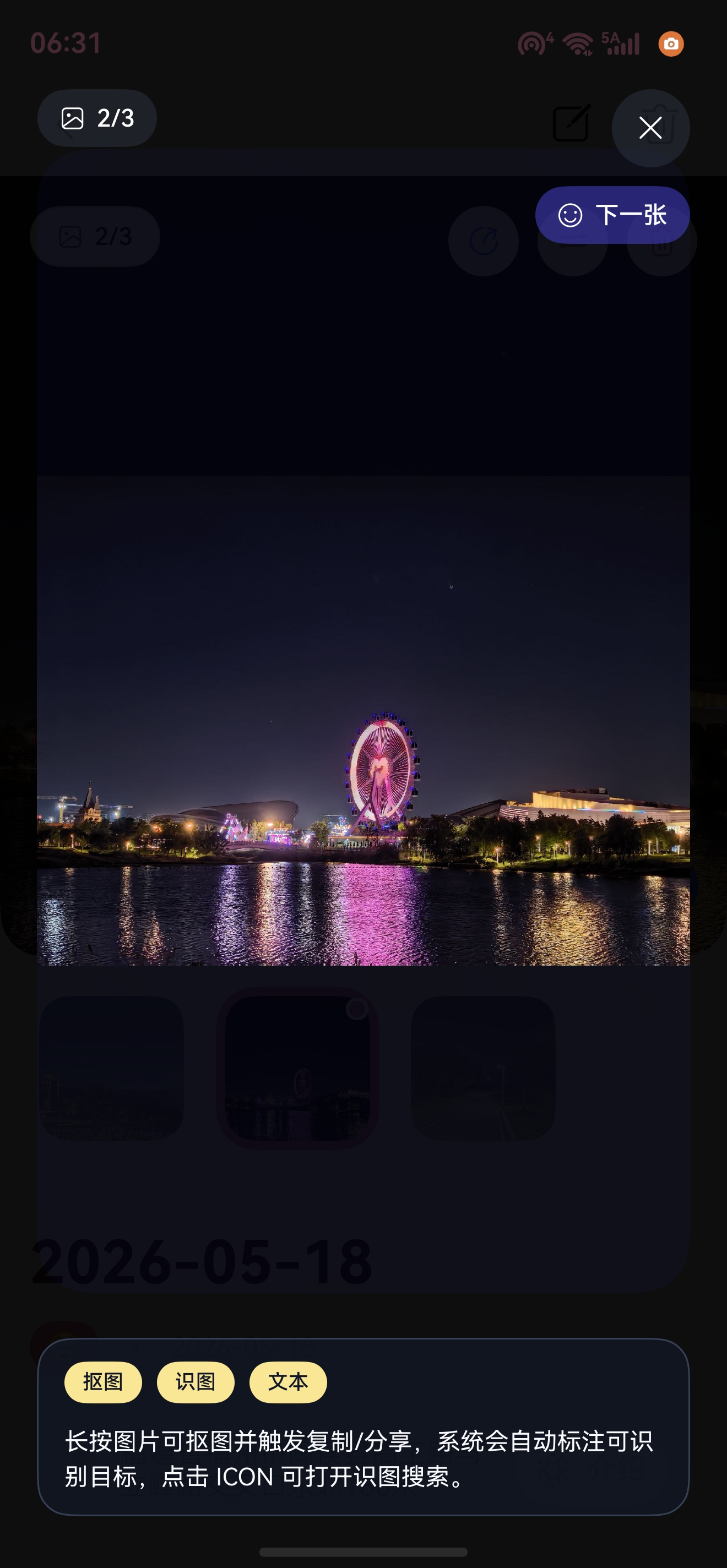
动作映射我做得比较保守:
| 用户动作 | AR Engine 数据 | 《时光旅记》里的命令 |
|---|---|---|
| 挑眉,或轻轻向左转头 | BROW_INNER_UP 或 yaw < -0.18 |
下一张 |
| 皱眉,或轻轻向右转头 | BROW_DOWN_LEFT + BROW_DOWN_RIGHT 或 yaw > 0.18 |
上一张 |
| 双眼眯眼 | EYE_SQUINT_LEFT + EYE_SQUINT_RIGHT |
退出全屏 |
这里有两个细节很关键。第一,识别到一个命令后要进入冷却时间,不然连续帧会把一张照片直接翻到最后。第二,动作释放以后才能识别下一次命令,所以代码里有一组比触发阈值更低的 release 阈值,用来判断用户是否回到自然表情。
整体结构
我把 AR Engine 和业务层隔开了。AR Engine 只负责给我 ARFace、ARBlendShapes、ARPose;至于挑眉代表下一张,皱眉代表上一张,这是《时光旅记》的业务规则,放在 ExpressionPhotoController 里。
#mermaid-svg-p7ZO343jJmDOKStQ{font-family:"trebuchet ms",verdana,arial,sans-serif;font-size:16px;fill:#333;}@keyframes edge-animation-frame{from{stroke-dashoffset:0;}}@keyframes dash{to{stroke-dashoffset:0;}}#mermaid-svg-p7ZO343jJmDOKStQ .edge-animation-slow{stroke-dasharray:9,5!important;stroke-dashoffset:900;animation:dash 50s linear infinite;stroke-linecap:round;}#mermaid-svg-p7ZO343jJmDOKStQ .edge-animation-fast{stroke-dasharray:9,5!important;stroke-dashoffset:900;animation:dash 20s linear infinite;stroke-linecap:round;}#mermaid-svg-p7ZO343jJmDOKStQ .error-icon{fill:#552222;}#mermaid-svg-p7ZO343jJmDOKStQ .error-text{fill:#552222;stroke:#552222;}#mermaid-svg-p7ZO343jJmDOKStQ .edge-thickness-normal{stroke-width:1px;}#mermaid-svg-p7ZO343jJmDOKStQ .edge-thickness-thick{stroke-width:3.5px;}#mermaid-svg-p7ZO343jJmDOKStQ .edge-pattern-solid{stroke-dasharray:0;}#mermaid-svg-p7ZO343jJmDOKStQ .edge-thickness-invisible{stroke-width:0;fill:none;}#mermaid-svg-p7ZO343jJmDOKStQ .edge-pattern-dashed{stroke-dasharray:3;}#mermaid-svg-p7ZO343jJmDOKStQ .edge-pattern-dotted{stroke-dasharray:2;}#mermaid-svg-p7ZO343jJmDOKStQ .marker{fill:#333333;stroke:#333333;}#mermaid-svg-p7ZO343jJmDOKStQ .marker.cross{stroke:#333333;}#mermaid-svg-p7ZO343jJmDOKStQ svg{font-family:"trebuchet ms",verdana,arial,sans-serif;font-size:16px;}#mermaid-svg-p7ZO343jJmDOKStQ p{margin:0;}#mermaid-svg-p7ZO343jJmDOKStQ .label{font-family:"trebuchet ms",verdana,arial,sans-serif;color:#333;}#mermaid-svg-p7ZO343jJmDOKStQ .cluster-label text{fill:#333;}#mermaid-svg-p7ZO343jJmDOKStQ .cluster-label span{color:#333;}#mermaid-svg-p7ZO343jJmDOKStQ .cluster-label span p{background-color:transparent;}#mermaid-svg-p7ZO343jJmDOKStQ .label text,#mermaid-svg-p7ZO343jJmDOKStQ span{fill:#333;color:#333;}#mermaid-svg-p7ZO343jJmDOKStQ .node rect,#mermaid-svg-p7ZO343jJmDOKStQ .node circle,#mermaid-svg-p7ZO343jJmDOKStQ .node ellipse,#mermaid-svg-p7ZO343jJmDOKStQ .node polygon,#mermaid-svg-p7ZO343jJmDOKStQ .node path{fill:#ECECFF;stroke:#9370DB;stroke-width:1px;}#mermaid-svg-p7ZO343jJmDOKStQ .rough-node .label text,#mermaid-svg-p7ZO343jJmDOKStQ .node .label text,#mermaid-svg-p7ZO343jJmDOKStQ .image-shape .label,#mermaid-svg-p7ZO343jJmDOKStQ .icon-shape .label{text-anchor:middle;}#mermaid-svg-p7ZO343jJmDOKStQ .node .katex path{fill:#000;stroke:#000;stroke-width:1px;}#mermaid-svg-p7ZO343jJmDOKStQ .rough-node .label,#mermaid-svg-p7ZO343jJmDOKStQ .node .label,#mermaid-svg-p7ZO343jJmDOKStQ .image-shape .label,#mermaid-svg-p7ZO343jJmDOKStQ .icon-shape .label{text-align:center;}#mermaid-svg-p7ZO343jJmDOKStQ .node.clickable{cursor:pointer;}#mermaid-svg-p7ZO343jJmDOKStQ .root .anchor path{fill:#333333!important;stroke-width:0;stroke:#333333;}#mermaid-svg-p7ZO343jJmDOKStQ .arrowheadPath{fill:#333333;}#mermaid-svg-p7ZO343jJmDOKStQ .edgePath .path{stroke:#333333;stroke-width:2.0px;}#mermaid-svg-p7ZO343jJmDOKStQ .flowchart-link{stroke:#333333;fill:none;}#mermaid-svg-p7ZO343jJmDOKStQ .edgeLabel{background-color:rgba(232,232,232, 0.8);text-align:center;}#mermaid-svg-p7ZO343jJmDOKStQ .edgeLabel p{background-color:rgba(232,232,232, 0.8);}#mermaid-svg-p7ZO343jJmDOKStQ .edgeLabel rect{opacity:0.5;background-color:rgba(232,232,232, 0.8);fill:rgba(232,232,232, 0.8);}#mermaid-svg-p7ZO343jJmDOKStQ .labelBkg{background-color:rgba(232, 232, 232, 0.5);}#mermaid-svg-p7ZO343jJmDOKStQ .cluster rect{fill:#ffffde;stroke:#aaaa33;stroke-width:1px;}#mermaid-svg-p7ZO343jJmDOKStQ .cluster text{fill:#333;}#mermaid-svg-p7ZO343jJmDOKStQ .cluster span{color:#333;}#mermaid-svg-p7ZO343jJmDOKStQ div.mermaidTooltip{position:absolute;text-align:center;max-width:200px;padding:2px;font-family:"trebuchet ms",verdana,arial,sans-serif;font-size:12px;background:hsl(80, 100%, 96.2745098039%);border:1px solid #aaaa33;border-radius:2px;pointer-events:none;z-index:100;}#mermaid-svg-p7ZO343jJmDOKStQ .flowchartTitleText{text-anchor:middle;font-size:18px;fill:#333;}#mermaid-svg-p7ZO343jJmDOKStQ rect.text{fill:none;stroke-width:0;}#mermaid-svg-p7ZO343jJmDOKStQ .icon-shape,#mermaid-svg-p7ZO343jJmDOKStQ .image-shape{background-color:rgba(232,232,232, 0.8);text-align:center;}#mermaid-svg-p7ZO343jJmDOKStQ .icon-shape p,#mermaid-svg-p7ZO343jJmDOKStQ .image-shape p{background-color:rgba(232,232,232, 0.8);padding:2px;}#mermaid-svg-p7ZO343jJmDOKStQ .icon-shape .label rect,#mermaid-svg-p7ZO343jJmDOKStQ .image-shape .label rect{opacity:0.5;background-color:rgba(232,232,232, 0.8);fill:rgba(232,232,232, 0.8);}#mermaid-svg-p7ZO343jJmDOKStQ .label-icon{display:inline-block;height:1em;overflow:visible;vertical-align:-0.125em;}#mermaid-svg-p7ZO343jJmDOKStQ .node .label-icon path{fill:currentColor;stroke:revert;stroke-width:revert;}#mermaid-svg-p7ZO343jJmDOKStQ :root{--mermaid-font-family:"trebuchet ms",verdana,arial,sans-serif;} NEXT
PREV
FULLSCREEN
SettingsPage 开启微表情辅助
ImagePreviewDialog 全屏照片预览
ExpressionPhotoPracticePage 新手体验
ensurePermissionsGranted 申请相机和运动传感器权限
ARViewContext
Scene.load
ARConfig type FACE front camera
ExpressionPhotoArCallback
ARSession.getFrame
frame.getUpdatedTrackables FACE
ARFace.getBlendShapes / getPose
ExpressionPhotoController
解析命令
切到下一张
切到上一张
退出全屏
页面调用时序是这样:
ExpressionPhotoController ExpressionPhotoArCallback ARViewContext 权限工具 ImagePreviewDialog 用户 ExpressionPhotoController ExpressionPhotoArCallback ARViewContext 权限工具 ImagePreviewDialog 用户 #mermaid-svg-RhcVFq1svj7myTML{font-family:"trebuchet ms",verdana,arial,sans-serif;font-size:16px;fill:#333;}@keyframes edge-animation-frame{from{stroke-dashoffset:0;}}@keyframes dash{to{stroke-dashoffset:0;}}#mermaid-svg-RhcVFq1svj7myTML .edge-animation-slow{stroke-dasharray:9,5!important;stroke-dashoffset:900;animation:dash 50s linear infinite;stroke-linecap:round;}#mermaid-svg-RhcVFq1svj7myTML .edge-animation-fast{stroke-dasharray:9,5!important;stroke-dashoffset:900;animation:dash 20s linear infinite;stroke-linecap:round;}#mermaid-svg-RhcVFq1svj7myTML .error-icon{fill:#552222;}#mermaid-svg-RhcVFq1svj7myTML .error-text{fill:#552222;stroke:#552222;}#mermaid-svg-RhcVFq1svj7myTML .edge-thickness-normal{stroke-width:1px;}#mermaid-svg-RhcVFq1svj7myTML .edge-thickness-thick{stroke-width:3.5px;}#mermaid-svg-RhcVFq1svj7myTML .edge-pattern-solid{stroke-dasharray:0;}#mermaid-svg-RhcVFq1svj7myTML .edge-thickness-invisible{stroke-width:0;fill:none;}#mermaid-svg-RhcVFq1svj7myTML .edge-pattern-dashed{stroke-dasharray:3;}#mermaid-svg-RhcVFq1svj7myTML .edge-pattern-dotted{stroke-dasharray:2;}#mermaid-svg-RhcVFq1svj7myTML .marker{fill:#333333;stroke:#333333;}#mermaid-svg-RhcVFq1svj7myTML .marker.cross{stroke:#333333;}#mermaid-svg-RhcVFq1svj7myTML svg{font-family:"trebuchet ms",verdana,arial,sans-serif;font-size:16px;}#mermaid-svg-RhcVFq1svj7myTML p{margin:0;}#mermaid-svg-RhcVFq1svj7myTML .actor{stroke:hsl(259.6261682243, 59.7765363128%, 87.9019607843%);fill:#ECECFF;}#mermaid-svg-RhcVFq1svj7myTML text.actor>tspan{fill:black;stroke:none;}#mermaid-svg-RhcVFq1svj7myTML .actor-line{stroke:hsl(259.6261682243, 59.7765363128%, 87.9019607843%);}#mermaid-svg-RhcVFq1svj7myTML .innerArc{stroke-width:1.5;stroke-dasharray:none;}#mermaid-svg-RhcVFq1svj7myTML .messageLine0{stroke-width:1.5;stroke-dasharray:none;stroke:#333;}#mermaid-svg-RhcVFq1svj7myTML .messageLine1{stroke-width:1.5;stroke-dasharray:2,2;stroke:#333;}#mermaid-svg-RhcVFq1svj7myTML #arrowhead path{fill:#333;stroke:#333;}#mermaid-svg-RhcVFq1svj7myTML .sequenceNumber{fill:white;}#mermaid-svg-RhcVFq1svj7myTML #sequencenumber{fill:#333;}#mermaid-svg-RhcVFq1svj7myTML #crosshead path{fill:#333;stroke:#333;}#mermaid-svg-RhcVFq1svj7myTML .messageText{fill:#333;stroke:none;}#mermaid-svg-RhcVFq1svj7myTML .labelBox{stroke:hsl(259.6261682243, 59.7765363128%, 87.9019607843%);fill:#ECECFF;}#mermaid-svg-RhcVFq1svj7myTML .labelText,#mermaid-svg-RhcVFq1svj7myTML .labelText>tspan{fill:black;stroke:none;}#mermaid-svg-RhcVFq1svj7myTML .loopText,#mermaid-svg-RhcVFq1svj7myTML .loopText>tspan{fill:black;stroke:none;}#mermaid-svg-RhcVFq1svj7myTML .loopLine{stroke-width:2px;stroke-dasharray:2,2;stroke:hsl(259.6261682243, 59.7765363128%, 87.9019607843%);fill:hsl(259.6261682243, 59.7765363128%, 87.9019607843%);}#mermaid-svg-RhcVFq1svj7myTML .note{stroke:#aaaa33;fill:#fff5ad;}#mermaid-svg-RhcVFq1svj7myTML .noteText,#mermaid-svg-RhcVFq1svj7myTML .noteText>tspan{fill:black;stroke:none;}#mermaid-svg-RhcVFq1svj7myTML .activation0{fill:#f4f4f4;stroke:#666;}#mermaid-svg-RhcVFq1svj7myTML .activation1{fill:#f4f4f4;stroke:#666;}#mermaid-svg-RhcVFq1svj7myTML .activation2{fill:#f4f4f4;stroke:#666;}#mermaid-svg-RhcVFq1svj7myTML .actorPopupMenu{position:absolute;}#mermaid-svg-RhcVFq1svj7myTML .actorPopupMenuPanel{position:absolute;fill:#ECECFF;box-shadow:0px 8px 16px 0px rgba(0,0,0,0.2);filter:drop-shadow(3px 5px 2px rgb(0 0 0 / 0.4));}#mermaid-svg-RhcVFq1svj7myTML .actor-man line{stroke:hsl(259.6261682243, 59.7765363128%, 87.9019607843%);fill:#ECECFF;}#mermaid-svg-RhcVFq1svj7myTML .actor-man circle,#mermaid-svg-RhcVFq1svj7myTML line{stroke:hsl(259.6261682243, 59.7765363128%, 87.9019607843%);fill:#ECECFF;stroke-width:2px;}#mermaid-svg-RhcVFq1svj7myTML :root{--mermaid-font-family:"trebuchet ms",verdana,arial,sans-serif;} 打开瞬间照片全屏预览setCommandHandler(...)ensurePermissionsGranted(CAMERA/GYROSCOPE/ACCELEROMETER)已授权new ARViewContext()scene = await Scene.load()config = ARType.FACE + FRONTcallback = ExpressionPhotoArCallbackinit()初始化完成onFrameUpdate(ctx)ctx.session.getFrame()读取 FACE trackables读取 blendShapes 和 yawhandleFace(expressionFace)NEXT / PREV / FULLSCREEN切图或关闭预览退出预览pause()destroy()
接入 AR Engine Kit 的关键点
AR Engine 在 ArkTS 侧主要靠 ARViewContext 管理会话。它比直接操作 ARSession 更适合页面开发,因为它同时封装了 AR 会话、场景、配置和回调。官方接口里也明确要求 ARViewContext.init() 前要准备好 scene、config、callback,并且需要相机、陀螺仪、加速度传感器权限。
在《时光旅记》这个场景里,配置项要尽量轻:
ts
const arConfig: arEngine.ARConfig = {
  type: arEngine.ARType.FACE,
  planeFindingMode: arEngine.ARPlaneFindingMode.DISABLED,
  semanticMode: arEngine.ARSemanticMode.NONE,
  meshMode: arEngine.ARMeshMode.DISABLED,
  focusMode: arEngine.ARFocusMode.AUTO,
  cameraLensFacing: arEngine.ARCameraLensFacing.FRONT,
  multiFaceMode: arEngine.ARMultiFaceMode.MULTIFACE_DISABLE
};
type 必须是 ARType.FACE,因为我要做人脸跟踪。摄像头用 FRONT。平面检测、语义、网格这些能力都关掉,因为翻照片不需要识别桌面、墙面或空间网格。多人脸也关掉,只跟踪当前使用手机的人,避免旁边的人影响照片切换。
UI 上有两种做法。练习页可以直接展示一个圆形 ARView,让用户知道脸有没有在识别区域里。照片预览页则把 ARView 放到后层,透明度设得很低,避免打扰图片本身:
ts
if (this.expressionArContext !== undefined) {
  ARView({ context: this.expressionArContext })
    .width('100%')
    .height('100%')
    .opacity(0.01)
    .enabled(false)
    .hitTestBehavior(HitTestMode.None)
    .position({ left: 0, top: 0 })
    .zIndex(-1)
}
为什么要自己做一层 Bridge
ARViewCallback.onFrameUpdate() 每帧都会被触发。如果我在页面里直接写人脸解析,页面很快会变成一堆 AR 细节:拿 session、拿 frame、查 FACE trackable、释放 frame、释放 blendShapes、解析四元数、节流状态文案。
所以我单独做了 ExpressionPhotoArCallback。它继承 arViewController.ARViewCallback,只做三件事:
第一,从 ctx.session 取当前 ARFrame。
第二,找 ARTrackableType.FACE,只处理 ARTrackingState.TRACKING 的第一张人脸。
第三,把 ARFace 里的 BlendShape 和 Pose 转成自己的 ExpressionFaceLike,交给控制器。
这里一定要注意释放资源。session.getFrame() 拿到的 ARFrame 用完后要 release(),face.getBlendShapes() 拿到的 ARBlendShapes 用完后也要 release(),face.getPose() 拿到的 ARPose 同样要释放。照片预览是高频场景,不释放会很快出问题。
完整代码
下面这份代码按《时光旅记》当前实现整理出来,包含权限工具、AR 回调桥接、表情命令控制器、全屏预览接入和新手练习页。实际项目里 ImagePreviewDialog 还叠加了动态照片、AI 识图、缩放拖拽等能力,这里把和 AR Engine 相关的主链路保留下来,方便直接迁移。
PermissionUtil.ets
ts
import { abilityAccessCtrl, bundleManager, Context, Permissions } from '@kit.AbilityKit';

let cachedAccessTokenId: number = -1;

async function getSelfAccessTokenId(): Promise<number> {
  if (cachedAccessTokenId > 0) {
    return cachedAccessTokenId;
  }
  const bundleInfo = await bundleManager.getBundleInfoForSelf(
    bundleManager.BundleFlag.GET_BUNDLE_INFO_WITH_APPLICATION
  );
  cachedAccessTokenId = bundleInfo.appInfo.accessTokenId;
  return cachedAccessTokenId;
}

export async function arePermissionsGranted(permissions: Array<Permissions>): Promise<boolean> {
  if (permissions.length === 0) {
    return true;
  }
  try {
    const atManager: abilityAccessCtrl.AtManager = abilityAccessCtrl.createAtManager();
    const accessTokenId: number = await getSelfAccessTokenId();
    for (let i: number = 0; i < permissions.length; i++) {
      const grantStatus: abilityAccessCtrl.GrantStatus =
        await atManager.checkAccessToken(accessTokenId, permissions[i]);
      if (grantStatus !== abilityAccessCtrl.GrantStatus.PERMISSION_GRANTED) {
        return false;
      }
    }
    return true;
  } catch (_error) {
    return false;
  }
}

export async function ensurePermissionsGranted(context: Context, permissions: Array<Permissions>): Promise<boolean> {
  if (await arePermissionsGranted(permissions)) {
    return true;
  }
  try {
    await abilityAccessCtrl.createAtManager().requestPermissionsFromUser(context, permissions);
  } catch (_error) {
  }
  return await arePermissionsGranted(permissions);
}
ExpressionPhotoController.ets
ts
import { BusinessError } from '@kit.BasicServicesKit';
import { vibrator } from '@kit.SensorServiceKit';

export enum ExpressionPhotoCommand {
  NEXT = 'NEXT',
  PREV = 'PREV',
  FULLSCREEN = 'FULLSCREEN'
}

export interface ExpressionBlendShapes {
  browInnerUp?: number;
  browDownLeft?: number;
  browDownRight?: number;
  eyeSquintLeft?: number;
  eyeSquintRight?: number;
}

export interface ExpressionPoseLike {
  x?: number;
  y?: number;
  z?: number;
  yaw?: number;
  pitch?: number;
  roll?: number;
}

export interface ExpressionFaceLike {
  blendShapes?: ExpressionBlendShapes;
  pose?: ExpressionPoseLike;
  getBlendShapes?: () => ExpressionBlendShapes | undefined;
  getPose?: () => ExpressionPoseLike | undefined;
}

type ExpressionCommandHandler = (command: ExpressionPhotoCommand) => void;

export class ExpressionPhotoController {
  private static instance?: ExpressionPhotoController;
  private lastCommandTime: number = 0;
  private activeCommand: ExpressionPhotoCommand | null = null;
  private commandHandler?: ExpressionCommandHandler;
  private readonly cooldownMs: number = 800;
  private readonly browRaiseThreshold: number = 0.28;
  private readonly browFurrowThreshold: number = 0.24;
  private readonly eyeSquintThreshold: number = 0.28;
  private readonly headTurnThreshold: number = 0.18;
  private readonly browRaiseReleaseThreshold: number = 0.16;
  private readonly browFurrowReleaseThreshold: number = 0.14;
  private readonly eyeSquintReleaseThreshold: number = 0.16;
  private readonly headTurnReleaseThreshold: number = 0.08;

  static getInstance(): ExpressionPhotoController {
    if (ExpressionPhotoController.instance === undefined) {
      ExpressionPhotoController.instance = new ExpressionPhotoController();
    }
    return ExpressionPhotoController.instance;
  }

  setCommandHandler(handler?: ExpressionCommandHandler): void {
    this.commandHandler = handler;
  }

  reset(): void {
    this.lastCommandTime = 0;
    this.activeCommand = null;
  }

  handleFace(face: ExpressionFaceLike | undefined): ExpressionPhotoCommand | null {
    const command: ExpressionPhotoCommand | null = this.parseExpression(face);
    if (command !== null) {
      this.emitFeedback(command);
      if (this.commandHandler !== undefined) {
        this.commandHandler(command);
      }
    }
    return command;
  }

  parseExpression(face: ExpressionFaceLike | undefined): ExpressionPhotoCommand | null {
    const now: number = Date.now();
    if (face === undefined) {
      this.activeCommand = null;
      return null;
    }

    const blendShapes: ExpressionBlendShapes | undefined = this.resolveBlendShapes(face);
    const pose: ExpressionPoseLike | undefined = this.resolvePose(face);
    if (this.isNeutralExpression(blendShapes, pose)) {
      this.activeCommand = null;
      return null;
    }
    if (this.activeCommand !== null) {
      return null;
    }
    if (now - this.lastCommandTime < this.cooldownMs) {
      return null;
    }

    if (this.isBrowRaised(blendShapes) || this.isHeadTurnedLeft(pose)) {
      this.lastCommandTime = now;
      this.activeCommand = ExpressionPhotoCommand.NEXT;
      return ExpressionPhotoCommand.NEXT;
    }
    if (this.isBrowFurrowed(blendShapes) || this.isHeadTurnedRight(pose)) {
      this.lastCommandTime = now;
      this.activeCommand = ExpressionPhotoCommand.PREV;
      return ExpressionPhotoCommand.PREV;
    }
    if (this.isEyeSquint(blendShapes)) {
      this.lastCommandTime = now;
      this.activeCommand = ExpressionPhotoCommand.FULLSCREEN;
      return ExpressionPhotoCommand.FULLSCREEN;
    }
    return null;
  }

  private resolveBlendShapes(face: ExpressionFaceLike): ExpressionBlendShapes | undefined {
    if (face.blendShapes !== undefined) {
      return face.blendShapes;
    }
    if (face.getBlendShapes !== undefined) {
      return face.getBlendShapes();
    }
    return undefined;
  }

  private resolvePose(face: ExpressionFaceLike): ExpressionPoseLike | undefined {
    if (face.pose !== undefined) {
      return face.pose;
    }
    if (face.getPose !== undefined) {
      return face.getPose();
    }
    return undefined;
  }

  private isBrowRaised(blendShapes: ExpressionBlendShapes | undefined): boolean {
    return (blendShapes?.browInnerUp ?? 0) > this.browRaiseThreshold;
  }

  private isBrowFurrowed(blendShapes: ExpressionBlendShapes | undefined): boolean {
    return (blendShapes?.browDownLeft ?? 0) > this.browFurrowThreshold &&
      (blendShapes?.browDownRight ?? 0) > this.browFurrowThreshold;
  }

  private isEyeSquint(blendShapes: ExpressionBlendShapes | undefined): boolean {
    return (blendShapes?.eyeSquintLeft ?? 0) > this.eyeSquintThreshold &&
      (blendShapes?.eyeSquintRight ?? 0) > this.eyeSquintThreshold;
  }

  private isNeutralExpression(
    blendShapes: ExpressionBlendShapes | undefined,
    pose: ExpressionPoseLike | undefined
  ): boolean {
    return (blendShapes?.browInnerUp ?? 0) < this.browRaiseReleaseThreshold &&
      (blendShapes?.browDownLeft ?? 0) < this.browFurrowReleaseThreshold &&
      (blendShapes?.browDownRight ?? 0) < this.browFurrowReleaseThreshold &&
      (blendShapes?.eyeSquintLeft ?? 0) < this.eyeSquintReleaseThreshold &&
      (blendShapes?.eyeSquintRight ?? 0) < this.eyeSquintReleaseThreshold &&
      Math.abs(this.getHeadYaw(pose)) < this.headTurnReleaseThreshold;
  }

  private getHeadYaw(pose: ExpressionPoseLike | undefined): number {
    if (pose === undefined) {
      return 0;
    }
    if (pose.yaw !== undefined) {
      return pose.yaw;
    }
    return pose.y ?? 0;
  }

  private isHeadTurnedLeft(pose: ExpressionPoseLike | undefined): boolean {
    return this.getHeadYaw(pose) < -this.headTurnThreshold;
  }

  private isHeadTurnedRight(pose: ExpressionPoseLike | undefined): boolean {
    return this.getHeadYaw(pose) > this.headTurnThreshold;
  }

  private emitFeedback(command: ExpressionPhotoCommand): void {
    try {
      vibrator.startVibration({
        type: 'time',
        duration: command === ExpressionPhotoCommand.FULLSCREEN ? 60 : 30
      }, {
        id: 0,
        usage: 'touch'
      }, (error: BusinessError) => {
        if (error) {
          console.warn(`Expression haptic failed. code=${error.code}, message=${error.message}`);
        }
      });
    } catch (error) {
      const businessError: BusinessError = error as BusinessError;
      console.warn(`Expression haptic unavailable. code=${businessError.code}, message=${businessError.message}`);
    }
  }
}
ExpressionPhotoArBridge.ets
ts
import { arEngine, arViewController } from '@kit.AREngine';
import { Node } from '@ohos.graphics.scene';
import {
  ExpressionBlendShapes,
  ExpressionFaceLike,
  ExpressionPhotoController,
  ExpressionPoseLike
} from './ExpressionPhotoController';

type ExpressionArStatusHandler = (status: string) => void;

export class ExpressionPhotoArCallback extends arViewController.ARViewCallback {
  private readonly controller: ExpressionPhotoController = ExpressionPhotoController.getInstance();
  private statusHandler?: ExpressionArStatusHandler;
  private lastStatusUpdateTime: number = 0;
  private frameUpdateCount: number = 0;
  private anchorUpdateCount: number = 0;
  private pollUpdateCount: number = 0;
  private pollTimer: number = -1;
  private pollContext?: arViewController.ARViewContext;
  private lastRawBlendShapeSummary: string = '';

  setStatusHandler(handler?: ExpressionArStatusHandler): void {
    this.statusHandler = handler;
    if (handler === undefined) {
      this.stopPolling();
    }
  }

  onFrameUpdate(ctx: arViewController.ARViewContext, _sysBootTs: number): void {
    this.frameUpdateCount += 1;
    this.ensurePolling(ctx);
    const session: arEngine.ARSession | undefined = ctx.session;
    if (session === undefined) {
      return;
    }
    const frame: arEngine.ARFrame | undefined = session.getFrame();
    if (frame === undefined) {
      return;
    }
    try {
      const trackables: Array<arEngine.ARTrackable> =
        frame.getUpdatedTrackables(arEngine.ARTrackableType.FACE);
      if (trackables.length === 0) {
        return;
      }
      let hasTrackingFace: boolean = false;
      for (let i: number = 0; i < trackables.length; i++) {
        const trackable: arEngine.ARTrackable = trackables[i];
        if (trackable.state !== arEngine.ARTrackingState.TRACKING) {
          continue;
        }
        hasTrackingFace = true;
        this.processFace(trackable as arEngine.ARFace, 'f');
        break;
      }
      if (!hasTrackingFace) {
        return;
      }
    } catch (error) {
      console.warn(`[ExpressionPhotoAr] frame parse failed error=${JSON.stringify(error)}`);
    } finally {
      void frame.release();
    }
  }

  private ensurePolling(ctx: arViewController.ARViewContext): void {
    this.pollContext = ctx;
    if (this.pollTimer >= 0) {
      return;
    }
    this.pollTimer = setInterval(() => {
      this.pollLatestFace();
    }, 80);
  }

  private stopPolling(): void {
    if (this.pollTimer < 0) {
      return;
    }
    clearInterval(this.pollTimer);
    this.pollTimer = -1;
    this.pollContext = undefined;
  }

  private pollLatestFace(): void {
    this.pollUpdateCount += 1;
    const ctx: arViewController.ARViewContext | undefined = this.pollContext;
    const session: arEngine.ARSession | undefined = ctx?.session;
    if (session === undefined) {
      return;
    }
    let frame: arEngine.ARFrame | undefined = undefined;
    try {
      frame = session.getFrame();
      const trackables: Array<arEngine.ARTrackable> =
        session.getAllTrackables(arEngine.ARTrackableType.FACE);
      if (trackables.length === 0) {
        this.controller.handleFace(undefined);
        this.emitStatus(`p${this.pollUpdateCount} 等待人脸`);
        return;
      }
      let hasTrackingFace: boolean = false;
      for (let i: number = 0; i < trackables.length; i++) {
        const trackable: arEngine.ARTrackable = trackables[i];
        if (trackable.state !== arEngine.ARTrackingState.TRACKING) {
          continue;
        }
        hasTrackingFace = true;
        this.processFace(trackable as arEngine.ARFace, 'p');
        break;
      }
      if (!hasTrackingFace) {
        this.controller.handleFace(undefined);
        this.emitStatus(`p${this.pollUpdateCount} 人脸暂停`);
      }
    } catch (error) {
      console.warn(`[ExpressionPhotoAr] poll parse failed error=${JSON.stringify(error)}`);
    } finally {
      if (frame !== undefined) {
        void frame.release();
      }
    }
  }

  private emitStatus(status: string): void {
    const now: number = Date.now();
    if (now - this.lastStatusUpdateTime < 180) {
      return;
    }
    this.lastStatusUpdateTime = now;
    if (this.statusHandler !== undefined) {
      this.statusHandler(status);
    }
  }

  onAnchorAdd(_ctx: arViewController.ARViewContext, _node: Node, _anchor: arEngine.ARAnchor): void {
  }

  onAnchorUpdate(ctx: arViewController.ARViewContext, node: Node, anchor: arEngine.ARAnchor): void {
    this.anchorUpdateCount += 1;
    if (anchor.trackingState !== arEngine.ARTrackingState.TRACKING) {
      return;
    }
    try {
      const faceAnchor: arEngine.ARFaceAnchor = anchor as arEngine.ARFaceAnchor;
      this.processAnchorFace(ctx, node, faceAnchor);
    } catch (error) {
      console.warn(`[ExpressionPhotoAr] anchor parse failed error=${JSON.stringify(error)}`);
    }
  }

  private processAnchorFace(
    ctx: arViewController.ARViewContext,
    node: Node,
    faceAnchor: arEngine.ARFaceAnchor
  ): void {
    const expressionFace: ExpressionFaceLike = {};
    const nodeBlendShapes: ExpressionBlendShapes | undefined = this.readNodeBlendShapes(ctx, node);
    expressionFace.blendShapes = nodeBlendShapes ?? this.readBlendShapes(faceAnchor.getFace());
    expressionFace.pose = this.readAnchorPose(faceAnchor);
    this.emitStatus(this.describeExpressionFace(expressionFace, 'a'));
    this.controller.handleFace(expressionFace);
  }

  private processFace(face: arEngine.ARFace, source: string): void {
    const expressionFace: ExpressionFaceLike = this.toExpressionFace(face);
    this.emitStatus(this.describeExpressionFace(expressionFace, source));
    this.controller.handleFace(expressionFace);
  }

  private toExpressionFace(face: arEngine.ARFace): ExpressionFaceLike {
    const expressionFace: ExpressionFaceLike = {};
    expressionFace.blendShapes = this.readBlendShapes(face);
    expressionFace.pose = this.readPose(face);
    return expressionFace;
  }

  private readBlendShapes(face: arEngine.ARFace): ExpressionBlendShapes {
    const result: ExpressionBlendShapes = {};
    let blendShapes: arEngine.ARBlendShapes | undefined = undefined;
    try {
      blendShapes = face.getBlendShapes();
      const types: Array<arEngine.ARBlendShapeType> = blendShapes.getTypes();
      const values: Float32Array = new Float32Array(blendShapes.getData());
      const count: number = Math.min(types.length, values.length);
      this.lastRawBlendShapeSummary = this.describeRawBlendShapes(values, count);
      for (let i: number = 0; i < count; i++) {
        this.assignBlendShapeValue(result, types[i], values[i]);
      }
    } catch (error) {
      console.warn(`[ExpressionPhotoAr] blendshape parse failed error=${JSON.stringify(error)}`);
    } finally {
      if (blendShapes !== undefined) {
        void blendShapes.release();
      }
    }
    return result;
  }

  private readNodeBlendShapes(ctx: arViewController.ARViewContext, node: Node): ExpressionBlendShapes | undefined {
    const result: ExpressionBlendShapes = {};
    let hasValue: boolean = false;
    hasValue = this.assignNodeBlendShapeValue(ctx, node, result, arEngine.ARBlendShapeType.BROW_INNER_UP) || hasValue;
    hasValue = this.assignNodeBlendShapeValue(ctx, node, result, arEngine.ARBlendShapeType.BROW_DOWN_LEFT) || hasValue;
    hasValue = this.assignNodeBlendShapeValue(ctx, node, result, arEngine.ARBlendShapeType.BROW_DOWN_RIGHT) || hasValue;
    hasValue = this.assignNodeBlendShapeValue(ctx, node, result, arEngine.ARBlendShapeType.EYE_SQUINT_LEFT) || hasValue;
    hasValue = this.assignNodeBlendShapeValue(ctx, node, result, arEngine.ARBlendShapeType.EYE_SQUINT_RIGHT) || hasValue;
    if (!hasValue) {
      return undefined;
    }
    this.lastRawBlendShapeSummary = 'node';
    return result;
  }

  private assignNodeBlendShapeValue(
    ctx: arViewController.ARViewContext,
    node: Node,
    target: ExpressionBlendShapes,
    type: arEngine.ARBlendShapeType
  ): boolean {
    try {
      const value: number | null = ctx.getBlendShapeWeight(node, type);
      if (value === null) {
        return false;
      }
      this.assignBlendShapeValue(target, type, value);
      return true;
    } catch (_error) {
      return false;
    }
  }

  private assignBlendShapeValue(
    target: ExpressionBlendShapes,
    type: arEngine.ARBlendShapeType,
    value: number
  ): void {
    if (type === arEngine.ARBlendShapeType.BROW_INNER_UP) {
      target.browInnerUp = value;
      return;
    }
    if (type === arEngine.ARBlendShapeType.BROW_DOWN_LEFT) {
      target.browDownLeft = value;
      return;
    }
    if (type === arEngine.ARBlendShapeType.BROW_DOWN_RIGHT) {
      target.browDownRight = value;
      return;
    }
    if (type === arEngine.ARBlendShapeType.EYE_SQUINT_LEFT) {
      target.eyeSquintLeft = value;
      return;
    }
    if (type === arEngine.ARBlendShapeType.EYE_SQUINT_RIGHT) {
      target.eyeSquintRight = value;
    }
  }

  private readPose(face: arEngine.ARFace): ExpressionPoseLike {
    let pose: arEngine.ARPose | undefined = undefined;
    try {
      pose = face.getPose();
      return this.poseToExpressionPose(pose);
    } catch (error) {
      console.warn(`[ExpressionPhotoAr] pose parse failed error=${JSON.stringify(error)}`);
      const result: ExpressionPoseLike = {};
      return result;
    } finally {
      if (pose !== undefined) {
        void pose.release();
      }
    }
  }

  private readAnchorPose(anchor: arEngine.ARAnchor): ExpressionPoseLike {
    let pose: arEngine.ARPose | undefined = undefined;
    try {
      pose = anchor.getPose();
      return this.poseToExpressionPose(pose);
    } catch (error) {
      console.warn(`[ExpressionPhotoAr] anchor pose parse failed error=${JSON.stringify(error)}`);
      const result: ExpressionPoseLike = {};
      return result;
    } finally {
      if (pose !== undefined) {
        void pose.release();
      }
    }
  }

  private poseToExpressionPose(pose: arEngine.ARPose): ExpressionPoseLike {
    const rotation = pose.rotation;
    const yaw: number = Math.atan2(
      2 * (rotation.w * rotation.y + rotation.z * rotation.x),
      1 - 2 * (rotation.y * rotation.y + rotation.x * rotation.x)
    );
    const result: ExpressionPoseLike = {};
    result.yaw = yaw;
    return result;
  }

  private describeExpressionFace(face: ExpressionFaceLike, source: string): string {
    const blendShapes: ExpressionBlendShapes | undefined = face.blendShapes;
    const pose: ExpressionPoseLike | undefined = face.pose;
    const sourceLabel: string = this.getSourceLabel(source);
    return `r${this.lastRawBlendShapeSummary} ${sourceLabel} y${this.formatMetric(pose?.yaw ?? 0)} ` +
      `眉${this.formatMetric(blendShapes?.browInnerUp ?? 0)} ` +
      `皱${this.formatMetric(Math.max(blendShapes?.browDownLeft ?? 0, blendShapes?.browDownRight ?? 0))} ` +
      `眯${this.formatMetric(Math.max(blendShapes?.eyeSquintLeft ?? 0, blendShapes?.eyeSquintRight ?? 0))}`;
  }

  private getSourceLabel(source: string): string {
    if (source === 'a') {
      return `a${this.anchorUpdateCount}`;
    }
    if (source === 'p') {
      return `p${this.pollUpdateCount}`;
    }
    return `f${this.frameUpdateCount}`;
  }

  private formatMetric(value: number): string {
    return value.toFixed(2);
  }

  private describeRawBlendShapes(values: Float32Array, count: number): string {
    if (count <= 0) {
      return '0';
    }
    let maxValue: number = 0;
    let maxIndex: number = 0;
    let sum: number = 0;
    for (let i: number = 0; i < count; i++) {
      const value: number = values[i];
      sum += value;
      if (value > maxValue) {
        maxValue = value;
        maxIndex = i;
      }
    }
    return `${count}:${maxIndex},${this.formatMetric(maxValue)},${this.formatMetric(sum)}`;
  }
}
ExpressionImagePreviewDialog.ets
ts
import { Context, Permissions } from '@kit.AbilityKit';
import { arEngine, ARView, arViewController } from '@kit.AREngine';
import { promptAction } from '@kit.ArkUI';
import { Scene } from '@ohos.graphics.scene';
import { ExpressionPhotoCommand, ExpressionPhotoController } from '../utils/ExpressionPhotoController';
import { ExpressionPhotoArCallback } from '../utils/ExpressionPhotoArBridge';
import { ensurePermissionsGranted } from '../utils/PermissionUtil';

@Component
export struct ExpressionImagePreviewDialog {
  @Link imageUri: string;
  @Link imageIndex: number;
  imageUris: Array<string> = [];
  expressionAssistEnabled: boolean = false;
  onClose?: () => void;
  onImageChange?: (index: number, uri: string) => void;

  @State private expressionFeedbackLabel: string = '';
  @State private expressionArActive: boolean = false;
  @State private expressionArStatus: string = '';
  @State private expressionArContext: arViewController.ARViewContext | undefined = undefined;

  private readonly expressionArCallback: ExpressionPhotoArCallback = new ExpressionPhotoArCallback();
  private readonly expressionArPermissions: Array<Permissions> = [
    'ohos.permission.CAMERA',
    'ohos.permission.GYROSCOPE',
    'ohos.permission.ACCELEROMETER'
  ];
  private expressionFeedbackTimer: number = -1;
  private expressionArStartTimer: number = -1;

  aboutToAppear(): void {
    this.normalizePreviewIndex();
    this.syncExpressionAssistHandler();
    void this.prepareExpressionAr();
  }

  aboutToDisappear(): void {
    this.clearExpressionFeedbackTimer();
    ExpressionPhotoController.getInstance().setCommandHandler(undefined);
    void this.destroyExpressionAr();
  }

  build(): void {
    Stack({ alignContent: Alignment.TopStart }) {
      if (this.expressionArContext !== undefined) {
        ARView({ context: this.expressionArContext })
          .width('100%')
          .height('100%')
          .opacity(0.01)
          .enabled(false)
          .hitTestBehavior(HitTestMode.None)
          .position({ left: 0, top: 0 })
          .zIndex(-1)
      }

      Column()
        .width('100%')
        .height('100%')
        .backgroundColor('#F0000000')
        .onClick(() => {
          if (this.onClose !== undefined) {
            this.onClose();
          }
        })

      Column() {
        Image(this.imageUri)
          .width('100%')
          .height('100%')
          .objectFit(ImageFit.Contain)
      }
      .width('100%')
      .height('100%')
      .padding({ left: 20, right: 20, top: 80, bottom: 148 })

      if (this.getPreviewUris().length > 1) {
        Text(`${this.getSafePreviewIndex() + 1}/${this.getPreviewUris().length}`)
          .fontSize(13)
          .fontWeight(FontWeight.Medium)
          .fontColor(Color.White)
          .padding({ left: 12, right: 12, top: 8, bottom: 8 })
          .backgroundColor('#66323E50')
          .borderRadius(18)
          .position({ left: 20, top: 48 })
      }

      Button('关闭')
        .height(42)
        .padding({ left: 16, right: 16 })
        .borderRadius(21)
        .fontColor(Color.White)
        .backgroundColor('#66323E50')
        .position({ right: 20, top: 48 })
        .onClick(() => {
          if (this.onClose !== undefined) {
            this.onClose();
          }
        })

      if (this.expressionAssistEnabled) {
        Text(this.getExpressionAssistBadgeText())
          .fontSize(13)
          .fontWeight(FontWeight.Medium)
          .fontColor(Color.White)
          .maxLines(1)
          .textOverflow({ overflow: TextOverflow.Ellipsis })
          .constraintSize({ maxWidth: '80%' })
          .padding({ left: 12, right: 12, top: 8, bottom: 8 })
          .backgroundColor(this.expressionFeedbackLabel.length > 0 ? '#804F46E5' : '#66323E50')
          .borderRadius(18)
          .position({ right: 20, top: 100 })
          .zIndex(2)
      }
    }
    .width('100%')
    .height('100%')
  }

  private getPreviewUris(): Array<string> {
    let result: Array<string> = [];
    for (let i: number = 0; i < this.imageUris.length; i++) {
      if (this.imageUris[i].length === 0 || result.indexOf(this.imageUris[i]) >= 0) {
        continue;
      }
      result.push(this.imageUris[i]);
    }
    if (result.length === 0 && this.imageUri.length > 0) {
      result.push(this.imageUri);
    }
    return result;
  }

  private getSafePreviewIndex(): number {
    const previewUris: Array<string> = this.getPreviewUris();
    if (previewUris.length === 0) {
      return 0;
    }
    if (this.imageIndex >= 0 && this.imageIndex < previewUris.length) {
      return this.imageIndex;
    }
    const matchedIndex: number = previewUris.indexOf(this.imageUri);
    if (matchedIndex >= 0) {
      return matchedIndex;
    }
    return 0;
  }

  private normalizePreviewIndex(): void {
    const previewUris: Array<string> = this.getPreviewUris();
    if (previewUris.length === 0) {
      this.imageIndex = 0;
      return;
    }
    const safeIndex: number = this.getSafePreviewIndex();
    this.imageIndex = safeIndex;
    this.imageUri = previewUris[safeIndex];
  }

  private handlePreviewIndexChange(index: number): void {
    const previewUris: Array<string> = this.getPreviewUris();
    if (index < 0 || index >= previewUris.length) {
      return;
    }
    this.imageIndex = index;
    this.imageUri = previewUris[index];
    if (this.onImageChange !== undefined) {
      this.onImageChange(index, previewUris[index]);
    }
  }

  private syncExpressionAssistHandler(): void {
    if (!this.expressionAssistEnabled) {
      ExpressionPhotoController.getInstance().setCommandHandler(undefined);
      return;
    }
    ExpressionPhotoController.getInstance().setCommandHandler((command: ExpressionPhotoCommand): void => {
      this.handleExpressionPhotoCommand(command);
    });
  }

  private async prepareExpressionAr(): Promise<void> {
    if (!this.expressionAssistEnabled) {
      return;
    }
    const hostContext: Context | undefined = this.getUIContext().getHostContext();
    if (hostContext === undefined) {
      this.expressionArStatus = '无法获取应用上下文';
      return;
    }
    const hasPermission: boolean = await ensurePermissionsGranted(hostContext, this.expressionArPermissions);
    if (!hasPermission) {
      this.expressionArStatus = '微表情辅助需要相机与运动传感器权限';
      return;
    }
    this.expressionArActive = true;
    this.clearExpressionArStartTimer();
    this.expressionArStartTimer = setTimeout(() => {
      this.expressionArStartTimer = -1;
      void this.startExpressionAr();
    }, 80);
  }

  private async startExpressionAr(): Promise<void> {
    if (!this.expressionAssistEnabled || !this.expressionArActive) {
      return;
    }
    let viewContext: arViewController.ARViewContext | undefined = undefined;
    try {
      viewContext = new arViewController.ARViewContext();
      this.expressionArCallback.setStatusHandler((status: string): void => {
        this.expressionArStatus = status;
      });
      const arConfig: arEngine.ARConfig = {
        type: arEngine.ARType.FACE,
        planeFindingMode: arEngine.ARPlaneFindingMode.DISABLED,
        semanticMode: arEngine.ARSemanticMode.NONE,
        meshMode: arEngine.ARMeshMode.DISABLED,
        focusMode: arEngine.ARFocusMode.AUTO,
        cameraLensFacing: arEngine.ARCameraLensFacing.FRONT,
        multiFaceMode: arEngine.ARMultiFaceMode.MULTIFACE_DISABLE
      };
      viewContext.scene = await Scene.load();
      viewContext.callback = this.expressionArCallback;
      viewContext.config = arConfig;
      await viewContext.init();
      if (!this.expressionAssistEnabled || !this.expressionArActive) {
        await viewContext.destroy();
        return;
      }
      this.expressionArContext = viewContext;
      this.expressionArStatus = '';
    } catch (error) {
      this.expressionArActive = false;
      this.expressionArContext = undefined;
      this.expressionArCallback.setStatusHandler(undefined);
      if (viewContext !== undefined) {
        try {
          await viewContext.destroy();
        } catch (_destroyError) {
        }
      }
      this.expressionArStatus = '当前设备暂时无法启动微表情辅助';
      console.warn(`[ExpressionPhotoAr] init failed error=${JSON.stringify(error)}`);
    }
  }

  private async destroyExpressionAr(): Promise<void> {
    this.clearExpressionArStartTimer();
    if (!this.expressionArActive) {
      return;
    }
    const viewContext: arViewController.ARViewContext | undefined = this.expressionArContext;
    this.expressionArActive = false;
    this.expressionArContext = undefined;
    this.expressionArCallback.setStatusHandler(undefined);
    if (viewContext === undefined) {
      return;
    }
    try {
      viewContext.pause();
    } catch (_error) {
    }
    try {
      await viewContext.destroy();
    } catch (error) {
      console.warn(`[ExpressionPhotoAr] destroy failed error=${JSON.stringify(error)}`);
    }
  }

  private clearExpressionArStartTimer(): void {
    if (this.expressionArStartTimer < 0) {
      return;
    }
    clearTimeout(this.expressionArStartTimer);
    this.expressionArStartTimer = -1;
  }

  private getExpressionAssistBadgeText(): string {
    if (this.expressionFeedbackLabel.length > 0) {
      return this.expressionFeedbackLabel;
    }
    if (this.isExpressionArUserFacingStatus(this.expressionArStatus)) {
      return this.expressionArStatus;
    }
    return '微表情辅助';
  }

  private isExpressionArUserFacingStatus(status: string): boolean {
    if (status.length === 0) {
      return false;
    }
    return status.indexOf('无法') >= 0 ||
      status.indexOf('需要') >= 0 ||
      status.indexOf('暂时') >= 0;
  }

  private handleExpressionPhotoCommand(command: ExpressionPhotoCommand): void {
    if (!this.expressionAssistEnabled) {
      return;
    }
    if (command === ExpressionPhotoCommand.NEXT) {
      this.movePreviewByExpression(1);
      this.showExpressionFeedback('下一张');
      return;
    }
    if (command === ExpressionPhotoCommand.PREV) {
      this.movePreviewByExpression(-1);
      this.showExpressionFeedback('上一张');
      return;
    }
    if (command === ExpressionPhotoCommand.FULLSCREEN) {
      this.showExpressionFeedback('退出全屏');
      if (this.onClose !== undefined) {
        this.onClose();
      }
    }
  }

  private movePreviewByExpression(delta: number): void {
    const previewUris: Array<string> = this.getPreviewUris();
    if (previewUris.length <= 1) {
      return;
    }
    const nextIndex: number = Math.min(
      previewUris.length - 1,
      Math.max(0, this.getSafePreviewIndex() + delta)
    );
    if (nextIndex === this.getSafePreviewIndex()) {
      return;
    }
    this.handlePreviewIndexChange(nextIndex);
  }

  private showExpressionFeedback(label: string): void {
    this.expressionFeedbackLabel = label;
    this.clearExpressionFeedbackTimer();
    this.expressionFeedbackTimer = setTimeout(() => {
      this.expressionFeedbackLabel = '';
      this.expressionFeedbackTimer = -1;
    }, 900);
  }

  private clearExpressionFeedbackTimer(): void {
    if (this.expressionFeedbackTimer < 0) {
      return;
    }
    clearTimeout(this.expressionFeedbackTimer);
    this.expressionFeedbackTimer = -1;
  }
}
ExpressionPhotoPracticePage.ets
ts
import { Context, Permissions } from '@kit.AbilityKit';
import { arEngine, ARView, arViewController } from '@kit.AREngine';
import { router } from '@kit.ArkUI';
import { BusinessError } from '@kit.BasicServicesKit';
import { Scene } from '@ohos.graphics.scene';
import { ExpressionPhotoArCallback } from '../../utils/ExpressionPhotoArBridge';
import { ExpressionPhotoCommand, ExpressionPhotoController } from '../../utils/ExpressionPhotoController';
import { ensurePermissionsGranted } from '../../utils/PermissionUtil';

interface ExpressionPracticeStep {
  title: string;
  hint: string;
  command: ExpressionPhotoCommand;
  successLabel: string;
}

const EXPRESSION_PRACTICE_STEPS: Array<ExpressionPracticeStep> = [
  {
    title: '切到下一张',
    hint: '挑眉,或轻轻向左转头',
    command: ExpressionPhotoCommand.NEXT,
    successLabel: '已成功识别下一张'
  },
  {
    title: '切到上一张',
    hint: '皱眉,或轻轻向右转头',
    command: ExpressionPhotoCommand.PREV,
    successLabel: '已成功识别上一张'
  }
];

@Entry
@Component
export struct ExpressionPhotoPracticePage {
  @State private arContext: arViewController.ARViewContext | undefined = undefined;
  @State private arStatus: string = '正在准备微表情识别';
  @State private activeStepIndex: number = 0;
  @State private completedStepCount: number = 0;
  @State private feedbackText: string = '';
  @State private isFinished: boolean = false;
  @State private isStarting: boolean = false;

  private readonly arCallback: ExpressionPhotoArCallback = new ExpressionPhotoArCallback();
  private readonly arPermissions: Array<Permissions> = [
    'ohos.permission.CAMERA',
    'ohos.permission.GYROSCOPE',
    'ohos.permission.ACCELEROMETER'
  ];
  private advanceTimer: number = -1;

  aboutToAppear(): void {
    const controller: ExpressionPhotoController = ExpressionPhotoController.getInstance();
    controller.reset();
    controller.setCommandHandler((command: ExpressionPhotoCommand): void => {
      this.handlePracticeCommand(command);
    });
    void this.startARView();
  }

  aboutToDisappear(): void {
    this.clearAdvanceTimer();
    const controller: ExpressionPhotoController = ExpressionPhotoController.getInstance();
    controller.setCommandHandler(undefined);
    controller.reset();
    void this.stopARView();
  }

  onBackPress(): boolean {
    router.back();
    return true;
  }

  build(): void {
    Stack({ alignContent: Alignment.Center }) {
      Column({ space: 26 }) {
        this.buildFaceGuide()
        this.buildPracticePanel()
        this.buildStepProgress()
      }
      .width('100%')
      .height('100%')
      .justifyContent(FlexAlign.Center)
      .padding({ left: 24, right: 24, bottom: 28 })
    }
    .width('100%')
    .height('100%')
    .backgroundColor('#F7F8FA')
  }

  @Builder
  private buildFaceGuide(): void {
    Stack({ alignContent: Alignment.Center }) {
      Stack() {
        if (this.arContext !== undefined) {
          ARView({ context: this.arContext })
            .width(232)
            .height(232)
            .enabled(false)
            .hitTestBehavior(HitTestMode.None)
        } else {
          Column()
            .width(232)
            .height(232)
            .backgroundColor('#E7EAF0')
        }
      }
      .width(232)
      .height(232)
      .borderRadius(116)
      .clip(true)
      .shadow({ radius: 18, color: '#1F000000', offsetY: 8 })

      Circle()
        .width(232)
        .height(232)
        .fill('#33000000')

      Circle()
        .width(232)
        .height(232)
        .fill(Color.Transparent)
        .stroke('#4F46E5')
        .strokeWidth(3)
    }
    .width('100%')
    .height(260)
  }

  @Builder
  private buildPracticePanel(): void {
    Column({ space: 12 }) {
      Text(this.getPracticeTitle())
        .fontSize(24)
        .fontWeight(FontWeight.Bold)
        .fontColor('#111827')
        .textAlign(TextAlign.Center)

      Text(this.getPracticeHint())
        .fontSize(15)
        .lineHeight(22)
        .fontColor('#6B7280')
        .textAlign(TextAlign.Center)

      Text(this.getPracticeStatusText())
        .fontSize(13)
        .fontColor(this.getPracticeStatusColor())
        .textAlign(TextAlign.Center)
        .margin({ top: 4 })

      if (this.isFinished) {
        Button('完成')
          .height(44)
          .borderRadius(22)
          .backgroundColor('#4F46E5')
          .fontColor(Color.White)
          .fontSize(15)
          .fontWeight(FontWeight.Medium)
          .margin({ top: 10 })
          .onClick(() => {
            router.back();
          })
      }
    }
    .width('100%')
    .padding(22)
    .backgroundColor(Color.White)
    .borderRadius(24)
    .border({ width: 1, color: '#11000000' })
  }

  @Builder
  private buildStepProgress(): void {
    Row({ space: 10 }) {
      ForEach(EXPRESSION_PRACTICE_STEPS, (_step: ExpressionPracticeStep, index: number) => {
        Text(`${index + 1}`)
          .fontSize(13)
          .fontColor(index < this.completedStepCount ? '#20A464' : '#9CA3AF')
          .width(24)
          .height(24)
          .textAlign(TextAlign.Center)
          .borderRadius(12)
          .backgroundColor(index < this.completedStepCount ? '#1A20A464' : '#FFE5E7EB')
      })
    }
    .justifyContent(FlexAlign.Center)
  }

  private async startARView(): Promise<void> {
    if (this.isStarting || this.arContext !== undefined) {
      return;
    }
    this.isStarting = true;
    const hostContext: Context | undefined = this.getUIContext().getHostContext();
    if (hostContext === undefined) {
      this.arStatus = '无法获取应用上下文';
      this.isStarting = false;
      return;
    }
    const granted: boolean = await ensurePermissionsGranted(hostContext, this.arPermissions);
    if (!granted) {
      this.arStatus = '需要相机与运动传感器权限';
      this.isStarting = false;
      return;
    }

    let viewContext: arViewController.ARViewContext | undefined = undefined;
    try {
      viewContext = new arViewController.ARViewContext();
      this.arCallback.setStatusHandler((_status: string): void => {
        if (!this.isFinished && this.feedbackText.length === 0) {
          this.arStatus = '请看向屏幕,保持面部在圆圈中';
        }
      });
      const arConfig: arEngine.ARConfig = {
        type: arEngine.ARType.FACE,
        planeFindingMode: arEngine.ARPlaneFindingMode.DISABLED,
        semanticMode: arEngine.ARSemanticMode.NONE,
        meshMode: arEngine.ARMeshMode.DISABLED,
        focusMode: arEngine.ARFocusMode.AUTO,
        cameraLensFacing: arEngine.ARCameraLensFacing.FRONT,
        multiFaceMode: arEngine.ARMultiFaceMode.MULTIFACE_DISABLE
      };
      viewContext.scene = await Scene.load();
      viewContext.callback = this.arCallback;
      viewContext.config = arConfig;
      await viewContext.init();
      this.arContext = viewContext;
      this.arStatus = '请看向屏幕,保持面部在圆圈中';
    } catch (error) {
      const businessError: BusinessError = error as BusinessError;
      this.arStatus = `微表情识别启动失败:${businessError.message}`;
      if (viewContext !== undefined) {
        try {
          await viewContext.destroy();
        } catch (_destroyError) {
        }
      }
    }
    this.isStarting = false;
  }

  private async stopARView(): Promise<void> {
    const viewContext: arViewController.ARViewContext | undefined = this.arContext;
    this.arContext = undefined;
    this.arCallback.setStatusHandler(undefined);
    if (viewContext === undefined) {
      return;
    }
    try {
      viewContext.pause();
    } catch (_error) {
    }
    try {
      await viewContext.destroy();
    } catch (error) {
      console.warn(`[ExpressionPhotoPractice] destroy failed error=${JSON.stringify(error)}`);
    }
  }

  private handlePracticeCommand(command: ExpressionPhotoCommand): void {
    if (this.isFinished) {
      return;
    }
    const step: ExpressionPracticeStep = EXPRESSION_PRACTICE_STEPS[this.activeStepIndex];
    if (command !== step.command) {
      return;
    }
    this.feedbackText = step.successLabel;
    this.completedStepCount = Math.max(this.completedStepCount, this.activeStepIndex + 1);
    this.clearAdvanceTimer();
    this.advanceTimer = setTimeout(() => {
      this.advanceTimer = -1;
      if (this.activeStepIndex >= EXPRESSION_PRACTICE_STEPS.length - 1) {
        this.isFinished = true;
        this.feedbackText = '已完成微表情练习';
        this.arStatus = '你已经可以在瞬间照片全屏预览里用微表情切换照片。';
        return;
      }
      this.activeStepIndex += 1;
      this.feedbackText = '';
      this.arStatus = '请看向屏幕,保持面部在圆圈中';
      ExpressionPhotoController.getInstance().reset();
    }, 900);
  }

  private clearAdvanceTimer(): void {
    if (this.advanceTimer < 0) {
      return;
    }
    clearTimeout(this.advanceTimer);
    this.advanceTimer = -1;
  }

  private getPracticeTitle(): string {
    if (this.isFinished) {
      return '练习完成';
    }
    return EXPRESSION_PRACTICE_STEPS[this.activeStepIndex].title;
  }

  private getPracticeHint(): string {
    if (this.isFinished) {
      return '你已经可以在瞬间照片全屏预览里使用微表情辅助。';
    }
    return EXPRESSION_PRACTICE_STEPS[this.activeStepIndex].hint;
  }

  private getPracticeStatusText(): string {
    if (this.feedbackText.length > 0) {
      return this.feedbackText;
    }
    return this.arStatus;
  }

  private getPracticeStatusColor(): ResourceColor {
    if (this.feedbackText.length > 0 || this.isFinished) {
      return '#20A464';
    }
    if (this.arStatus.indexOf('失败') >= 0 || this.arStatus.indexOf('需要') >= 0) {
      return '#D14343';
    }
    return '#6B7280';
  }
}
module.json5 权限声明
json5
{
  "module": {
    "requestPermissions": [
      {
        "name": "ohos.permission.CAMERA",
        "reason": "$string:permission_camera_reason",
        "usedScene": {
          "abilities": [
            "EntryAbility"
          ],
          "when": "inuse"
        }
      },
      {
        "name": "ohos.permission.GYROSCOPE"
      },
      {
        "name": "ohos.permission.ACCELEROMETER"
      },
      {
        "name": "ohos.permission.VIBRATE"
      }
    ]
  }
}
CAMERA 是 AR 会话初始化必须要的权限;GYROSCOPE 和 ACCELEROMETER 对 AR 跟踪也很关键;VIBRATE 不是 AR Engine 必需,但我在识别成功后做了轻微震动反馈,所以一起声明。
调试时我遇到的几个点
微表情这种能力最怕"看起来能跑,但用户一用就误触"。我在项目里主要做了几层保护。
首先是只在用户主动开启后启动 AR。设置页默认不开,用户开启后才会在全屏预览里申请相机和传感器权限。
其次是照片预览页关闭时必须销毁 ARViewContext。我的顺序是先清 timer,再把 expressionArActive 置 false,然后 pause(),最后 destroy()。这样页面退出后不会继续占用相机。
再就是阈值不要太激进。比如挑眉触发阈值是 0.28,释放阈值是 0.16;头部 yaw 触发阈值是 0.18,释放阈值是 0.08。触发和释放分开以后,连续帧抖动会少很多。
最后是不要把底层调试状态直接展示给用户。ExpressionPhotoArCallback 里会生成类似 眉0.32 皱0.02 眯0.01 的状态,这些对调试有用,但普通用户只需要看到"微表情辅助""需要相机与运动传感器权限""当前设备暂时无法启动微表情辅助"这类信息。
小结
这次接入 AR Engine Kit,我更像是把它当成一个新的输入方式:摄像头负责捕捉人脸,AR Engine 负责人脸跟踪和 BlendShape,业务层再把这些连续数据翻译成照片浏览命令。
如果你的应用也有照片浏览、阅读、演示、无障碍辅助这类场景,不一定非要做复杂的 AR 视觉效果。把 AR Engine 的人脸跟踪能力拿来做轻交互,也能让应用体验多一个很自然的入口。