openxml中的FieldChar和FieldCode类是构建Word文档中复杂字段(如 PAGE、MERGEFIELD、= 公式等)的两个核心类,其中FieldChar类用于定义复杂字段的结构边界(开始、分隔、结束),而FieldCode类用于存储复杂字段的指令内容(例如PAGE、MERGEFIELD、UserName等)。只有将两者按正确顺序组合在一起,Word文档才能正确识别复杂字段并动态更新字段内容。
FieldChar类用于构建复杂字段,其主要包含以下属性:
1)FieldCharType属性:设置字段字符类型,从枚举类FieldCharValues内取值,包括begin(字段的开始标记)、separate(用于分隔字段的"指令代码"和"显示结果"部分)、end(字段的结束标记)等值,用于定义复杂字段的结构;
2)FieldLock属性:设置是否重新计算字段内容,类型为OnOffValue,值为true时字段值将不再随文档变化而重新计算;
3)FieldData属性:设置自定义字段数据,类型为FieldData,用于存储与字段关联的自定义数据。
FieldCode类保存复杂字段结构中的指令代码,其必须与FieldChar类配合使用,否则其内容将被视为普通文本。其主要包含以下属性:
1)Text属性:设置指令代码;
2)Space属性:设置空格的处理方式,从枚举类SpaceProcessingModeValues内取值。
常用的指令代码如下图所示(内容来自DeepSeek):

下面的代码用于展示插入带格式的复杂字段及简单数学公式。
csharp
// 插入页码
run.Append(new Break());
run.AppendChild(new Text("第"));

run.AppendChild(new FieldChar() { FieldCharType = FieldCharValues.Begin });
run.AppendChild(new FieldCode("PAGE"));
run.AppendChild(new FieldChar() { FieldCharType = FieldCharValues.Separate });
run.AppendChild(new Text(" "));
run.AppendChild(new FieldChar() { FieldCharType = FieldCharValues.End });

run.AppendChild(new Text("页 / 共"));

run.AppendChild(new FieldChar() { FieldCharType = FieldCharValues.Begin });
run.AppendChild(new FieldCode("NUMPAGES"));
run.AppendChild(new FieldChar() { FieldCharType = FieldCharValues.Separate });
run.AppendChild(new Text(" "));
run.AppendChild(new FieldChar() { FieldCharType = FieldCharValues.End });

run.AppendChild(new Text("页"));

// 插入数学公式
run.Append(new Break());
string mathExpre = "1 + 2 * 3 - 8";
run.AppendChild(new Text(mathExpre+" = "));

run.AppendChild(new FieldChar() { FieldCharType = FieldCharValues.Begin });
run.AppendChild(new FieldCode("= "+mathExpre) { Space = SpaceProcessingModeValues.Preserve });
run.AppendChild(new FieldChar() { FieldCharType = FieldCharValues.Separate });
run.AppendChild(new Text(" "));
run.AppendChild(new FieldChar() { FieldCharType = FieldCharValues.End });
运行程序并保存为word文档后,打开word文档复杂字段的内容并不会自动更新,如下图所示,需要手工按F9逐个更新复杂字段的内容。

可以在保存word文档时增加打开文档时更新字段的设置,代码如下所示,不过这样的话每次打开word文档都会有更新域的提醒,最终效果如下图所示:
csharp
DocumentSettingsPart settingsPart = wordDocument.MainDocumentPart.DocumentSettingsPart;
if (settingsPart == null)
{
    settingsPart = wordDocument.MainDocumentPart.AddNewPart<DocumentSettingsPart>();
    settingsPart.Settings = new Settings();
}

if (settingsPart.Settings == null)
{
    settingsPart.Settings = new Settings();
}

settingsPart.Settings.AppendChild(new UpdateFieldsOnOpen());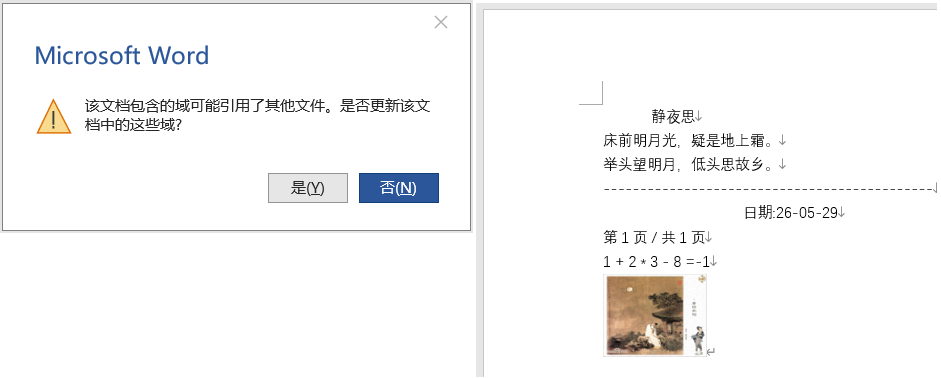
参考文献
1https://github.com/dotnet/Open-XML-SDK
2https://learn.microsoft.com/zh-cn/office/open-xml/open-xml-sdk