目的
就是实现标签左侧水平显示,这个功能Qt本身是不支持的,而AI也实现不了通过改造标签,从而实现这一个功能,因此记录下来。
大部分人用标签页这样:
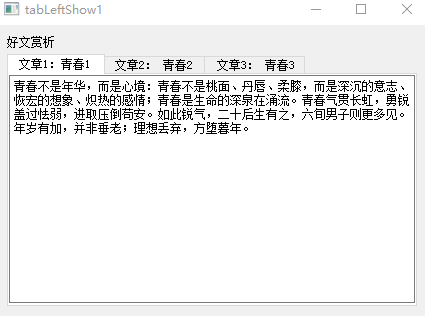
视频效果如下:
Qt标签顶部显示
这样的话,如果标签多的话,就不好看了,而且部分隐藏了,操作不方便。
如果是左侧的话是这样:
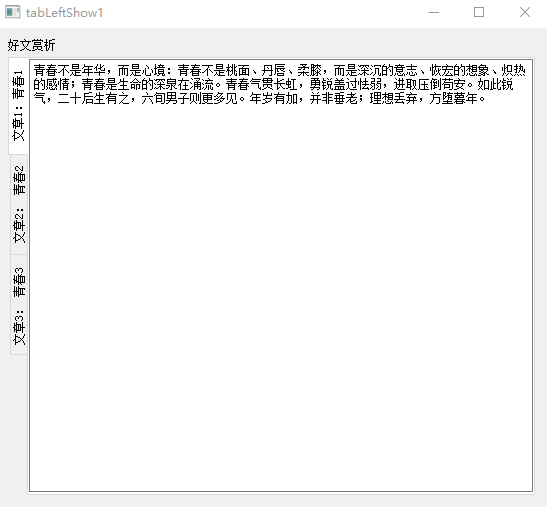
这样显然的问题就是看不方便
而我想左侧且平行显示,怎么弄呢?
这就是当前需要解决的问题,想达到这种效果:
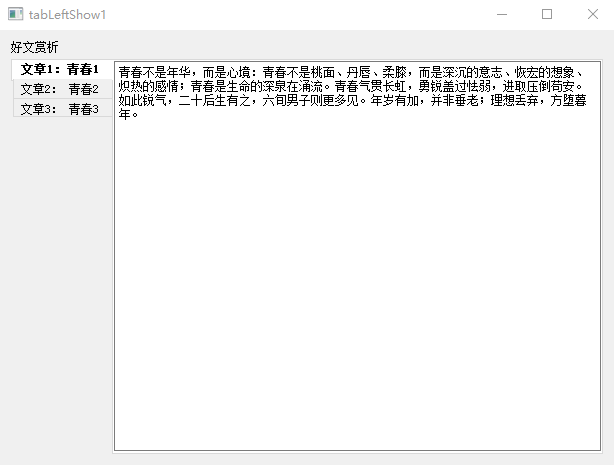
视频效果如下:
左水平显示
情况
平常的情况
关键代码情况
cpp
int main(int argc, char *argv[])
{
    QApplication a(argc, argv);
    //MainWindow w;
    //w.show();
    QWidget w;
    QVBoxLayout layout(&w);
    QTabWidget tabWidget;
    //tabWidget.setTabPosition(QTabWidget::West);
    //w.setStyle(new HorizontalTabStyle(w.style()));
    // 现在可以安全地添加标签页了
    QLabel* label1 = new QLabel();
    label1->setMaximumHeight(100);
    label1->setText("好文赏析");
    QTextEdit* edit1 = new QTextEdit();
    QTextEdit* edit2 = new QTextEdit();
    QTextEdit* edit3 = new QTextEdit();
    tabWidget.addTab(edit1, ("文章1:青春1"));
    tabWidget.addTab(edit2, ("文章2: 青春2"));
    tabWidget.addTab(edit3, ("文章3: 青春3"));
    layout.addWidget(label1);
    layout.addWidget(&tabWidget);
    w.show();
    edit1->setText("青春不是年华,而是心境:青春不是桃面、丹唇、柔膝,而是深沉的意志、恢宏的想象、炽热的感情;青春是生命的深泉在涌流。"
                   "青春气贯长虹,勇锐盖过怯弱,进取压倒苟安。如此锐气,二十后生有之,六旬男子则更多见。年岁有加,并非垂老;理想丢弃,方堕暮年。");
    edit2->setText("岁月悠悠,衰微只及肌肤;热忱抛却,颓唐必至灵魂。忧烦、惶恐、丧失自信,定使心灵扭曲,意气如灰。"
                   "无论年届花甲,抑或二八芳龄,心中皆有生命之欢乐,奇迹之诱惑,孩童般天真久盛不衰。");
    edit3->setText("人心中皆有一台天线,只要你从天上人间接受美好、希望、欢乐、勇气和力量的信号,你就青春永驻、风华长存。"
                   "一旦天线降下,锐气便被冰雪覆盖,玩世不恭、自暴自弃油然而生,即便年方二十,实已垂垂老矣;然则只要竖起天线,捕捉乐观信号,你就有望在八十高龄告别尘寰时仍觉年轻。");
    return a.exec();
}
运行情况
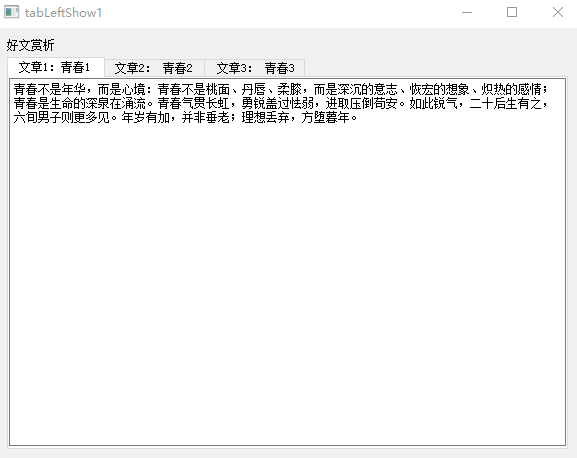
定制的左侧平行的情况
关键代码情况
定制QTabBar的头文件:
cpp
#ifndef HORIZONTALTABBAR_H
#define HORIZONTALTABBAR_H
#include <QObject>
#include <QTabBar>
#include <QStylePainter>
#include <QStyleOptionTab>
class HorizontalTabBar : public QTabBar
{
    Q_OBJECT
   public:
       explicit HorizontalTabBar(QWidget *parent = nullptr);
   protected:
       // 重写标签页大小提示
       QSize tabSizeHint(int index) const override;
       // 重写绘制事件
       void paintEvent(QPaintEvent *event) override;
};
#endif // HORIZONTALTABBAR_H
定制QTabBar的CPP文件:
cpp
//#pragma execution_character_set("utf-8")
#include "horizontaltabbar.h"
#include <QDebug>

HorizontalTabBar::HorizontalTabBar(QWidget *parent) : QTabBar(parent)
{
}

QSize HorizontalTabBar::tabSizeHint(int index) const
{
    // Get default size
    QSize size = QTabBar::tabSizeHint(index);
    // Swap width and height to change from vertical to horizontal layout
    return QSize(size.height(), size.width());
}

void HorizontalTabBar::paintEvent(QPaintEvent *event)
{
    qDebug("enter function HorizontalTabBar::paintEvent");
    Q_UNUSED(event);

    QStylePainter painter(this);
    QStyleOptionTab opt;

    for (int i = 0; i < count(); ++i)
    {
        initStyleOption(&opt, i);
        // Paint the control
        painter.drawControl(QStyle::CE_TabBarTabShape, opt);

        QString text = tabText(i);
        if (text.isEmpty())
            continue;

        painter.save();
        QRect rect = opt.rect;
        qDebug() << "rect1=" << rect;

        QFont font = painter.font();
        font.setBold(opt.state & QStyle::State_Selected);
        painter.setFont(font);

        // Adjust size slightly
        QRect textRect = rect.adjusted(10, 0, 0, 0);
        // Paint text
        painter.drawText(textRect, Qt::AlignLeft | Qt::AlignVCenter, text);

        painter.restore();
    }

    qDebug("exit function HorizontalTabBar::paintEvent");
}
定制TabWidget的头文件:
cpp
#ifndef CUSTOMTABWIDGET_H
#define CUSTOMTABWIDGET_H
#include <QTabWidget>
#include "HorizontalTabBar.h"
#include <QObject>
class CustomTabWidget : public QTabWidget
{
    Q_OBJECT
public:
    explicit CustomTabWidget(QWidget *parent = nullptr);
};
#endif // CUSTOMTABWIDGET_H
定制TabWidget的CPP文件:
cpp
#include "customtabwidget.h"
CustomTabWidget::CustomTabWidget(QWidget *parent) : QTabWidget(parent)
{
    // 关键步骤:在子类构造函数中调用setTabBar,替换默认的QTabBar
    // 并且必须在添加任何标签页之前调用
    setTabBar(new HorizontalTabBar(this));
    // 将标签页位置设置为左侧
    setTabPosition(QTabWidget::West);
}
主程序:
cpp
#pragma execution_character_set("utf-8")
#include "mainwindow.h"
#include <QApplication>
#include <QTextEdit>
#include <QLabel>
#include <QVBoxLayout>
#include "customtabwidget.h"
#include "horizontaltabstyle.h"

int main(int argc, char *argv[])
{
    QApplication a(argc, argv);
    //MainWindow w;
    //w.show();

    QWidget w;
    QVBoxLayout layout(&w);
    CustomTabWidget customer;
    //w.setTabPosition(QTabWidget::West);
    //w.setStyle(new HorizontalTabStyle(w.style()));

    // Now it's safe to add tab pages
    QLabel* label1 = new QLabel();
    label1->setMaximumHeight(100);
    label1->setText("Good Article Appreciation");

    QTextEdit* edit1 = new QTextEdit();
    QTextEdit* edit2 = new QTextEdit();
    QTextEdit* edit3 = new QTextEdit();

    customer.addTab(edit1, ("Article 1: Youth 1"));
    customer.addTab(edit2, ("Article 2: Youth 2"));
    customer.addTab(edit3, ("Article 3: Youth 3"));

    layout.addWidget(label1);
    layout.addWidget(&customer);
    w.show();

    edit1->setText("Youth is not a time of life; it is a state of mind; it is not a matter of rosy cheeks, red lips and supple knees; it is a matter of the will, a quality of the imagination, a vigor of the emotions; it is the freshness of the deep springs of life. "
                   "Youth means a temperamental predominance of courage over timidity, of the appetite for adventure over the love of ease. This often exists in a man of sixty more than a boy of twenty. Nobody grows old merely by a number of years. We grow old by deserting our ideals.");

    edit2->setText("Years may wrinkle the skin, but to give up enthusiasm wrinkles the soul. Worry, fear, self-distrust bows the heart and turns the spirit back to dust. "
                   "Whether sixty or sixteen, there is in every human being's heart the lure of wonder, the unfailing child-like appetite of what's next, and the joy of the game of living.");

    edit3->setText("In the center of your heart and my heart there is a wireless station: so long as it receives messages of beauty, hope, cheer, courage and power from men and from the Infinite, so long are you young. "
                   "When the aerials are down, and your spirit is covered with snows of cynicism and the ice of pessimism, then you are grown old, even at twenty, but as long as your aerials are up, to catch waves of optimism, there is hope you may die young at eighty.");

    return a.exec();
}
运行情况:
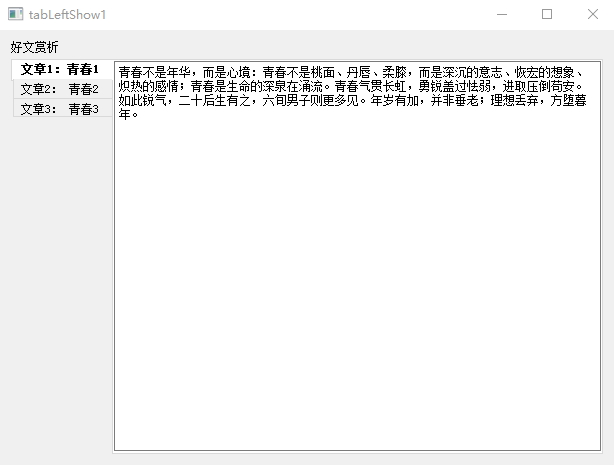
总结
通过自定义QTabWidget的TabBar来实现这一个功能,
首先大小的定义:
cpp
QSize HorizontalTabBar::tabSizeHint(int index) const
{
    // 获取默认尺寸
    QSize size = QTabBar::tabSizeHint(index);
    // 交换宽度和高度,将标签从垂直布局改为水平布局
    return QSize(size.height(), size.width());
}
然后,对这个标签进行绘画操作:
cpp
void HorizontalTabBar::paintEvent(QPaintEvent *event)
{
    qDebug("enter function HorizontalTabBar::paintEvent");
    Q_UNUSED(event);
    QStylePainter painter(this);
    QStyleOptionTab opt;
    for (int i = 0; i < count(); ++i)
    {
       initStyleOption(&opt, i);
       //绘画控件
       painter.drawControl(QStyle::CE_TabBarTabShape, opt);
       QString text = tabText(i);
       if (text.isEmpty())
           continue;
       painter.save();
       QRect rect = opt.rect;
       qDebug()<<"rect1="<<rect;
       QFont font = painter.font();
       font.setBold(opt.state & QStyle::State_Selected);
       painter.setFont(font);
       //调整一下大小
       QRect textRect = rect.adjusted(10, 0, 0, 0);
       //绘画文字
       painter.drawText(textRect, Qt::AlignLeft | Qt::AlignVCenter, text);
       painter.restore();
    }
    qDebug("exit function HorizontalTabBar::paintEvent");
}
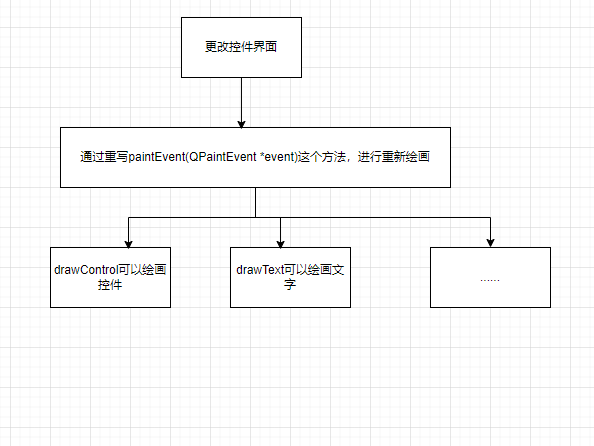
其实,通过这个例子,我们可以感觉到,每一个控件,都是画出来的,如果想自定义一个控件,就得重新绘画:
代码下载链接:https://download.csdn.net/download/maokexu123/92919575