参考资料
目录
- [一. 简介](#一. 简介)
-
- [1.1 安装](#1.1 安装)
-
- [1.1.1 默认安装](#1.1.1 默认安装)
- [1.1.2 安装到指定目录下](#1.1.2 安装到指定目录下)
- [1.1.3 安装后修改安装目录](#1.1.3 安装后修改安装目录)
- [1.2 目录结构](#1.2 目录结构)
- [1.3 国内使用](#1.3 国内使用)
-
- [1.3.1 使用国内 Bucket 镜像](#1.3.1 使用国内 Bucket 镜像)
- [1.3.2 使用Aria2开启多线程下载](#1.3.2 使用Aria2开启多线程下载)
- [1.3.3 设置代理](#1.3.3 设置代理)
- [二. scoop常用操作](#二. scoop常用操作)
-
- [2.1 bucket](#2.1 bucket)
- [2.2 检索](#2.2 检索)
- [2.3 安装](#2.3 安装)
-
- [2.3.1 命令行工具](#2.3.1 命令行工具)
- [2.3.2 软件开发环境](#2.3.2 软件开发环境)
- [2.4 查看](#2.4 查看)
-
- [2.4.1 查看scoop的整体状态](#2.4.1 查看scoop的整体状态)
- [2.4.2 查看已经安装的所有软件](#2.4.2 查看已经安装的所有软件)
- [2.4.3 查看指定软甲的相关信息](#2.4.3 查看指定软甲的相关信息)
- [2.4.4 查看软件的安装位置](#2.4.4 查看软件的安装位置)
- [2.4.5 查看所有的shim](#2.4.5 查看所有的shim)
- [2.4.6 查看当前使用的命令的路径](#2.4.6 查看当前使用的命令的路径)
- [2.5 更新](#2.5 更新)
- [2.6 版本管理](#2.6 版本管理)
- [2.7 卸载](#2.7 卸载)
- [2.8 导入与导出](#2.8 导入与导出)
- [三. 别名配置](#三. 别名配置)
一. 简介
🔷Scoop 是一个开源的 Windows 包管理器,通过用命令行管理开发工具,类似于Linux的apt 和 macOS的Homebrew。
- 官方Github仓库:
https://github.com/ScoopInstaller/Scoop
1.1 安装
1.1.1 默认安装
🔷通过Powershell进行安装
powershell
Set-ExecutionPolicy -ExecutionPolicy RemoteSigned -Scope CurrentUser
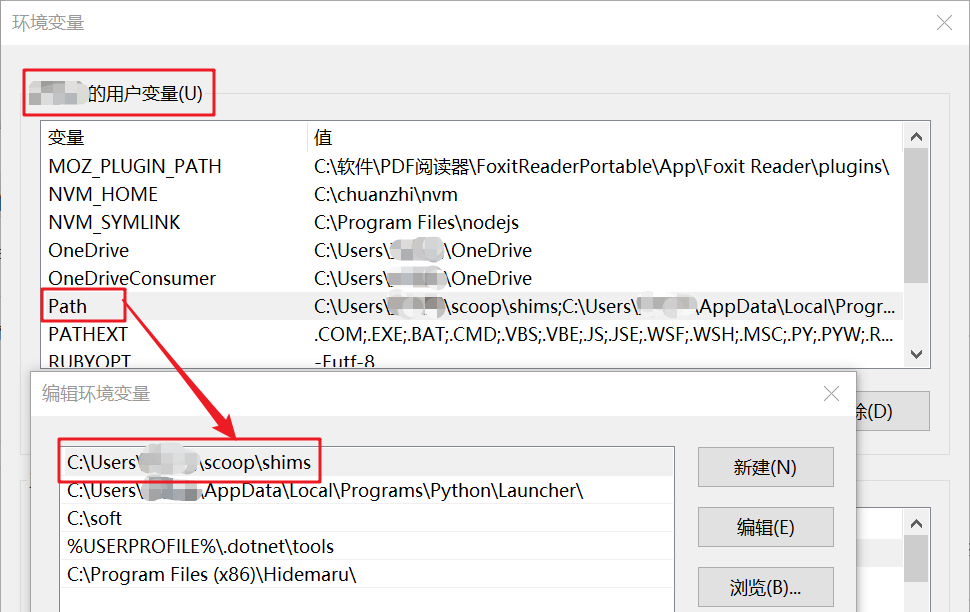
Invoke-RestMethod -Uri https://get.scoop.sh | Invoke-Expression🔷安装成功之后,会默认将当前用户的scoop\shims目录添加到用户环境变量中
1.1.2 安装到指定目录下
- 先配置环境变量,指定安装位置后,再执行安装命令
powershell
# 当前用户系统变量
[Environment]::SetEnvironmentVariable(
    'SCOOP',
    'D:\Scoop',
    [EnvironmentVariableTarget]::User
)

# 系统变量
[Environment]::SetEnvironmentVariable(
    'SCOOP',
    'D:\Scoop',
    [EnvironmentVariableTarget]::Machine
)

Set-ExecutionPolicy -ExecutionPolicy RemoteSigned -Scope CurrentUser
Invoke-RestMethod -Uri https://get.scoop.sh | Invoke-Expression
1.1.3 安装后修改安装目录
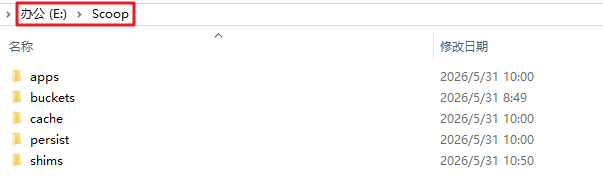
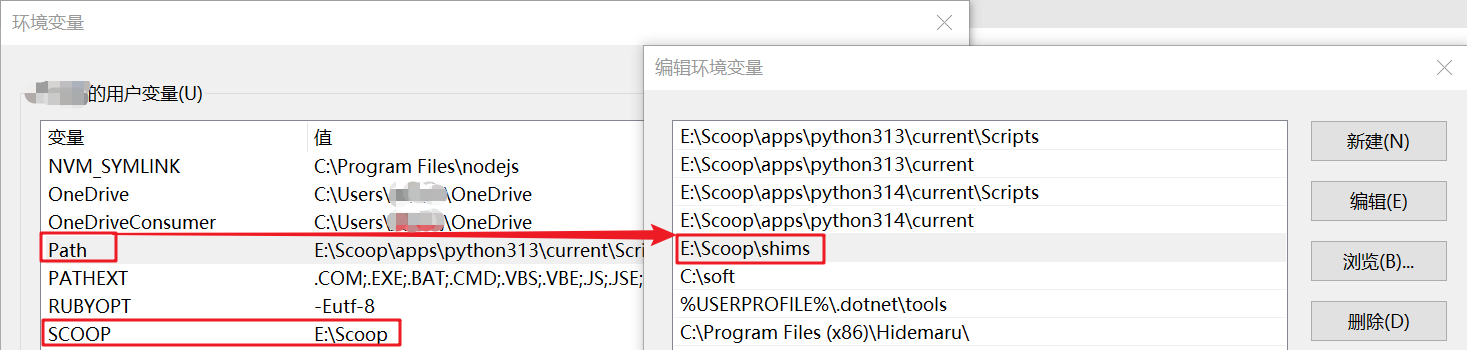
🔷如果C盘空间吃紧,或者当前用户名含有汉字的情况下,可以将scoop目录移动到其他磁盘中。
- 找到原目录后,直接剪切走即可
- 然后修改环境变量
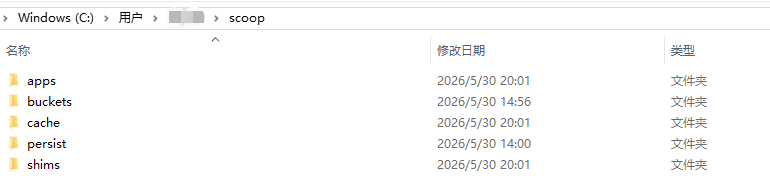
1.2 目录结构
🔷默认会安装在当前用户的scoop目录下
- apps:用于存放安装的软件
- buckets:软件仓库,默认的仓库是main,可自行添加
- cache:缓存
- persist:存放软件配置,用来保证软件升级后不丢失配置
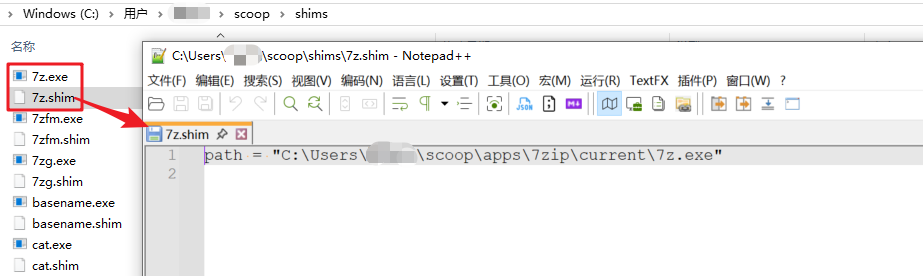
🔷shims:
当通过 Scoop 安装一个命令行工具(如 git)时,Scoop 并不会修改系统的 PATH 环境变量来直接指向该工具的实际可执行文件(.exe)。
Scoop 会在 shims 目录下创建一个同名的、轻量级的可执行文件(.exe)。系统 PATH 环境变量中只需添加 ~\scoop\shims 这一个路径。
当运行命令(例如 git)时,系统会先找到 shims 目录下的 git.exe,这个 git.exe程序会负责定位并启动 apps 目录下对应软件的真实 git.exe。
7z.shim实际指向的是apps目录下的7z.exe
1.3 国内使用
1.3.1 使用国内 Bucket 镜像
- scoop国内镜像优化库:
https://gitee.com/scoop-installer/scoop
bash
# 删除默认的main所关联的仓库
scoop bucket rm main

# 添加国内的镜像库
scoop bucket add main https://gitee.com/scoop-installer/main.git
scoop bucket add extras https://gitee.com/scoop-installer/extras.git
scoop bucket add versions https://gitee.com/scoop-installer/versions.git
1.3.2 使用Aria2开启多线程下载
- 下载并启用之后,下载大型软件的话,可以提升下载速度
bash
scoop install aria2
scoop config aria2-enabled true- 查看配置
powershell
PS F:\> scoop config

last_update        scoop_repo                              scoop_branch aria2-enabled
-----------        ----------                              ------------ -------------
2026/5/31 13:18:38 https://github.com/ScoopInstaller/Scoop master                True
1.3.3 设置代理
- 如果有条件的话,可以使用代理
bash
# 设置代理
scoop config proxy http://127.0.0.1:7890
# 查看代理
scoop config proxy
# 删除代理
scoop config rm proxy
二. scoop常用操作
2.1 bucket
- 列出所有可安装的bucket
bash
PS F:\> scoop bucket known
main
extras
versions
nirsoft
sysinternals
php
nerd-fonts
nonportable
java
games
PS F:\>- 列出已经安装的bucket
bash
PS F:\> scoop bucket list

Name     Source                                     Updated           Manifests
----     ------                                     -------           ---------
main     https://github.com/ScoopInstaller/Main.git 2026/5/31 5:38:29      1552
extras   https://github.com/ScoopInstaller/Extras   2026/5/31 3:20:12      2304
versions https://github.com/ScoopInstaller/Versions 2026/5/31 6:18:08 586- 添加指定的bucket
bash
scoop bucket add extras
scoop bucket add versions
scoop bucket add java- 移除指定的bucket
bash
scoop bucket rm java2.2 检索
bash
PS F:\> scoop search grep
Results from local buckets...

Name       Version    Source Binaries
----       -------    ------ --------
ast-grep   0.43.0     main
gettext    1.0-v1.19  main   msggrep.exe
gow        0.8.0      main   egrep.exe | fgrep.exe | grep.exe
grep       3.11       main
igrep      1.3.0      main
jsongrep   0.9.0      main
nim        2.2.10     main   nimgrep.exe
pcre2grep  10.39      main
pcregrep   8.45       main
repgrep    0.16.1     main
rga        0.10.9     main   ripgrep-all.exe
ripgrep    15.1.0     main
rktools2k3 1.0        main   qgrep.exe
ugrep      7.8.2      main
unxutils   2007.03.01 main   agrep.exe | egrep.exe | fgrep.exe | grep.exe
astrogrep  4.4.9      extras
baregrep   3.50a      extras
dngrep     4.7.54.0   extras
grepwin    2.1.12     extras
roughgrep  3.16.2     extras
2.3 安装
2.3.1 命令行工具
🔷所有的安装包都依赖于7zip解压缩,属于必安装的软件
bash
scoop install 7zip🔷coreutils提供了大多数常用的命令行工具
bash
scoop install less
scoop install touch
scoop install coreutils
🔷文本处理3剑客
bash
scoop install grep
scoop install gawk
scoop install sed
🔷更加现代化的命令行工具
ripgrep用于代替grepfd用于代替find,在windows中使用的话,find会乱码bat用于代替cateza用于代替ls
bash
scoop install ripgrep
scoop install fd
scoop install bat
scoop install eza
2.3.2 软件开发环境
bash
scoop install sudo
bash
scoop install vscode
scoop install eclipse-java
scoop install notepadplusplus
bash
scoop install python313
scoop install python314

scoop install nodejs22
scoop install nodejs24
bash
scoop install openjdk17
scoop install openjdk21
2.4 查看
2.4.1 查看scoop的整体状态
bash
PS F:\> scoop status
Scoop is up to date.
Everything is ok!
2.4.2 查看已经安装的所有软件
bash
PS F:\> scoop list
Installed apps:

Name      Version      Source Updated             Info
----      -------      ------ -------             ----
7zip      26.01        main   2026-05-30 14:00:24
bat       0.26.1       main   2026-05-31 08:29:50
coreutils 5.97.3       main   2026-05-30 14:22:33
eza       0.23.4       main   2026-05-30 19:40:30
fd        10.4.2       main   2026-05-30 19:23:59
ripgrep   15.1.0       main   2026-05-30 20:01:15
sudo      0.2020.01.26 main   2026-05-30 15:17:11
touch     0.2018.07.25 main   2026-05-31 08:28:36
2.4.3 查看指定软甲的相关信息
bash
PS F:\> scoop info 7zip

Name        : 7zip
Description : A multi-format file archiver with high compression ratios.
Version     : 26.01
Source      : main
Website     : https://www.7-zip.org
License     : BSD-2-Clause, BSD-3-Clause, LGPL-2.1-or-later
Updated at  : 2026/4/28 1:55:41
Updated by  : github-actions[bot]
Installed   : 26.01
Binaries    : 7z.exe | 7zG.exe | 7zFM.exe
Shortcuts   : 7-Zip\7-Zip File Manager | 7-Zip\7-Zip Help
Notes       : To register the context menu entry, please execute the following command:
              reg import "<root>\install-context.reg"

              If an error occurs while attempting to delete files during uninstallation, run the following command and then retry:
              Stop-Process -Name 'explorer'
2.4.4 查看软件的安装位置
bash
PS F:\> scoop prefix 7zip
C:\Users\用户名\scoop\apps\7zip\current
2.4.5 查看所有的shim
bash
PS F:\> scoop shim list | head

Name      Source    Alternatives        IsGlobal IsHidden
----      ------    ------------        -------- --------
7z        External                      False    True
7zfm      External                      False    True
7zg       External                      False    True
basename  External                      False    True
bat       External                      False    True
cat       External                      False    True
chmod     External                      False    True
2.4.6 查看当前使用的命令的路径
- 若系统中有多个版本的grep命令的话,使用
scoop which,可以明确当前使用的grep安装路径
bash
PS F:\> scoop which grep
C:\Program Files\Git\usr\bin\grep.exe
2.5 更新
- 更新
scoop自身,查看是否有软件可更新
bash
PS F:\> scoop update
Updating Scoop...
Updating Buckets...
Scoop was updated successfully!- 更新指定的软件
bash
PS F:\> scoop update 7zip
7zip: 26.01 (latest version)
Latest versions for all apps are installed! For more information try 'scoop status'
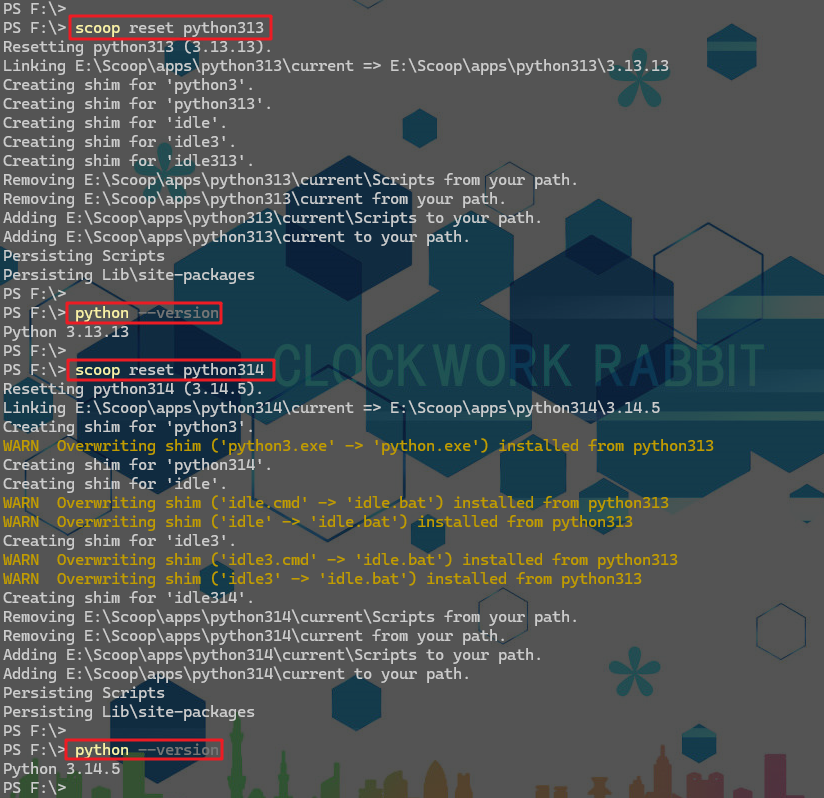
2.6 版本管理
🔷当安装了多个版本的软件后,可通过reset命令切换版本。
scoop reset python版本
2.7 卸载
bash
# 卸载
scoop uninstall findutils
# 清除缓存
scoop cache rm findutils
2.8 导入与导出
bash
# 将安装的软件列表导出
scoop export > scoop.json
# 依据导出的软件列表导入软甲
scoop import scoop.json
三. 别名配置
🔷Windows使用的是Powershell7,在C:\Users\用户名\Documents\PowerShell\profile.ps1的路径中新建profile.ps1文件。
- 创建
ll函数,用来封装eza命令 - 文件夹优先,并且显示详细
powershell
function ll {
    $eza = Join-Path $env:SCOOP 'shims\eza.exe'
    & $eza `
        -lah `
        --group-directories-first `
        @args
}