大屏实现方案之-高德
实现方式
1、安装高德地图加载器
为了在 Vue 中按需、优雅地加载高德地图,官方推荐使用 @amap/amap-jsapi-loader:
npm install @amap/amap-jsapi-loader --save
具体实现功能代码以及效果展示
基础3D地图
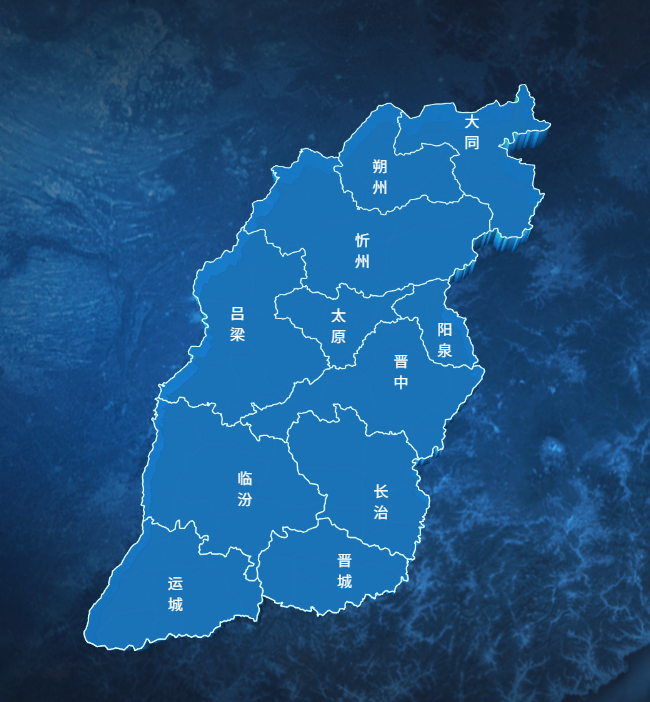
地图组件:Shanxi3DMap
html
<template>
  <div class="map-container">
    <div id="amap-container" class="map-wrapper"></div>
  </div>
</template>

<script>
import AMapLoader from "@amap/amap-jsapi-loader";
import {
  AMAP_KEY,
  AMAP_SECRET,
  AMAP_VERSION,
  MAP_CENTER,
  MAP_DEFAULT_ZOOM,
  MAP_PITCH,
  MAP_ROTATE,
} from "@/config/params.js";

export default {
  name: "ShanXi3DMap",
  data() {
    return {
      map: null,
      loca: null,
      polygonLayer: null,
      topLineLayer: null,
      bottomLineLayer: null,
      cityMarkers: [],
    };
  },
  mounted() {
    this.initMap();
  },
  beforeDestroy() {
    // 销毁地图和 Loca 实例,防止内存泄漏
    if (this.loca) {
      this.loca.animate.stop();
      this.loca.destroy();
    }
    if (this.map) {
      this.map.destroy();
    }
  },
  methods: {
    initMap() {
      // 高德地图安全配置
      window._AMapSecurityConfig = {
        securityJsCode: AMAP_SECRET, // 请替换为你的高德安全密钥
      };

      AMapLoader.load({
        key: AMAP_KEY, // 请替换为你的高德 Key
        version: AMAP_VERSION,
        Loca: { version: AMAP_VERSION },
      })
        .then((AMap) => {
          // 👇 核心:创建一个完全透明的自定义瓦片图层
          const emptyLayer = new AMap.TileLayer({
            opacity: 0, // 瓦片完全透明
            zooms: [3, 20],
          });
          // 初始化地图
          this.map = new AMap.Map("amap-container", {
            viewMode: "3D",
            //俯仰角度
            pitch: MAP_PITCH,
            //初始地图顺时针旋转的角度
            rotation: MAP_ROTATE,
            //缩放比例
            zoom: MAP_DEFAULT_ZOOM,
            //中心点
            center: MAP_CENTER,
            //是否展示地图文字和 POI 信息。 高德地图 JSAPI 2.0 中,Map 实例并没有 setStyle 这个方法来通过 JSON 对象动态修改底图文字样式,需要设置自定义样式
            showLabel: false,
            //是否展示楼块
            showBuildings: false,
            //地图样式
            // mapStyle: "amap://styles/a2a9b46da661bd97c1b6b028ae9e5ee7", // 自定义无网格
            mapStyle: "amap://styles/dark",
            //是否允许旋转
            rotateEnable: false,
            //是否允许俯仰
            pitchEnable: false,
            //是否允许缩放
            zoomEnable: false,
            //是否允许拖拽
            dragEnable: false,
            // 👇 新增:强制设置地图背景为透明,这是让外部透出底图的关键
            backgroundColor: "rgba(0,0,0,0)",
            // 这样高德根本不会去请求和渲染网格瓦片!
            // layers: [emptyLayer],
          });

          // 注意:Loca 2.0 是挂载在全局 Loca 上的,而不是 AMap.Loca
          this.loca = new Loca.Container({ map: this.map });

          this.loadShanxiData();
        })
        .catch((e) => {
          console.error("高德地图加载失败:", e);
        });
    },

    async loadShanxiData() {
      try {
        const res = await fetch(
          "https://geo.datav.aliyun.com/areas_v3/bound/140000_full.json"
        );
        const data = await res.json();

        // ==========================================
        // 1. 提取坐标数据,生成 opts.mask 掩膜
        // ==========================================
        let maskCoords = [];
        data.features.forEach((feature) => {
          const geom = feature.geometry;
          if (geom.type === "Polygon") {
            maskCoords.push(geom.coordinates);
          } else if (geom.type === "MultiPolygon") {
            maskCoords.push(...geom.coordinates);
          }
        });

        // 设置地图掩膜
        this.map.setMask(maskCoords);

        // ==========================================
        // 2. 将面数据转为线数据 (修正版本)
        // ==========================================
        const lineFeatures = [];

        data.features.forEach((feature) => {
          const geom = feature.geometry;
          const coords = geom.coordinates; // 原始坐标数组

          // 如果是 Polygon,coords 是 [[[lng,lat]...], ...]
          // 如果是 MultiPolygon,coords 是 [[[[lng,lat]...]], ...]
          // 我们需要提取所有的环,并把它们作为独立的 LineString Feature

          let rings = [];
          if (geom.type === "MultiPolygon") {
            // 展开三维数组:把所有 Polygon 的所有环拿出来
            coords.forEach((polygon) => {
              rings.push(...polygon);
            });
          } else if (geom.type === "Polygon") {
            rings = coords;
          }

          // 将每一个环转换为一个独立的 LineString Feature
          rings.forEach((ring) => {
            lineFeatures.push({
              type: "Feature",
              properties: feature.properties, // 保留属性信息
              geometry: {
                type: "LineString", // 强制改为 LineString
                coordinates: ring, // 直接放一维坐标数组
              },
            });
          });
        });

        const lineData = { type: "FeatureCollection", features: lineFeatures };

        this.renderShanxi3D(data, lineData);
      } catch (error) {
        console.error("加载 GeoJSON 数据失败:", error);
      }
    },

    renderShanxi3D(polygonGeoJson, lineGeoJson) {
      // 1. 创建数据源
      const polygonSource = new Loca.GeoJSONSource({ data: polygonGeoJson });
      const lineSource = new Loca.GeoJSONSource({ data: lineGeoJson });

      // 清除旧图层
      if (this.polygonLayer) this.loca.remove(this.polygonLayer);
      if (this.topLineLayer) this.loca.remove(this.topLineLayer);
      if (this.bottomLineLayer) this.loca.remove(this.bottomLineLayer);

      // ========== 2. 3D 拉伸区块  设置色块儿颜色==========
      this.polygonLayer = new Loca.PolygonLayer({
        zIndex: 6.5,
        opacity: 0.8,
        visible: true,
        zooms: [2, 22],
      });

      this.polygonLayer.setSource(polygonSource);
      this.polygonLayer.setStyle({
        // 顶面颜色:3D区块最顶部的颜色(浅蓝色)
        topColor: "#1b9cff",
        // 侧面颜色:3D区块侧面的色块儿颜色(深蓝色)
        sideTopColor: "#1b9cff",
        // 底面颜色:3D区块最底部的颜色(深蓝色)
        sideBottomColor: "#00396e",
        // 拉伸高度
        height: 50000,
        // 3D区块的深度
        altitude: 0,
        // 3D区块的 Shininess 值
        shininess: 30,
        // 3D区块的镜面反射颜色
        specular: "#111111",
      });

      this.loca.add(this.polygonLayer);

      // ========== 3. 顶部边界线 (与拉伸高度齐平,勾勒方块顶部) ==========
      this.topLineLayer = new Loca.LineLayer({
        zIndex: 11,
        opacity: 1,
        visible: true,
        zooms: [2, 22],
      });

      this.topLineLayer.setSource(lineSource);
      this.topLineLayer.setStyle({
        // 线颜色
        color: "#E0FFFF",
        // 线宽度
        width: 1,
        altitude: 50000, // 必须与拉伸高度保持一致
        lineWidth: 1,
      });

      this.loca.add(this.topLineLayer);

      // ==========可选 4.3D切边 线条效果 底部发光边界线  (贴地,增强悬浮科技感) ==========
      this.bottomLineLayer = new Loca.LineLayer({
        zIndex: 9,
        opacity: 0.6,
        visible: true,
        zooms: [2, 22],
      });

      this.bottomLineLayer.setSource(lineSource);
      this.bottomLineLayer.setStyle({
        color: "#00e5ff",
        width: 3,
        altitude: 1, // 贴地
        lineWidth: 2,
      });

      //3D底部的边界线
      //   this.loca.add(this.bottomLineLayer);

      // 添加城市名称标记
      this.addCityMarkers();

      // 启动 Loca 动画渲染
      this.loca.animate.start();
    },

    addCityMarkers() {
      const cities = [
        { name: "太原", lng: 112.55, lat: 37.87 },
        { name: "大同", lng: 113.17, lat: 40.09 },
        { name: "朔州", lng: 112.44, lat: 39.33 },
        { name: "忻州", lng: 112.73, lat: 38.43 },
        { name: "吕梁", lng: 111.83, lat: 37.53 },
        { name: "晋中", lng: 112.75, lat: 37.68 },
        { name: "阳泉", lng: 113.57, lat: 37.87 },
        { name: "长治", lng: 113.13, lat: 36.19 },
        { name: "晋城", lng: 112.85, lat: 35.5 },
        { name: "临汾", lng: 111.52, lat: 36.09 },
        { name: "运城", lng: 110.99, lat: 35.02 },
      ];

      // 1. 建立城市名称与偏移量的映射表  此方法在不同分辨率上会出现偏差
      const offsetMap = {
        大同: [20, -30],
        朔州: [0, -40],
        忻州: [-20, -50],
        吕梁: [-50, -50],
        太原: [-20, -30],
        晋中: [20, -10],
      };
      const defaultOffset = [0, -30]; // 默认偏移量

      this.cityMarkers.forEach((marker) => marker.setMap(null));
      this.cityMarkers = [];

      cities.forEach((city) => {
        // 2. 从映射表获取偏移量,没有则用默认值
        const currentOffset = offsetMap[city.name] || defaultOffset;

        const marker = new AMap.Marker({
          position: [city.lng, city.lat],
          title: city.name,
          content: `<div class="city-marker" style="color: white; font-size: 12px">${city.name}</div>`,
          offset: new AMap.Pixel(currentOffset[0], currentOffset[1]),
        });

        marker.setMap(this.map);
        this.cityMarkers.push(marker);
      });
    },
  },
};
</script>

<style scoped>
.map-container {
  width: 100%;
  height: 100vh;
  /* 容器背景透明 */
  background-color: transparent;
  overflow: hidden;

  /* 👇 你的自定义大屏背景图,在这里显示 */
  background-image: url(~@/assets/images/icon_screen.png);
  background-size: cover;
  background-position: center;
  background-repeat: no-repeat;
}
/* 去掉地图底部背景网格 */
.amap-container {
  background-image: none !important;
}
.map-wrapper {
  width: 100%;
  height: 100%;
}

/* 城市标记样式 */
.city-marker {
  background-color: rgba(0, 0, 0, 0.6);
  color: #fff;
  padding: 4px 8px;
  border-radius: 4px;
  font-size: 12px;
  border: 1px solid #00e5a0;
  white-space: nowrap;
  box-shadow: 0 0 5px rgba(0, 229, 160, 0.4);
  position: relative;
  transform: translateX(-50%) translateY(-100%);
  margin-top: -10px;
}

/* 隐藏 Logo 和版权信息 */
:deep(.amap-logo),
:deep(.amap-copyright) {
  display: none !important;
}
</style>
页面中引用:twoDimensional_normal_page
html
<template>
  <div class="large-screen">
    <ShanXi3DMap />
    <!-- <div id="amap-container" class="map-wrapper"></div> -->
  </div>
</template>

<script>
import ShanXi3DMap from "@/views/twoDimensional/components/Shanxi3DMap.vue";
export default {
  name: "TwoDimensionalNormalPage",
  components: { ShanXi3DMap },
  mounted() {
    // ★ 关键 2:组件挂载时,添加 PC 端缩放拦截监听
    this.$nextTick(() => {
      // 绑定事件,注意 { passive: false } 必须加,否则无法阻止默认行为
      document.addEventListener("wheel", this.handleWheel, { passive: false });
      document.addEventListener("keydown", this.handleKeydown);
    });
  },
  beforeDestroy() {
    // ★ 关键 3:组件销毁时,必须移除监听,否则会影响其他页面!!!
    document.removeEventListener("wheel", this.handleWheel);
    document.removeEventListener("keydown", this.handleKeydown);
  },
  methods: {
    /** 拦截 Ctrl + 鼠标滚轮 缩放 */
    handleWheel(e) {
      if (e.ctrlKey || e.metaKey) {
        e.preventDefault();
      }
    },
    /** 拦截 Ctrl + +/- 以及 Ctrl + 0 缩放 */
    handleKeydown(e) {
      // metaKey 是 Mac 的 Command 键
      if (
        (e.ctrlKey || e.metaKey) &&
        (e.key === "=" || e.key === "+" || e.key === "-" || e.key === "0")
      ) {
        e.preventDefault();
      }
    },
  },
};
</script>

<style scoped>
.large-screen {
  width: 100vw;
  height: 100vh;
  overflow: hidden;
  position: relative;
  /* background-color: #02112e; */
  background-image: url(~@/assets/images/icon_screen.png);
  background-size: cover;
  background-position: center;
  background-repeat: no-repeat;
}

.map-wrapper {
  width: 100%;
  height: 100%;
}
</style>
边界流光效果(动态)
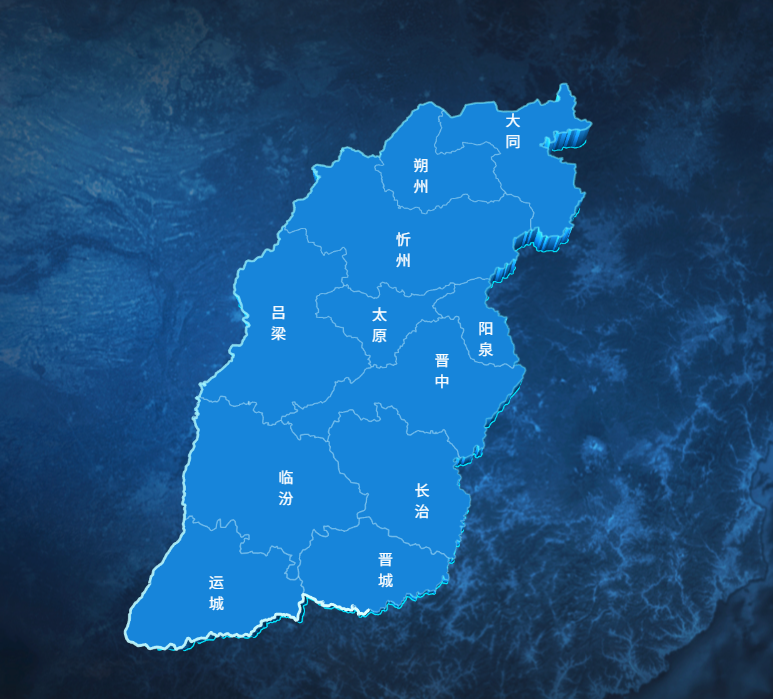
地图组件:Shanxi3DStyleMap
html
<template>
  <div class="map-container">
    <div id="amap-container" class="map-wrapper"></div>
  </div>
</template>

<script>
import AMapLoader from "@amap/amap-jsapi-loader";
import {
  AMAP_KEY,
  AMAP_SECRET,
  AMAP_VERSION,
  MAP_CENTER,
  MAP_DEFAULT_ZOOM,
  MAP_PITCH,
  MAP_ROTATE,
} from "@/config/params.js";

export default {
  name: "ShanXi3DStyleMap",
  data() {
    return {
      map: null,
      loca: null,
      polygonLayer: null,
      topLineLayer: null,
      pulseLineLayer: null, // 新增:顶部流光图层
      centerLineLayer: null,
      bottomLineLayer: null,
      cityMarkers: [],
    };
  },
  mounted() {
    this.initMap();
  },
  beforeDestroy() {
    if (this.loca) {
      this.loca.animate.stop();
      this.loca.destroy();
    }
    if (this.map) {
      this.map.destroy();
    }
  },
  methods: {
    initMap() {
      window._AMapSecurityConfig = {
        securityJsCode: AMAP_SECRET,
      };

      AMapLoader.load({
        key: AMAP_KEY,
        version: AMAP_VERSION,
        Loca: { version: AMAP_VERSION },
      })
        .then((AMap) => {
          this.map = new AMap.Map("amap-container", {
            viewMode: "3D",
            pitch: MAP_PITCH,
            rotation: MAP_ROTATE,
            zoom: MAP_DEFAULT_ZOOM,
            center: MAP_CENTER,
            showLabel: false,
            showBuildings: false,
            mapStyle: "amap://styles/a2a9b46da661bd97c1b6b028ae9e5ee7",
            rotateEnable: false,
            pitchEnable: false,
            zoomEnable: false,
            dragEnable: false,
            backgroundColor: "rgba(0,0,0,0)",
          });

          this.loca = new Loca.Container({ map: this.map });
          this.loadShanxiData();
        })
        .catch((e) => {
          console.error("高德地图加载失败:", e);
        });
    },
    async loadShanxiData() {
      try {
        // ==========================================
        // 1. 加载市级全量数据(_full)→ 用于3D分块、静态线
        // ==========================================
        const resFull = await fetch(
          "https://geo.datav.aliyun.com/areas_v3/bound/140000_full.json"
        );
        const dataFull = await resFull.json();

        // 提取掩膜坐标
        let maskCoords = [];
        dataFull.features.forEach((feature) => {
          const geom = feature.geometry;
          if (geom.type === "Polygon") {
            maskCoords.push(geom.coordinates);
          } else if (geom.type === "MultiPolygon") {
            maskCoords.push(...geom.coordinates);
          }
        });
        this.map.setMask(maskCoords);

        // 将市级面数据转为线数据
        const cityLineFeatures = [];
        dataFull.features.forEach((feature) => {
          const geom = feature.geometry;
          const coords = geom.coordinates;
          let rings = [];
          if (geom.type === "MultiPolygon") {
            coords.forEach((polygon) => {
              rings.push(...polygon);
            });
          } else if (geom.type === "Polygon") {
            rings = coords;
          }
          rings.forEach((ring) => {
            cityLineFeatures.push({
              type: "Feature",
              properties: feature.properties,
              geometry: {
                type: "LineString",
                coordinates: ring,
              },
            });
          });
        });
        const cityLineData = {
          type: "FeatureCollection",
          features: cityLineFeatures,
        };

        // ==========================================
        // 2. 加载省级外轮廓数据(不带 _full)→ 只用于流光
        // ==========================================
        const resProvince = await fetch(
          "https://geo.datav.aliyun.com/areas_v3/bound/140000.json"
        );
        const dataProvince = await resProvince.json();

        // ★ 修复:先收集所有 feature 的所有环,再全局找最长的那个
        let allRings = [];
        dataProvince.features.forEach((feature) => {
          const geom = feature.geometry;
          const coords = geom.coordinates;
          if (geom.type === "MultiPolygon") {
            coords.forEach((polygon) => {
              allRings.push(...polygon);
            });
          } else if (geom.type === "Polygon") {
            allRings.push(...coords);
          }
        });

        // 全局找坐标点最多(边界最长)的环,只保留这一条
        let maxRing = null;
        let maxLen = 0;
        allRings.forEach((ring) => {
          if (ring.length > maxLen) {
            maxLen = ring.length;
            maxRing = ring;
          }
        });

        const provinceLineFeatures = [];
        if (maxRing) {
          provinceLineFeatures.push({
            type: "Feature",
            properties: dataProvince.features[0].properties,
            geometry: {
              type: "LineString",
              coordinates: maxRing,
            },
          });
        }

        const provinceLineData = {
          type: "FeatureCollection",
          features: provinceLineFeatures,
        };

        // 传入两份数据:市级(分块+静态线) + 省级(流光)
        this.renderShanxi3D(dataFull, cityLineData, provinceLineData);
      } catch (error) {
        console.error("加载 GeoJSON 数据失败:", error);
      }
    },


    renderShanxi3D(polygonGeoJson, cityLineGeoJson, provinceLineGeoJson) {
      const polygonSource = new Loca.GeoJSONSource({ data: polygonGeoJson });
      const cityLineSource = new Loca.GeoJSONSource({ data: cityLineGeoJson });
      // 省级外轮廓线数据源 → 专门给流光用
      const provinceLineSource = new Loca.GeoJSONSource({
        data: provinceLineGeoJson,
      });

      // 清除旧图层
      if (this.polygonLayer) this.loca.remove(this.polygonLayer);
      if (this.topLineLayer) this.loca.remove(this.topLineLayer);
      if (this.pulseLineLayer) this.loca.remove(this.pulseLineLayer);
      if (this.centerLineLayer) this.loca.remove(this.centerLineLayer);
      if (this.bottomLineLayer) this.loca.remove(this.bottomLineLayer);

      // ========== 2. 3D 拉伸区块(用市级数据,每块独立) ==========
      this.polygonLayer = new Loca.PolygonLayer({
        zIndex: 4,
        opacity: 1,
        visible: true,
        zooms: [2, 22],
      });
      this.polygonLayer.setSource(polygonSource);
      this.polygonLayer.setStyle({
        topColor: "#1b9cff",
        sideTopColor: "#1b9cff",
        sideBottomColor: "#00396e",
        height: 50000,
        altitude: 0,
        shininess: 30,
        specular: "#111111",
      });
      this.loca.add(this.polygonLayer);

      // ========== 3. 顶部边界线 - 静态底色(用市级数据,每条市界都有) ==========
      this.topLineLayer = new Loca.LineLayer({
        zIndex: 5,
        opacity: 1,
        visible: true,
        zooms: [2, 22],
      });
      this.topLineLayer.setSource(cityLineSource);
      this.topLineLayer.setStyle({
        color: "rgba(224, 255, 255, 0.25)",
        altitude: 50000,
        lineWidth: 1,
      });
      this.loca.add(this.topLineLayer);

      // ========== 流光效果 - 只用省级外轮廓数据! ==========
      // 关键区别:数据源是 provinceLineSource 而非 cityLineSource
      // provinceLineGeoJson 只包含山西省整体外边界,没有内部市界
      // 所以流光只会在外圈跑,不会出现在每条市界上
      this.pulseLineLayer = new Loca.PulseLineLayer({
        zIndex: 6,
        opacity: 1,
        visible: true,
        zooms: [2, 22],
      });
      this.pulseLineLayer.setSource(provinceLineSource); // ← 省级外轮廓
      this.pulseLineLayer.setStyle({
        altitude: 50000,
        lineWidth: 2,
        headColor: "#E0FFFF",
        trailColor: "rgba(0, 229, 255, 0)",
        //修改这里的值,可以实现多条流光的效果
        interval: 1,
        duration: 10000,
      });
      this.loca.add(this.pulseLineLayer);

      // ========== 4. 底部发光边界线(用市级数据) ==========
      this.bottomLineLayer = new Loca.LineLayer({
        zIndex: 1,
        opacity: 1,
        visible: true,
        zooms: [2, 22],
      });
      this.bottomLineLayer.setSource(cityLineSource);
      this.bottomLineLayer.setStyle({
        color: "#00e5ff",
        width: 3,
        altitude: 1,
        lineWidth: 2,
      });
      this.loca.add(this.bottomLineLayer);

      // 添加城市名称标记
      this.addCityMarkers();

      // 启动 Loca 动画渲染
      this.loca.animate.start();
    },

    addCityMarkers() {
      const cities = [
        { name: "太原", lng: 112.55, lat: 37.87 },
        { name: "大同", lng: 113.17, lat: 40.09 },
        { name: "朔州", lng: 112.44, lat: 39.33 },
        { name: "忻州", lng: 112.73, lat: 38.43 },
        { name: "吕梁", lng: 111.83, lat: 37.53 },
        { name: "晋中", lng: 112.75, lat: 37.68 },
        { name: "阳泉", lng: 113.57, lat: 37.87 },
        { name: "长治", lng: 113.13, lat: 36.19 },
        { name: "晋城", lng: 112.85, lat: 35.5 },
        { name: "临汾", lng: 111.52, lat: 36.09 },
        { name: "运城", lng: 110.99, lat: 35.02 },
      ];

      const offsetMap = {
        大同: [20, -30],
        朔州: [0, -40],
        忻州: [-20, -50],
        吕梁: [-50, -50],
        太原: [-20, -30],
        晋中: [20, -10],
      };
      const defaultOffset = [0, -30];

      this.cityMarkers.forEach((marker) => marker.setMap(null));
      this.cityMarkers = [];

      cities.forEach((city) => {
        const currentOffset = offsetMap[city.name] || defaultOffset;
        const marker = new AMap.Marker({
          position: [city.lng, city.lat],
          title: city.name,
          content: `<div class="city-marker" style="color: white; font-size: 12px">${city.name}</div>`,
          offset: new AMap.Pixel(currentOffset[0], currentOffset[1]),
        });
        marker.setMap(this.map);
        this.cityMarkers.push(marker);
      });
    },
  },
};
</script>

<style scoped>
.map-container {
  width: 100%;
  height: 100vh;
  background-color: transparent;
  overflow: hidden;
  background-image: url(~@/assets/images/icon_screen.png);
  background-size: cover;
  background-position: center;
  background-repeat: no-repeat;
}
.amap-container {
  background-image: none !important;
}
.map-wrapper {
  width: 100%;
  height: 100%;
}
:deep(.amap-logo),
:deep(.amap-copyright) {
  display: none !important;
}
</style>
页面中引用:twoDimensional_style_page
html
<template>
  <div class="large-screen">
    <ShanXi3DStyleMap />
    <!-- <div id="amap-container" class="map-wrapper"></div> -->
  </div>
</template>

<script>
import ShanXi3DStyleMap from "@/views/twoDimensional/components/Shanxi3DStyleMap.vue";
export default {
  name: "TwoDimensionalStylePage",
  components: { ShanXi3DStyleMap },
  mounted() {
    // ★ 关键 2:组件挂载时,添加 PC 端缩放拦截监听
    this.$nextTick(() => {
      // 绑定事件,注意 { passive: false } 必须加,否则无法阻止默认行为
      document.addEventListener("wheel", this.handleWheel, { passive: false });
      document.addEventListener("keydown", this.handleKeydown);
    });
  },
  beforeDestroy() {
    // ★ 关键 3:组件销毁时,必须移除监听,否则会影响其他页面!!!
    document.removeEventListener("wheel", this.handleWheel);
    document.removeEventListener("keydown", this.handleKeydown);
  },
  methods: {
    /** 拦截 Ctrl + 鼠标滚轮 缩放 */
    handleWheel(e) {
      if (e.ctrlKey || e.metaKey) {
        e.preventDefault();
      }
    },
    /** 拦截 Ctrl + +/- 以及 Ctrl + 0 缩放 */
    handleKeydown(e) {
      // metaKey 是 Mac 的 Command 键
      if (
        (e.ctrlKey || e.metaKey) &&
        (e.key === "=" || e.key === "+" || e.key === "-" || e.key === "0")
      ) {
        e.preventDefault();
      }
    },
  },
};
</script>

<style scoped>
.large-screen {
  width: 100vw;
  height: 100vh;
  overflow: hidden;
  position: relative;
  /* background-color: #02112e; */
  background-image: url(~@/assets/images/icon_screen.png);
  background-size: cover;
  background-position: center;
  background-repeat: no-repeat;
}

.map-wrapper {
  width: 100%;
  height: 100%;
}
</style>
鼠标移动,地区高亮凸起
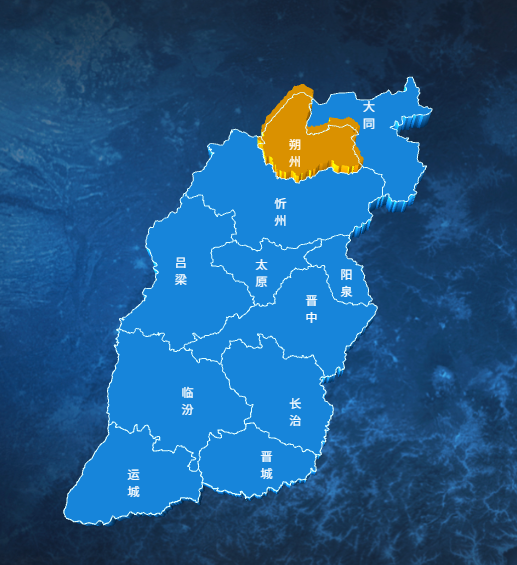
地图组件:Shanxi3DMap
html
<template>
  <div class="map-container">
    <div id="amap-container" class="map-wrapper"></div>
  </div>
</template>

<script>
import AMapLoader from "@amap/amap-jsapi-loader";
import {
  AMAP_KEY,
  AMAP_SECRET,
  AMAP_VERSION,
  MAP_CENTER,
  MAP_DEFAULT_ZOOM,
  MAP_PITCH,
  MAP_ROTATE,
} from "@/config/params.js";

export default {
  name: "ShanXi3DMap",
  data() {
    return {
      AMapIns: null, // 保存 AMap 实例,供 GeometryUtil 使用
      map: null,
      loca: null,
      polygonLayer: null,
      topLineLayer: null,
      bottomLineLayer: null,
      cityMarkers: [],
      hoveredAdcode: null,
      geoFeatures: [], // 保存市的几何数据,用于数学计算判断
    };
  },
  mounted() {
    this.initMap();
  },
  beforeDestroy() {
    if (this.loca) {
      this.loca.animate.stop();
      this.loca.destroy();
    }
    if (this.map) {
      this.map.destroy();
    }
  },
  methods: {
    initMap() {
      window._AMapSecurityConfig = {
        securityJsCode: AMAP_SECRET,
      };

      AMapLoader.load({
        key: AMAP_KEY,
        version: AMAP_VERSION,
        Loca: { version: AMAP_VERSION },
      })
        .then((AMap) => {
          this.AMapIns = AMap; // 保存 AMap 引用
          this.map = new AMap.Map("amap-container", {
            viewMode: "3D",
            pitch: MAP_PITCH,
            rotation: MAP_ROTATE,
            zoom: MAP_DEFAULT_ZOOM,
            center: MAP_CENTER,
            showLabel: false,
            showBuildings: false,
            mapStyle: "amap://styles/dark",
            rotateEnable: false,
            pitchEnable: false,
            zoomEnable: false, // 先开启,保证地图容器能接收鼠标事件
            dragEnable: false,
            backgroundColor: "rgba(0,0,0,0)",
          });

          this.loca = new Loca.Container({ map: this.map });
          this.loadShanxiData();
        })
        .catch((e) => {
          console.error("高德地图加载失败:", e);
        });
    },

    async loadShanxiData() {
      try {
        const res = await fetch(
          "https://geo.datav.aliyun.com/areas_v3/bound/140000_full.json"
        );
        const data = await res.json();

        // 提取掩膜坐标
        let maskCoords = [];
        data.features.forEach((feature) => {
          const geom = feature.geometry;
          if (geom.type === "Polygon") {
            maskCoords.push(geom.coordinates);
          } else if (geom.type === "MultiPolygon") {
            maskCoords.push(...geom.coordinates);
          }
        });
        this.map.setMask(maskCoords);

        // 将市级面数据转为线数据
        const lineFeatures = [];
        data.features.forEach((feature) => {
          const geom = feature.geometry;
          const coords = geom.coordinates;
          let rings = [];
          if (geom.type === "MultiPolygon") {
            coords.forEach((polygon) => {
              rings.push(...polygon);
            });
          } else if (geom.type === "Polygon") {
            rings = coords;
          }
          rings.forEach((ring) => {
            lineFeatures.push({
              type: "Feature",
              properties: feature.properties,
              geometry: {
                type: "LineString",
                coordinates: ring,
              },
            });
          });
        });

        const lineData = { type: "FeatureCollection", features: lineFeatures };
        this.renderShanxi3D(data, lineData);
      } catch (error) {
        console.error("加载 GeoJSON 数据失败:", error);
      }
    },

    renderShanxi3D(polygonGeoJson, lineGeoJson) {
      // ★ 保存一份面数据给纯几何计算用
      this.geoFeatures = polygonGeoJson.features;

      const polygonSource = new Loca.GeoJSONSource({ data: polygonGeoJson });
      const lineSource = new Loca.GeoJSONSource({ data: lineGeoJson });

      if (this.polygonLayer) this.loca.remove(this.polygonLayer);
      if (this.topLineLayer) this.loca.remove(this.topLineLayer);
      if (this.bottomLineLayer) this.loca.remove(this.bottomLineLayer);

      // ========== 2. 3D 拉伸区块 ==========
      this.polygonLayer = new Loca.PolygonLayer({
        zIndex: 1,
        opacity: 1,
        visible: true,
        zooms: [2, 22],
        evented: true, // ★ 关键1:开启图层级别的 3D 事件支持
      });

      this.polygonLayer.setSource(polygonSource);
      const getStyle = () => ({
        topColor: (index, feature) => {
          return feature.properties.adcode === this.hoveredAdcode
            ? "#ffaa00"
            : "#1b9cff";
        },
        sideTopColor: (index, feature) => {
          return feature.properties.adcode === this.hoveredAdcode
            ? "#ffaa00"
            : "#1b9cff";
        },
        sideBottomColor: (index, feature) => {
          return feature.properties.adcode === this.hoveredAdcode
            ? "#884400"
            : "#00396e";
        },
        //高度固定
        // height: 50000,
        // 高亮时候凸起
        height: (index, feature) => {
          // 高亮时拔高到 80000,默认 50000
          return feature.properties.adcode === this.hoveredAdcode
            ? 80000
            : 50000;
        },
        altitude: 0,
        shininess: 30,
        specular: "#111111",
      });

      this.polygonLayer.setStyle(getStyle());
      this.loca.add(this.polygonLayer);

      // ========== 3. 顶部边界线 ==========
      this.topLineLayer = new Loca.LineLayer({
        zIndex: 3,
        opacity: 1,
        visible: true,
        zooms: [2, 22],
      });
      this.topLineLayer.setSource(lineSource);
      const getTopLineStyle = () => ({
        color: "#E0FFFF",
        width: 1,
        altitude: 50000,
        lineWidth: 1,
      });

      this.topLineLayer.setStyle(getTopLineStyle());
      this.loca.add(this.topLineLayer);

      // ========== 4. 底部发光边界线 ==========
      this.bottomLineLayer = new Loca.LineLayer({
        zIndex: 2,
        opacity: 0.6,
        visible: true,
        zooms: [2, 22],
      });
      this.bottomLineLayer.setSource(lineSource);
      this.bottomLineLayer.setStyle({
        color: "#00e5ff",
        width: 3,
        altitude: 1,
        lineWidth: 2,
      });

      //鼠标移动到市,该市颜色高亮
      let lastAdcode = null;

      this.map.on("mousemove", (e) => {
        const lnglat = e.lnglat;
        let foundAdcode = null;

        // 遍历判断鼠标在哪个市
        for (let i = 0; i < this.geoFeatures.length; i++) {
          const feature = this.geoFeatures[i];
          const geom = feature.geometry;
          let rings = [];
          if (geom.type === "MultiPolygon") {
            geom.coordinates.forEach((polygon) => rings.push(...polygon));
          } else if (geom.type === "Polygon") {
            rings = geom.coordinates;
          }
          for (let j = 0; j < rings.length; j++) {
            if (this.AMapIns.GeometryUtil.isPointInRing(lnglat, rings[j])) {
              foundAdcode = feature.properties.adcode;
              break;
            }
          }

          if (foundAdcode) break;
        }
        // ★ 关键优化:只有悬停城市发生变化时才重绘,避免频繁 setStyle 导致卡顿和闪烁
        if (lastAdcode !== foundAdcode) {
          lastAdcode = foundAdcode;
          this.hoveredAdcode = foundAdcode;
          this.polygonLayer.setStyle(getStyle()); // 此时 getStyle 中高度不要变,只变颜色
          this.topLineLayer.setStyle(getTopLineStyle());
          this.map.setDefaultCursor(foundAdcode ? "pointer" : "default");
        }
      });

      this.map.on("mouseout", () => {
        console.log("mouseout");
        if (lastAdcode !== null) {
          lastAdcode = null;
          this.hoveredAdcode = null;

          this.polygonLayer.setStyle(getStyle());

          this.topLineLayer.setStyle(getTopLineStyle());
          this.map.setDefaultCursor("default");
        }
      });

      this.addCityMarkers();
      this.loca.animate.start();
    },

    addCityMarkers() {
      const cities = [
        { name: "太原", lng: 112.55, lat: 37.87 },
        { name: "大同", lng: 113.17, lat: 40.09 },
        { name: "朔州", lng: 112.44, lat: 39.33 },
        { name: "忻州", lng: 112.73, lat: 38.43 },
        { name: "吕梁", lng: 111.83, lat: 37.53 },
        { name: "晋中", lng: 112.75, lat: 37.68 },
        { name: "阳泉", lng: 113.57, lat: 37.87 },
        { name: "长治", lng: 113.13, lat: 36.19 },
        { name: "晋城", lng: 112.85, lat: 35.5 },
        { name: "临汾", lng: 111.52, lat: 36.09 },
        { name: "运城", lng: 110.99, lat: 35.02 },
      ];

      const offsetMap = {
        大同: [20, -30],
        朔州: [0, -40],
        忻州: [-20, -50],
        吕梁: [-50, -50],
        太原: [-20, -30],
        晋中: [20, -10],
      };
      const defaultOffset = [0, -30];

      this.cityMarkers.forEach((marker) => marker.setMap(null));
      this.cityMarkers = [];

      cities.forEach((city) => {
        const currentOffset = offsetMap[city.name] || defaultOffset;
        const marker = new AMap.Marker({
          position: [city.lng, city.lat],
          title: city.name,
          // pointer-events: none; 设置城市marker点击时,不会触发地图的点击事件
          content: `<div class="city-marker" style="color: white; font-size: 12px;pointer-events: none;">${city.name}</div>`,
          offset: new AMap.Pixel(currentOffset[0], currentOffset[1]),
        });
        marker.setMap(this.map);
        this.cityMarkers.push(marker);
      });
    },
  },
};
</script>

<style scoped>
.map-container {
  width: 100%;
  height: 100vh;
  background-color: transparent;
  overflow: hidden;
  background-image: url(~@/assets/images/icon_screen.png);
  background-size: cover;
  background-position: center;
  background-repeat: no-repeat;
}
.amap-container {
  background-image: none !important;
}
.map-wrapper {
  width: 100%;
  height: 100%;
}

:deep(.amap-logo),
:deep(.amap-copyright) {
  display: none !important;
}
/* ★ 关键:强制高德地图的 Marker 外层容器穿透鼠标事件 */
:deep(.amap-marker) {
  pointer-events: none !important;
}
</style>
页面中引用:twoDimensional_normal_page
html
<template>
  <div class="large-screen">
    <ShanXi3DMap />
    <!-- <div id="amap-container" class="map-wrapper"></div> -->
  </div>
</template>

<script>
import ShanXi3DMap from "@/views/twoDimensional/components/Shanxi3DMap.vue";
export default {
  name: "TwoDimensionalNormalPage",
  components: { ShanXi3DMap },
  mounted() {
    // ★ 关键 2:组件挂载时,添加 PC 端缩放拦截监听
    this.$nextTick(() => {
      // 绑定事件,注意 { passive: false } 必须加,否则无法阻止默认行为
      // document.addEventListener("wheel", this.handleWheel, { passive: false });
      // document.addEventListener("keydown", this.handleKeydown);
    });
  },
  beforeDestroy() {
    // ★ 关键 3:组件销毁时,必须移除监听,否则会影响其他页面!!!
    // document.removeEventListener("wheel", this.handleWheel);
    // document.removeEventListener("keydown", this.handleKeydown);
  },
  methods: {
    /** 拦截 Ctrl + 鼠标滚轮 缩放 */
    // handleWheel(e) {
    //   if (e.ctrlKey || e.metaKey) {
    //     e.preventDefault();
    //   }
    // },
    /** 拦截 Ctrl + +/- 以及 Ctrl + 0 缩放 */
    // handleKeydown(e) {
    //   // metaKey 是 Mac 的 Command 键
    //   if (
    //     (e.ctrlKey || e.metaKey) &&
    //     (e.key === "=" || e.key === "+" || e.key === "-" || e.key === "0")
    //   ) {
    //     e.preventDefault();
    //   }
    // },
  },
};
</script>

<style scoped>
.large-screen {
  width: 100vw;
  height: 100vh;
  overflow: hidden;
  position: relative;
  /* background-color: #02112e; */
  background-image: url(~@/assets/images/icon_screen.png);
  background-size: cover;
  background-position: center;
  background-repeat: no-repeat;
}

.map-wrapper {
  width: 100%;
  height: 100%;
}
</style>
地理贴图(卫星图+3D)
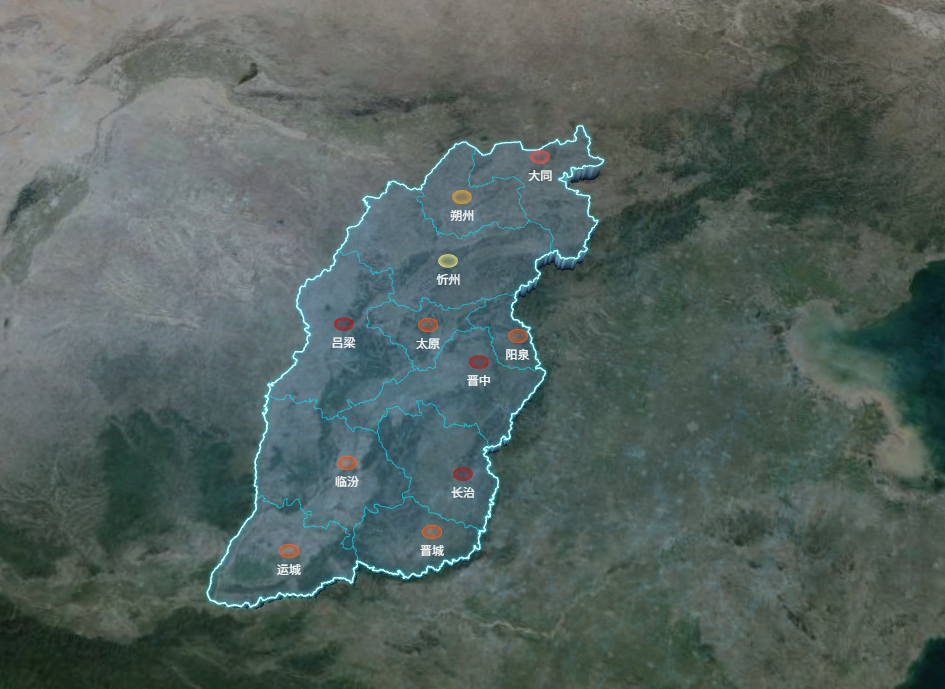
地图组件:SimpleSatelliteMap.vue
html
<template>
  <div class="map-container">
    <div id="satellite-map" class="map-wrapper"></div>
  </div>
</template>

<script>
import AMapLoader from "@amap/amap-jsapi-loader";
import {
  AMAP_KEY,
  AMAP_SECRET,
  AMAP_VERSION,
  MAP_CENTER,
  MAP_DEFAULT_ZOOM,
  MAP_PITCH,
  MAP_ROTATE,
} from "@/config/params.js";
export default {
  name: "SimpleSatelliteMap",
  data() {
    return {
      AMapIns: null,
      map: null,
      loca: null,
      polygonLayer: null,
      topLineLayer: null,
      bottomLineLayer: null,
      cityMarkers: [],
    };
  },
  mounted() {
    this.initMap();
  },
  beforeDestroy() {
    if (this.loca) {
      this.loca.animate.stop();
      this.loca.destroy();
    }
    if (this.map) {
      this.map.destroy();
    }
  },
  methods: {
    initMap() {
      window._AMapSecurityConfig = { securityJsCode: AMAP_SECRET };

      AMapLoader.load({
        key: AMAP_KEY,
        version: AMAP_VERSION,
        Loca: { version: AMAP_VERSION }, // ★ 必须引入 Loca 才能画3D
        plugins: ["AMap.TileLayer.Satellite", "AMap.TileLayer.RoadNet"],
      })
        .then((AMap) => {
          this.AMapIns = AMap;

          // 1. 创建卫星图层 (降低一点透明度,防止太抢眼)
          const satelliteLayer = new AMap.TileLayer.Satellite({
            zIndex: 0,
            opacity: 0.7,
          });
          // 2. 创建路网图层 (暗黑风格,叠加在卫星图上增加细节)
          const roadNetLayer = new AMap.TileLayer.RoadNet({
            zIndex: 1,
            style: "amap://styles/dark",
            opacity: 0.5,
          });

          this.map = new AMap.Map("satellite-map", {
            viewMode: "3D", // ★ 核心1:必须开启3D视图
            pitch: MAP_PITCH, // ★ 核心2:俯仰角,产生鸟瞰悬浮感
            rotation: MAP_ROTATE, // 带一点旋转
            zoom: MAP_DEFAULT_ZOOM,
            center: MAP_CENTER,
            showLabel: false,
            showBuildings: false,
            zoomEnable: false,
            dragEnable: false,
            backgroundColor: "rgba(0,0,0,0)",
            layers: [satelliteLayer], // 底图组合
          });

          this.loca = new Loca.Container({ map: this.map });
          this.loadShanxiData();
        })
        .catch((e) => console.error("地图加载失败:", e));
    },

    async loadShanxiData() {
      try {
        // ★ 请求1:获取山西省整体外轮廓数据(用于发光)
        const resProvince = await fetch(
          "https://geo.datav.aliyun.com/areas_v3/bound/140000.json"
        );
        const provinceData = await resProvince.json();

        // 请求2:获取各市详细数据(用于3D区块和内部细线)
        const resCity = await fetch(
          "https://geo.datav.aliyun.com/areas_v3/bound/140000_full.json"
        );
        const cityData = await resCity.json();

        // ---------- 处理省级外轮廓线数据 ----------
        const provinceLineFeatures = [];
        // 兼容处理:140000.json 可能返回 Feature 或 FeatureCollection
        const provinceGeom =
          provinceData.type === "FeatureCollection"
            ? provinceData.features[0].geometry
            : provinceData.geometry;

        let provinceRings = [];
        if (provinceGeom.type === "MultiPolygon") {
          provinceGeom.coordinates.forEach((polygon) =>
            provinceRings.push(...polygon)
          );
        } else if (provinceGeom.type === "Polygon") {
          provinceRings = provinceGeom.coordinates;
        }
        provinceRings.forEach((ring) => {
          provinceLineFeatures.push({
            type: "Feature",
            geometry: { type: "LineString", coordinates: ring },
          });
        });
        const provinceLineData = {
          type: "FeatureCollection",
          features: provinceLineFeatures,
        };

        // ---------- 处理市级边界线数据 ----------
        const cityLineFeatures = [];
        cityData.features.forEach((feature) => {
          // 注意这里用的是 cityData
          const geom = feature.geometry;
          let rings = [];
          if (geom.type === "MultiPolygon")
            geom.coordinates.forEach((polygon) => rings.push(...polygon));
          else if (geom.type === "Polygon") rings = geom.coordinates;

          rings.forEach((ring) => {
            cityLineFeatures.push({
              type: "Feature",
              properties: feature.properties,
              geometry: { type: "LineString", coordinates: ring },
            });
          });
        });
        const cityLineData = {
          type: "FeatureCollection",
          features: cityLineFeatures,
        };

        // 传入渲染函数
        this.render3DShanxi(cityData, cityLineData, provinceLineData);
      } catch (error) {
        console.error("数据加载失败:", error);
      }
    },

    render3DShanxi(cityPolygonGeoJson, cityLineGeoJson, provinceLineGeoJson) {
      // 数据源实例化
      const polygonSource = new Loca.GeoJSONSource({
        data: cityPolygonGeoJson,
      });
      const cityLineSource = new Loca.GeoJSONSource({ data: cityLineGeoJson });
      const provinceLineSource = new Loca.GeoJSONSource({
        data: provinceLineGeoJson,
      }); // ★ 新增省级线数据源

      // ========== 1. 3D 半透明悬浮区块 (不变) ==========
      this.polygonLayer = new Loca.PolygonLayer({
        zIndex: 1,
        opacity: 1,
        zooms: [2, 22],
      });
      this.polygonLayer.setSource(polygonSource);
      this.polygonLayer.setStyle({
        topColor: "rgba(120, 190, 255, 0.2)",
        sideTopColor: "rgba(120, 190, 255, 0.3)",
        sideBottomColor: "#000a14",
        height: 50000,
        altitude: 0,
        shininess: 30,
        specular: "#111111",
      });
      this.loca.add(this.polygonLayer);

      const altitudeVal = 50000;

      // ========== 2. 顶面市级细线 (不发光,仅勾勒轮廓) ==========
      const cityTopLineLayer = new Loca.LineLayer({ zIndex: 5, opacity: 1 });
      cityTopLineLayer.setSource(cityLineSource); // ★ 绑定市级数据
      cityTopLineLayer.setStyle({
        color: "rgba(0, 229, 255, 0.4)", // 暗淡的青色,不抢眼
        width: 1,
        altitude: altitudeVal,
        lineWidth: 1,
      });
      this.loca.add(cityTopLineLayer);

      // ========== 3. 顶面省级外轮廓发光线 (核心修改) ==========
      // 第1层:最外层微光
      const glow1 = new Loca.LineLayer({ zIndex: 6, opacity: 0.6 }); // 层级要高于市线
      glow1.setSource(provinceLineSource); // ★ 绑定省级数据
      glow1.setStyle({
        color: "rgba(0, 229, 255, 0.1)",
        width: 8,
        altitude: altitudeVal,
        lineWidth: 8,
      });
      this.loca.add(glow1);

      // 第2层:中层光晕
      const glow2 = new Loca.LineLayer({ zIndex: 7, opacity: 0.8 });
      glow2.setSource(provinceLineSource); // ★ 绑定省级数据
      glow2.setStyle({
        color: "rgba(0, 229, 255, 0.3)",
        width: 4,
        altitude: altitudeVal,
        lineWidth: 4,
      });
      this.loca.add(glow2);

      // 第3层:核心高亮线
      const coreLine = new Loca.LineLayer({ zIndex: 8, opacity: 1 });
      coreLine.setSource(provinceLineSource); // ★ 绑定省级数据
      coreLine.setStyle({
        color: "#E0FFFF",
        width: 1.5,
        altitude: altitudeVal,
        lineWidth: 1.5,
      });
      this.loca.add(coreLine);

      // ========== 4. 底部边界线 (可以统一用市级数据,加一点微光) ==========
      this.bottomLineLayer = new Loca.LineLayer({ zIndex: 2, opacity: 0.6 });
      this.bottomLineLayer.setSource(cityLineSource);
      this.bottomLineLayer.setStyle({
        color: "#00e5ff",
        width: 2,
        altitude: 1,
        lineWidth: 2,
      });
      //   this.loca.add(this.bottomLineLayer);
      this.addCityMarkers();
      this.loca.animate.start();
    },
    addCityMarkers() {
      const cities = [
        { name: "太原", lng: 112.55, lat: 37.87, num: 5000 }, // 测试 0-10000
        { name: "大同", lng: 113.17, lat: 40.09, num: 15000 }, // 测试 10000-20000
        { name: "朔州", lng: 112.44, lat: 39.33, num: 25000 }, // 测试 20000-30000
        { name: "忻州", lng: 112.73, lat: 38.43, num: 35000 }, // 测试 30000-40000
        { name: "吕梁", lng: 111.83, lat: 37.53, num: 45000 }, // 测试 40000-50000
        { name: "晋中", lng: 112.75, lat: 37.68, num: 55000 }, // 测试 50000以上
        { name: "阳泉", lng: 113.57, lat: 37.87, num: 4000 },
        { name: "长治", lng: 113.13, lat: 36.19, num: 50000 },
        { name: "晋城", lng: 112.85, lat: 35.5, num: 2000 },
        { name: "临汾", lng: 111.52, lat: 36.09, num: 1000 },
        { name: "运城", lng: 110.99, lat: 35.02, num: 1000 },
      ];

      const offsetMap = {
        大同: [20, -30],
        朔州: [0, -40],
        忻州: [-20, -50],
        吕梁: [-50, -50],
        太原: [-20, -30],
        晋中: [20, -10],
      };
      const defaultOffset = [0, -30];

      // ★ 新增:根据 num 区间获取对应图片的函数
      const getIconByNum = (num) => {
        if (num <= 10000) {
          return require("@/assets/images/icon_circle_01.png");
        } else if (num <= 20000) {
          return require("@/assets/images/icon_circle_02.png");
        } else if (num <= 30000) {
          return require("@/assets/images/icon_circle_03.png");
        } else if (num <= 40000) {
          return require("@/assets/images/icon_circle_04.png");
        } else {
          // 40000 以上 (包含 40000-50000 及更高)
          return require("@/assets/images/icon_circle_05.png");
        }
      };

      this.cityMarkers.forEach((marker) => marker.setMap(null));
      this.cityMarkers = [];

      cities.forEach((city) => {
        const currentOffset = offsetMap[city.name] || defaultOffset;

        // ★ 调用函数获取当前城市对应的图片路径
        const iconSrc = getIconByNum(city.num);

        const marker = new AMap.Marker({
          position: [city.lng, city.lat],
          title: city.name,
          content: `<div class="city-marker" style="display: flex; flex-direction: column; align-items: center; pointer-events: none;">
                      <img src="${iconSrc}" style="width: 20px; height: 14px; pointer-events: none;" />
                      <span style="color: white; font-size: 12px; margin-top: 2px; white-space: nowrap; pointer-events: none;">${city.name}</span>
                    </div>`,
          offset: new AMap.Pixel(currentOffset[0], currentOffset[1]),
        });
        marker.setMap(this.map);
        this.cityMarkers.push(marker);
      });
    },
  },
};
</script>

<style scoped>
.map-container {
  width: 100%;
  height: 100vh;
  background-color: transparent;
  overflow: hidden;
  background-image: url(~@/assets/images/icon_screen.png);
  background-size: cover;
  background-position: center;
  background-repeat: no-repeat;
}
/* .map-container {
  width: 100%;
  height: 100vh;
  background-color: #000;
  overflow: hidden;
} */
.map-wrapper {
  width: 100%;
  height: 100%;
}
:deep(.amap-logo),
:deep(.amap-copyright) {
  display: none !important;
}
.amap-container {
  background-image: none !important;
}

/* ★ 核心4:将卫星图层去色变暗,极大增强科技感,避免实景图喧宾夺主 */
:deep(.amap-layer) {
  /* filter: grayscale(100%) brightness(0.5) contrast(1.2); */
}
</style>
页面引用:twoDimensionalsatellite_page.vue
html
<template>
  <div class="large-screen">
    <SimpleSatelliteMap />
    <!-- <div id="amap-container" class="map-wrapper"></div> -->
  </div>
</template>

<script>
import SimpleSatelliteMap from "@/views/twoDimensional/components/SimpleSatelliteMap.vue";
export default {
  name: "TwoDimensionalSatellitePage",
  components: { SimpleSatelliteMap },
  mounted() {
    // ★ 关键 2:组件挂载时,添加 PC 端缩放拦截监听
    this.$nextTick(() => {
      // 绑定事件,注意 { passive: false } 必须加,否则无法阻止默认行为
      // document.addEventListener("wheel", this.handleWheel, { passive: false });
      // document.addEventListener("keydown", this.handleKeydown);
    });
  },
  beforeDestroy() {
    // ★ 关键 3:组件销毁时,必须移除监听,否则会影响其他页面!!!
    // document.removeEventListener("wheel", this.handleWheel);
    // document.removeEventListener("keydown", this.handleKeydown);
  },
  methods: {
    /** 拦截 Ctrl + 鼠标滚轮 缩放 */
    // handleWheel(e) {
    //   if (e.ctrlKey || e.metaKey) {
    //     e.preventDefault();
    //   }
    // },
    /** 拦截 Ctrl + +/- 以及 Ctrl + 0 缩放 */
    // handleKeydown(e) {
    //   // metaKey 是 Mac 的 Command 键
    //   if (
    //     (e.ctrlKey || e.metaKey) &&
    //     (e.key === "=" || e.key === "+" || e.key === "-" || e.key === "0")
    //   ) {
    //     e.preventDefault();
    //   }
    // },
  },
};
</script>

<style scoped>
.large-screen {
  width: 100vw;
  height: 100vh;
  overflow: hidden;
  position: relative;
  /* background-color: #02112e; */
  background-image: url(~@/assets/images/icon_screen.png);
  background-size: cover;
  background-position: center;
  background-repeat: no-repeat;
}

.map-wrapper {
  width: 100%;
  height: 100%;
}
</style>
地理贴图(2D+自定义图片)
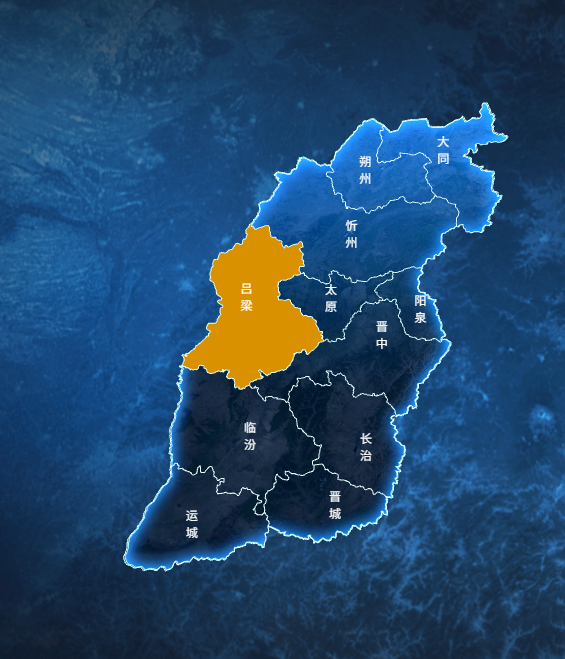
地图组件:Shanxi3DTextureMap.vue
html
<template>
  <div class="map-container">
    <div id="amap-container" class="map-wrapper"></div>
  </div>
</template>

<script>
import AMapLoader from "@amap/amap-jsapi-loader";
import {
  AMAP_KEY,
  AMAP_SECRET,
  AMAP_VERSION,
  MAP_CENTER,
  MAP_DEFAULT_ZOOM,
  MAP_PITCH,
  MAP_ROTATE,
} from "@/config/params.js";

export default {
  name: "ShanXi3DTextureMap",
  data() {
    return {
      AMapIns: null, // 保存 AMap 实例,供 GeometryUtil 使用
      map: null,
      loca: null,
      polygonLayer: null,
      topLineLayer: null,
      bottomLineLayer: null,
      cityMarkers: [],
      hoveredAdcode: null,
      geoFeatures: [], // 保存市的几何数据,用于数学计算判断
    };
  },
  mounted() {
    this.initMap();
  },
  beforeDestroy() {
    if (this.loca) {
      this.loca.animate.stop();
      this.loca.destroy();
    }
    if (this.map) {
      this.map.destroy();
    }
  },
  methods: {
    initMap() {
      window._AMapSecurityConfig = {
        securityJsCode: AMAP_SECRET,
      };

      AMapLoader.load({
        key: AMAP_KEY,
        version: AMAP_VERSION,
        Loca: { version: AMAP_VERSION },
      })
        .then((AMap) => {
          this.AMapIns = AMap; // 保存 AMap 引用
          // 1. 创建自定义图片图层  注意这种方式图片有偏差很难对齐
          // const imageUrl = require("@/assets/images/icon_map_background.png");
          const imageUrl = require("@/assets/images/icon_map_05.png");
          // ★ 1. 定义原始基准边界
          const baseSouthWest = [109.6, 34.5];
          const baseNorthEast = [114.5, 40.7];

          // ★ 2. 定义微调偏移量 (核心调试区域)
          // 经度偏移:正值向东(右)移动,负值向西(左)移动
          // 纬度偏移:正值向北(上)移动,负值向南(下)移动
          const offsetLng = 0.1; // 例如:如果图片偏左了,改成 0.1 或 0.2
          const offsetLat = 0.05; // 例如:如果图片偏下了,改成 0.1 或 0.2

          const customImageLayer = new AMap.ImageLayer({
            url: imageUrl,
            // ★ 3. 将偏移量应用到边界坐标上
            bounds: new AMap.Bounds(
              [baseSouthWest[0] + offsetLng, baseSouthWest[1] + offsetLat], // 西南角加偏移
              [baseNorthEast[0] + offsetLng, baseNorthEast[1] + offsetLat] // 东北角加偏移
            ),
            // zooms: [2, 22],
            zIndex: 1,
            opacity: 1,
          });

          this.map = new AMap.Map("amap-container", {
            viewMode: "3D",
            pitch: MAP_PITCH,
            rotation: MAP_ROTATE,
            zoom: MAP_DEFAULT_ZOOM,
            center: MAP_CENTER,
            showLabel: false,
            showBuildings: false,
            mapStyle: "amap://styles/dark",
            rotateEnable: false,
            pitchEnable: false,
            zoomEnable: false, // 先开启,保证地图容器能接收鼠标事件
            dragEnable: false,
            backgroundColor: "rgba(0,0,0,0)",
            showBuildingBlock: false, // 完全关闭底图建筑物块
            fog: {
              // ★ 开启雾化,增加远景纵深感
              enable: true,
              color: "#000000", // 雾的颜色,建议和你的大屏背景色一致
            },
            // layers: [customImageLayer],
          });

          this.loca = new Loca.Container({ map: this.map });
          this.loadShanxiData();
        })
        .catch((e) => {
          console.error("高德地图加载失败:", e);
        });
    },

    async loadShanxiData() {
      try {
        const res = await fetch(
          "https://geo.datav.aliyun.com/areas_v3/bound/140000_full.json"
        );
        const data = await res.json();

        // 提取掩膜坐标
        let maskCoords = [];
        data.features.forEach((feature) => {
          const geom = feature.geometry;
          if (geom.type === "Polygon") {
            maskCoords.push(geom.coordinates);
          } else if (geom.type === "MultiPolygon") {
            maskCoords.push(...geom.coordinates);
          }
        });
        this.map.setMask(maskCoords);

        // 将市级面数据转为线数据
        const lineFeatures = [];
        data.features.forEach((feature) => {
          const geom = feature.geometry;
          const coords = geom.coordinates;
          let rings = [];
          if (geom.type === "MultiPolygon") {
            coords.forEach((polygon) => {
              rings.push(...polygon);
            });
          } else if (geom.type === "Polygon") {
            rings = coords;
          }
          rings.forEach((ring) => {
            lineFeatures.push({
              type: "Feature",
              properties: feature.properties,
              geometry: {
                type: "LineString",
                coordinates: ring,
              },
            });
          });
        });

        const lineData = { type: "FeatureCollection", features: lineFeatures };
        this.renderShanxi3D(data, lineData);
      } catch (error) {
        console.error("加载 GeoJSON 数据失败:", error);
      }
    },

    renderShanxi3D(polygonGeoJson, lineGeoJson) {
      // ★ 保存一份面数据给纯几何计算用
      this.geoFeatures = polygonGeoJson.features;

      const polygonSource = new Loca.GeoJSONSource({ data: polygonGeoJson });
      const lineSource = new Loca.GeoJSONSource({ data: lineGeoJson });

      if (this.polygonLayer) this.loca.remove(this.polygonLayer);
      if (this.topLineLayer) this.loca.remove(this.topLineLayer);
      if (this.bottomLineLayer) this.loca.remove(this.bottomLineLayer);

      // ========== 2. 3D 拉伸区块 ==========
      this.polygonLayer = new Loca.PolygonLayer({
        zIndex: 3,
        opacity: 1,
        visible: true,
        zooms: [2, 22],
        evented: true, // ★ 关键1:开启图层级别的 3D 事件支持
      });

      this.polygonLayer.setSource(polygonSource);
      const getStyle = () => ({
        topColor: (index, feature) => {
          return feature.properties.adcode === this.hoveredAdcode
            ? "#ffaa00"
            : "#00000000";
        },
        sideTopColor: (index, feature) => {
          return feature.properties.adcode === this.hoveredAdcode
            ? "#ffaa00"
            : "#00000000";
        },
        // sideBottomColor: (index, feature) => {
        //   return feature.properties.adcode === this.hoveredAdcode
        //     ? "#884400"
        //     : "#00396e";
        // },
        //高度固定
        // height: 50000,
        height: 0,
        altitude: 0,
        shininess: 50,
        specular: "#1a3a5a",
      });

      this.polygonLayer.setStyle(getStyle());
      this.loca.add(this.polygonLayer);

      // ========== 3. 顶部边界线 ==========
      this.topLineLayer = new Loca.LineLayer({
        zIndex: 4,
        opacity: 1,
        visible: true,
        zooms: [2, 22],
      });
      this.topLineLayer.setSource(lineSource);
      const getTopLineStyle = () => ({
        color: "#E0FFFF",
        width: 1,
        // altitude: 50000,
        altitude: 0,
        lineWidth: 1,
      });

      this.topLineLayer.setStyle(getTopLineStyle());
      this.loca.add(this.topLineLayer);

      //鼠标移动到市,该市颜色高亮
      let lastAdcode = null;

      this.map.on("mousemove", (e) => {
        const lnglat = e.lnglat;
        let foundAdcode = null;

        // 遍历判断鼠标在哪个市
        for (let i = 0; i < this.geoFeatures.length; i++) {
          const feature = this.geoFeatures[i];
          const geom = feature.geometry;
          let rings = [];
          if (geom.type === "MultiPolygon") {
            geom.coordinates.forEach((polygon) => rings.push(...polygon));
          } else if (geom.type === "Polygon") {
            rings = geom.coordinates;
          }
          for (let j = 0; j < rings.length; j++) {
            if (this.AMapIns.GeometryUtil.isPointInRing(lnglat, rings[j])) {
              foundAdcode = feature.properties.adcode;
              break;
            }
          }

          if (foundAdcode) break;
        }
        // ★ 关键优化:只有悬停城市发生变化时才重绘,避免频繁 setStyle 导致卡顿和闪烁
        if (lastAdcode !== foundAdcode) {
          lastAdcode = foundAdcode;
          this.hoveredAdcode = foundAdcode;
          this.polygonLayer.setStyle(getStyle()); // 此时 getStyle 中高度不要变,只变颜色
          this.topLineLayer.setStyle(getTopLineStyle());
          this.map.setDefaultCursor(foundAdcode ? "pointer" : "default");
        }
      });

      this.map.on("mouseout", () => {
        console.log("mouseout");
        if (lastAdcode !== null) {
          lastAdcode = null;
          this.hoveredAdcode = null;

          this.polygonLayer.setStyle(getStyle());

          this.topLineLayer.setStyle(getTopLineStyle());
          this.map.setDefaultCursor("default");
        }
      });

      // 1. 动态计算真实的 Bounds
      let minLng = 180,
        maxLng = -180,
        minLat = 90,
        maxLat = -90;
      const extractCoords = (coords) => {
        coords.forEach((coord) => {
          if (Array.isArray(coord[0])) {
            extractCoords(coord); // 递归处理多层嵌套
          } else {
            minLng = Math.min(minLng, coord[0]);
            maxLng = Math.max(maxLng, coord[0]);
            minLat = Math.min(minLat, coord[1]);
            maxLat = Math.max(maxLat, coord[1]);
          }
        });
      };
      polygonGeoJson.features.forEach((f) =>
        extractCoords(f.geometry.coordinates)
      );

      // 2. 创建图片图层,使用计算出的精确 Bounds
      const imageUrl = require("@/assets/images/icon_map_05.png");
      const customImageLayer = new AMap.ImageLayer({
        url: imageUrl,
        bounds: new AMap.Bounds([minLng, minLat], [maxLng, maxLat]), // ★ 使用动态计算的精确范围
        zooms: [2, 22],
        zIndex: 2, // ★ 建议设为0,在3D模型下方
        opacity: 1,
      });
      this.map.add(customImageLayer); // 动态添加图层

      this.addCityMarkers();
      this.loca.animate.start();
    },

    addCityMarkers() {
      const cities = [
        { name: "太原", lng: 112.55, lat: 37.87 },
        { name: "大同", lng: 113.17, lat: 40.09 },
        { name: "朔州", lng: 112.44, lat: 39.33 },
        { name: "忻州", lng: 112.73, lat: 38.43 },
        { name: "吕梁", lng: 111.83, lat: 37.53 },
        { name: "晋中", lng: 112.75, lat: 37.68 },
        { name: "阳泉", lng: 113.57, lat: 37.87 },
        { name: "长治", lng: 113.13, lat: 36.19 },
        { name: "晋城", lng: 112.85, lat: 35.5 },
        { name: "临汾", lng: 111.52, lat: 36.09 },
        { name: "运城", lng: 110.99, lat: 35.02 },
      ];

      const offsetMap = {
        大同: [20, -10],
        朔州: [0, -40],
        忻州: [-20, -50],
        吕梁: [-50, -50],
        太原: [-20, -30],
        晋中: [20, -10],
      };
      const defaultOffset = [0, -30];

      this.cityMarkers.forEach((marker) => marker.setMap(null));
      this.cityMarkers = [];

      cities.forEach((city) => {
        const currentOffset = offsetMap[city.name] || defaultOffset;
        const marker = new AMap.Marker({
          position: [city.lng, city.lat],
          title: city.name,
          // pointer-events: none; 设置城市marker点击时,不会触发地图的点击事件
          content: `<div class="city-marker" style="color: white; font-size: 12px;pointer-events: none;">${city.name}</div>`,
          offset: new AMap.Pixel(currentOffset[0], currentOffset[1]),
        });
        marker.setMap(this.map);
        this.cityMarkers.push(marker);
      });
    },
  },
};
</script>

<style scoped>
.map-container {
  width: 100%;
  height: 100vh;
  background-color: transparent;
  overflow: hidden;
  background-image: url(~@/assets/images/icon_screen.png);
  background-size: cover;
  background-position: center;
  background-repeat: no-repeat;
}
.amap-container {
  background-image: none !important;
}
.map-wrapper {
  width: 100%;
  height: 100%;
}

:deep(.amap-logo),
:deep(.amap-copyright) {
  display: none !important;
}
/* ★ 关键:强制高德地图的 Marker 外层容器穿透鼠标事件 */
:deep(.amap-marker) {
  pointer-events: none !important;
}
</style>
页面中使用:twoDimensional_texture_page.vue
html
<template>
  <div class="large-screen">
    <ShanXi3DTextureMap />
    <!-- <div id="amap-container" class="map-wrapper"></div> -->
  </div>
</template>

<script>
import ShanXi3DTextureMap from "@/views/twoDimensional/components/Shanxi3DTextureMap.vue";
export default {
  name: "TwoDimensionalTexturePage",
  components: { ShanXi3DTextureMap },
  mounted() {
    // ★ 关键 2:组件挂载时,添加 PC 端缩放拦截监听
    this.$nextTick(() => {
      // 绑定事件,注意 { passive: false } 必须加,否则无法阻止默认行为
      // document.addEventListener("wheel", this.handleWheel, { passive: false });
      // document.addEventListener("keydown", this.handleKeydown);
    });
  },
  beforeDestroy() {
    // ★ 关键 3:组件销毁时,必须移除监听,否则会影响其他页面!!!
    // document.removeEventListener("wheel", this.handleWheel);
    // document.removeEventListener("keydown", this.handleKeydown);
  },
  methods: {
    /** 拦截 Ctrl + 鼠标滚轮 缩放 */
    // handleWheel(e) {
    //   if (e.ctrlKey || e.metaKey) {
    //     e.preventDefault();
    //   }
    // },
    /** 拦截 Ctrl + +/- 以及 Ctrl + 0 缩放 */
    // handleKeydown(e) {
    //   // metaKey 是 Mac 的 Command 键
    //   if (
    //     (e.ctrlKey || e.metaKey) &&
    //     (e.key === "=" || e.key === "+" || e.key === "-" || e.key === "0")
    //   ) {
    //     e.preventDefault();
    //   }
    // },
  },
};
</script>

<style scoped>
.large-screen {
  width: 100vw;
  height: 100vh;
  overflow: hidden;
  position: relative;
  /* background-color: #02112e; */
  /* background-image: url(~@/assets/images/icon_screen.png);
  background-size: cover;
  background-position: center;
  background-repeat: no-repeat; */
}

.map-wrapper {
  width: 100%;
  height: 100%;
}
</style>
技术点备注:
1、去掉地图背景网格
html
/* 去掉地图底部背景网格 */
.amap-container {
  background-image: none !important;
}
2、尺寸怎么控制
地图的显示样式备注
https://lbs.amap.com/api/javascript-api-v2/documentation#map
设置地图的显示样式,目前支持两种地图样式:
第一种:自定义地图样式,如:
amap://styles/d6bf8c1d69cea9f5c696185ad4ac4c86.
可前往地图自定义平台定制自己的个性地图样式;
第二种:官方样式模版,如:
amap://styles/normal
amap://styles/grey
amap://styles/whitesmoke
amap://styles/dark
amap://styles/light
amap://styles/graffiti.
其他模版样式及自定义地图的使用说明见开发指南。