框架思想
解决重复性开发工作,通过设计,沉淀 80% 的重复开发工作,同时保留 20% 的定制化空间。
- 沉淀80%重复工作:基于 DSL 的模板配置,经过解析器处理后,可以直接生成大部分内容;
- 保留20%定制化能力:DSL 配置中有不同的类型可供用户选择,页面可以直接通过配置生成,也可以自己写代码实现。
整体架构
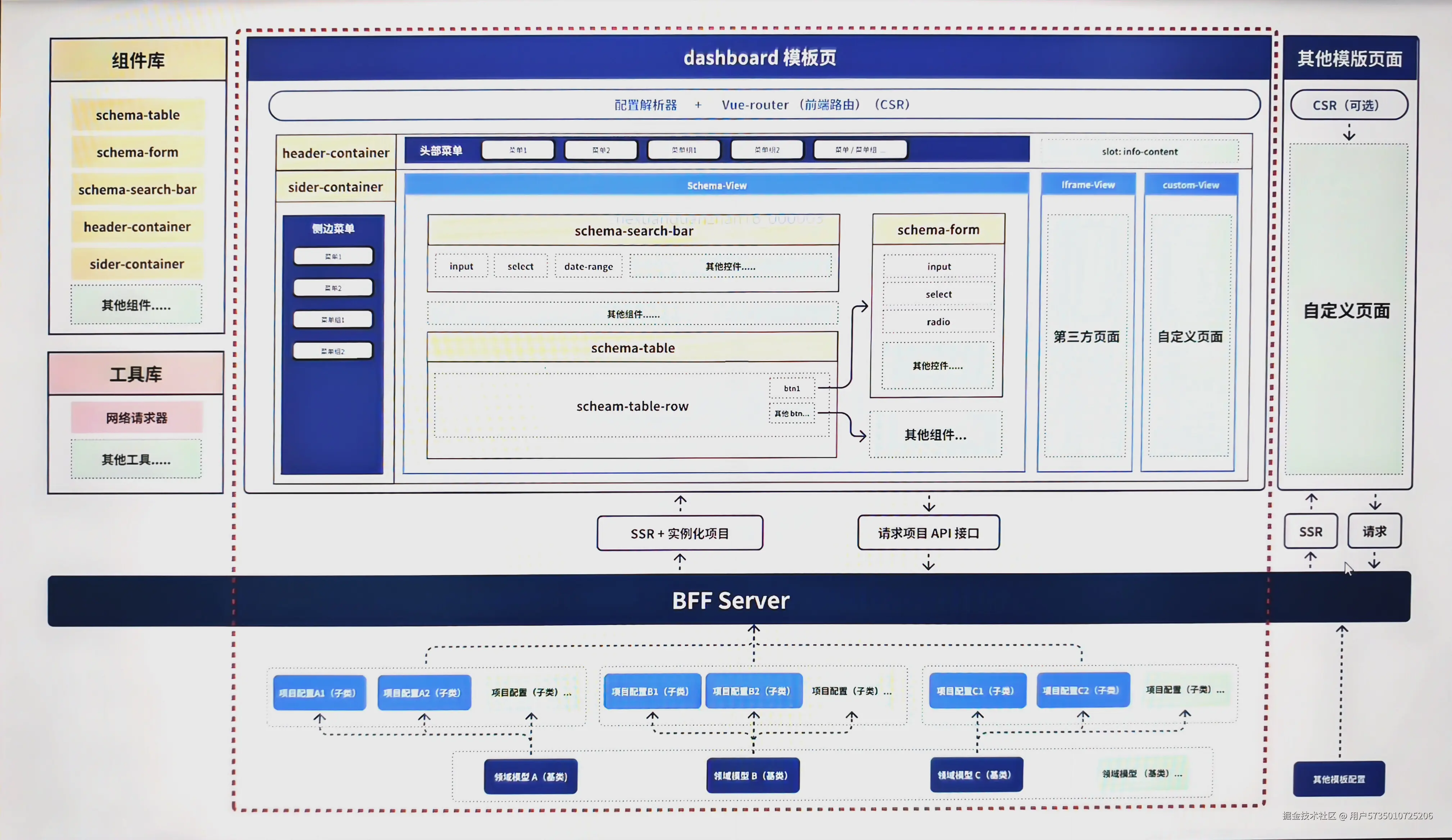
通过 model(模型) 可以派生出不同的 project(项目),通过 server 层,输出到 dashboard 模板页,dashboard 模板引擎通过解析后端返回的 DSL,可以生成一个站点。
DSL设计
js
config = {
    mode: 'dashboard', // 模版类型,不同模板类型对应不一样的模板数据结构
    name: '', // 名称
    desc: '', // 描述
    icon: '', // icon
    homePage: '', // 首页(项目配置)
    // 头部菜单
    menu: [
        {
            key: '', // 菜单唯一描述
            name: '', // 菜单名称
            menuType: '', // 枚举值,group / module

            // 当 menuType == group 时,可填
            subMenu: [
                {
                    // 可递归 menuItem
                },
                // ...
            ],

            // 当 menuType == module 时,可填
            module: '', // 枚举值:sider / iframe / custom / schema

            // 当 module === sider 时
            siderConfig: {
                menu: [
                    {
                        // 可递归 menuItem(除 moduleType === sider)
                    }
                ]
            },

            // 当 module == iframe 时
            iframeConfig: {
                path: '', // iframe 地址

            },

            // 当 module == custom 时
            customConfig: {
                path: '', // 自定义模块路径
            },

            // 当 module == schema 时
            schemaConfig: {
                api: '/api/user', // 数据源API(遵循 RESTFUL 规范)
                schema: { // 板块数据结构
                    type: 'object',
                    properties: {
                        key: {
                            ...schema, // 标准 schema 配置
                            type: '', // 字段类型
                            label: '', // 字段中文名
                            // 字段在 table 中的相关配置
                            tableOption: {
                                ...elTableColumnConfig, // 标准 el-table-column 配置
                                toFixes: 2, // 数字类字段保留小数位数
                                visible: true // 是否在 表单 中显示,没有配置时默认显示
                            },
                            // 字段在 search-bar 中的相关配置
                            searchOption: {
                                ...elComponentConfig, // 标准 el-component-column 配置
                                comType: '', // 配置组件类型 input/select....
                                default: '', // 默认值

                                // 当 comType 为 select时
                                enumList: [], // 下拉框可选值

                                // 当 comType 为 dynamicSelect时
                                api: '',
                            }
                        },
                        // ...
                    }
                },
                // table 相关配置
                tableConfig: {
                    // 头部按钮组
                    headerButtons: [
                        {
                            label: '', // 按钮名称
                            eventKey: '', // 按钮事件名
                            eventOption: {}, // 按钮配置
                            ...elButton, // 标准 el-button 配置
                        },
                        //...
                    ],
                    // 行按钮组
                    rowButtons: [
                        {
                            label: '',
                            eventKey: '',
                            eventOption: {
                                // 当eventKey === 'remove' 时,可填
                                params: {
                                    // paramKey = 参数键名
                                    // rowValueKey = 参数值 当格式为 schema::tableKey 的时候,到 table中找到响应的字段
                                    paramKey: rowValueKey // 如 user_id: schema::user_id
                                }
                            },
                            ...elButton,
                        },
                        // ...
                    ]
                },
                searchConfig: {}, // search-bar 相关配置
                components: {}, // 模块组件
            },
        },
        // ...
    ],


};
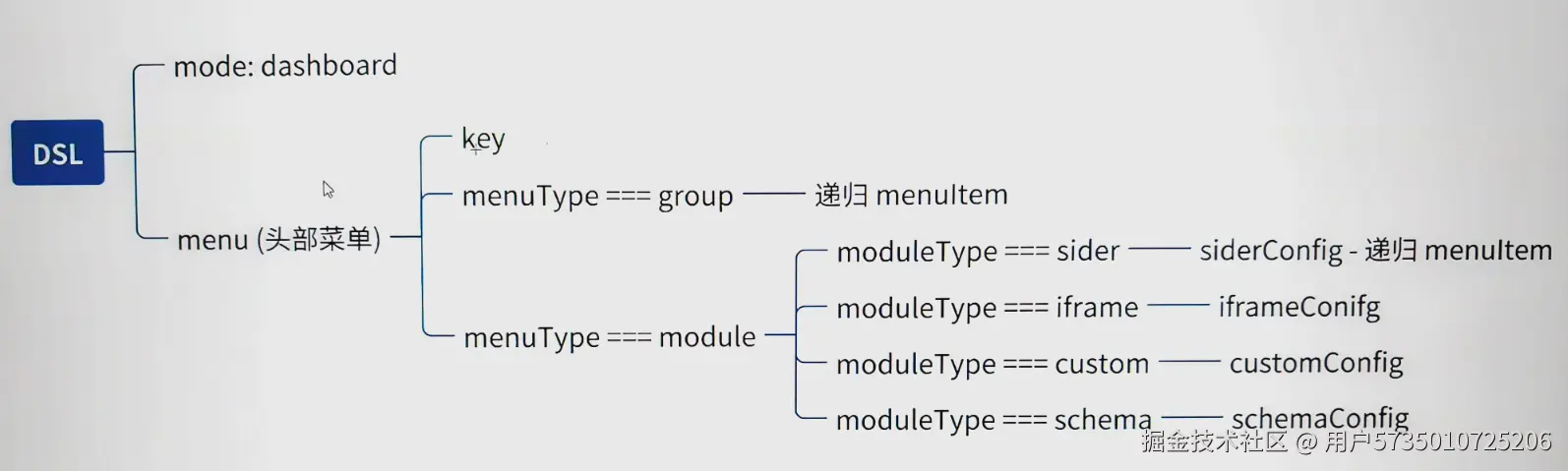
菜单层级如下:
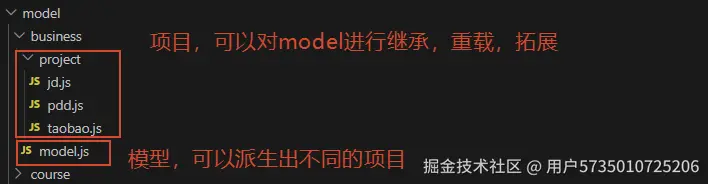
对于重复开发的板块,可以直接在 model 层配置好,project 直接继承 model 的配置。因为 project 继承 model,所以需要处理修改和新增内容的情况,规则如下:
| 场景 | 行为 |
|---|---|
| project 有的键值, model 也有 | 修改(重载) |
| project 有的键值, model 没有 | 新增(拓展) |
| project 没有的键值, model 有 | 保留(继承) |
SchemaView 开发
80% 的标准增删改查页面,直接通过 SchemaView 渲染,设计如下:
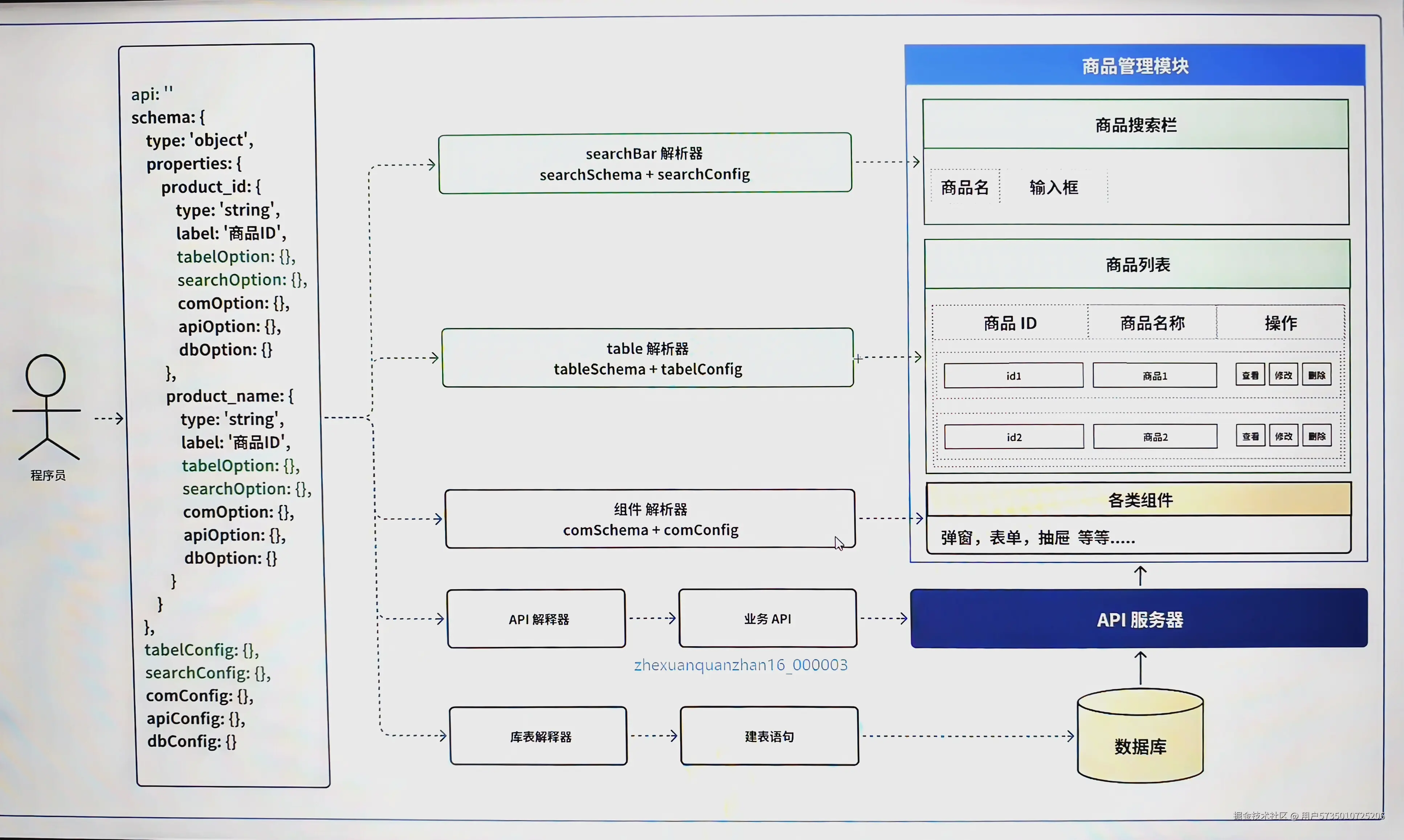 左侧是不同字段的配置,基于
 json-schema规范,再拓展表单,表格等配置,再通过开发不同的解析器,最终生成右侧的页面
SchemaTable 开发
关注 DSL 中 schemaConfig.tableConfig 以及 schemaConfig.schema.properties.key.tableOption 的配置,封装 schema-table组件对配置进行处理。
SchemaSearchBar 开发
关注 DSL 中 schemaConfig.searchConfig 以及 schemaConfig.schema.properties.key.searchOption 的配置,封装 schema-search-bar组件对配置进行处理。
对于不同的表单类型组件,封装在 app/pages/widgets/schema-search-bar/complex-view 中,schema-search-bar通过 动态组件的形式进行渲染。
总结整个框架可拓展的点
-
DSL 的 mode 字段,可以定义不同的模板,后续可以增加不同的模板解析引擎;
-
moduleType 字段的设计,支持不同类型,后续还可以继续拓展,对标去增加不同的解析引擎;
类型 说明 使用场景 schema基于 JSON Schema 自动生成增删改查页面 80% 的标准后台页面 iframe嵌入第三方页面 嵌入已有系统 custom完全自定义的页面 复杂交互或特殊页面 sider带侧边栏的二级菜单 需要多级导航的模块 -
SchemaSearchBar 中,
app/pages/widgets/schema-search-bar/complex-view中可以定义各种组件,如input、select...; -
表格的按钮,通过配置,点击后抛出不同的事件,可自定义处理