将下面脚本代码保存成一个ps1文件:migrate-vscode.ps1
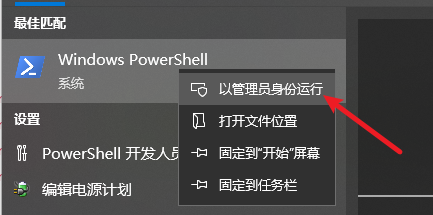
然后用管理员身份打开powershell
然后执行此脚本(我的脚本保存在D:\MyDesktop\git\migrate-vscode.ps1,所以这样输入,具体得看你自己的保存位置)
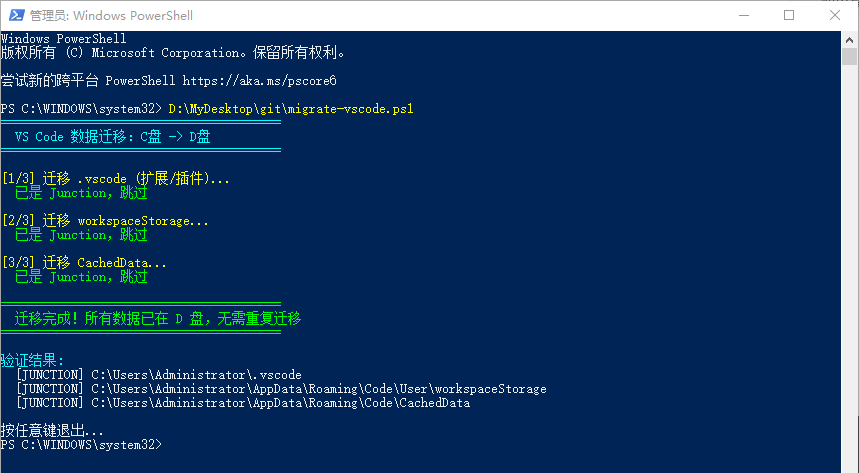
迁移完,最好是重启一下电脑。
powershell
# VS Code 数据迁移脚本 - 从 C 盘迁移到 D 盘
# 请先关闭所有 VS Code 窗口再运行此脚本!

Write-Host "========================================" -ForegroundColor Cyan
Write-Host "  VS Code 数据迁移:C盘 -> D盘" -ForegroundColor Cyan
Write-Host "========================================" -ForegroundColor Cyan
Write-Host ""

# 辅助函数:格式化文件大小
function Format-FileSize {
    param([long]$Bytes)
    if ($Bytes -ge 1TB) { return "{0:F2} TB" -f ($Bytes / 1TB) }
    if ($Bytes -ge 1GB) { return "{0:F2} GB" -f ($Bytes / 1GB) }
    if ($Bytes -ge 1MB) { return "{0:F2} MB" -f ($Bytes / 1MB) }
    if ($Bytes -ge 1KB) { return "{0:F2} KB" -f ($Bytes / 1KB) }
    return "$Bytes B"
}

# 辅助函数:计算目录大小
function Get-DirectorySize {
    param([string]$Path)
    if (-not (Test-Path $Path)) { return 0 }
    $size = (Get-ChildItem -Path $Path -Recurse -Force -ErrorAction SilentlyContinue |
        Where-Object { -not $_.PSIsContainer } |
        Measure-Object -Property Length -Sum).Sum
    return $size
}

# 累计释放空间
$freedBytes = 0

# 检查 VS Code 是否已关闭
$vscodeRunning = Get-Process "Code" -ErrorAction SilentlyContinue
if ($vscodeRunning) {
    Write-Host "[错误] 检测到 VS Code 仍在运行!请关闭所有 VS Code 窗口后重试。" -ForegroundColor Red
    Write-Host "按任意键退出..."
    $null = $Host.UI.RawUI.ReadKey("NoEcho,IncludeKeyDown")
    exit 1
}

Write-Host "[1/3] 迁移 .vscode (扩展/插件)..." -ForegroundColor Yellow
$src = "$env:USERPROFILE\.vscode"
$dst = "D:\VSCodeData\.vscode"

if ((Get-Item $src -Force).Attributes -match 'ReparsePoint') {
    Write-Host "  已是 Junction,跳过" -ForegroundColor Green
} else {
    Write-Host "  正在计算目录大小..."
    $size1 = Get-DirectorySize $src
    Write-Host "  当前大小: $(Format-FileSize $size1)"
    if (Test-Path $dst) {
        Write-Host "  目标已存在,先删除..."
        Remove-Item $dst -Recurse -Force
    }
    Write-Host "  正在移动数据到 D 盘 (可能需要一两分钟)..."
    Move-Item -Path $src -Destination $dst -Force
    Write-Host "  创建 Junction..."
    cmd /c mklink /J "$src" "$dst"
    $freedBytes += $size1
    Write-Host "  .vscode 迁移完成! 释放 $(Format-FileSize $size1)" -ForegroundColor Green
}

Write-Host ""
Write-Host "[2/3] 迁移 workspaceStorage..." -ForegroundColor Yellow
$src = "$env:APPDATA\Code\User\workspaceStorage"
$dst = "D:\VSCodeData\workspaceStorage"

if ((Get-Item $src -Force).Attributes -match 'ReparsePoint') {
    Write-Host "  已是 Junction,跳过" -ForegroundColor Green
} else {
    # 计算 C 盘原目录大小
    $size2 = Get-DirectorySize $src
    Write-Host "  当前大小: $(Format-FileSize $size2)"
    # 删除 C 盘残留(如果存在)
    if (Test-Path $src) {
        Remove-Item $src -Recurse -Force -ErrorAction SilentlyContinue
    }
    # 确保 D 盘目标存在
    if (-not (Test-Path $dst)) {
        New-Item -ItemType Directory -Path $dst -Force | Out-Null
    }
    Write-Host "  创建 Junction..."
    cmd /c mklink /J "$src" "$dst"
    $freedBytes += $size2
    Write-Host "  workspaceStorage 迁移完成! 释放 $(Format-FileSize $size2)" -ForegroundColor Green
}

Write-Host ""
Write-Host "[3/3] 迁移 CachedData..." -ForegroundColor Yellow
$src = "$env:APPDATA\Code\CachedData"
$dst = "D:\VSCodeData\CachedData"

if ((Get-Item $src -Force).Attributes -match 'ReparsePoint') {
    Write-Host "  已是 Junction,跳过" -ForegroundColor Green
} else {
    Write-Host "  正在计算目录大小..."
    $size3 = Get-DirectorySize $src
    Write-Host "  当前大小: $(Format-FileSize $size3)"
    if (Test-Path $dst) {
        Write-Host "  目标已存在,先删除..."
        Remove-Item $dst -Recurse -Force
    }
    Write-Host "  正在移动数据到 D 盘 (可能需要一两分钟)..."
    Move-Item -Path $src -Destination $dst -Force
    Write-Host "  创建 Junction..."
    cmd /c mklink /J "$src" "$dst"
    $freedBytes += $size3
    Write-Host "  CachedData 迁移完成! 释放 $(Format-FileSize $size3)" -ForegroundColor Green
}

Write-Host ""
Write-Host "========================================" -ForegroundColor Green
if ($freedBytes -gt 0) {
    Write-Host "  迁移完成!已释放约 $(Format-FileSize $freedBytes) C 盘空间" -ForegroundColor Green
} else {
    Write-Host "  迁移完成!所有数据已在 D 盘,无需重复迁移" -ForegroundColor Green
}
Write-Host "========================================" -ForegroundColor Green
Write-Host ""
Write-Host "验证结果:" -ForegroundColor Cyan
$paths = @(
    "$env:USERPROFILE\.vscode",
    "$env:APPDATA\Code\User\workspaceStorage",
    "$env:APPDATA\Code\CachedData"
)
foreach ($p in $paths) {
    $isJunction = (Get-Item $p -Force).Attributes -match 'ReparsePoint'
    $mark = if ($isJunction) { "[JUNCTION]" } else { "[普通目录]" }
    Write-Host "  $mark $p"
}

Write-Host ""
Write-Host "按任意键退出..."
$null = $Host.UI.RawUI.ReadKey("NoEcho,IncludeKeyDown")