定义:一个可以局部刷新的 Widget,它内部有自己的状态,不会影响父组件。
格式
Dart
StatefulBuilder(
  builder: (context, setState) {
    // 这个 setState 只会刷新 StatefulBuilder 内部的 Widget
  }
)
效果图
1.对话框
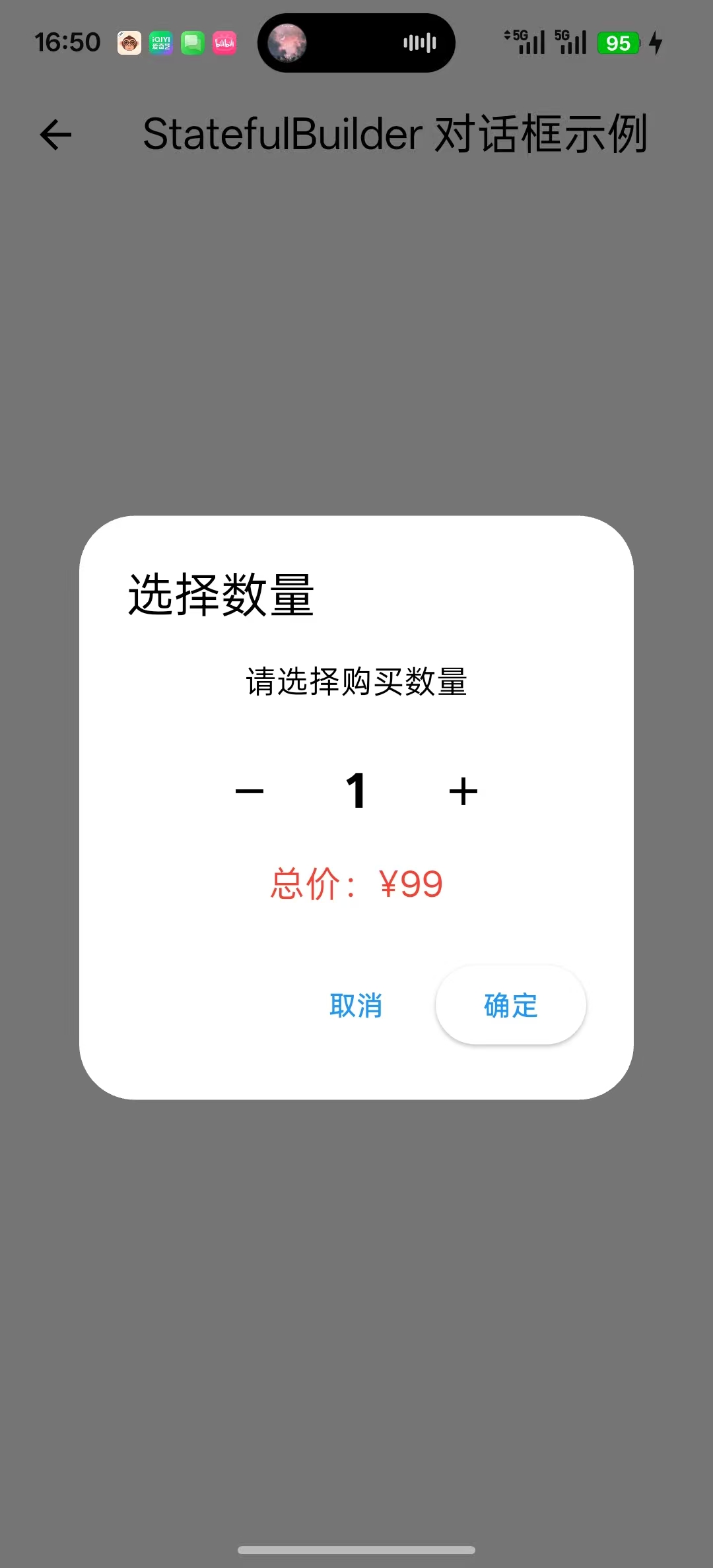
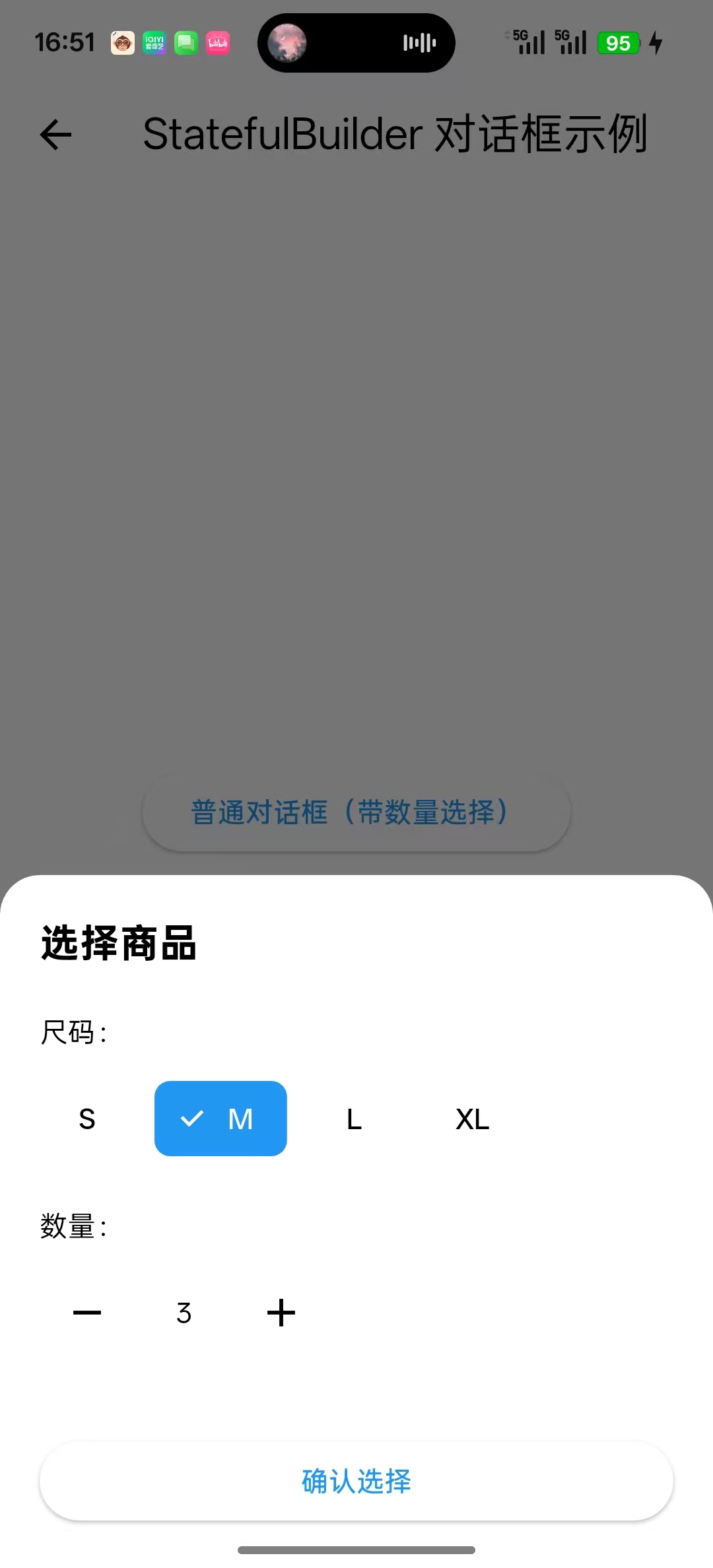
2.列表项展开
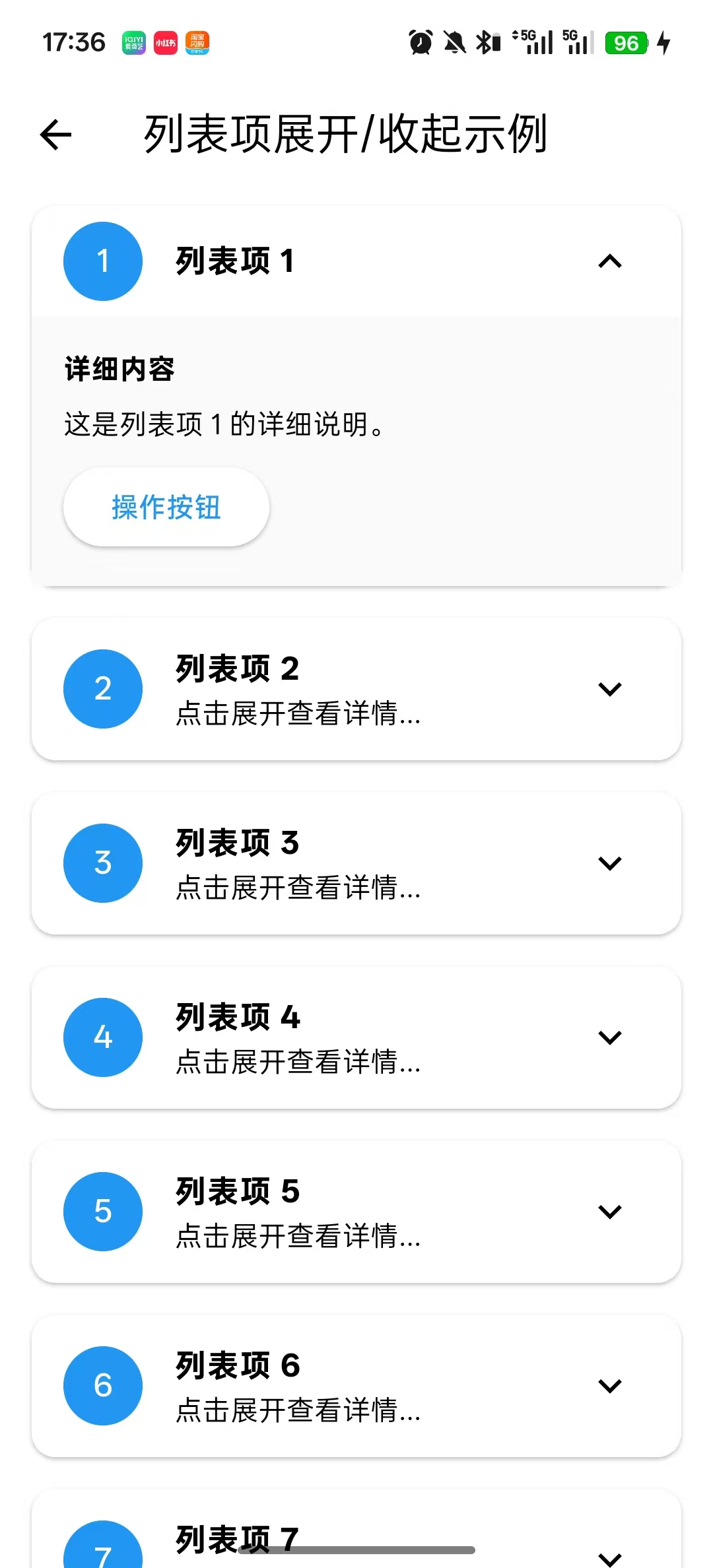
3.下拉菜单内部状态
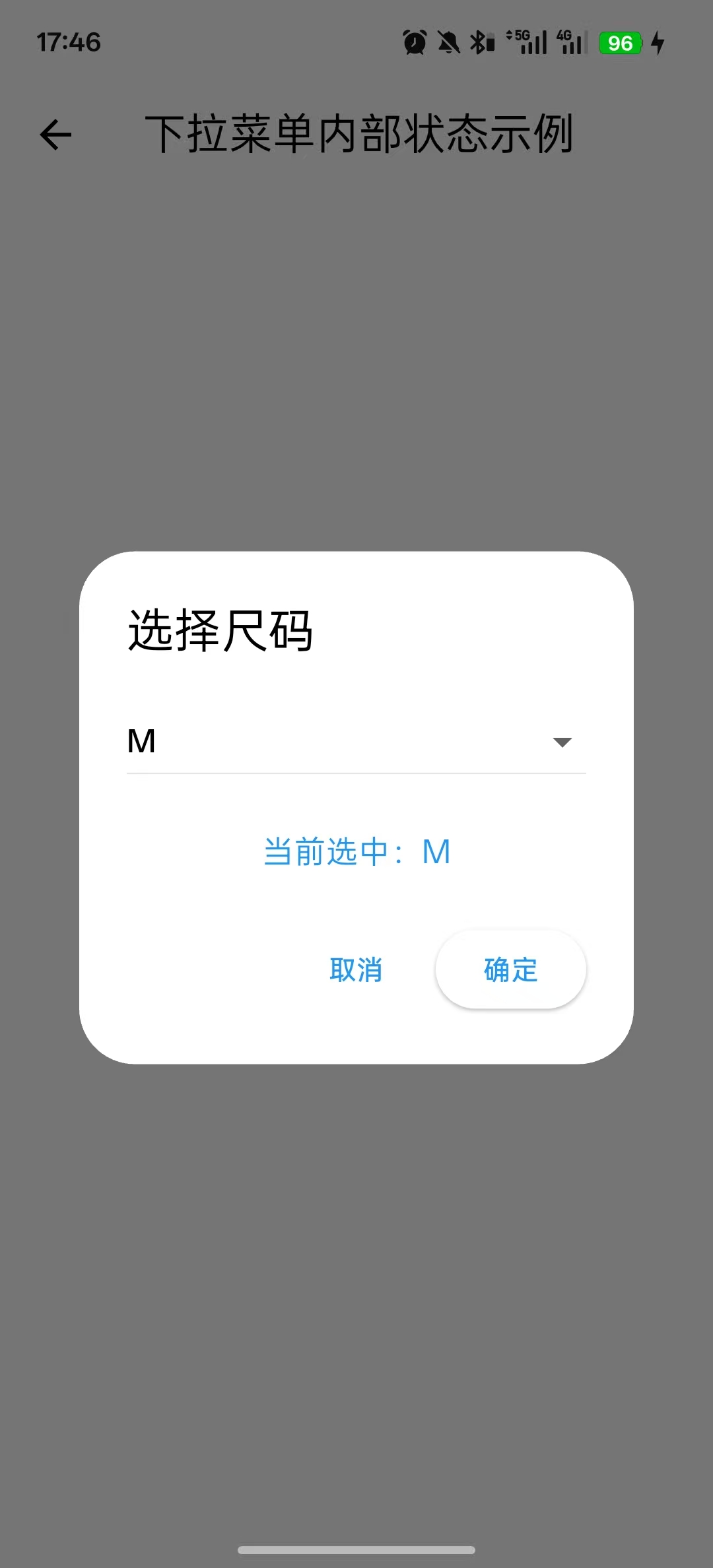
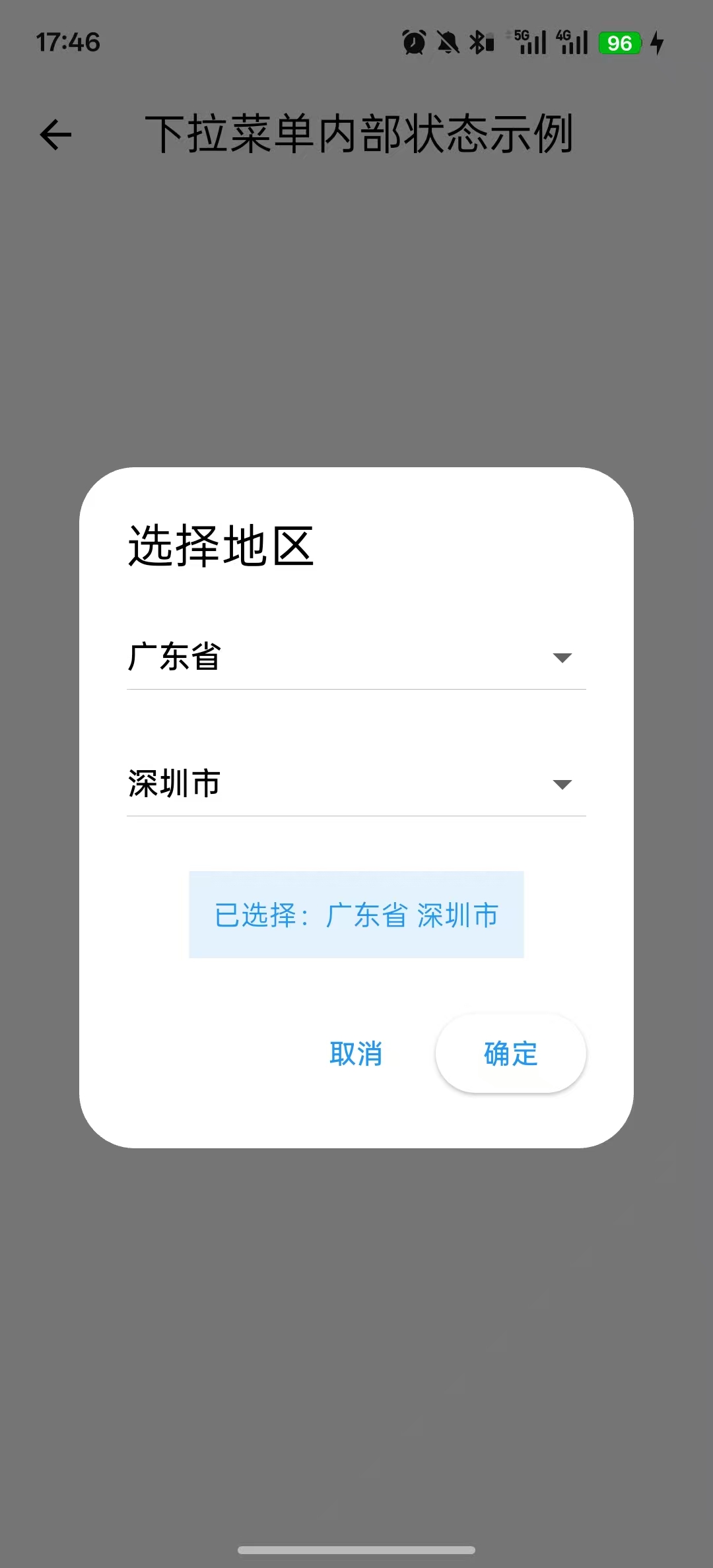
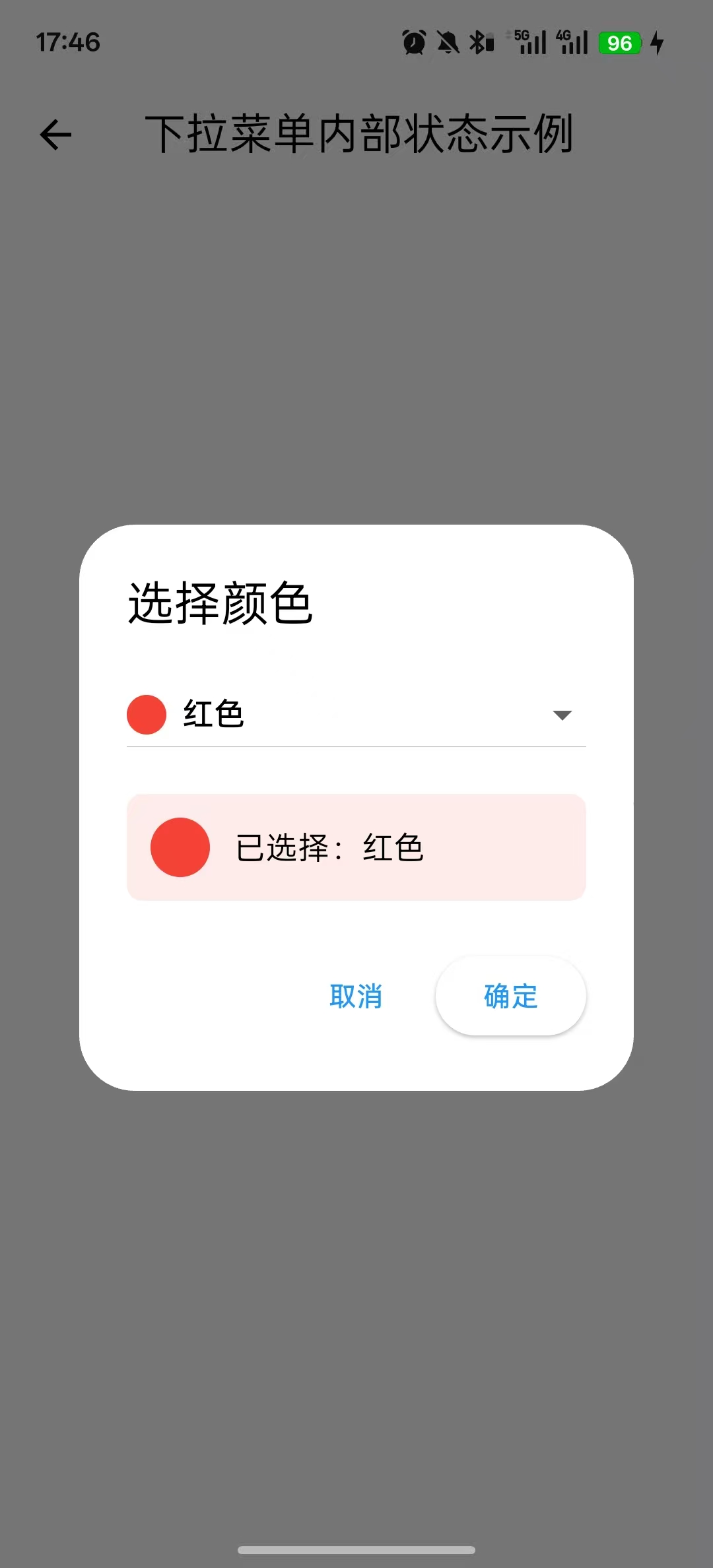
1.对话框实例
Dart
import 'package:flutter/material.dart';

class DemoPage extends StatefulWidget {
  const DemoPage({super.key});

  @override
  State<DemoPage> createState() => _DemoPageState();
}

class _DemoPageState extends State<DemoPage> {

  @override
  Widget build(BuildContext context) {
    return Scaffold(
      appBar: AppBar(
        title: Text('StatefulBuilder 对话框示例'),
      ),
      body: Center(
        child: Column(
          mainAxisAlignment: MainAxisAlignment.center,
          children: [
            ElevatedButton(
              onPressed: _showNormalDialog,
              child: Text('普通对话框(带数量选择)'),
            ),
            SizedBox(height: 20),

            ElevatedButton(
              onPressed: _showBottomSheet,
              child: Text('底部弹窗(带数量选择)'),
            ),
          ],
        ),
      ),
    );
  }

  // ==================== 普通对话框 ====================
  void _showNormalDialog() {
    int quantity = 1;

    showDialog(
      context: context,
      builder: (context) {
        return AlertDialog(
          title: Text('选择数量'),
          content: StatefulBuilder(
            builder: (context, setState) {
              return Column(
                mainAxisSize: MainAxisSize.min,
                children: [
                  Text('请选择购买数量', style: TextStyle(fontSize: 16)),
                  SizedBox(height: 20),
                  Row(
                    mainAxisAlignment: MainAxisAlignment.center,
                    children: [
                      IconButton(
                        onPressed: () {
                          setState(() {
                            if (quantity > 1) quantity--;
                          });
                        },
                        icon: Icon(Icons.remove),
                      ),
                      Container(
                        width: 60,
                        child: Text(
                          '$quantity',
                          textAlign: TextAlign.center,
                          style: TextStyle(fontSize: 24, fontWeight: FontWeight.bold),
                        ),
                      ),
                      IconButton(
                        onPressed: () {
                          setState(() {
                            quantity++;
                          });
                        },
                        icon: Icon(Icons.add),
                      ),
                    ],
                  ),
                  SizedBox(height: 10),
                  Text(
                    '总价:¥${quantity * 99}',
                    style: TextStyle(fontSize: 18, color: Colors.red),
                  ),
                ],
              );
            },
          ),
          actions: [
            TextButton(
              onPressed: () => Navigator.pop(context),
              child: Text('取消'),
            ),
            ElevatedButton(
              onPressed: () => Navigator.pop(context),
              child: Text('确定'),
            ),
          ],
        );
      },
    );
  }

  // ====================底部弹窗 ====================
  void _showBottomSheet() {
    int quantity = 1;
    String selectedSize = 'M';
    List<String> sizes = ['S', 'M', 'L', 'XL'];

    showModalBottomSheet(
      context: context,
      shape: RoundedRectangleBorder(
        borderRadius: BorderRadius.vertical(top: Radius.circular(20)),
      ),
      builder: (context) {
        return StatefulBuilder(
          builder: (context, setState) {
            return Container(
              padding: EdgeInsets.all(20),
              height: 350,
              child: Column(
                crossAxisAlignment: CrossAxisAlignment.start,
                children: [
                  Text('选择商品', style: TextStyle(fontSize: 20, fontWeight: FontWeight.bold)),
                  SizedBox(height: 20),

                  Text('尺码:'),
                  SizedBox(height: 10),
                  Row(
                    children: sizes.map((size) {
                      return Padding(
                        padding: EdgeInsets.only(right: 10),
                        child: ChoiceChip(
                          label: Text(size),
                          selected: selectedSize == size,
                          onSelected: (selected) {
                            setState(() {
                              if (selected) selectedSize = size;
                            });
                          },
                        ),
                      );
                    }).toList(),
                  ),

                  SizedBox(height: 20),
                  Text('数量:'),
                  SizedBox(height: 10),
                  Row(
                    children: [
                      IconButton(
                        onPressed: () => setState(() {
                          if (quantity > 1) quantity--;
                        }),
                        icon: Icon(Icons.remove),
                      ),
                      Container(
                        width: 50,
                        child: Text('$quantity', textAlign: TextAlign.center),
                      ),
                      IconButton(
                        onPressed: () => setState(() => quantity++),
                        icon: Icon(Icons.add),
                      ),
                    ],
                  ),

                  Spacer(),

                  SizedBox(
                    width: double.infinity,
                    child: ElevatedButton(
                      onPressed: () {
                        Navigator.pop(context);
                        ScaffoldMessenger.of(context).showSnackBar(
                          SnackBar(content: Text('已选择:$selectedSize码,数量:$quantity')),
                        );
                      },
                      child: Text('确认选择'),
                    ),
                  ),
                ],
              ),
            );
          },
        );
      },
    );
  }

}
2.列表项展开实例
Dart
import 'package:flutter/material.dart';

class DemoPage extends StatefulWidget {
  const DemoPage({super.key});

  @override
  State<DemoPage> createState() => _DemoPageState();
}

class _DemoPageState extends State<DemoPage> {

  @override
  Widget build(BuildContext context) {
    return Scaffold(
      appBar: AppBar(
        title: Text('列表项展开/收起示例'),
      ),
      body: ListView.builder(
        itemCount: 20,
        itemBuilder: (context, index) {
          return _buildListItem(index);
        },
      ),
    );
  }


  //列表子项
  Widget _buildListItem(int index) {
    //变量放在 StatefulBuilder 外面
    bool isExpanded = false;

    return Card(
      margin: EdgeInsets.symmetric(horizontal: 16, vertical: 8),
      child: StatefulBuilder( //StatefulBuilder
        builder: (context, setState) {
          return Column(
            children: [
              ListTile(
                leading: CircleAvatar(
                  child: Text('${index + 1}'),
                ),
                title: Text(
                  '列表项 ${index + 1}',
                  style: TextStyle(fontWeight: FontWeight.bold),
                ),
                subtitle: isExpanded ? null : Text('点击展开查看详情...'),
                trailing: Icon(
                  isExpanded ? Icons.expand_less : Icons.expand_more,
                ),
                onTap: () {
                  setState(() {
                    isExpanded = !isExpanded;
                  });
                },
              ),

              if (isExpanded)
                Container(
                  padding: EdgeInsets.all(16),
                  color: Colors.grey.shade50,
                  child: Column(
                    crossAxisAlignment: CrossAxisAlignment.start,
                    children: [
                      Text('详细内容', style: TextStyle(fontWeight: FontWeight.bold)),
                      SizedBox(height: 8),
                      Text('这是列表项 ${index + 1} 的详细说明。'),
                      SizedBox(height: 8),
                      Row(
                        children: [
                          ElevatedButton(
                            onPressed: () {
                              ScaffoldMessenger.of(context).showSnackBar(
                                SnackBar(content: Text('点击了列表项 ${index + 1} 的按钮')),
                              );
                            },
                            child: Text('操作按钮'),
                          ),
                        ],
                      ),
                    ],
                  ),
                ),
            ],
          );
        },
      ),
    );
  }
}
3.下拉菜单内部状态实例
Dart
import 'package:flutter/material.dart';

class DemoPage extends StatefulWidget {
  const DemoPage({super.key});

  @override
  State<DemoPage> createState() => _DemoPageState();
}

class _DemoPageState extends State<DemoPage> {

  @override
  Widget build(BuildContext context) {
    return Scaffold(
      appBar: AppBar(
        title: Text('下拉菜单内部状态示例'),
      ),
      body: Center(
        child: Column(
          mainAxisAlignment: MainAxisAlignment.center,
          children: [
            // 示例1:普通下拉菜单
            ElevatedButton(
              onPressed: _showSimpleDropdownDialog,
              child: Text('简单下拉菜单(Dialog)'),
            ),
            SizedBox(height: 20),

            // 示例2:级联下拉菜单(省市区)
            ElevatedButton(
              onPressed: _showCascadingDropdownDialog,
              child: Text('级联下拉菜单(省市区)'),
            ),
            SizedBox(height: 20),

            // 示例3:动态下拉菜单(从列表选择)
            ElevatedButton(
              onPressed: _showDynamicDropdownDialog,
              child: Text('动态下拉菜单(搜索/过滤)'),
            ),
          ],
        ),
      ),
    );
  }

  // ==================== 示例1:普通下拉菜单 ====================
  void _showSimpleDropdownDialog() {
    String selectedSize = 'M';  // 选中的尺码
    List<String> sizes = ['S', 'M', 'L', 'XL', 'XXL'];

    showDialog(
      context: context,
      builder: (context) {
        return AlertDialog(
          title: Text('选择尺码'),
          content: StatefulBuilder(
            builder: (context, setState) {
              return Column(
                mainAxisSize: MainAxisSize.min,
                children: [
                  // 下拉菜单
                  DropdownButton<String>(
                    value: selectedSize,
                    isExpanded: true,
                    items: sizes.map((size) {
                      return DropdownMenuItem(
                        value: size,
                        child: Text(size),
                      );
                    }).toList(),
                    onChanged: (value) {
                      setState(() {
                        selectedSize = value!;  // 只刷新对话框
                      });
                    },
                  ),
                  SizedBox(height: 20),
                  Text(
                    '当前选中:$selectedSize',
                    style: TextStyle(fontSize: 16, color: Colors.blue),
                  ),
                ],
              );
            },
          ),
          actions: [
            TextButton(
              onPressed: () => Navigator.pop(context),
              child: Text('取消'),
            ),
            ElevatedButton(
              onPressed: () {
                Navigator.pop(context);
                ScaffoldMessenger.of(context).showSnackBar(
                  SnackBar(content: Text('已选择尺码:$selectedSize')),
                );
              },
              child: Text('确定'),
            ),
          ],
        );
      },
    );
  }

  // ==================== 示例2:级联下拉菜单(省市区) ====================
  void _showCascadingDropdownDialog() {
    // 模拟数据
    Map<String, List<String>> cityData = {
      '广东省': ['广州市', '深圳市', '珠海市', '佛山市'],
      '浙江省': ['杭州市', '宁波市', '温州市'],
      '江苏省': ['南京市', '苏州市', '无锡市'],
    };

    String selectedProvince = '广东省';
    String selectedCity = '深圳市';

    showDialog(
      context: context,
      builder: (context) {
        return AlertDialog(
          title: Text('选择地区'),
          content: StatefulBuilder(
            builder: (context, setState) {
              // 获取当前省份下的城市列表
              List<String> cities = cityData[selectedProvince] ?? [];

              // 如果选中的城市不在当前省份的城市列表中,重新设置
              if (!cities.contains(selectedCity) && cities.isNotEmpty) {
                selectedCity = cities.first;
              }

              return Container(
                width: 300,
                child: Column(
                  mainAxisSize: MainAxisSize.min,
                  children: [
                    // 省份下拉菜单
                    DropdownButton<String>(
                      value: selectedProvince,
                      isExpanded: true,
                      items: cityData.keys.map((province) {
                        return DropdownMenuItem(
                          value: province,
                          child: Text(province),
                        );
                      }).toList(),
                      onChanged: (value) {
                        setState(() {
                          selectedProvince = value!;
                          // 切换省份时,自动选中该省份的第一个城市
                          if (cityData[selectedProvince]!.isNotEmpty) {
                            selectedCity = cityData[selectedProvince]!.first;
                          }
                        });
                      },
                    ),
                    SizedBox(height: 16),

                    // 城市下拉菜单
                    DropdownButton<String>(
                      value: selectedCity,
                      isExpanded: true,
                      items: cities.map((city) {
                        return DropdownMenuItem(
                          value: city,
                          child: Text(city),
                        );
                      }).toList(),
                      onChanged: (value) {
                        setState(() {
                          selectedCity = value!;
                        });
                      },
                    ),
                    SizedBox(height: 20),

                    Container(
                      padding: EdgeInsets.all(12),
                      color: Colors.blue.shade50,
                      child: Text(
                        '已选择:$selectedProvince $selectedCity',
                        style: TextStyle(color: Colors.blue),
                      ),
                    ),
                  ],
                ),
              );
            },
          ),
          actions: [
            TextButton(
              onPressed: () => Navigator.pop(context),
              child: Text('取消'),
            ),
            ElevatedButton(
              onPressed: () {
                Navigator.pop(context);
                ScaffoldMessenger.of(context).showSnackBar(
                  SnackBar(content: Text('已选择:$selectedProvince $selectedCity')),
                );
              },
              child: Text('确定'),
            ),
          ],
        );
      },
    );
  }

  // ==================== 示例3:动态下拉菜单(带搜索/过滤) ====================
  void _showDynamicDropdownDialog() {
    List<String> allColors = [
      '红色', '橙色', '黄色', '绿色', '青色', '蓝色', '紫色',
      '粉色', '棕色', '黑色', '白色', '灰色', '金色', '银色'
    ];

    String selectedColor = '红色';
    String searchText = '';

    showDialog(
      context: context,
      builder: (context) {
        return AlertDialog(
          title: Text('选择颜色'),
          content: StatefulBuilder(
            builder: (context, setState) {
              // 根据搜索文本过滤颜色列表
              List<String> filteredColors = allColors.where((color) {
                return color.contains(searchText);
              }).toList();

              return Container(
                width: 280,
                child: Column(
                  mainAxisSize: MainAxisSize.min,
                  children: [


                    // 下拉菜单
                    DropdownButton<String>(
                      value: selectedColor,
                      isExpanded: true,
                      hint: Text('请选择颜色'),
                      items: filteredColors.map((color) {
                        return DropdownMenuItem(
                          value: color,
                          child: Row(
                            children: [
                              Container(
                                width: 20,
                                height: 20,
                                decoration: BoxDecoration(
                                  color: _getColorFromName(color),
                                  shape: BoxShape.circle,
                                ),
                              ),
                              SizedBox(width: 8),
                              Text(color),
                            ],
                          ),
                        );
                      }).toList(),
                      onChanged: (value) {
                        setState(() {
                          selectedColor = value!;
                        });
                      },
                    ),
                    SizedBox(height: 16),

                    // 显示选中的颜色
                    Container(
                      padding: EdgeInsets.all(12),
                      decoration: BoxDecoration(
                        color: _getColorFromName(selectedColor).withOpacity(0.1),
                        borderRadius: BorderRadius.circular(8),
                      ),
                      child: Row(
                        children: [
                          Container(
                            width: 30,
                            height: 30,
                            decoration: BoxDecoration(
                              color: _getColorFromName(selectedColor),
                              shape: BoxShape.circle,
                            ),
                          ),
                          SizedBox(width: 12),
                          Text(
                            '已选择:$selectedColor',
                            style: TextStyle(fontSize: 16),
                          ),
                        ],
                      ),
                    ),
                  ],
                ),
              );
            },
          ),
          actions: [
            TextButton(
              onPressed: () => Navigator.pop(context),
              child: Text('取消'),
            ),
            ElevatedButton(
              onPressed: () {
                Navigator.pop(context);
                ScaffoldMessenger.of(context).showSnackBar(
                  SnackBar(content: Text('已选择颜色:$selectedColor')),
                );
              },
              child: Text('确定'),
            ),
          ],
        );
      },
    );
  }

  // 根据颜色名称获取颜色
  Color _getColorFromName(String colorName) {
    switch (colorName) {
      case '红色': return Colors.red;
      case '橙色': return Colors.orange;
      case '黄色': return Colors.yellow;
      case '绿色': return Colors.green;
      case '青色': return Colors.cyan;
      case '蓝色': return Colors.blue;
      case '紫色': return Colors.purple;
      case '粉色': return Colors.pink;
      case '棕色': return Colors.brown;
      case '黑色': return Colors.black;
      case '白色': return Colors.white;
      case '灰色': return Colors.grey;
      default: return Colors.grey;
    }
  }
}