鸿蒙原生应用实战(二):首页开发 ------ 周历导航与@Builder组件化实践
前言
在上一篇中,我们完成了项目初始化与Stage模型架构设计。本篇将进入核心开发环节------首页(Index.ets) 的实现。
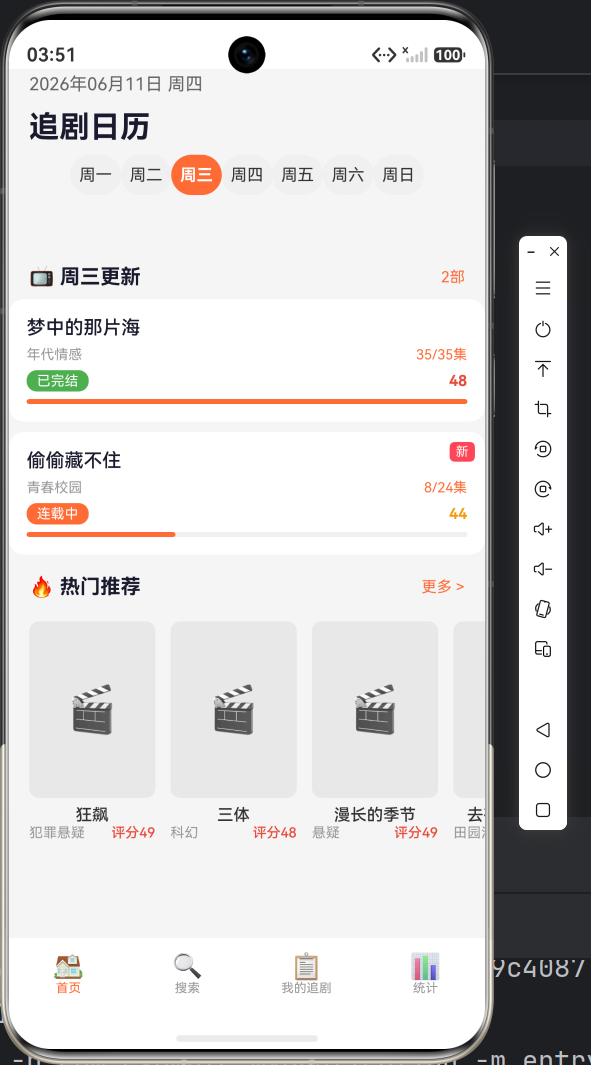
首页是用户启动App后看到的第一个页面,承载着三个核心功能模块:
- 顶部周历导航栏 ------ 显示当前日期、星期切换
- 今日更新列表 ------ 按所选星期显示更新剧集
- 热门推荐区域 ------ 横向滚动展示热门剧集
我将带你从ArkTS组件化思维出发,完整实现这三大模块,并深入讲解@Builder的使用技巧。
一、首页整体框架
1.1 页面结构规划
Index.ets
├── @Builder buildNavBar()        ← 顶部导航栏(日期 + 星期选择)
│   ├── Row: 日期显示
│   ├── Row: 标题"追剧日历"
│   └── List: 七天星期切换
├── @Builder buildTodayDramas()   ← 今日更新剧集列表
│   ├── Row: 标题 + 剧集数量
│   └── ForEach: 剧集卡片列表
├── @Builder buildHotSection()    ← 热门推荐
│   ├── Row: 标题"热门推荐"
│   └── Scroll→Row: 横向滚动卡片
├── @Builder buildBottomNav()     ← 底部导航栏
│   └── Row: 四个Tab图标
└── build()                       ← 主布局组合
1.2 数据接口定义
typescript
interface Drama {
  id: number;              // 唯一标识
  title: string;           // 剧集名称
  cover: string;           // 封面图(预留字段)
  genre: string;           // 类型
  episodes: number;        // 总集数
  watchedEpisodes: number; // 已看集数
  status: string;          // 状态:连载中/已完结
  rating: number;          // 评分(5分制÷10,如47=4.7分)
  updateDay: string;       // 更新日:周一~周日
  isNew: boolean;          // 是否为新剧
}
这里 rating 使用整数存储(如47代表4.7分),避免浮点数精度问题。cover 预留为字符串,后续可从网络加载图片URL。
二、@State状态管理与初始化
2.1 状态变量声明
typescript
@Component
struct Index {
  @State currentDate: string = '2025-01-15';  // 当前日期显示
  @State dramas: Drama[] = [];                 // 全部剧集数据
  @State hotDramas: Drama[] = [];              // 热门剧集数据
  @State selectedDay: string = '周一';          // 当前选中的星期
  @State weekDays: string[] = ['周一', '周二', '周三', '周四', '周五', '周六', '周日'];
}
@State装饰器的作用 :当被装饰的变量值发生变化时,ArkTS框架会自动触发UI刷新。这是声明式UI的核心机制------数据驱动视图。
2.2 数据初始化
typescript
aboutToAppear(): void {
  this.initDramas();
  this.initHotDramas();
  this.updateCurrentDate();
}
aboutToAppear 是ArkTS组件生命周期方法,在组件即将显示时调用。它等同于 onPageShow,适合在此处加载数据。
2.3 日期处理
typescript
updateCurrentDate(): void {
  const now: Date = new Date();
  const year: number = now.getFullYear();
  const month: number = now.getMonth() + 1;   // getMonth()返回0-11
  const day: number = now.getDate();
  const dayOfWeek: number = now.getDay();      // getDay()返回0(周日)-6(周六)
  const weekMap: string[] = ['周日', '周一', '周二', '周三', '周四', '周五', '周六'];
  this.currentDate = `${year}年${month < 10 ? '0' + month : month}月${day < 10 ? '0' + day : day}日 ${weekMap[dayOfWeek]}`;
  this.currentDayIndex = dayOfWeek === 0 ? 6 : dayOfWeek - 1;
  this.selectedDay = this.weekDays[this.currentDayIndex];
}关键点:
getMonth()返回0-11,需要 +1 才是实际月份getDay()返回0表示周日,需要映射到我们的数组索引- 使用条件表达式处理个位数的月份/日期补零
2.4 模拟数据
typescript
initDramas(): void {
  this.dramas = [
    { id: 1, title: '星落凝成糖', genre: '古装仙侠', episodes: 40, watchedEpisodes: 12,
      status: '连载中', rating: 47, updateDay: '周一', isNew: true },
    // ... 共8条模拟数据,覆盖周一到周六的更新
  ];
}

initHotDramas(): void {
  this.hotDramas = [
    { id: 9, title: '狂飙', genre: '犯罪悬疑', episodes: 39, status: '已完结', rating: 49, ... },
    // ... 共4条热门剧集数据
  ];
}开发阶段使用模拟数据的优势:
- 不依赖后端接口,可独立开发UI
- 数据可控,方便测试各种边界情况
- 后续只需替换为网络请求即可
三、@Builder组件化实践
3.1 什么是@Builder
@Builder 是ArkTS中定义可复用的UI片段的方法装饰器。与提取自定义组件相比:
- @Builder更轻量,不需要额外的struct定义
- 可以直接访问所在组件的成员变量和方法
- 适合封装页面内的功能模块
3.2 顶部导航栏 buildNavBar()
typescript
@Builder buildNavBar() {
  Column() {
    // --------- 第一行:日期显示 ---------
    Row() {
      Text(this.currentDate)
        .fontSize(14)
        .fontColor('#666666')
      Blank()          // 弹性空白,撑开两侧
      Image("")
        .width(24).height(24).borderRadius(12)  // 用户头像占位
    }
    .width('100%').padding({ left: 16, right: 16 })

    // --------- 第二行:标题 ---------
    Row() {
      Text('追剧日历')
        .fontSize(24).fontWeight(FontWeight.Bold).fontColor('#1A1A2E')
      Blank()
      Image("").width(22).height(22).opacity(0)  // 对称占位,保持标题居中
    }
    .width('100%').padding({ left: 16, right: 16, top: 8 })

    // --------- 第三行:星期选择器 ---------
    List() {
      ForEach(this.weekDays, (day: string) => {
        ListItem() {
          Column() {
            Text(day)
              .fontSize(13)
              .fontColor(this.selectedDay === day ? '#FFFFFF' : '#333333')
          }
          .width(40).height(32).borderRadius(16)
          .backgroundColor(this.selectedDay === day ? '#FF6B35' : '#F0F0F0')
          .onClick(() => { this.selectedDay = day; })
        }
      }, (day: string) => day)
    }
    .listDirection(Axis.Horizontal)
    .height(44).padding({ left: 12, right: 12, top: 8 })
  }
  .width('100%')
}设计要点:
a) Blank()的妙用
Blank() 是一个弹性空白组件,会自动占据Row中的剩余空间。在日期行中,它将日期推到左侧,头像占位推到右侧。
b) 对称占位技巧
标题行中左侧是"追剧日历"Text,右侧放了一个透明Image来保持视觉平衡。如果右侧没有元素,标题会偏左,整体观感不对称。
c) List + ForEach实现标签导航
使用 List 组件并设置 listDirection(Axis.Horizontal) 实现横向滚动标签栏。当标签数量超过屏幕宽度时自动支持滑动,比直接使用 Row 更稳健。
d) 条件样式
通过对比 this.selectedDay === day 来决定Text颜色和背景色,实现选中态高亮。
3.3 今日更新区域 buildTodayDramas()
typescript
@Builder buildTodayDramas() {
  Column() {
    // --------- 区域标题 ---------
    Row() {
      Text(`📺 ${this.selectedDay}更新`)  // 动态拼接标题
        .fontSize(16).fontWeight(FontWeight.Bold).fontColor('#1A1A2E')
      Blank()
      Text(`${this.getDayDramas().length}部`)  // 动态统计数量
        .fontSize(12).fontColor('#FF6B35')
    }
    .width('100%').padding({ left: 16, right: 16, top: 12 })

    // --------- 剧集卡片列表 ---------
    ForEach(this.getDayDramas(), (item: Drama) => {
      Stack() {
        Row() {
          Column() {
            // 剧名
            Text(item.title).fontSize(15).fontWeight(FontWeight.Medium).fontColor('#1A1A2E')
            // 类型 + 已看/总集数
            Row() {
              Text(item.genre).fontSize(11).fontColor('#999999')
              Blank()
              Text(`${item.watchedEpisodes}/${item.episodes}集`).fontSize(11).fontColor('#FF6B35')
            }.width('100%').margin({ top: 6 })
            // 状态标签 + 评分
            Row() {
              Text(item.status)
                .fontSize(11).fontColor(Color.White)
                .padding({ left: 8, right: 8, top: 2, bottom: 2 })
                .backgroundColor(this.getStatusColor(item.status)).borderRadius(8)
              Blank()
              Text(item.rating.toString()).fontSize(12).fontWeight(FontWeight.Bold)
                .fontColor(this.getRatingColor(item.rating))
            }.width('100%').margin({ top: 6 })
            // 追剧进度条
            Progress({ value: this.getProgressPercent(item), total: 100, style: ProgressStyle.Linear })
              .width('100%').height(4).color('#FF6B35').backgroundColor('#F0F0F0').borderRadius(2)
              .margin({ top: 6 })
          }
          .layoutWeight(1).alignItems(HorizontalAlign.Start)
        }
        .width('100%').padding(14)
        .backgroundColor('#FFFFFF').borderRadius(12)

        // "新"标签(条件渲染)
        if (item.isNew) {
          Text('新').fontSize(10).fontColor(Color.White)
            .padding({ left: 5, right: 5, top: 2, bottom: 2 })
            .backgroundColor('#FF4757').borderRadius(4)
            .position({ top: 8, right: 8 })  // 绝对定位在卡片右上角
        }
      }
      .width('100%').margin({ top: 8 })
      .onClick(() => {
        router.pushUrl({ url: 'pages/DetailPage', params: { dramaId: item.id } });
      })
    }, (item: Drama) => item.id.toString())
  }
  .width('100%')
}核心组件详解:
a) Progress进度条
typescript
Progress({ value: percent, total: 100, style: ProgressStyle.Linear })value: 当前进度值total: 总进度值(100)style: 样式,支持Linear(线性)、Ring(环形)等
进度条展示了追剧进度,视觉上让用户一目了然地知道每部剧追了多少。
b) Stack + position实现角标
typescript
Stack() {
  // 卡片主体...
  if (item.isNew) {
    Text('新').position({ top: 8, right: 8 })
  }
}
Stack 是一个层叠布局容器,子组件按顺序叠放。通过 position() 设置绝对定位,将"新"标签放在卡片右上角。
c) getDayDramas() ------ 数据筛选方法
typescript
getDayDramas(): Drama[] {
  return this.dramas.filter((item: Drama) => item.updateDay === this.selectedDay);
}这是一个计算属性 ,每次调用都会根据当前 selectedDay 重新筛选。当用户点击不同的星期时,selectedDay 变化触发UI刷新,列表实时更新。
3.4 热门推荐区域 buildHotSection()
typescript
@Builder buildHotSection() {
  Column() {
    Row() {
      Text('🔥 热门推荐').fontSize(16).fontWeight(FontWeight.Bold).fontColor('#1A1A2E')
      Blank()
      Text('更多 >').fontSize(12).fontColor('#FF6B35')
    }
    .width('100%').padding({ left: 16, right: 16, top: 16 })

    // 横向滚动容器
    Scroll() {
      Row() {
        ForEach(this.hotDramas, (item: Drama) => {
          Column() {
            // 封面占位(带Emoji图标)
            Stack() {
              Column().width(100).height(140)
                .backgroundColor('#E8E8E8').borderRadius(8)
              Text('🎬').fontSize(36)
            }.width(100).height(140)

            Text(item.title).fontSize(13).fontWeight(FontWeight.Medium)
              .fontColor('#333333').margin({ top: 6 })
              .maxLines(1).textOverflow({ overflow: TextOverflow.Ellipsis })

            Row() {
              Text(item.genre).fontSize(11).fontColor('#999999')
              Blank()
              Text(`评分${item.rating}`).fontSize(11).fontColor('#E74C3C')
            }.width(100)
          }
          .margin({ right: 12 })
          .onClick(() => {
            router.pushUrl({ url: 'pages/DetailPage', params: { dramaId: item.id } });
          })
        }, (item: Drama) => item.id.toString())
      }
      .padding({ left: 16, right: 16 })
    }
    .scrollable(ScrollDirection.Horizontal)  // 关键:水平滚动
    .height(210)
  }
  .width('100%')
}横向滚动的实现机制:
Scroll(scrollable: ScrollDirection.Horizontal)
  └── Row
       ├── Column (卡片1)
       ├── Column (卡片2)
       └── Column (卡片3) ...
要点:
Scroll的scrollable属性设为ScrollDirection.HorizontalRow作为子容器,内部Column卡片无需指定固定宽度,而是由内容撑开- 每个卡片设置
margin({ right: 12 })控制间距 - 整行通过
padding控制左右边距
四、底部导航栏设计
typescript
@Builder buildBottomNav() {
  Row() {
    Column() {
      Text('🏠').fontSize(20); Text('首页').fontSize(10).fontColor('#FF6B35')
    }.layoutWeight(1)

    Column() {
      Text('🔍').fontSize(20); Text('搜索').fontSize(10).fontColor('#999999')
    }.layoutWeight(1).onClick(() => { router.pushUrl({ url: 'pages/SearchPage' }); })

    Column() {
      Text('📋').fontSize(20); Text('我的追剧').fontSize(10).fontColor('#999999')
    }.layoutWeight(1).onClick(() => { router.pushUrl({ url: 'pages/MyListPage' }); })

    Column() {
      Text('📊').fontSize(20); Text('统计').fontSize(10).fontColor('#999999')
    }.layoutWeight(1).onClick(() => { router.pushUrl({ url: 'pages/StatsPage' }); })
  }
  .width('100%').height(60).backgroundColor('#FFFFFF')
}布局要点:
- 使用
layoutWeight(1)均匀分配四个Tab的宽度 - 图标使用Emoji简化(无需引入图标库)
- "首页"Tab高亮色表示当前页面
- 其他Tab绑定
router.pushUrl跳转到对应页面
五、主布局组装
typescript
build(): void {
  Column() {
    this.buildNavBar()           // 顶部导航栏(不滚动)
    Scroll() {
      Column() {
        this.buildTodayDramas()  // 今日更新
        this.buildHotSection()   // 热门推荐
      }.width('100%').padding({ bottom: 20 })
    }
    .scrollable(ScrollDirection.Vertical)
    .layoutWeight(1)
    .width('100%')

    this.buildBottomNav()        // 底部导航栏(不滚动)
  }
  .width('100%').height('100%').backgroundColor('#F5F5F5')
}布局层次:
Column (100% × 100%)
  ├── buildNavBar()         ← 固定顶部
  ├── Scroll (layoutWeight=1) ← 中间内容区,可滚动
  │     └── buildTodayDramas() + buildHotSection()
  └── buildBottomNav()      ← 固定底部
layoutWeight(1) 让Scroll占满剩余空间,这是Flex布局的经典用法。
六、辅助方法
6.1 颜色映射方法
typescript
getStatusColor(status: string): ResourceStr {
  if (status === '连载中') return '#FF6B35';  // 橙色:进行中
  if (status === '已完结') return '#4CAF50';  // 绿色:已完成
  return '#999999';                            // 灰色:其他
}

getRatingColor(rating: number): ResourceStr {
  if (rating >= 48) return '#E74C3C';  // 高评分:红色
  if (rating >= 44) return '#F39C12';  // 中评分:橙色
  return '#95A5A6';                     // 低评分:灰色
}
返回类型 ResourceStr :既可以返回资源引用 $r('app.color.xxx'),也可以返回颜色字符串 '#FF6B35'。
6.2 进度计算方法
typescript
getProgressPercent(item: Drama): number {
  if (item.episodes === 0) return 0;  // 防止除以0
  return Math.round((item.watchedEpisodes / item.episodes) * 100);
}
边界情况处理 :当 episodes 为0时直接返回0,避免出现 NaN。
七、ArkTS严格模式避坑
7.1 对象字面量类型推断
在ArkTS严格模式下(arkts-no-untyped-obj-literals),直接写对象字面量会编译报错:
typescript
// ❌ 编译错误:未类型化的对象字面量不可用
this.dramas = [{ id: 1, title: '...' }];

// ✅ 正确:前提是 dramas 声明为 Drama[] 类型
this.dramas = [{ id: 1, title: '...' }];  // 自动推断为 Drama 类型
7.2 ForEach的key生成
typescript
// ✅ 每个列表项必须有唯一key
ForEach(this.dramas, (item: Drama) => {
  // ...
}, (item: Drama) => item.id.toString())
第三个参数是key生成函数,用于Diff算法识别。缺少key或key不唯一会导致列表渲染性能问题和状态错乱。
7.3 数组推导式
typescript
// 不使用ArkTS的...展开运算符时,用for循环替代
// ⚠️ 注意:某些版本不支持 [...array] 语法
const newArray: Drama[] = [];
for (let i: number = 0; i < this.dramas.length; i++) {
  newArray.push(this.dramas[i]);
}
this.dramas = newArray;
八、性能优化建议
8.1 减少不必要的状态变量
typescript
// ❌ 不推荐:用状态变量存储衍生数据
@State dayDramasCount: number = 0;

// ✅ 推荐:直接通过方法计算,避免同步问题
getDayDramas(): Drama[] { ... }
8.2 合理使用key
在 ForEach 中始终提供稳定且唯一的key。使用 id 比使用 index(下标)更可靠,因为列表项位置可能变化。
8.3 Scroll嵌套的性能考量
Scroll 内部嵌套大量列表项时,考虑:
- 使用
LazyForEach替代ForEach(大数据量时) - 避免在列出项中使用复杂动画
- 减少嵌套层级
本项目中数据量较小(<20条),使用 ForEach 完全足够。
九、篇末总结
本篇我们完成了首页的全部开发,核心内容包括:
- ✅ @Builder装饰器实现UI组件化
- ✅ List + ForEach构建横向星期选择器
- ✅ Scroll + Row实现横向滚动推荐区
- ✅ Progress进度条组件展示追剧进度
- ✅ Stack + position实现角标效果
- ✅ Blank()弹性空间在布局中的应用
下一篇将实现搜索页与详情页,深入讲解:
- 多维度组合筛选算法
- 路由传参与动态数据加载
- 分集列表的勾选/取消逻辑
- Tab切换的多内容展示
文章索引:
- (一)项目初始化与Stage模型架构设计
- (二)首页开发 ------ 周历导航与@Builder组件化实践 ← 当前
- (三)搜索与详情页 ------ 多维度筛选与动态路由
- (四)我的追剧与统计页 ------ 三态Tab与数据可视化
- (五)编译构建与性能优化 ------ 从开发到上架