centos stream 9离线分层部署cloudstack 4.22高可用集群

mariadb

bash 复制代码
# 节点1、2、3
mv /etc/my.cnf.d/mariadb-server.cnf /etc/my.cnf.d/mariadb-server.cnf.bak

vim /etc/my.cnf.d/mariadb-server.cnf

[mysqld]
datadir=/var/lib/mysql
socket=/var/lib/mysql/mysql.sock
user=mysql
character-set-server = utf8mb4
collation-server = utf8mb4_general_ci
# 多主模式核心
innodb_autoinc_lock_mode = 2

bind-address = 11.1.1.8
# 写集复制
wsrep_on = ON
wsrep_provider = /usr/lib64/galera/libgalera_smm.so
# 集群标识
wsrep_cluster_name = "galera-cluster"
wsrep_cluster_address = "gcomm://11.1.1.8,11.1.1.9,11.1.1.10"
# 节点
wsrep_node_name = "cs1"
wsrep_node_address = "11.1.1.8"
# 状态快照传输(SST)
wsrep_sst_method = rsync
wsrep_sst_auth = "root:8LB5Lf3Cw3yqqCP9LzcqATZmufIWPnV0"
# 存储引擎
default_storage_engine = InnoDB
bash 复制代码
# 节点1
galera_new_cluster

# 节点2、3
systemctl start mariadb
# 所有节点
systemctl enable mariadb

# 加固
mysql_secure_installation

# 回车
# n
# y
# 8LB5Lf3Cw3yqqCP9LzcqATZmufIWPnV0
# y
# y
# y
# y

# 检查
mysql -u root -p
sql 复制代码
-- wsrep_ready: ON
-- wsrep_connected: ON
-- wsrep_cluster_size: 3
-- wsrep_local_state_comment: Synced
SHOW STATUS LIKE 'wsrep%';

-- local
SELECT host, user FROM user WHERE user = 'root';

haproxy

bash 复制代码
# 节点1、2、3

mv /etc/haproxy/haproxy.cfg /etc/haproxy/haproxy.cfg.bak

cat > /etc/haproxy/haproxy.cfg << EOF
global
    log         127.0.0.1 local2 err
    chroot      /var/lib/haproxy
    maxconn     4096
    user        haproxy
    group       haproxy
    daemon

defaults
    log                     global
    option                  dontlognull
    option                  redispatch
    retries                 3
    timeout connect         10s
    timeout client          1m
    timeout server          1m
    timeout check           10s
    maxconn                 3000

# 数据库
listen mariadb
    bind 11.1.1.250:3306
    mode tcp
    option tcplog
    balance roundrobin
    server cs1 11.1.1.8:3306 check inter 2000 fall 3 rise 2
    server cs2 11.1.1.9:3306 check inter 2000 fall 3 rise 2
    server cs3 11.1.1.10:3306 check inter 2000 fall 3 rise 2
 
# cloudstack-management
listen cloudstack
    bind 11.1.1.250:18080
    mode tcp
    option tcplog
    balance source
    server cs1 11.1.1.8:8080 check inter 2000 fall 3 rise 2
    server cs2 11.1.1.9:8080 check inter 2000 fall 3 rise 2
    server cs3 11.1.1.10:8080 check inter 2000 fall 3 rise 2

# rgw
listen rgw
    bind 11.1.1.250:7480
    mode http
    balance roundrobin
    option httpchk
    server cs1 11.1.1.8:7480 check inter 3000 fall 3 rise 2
    server cs2 11.1.1.9:7480 check inter 3000 fall 3 rise 2
    server cs3 11.1.1.10:7480 check inter 3000 fall 3 rise 2
EOF
bash 复制代码
# 检查
haproxy -c -f /etc/haproxy/haproxy.cfg

keepalived

bash 复制代码
# 节点1、2、3
mv /etc/keepalived/keepalived.conf /etc/keepalived/keepalived.conf.conf

vim /etc/keepalived/keepalived.conf

global_defs {
   # 节点唯一标识
   router_id cs1
   script_user root
   enable_script_security
}

# 检查haproxy进程是否存在
vrrp_script check_haproxy {
    script "killall -0 haproxy"
    interval 2
    weight 2
}

vrrp_instance VI_2 {
    # 主
    state MASTER
    # 备1、2
    # state BACKUP 
    # interface bond0
    interface eth0
    # 相同
    virtual_router_id 52
    priority 100
    # priority 90
    # priority 80
    advert_int 1
    authentication {
        auth_type PASS
        auth_pass 8LB5Lf3Cw3yqqCP9LzcqATZmufIWPnV0
    }
    virtual_ipaddress {
        # VIP地址
        # 11.1.1.250/24 dev bond0
        11.1.1.250/24 dev eth0
    }
    track_script {
        check_haproxy
    }
}
bash 复制代码
systemctl start keepalived && systemctl start haproxy

systemctl status haproxy
systemctl status keepalived

ip a

库与用户

sql 复制代码
-- 创建 cloud 用户
CREATE USER 'cloud'@'localhost' IDENTIFIED BY 'Cloud@Cs2026#';
CREATE USER 'cloud'@'127.0.0.1' IDENTIFIED BY 'Cloud@Cs2026#';
CREATE USER 'cloud'@'11.1.1.%' IDENTIFIED BY 'Cloud@Cs2026#';

-- 授权
GRANT ALL PRIVILEGES ON cloud.* TO 'cloud'@'localhost';
GRANT ALL PRIVILEGES ON cloud.* TO 'cloud'@'127.0.0.1';
GRANT ALL PRIVILEGES ON cloud.* TO 'cloud'@'11.1.1.%';

GRANT ALL PRIVILEGES ON cloud_usage.* TO 'cloud'@'localhost';
GRANT ALL PRIVILEGES ON cloud_usage.* TO 'cloud'@'127.0.0.1';
GRANT ALL PRIVILEGES ON cloud_usage.* TO 'cloud'@'11.1.1.%';

-- 创建 root 用户
CREATE USER 'root'@'11.1.1.%' IDENTIFIED BY '8LB5Lf3Cw3yqqCP9LzcqATZmufIWPnV0';

-- 授权
GRANT ALL PRIVILEGES ON *.* TO 'root'@'localhost' WITH GRANT OPTION;
GRANT ALL PRIVILEGES ON *.* TO 'root'@'11.1.1.%' WITH GRANT OPTION;

FLUSH PRIVILEGES;
exit;

管理节点

bash 复制代码
# 节点1
# 建库、建全表、初始化基础数据
cloudstack-setup-databases cloud:Cloud@Cs2026#@11.1.1.250 --deploy-as=root:8LB5Lf3Cw3yqqCP9LzcqATZmufIWPnV0 --force-recreate -i 11.1.1.250

# Mysql user name:cloud                                                           [ OK ]
# Mysql user password:******                                                      [ OK ]
# Mysql server ip:11.1.1.250                                                     [ OK ]
# Mysql server port:3306                                                          [ OK ]
# Mysql root user name:root                                                       [ OK ]
# Mysql root user password:******                                                 [ OK ]
# Using specified cluster management server node IP 11.1.1.250                    [ OK ]
# Checking Cloud database files ...                                               [ OK ]
# Checking local machine hostname ...                                             [ OK ]
# Checking SELinux setup ...                                                      [ OK ]
# Preparing /etc/cloudstack/management/db.properties                              [ OK ]
# Applying /usr/share/cloudstack-management/setup/create-database.sql             [ OK ]
# Applying /usr/share/cloudstack-management/setup/create-schema.sql               [ OK ]
# Applying /usr/share/cloudstack-management/setup/create-database-premium.sql     [ OK ]
# Applying /usr/share/cloudstack-management/setup/create-schema-premium.sql       [ OK ]
# Applying /usr/share/cloudstack-management/setup/server-setup.sql                [ OK ]
# Applying /usr/share/cloudstack-management/setup/templates.sql                   [ OK ]
# Processing encryption ...                                                       [ OK ]
# Finalizing setup ...                                                            [ OK ]

# CloudStack has successfully initialized database, you can check your database configuration in /etc/cloudstack/management/db.properties
bash 复制代码
# 节点1、2、3
mv /etc/cloudstack/management/db.properties /etc/cloudstack/management/db.properties.bak

cat > /etc/cloudstack/management/db.properties << EOF

cluster.node.IP=127.0.0.1
cluster.servlet.port=9090
region.id=1

# CloudStack database settings
db.cloud.username=cloud
db.cloud.password=Cloud@Cs2026#
db.cloud.host=11.1.1.250
db.cloud.driver=jdbc:mariadb
db.cloud.port=3306
db.cloud.name=cloud

# Connection URI to the database "cloud".
db.cloud.uri=jdbc:mariadb://11.1.1.250:3306/cloud?useSSL=false&allowMultiQueries=true

# CloudStack database tuning parameters
db.cloud.connectionPoolLib=hikaricp
db.cloud.maxActive=250
db.cloud.maxIdle=30
db.cloud.maxWait=600000
db.cloud.minIdleConnections=5
db.cloud.connectionTimeout=30000
db.cloud.keepAliveTime=600000
db.cloud.validationQuery=/* ping */ SELECT 1
db.cloud.testOnBorrow=true
db.cloud.testWhileIdle=true
db.cloud.timeBetweenEvictionRunsMillis=40000
db.cloud.minEvictableIdleTimeMillis=240000
db.cloud.poolPreparedStatements=false
db.cloud.url.params=prepStmtCacheSize=517&cachePrepStmts=true&sessionVariables=sql_mode='STRICT_TRANS_TABLES,NO_ZERO_IN_DATE,NO_ZERO_DATE,ERROR_FOR_DIVISION_BY_ZERO,NO_ENGINE_SUBSTITUTION'&serverTimezone=UTC

# CloudStack database SSL settings
db.cloud.useSSL=false
db.cloud.keyStore=
db.cloud.keyStorePassword=
db.cloud.trustStore=
db.cloud.trustStorePassword=

# Encryption Settings
db.cloud.encryption.type=none
db.cloud.encrypt.secret=
db.cloud.encryptor.version=

# usage database settings
db.usage.username=cloud
db.usage.password=Cloud@Cs2026#
db.usage.host=11.1.1.250
db.usage.driver=jdbc:mariadb
db.usage.port=3306
db.usage.name=cloud_usage

# Connection URI to the database "usage".
db.usage.uri=jdbc:mariadb://11.1.1.250:3306/cloud_usage?useSSL=false&allowMultiQueries=true

# usage database tuning parameters
db.usage.connectionPoolLib=hikaricp
db.usage.maxActive=100
db.usage.maxIdle=30
db.usage.maxWait=600000
db.usage.minIdleConnections=5
db.usage.connectionTimeout=30000
db.usage.keepAliveTime=600000
db.usage.url.params=serverTimezone=UTC

# Simulator database settings
db.simulator.username=cloud
db.simulator.password=Cloud@Cs2026#
db.simulator.host=11.1.1.250
db.simulator.driver=jdbc:mariadb
db.simulator.port=3306
db.simulator.name=simulator
db.simulator.connectionPoolLib=hikaricp
db.simulator.maxActive=250
db.simulator.maxIdle=30
db.simulator.maxWait=600000
db.simulator.minIdleConnections=5
db.simulator.connectionTimeout=30000
db.simulator.keepAliveTime=600000
db.simulator.autoReconnect=true

# Connection URI to the database "simulator".
db.simulator.uri=jdbc:mariadb://11.1.1.250:3306/simulator?useSSL=false&allowMultiQueries=true

# High Availability And Cluster Properties
db.ha.enabled=false
db.ha.loadBalanceStrategy=com.cloud.utils.db.StaticStrategy
# cloud stack Database
db.cloud.replicas=11.1.1.8,11.1.1.9,11.1.1.10
db.cloud.autoReconnect=true
db.cloud.failOverReadOnly=false
db.cloud.reconnectAtTxEnd=true
db.cloud.autoReconnectForPools=true
db.cloud.secondsBeforeRetrySource=30
db.cloud.queriesBeforeRetrySource=5000
db.cloud.initialTimeout=5

#usage Database
db.usage.replicas=11.1.1.8,11.1.1.9,11.1.1.10
db.usage.autoReconnect=true
db.usage.failOverReadOnly=false
db.usage.reconnectAtTxEnd=true
db.usage.autoReconnectForPools=true
db.usage.secondsBeforeRetrySource=30
db.usage.queriesBeforeRetrySource=5000
db.usage.initialTimeout=5
EOF
bash 复制代码
chown -R cloud:cloud /etc/cloudstack

chown -R cloud:cloud /var/log/cloudstack
chown -R cloud:cloud /var/cloudstack
chown -R cloud:cloud /var/cache/cloudstack

chown -R cloud:cloud /usr/share/cloudstack-common
chown -R cloud:cloud /usr/share/cloudstack-management

systemctl start cloudstack-management
systemctl enable cloudstack-management

# http://11.1.1.8:8080/client
# http://11.1.1.250:18080/client

块存储

  • mon节点与osd节点
bash 复制代码
# 节点1

# 附加ceph源
dnf install -y centos-release-openstack-caracal
# dnf install -y --downloadonly --downloaddir=/pkg/ceph cephadm ceph-common

cephadm bootstrap --mon-ip 11.1.1.8 --initial-dashboard-user admin --initial-dashboard-password admin123

podman images
quay.io/ceph/ceph                 v18         0f5473a1e726  10 months ago  1.27 GB
quay.io/ceph/ceph-grafana         9.4.7       954c08fa6188  2 years ago    647 MB
quay.io/prometheus/alertmanager   v0.25.0     c8568f914cd2  3 years ago    66.5 MB
quay.io/prometheus/node-exporter  v1.5.0      0da6a335fe13  3 years ago    23.9 MB
quay.io/prometheus/prometheus     v2.43.0     a07b618ecd1d  2 years ago    235 MB

# 导出镜像
podman save -o ceph.tar ceph:v18
podman save -o ceph-grafana.tar ceph-grafana:9.4.7
podman save -o alertmanager.tar alertmanager:v0.25.0
podman save -o node-exporter.tar node-exporter:v1.5.0
podman save -o prometheus.tar prometheus:v2.43.0

# 导入镜像
podman load -i ceph.tar
podman load -i ceph-grafana.tar
podman load -i alertmanager.tar
podman load -i node-exporter.tar
podman load -i prometheus.tar

# pod tag xxx xxx:v18
bash 复制代码
Ceph Dashboard is now available at:

             URL: https://cs1:8443/
            User: admin
        Password: admin123

Enabling client.admin keyring and conf on hosts with "admin" label
Saving cluster configuration to /var/lib/ceph/f053eff2-64ae-11f1-83a4-00155d00017f/config directory
Enabling autotune for osd_memory_target
You can access the Ceph CLI as following in case of multi-cluster or non-default config:

        sudo /usr/sbin/cephadm shell --fsid f053eff2-64ae-11f1-83a4-00155d00017f -c /etc/ceph/ceph.conf -k /etc/ceph/ceph.client.admin.keyring

Or, if you are only running a single cluster on this host:

        sudo /usr/sbin/cephadm shell 

Please consider enabling telemetry to help improve Ceph:

        ceph telemetry on

For more information see:

        https://docs.ceph.com/en/latest/mgr/telemetry/
bash 复制代码
# 查看密钥
cat /etc/ceph/ceph.pub

# 节点2、3

# 同步密钥
echo "ssh-ed25519 AAAAC3NzaC1lZDI1NTE5AAAAIE9g5VIO3bh0fD5lJSCqndcSyJ0Id77ybwB+jl4C65VJ ceph-f053eff2-64ae-11f1-83a4-00155d00017f" >> /root/.ssh/authorized_keys
bash 复制代码
# 节点1

# 添加mon
ceph orch host add cs2 11.1.1.9
ceph orch host add cs3 11.1.1.10
# 查看
ceph orch host ls

# 两网分离
ceph config set global public_network 11.1.1.0/24
ceph config set global cluster_network 12.1.1.0/24

# mon扩容
ceph orch apply mon --placement="cs1,cs2,cs3"

# 查看
ceph orch ps --daemon-type mon

# 添加osd
# ceph orch host add cs04 ip  

ceph orch apply osd --all-available-devices
# 查看
ceph orch ps --daemon-type osd
bash 复制代码
# 验证
ceph -s
  cluster:
    id:     f053eff2-64ae-11f1-83a4-00155d00017f
    health: HEALTH_OK
 
  services:
    mon: 3 daemons, quorum cs1,cs2,cs3 (age 5s)
    mgr: cs1.qgcise(active, since 14m), standbys: cs2.zdmesl
    osd: 3 osds: 0 up, 3 in (since 4s)
 
  data:
    pools:   0 pools, 0 pgs
    objects: 0 objects, 0 B
    usage:   0 B used, 0 B / 0 B avail
    pgs:
bash 复制代码
scp /etc/ceph/ceph.conf root@cs2:/etc/ceph/
scp /etc/ceph/ceph.client.admin.keyring root@cs2:/etc/ceph/

scp /etc/ceph/ceph.conf root@cs3:/etc/ceph/
scp /etc/ceph/ceph.client.admin.keyring root@cs3:/etc/ceph/

rbd配置

  • ceph侧
bash 复制代码
# 128 ,(OSD数量 * 100) / 副本数
# 创建池
ceph osd pool create volumes 32 32
ceph osd pool set volumes size 2

# 初始化rbd池
rbd pool init volumes

# 创建cloud用户并赋予权限
# 允许读取集群拓扑信息,知道数据在osd的分布
# 允许读取 RBD 快照的克隆关系
# 允许读写 volumes 池
ceph auth get-or-create client.cloud \
  mon 'allow r' \
  osd 'allow class-read object_prefix rbd_children, allow rwx pool=volumes' \
  -o /etc/ceph/ceph.client.cloud.keyring

# 查看保存的密钥
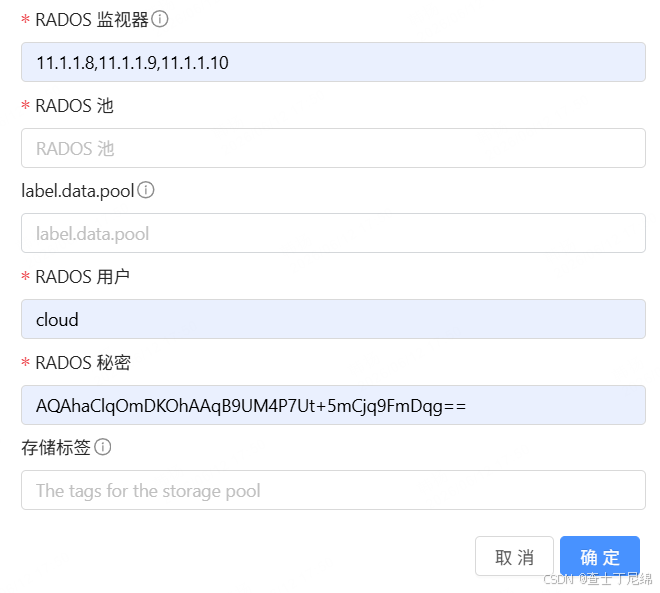
ceph auth get-key client.cloud
# AQAhaClqOmDKOhAAqB9UM4P7Ut+5mCjq9FmDqg==
  • kvm侧
bash 复制代码
# dnf install -y ceph-common
scp /etc/ceph/ceph.conf root@compute1:/etc/ceph/
scp /etc/ceph/ceph.client.cloud.keyring root@compute1:/etc/ceph/

# 验证
rbd --id cloud --pool volumes ls

primary storage

rgw配置

bash 复制代码
# 部署rgw服务
ceph orch apply rgw default --placement="cs1,cs2,cs3"

# 查看rgw服务状态
ceph orch ps --daemon-type rgw
# 查看rgw服务详情
ceph orch ls rgw
# 查看所有存储池(会自动创建所需池)
ceph osd pool ls

# 创建rgw用户
radosgw-admin user create \
  --uid=cloud2 \
  --display-name="CloudStack Secondary Storage"

# 记录输出的access_key和secret_key
{
    "user_id": "cloud2",
    "display_name": "CloudStack Secondary Storage",
    "email": "",
    "suspended": 0,
    "max_buckets": 1000,
    "subusers": [],
    "keys": [
        {
            "user": "cloud2",
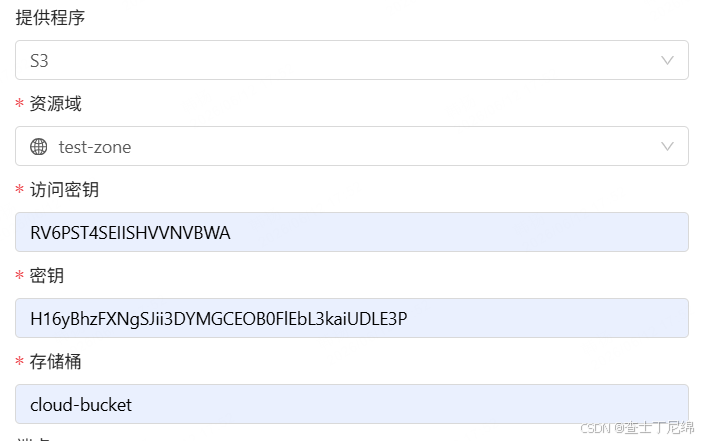
            "access_key": "RV6PST4SEIISHVVNVBWA",
            "secret_key": "H16yBhzFXNgSJii3DYMGCEOB0FlEbL3kaiUDLE3P"
        }
    ],
    "swift_keys": [],
    "caps": [],
    "op_mask": "read, write, delete",
    "default_placement": "",
    "default_storage_class": "",
    "placement_tags": [],
    "bucket_quota": {
        "enabled": false,
        "check_on_raw": false,
        "max_size": -1,
        "max_size_kb": 0,
        "max_objects": -1
    },
    "user_quota": {
        "enabled": false,
        "check_on_raw": false,
        "max_size": -1,
        "max_size_kb": 0,
        "max_objects": -1
    },
    "temp_url_keys": [],
    "type": "rgw",
    "mfa_ids": []
}

# 查看 
radosgw-admin user info --uid=cloud2

# 简单测试 curl http://cs1:7480

# 查看桶列表
radosgw-admin bucket list --uid=cloud2

# 查看桶详细信息 radosgw-admin bucket stats --bucket=cloud-bucket

secondary storage

计算节点

bash 复制代码
dnf install --downloadonly --downloaddir=/root/cs-com qemu-kvm libvirt virt-install bridge-utils cloudstack-agent

# 创建网桥
nmcli connection add type bridge ifname cloudbr0
# nmcli connection add type bridge ifname cloudbr1

# 网卡绑定网桥
nmcli connection add type bridge-slave ifname eth0 master cloudbr0

# 启动网桥
nmcli connection up bridge-cloudbr0
bash 复制代码
# agent配置
vim /etc/cloudstack/agent/agent.properties

# uuidgen
uuid = dc287213-0d0e-4b1c-b268-0745fa636c33
host=11.1.1.8,11.1.1.9,11.1.1.10@roundrobin
port=8250

local.ip.address=11.1.1.11

# management流量
private.network.device=cloudbr0
# guest流量
guest.network.device=cloudbr0
# storage流量
storage.network.device=cloudbr0

# public流量
# public.network.device=cloudbr0
bash 复制代码
# 允许与management通信
vim /etc/libvirt/libvirtd.conf

listen_tls = 0
listen_tcp = 1
tcp_port = "16509"
auth_tcp = "none"
mdns_adv = 0

cat <<EOF > /etc/sysconfig/libvirtd
LIBVIRTD_ARGS="--listen"
EOF

# 启动
systemctl enable --now libvirtd
# libvirtd --listen
systemctl enable --now cloudstack-agent

计算网络

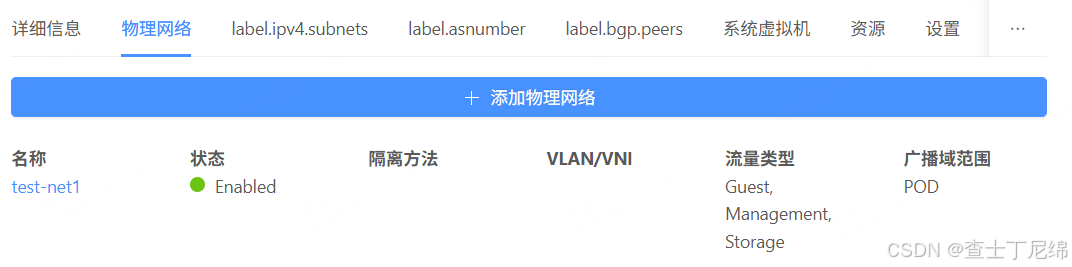
物理网络

虚拟网络(举例)

主机(计算节点)

相关推荐
2301_773643623 天前
ceph镜像
前端·javascript·ceph
2301_773643624 天前
ceph池
开发语言·ceph·python
2301_773643624 天前
ceph实践
ceph
2301_773643627 天前
ceph分布式存储
分布式·ceph
m0_736034859 天前
ceph分布式存储
分布式·ceph
三十..9 天前
Ceph 三大存储接口深度实践与数据保护指南
运维·ceph
AOwhisky10 天前
Ceph系列第六期:Ceph 文件系统(CephFS)精讲
linux·运维·网络·笔记·ceph
潮起鲸落入海10 天前
Ceph 分布式存储 对象存储管理
ceph