所有命令都依赖现有搭建好的环境python+编译工具
新建项目
idf.py create-project atk_test设置目标芯片
idf.py set-target esp32s3直接设置会报错,我们的进入这个项目目录进行执行atk_test
报错内容为:
Executing action: set-target
Set Target to: esp32s3, new sdkconfig will be created.
CMakeLists.txt not found in project directory
建立工程
idf.py build程序烧录
idf.py flash或者
idf.py -p PORT flash查看设备端口
ls /dev/ttyUSB* /dev/ttyACM*进行烧录
idf.py -p /dev/ttyACM0 flash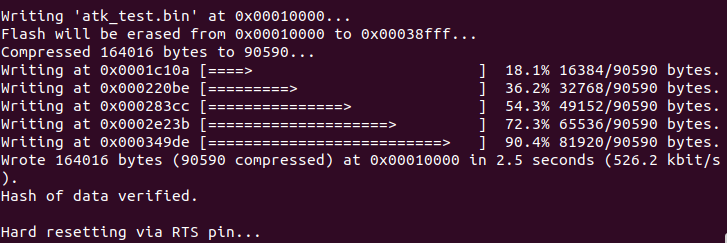
新建组件
idf.py create-component LED打开监视器
idf.py monitor在主程序写入打印程序
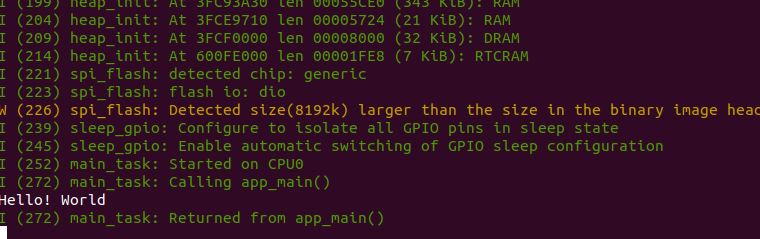
按住"Ctrl+]"退出监视器
配置菜单
idf.py menuconfig清除编译文件
idf.py fullclean;idf.py clean.vscode配置文件
html
{
    "idf.espIdfPath": "/home/wisdom/.espressif/v6.0.1/esp-idf",
    "idf.toolsPath": "/home/wisdom/.espressif/tools",
    "idf.pythonBinPath": "/home/wisdom/.espressif/tools/python/v6.0.1/venv/bin/python",
    "idf.cmakePath": "/home/wisdom/.espressif/tools/cmake/4.0.3/bin/cmake",
    "idf.ninjaPath": "/home/wisdom/.espressif/tools/ninja/1.12.1/ninja",
    "idf.port": "/dev/ttyACM0",
    "idf.eimIdfJson": "/home/wisdom/.espressif/tools/eim_idf.json",
    "idf.selectedIdfId": "esp-idf-9dfb55fda77b46ed99a714b551618789",
    "idf.currentSetup": "/home/wisdom/.espressif/v6.0.1/esp-idf"
}