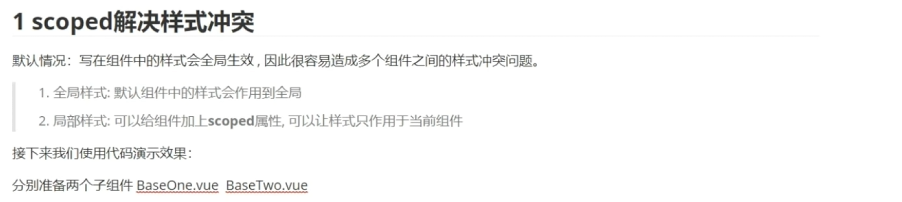
<template>
  <div>BaseOne</div>
</template>

<script>
export default {

}
</script>

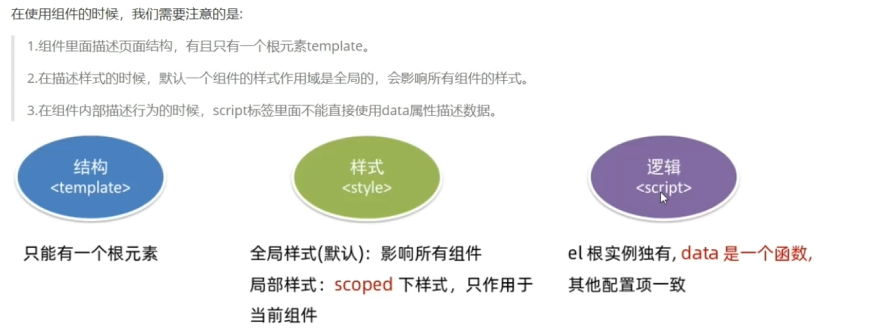
<style scoped>
/**
为什么加上scoped就不会有样式冲突
那么浏览器在解析时回给当前组件设置一个data-v-hash的值,
在css选择器后面也会自动拼接一个叫data-v-hash的属性值
用于区分不同组件的样式
*/
div{
    border:3px solid red;
}
</style>

<template>
  <div class="base-two">BaseTwo</div>
</template>

<script>
export default {

}
</script>

<style scoped>
div{
    border:3px solid skyblue;
}
</style>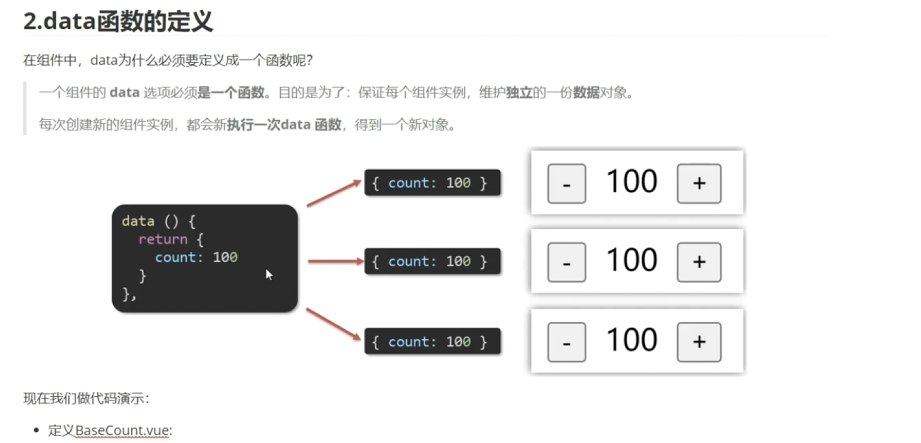
<template>
  <div class="base-count">
    <button @click="count--">-</button>
    <span>{{count}}</span>
    <button @click="count++">+</button>
  </div>
</template>

<script>
export default {
    data(){
        return{
            count:100
        }
    }
    //以下这种声明方法是不被允许的,保证了每个组件的属性是相互独立的
    // data:{
    //     count:100,
    // }
}
</script>

<style>
.base-count{
    margin: 20px;
}
</style>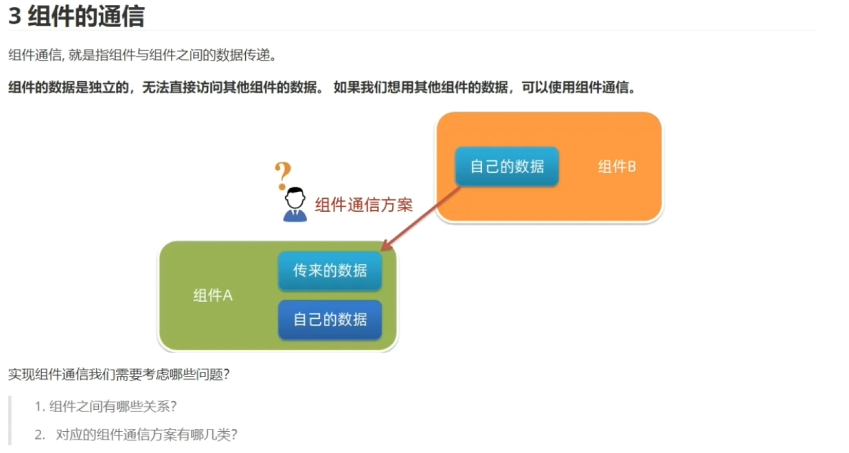

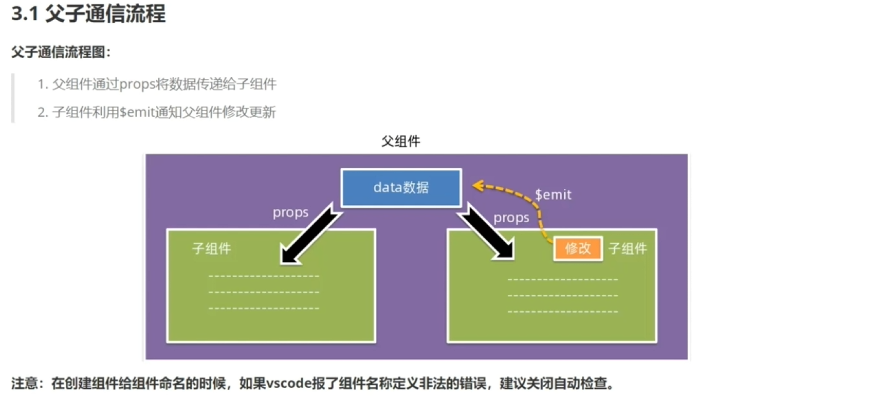
<template>
  <div id="app" style="magin:20px;border:2px brown solid">
    我是一个父组件
    <!--
    父子传值第二步:
    通过在子组件的标签里面通过title属性引入data函数里的数据
    title属性不能写死 :title
    -->
    <!--
    子父传值第三步:
    定义一个事件,监听子组件修改数据的事件
    这个事件的名称必须和$emit里面定义的一样
    -->
    <MySon :title="msg" @changeData="handleValue"></MySon>
  </div>

</template>

<script>
import MySon from "./components/MySon.vue";
export default {
  name:"app",
  components:{
  MySon
  },
  methods:{
    handleValue(newValue){
      //子父传值第四步:
      //接收子组件传递的数据
      console.log(newValue);
      this.msg = newValue;
    }
  },
  data(){
    return{
      //父子传值的第一步:定义数据
      msg:"parent",
    }
  }
}
</script>

<style>

</style>

<template>
  <div class="my-son">
    我是一个子组件{{ title }}
    <!--
    父子传值第四步:通过插值表达式接收传递过来的值
     -->
     <!--
     子父传值第一步:
     定义一个单击事件触发数据的修改
     -->
     <button @click="changetitle()">修改数据</button>
    </div>
</template>

<script>
export default {
  /**
   * 父子传值第三步:
   * 使用props属性接收父组件传递过来的值
   */
  props:['title'],
  methods:{
    // 子父传值第二步:
    // 使用$emit函数将子组件里面的值传递给父组件
    //参数1:子传父的事件名称 参数2:子传父的数据
    changetitle(){
      this.$emit('changeData',"hello,vue");
    }
  }
}
</script>

<style>
.my-son{
    border:3px solid #000;
    margin: 10px;
}
</style>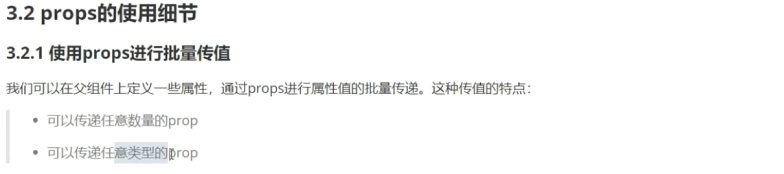
<template>
  <div id="app" style="magin:20px;border:2px brown solid">
    <UserInfo :username="username" :age="age" :isSingle="isSingle" :car="car" :hobby="hobby"></UserInfo>
  </div>

</template>

<script>
import UserInfo from "./components/UserInfo.vue";
export default {
  name:"app",
  components:{
  UserInfo
  },
  methods:{
  },
  data(){
    return{
      username:"eric",
      age:23,
      isSingle:true,
      car:{
        brand:"奔驰",
      },
      hobby:["足球","蓝球","游泳"],
      }
  }
}
</script>

<style>

</style>

<template>
  <div class="userinfo">
    <h3>我是个人信息组件</h3>
    <div>姓名:{{username}}</div>
    <div>年龄:{{age}}</div>
    <div>是否单身:{{isSingle}}</div>
    <div>汽车:{{car.brand}}</div>
    <div>兴趣爱好:{{hobby}}</div>
  </div>
</template>

<script>
export default {
    props:['username','age','isSingle','car','hobby']
}
</script>

<style>
.userinfo{
    border:3px solid #000;
    padding: 20px;
    width:300px;

}
</style>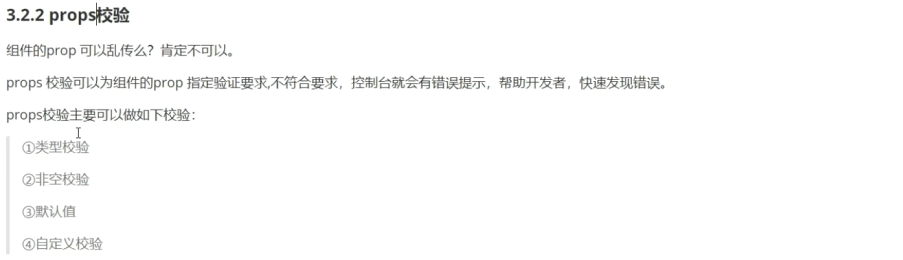
<template>
  <div class="base-progress">
    <div class="inner" :style="{ width: w + '%' }"></div>
    <span>{{ w }}%</span>
  </div>
</template>

<script>
export default {
//      props:['w'],
//      props数据校验写法 --简单写法:(校验数据类型)
//      props:{
//         w: Number,
//      }

//      props数据校验的完整写法:
        props:{
            w:{
                type:Number,//校验数据类型
                required:false,//是否必须传值
                default:0,//如果没有传值,就用这个值替代
                validator(val){//自定义数据校验逻辑
                    console.log(val);
                    if(val > 100 || val < 0){
                        console.error("传递的数字必须在0~100");
                        return false;
                    }else{
                        return true;
                    }
                }

            }
        }
}
</script>

<style scoped>
.base-progress {
  height: 26px;
  width: 400px;
  border-radius: 15px;
  background-color: #272425;
  border: 3px solid #272425;
  box-sizing: border-box;
  margin-bottom: 30px;
}

.inner {
  position: relative;
  background: #379bff;
  border-radius: 15px;
  height: 25px;
  box-sizing: border-box;
}
</style>

<template>
  <BaseProgress :w="width"></BaseProgress>
</template>

<script>
import BaseProgress from './components/BaseProgress.vue'
export default {
  components:{
    BaseProgress,
    },
  data(){
    return{
      width:30,
    }
  }
}
</script>

<style>

</style>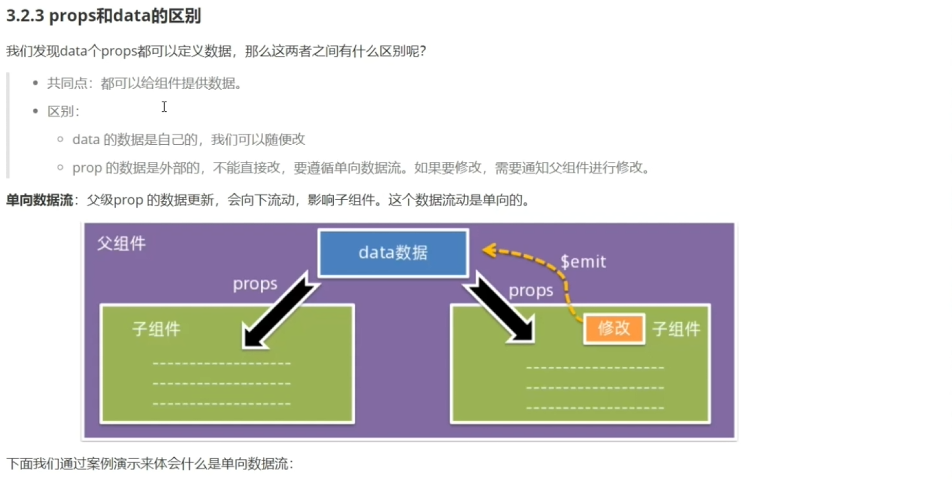
<template>
  <div class="app">
    <BaseCount :count="count" @changeCount="handleValue"></BaseCount>
  </div>
</template>

<script>
import BaseCount from "./components/BaseCount.vue"
export default {
  components:{
    BaseCount,
  },
  methods:{
    handleValue(newValue){
      console.log(newValue);
      this.count = newValue;
    }
  },
  data(){
    return{
      count:1000,
    }
  }
}
</script>

<style>

</style>

<template>
  <div class="base-count">
    <!-- <button @click="count--">-</button> -->
    <button @click="handleSub">-</button>
    <span>{{count}}</span>
    <!-- <button @click="count++">+</button> -->
    <button @click="handleAdd">+</button>
  </div>
</template>

<script>
// 在子组件里面不能直接修改父组件的值
// 如果需要修改,可以通过$emit函数停通知父组件进行修改
export default {
    // data(){
    //     return{
    //         count:100
    //     }
    // }
    //以下这种声明方法是不被允许的
    // data:{
    //     count:100,
    // }
    methods:{
        handleSub(){
            this.$emit('changeCount',this.count - 1);
        },
        handleAdd(){
            this.$emit('changeCount',this.count + 1);
        },
    },
     props:{
        count:{
            required:false,
        }
    }
}
</script>

<style>
.base-count{
    margin: 20px;
}
</style>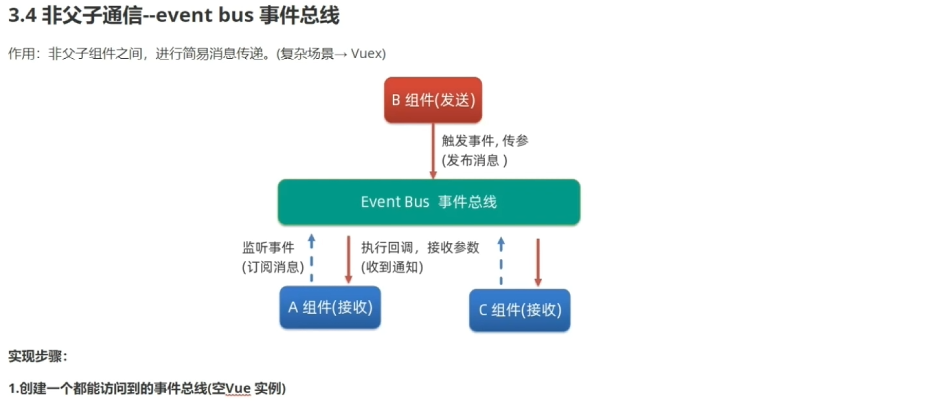
import Vue from 'vue';
const bus = new Vue();// 创建应该空的实例对象,
export default bus//将这个对象对外暴露即可

<template>
  <div class="base-b">
  <div>我是B组件(发送方)</div>
  <button @click="sendMsg">发送信息</button>
  </div>
</template>

<script>
import Bus from '../utils/EventBus';
export default {
    methods:{
        sendMsg(){
            Bus.$emit('sendMsg','今天是个好天气');
        }
    }
}
</script>

<style>
.base-b{
    width: 200px;
    height: 200px;
    border: 3px solid skyblue;
    margin: 10px;
}
</style>

<template>
  <div class="base-a">我是A组件(接收方)
    <p>{{msg}}</p>
    </div>
</template>

<script>
import Bus from '../utils/EventBus'
export default {
    data(){
        return{
            msg:'0'
        }
    },
    //订阅消息
    created(){
        Bus.$on('sendMsg',(msg) => {
            this.msg = msg;
        })
    }
}
</script>

<style>
.base-a{
    width: 200px;
    height: 200px;
    border: 3px solid #000;
    margin: 10px;
}
</style>

<template>
  <div class="base-c">我是C组件(接收方)
    <p>{{msg}}</p>
    </div>
</template>

<script>
import Bus from '../utils/EventBus'
export default {
    data(){
        return{
            msg:'0'
        }
    },
    //订阅消息
    created(){
        Bus.$on('sendMsg',(msg) => {
            this.msg = msg;
        })
    }
}
</script>

<style>
.base-c{
    width: 200px;
    height: 200px;
    border: 3px solid #000;
    margin: 10px;
}
</style>
实现一对多发送
<template>
  <div class="grand-son">
    我是GrandSon
    {{color}} {{userInfo.name}} {{userInfo.age}}
  </div>
</template>

<script>
export default {
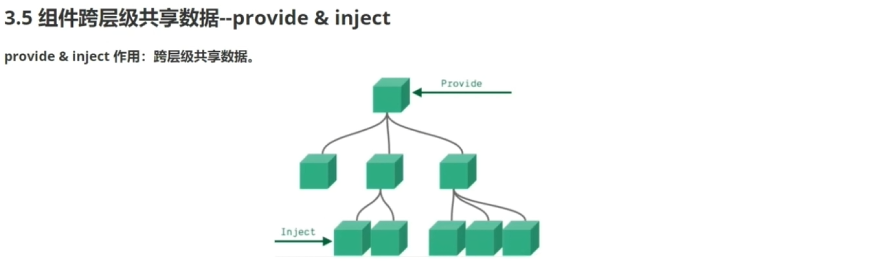
    inject:['color','userInfo'],
    created(){
        console.log(this.color,this.userInfo.name);
    }
}
</script>

<style>
.grand-son{
    border: 3px solid #000;
    border-radius: 6px;
    margin: 10px;
    height: 100px;
}
</style>

<template>
  <div class="son-a">
    我是SonA组件
    <GrandSon></GrandSon>
  </div>
</template>

<script>
import GrandSon from '../components/GrandSon.vue';

export default {
    components:{
    GrandSon,
    }
}
</script>

<style>
.son-a{
    border:2px solid #000;
    border-radius: 6px;
    height: 200px;
    margin: 10px;
}
</style>

<template>
  <div class="app">
    我是Vue组件 <button @click="change">修改数据</button>
    <SonA></SonA>
  </div>
</template>

<script>
import SonA from "./components/SonA.vue"
export default {
  components:{
    SonA,
  },
  provide(){
    return{
      color:this.color,//简单的数据类型,非响应式的
      //就是说如果父组件修改数据的话,子组件是感知不到的
      userInfo:this.userInfo,//复杂的,是响应式的
      //相反会立刻改变
    }
  },
  methods:{
    change(){
      this.color='red',
      this.userInfo.name='lava'
    }
  },
  data(){
    return{
      color:'skyblue',
      userInfo:{
        name:'eric',
        age:18,

      }
    }
  }

}
</script>

<style>
.app{
    border:2px solid #000;
    border-radius: 6px;
    height: 400px;
    margin: 10px;
}
</style>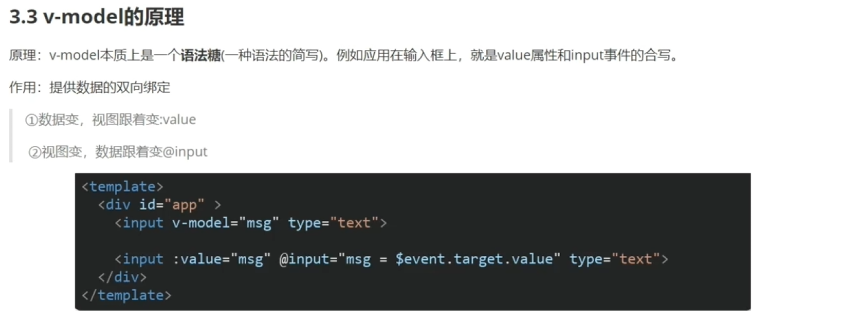
<template>
  <div>
    输入框1:<input type="text" v-model="msg1">
    <!--
    <如果我们想要在模板里面获取事件对象,必须使用$event才可以
    -->
    输入框2:<input type="text" :value="msg2" @input="msg2 = $event.target.value">
  </div>
</template>

<script>
export default {
  data(){
    return{
      msg1:"你好",
      msg2:"哈哈",

    }
  }
}
</script>

<style>

</style>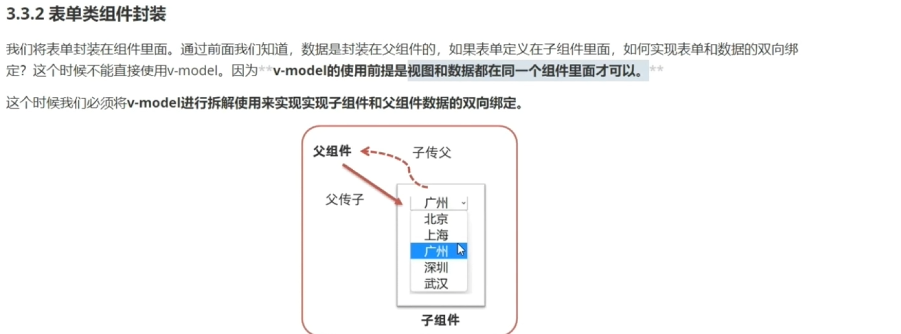
<template>
  <div>
    <select :value="value" @change="selectCity">
        <option value="北京">北京</option>
        <option value="上海">上海</option>
        <option value="武汉">武汉</option>
        <option value="广州">广州</option>
        <option value="深圳">深圳</option>
    </select>
  </div>
</template>

<script>
export default {
    props:{
        value:{
            String,

        }
    },
    methods:{
        selectCity(e){
            const val = e.target.value;
            this.$emit("changeVal",val)
        }
    }
}
</script>

<style>

</style>

<template>
  <div>
    <BaseSelect :value="selectid" @changeVal = "selectid = $event"></BaseSelect>
  </div>
</template>

<script>
import BaseSelect from './components/BaseSelect.vue'
export default {
  components:{
    BaseSelect
  },
  data(){
    return{
      selectid:"上海",
    }
  }
}
</script>

<style>

</style>
<template>
  <div>
    <!-- <BaseSelect :value="selectid" @changeVal = "selectid = $event"></BaseSelect> -->
    <!-- v-model等价于:value="" + @input -->
    <BaseSelect v-model="selectid" ></BaseSelect>
  </div>
</template>

<script>
import BaseSelect from './components/BaseSelect.vue'
export default {
  components:{
    BaseSelect
  },
  data(){
    return{
      selectid:"上海",
    }
  }
}
</script>

<style>

</style>

<template>
  <div>
    <select :value="value" @change="selectCity">
        <option value="北京">北京</option>
        <option value="上海">上海</option>
        <option value="武汉">武汉</option>
        <option value="广州">广州</option>
        <option value="深圳">深圳</option>
    </select>
  </div>
</template>

<script>
export default {
    props:{
        value:{
            String,

        }
    },
    methods:{
        selectCity(e){
            const val = e.target.value;
            this.$emit("input",val)//注意这里要改成input事件
        }
    }
}
</script>

<style>

</style>
传统写法
<template>
  <div class="base-dialog-wrap" v-show="isShow">
    <div class="base-dialog">
      <div class="title">
        <h3>温馨提示:</h3>
        <button class="close" @click="closeDialog">x</button>
      </div>
      <div class="content">
        <p>你确认要退出本系统么?</p>
      </div>
      <div class="footer">
        <button>确认</button>
        <button>取消</button>
      </div>
    </div>
  </div>
</template>

<script>
export default {
    props:{
        isShow:{
            type:Boolean,

        }
    },
    methods:{
        closeDialog(){
            this.$emit('updateAppeal',false)
        }
    }
}
</script>

<style scoped>
.base-dialog-wrap {
  width: 300px;
  height: 200px;
  box-shadow: 2px 2px 2px 2px #ccc;
  position: fixed;
  left: 50%;
}
</style>

<template>
  <div>
  <button @click="openDialog">退出按钮</button>
  <BaseDialog  :isShow="isShow" @updateAppeal="isShow=$event"></BaseDialog>
  </div>
</template>

<script>
import BaseDialog from './components/BaseDialog.vue'
export default {
  components:{
    BaseDialog
  },
  data(){
    return{
      isShow:false,

    }
  },
  methods:{
    openDialog(){
      this.isShow = true;
    }
  }
}
</script>

<style>

</style>
使用sync
<template>
  <div class="base-dialog-wrap" v-show="isShow">
    <div class="base-dialog">
      <div class="title">
        <h3>温馨提示:</h3>
        <button class="close" @click="closeDialog">x</button>
      </div>
      <div class="content">
        <p>你确认要退出本系统么?</p>
      </div>
      <div class="footer">
        <button>确认</button>
        <button>取消</button>
      </div>
    </div>
  </div>
</template>

<script>
export default {
    props:{
        isShow:{
            type:Boolean,

        }
    },
    methods:{
        closeDialog(){
            this.$emit('update:isShow',false);
        }
    }
}
</script>

<style scoped>
.base-dialog-wrap {
  width: 300px;
  height: 200px;
  box-shadow: 2px 2px 2px 2px #ccc;
  position: fixed;
  left: 50%;
}
</style>

<template>
  <div
  <button @click="openDialog">退出按钮</button>
  <!--
  :isShow.sync => :isShow = "isShow" @update:isShow="isShow=$event"
   -->
  <BaseDialog  :isShow.sync="isShow"></BaseDialog>
  </div>
</template>

<script>
import BaseDialog from './components/BaseDialog.vue'
export default {
  components:{
    BaseDialog
  },
  data(){
    return{
      isShow:false,
    }
  },
  methods:{
    openDialog(){
      this.isShow = true;
    }
  }
}
</script>

<style>

</style>
<template>
  <div class="base-chart-box" ref="baseChartBox">子组件</div>
</template>

<script>
import * as echarts from 'echarts'

export default {
  mounted() {
    // 基于准备好的dom,初始化echarts实例
    // document.querySelector 会查找项目中所有的元素
    // $refs只会在当前组件查找盒子
    // var myChart = echarts.init(document.querySelector('.base-chart-box'))
    var myChart = echarts.init(this.$refs.baseChartBox)
    // 绘制图表
    myChart.setOption({
      title: {
        text: 'ECharts 入门示例',
      },
      tooltip: {},
      xAxis: {
        data: ['衬衫', '羊毛衫', '雪纺衫', '裤子', '高跟鞋', '袜子'],
      },
      yAxis: {},
      series: [
        {
          name: '销量',
          type: 'bar',
          data: [5, 20, 36, 10, 10, 20],
        },
      ],
    })
  },
}
</script>

<style scoped>
.base-chart-box {
  width: 400px;
  height: 300px;
  border: 3px solid #000;
  border-radius: 6px;
}
</style>

<template>
  <div class="app">
    <div>我是父组件的一个div盒子</div>
    <BaseChart ></BaseChart>
  </div>
</template>

<script>
import BaseChart from './components/BaseChart.vue'
export default {
  components:{
    BaseChart
  },
  data(){
  },
  methods:{
  }
}
</script>

<style>
.app {
  width: 300px;
  height: 200px;
}
</style>
<template>
  <div class="app">
    <div>
      账号: <input v-model="username" type="text">
    </div>
    <div>
      密码: <input v-model="password" type="text">
    </div>
  </div>
</template>

<script>
export default {
  data() {
    return {
      username: 'admin',
      password: '123456',
    }
  },
  methods: {
    // 获取表单数据
    getFromData() {
      console.log('获取表单数据', this.username, this.password);
    },
    // 重置表单数据
    resetFromData() {
      this.username = ''
      this.password = ''
      console.log('重置表单数据成功', this.username, this.password);
    }
  }
}
</script>

<template>
  <div>
    <div>我是父组件的一个div盒子</div>
    <BaseForm ref="baseForm" ></BaseForm>
    <button @click="handleGet">获取表单数据</button>
    <button @click="handleReset">重置表单数据</button>
  </div>
</template>

<script>
import BaseForm from './components/BaseForm.vue'
export default {
  components:{
    BaseForm
  },
  data(){
    return{

    }
  },
  methods:{
    handleReset(){
      this.$refs.baseForm.resetFromData();
    },
    handleGet(){
      // 获取子组件的实例对象
      this.$refs.baseForm.getFromData();
    }
  }
}
</script>

<style>
</style>
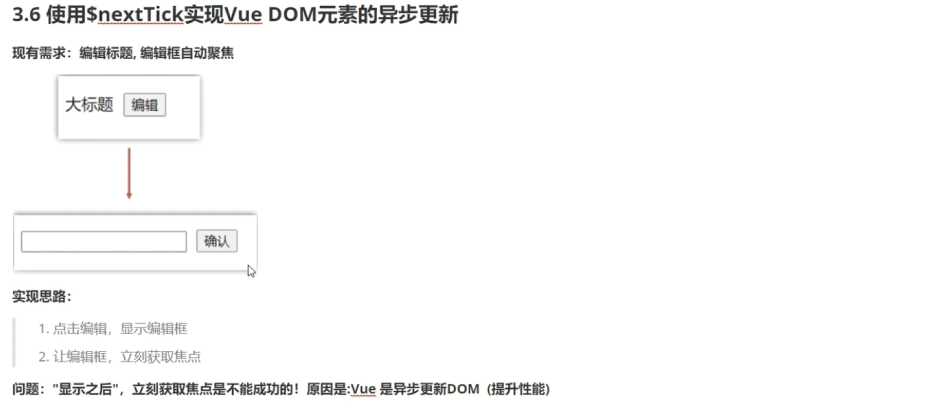
<template>
  <div class="app">
    <div v-if="isShowEdit">
    <input ref="inp" type="text" v-model="editValue">
    <button>确认</button>
    </div>
    <div>
      <span>{{title}}</span>
      <button @click="handleEdit">编辑</button>
    </div>
  </div>
</template>

<script>
export default {
  data(){
    return{
      title:"大标题",
      isShowEdit:false,
      editValue:"",
    }
  },
  methods:{
    handleEdit(){
      this.isShowEdit = true;//显示输入框
      //console.log(this.$refs.inp);
      //在vue中对dom的更新渲染是异步的,当前面直接修改dom的数据时
      //还没有重新渲染完成,如果再对当前dom进行其他操作是不生效的
      //如果我们要做后续操作,必须等待当前修改的dom重新渲染成功
      //vue提供了一个$nextTick函数,就可以监听到dom的重新渲染
      this.$nextTick(()=>{
      this.$refs.inp.focus();//自动获取焦点
      })
    }
  }
}
</script>

<style>
.app{
  text-align: center;
}
</style>