网格打对勾 编辑网格 设置父级
新建(网格) 创建(网格) 点击编辑网格(退出0) 点击权重 点击绑定
视图幻影打开 关键帧 前后打开 前帧数设置为30 后帧数设置为30
选择两个腿骨 转到层级下 点击新建 ik 约束
skina1
导入后在视图中打开皮肤面板才可以看到皮肤
SPINE 下产生动画的常用技术办法
1 SPINE 下所有可以被打关键帧的参数都可以生成动画。
2 通过骨骼产生动画 案例 小机器人
3 通过序列帧产生动画 案例 火影忍者
4 通过网格变形产生动画 案例 钻石(立体感的形成)
5 通过骨骼权重控制产生动画 案例 蛇(立体感的形成)高级搜索 后台登陆 仅网页标题中 title:(后台管理)
android 就是一个老奶奶 打包太慢了
godot 打包为android端无法播放视频 播放spine动画需要依赖
unity收费
ue学习曲线太陡峭了
cocos没有联机教程 到底怎么办啊请使用cocos 写 控制spine游戏人物左右行走 我的cocos版本是3.8.8
人脸默认朝向右侧的
按左键人物脸要朝向左测
按右键人物脸要朝向右测
按上 或者下 朝向上一次的脸部朝向
左上 左下 右上 右下 都是朝向上一次的脸部朝向
动画名称 为 idle / walk / jump
摄像机跟随功能 人物原地走
支持上适配手机 手指滑动控制游戏人物行走朝向
你现在的需求:人物原地踏步、镜头滑动、可走遍整张城市地图( 元宇宙同款)
正确api是 input.on(Input.EventType.KEY_DOWN, this.onKeyDown, this);
cocos显示向王者荣耀一样的摄像机跟随 ,一个脚本解决
cocos 3.8.8控制游戏人物的移动 加上 摄像机跟随 一个脚本解决
正确api是 input.on(Input.EventType.KEY_DOWN, this.onKeyDown, this);
王者荣耀正确逻辑(本次重构目标)
手指滑动屏幕 / 摇杆输入 → 移动相机坐标(地图跟着相机动)
人物坐标永远固定在屏幕中心,视觉上人物原地不动、背景地图反向滚动;
相机自由在整张大图内移动,等同于人物 "走到地图任意位置",完全符合你的需求。
行为表现说明
手指向左滑 → 相机左移 → 地图视觉向右滚动;
手指向右滑 → 相机右移 → 地图视觉向左滚动;
小人永久固定屏幕中心,后续直接挂载 Spine 行走动画,原地播放动画,实现王者荣耀同款效果;
相机有地图边界限制,不会拖出地图出现黑边,相机可遍历整张地图任意坐标。cocos控制游戏人物的八移动 摄像机跟随 正确api是 input.on(Input.EventType.KEY_DOWN, this.onKeyDown, this);
cocos版本是 3.8.8
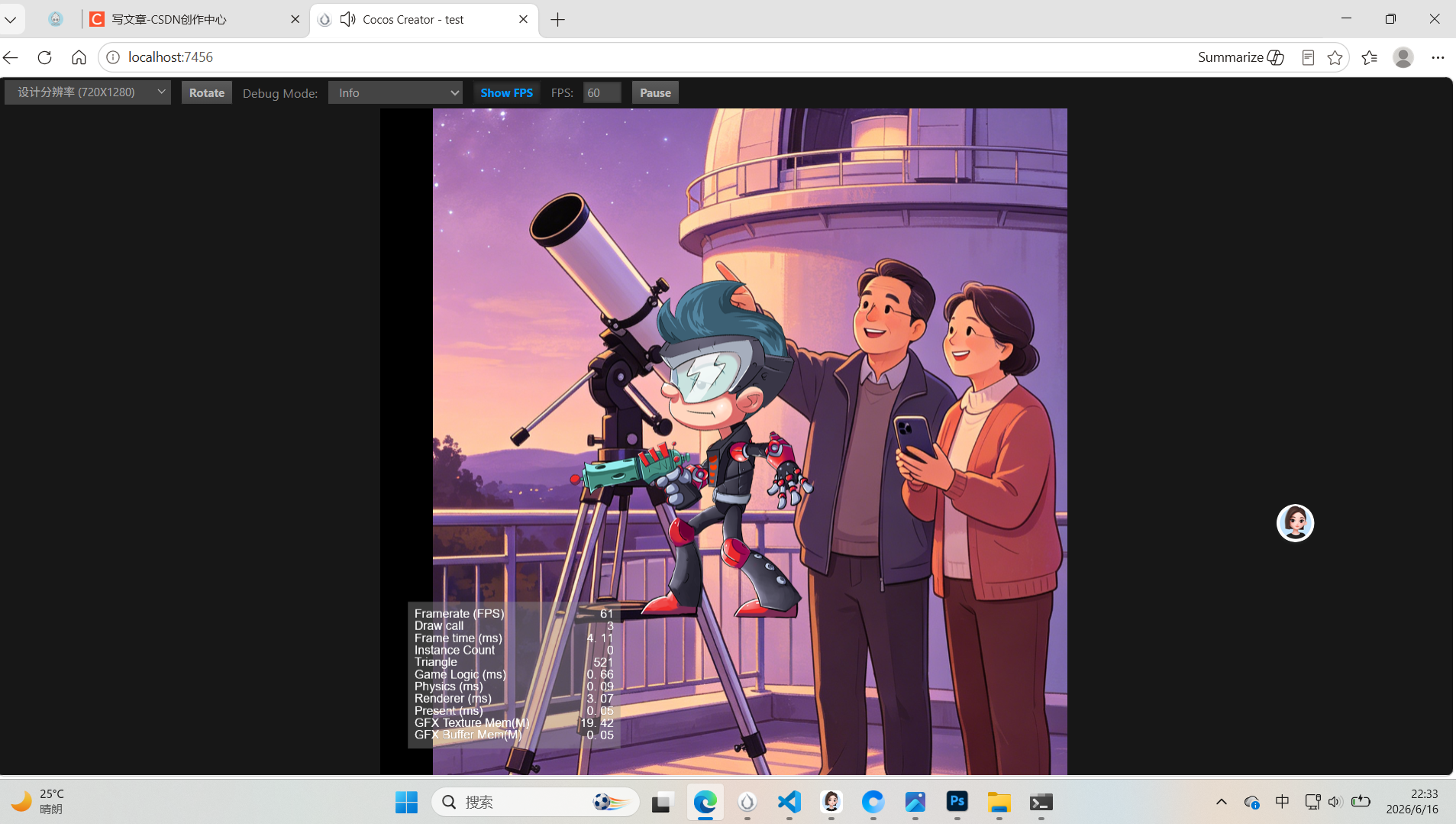
html
import { _decorator, Component, Node, Vec3, Vec2, input, Input, EventKeyboard, KeyCode, UITransform, EventTouch } from 'cc';
import { sp } from 'cc';
const { ccclass, property } = _decorator;

@ccclass('PlayerCameraController')
export class PlayerCameraController extends Component {
    // ===== 相机面板参数(完全保留你原版,可拖拽)=====
    @property(Node)
    cameraNode: Node | null = null;

    @property
    moveSpeed: number = 200;

    @property
    smoothTime: number = 0.15;

    @property(Vec3)
    cameraOffset: Vec3 = new Vec3(0, 0, 1000);

    // 背景地图宽高,填你back图片尺寸
    @property
    mapWidth: number = 1635;
    @property
    mapHeight: number = 2732;

    // ===== Spine动画、触摸、跳跃面板参数 =====
    @property(sp.Skeleton)
    spine: sp.Skeleton = null!;

    @property
    jumpPower = 320;

    @property
    touchSensitivity = 0.8;

    // 键盘状态缓存(原版)
    private keyState = { w: false, a: false, s: false, d: false };
    private moveDir: Vec3 = new Vec3();
    private tempPos: Vec3 = new Vec3();
    private halfViewW = 0;
    private halfViewH = 0;

    // 触摸相关
    private touchStartPos = new Vec2();
    private isTouching = false;
    private touchMoveDir = new Vec3(0, 0, 0);

    // 动画、朝向、跳跃状态
    private lastFaceDir = 1; // 1朝右 -1朝左
    private isMoving = false;
    private isJumping = false;
    private jumpCd = 0;

    start() {
        // 读取画布可视尺寸,用于相机边界(原版逻辑不变)
        const canvas = this.node.parent;
        const uiTrans = canvas.getComponent(UITransform);
        if (uiTrans) {
            this.halfViewW = uiTrans.contentSize.width / 2;
            this.halfViewH = uiTrans.contentSize.height / 2;
        }

        // Spine动画初始化
        this.spine.setAnimation(0, 'idle', true);
        this.node.setScale(1, 1, 1);
        this.spine._skeleton.scaleX = this.lastFaceDir;

        // 开局相机对齐人物本地坐标,不使用worldPosition(原版不变)
        if (!this.cameraNode) return;
        const playerLocal = this.node.position;
        // X Y双取反,匹配画面滚动方向
        this.tempPos.set(-playerLocal.x, -playerLocal.y, 0);
        Vec3.add(this.tempPos, this.tempPos, this.cameraOffset);
        this.cameraNode.setPosition(this.tempPos);
        console.log(`【初始化】人物本地坐标:${playerLocal.x.toFixed(2)},${playerLocal.y.toFixed(2)} | 相机初始坐标:${this.tempPos.x.toFixed(2)},${this.tempPos.y.toFixed(2)}`);
    }

    onEnable() {
        // 键盘监听(原版)
        input.on(Input.EventType.KEY_DOWN, this.onKeyDown, this);
        input.on(Input.EventType.KEY_UP, this.onKeyUp, this);
        // 新增触摸监听
        input.on(Input.EventType.TOUCH_START, this.onTouchStart, this);
        input.on(Input.EventType.TOUCH_MOVE, this.onTouchMove, this);
        input.on(Input.EventType.TOUCH_END, this.onTouchEnd, this);
        input.on(Input.EventType.TOUCH_CANCEL, this.onTouchEnd, this);
    }

    onDisable() {
        // 注销键盘(原版)
        input.off(Input.EventType.KEY_DOWN, this.onKeyDown, this);
        input.off(Input.EventType.KEY_UP, this.onKeyUp, this);
        // 注销触摸
        input.off(Input.EventType.TOUCH_START, this.onTouchStart, this);
        input.off(Input.EventType.TOUCH_MOVE, this.onTouchMove, this);
        input.off(Input.EventType.TOUCH_END, this.onTouchEnd, this);
        input.off(Input.EventType.TOUCH_CANCEL, this.onTouchEnd, this);
    }

    onKeyDown(event: EventKeyboard) {
        this.updateKeyState(event.keyCode, true);

        // 空格跳跃逻辑
        const key = event.keyCode;
        if (key === KeyCode.SPACE && this.jumpCd <= 0 && !this.isJumping) {
            this.isJumping = true;
            this.jumpCd = 0.6;
            this.spine.setAnimation(0, 'jump', false);
            setTimeout(() => {
                this.isJumping = false;
            }, 600);
        }
    }
    onKeyUp(event: EventKeyboard) {
        this.updateKeyState(event.keyCode, false);
    }

    private updateKeyState(keyCode: KeyCode, isPressed: boolean) {
        switch (keyCode) {
            case KeyCode.KEY_W: case KeyCode.ARROW_UP: this.keyState.w = isPressed; break;
            case KeyCode.KEY_A: case KeyCode.ARROW_LEFT: this.keyState.a = isPressed; break;
            case KeyCode.KEY_S: case KeyCode.ARROW_DOWN: this.keyState.s = isPressed; break;
            case KeyCode.KEY_D: case KeyCode.ARROW_RIGHT: this.keyState.d = isPressed; break;
        }
    }

    update(dt: number) {
        this.jumpCd -= dt;

        // 1. 合并键盘+触摸输入向量
        this.calcFinalMoveDir();

        // 2. 人物八方向移动(原版移动逻辑保留)
        const pos = this.node.position;
        const newPlayerX = pos.x + this.moveDir.x * this.moveSpeed * dt;
        const newPlayerY = pos.y + this.moveDir.y * this.moveSpeed * dt;
        this.node.setPosition(newPlayerX, newPlayerY, pos.z);

        // 3. 更新Spine朝向与动画
        this.updatePlayerAnim();

        // 4. 原版完整相机跟随+边界限制(完全不改动你原来的相机代码)
        if (!this.cameraNode) return;
        const playerLocal = this.node.position;
        // 相机目标:本地坐标取反
        this.tempPos.set(-playerLocal.x, -playerLocal.y, 0);
        Vec3.add(this.tempPos, this.tempPos, this.cameraOffset);

        // 平滑插值
        const camPos = this.cameraNode.position;
        const t = Math.min(1, dt / this.smoothTime);
        let targetCamX = camPos.x + (this.tempPos.x - camPos.x) * t;
        let targetCamY = camPos.y + (this.tempPos.y - camPos.y) * t;

        // 相机边界限制,防止跑出地图黑屏
        const minCamX = -this.mapWidth + this.halfViewW;
        const maxCamX = this.mapWidth - this.halfViewW;
        const minCamY = -this.mapHeight + this.halfViewH;
        const maxCamY = this.mapHeight - this.halfViewH;
        targetCamX = Math.max(minCamX, Math.min(maxCamX, targetCamX));
        targetCamY = Math.max(minCamY, Math.min(maxCamY, targetCamY));

        this.tempPos.set(targetCamX, targetCamY, this.cameraOffset.z);
        this.cameraNode.setPosition(this.tempPos);

        // 打印日志,调试坐标偏移(原版日志保留)
        console.log(`【帧更新】人物:${playerLocal.x.toFixed(1)},${playerLocal.y.toFixed(1)} | 相机:${targetCamX.toFixed(1)},${targetCamY.toFixed(1)}`);
    }

    // 合并键盘、触摸移动向量,键盘优先级更高
    private calcFinalMoveDir() {
        let x = 0, y = 0;
        // 键盘输入优先
        if (this.keyState.a) x -= 1;
        if (this.keyState.d) x += 1;
        if (this.keyState.s) y -= 1;
        if (this.keyState.w) y += 1;

        // 无键盘输入时使用触摸向量
        if (x === 0 && y === 0 && this.isTouching) {
            x = this.touchMoveDir.x;
            y = this.touchMoveDir.y;
        }

        this.moveDir.set(x, y, 0);
        if (this.moveDir.length() > 0) this.moveDir.normalize();
    }

    // 更新人物骨骼朝向 + idle/walk/jump动画切换
    private updatePlayerAnim() {
        // 仅左右输入修改脸部朝向,上下/斜向保留上次朝向
        if (this.moveDir.x !== 0) {
            this.lastFaceDir = this.moveDir.x > 0 ? 1 : -1;
        }
        this.spine._skeleton.scaleX = this.lastFaceDir;

        // 判断是否在移动
        const hasMove = Math.abs(this.moveDir.x) > 0 || Math.abs(this.moveDir.y) > 0;
        if (hasMove && !this.isMoving && !this.isJumping) {
            this.spine.setAnimation(0, 'walk', true);
            this.isMoving = true;
        } else if (!hasMove && this.isMoving && !this.isJumping) {
            this.spine.setAnimation(0, 'idle', true);
            this.isMoving = false;
        }
    }

    // ========== 手机触摸滑动控制 ==========
    private onTouchStart(event: EventTouch) {
        this.isTouching = true;
        this.touchStartPos.set(event.getLocation());
    }

    private onTouchMove(event: EventTouch) {
        if (!this.isTouching) return;
        const curPos = event.getLocation();
        const offsetX = (curPos.x - this.touchStartPos.x) * this.touchSensitivity;
        const offsetY = (curPos.y - this.touchStartPos.y) * this.touchSensitivity;

        // 滑动阈值过滤抖动
        this.touchMoveDir.x = offsetX > 10 ? 1 : offsetX < -10 ? -1 : 0;
        this.touchMoveDir.y = offsetY > 10 ? 1 : offsetY < -10 ? -1 : 0;
    }

    private onTouchEnd() {
        this.isTouching = false;
        this.touchMoveDir.set(0, 0, 0);
    }

    onDestroy() {
        // 全部输入监听释放
        input.off(Input.EventType.KEY_DOWN, this.onKeyDown, this);
        input.off(Input.EventType.KEY_UP, this.onKeyUp, this);
        input.off(Input.EventType.TOUCH_START, this.onTouchStart, this);
        input.off(Input.EventType.TOUCH_MOVE, this.onTouchMove, this);
        input.off(Input.EventType.TOUCH_END, this.onTouchEnd, this);
        input.off(Input.EventType.TOUCH_CANCEL, this.onTouchEnd, this);
    }
}


csdn 王家视频教程图书馆提供技术支持


Cocos Creator 3.8.8 2D 元宇宙大地图原地行走 + 边界限制相机跟随完整方案
一、方案概述
适用场景

元宇宙、城市大地图互动场景,核心需求:

人物视觉原地踏步行走,背景地图滚动,避免角色跑出屏幕;
支持 PC 键盘(WASD + 方向键 + 空格跳跃)、手机全屏触摸滑动双端操作;
人物脸部朝向规则:仅左右输入修改朝向,上下 / 斜向行走保留上次左右朝向;
Spine 三动画自动切换:idle静止 / walk行走 / jump跳跃,无动画卡顿;
相机自带地图边界限制,镜头不会拖出地图产生黑屏;
全部参数面板可视化拖拽调节,无需修改代码即可调整手感、镜头、地图尺寸。
核心技术原理(大厂标准实现)
反向相机偏移实现原地行走视觉
角色节点正常世界坐标移动,相机坐标取角色坐标反向偏移;角色向右走,相机同步向左移动,视觉呈现「人物原地踏步、地图向后滚动」,天然不会出现人物跑出屏幕问题。
屏幕可视尺寸动态计算边界
通过 Canvas 的UITransform实时获取屏幕宽高,结合整张地图像素尺寸计算相机最大移动范围,镜头触达地图边缘自动锁死,杜绝黑边。
双输入优先级隔离
键盘输入优先级高于触摸,同时支持八方向归一化移动,避免斜向移动速度过快。
骨骼内部翻转
仅修改 Spine 骨骼_skeleton.scaleX实现人物左右转向,不修改角色节点全局 Scale,避免坐标计算错乱。
二、场景层级规范(强制标准)
plaintext
Canvas
├ Main Camera(正交相机,独立顶层节点)
└ PlayerNode(角色根节点,挂载主控制脚本)
    └ Spine骨骼节点(人物动画资源)
关键编辑器配置
选中顶层Canvas节点 → Canvas 组件,取消勾选 Align Canvas With Screen;
该选项开启时引擎每帧强制重置相机坐标,相机跟随逻辑完全失效。
角色根节点PlayerNode缩放固定 Scale(1,1,1),禁止手动设置负缩放;
Camera 节点仅保留正交相机组件,不挂载任何跟随脚本。

注意 脚本 camera node 节点必须挂 背景图 才出摄像机跟随的效果
注意 脚本 camera node 节点必须挂 背景图 才出摄像机跟随的效果
注意 脚本 camera node 节点必须挂 背景图 才出摄像机跟随的效果
注意 脚本 camera node 节点必须挂 背景图 才出摄像机跟随的效果
注意 脚本 camera node 节点必须挂 背景图 才出摄像机跟随的效果
注意 脚本 camera node 节点必须挂 背景图 才出摄像机跟随的效果
注意 脚本 camera node 节点必须挂 背景图 才出摄像机跟随的效果
注意 脚本 camera node 节点必须挂 背景图 才出摄像机跟随的效果
注意 脚本 camera node 节点必须挂 背景图 才出摄像机跟随的效果
注意 脚本 camera node 节点必须挂 背景图 才出摄像机跟随的效果