保护伞主题系统扫描页面 html开源
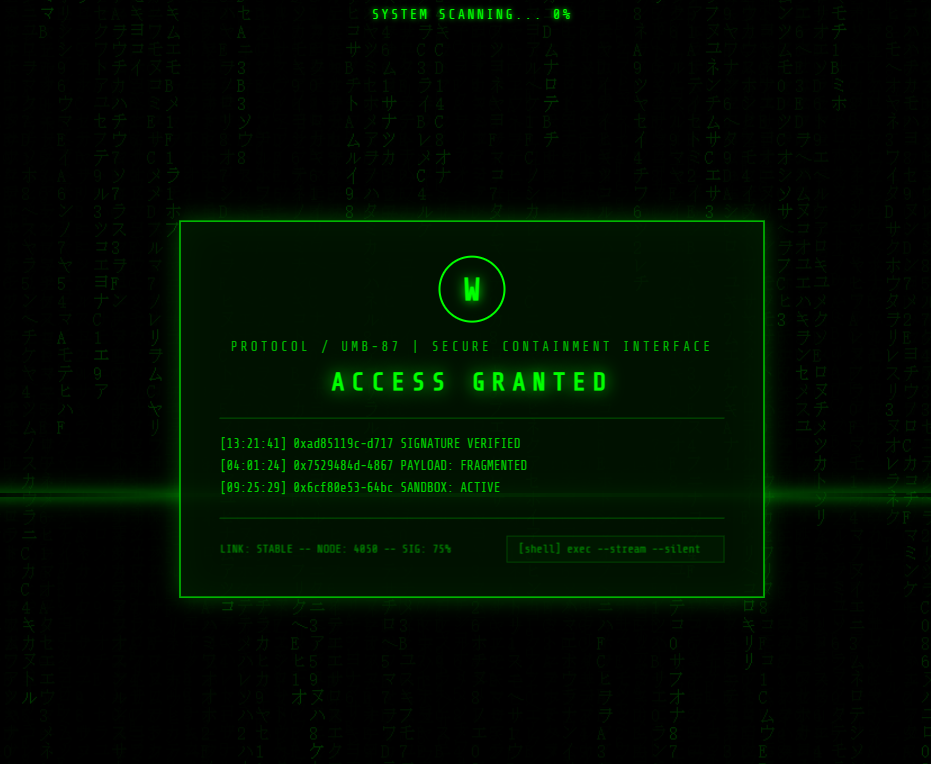
绿色初始阶段:
背景日文+数字代码流持续下落(Canvas 实现)
扫描线上下滚动
顶部显示
SYSTEM SCANNING... 0%,进度自动增长中央面板显示绿色
ACCESS GRANTED代码列表逐字符打字动画输入
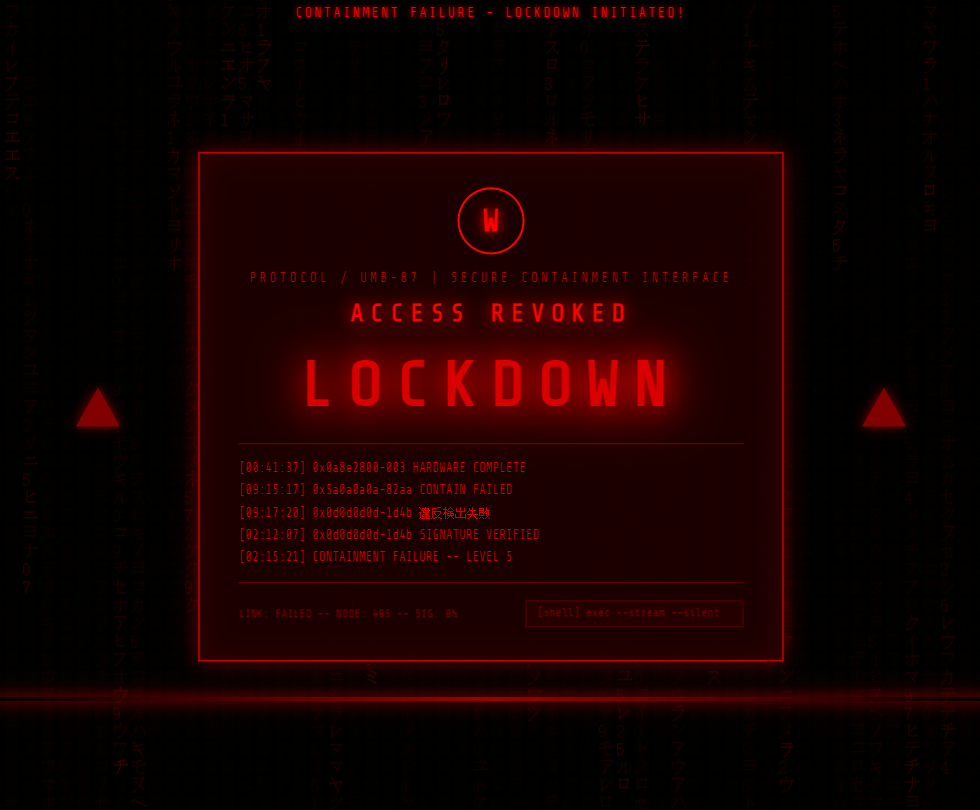
扫描完成 → 红色警报:
进度到 100% 后自动触发,所有元素瞬间变红
顶部变为
CONTAINMENT FAILURE - LOCKDOWN INITIATED!中央显示超大红色
LOCKDOWN闪烁文字左右两侧出现脉冲闪烁的警告三角
代码列表自动替换为警报内容
扫描线、面板边框、LOGO
、文字全部同步变红
html
<!DOCTYPE html>
<html lang="zh-CN">
<head>
    <meta charset="UTF-8">
    <meta name="viewport" content="width=device-width, initial-scale=1.0">
    <title>System Scanning...</title>
    <link href="https://fonts.googleapis.com/css2?family=Share+Tech+Mono&display=swap" rel="stylesheet">
    <style>
        * {
            margin: 0;
            padding: 0;
            box-sizing: border-box;
        }

        body {
            background: #000;
            color: #00ff00;
            font-family: 'Share Tech Mono', monospace;
            overflow: hidden;
            width: 100vw;
            height: 100vh;
            position: relative;
        }

        /* 背景代码流 */
        .matrix-bg {
            position: fixed;
            top: 0;
            left: 0;
            width: 100%;
            height: 100%;
            z-index: 1;
            pointer-events: none;
            opacity: 0.3;
        }

        /* 扫描线 */
        .scan-line {
            position: fixed;
            left: 0;
            width: 100%;
            height: 3px;
            background: linear-gradient(to right, transparent, #00ff00, transparent);
            box-shadow: 0 0 10px #00ff00, 0 0 20px #00ff00;
            z-index: 5;
            animation: scanMove 3s linear infinite;
            opacity: 0.6;
        }

        @keyframes scanMove {
            0% { top: 0; }
            100% { top: 100%; }
        }

        /* 中央面板 */
        .panel {
            position: fixed;
            top: 50%;
            left: 50%;
            transform: translate(-50%, -50%);
            width: 520px;
            border: 1px solid #00ff00;
            background: rgba(0, 20, 0, 0.85);
            padding: 30px 35px;
            z-index: 10;
            box-shadow:
                0 0 20px rgba(0, 255, 0, 0.3),
                inset 0 0 30px rgba(0, 255, 0, 0.05);
            transition: all 0.5s ease;
        }

        .panel::before {
            content: '';
            position: absolute;
            top: -1px; left: -1px; right: -1px; bottom: -1px;
            border: 1px solid #00ff00;
            opacity: 0.3;
            pointer-events: none;
        }

        /* LOGO */
        .logo {
            width: 60px;
            height: 60px;
            margin: 0 auto 15px;
            border: 2px solid #00ff00;
            border-radius: 50%;
            display: flex;
            align-items: center;
            justify-content: center;
            font-size: 28px;
            font-weight: bold;
            color: #00ff00;
            text-shadow: 0 0 10px #00ff00;
            transition: all 0.5s ease;
        }

        /* 协议信息 */
        .protocol {
            text-align: center;
            font-size: 11px;
            letter-spacing: 3px;
            color: #00ff00;
            opacity: 0.7;
            margin-bottom: 12px;
            transition: all 0.5s ease;
        }

        /* ACCESS 状态 */
        .access-status {
            text-align: center;
            font-size: 22px;
            font-weight: bold;
            letter-spacing: 6px;
            color: #00ff00;
            text-shadow: 0 0 15px #00ff00;
            margin-bottom: 20px;
            transition: all 0.5s ease;
        }

        /* LOCKDOWN 大字 */
        .lockdown-text {
            text-align: center;
            font-size: 56px;
            font-weight: bold;
            letter-spacing: 12px;
            color: #ff0000;
            text-shadow: 0 0 20px #ff0000, 0 0 40px #ff0000, 0 0 60px #ff0000;
            margin: 10px 0 20px;
            display: none;
            animation: lockdownPulse 0.8s ease-in-out infinite alternate;
        }

        @keyframes lockdownPulse {
            0% { opacity: 0.6; text-shadow: 0 0 20px #ff0000, 0 0 40px #ff0000; }
            100% { opacity: 1; text-shadow: 0 0 30px #ff0000, 0 0 60px #ff0000, 0 0 80px #ff0000; }
        }

        /* 代码列表区域 */
        .code-area {
            border-top: 1px solid rgba(0, 255, 0, 0.3);
            border-bottom: 1px solid rgba(0, 255, 0, 0.3);
            padding: 12px 0;
            margin-bottom: 15px;
            min-height: 90px;
            transition: all 0.5s ease;
        }

        .code-line {
            font-size: 11px;
            line-height: 1.8;
            color: #00ff00;
            opacity: 0.8;
            white-space: nowrap;
            overflow: hidden;
            transition: all 0.5s ease;
        }

        .code-line .timestamp {
            color: #00ff00;
            opacity: 0.5;
            margin-right: 8px;
        }

        /* 底部信息 */
        .bottom-info {
            display: flex;
            justify-content: space-between;
            align-items: center;
            font-size: 10px;
            color: #00ff00;
            opacity: 0.5;
            transition: all 0.5s ease;
        }

        .shell-input {
            border: 1px solid rgba(0, 255, 0, 0.4);
            padding: 4px 10px;
            font-size: 10px;
            color: #00ff00;
            background: rgba(0, 255, 0, 0.05);
            font-family: 'Share Tech Mono', monospace;
            transition: all 0.5s ease;
        }

        /* 顶部扫描信息 */
        .top-scan {
            position: fixed;
            top: 20px;
            left: 50%;
            transform: translateX(-50%);
            font-size: 12px;
            letter-spacing: 2px;
            color: #00ff00;
            text-shadow: 0 0 5px #00ff00;
            z-index: 10;
            transition: all 0.5s ease;
        }

        /* 警告三角 */
        .warning-triangle {
            position: fixed;
            top: 50%;
            transform: translateY(-50%);
            width: 0;
            height: 0;
            border-left: 20px solid transparent;
            border-right: 20px solid transparent;
            border-bottom: 35px solid #ff0000;
            z-index: 10;
            display: none;
            filter: drop-shadow(0 0 10px #ff0000);
            animation: trianglePulse 0.6s ease-in-out infinite alternate;
        }

        .warning-triangle.left {
            left: 80px;
        }

        .warning-triangle.right {
            right: 80px;
        }

        @keyframes trianglePulse {
            0% { opacity: 0.5; filter: drop-shadow(0 0 5px #ff0000); }
            100% { opacity: 1; filter: drop-shadow(0 0 20px #ff0000); }
        }

        /* 红色状态类 */
        body.red-mode {
            color: #ff0000;
        }

        body.red-mode .panel {
            border-color: #ff0000;
            background: rgba(30, 0, 0, 0.9);
            box-shadow:
                0 0 20px rgba(255, 0, 0, 0.4),
                inset 0 0 30px rgba(255, 0, 0, 0.1);
        }

        body.red-mode .panel::before {
            border-color: #ff0000;
        }

        body.red-mode .logo {
            border-color: #ff0000;
            color: #ff0000;
            text-shadow: 0 0 10px #ff0000;
        }

        body.red-mode .protocol {
            color: #ff0000;
        }

        body.red-mode .access-status {
            color: #ff0000;
            text-shadow: 0 0 15px #ff0000;
        }

        body.red-mode .code-area {
            border-color: rgba(255, 0, 0, 0.4);
        }

        body.red-mode .code-line {
            color: #ff0000;
        }

        body.red-mode .code-line .timestamp {
            color: #ff0000;
        }

        body.red-mode .bottom-info {
            color: #ff0000;
        }

        body.red-mode .shell-input {
            border-color: rgba(255, 0, 0, 0.5);
            color: #ff0000;
            background: rgba(255, 0, 0, 0.08);
        }

        body.red-mode .top-scan {
            color: #ff0000;
            text-shadow: 0 0 5px #ff0000;
        }

        body.red-mode .scan-line {
            background: linear-gradient(to right, transparent, #ff0000, transparent);
            box-shadow: 0 0 10px #ff0000, 0 0 20px #ff0000;
        }

        /* 闪烁效果 */
        @keyframes flicker {
            0%, 100% { opacity: 1; }
            50% { opacity: 0.3; }
        }

        .flicker {
            animation: flicker 0.1s ease 3;
        }

        /* 光标 */
        .cursor {
            display: inline-block;
            width: 8px;
            height: 14px;
            background: currentColor;
            animation: blink 1s step-end infinite;
            vertical-align: middle;
            margin-left: 2px;
        }

        @keyframes blink {
            0%, 100% { opacity: 1; }
            50% { opacity: 0; }
        }
    </style>
<base target="_blank">
</head>
<body>
    <!-- 背景代码流 Canvas -->
    <canvas class="matrix-bg" id="matrixCanvas"></canvas>

    <!-- 扫描线 -->
    <div class="scan-line" id="scanLine"></div>

    <!-- 顶部扫描信息 -->
    <div class="top-scan" id="topScan">SYSTEM SCANNING... 0%</div>

    <!-- 警告三角 -->
    <div class="warning-triangle left" id="triLeft"></div>
    <div class="warning-triangle right" id="triRight"></div>

    <!-- 中央面板 -->
    <div class="panel" id="panel">
        <div class="logo" id="logo">W</div>
        <div class="protocol" id="protocol">PROTOCOL / UMB-87 | SECURE CONTAINMENT INTERFACE</div>
        <div class="access-status" id="accessStatus">ACCESS GRANTED</div>
        <div class="lockdown-text" id="lockdownText">LOCKDOWN</div>

        <div class="code-area" id="codeArea">
            <div class="code-line" id="codeLine1"></div>
            <div class="code-line" id="codeLine2"></div>
            <div class="code-line" id="codeLine3"></div>
            <div class="code-line" id="codeLine4"></div>
        </div>

        <div class="bottom-info" id="bottomInfo">
            <span>LINK: STABLE -- NODE: 4050 -- SIG: 75%</span>
            <span class="shell-input">[shell] exec --stream --silent<span class="cursor"></span></span>
        </div>
    </div>

    <script>
        // ========== 矩阵背景 ==========
        const canvas = document.getElementById('matrixCanvas');
        const ctx = canvas.getContext('2d');

        let w, h;
        let columns;
        let drops = [];
        let isRed = false;

        const greenChars = 'アイウエオカキクケコサシスセソタチツテトナニヌネノハヒフヘホマミムメモヤユヨラリルレロワヲン0123456789ABCDEF';
        const redChars = 'アイウエオカキクケコサシスセソタチツテトナニヌネノハヒフヘホマミムメモヤユヨラリルレロワヲン0123456789';

        function resize() {
            w = canvas.width = window.innerWidth;
            h = canvas.height = window.innerHeight;
            columns = Math.floor(w / 16);
            drops = [];
            for (let i = 0; i < columns; i++) {
                drops[i] = Math.random() * -100;
            }
        }
        resize();
        window.addEventListener('resize', resize);

        function drawMatrix() {
            ctx.fillStyle = isRed ? 'rgba(0, 0, 0, 0.05)' : 'rgba(0, 0, 0, 0.05)';
            ctx.fillRect(0, 0, w, h);

            const fontSize = 16;
            ctx.font = fontSize + 'px monospace';

            const chars = isRed ? redChars : greenChars;
            const color = isRed ? '#ff0000' : '#00ff00';

            for (let i = 0; i < drops.length; i++) {
                const char = chars[Math.floor(Math.random() * chars.length)];
                ctx.fillStyle = color;
                ctx.globalAlpha = Math.random() * 0.5 + 0.3;
                ctx.fillText(char, i * fontSize, drops[i] * fontSize);
                ctx.globalAlpha = 1;

                if (drops[i] * fontSize > h && Math.random() > 0.975) {
                    drops[i] = 0;
                }
                drops[i]++;
            }
            requestAnimationFrame(drawMatrix);
        }
        drawMatrix();

        // ========== 打字机效果 ==========
        const greenLines = [
            '[13:21:41] 0xad85119c-d717 SIGNATURE VERIFIED',
            '[04:01:24] 0x7529484d-4867 PAYLOAD: FRAGMENTED',
            '[09:25:29] 0x6cf80e53-64bc SANDBOX: ACTIVE',
            '[02:48:40] 0xdd9d9e64-568e 初期化完了'
        ];

        const redLines = [
            '[00:41:37] 0x0a8e2800-003 HARDWARE COMPLETE',
            '[09:15:17] 0x5a0a0a0a-82aa CONTAIN FAILED',
            '[09:17:20] 0x0d0d0d0d-1d4b 違反検出失敗',
            '[02:12:07] 0x0d0d0d0d-1d4b SIGNATURE VERIFIED',
            '[02:15:21] CONTAINMENT FAILURE -- LEVEL 5'
        ];

        async function typeLine(element, text, speed = 30) {
            element.textContent = '';
            for (let i = 0; i < text.length; i++) {
                element.textContent += text[i];
                await sleep(speed);
            }
        }

        function sleep(ms) {
            return new Promise(resolve => setTimeout(resolve, ms));
        }

        // ========== 扫描进度 ==========
        const topScan = document.getElementById('topScan');
        let progress = 0;

        async function runScan() {
            // 初始打字
            const line1 = document.getElementById('codeLine1');
            const line2 = document.getElementById('codeLine2');
            const line3 = document.getElementById('codeLine3');
            const line4 = document.getElementById('codeLine4');

            await typeLine(line1, greenLines[0], 25);
            await sleep(200);
            await typeLine(line2, greenLines[1], 25);
            await sleep(200);
            await typeLine(line3, greenLines[2], 25);
            await sleep(200);
            await typeLine(line4, greenLines[3], 25);

            // 开始扫描进度
            await sleep(500);

            const scanInterval = setInterval(() => {
                progress += Math.random() * 2 + 0.5;
                if (progress >= 100) {
                    progress = 100;
                    clearInterval(scanInterval);
                    setTimeout(triggerLockdown, 500);
                }
                topScan.textContent = `SYSTEM SCANNING... ${Math.floor(progress)}%`;
            }, 80);
        }

        // ========== 触发红色警报 ==========
        async function triggerLockdown() {
            isRed = true;
            document.body.classList.add('red-mode');

            // 闪烁效果
            document.body.classList.add('flicker');
            setTimeout(() => document.body.classList.remove('flicker'), 500);

            // 更新顶部文字
            topScan.textContent = 'CONTAINMENT FAILURE - LOCKDOWN INITIATED!';

            // 更新面板内容
            document.getElementById('protocol').textContent = 'PROTOCOL / UMB-87 | SECURE CONTAINMENT INTERFACE';
            document.getElementById('accessStatus').textContent = 'ACCESS REVOKED';

            // 显示 LOCKDOWN 大字
            document.getElementById('lockdownText').style.display = 'block';

            // 显示警告三角
            document.getElementById('triLeft').style.display = 'block';
            document.getElementById('triRight').style.display = 'block';

            // 更新底部信息
            document.querySelector('.bottom-info span:first-child').textContent = 'LINK: FAILED -- NODE: 405 -- SIG: 0%';

            // 替换代码行
            const line1 = document.getElementById('codeLine1');
            const line2 = document.getElementById('codeLine2');
            const line3 = document.getElementById('codeLine3');
            const line4 = document.getElementById('codeLine4');

            line1.textContent = '';
            line2.textContent = '';
            line3.textContent = '';
            line4.textContent = '';

            await sleep(300);
            await typeLine(line1, redLines[0], 20);
            await sleep(150);
            await typeLine(line2, redLines[1], 20);
            await sleep(150);
            await typeLine(line3, redLines[2], 20);
            await sleep(150);
            await typeLine(line4, redLines[3], 20);

            // 添加第5行
            const codeArea = document.getElementById('codeArea');
            const line5 = document.createElement('div');
            line5.className = 'code-line';
            line5.id = 'codeLine5';
            codeArea.appendChild(line5);
            await sleep(200);
            await typeLine(line5, redLines[4], 20);
        }

        // 启动
        setTimeout(runScan, 800);
    </script>
</body>
</html>