大家好,我是鸿蒙Jack。本期以我的《时光旅记》APP 为例,聊一下我怎么把 Core Speech Kit 的语音识别能力接到真实记录场景里。
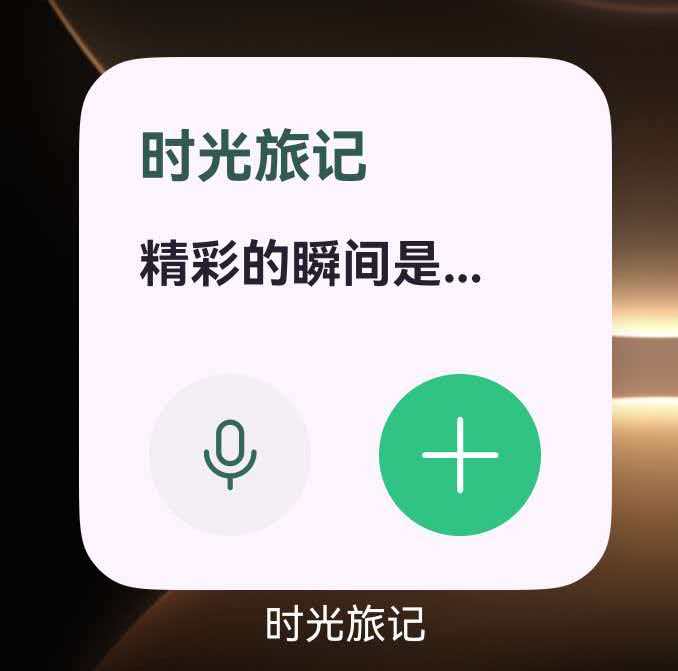
《时光旅记》的核心不是"做一个语音 Demo",而是让用户在写瞬间、写时光简介、补行程描述,甚至从桌面卡片进入时,都能尽快把嘴里说的话变成可编辑的文字。这个能力背后用到的是 @kit.CoreSpeechKit 的 speechRecognizer,同时配合 ArkUI 组件状态、麦克风权限、AudioKit 采集音频流、CoreFileKit 保存录音文件和 Form Kit 桌面卡片入口。
官方语音识别能力当前支持中文普通话,支持离线模型。短语音模式不超过 60 秒,长语音模式最长可到 8 小时。我的项目里正好用了两种路径:普通输入框用短语音实时录音识别;桌面"此刻速记"用 AudioKit 采集 PCM 音频流,再通过 writeAudio 喂给 Core Speech Kit 的长语音识别,同时保存一份录音文件。
官方文档入口:speechRecognizer(语音识别)。
项目里实际用到的技术栈
先把扫描结果讲清楚。项目里直接使用 Core Speech Kit 的位置有两个:
entry/src/main/ets/components/SharedComponents.ets 里封装了 VoiceInputButton。它用于普通输入框语音输入,当前被这些场景复用:瞬间正文、时光简介、旅行子行程描述。它创建 SpeechRecognitionEngine 后直接调用 startListening,让系统从麦克风实时录音并返回识别结果。
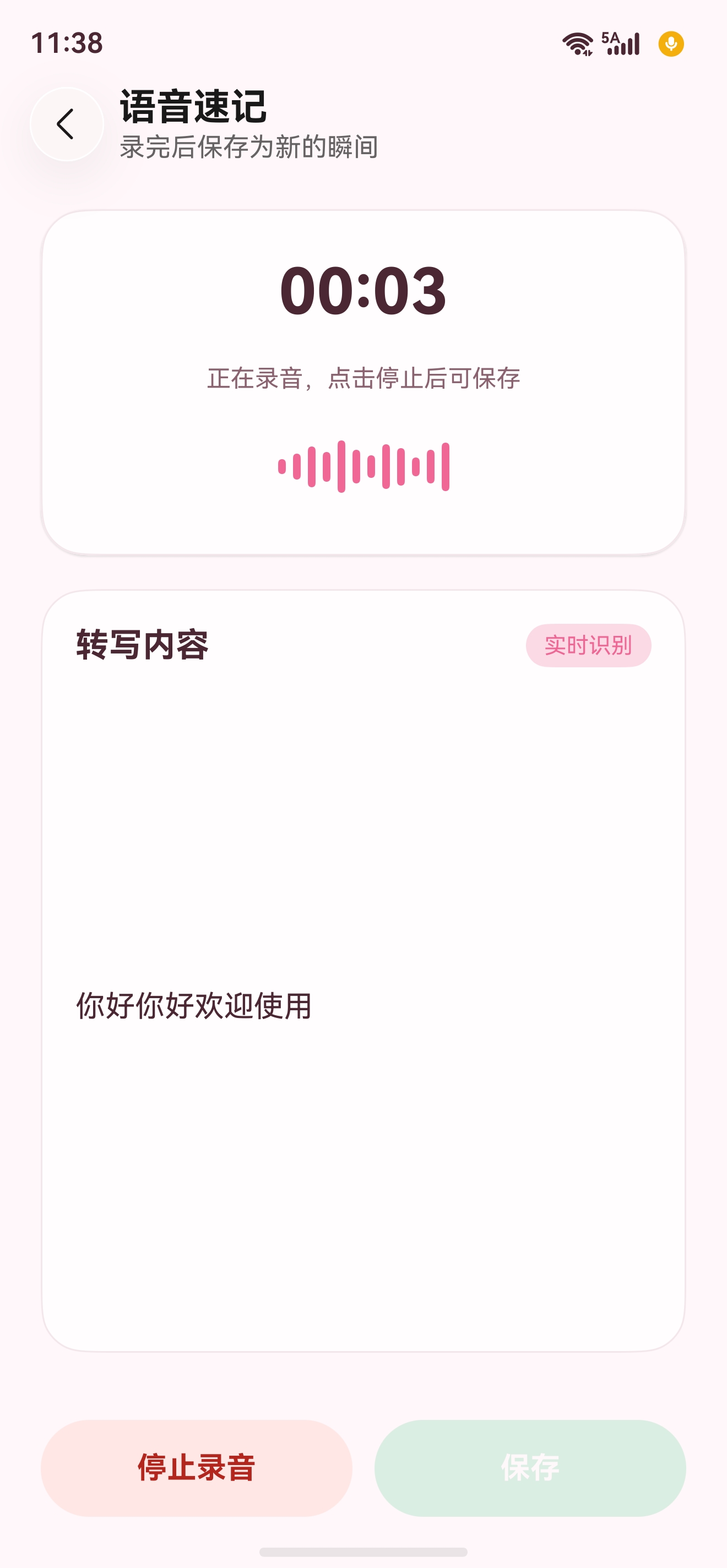
entry/src/main/ets/pages/shell/MainPage.ets 里还有一套 QuickVoiceMomentRecorder。它是桌面卡片"此刻速记"的主链路,先用 Form Kit 卡片拉起 APP 内页面,再用 AudioKit 的 AudioCapturer 采集 16000Hz、单声道、16bit PCM。采集到的音频一边写入沙箱 WAV 文件,一边按 1280 字节分片调用 speechRecognizer.writeAudio 做长语音识别。
这两套业务都依赖 ohos.permission.MICROPHONE。权限声明在 entry/src/main/module.json5,动态授权封装在 entry/src/main/ets/utils/PermissionUtil.ets。提示语放在 entry/src/main/resources/base/element/string.json,比如"用于将语音识别成时光描述和瞬间内容""没有拿到麦克风权限""语音内容已添加到输入框"。
如果按文件看,本文涉及的项目代码主要是这些:
entry/src/main/ets/components/SharedComponents.etsentry/src/main/ets/components/MomentComposerDialog.etsentry/src/main/ets/components/NotebookComposerDialog.etsentry/src/main/ets/pages/travel/SubPlanDialog.etsentry/src/main/ets/pages/shell/MainPage.etsentry/src/main/ets/widget/pages/forms/QuickVoiceMomentForm.etsentry/src/main/ets/utils/PermissionUtil.etsentry/src/main/module.json5entry/src/main/resources/base/element/string.json
整体架构是这样:
#mermaid-svg-icJMoVcsP7Odoqae{font-family:"trebuchet ms",verdana,arial,sans-serif;font-size:16px;fill:#333;}@keyframes edge-animation-frame{from{stroke-dashoffset:0;}}@keyframes dash{to{stroke-dashoffset:0;}}#mermaid-svg-icJMoVcsP7Odoqae .edge-animation-slow{stroke-dasharray:9,5!important;stroke-dashoffset:900;animation:dash 50s linear infinite;stroke-linecap:round;}#mermaid-svg-icJMoVcsP7Odoqae .edge-animation-fast{stroke-dasharray:9,5!important;stroke-dashoffset:900;animation:dash 20s linear infinite;stroke-linecap:round;}#mermaid-svg-icJMoVcsP7Odoqae .error-icon{fill:#552222;}#mermaid-svg-icJMoVcsP7Odoqae .error-text{fill:#552222;stroke:#552222;}#mermaid-svg-icJMoVcsP7Odoqae .edge-thickness-normal{stroke-width:1px;}#mermaid-svg-icJMoVcsP7Odoqae .edge-thickness-thick{stroke-width:3.5px;}#mermaid-svg-icJMoVcsP7Odoqae .edge-pattern-solid{stroke-dasharray:0;}#mermaid-svg-icJMoVcsP7Odoqae .edge-thickness-invisible{stroke-width:0;fill:none;}#mermaid-svg-icJMoVcsP7Odoqae .edge-pattern-dashed{stroke-dasharray:3;}#mermaid-svg-icJMoVcsP7Odoqae .edge-pattern-dotted{stroke-dasharray:2;}#mermaid-svg-icJMoVcsP7Odoqae .marker{fill:#333333;stroke:#333333;}#mermaid-svg-icJMoVcsP7Odoqae .marker.cross{stroke:#333333;}#mermaid-svg-icJMoVcsP7Odoqae svg{font-family:"trebuchet ms",verdana,arial,sans-serif;font-size:16px;}#mermaid-svg-icJMoVcsP7Odoqae p{margin:0;}#mermaid-svg-icJMoVcsP7Odoqae .label{font-family:"trebuchet ms",verdana,arial,sans-serif;color:#333;}#mermaid-svg-icJMoVcsP7Odoqae .cluster-label text{fill:#333;}#mermaid-svg-icJMoVcsP7Odoqae .cluster-label span{color:#333;}#mermaid-svg-icJMoVcsP7Odoqae .cluster-label span p{background-color:transparent;}#mermaid-svg-icJMoVcsP7Odoqae .label text,#mermaid-svg-icJMoVcsP7Odoqae span{fill:#333;color:#333;}#mermaid-svg-icJMoVcsP7Odoqae .node rect,#mermaid-svg-icJMoVcsP7Odoqae .node circle,#mermaid-svg-icJMoVcsP7Odoqae .node ellipse,#mermaid-svg-icJMoVcsP7Odoqae .node polygon,#mermaid-svg-icJMoVcsP7Odoqae .node path{fill:#ECECFF;stroke:#9370DB;stroke-width:1px;}#mermaid-svg-icJMoVcsP7Odoqae .rough-node .label text,#mermaid-svg-icJMoVcsP7Odoqae .node .label text,#mermaid-svg-icJMoVcsP7Odoqae .image-shape .label,#mermaid-svg-icJMoVcsP7Odoqae .icon-shape .label{text-anchor:middle;}#mermaid-svg-icJMoVcsP7Odoqae .node .katex path{fill:#000;stroke:#000;stroke-width:1px;}#mermaid-svg-icJMoVcsP7Odoqae .rough-node .label,#mermaid-svg-icJMoVcsP7Odoqae .node .label,#mermaid-svg-icJMoVcsP7Odoqae .image-shape .label,#mermaid-svg-icJMoVcsP7Odoqae .icon-shape .label{text-align:center;}#mermaid-svg-icJMoVcsP7Odoqae .node.clickable{cursor:pointer;}#mermaid-svg-icJMoVcsP7Odoqae .root .anchor path{fill:#333333!important;stroke-width:0;stroke:#333333;}#mermaid-svg-icJMoVcsP7Odoqae .arrowheadPath{fill:#333333;}#mermaid-svg-icJMoVcsP7Odoqae .edgePath .path{stroke:#333333;stroke-width:2.0px;}#mermaid-svg-icJMoVcsP7Odoqae .flowchart-link{stroke:#333333;fill:none;}#mermaid-svg-icJMoVcsP7Odoqae .edgeLabel{background-color:rgba(232,232,232, 0.8);text-align:center;}#mermaid-svg-icJMoVcsP7Odoqae .edgeLabel p{background-color:rgba(232,232,232, 0.8);}#mermaid-svg-icJMoVcsP7Odoqae .edgeLabel rect{opacity:0.5;background-color:rgba(232,232,232, 0.8);fill:rgba(232,232,232, 0.8);}#mermaid-svg-icJMoVcsP7Odoqae .labelBkg{background-color:rgba(232, 232, 232, 0.5);}#mermaid-svg-icJMoVcsP7Odoqae .cluster rect{fill:#ffffde;stroke:#aaaa33;stroke-width:1px;}#mermaid-svg-icJMoVcsP7Odoqae .cluster text{fill:#333;}#mermaid-svg-icJMoVcsP7Odoqae .cluster span{color:#333;}#mermaid-svg-icJMoVcsP7Odoqae div.mermaidTooltip{position:absolute;text-align:center;max-width:200px;padding:2px;font-family:"trebuchet ms",verdana,arial,sans-serif;font-size:12px;background:hsl(80, 100%, 96.2745098039%);border:1px solid #aaaa33;border-radius:2px;pointer-events:none;z-index:100;}#mermaid-svg-icJMoVcsP7Odoqae .flowchartTitleText{text-anchor:middle;font-size:18px;fill:#333;}#mermaid-svg-icJMoVcsP7Odoqae rect.text{fill:none;stroke-width:0;}#mermaid-svg-icJMoVcsP7Odoqae .icon-shape,#mermaid-svg-icJMoVcsP7Odoqae .image-shape{background-color:rgba(232,232,232, 0.8);text-align:center;}#mermaid-svg-icJMoVcsP7Odoqae .icon-shape p,#mermaid-svg-icJMoVcsP7Odoqae .image-shape p{background-color:rgba(232,232,232, 0.8);padding:2px;}#mermaid-svg-icJMoVcsP7Odoqae .icon-shape .label rect,#mermaid-svg-icJMoVcsP7Odoqae .image-shape .label rect{opacity:0.5;background-color:rgba(232,232,232, 0.8);fill:rgba(232,232,232, 0.8);}#mermaid-svg-icJMoVcsP7Odoqae .label-icon{display:inline-block;height:1em;overflow:visible;vertical-align:-0.125em;}#mermaid-svg-icJMoVcsP7Odoqae .node .label-icon path{fill:currentColor;stroke:revert;stroke-width:revert;}#mermaid-svg-icJMoVcsP7Odoqae :root{--mermaid-font-family:"trebuchet ms",verdana,arial,sans-serif;} 瞬间正文/时光简介/行程描述
桌面此刻速记卡片
用户输入场景
入口类型
VoiceInputButton
QuickVoiceMomentForm
MainPage 打开 QuickVoiceMomentPage
PermissionUtil 申请麦克风权限
Core Speech Kit createEngine short
startListening recognitionMode 0
onResult 实时预览文本
onComplete 回填输入框
PermissionUtil 申请麦克风权限
AudioKit AudioCapturer 采集 PCM
CoreFileKit 写入 WAV
Core Speech Kit createEngine long
writeAudio 分片送入识别引擎
onResult 预览识别文本
保存为瞬间正文和环境声音
普通输入框为什么用 short 模式
普通输入框的目标很明确:用户点一下麦克风,说一句话,再点一下结束,把识别出来的内容追加到当前输入框。它不需要长时间录音,也不需要把音频文件保存下来。
所以我在 VoiceInputButton 里使用的是:
arkts
const createParams: speechRecognizer.CreateEngineParams = {
  language: 'zh-CN',
  online: 1,
  extraParams: {
    locate: 'CN',
    recognizerMode: 'short'
  } as VoiceCreateEngineExtraParams
};
这里的 online: 1 对应离线模式,recognizerMode: 'short' 对应短语音。启动识别时,我没有自己采集音频流,而是让 Core Speech Kit 直接录音:
arkts
const extraParams: VoiceStartRecognitionExtraParams = {
  recognitionMode: 0,
  vadBegin: 2000,
  vadEnd: 1200,
  maxAudioDuration: 60000
};
recognitionMode: 0 表示实时录音识别,这时必须先拿到麦克风权限。vadBegin 和 vadEnd 是前后端点检测,控制用户开口和停顿后的识别行为。maxAudioDuration: 60000 正好卡住短语音上限,不让一个输入框语音输入无限录下去。
我在业务层做了一个细节:识别过程中不等最终完成才更新输入框,而是 onResult 一来就把当前识别文本和原输入内容拼起来做预览。用户正在说话时,输入框里能看到内容变化;onComplete 后再真正提交。
普通输入框的时序如下:
业务输入框 SpeechRecognitionEngine PermissionUtil VoiceInputButton 用户 业务输入框 SpeechRecognitionEngine PermissionUtil VoiceInputButton 用户 #mermaid-svg-lRQf3AkIp5ESt7ig{font-family:"trebuchet ms",verdana,arial,sans-serif;font-size:16px;fill:#333;}@keyframes edge-animation-frame{from{stroke-dashoffset:0;}}@keyframes dash{to{stroke-dashoffset:0;}}#mermaid-svg-lRQf3AkIp5ESt7ig .edge-animation-slow{stroke-dasharray:9,5!important;stroke-dashoffset:900;animation:dash 50s linear infinite;stroke-linecap:round;}#mermaid-svg-lRQf3AkIp5ESt7ig .edge-animation-fast{stroke-dasharray:9,5!important;stroke-dashoffset:900;animation:dash 20s linear infinite;stroke-linecap:round;}#mermaid-svg-lRQf3AkIp5ESt7ig .error-icon{fill:#552222;}#mermaid-svg-lRQf3AkIp5ESt7ig .error-text{fill:#552222;stroke:#552222;}#mermaid-svg-lRQf3AkIp5ESt7ig .edge-thickness-normal{stroke-width:1px;}#mermaid-svg-lRQf3AkIp5ESt7ig .edge-thickness-thick{stroke-width:3.5px;}#mermaid-svg-lRQf3AkIp5ESt7ig .edge-pattern-solid{stroke-dasharray:0;}#mermaid-svg-lRQf3AkIp5ESt7ig .edge-thickness-invisible{stroke-width:0;fill:none;}#mermaid-svg-lRQf3AkIp5ESt7ig .edge-pattern-dashed{stroke-dasharray:3;}#mermaid-svg-lRQf3AkIp5ESt7ig .edge-pattern-dotted{stroke-dasharray:2;}#mermaid-svg-lRQf3AkIp5ESt7ig .marker{fill:#333333;stroke:#333333;}#mermaid-svg-lRQf3AkIp5ESt7ig .marker.cross{stroke:#333333;}#mermaid-svg-lRQf3AkIp5ESt7ig svg{font-family:"trebuchet ms",verdana,arial,sans-serif;font-size:16px;}#mermaid-svg-lRQf3AkIp5ESt7ig p{margin:0;}#mermaid-svg-lRQf3AkIp5ESt7ig .actor{stroke:hsl(259.6261682243, 59.7765363128%, 87.9019607843%);fill:#ECECFF;}#mermaid-svg-lRQf3AkIp5ESt7ig text.actor>tspan{fill:black;stroke:none;}#mermaid-svg-lRQf3AkIp5ESt7ig .actor-line{stroke:hsl(259.6261682243, 59.7765363128%, 87.9019607843%);}#mermaid-svg-lRQf3AkIp5ESt7ig .innerArc{stroke-width:1.5;stroke-dasharray:none;}#mermaid-svg-lRQf3AkIp5ESt7ig .messageLine0{stroke-width:1.5;stroke-dasharray:none;stroke:#333;}#mermaid-svg-lRQf3AkIp5ESt7ig .messageLine1{stroke-width:1.5;stroke-dasharray:2,2;stroke:#333;}#mermaid-svg-lRQf3AkIp5ESt7ig #arrowhead path{fill:#333;stroke:#333;}#mermaid-svg-lRQf3AkIp5ESt7ig .sequenceNumber{fill:white;}#mermaid-svg-lRQf3AkIp5ESt7ig #sequencenumber{fill:#333;}#mermaid-svg-lRQf3AkIp5ESt7ig #crosshead path{fill:#333;stroke:#333;}#mermaid-svg-lRQf3AkIp5ESt7ig .messageText{fill:#333;stroke:none;}#mermaid-svg-lRQf3AkIp5ESt7ig .labelBox{stroke:hsl(259.6261682243, 59.7765363128%, 87.9019607843%);fill:#ECECFF;}#mermaid-svg-lRQf3AkIp5ESt7ig .labelText,#mermaid-svg-lRQf3AkIp5ESt7ig .labelText>tspan{fill:black;stroke:none;}#mermaid-svg-lRQf3AkIp5ESt7ig .loopText,#mermaid-svg-lRQf3AkIp5ESt7ig .loopText>tspan{fill:black;stroke:none;}#mermaid-svg-lRQf3AkIp5ESt7ig .loopLine{stroke-width:2px;stroke-dasharray:2,2;stroke:hsl(259.6261682243, 59.7765363128%, 87.9019607843%);fill:hsl(259.6261682243, 59.7765363128%, 87.9019607843%);}#mermaid-svg-lRQf3AkIp5ESt7ig .note{stroke:#aaaa33;fill:#fff5ad;}#mermaid-svg-lRQf3AkIp5ESt7ig .noteText,#mermaid-svg-lRQf3AkIp5ESt7ig .noteText>tspan{fill:black;stroke:none;}#mermaid-svg-lRQf3AkIp5ESt7ig .activation0{fill:#f4f4f4;stroke:#666;}#mermaid-svg-lRQf3AkIp5ESt7ig .activation1{fill:#f4f4f4;stroke:#666;}#mermaid-svg-lRQf3AkIp5ESt7ig .activation2{fill:#f4f4f4;stroke:#666;}#mermaid-svg-lRQf3AkIp5ESt7ig .actorPopupMenu{position:absolute;}#mermaid-svg-lRQf3AkIp5ESt7ig .actorPopupMenuPanel{position:absolute;fill:#ECECFF;box-shadow:0px 8px 16px 0px rgba(0,0,0,0.2);filter:drop-shadow(3px 5px 2px rgb(0 0 0 / 0.4));}#mermaid-svg-lRQf3AkIp5ESt7ig .actor-man line{stroke:hsl(259.6261682243, 59.7765363128%, 87.9019607843%);fill:#ECECFF;}#mermaid-svg-lRQf3AkIp5ESt7ig .actor-man circle,#mermaid-svg-lRQf3AkIp5ESt7ig line{stroke:hsl(259.6261682243, 59.7765363128%, 87.9019607843%);fill:#ECECFF;stroke-width:2px;}#mermaid-svg-lRQf3AkIp5ESt7ig :root{--mermaid-font-family:"trebuchet ms",verdana,arial,sans-serif;} 点击麦克风 ensurePermissionsGranted(MICROPHONE) 已授权 createEngine(zh-CN, short) setListener(...) isBusy() startListening(sessionId, pcm 16k, recognitionMode 0) onResult(result) onPreviewTextChange(baseText + result) 再次点击结束 finish(sessionId) onComplete(sessionId) onRecognized(finalText) shutdown()
桌面"此刻速记"为什么用 long 模式
桌面卡片入口和普通输入框不一样。用户从桌面点"此刻速记",常见场景是走路、旅行途中、突然想到一句话,想把当下的声音和文字一起留下来。
这里我选择长语音链路,原因有两个。第一,速记页要自己画录音波形、计时和整理状态,AudioKit 采集音频更可控。第二,录音本身也是《时光旅记》的内容资产,识别文字只是其中一部分,所以我一边保存 WAV,一边把 PCM 分片送给 Core Speech Kit。
这条链路里用到的技术栈更多:
Form Kit 负责桌面卡片和目标拉起;ArkUI 负责速记页状态、波形和保存按钮;AbilityKit 负责上下文和麦克风权限;AudioKit 负责 AudioCapturer 采集麦克风 PCM;CoreSpeechKit 负责 createEngine、setListener、startListening、writeAudio、finish、shutdown;CoreFileKit 负责把录音写入沙箱 WAV 文件;项目自己的 TimeImprintService 负责准备沙箱路径、创建瞬间和持久化。
关键点是 writeAudio 对音频块大小有要求,当前只支持 640 字节或 1280 字节。我的项目里用 PcmChunkQueue 把 AudioCapturer 回来的不定长 buffer 整理成 1280 字节块,每 40ms 泵一次:
TimeImprintStore 沙箱 WAV 文件 Core Speech Kit PcmChunkQueue AudioKit AudioCapturer QuickVoiceMomentPage 桌面卡片 TimeImprintStore 沙箱 WAV 文件 Core Speech Kit PcmChunkQueue AudioKit AudioCapturer QuickVoiceMomentPage 桌面卡片 #mermaid-svg-fnR0sPXp9CKzfiaZ{font-family:"trebuchet ms",verdana,arial,sans-serif;font-size:16px;fill:#333;}@keyframes edge-animation-frame{from{stroke-dashoffset:0;}}@keyframes dash{to{stroke-dashoffset:0;}}#mermaid-svg-fnR0sPXp9CKzfiaZ .edge-animation-slow{stroke-dasharray:9,5!important;stroke-dashoffset:900;animation:dash 50s linear infinite;stroke-linecap:round;}#mermaid-svg-fnR0sPXp9CKzfiaZ .edge-animation-fast{stroke-dasharray:9,5!important;stroke-dashoffset:900;animation:dash 20s linear infinite;stroke-linecap:round;}#mermaid-svg-fnR0sPXp9CKzfiaZ .error-icon{fill:#552222;}#mermaid-svg-fnR0sPXp9CKzfiaZ .error-text{fill:#552222;stroke:#552222;}#mermaid-svg-fnR0sPXp9CKzfiaZ .edge-thickness-normal{stroke-width:1px;}#mermaid-svg-fnR0sPXp9CKzfiaZ .edge-thickness-thick{stroke-width:3.5px;}#mermaid-svg-fnR0sPXp9CKzfiaZ .edge-pattern-solid{stroke-dasharray:0;}#mermaid-svg-fnR0sPXp9CKzfiaZ .edge-thickness-invisible{stroke-width:0;fill:none;}#mermaid-svg-fnR0sPXp9CKzfiaZ .edge-pattern-dashed{stroke-dasharray:3;}#mermaid-svg-fnR0sPXp9CKzfiaZ .edge-pattern-dotted{stroke-dasharray:2;}#mermaid-svg-fnR0sPXp9CKzfiaZ .marker{fill:#333333;stroke:#333333;}#mermaid-svg-fnR0sPXp9CKzfiaZ .marker.cross{stroke:#333333;}#mermaid-svg-fnR0sPXp9CKzfiaZ svg{font-family:"trebuchet ms",verdana,arial,sans-serif;font-size:16px;}#mermaid-svg-fnR0sPXp9CKzfiaZ p{margin:0;}#mermaid-svg-fnR0sPXp9CKzfiaZ .actor{stroke:hsl(259.6261682243, 59.7765363128%, 87.9019607843%);fill:#ECECFF;}#mermaid-svg-fnR0sPXp9CKzfiaZ text.actor>tspan{fill:black;stroke:none;}#mermaid-svg-fnR0sPXp9CKzfiaZ .actor-line{stroke:hsl(259.6261682243, 59.7765363128%, 87.9019607843%);}#mermaid-svg-fnR0sPXp9CKzfiaZ .innerArc{stroke-width:1.5;stroke-dasharray:none;}#mermaid-svg-fnR0sPXp9CKzfiaZ .messageLine0{stroke-width:1.5;stroke-dasharray:none;stroke:#333;}#mermaid-svg-fnR0sPXp9CKzfiaZ .messageLine1{stroke-width:1.5;stroke-dasharray:2,2;stroke:#333;}#mermaid-svg-fnR0sPXp9CKzfiaZ #arrowhead path{fill:#333;stroke:#333;}#mermaid-svg-fnR0sPXp9CKzfiaZ .sequenceNumber{fill:white;}#mermaid-svg-fnR0sPXp9CKzfiaZ #sequencenumber{fill:#333;}#mermaid-svg-fnR0sPXp9CKzfiaZ #crosshead path{fill:#333;stroke:#333;}#mermaid-svg-fnR0sPXp9CKzfiaZ .messageText{fill:#333;stroke:none;}#mermaid-svg-fnR0sPXp9CKzfiaZ .labelBox{stroke:hsl(259.6261682243, 59.7765363128%, 87.9019607843%);fill:#ECECFF;}#mermaid-svg-fnR0sPXp9CKzfiaZ .labelText,#mermaid-svg-fnR0sPXp9CKzfiaZ .labelText>tspan{fill:black;stroke:none;}#mermaid-svg-fnR0sPXp9CKzfiaZ .loopText,#mermaid-svg-fnR0sPXp9CKzfiaZ .loopText>tspan{fill:black;stroke:none;}#mermaid-svg-fnR0sPXp9CKzfiaZ .loopLine{stroke-width:2px;stroke-dasharray:2,2;stroke:hsl(259.6261682243, 59.7765363128%, 87.9019607843%);fill:hsl(259.6261682243, 59.7765363128%, 87.9019607843%);}#mermaid-svg-fnR0sPXp9CKzfiaZ .note{stroke:#aaaa33;fill:#fff5ad;}#mermaid-svg-fnR0sPXp9CKzfiaZ .noteText,#mermaid-svg-fnR0sPXp9CKzfiaZ .noteText>tspan{fill:black;stroke:none;}#mermaid-svg-fnR0sPXp9CKzfiaZ .activation0{fill:#f4f4f4;stroke:#666;}#mermaid-svg-fnR0sPXp9CKzfiaZ .activation1{fill:#f4f4f4;stroke:#666;}#mermaid-svg-fnR0sPXp9CKzfiaZ .activation2{fill:#f4f4f4;stroke:#666;}#mermaid-svg-fnR0sPXp9CKzfiaZ .actorPopupMenu{position:absolute;}#mermaid-svg-fnR0sPXp9CKzfiaZ .actorPopupMenuPanel{position:absolute;fill:#ECECFF;box-shadow:0px 8px 16px 0px rgba(0,0,0,0.2);filter:drop-shadow(3px 5px 2px rgb(0 0 0 / 0.4));}#mermaid-svg-fnR0sPXp9CKzfiaZ .actor-man line{stroke:hsl(259.6261682243, 59.7765363128%, 87.9019607843%);fill:#ECECFF;}#mermaid-svg-fnR0sPXp9CKzfiaZ .actor-man circle,#mermaid-svg-fnR0sPXp9CKzfiaZ line{stroke:hsl(259.6261682243, 59.7765363128%, 87.9019607843%);fill:#ECECFF;stroke-width:2px;}#mermaid-svg-fnR0sPXp9CKzfiaZ :root{--mermaid-font-family:"trebuchet ms",verdana,arial,sans-serif;} openTarget quick_voice_moment createEngine(zh-CN, long) startListening(sessionId, recognitionMode 0) start() readData(ArrayBuffer) 写入 WAV 数据区 整理为 1280 字节 PCM 块 pending chunks writeAudio(sessionId, chunk) onResult(final/partial) 更新识别预览 stop() finish(sessionId) onComplete 回写 WAV header 保存瞬间文字和环境声音
权限配置
先在 module.json5 声明麦克风权限。我的项目把理由写成资源字符串,方便统一管理。
json5
{
  "module": {
    "requestPermissions": [
      {
        "name": "ohos.permission.MICROPHONE",
        "reason": "$string:permission_microphone_reason",
        "usedScene": {
          "abilities": [
            "EntryAbility"
          ],
          "when": "inuse"
        }
      }
    ]
  }
}
资源文案如下:
json
{
  "string": [
    {
      "name": "permission_microphone_reason",
      "value": "用于将语音识别成时光描述和瞬间内容"
    },
    {
      "name": "toast_microphone_permission_denied",
      "value": "没有拿到麦克风权限"
    },
    {
      "name": "toast_voice_engine_failed",
      "value": "语音识别初始化失败,请稍后重试"
    },
    {
      "name": "toast_voice_busy",
      "value": "语音识别服务正忙,请稍后再试"
    },
    {
      "name": "toast_voice_empty",
      "value": "没有识别到可用内容"
    },
    {
      "name": "toast_voice_added",
      "value": "语音内容已添加到输入框"
    }
  ]
}
动态授权我单独封装成工具函数。业务组件不直接关心 AtManager,只调用 ensurePermissionsGranted。
arkts
import { abilityAccessCtrl, bundleManager, Context, Permissions } from '@kit.AbilityKit';

let cachedAccessTokenId: number = -1;

async function getSelfAccessTokenId(): Promise<number> {
  if (cachedAccessTokenId > 0) {
    return cachedAccessTokenId;
  }
  const bundleInfo = await bundleManager.getBundleInfoForSelf(
    bundleManager.BundleFlag.GET_BUNDLE_INFO_WITH_APPLICATION
  );
  cachedAccessTokenId = bundleInfo.appInfo.accessTokenId;
  return cachedAccessTokenId;
}

export async function arePermissionsGranted(permissions: Array<Permissions>): Promise<boolean> {
  if (permissions.length === 0) {
    return true;
  }
  try {
    const atManager: abilityAccessCtrl.AtManager = abilityAccessCtrl.createAtManager();
    const accessTokenId: number = await getSelfAccessTokenId();
    for (let i: number = 0; i < permissions.length; i++) {
      const grantStatus: abilityAccessCtrl.GrantStatus =
        await atManager.checkAccessToken(accessTokenId, permissions[i]);
      if (grantStatus !== abilityAccessCtrl.GrantStatus.PERMISSION_GRANTED) {
        return false;
      }
    }
    return true;
  } catch (_error) {
    return false;
  }
}

export async function ensurePermissionsGranted(context: Context, permissions: Array<Permissions>): Promise<boolean> {
  if (await arePermissionsGranted(permissions)) {
    return true;
  }
  try {
    await abilityAccessCtrl.createAtManager().requestPermissionsFromUser(context, permissions);
  } catch (_error) {
  }
  return await arePermissionsGranted(permissions);
}
完整代码一:输入框语音按钮
这份代码来自《时光旅记》的 VoiceInputButton 主链路,适合正文、简介、备注、行程描述这类输入框。它把 Core Speech Kit 的生命周期包在一个 ArkUI 组件里,外层页面只需要传入当前文本和两个回调。
arkts
import { Context, Permissions } from '@kit.AbilityKit';
import { promptAction } from '@kit.ArkUI';
import { BusinessError } from '@kit.BasicServicesKit';
import { speechRecognizer } from '@kit.CoreSpeechKit';
import { ensurePermissionsGranted } from '../utils/PermissionUtil';

interface VoiceCreateEngineExtraParams extends Record<string, Object> {
  locate: string;
  recognizerMode: string;
}

interface VoiceStartRecognitionExtraParams extends Record<string, Object> {
  recognitionMode: number;
  vadBegin: number;
  vadEnd: number;
  maxAudioDuration: number;
}

@Component
export struct VoiceInputButton {
  isEnabled: boolean = true;
  textValue: string = '';
  accessibilityLabel: string = '语音输入';
  onRecognized?: (text: string) => void;
  onPreviewTextChange?: (text: string) => void;
  onListeningChange?: (isListening: boolean) => void;

  @State private isPreparing: boolean = false;
  @State private isListening: boolean = false;
  @State private latestRecognizedText: string = '';
  private asrEngine?: speechRecognizer.SpeechRecognitionEngine;
  private currentSessionId: string = '';
  private sessionBaseText: string = '';

  build() {
    Button({ type: ButtonType.Circle, stateEffect: true }) {
      SymbolGlyph(this.isListening ? $r('sys.symbol.mic_slash') : $r('sys.symbol.mic'))
        .fontSize(18)
        .fontColor([this.isListening ? '#C93C32' : '#31C383'])
    }
    .width(36)
    .height(36)
    .backgroundColor(this.isListening ? '#FFE7E5' : '#F3F4F6')
    .enabled(this.isEnabled && !this.isPreparing)
    .opacity(this.isEnabled ? 1 : 0.45)
    .accessibilityText(this.accessibilityLabel)
    .accessibilityDescription(this.getVoiceAccessibilityDescription())
    .onClick(() => {
      void this.handleActionClick();
    })
  }

  aboutToDisappear(): void {
    this.releaseEngine();
  }

  private getVoiceAccessibilityDescription(): string {
    if (!this.isEnabled) {
      return '当前不可用';
    }
    if (this.isPreparing) {
      return '正在准备语音识别';
    }
    if (this.isListening) {
      return '正在录音,再次双击结束语音输入';
    }
    return '双击开始语音输入';
  }

  private async handleActionClick(): Promise<void> {
    if (!this.isEnabled || this.isPreparing) {
      return;
    }
    if (this.isListening) {
      this.finishRecognition();
      return;
    }
    await this.startRecognition();
  }

  private async startRecognition(): Promise<void> {
    const hostContext: Context | undefined = this.getUIContext().getHostContext();
    if (hostContext === undefined) {
      this.showToast('当前无法获取页面上下文');
      return;
    }

    const granted: boolean = await this.requestPermissionList(hostContext, ['ohos.permission.MICROPHONE']);
    if (!granted) {
      this.showToast($r('app.string.toast_microphone_permission_denied'));
      return;
    }

    const engineReady: boolean = await this.ensureEngine();
    if (!engineReady || this.asrEngine === undefined) {
      return;
    }

    try {
      if (this.asrEngine.isBusy()) {
        this.showToast($r('app.string.toast_voice_busy'));
        return;
      }
    } catch (error) {
      this.showToast(this.resolveSpeechErrorMessage(error as BusinessError));
      return;
    }

    this.latestRecognizedText = '';
    this.sessionBaseText = this.textValue;
    this.currentSessionId = this.createSessionId();
    this.isListening = true;
    this.notifyListeningChange(true);

    const audioInfo: speechRecognizer.AudioInfo = {
      audioType: 'pcm',
      sampleRate: 16000,
      soundChannel: 1,
      sampleBit: 16
    };

    const extraParams: VoiceStartRecognitionExtraParams = {
      recognitionMode: 0,
      vadBegin: 2000,
      vadEnd: 1200,
      maxAudioDuration: 60000
    };

    const startParams: speechRecognizer.StartParams = {
      sessionId: this.currentSessionId,
      audioInfo: audioInfo,
      extraParams: extraParams
    };

    try {
      this.asrEngine.startListening(startParams);
    } catch (error) {
      this.isListening = false;
      this.notifyListeningChange(false);
      this.showToast(this.resolveSpeechErrorMessage(error as BusinessError));
    }
  }

  private finishRecognition(): void {
    if (!this.isListening || this.asrEngine === undefined || this.currentSessionId.length === 0) {
      return;
    }
    try {
      this.asrEngine.finish(this.currentSessionId);
    } catch (error) {
      this.isListening = false;
      this.notifyListeningChange(false);
      this.showToast(this.resolveSpeechErrorMessage(error as BusinessError));
    }
  }

  private async ensureEngine(): Promise<boolean> {
    if (this.asrEngine !== undefined) {
      return true;
    }
    this.isPreparing = true;
    try {
      const createParams: speechRecognizer.CreateEngineParams = {
        language: 'zh-CN',
        online: 1,
        extraParams: {
          locate: 'CN',
          recognizerMode: 'short'
        } as VoiceCreateEngineExtraParams
      };

      this.asrEngine = await speechRecognizer.createEngine(createParams);
      this.asrEngine.setListener({
        onStart: (_sessionId: string, _eventMessage: string): void => {
        },
        onEvent: (_sessionId: string, _eventCode: number, _eventMessage: string): void => {
        },
        onResult: (sessionId: string, result: speechRecognizer.SpeechRecognitionResult): void => {
          if (sessionId !== this.currentSessionId || result.result.trim().length === 0) {
            return;
          }
          this.latestRecognizedText = result.result.trim();
          this.emitPreviewText(this.latestRecognizedText);
        },
        onComplete: (sessionId: string, _eventMessage: string): void => {
          if (sessionId !== this.currentSessionId) {
            return;
          }
          this.isListening = false;
          this.notifyListeningChange(false);
          this.commitRecognizedText();
        },
        onError: (sessionId: string, errorCode: number, errorMessage: string): void => {
          if (sessionId !== this.currentSessionId) {
            return;
          }
          this.isListening = false;
          this.notifyListeningChange(false);
          this.currentSessionId = '';
          this.latestRecognizedText = '';
          this.sessionBaseText = '';
          this.showToast(this.resolveSpeechErrorCodeMessage(errorCode, errorMessage));
        }
      });
      return true;
    } catch (error) {
      this.showToast(this.resolveSpeechErrorMessage(error as BusinessError));
      return false;
    } finally {
      this.isPreparing = false;
    }
  }

  private commitRecognizedText(): void {
    const nextText: string = this.latestRecognizedText.trim();
    this.currentSessionId = '';
    this.latestRecognizedText = '';
    this.sessionBaseText = '';
    if (nextText.length === 0) {
      this.showToast($r('app.string.toast_voice_empty'));
      return;
    }
    if (this.onRecognized !== undefined) {
      this.onRecognized(nextText);
    }
    this.showToast($r('app.string.toast_voice_added'));
  }

  private releaseEngine(): void {
    if (this.asrEngine === undefined) {
      return;
    }
    const activeSessionId: string = this.currentSessionId;
    this.currentSessionId = '';
    this.latestRecognizedText = '';
    this.sessionBaseText = '';
    if (this.isListening && activeSessionId.length > 0) {
      try {
        this.asrEngine.cancel(activeSessionId);
      } catch (_error) {
      }
    }
    try {
      this.asrEngine.shutdown();
    } catch (_error) {
    }
    this.asrEngine = undefined;
    this.isPreparing = false;
    this.isListening = false;
    this.notifyListeningChange(false);
  }

  private async requestPermissionList(context: Context, permissions: Array<Permissions>): Promise<boolean> {
    return ensurePermissionsGranted(context, permissions);
  }

  private createSessionId(): string {
    return 'voice_' + Date.now().toString() + '_' + Math.floor(Math.random() * 100000).toString();
  }

  private resolveSpeechErrorMessage(error: BusinessError): string | Resource {
    return this.resolveSpeechErrorCodeMessage(Number(error.code), error.message);
  }

  private resolveSpeechErrorCodeMessage(errorCode: number, errorMessage: string): string | Resource {
    if (errorCode === 1002200006) {
      return $r('app.string.toast_voice_busy');
    }
    if (errorCode === 1002200012) {
      return $r('app.string.toast_microphone_permission_denied');
    }
    if (errorCode === 1002200001 || errorCode === 1002200007 ||
      errorCode === 1002200008 || errorCode === 1002200009) {
      return $r('app.string.toast_voice_engine_failed');
    }
    if (errorCode === 1002200002) {
      return '语音识别已在进行中,请稍候。';
    }
    if (errorCode === 1002200004) {
      return '结束语音识别失败,请重试。';
    }
    if (errorCode === 1002200005) {
      return '取消语音识别失败,请重试。';
    }
    if (errorMessage.length > 0) {
      return errorMessage;
    }
    return '语音识别暂时不可用,请稍后再试。';
  }

  private emitPreviewText(recognizedText: string): void {
    if (this.onPreviewTextChange === undefined) {
      return;
    }
    this.onPreviewTextChange(this.composeRecognizedText(this.sessionBaseText, recognizedText));
  }

  private composeRecognizedText(baseText: string, recognizedText: string): string {
    const normalizedRecognizedText: string = recognizedText.trim();
    if (normalizedRecognizedText.length === 0) {
      return baseText;
    }
    const normalizedBaseText: string = baseText.trim();
    if (normalizedBaseText.length === 0) {
      return normalizedRecognizedText;
    }
    return normalizedBaseText + '\n' + normalizedRecognizedText;
  }

  private notifyListeningChange(isListening: boolean): void {
    if (this.onListeningChange !== undefined) {
      this.onListeningChange(isListening);
    }
  }

  private showToast(message: string | Resource): void {
    promptAction.showToast({
      message: message,
      duration: 1800
    });
  }
}业务页面使用时很轻。以瞬间正文为例,onPreviewTextChange 负责边说边预览,onListeningChange 负责显示"语音输入中..."。
arkts
Stack({ alignContent: Alignment.TopEnd }) {
  TextArea({
    text: this.momentNoteInput,
    placeholder: '记录此刻发生的事'
  })
  .height(120)
  .padding({ left: 14, right: 58, top: 14, bottom: 14 })
  .onChange((value: string) => {
    this.momentNoteInput = value;
  })

  VoiceInputButton({
    isEnabled: !this.isBusy,
    textValue: this.momentNoteInput,
    accessibilityLabel: '瞬间内容语音输入',
    onPreviewTextChange: (text: string) => {
      this.momentNoteInput = text;
    },
    onListeningChange: (isListening: boolean) => {
      this.isMomentNoteVoiceInputting = isListening;
    }
  })
  .margin({ top: 10, right: 10 })
}
完整代码二:此刻速记录音加识别
下面这份是桌面"此刻速记"的核心录音识别代码。为了让文章聚焦,我保留了 AudioCapturer + writeAudio + WAV 保存 的主链路,页面保存瞬间的逻辑可以接到自己的数据层。
arkts
import { Context } from '@kit.AbilityKit';
import { audio } from '@kit.AudioKit';
import { BusinessError } from '@kit.BasicServicesKit';
import { fileIo } from '@kit.CoreFileKit';
import { speechRecognizer } from '@kit.CoreSpeechKit';
import { MediaKind, SandboxFileTarget } from '../../model/TimeImprintModels';
import { prepareSandboxFile } from '../../utils/TimeImprintService';

const QUICK_VOICE_CHUNK_BYTES: number = 1280;
const QUICK_VOICE_MAX_AUDIO_DURATION_MS: number = 8 * 60 * 60 * 1000;

interface QuickVoiceCreateEngineExtraParams extends Record<string, Object> {
  locate: string;
  recognizerMode: string;
}

interface QuickVoiceStartExtraParams extends Record<string, Object> {
  recognitionMode: number;
  vadBegin: number;
  vadEnd: number;
  maxAudioDuration: number;
}

class QuickVoiceCaptureResult {
  recognizedText: string = '';
  audioTarget: SandboxFileTarget = new SandboxFileTarget();
  hasAudio: boolean = false;
}

class FileWriteOptions {
  offset?: number;
  length?: number;
}

class PcmChunkQueue {
  private pending: Uint8Array = new Uint8Array(0);

  push(buffer: ArrayBuffer): Array<Uint8Array> {
    const incoming: Uint8Array = new Uint8Array(buffer);
    const combined: Uint8Array = new Uint8Array(this.pending.length + incoming.length);
    combined.set(this.pending, 0);
    combined.set(incoming, this.pending.length);

    const chunks: Array<Uint8Array> = [];
    let offset: number = 0;
    while (combined.length - offset >= QUICK_VOICE_CHUNK_BYTES) {
      chunks.push(combined.slice(offset, offset + QUICK_VOICE_CHUNK_BYTES));
      offset = offset + QUICK_VOICE_CHUNK_BYTES;
    }
    this.pending = combined.slice(offset);
    return chunks;
  }

  drain(): Uint8Array | undefined {
    if (this.pending.length === 0) {
      return undefined;
    }
    if (this.pending.length > 640) {
      const paddedLarge: Uint8Array = new Uint8Array(QUICK_VOICE_CHUNK_BYTES);
      paddedLarge.set(this.pending.slice(0, Math.min(this.pending.length, QUICK_VOICE_CHUNK_BYTES)), 0);
      this.pending = new Uint8Array(0);
      return paddedLarge;
    }
    const paddedSmall: Uint8Array = new Uint8Array(640);
    paddedSmall.set(this.pending, 0);
    this.pending = new Uint8Array(0);
    return paddedSmall;
  }
}

export class QuickVoiceMomentRecorder {
  private context: Context;
  private notebookId: string;
  private asrEngine?: speechRecognizer.SpeechRecognitionEngine;
  private audioCapturer?: audio.AudioCapturer;
  private audioFile?: fileIo.File;
  private target: SandboxFileTarget = new SandboxFileTarget();
  private sessionId: string = '';
  private audioWriteOffset: number = 0;
  private audioBytes: number = 0;
  private recognitionResult: string = '';
  private generatedText: string = '';
  private chunks: PcmChunkQueue = new PcmChunkQueue();
  private pendingAsrChunks: Array<Uint8Array> = [];
  private asrPumpTimer: number = -1;
  private completionFallbackTimer: number = -1;
  private finishing: boolean = false;
  private completed: boolean = false;
  private resolveCapture?: (result: QuickVoiceCaptureResult) => void;
  private rejectCapture?: (error: Error) => void;
  private onPreview: (text: string) => void;

  constructor(context: Context, notebookId: string, onPreview: (text: string) => void) {
    this.context = context;
    this.notebookId = notebookId;
    this.onPreview = onPreview;
  }

  async capture(): Promise<QuickVoiceCaptureResult> {
    return new Promise<QuickVoiceCaptureResult>((resolve, reject) => {
      this.resolveCapture = resolve;
      this.rejectCapture = reject;
      void this.startCapture();
    });
  }

  cancel(): void {
    this.finishCapture();
  }

  private async startCapture(): Promise<void> {
    try {
      this.target = await prepareSandboxFile(
        this.context,
        this.notebookId,
        MediaKind.AUDIO,
        'quick_voice_moment.wav',
        'wav'
      );
      this.audioFile = fileIo.openSync(
        this.target.filePath,
        fileIo.OpenMode.CREATE | fileIo.OpenMode.READ_WRITE | fileIo.OpenMode.TRUNC
      );
      this.writeWavHeader(0);
      this.audioWriteOffset = 44;
      this.sessionId = this.createSessionId();

      this.asrEngine = await this.createAsrEngine();
      this.asrEngine.setListener(this.createRecognitionListener());
      this.asrEngine.startListening({
        sessionId: this.sessionId,
        audioInfo: {
          audioType: 'pcm',
          sampleRate: 16000,
          soundChannel: 1,
          sampleBit: 16
        },
        extraParams: {
          recognitionMode: 0,
          vadBegin: 500,
          vadEnd: 10000,
          maxAudioDuration: QUICK_VOICE_MAX_AUDIO_DURATION_MS
        } as QuickVoiceStartExtraParams
      });

      this.audioCapturer = await this.createAudioCapturer();
      this.audioCapturer.on('readData', (buffer: ArrayBuffer): void => {
        this.handleAudioBuffer(buffer);
      });
      this.startAsrPump();
      await this.startAudioCapturer();
    } catch (error) {
      this.failCapture(error);
    }
  }

  private async createAsrEngine(): Promise<speechRecognizer.SpeechRecognitionEngine> {
    return speechRecognizer.createEngine({
      language: 'zh-CN',
      online: 1,
      extraParams: {
        locate: 'CN',
        recognizerMode: 'long'
      } as QuickVoiceCreateEngineExtraParams
    });
  }

  private createRecognitionListener(): speechRecognizer.RecognitionListener {
    return {
      onStart: (_sessionId: string, _eventMessage: string): void => {
      },
      onEvent: (_sessionId: string, _eventCode: number, _eventMessage: string): void => {
      },
      onResult: (sessionId: string, result: speechRecognizer.SpeechRecognitionResult): void => {
        if (sessionId !== this.sessionId || result.result.trim().length === 0) {
          return;
        }
        if (result.isFinal) {
          this.recognitionResult = this.recognitionResult + result.result.trim();
          this.generatedText = '';
        } else {
          this.generatedText = result.result.trim();
        }
        this.onPreview(this.resolveRecognizedText());
      },
      onComplete: (sessionId: string, _eventMessage: string): void => {
        if (sessionId === this.sessionId && this.finishing) {
          this.completeCapture();
        }
      },
      onError: (sessionId: string, errorCode: number, errorMessage: string): void => {
        if (sessionId !== this.sessionId) {
          return;
        }
        const message: string = errorMessage.length > 0 ? errorMessage : errorCode.toString();
        this.failCapture(new Error(message));
      }
    };
  }

  private async createAudioCapturer(): Promise<audio.AudioCapturer> {
    const options: audio.AudioCapturerOptions = {
      streamInfo: {
        samplingRate: audio.AudioSamplingRate.SAMPLE_RATE_16000,
        channels: audio.AudioChannel.CHANNEL_1,
        sampleFormat: audio.AudioSampleFormat.SAMPLE_FORMAT_S16LE,
        encodingType: audio.AudioEncodingType.ENCODING_TYPE_RAW
      },
      capturerInfo: {
        source: audio.SourceType.SOURCE_TYPE_MIC,
        capturerFlags: 0
      }
    };
    return new Promise<audio.AudioCapturer>((resolve, reject) => {
      audio.createAudioCapturer(options, (error: BusinessError, capturer: audio.AudioCapturer) => {
        if (error) {
          reject(new Error(error.message));
          return;
        }
        resolve(capturer);
      });
    });
  }

  private async startAudioCapturer(): Promise<void> {
    if (this.audioCapturer === undefined) {
      return;
    }
    await new Promise<void>((resolve, reject) => {
      this.audioCapturer?.start((error: BusinessError) => {
        if (error) {
          reject(new Error(error.message));
          return;
        }
        resolve();
      });
    });
  }

  private handleAudioBuffer(buffer: ArrayBuffer): void {
    if (this.completed) {
      return;
    }
    this.writeAudioBuffer(buffer);
    const chunks: Array<Uint8Array> = this.chunks.push(buffer);
    for (let i: number = 0; i < chunks.length; i++) {
      this.pendingAsrChunks.push(chunks[i]);
    }
  }

  private writeAudioBuffer(buffer: ArrayBuffer): void {
    if (this.audioFile === undefined || buffer.byteLength === 0) {
      return;
    }
    const options: FileWriteOptions = new FileWriteOptions();
    options.offset = this.audioWriteOffset;
    options.length = buffer.byteLength;
    fileIo.writeSync(this.audioFile.fd, buffer, options);
    this.audioWriteOffset = this.audioWriteOffset + buffer.byteLength;
    this.audioBytes = this.audioBytes + buffer.byteLength;
  }

  private startAsrPump(): void {
    if (this.asrPumpTimer >= 0) {
      return;
    }
    this.asrPumpTimer = setInterval(() => {
      if (this.asrEngine !== undefined && this.pendingAsrChunks.length > 0 && this.sessionId.length > 0) {
        const chunk: Uint8Array | undefined = this.pendingAsrChunks.shift();
        if (chunk !== undefined) {
          try {
            this.asrEngine.writeAudio(this.sessionId, chunk);
          } catch (error) {
            this.failCapture(error);
          }
        }
        return;
      }
      if (this.finishing && this.pendingAsrChunks.length === 0) {
        this.finishAsrEngine();
      }
    }, 40);
  }

  private finishCapture(): void {
    if (this.finishing || this.completed) {
      return;
    }
    this.finishing = true;
    this.stopAudioCapturer();
    const finalChunk: Uint8Array | undefined = this.chunks.drain();
    if (finalChunk !== undefined) {
      this.pendingAsrChunks.push(finalChunk);
    }
    if (this.pendingAsrChunks.length === 0) {
      this.finishAsrEngine();
    }
  }

  private finishAsrEngine(): void {
    if (!this.finishing || this.completed || this.asrEngine === undefined || this.sessionId.length === 0) {
      return;
    }
    try {
      this.asrEngine.finish(this.sessionId);
    } catch (_error) {
      this.completeCapture();
      return;
    }
    if (this.completionFallbackTimer < 0) {
      this.completionFallbackTimer = setTimeout(() => {
        this.completeCapture();
      }, 2200);
    }
  }

  private stopAudioCapturer(): void {
    const capturer: audio.AudioCapturer | undefined = this.audioCapturer;
    if (capturer === undefined) {
      return;
    }
    try {
      if (capturer.state.valueOf() === audio.AudioState.STATE_RUNNING) {
        capturer.stop(() => {
        });
      }
    } catch (_error) {
    }
  }

  private completeCapture(): void {
    if (this.completed) {
      return;
    }
    this.completed = true;
    this.cleanup();

    const result: QuickVoiceCaptureResult = new QuickVoiceCaptureResult();
    result.recognizedText = this.resolveRecognizedText();
    result.audioTarget = this.target;
    result.hasAudio = this.audioBytes > 0;

    const resolveCapture: ((result: QuickVoiceCaptureResult) => void) | undefined = this.resolveCapture;
    if (resolveCapture !== undefined) {
      resolveCapture(result);
    }
  }

  private failCapture(error: Object): void {
    if (this.completed) {
      return;
    }
    this.completed = true;
    this.cleanup();

    const rejectCapture: ((error: Error) => void) | undefined = this.rejectCapture;
    if (rejectCapture !== undefined) {
      rejectCapture(error instanceof Error ? error : new Error(JSON.stringify(error)));
    }
  }

  private cleanup(): void {
    if (this.asrPumpTimer >= 0) {
      clearInterval(this.asrPumpTimer);
      this.asrPumpTimer = -1;
    }
    if (this.completionFallbackTimer >= 0) {
      clearTimeout(this.completionFallbackTimer);
      this.completionFallbackTimer = -1;
    }
    this.stopAudioCapturer();
    try {
      this.audioCapturer?.release(() => {
      });
    } catch (_error) {
    }
    try {
      this.asrEngine?.shutdown();
    } catch (_error) {
    }
    if (this.audioFile !== undefined) {
      try {
        this.writeWavHeader(this.audioBytes);
      } catch (_error) {
      }
      fileIo.closeSync(this.audioFile);
      this.audioFile = undefined;
    }
    this.audioCapturer = undefined;
    this.asrEngine = undefined;
  }

  private resolveRecognizedText(): string {
    const finalText: string = this.recognitionResult.trim();
    if (finalText.length > 0) {
      return finalText;
    }
    return this.generatedText.trim();
  }

  private writeWavHeader(pcmBytes: number): void {
    if (this.audioFile === undefined) {
      return;
    }
    const header: ArrayBuffer = new ArrayBuffer(44);
    const view: DataView = new DataView(header);
    this.writeAscii(view, 0, 'RIFF');
    view.setUint32(4, 36 + pcmBytes, true);
    this.writeAscii(view, 8, 'WAVE');
    this.writeAscii(view, 12, 'fmt ');
    view.setUint32(16, 16, true);
    view.setUint16(20, 1, true);
    view.setUint16(22, 1, true);
    view.setUint32(24, 16000, true);
    view.setUint32(28, 16000 * 2, true);
    view.setUint16(32, 2, true);
    view.setUint16(34, 16, true);
    this.writeAscii(view, 36, 'data');
    view.setUint32(40, pcmBytes, true);

    const options: FileWriteOptions = new FileWriteOptions();
    options.offset = 0;
    options.length = 44;
    fileIo.writeSync(this.audioFile.fd, header, options);
  }

  private writeAscii(view: DataView, offset: number, value: string): void {
    for (let i: number = 0; i < value.length; i++) {
      view.setUint8(offset + i, value.charCodeAt(i));
    }
  }

  private createSessionId(): string {
    return 'quick_voice_' + Date.now().toString() + '_' + Math.floor(Math.random() * 100000).toString();
  }
}
速记页调用时,先申请麦克风权限,再创建 recorder。停止录音不是直接丢弃,而是让 recorder 把队列里剩余 PCM 送完,最后 finish ASR 引擎。
arkts
private async startRecording(): Promise<void> {
  const hostContext: Context | undefined = this.getUIContext().getHostContext();
  if (hostContext === undefined || this.notebookId.length === 0) {
    this.showToast('当前无法录音');
    return;
  }

  this.isPreparing = true;
  const granted: boolean = await ensurePermissionsGranted(hostContext, ['ohos.permission.MICROPHONE']);
  if (!granted) {
    this.isPreparing = false;
    this.showToast($r('app.string.toast_microphone_permission_denied'));
    return;
  }

  this.elapsedSeconds = 0;
  this.hasAudio = false;
  this.recognizedText = '';
  this.statusText = '正在录音,点击停止后可保存';

  const recorder: QuickVoiceMomentRecorder =
    new QuickVoiceMomentRecorder(hostContext, this.notebookId, (previewText: string) => {
      if (!this.isDisposed) {
        this.recognizedText = previewText;
      }
    });

  this.recorder = recorder;
  this.isRecording = true;
  this.isPreparing = false;
  this.startTimers();

  try {
    const result: QuickVoiceCaptureResult = await recorder.capture();
    if (this.isDisposed || this.recorder !== recorder) {
      return;
    }
    this.recorder = undefined;
    this.isRecording = false;
    this.clearTimers();
    this.hasAudio = result.hasAudio;
    this.captureTarget = result.audioTarget;
    this.recognizedText = result.recognizedText;
    this.statusText = result.hasAudio ? '录音完成,可以保存为瞬间' : '没有录到可用声音';
  } catch (error) {
    if (this.isDisposed || this.recorder !== recorder) {
      return;
    }
    this.recorder = undefined;
    this.isRecording = false;
    this.clearTimers();
    this.statusText = '录音失败,请重新录制';
    this.showToast(this.resolveQuickVoiceErrorMessage(error as Object));
  }
}

private stopRecording(): void {
  this.statusText = '正在整理录音和文字...';
  this.recorder?.cancel();
}
我在项目里踩出来的几个关键点
第一,普通语音输入不需要自己采集音频流。recognitionMode: 0 加 startListening 就能让 Core Speech Kit 从麦克风实时录音,这种方式代码最少,适合输入框。
第二,只有需要保存录音或控制音频流时,才走 AudioCapturer + writeAudio。一旦走这条路,就要严格处理 640/1280 字节分片,否则 writeAudio 很容易失败。
第三,每一次识别都要有独立 sessionId。回调里我都会判断 sessionId !== this.currentSessionId 直接返回,避免上一轮识别的回调污染当前输入框。
第四,离开页面必须释放资源。输入框组件在 aboutToDisappear 里会 cancel 当前会话并 shutdown 引擎;速记录音在 cleanup 里会停止计时器、释放 AudioCapturer、关闭 ASR 引擎、回写 WAV header 并关闭文件。
第五,错误码要转成用户能理解的话。比如 1002200006 是服务忙,1002200012 是麦克风权限问题,1002200001/0007/0008/0009 更适合统一提示"语音识别初始化失败"。
最后
Core Speech Kit 接入本身不复杂,真正要处理的是业务边界。短语音按钮要像输入法一样轻,点一下说话,再点一下结束;桌面速记要像录音笔一样稳,既要有识别文本,也要保住原始声音。
在《时光旅记》里,我最后形成了两套固定写法:输入框使用 VoiceInputButton + short + startListening,桌面速记使用 AudioCapturer + long + writeAudio。这样用户在不同入口得到的是同一个能力,但代码职责不会混在一起,后续要扩展热词、长语音整理、旅行场景词库,也有清晰的位置可以接。