一 组网说明
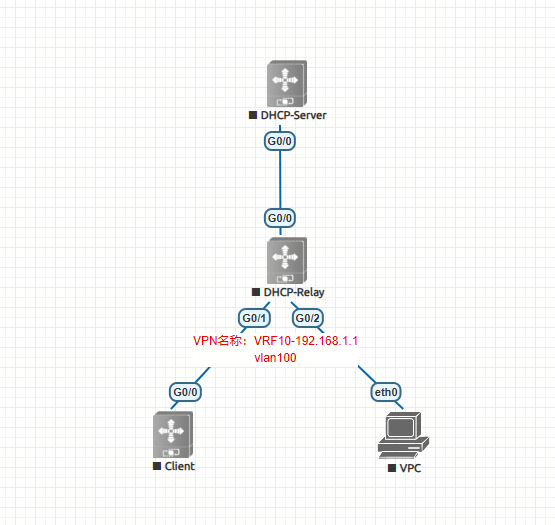
组网如上图:
Dhcp服务器和dhcp中继设备,dhcp中继设备下行接口有VPN,上行接口无VPN
二 设备配置
2.1 dhcp-server查看
hostname dhcp-server
!
service dhcp
ip dhcp excluded-address 192.168.1.1 192.168.1.200
ip dhcp excluded-address 192.168.1.201 192.168.1.250
!
ip dhcp pool vlan100
network 192.168.1.0 255.255.255.0
dns-server 202.106.0.20
default-router 192.168.1.1
!
interface GigabitEthernet 0/0
no switchport
ip address 1.1.1.1 255.255.255.0
!
ip route 192.168.1.0 255.255.255.0 1.1.1.2
!
2.2 dhcp-relay查看
hostname dhcp-relay
!
ip vrf VRF10
rd 10:10
!
service dhcp
!
vlan range 1,100
!
interface GigabitEthernet 0/0
no switchport
ip address 1.1.1.2 255.255.255.0
!
interface GigabitEthernet 0/1
switchport access vlan 100
!
interface GigabitEthernet 0/2
switchport access vlan 100
!
interface VLAN 100
ip vrf forwarding VRF10
ip address 192.168.1.1 255.255.255.0
ip helper-address 1.1.1.1
!
!
ip route 192.168.1.0 255.255.255.0 VLAN 100 //配置vrf间路由,不需要写下一跳地址
ip route vrf VRF10 1.1.1.0 255.255.255.0 GigabitEthernet 0/0
!
2.3 dhcp-client地址查看(因为VRF本地有意义,客户端侧VRF可添加,也可以不添加)
hostname dhcp-client
!
interface GigabitEthernet 0/0
no switchport
ip address dhcp
!
2.4 dhcp-client和VPC状态查看
dhcp-client#sh ip in b
Interface IP-Address(Pri) IP-Address(Sec) Status Protocol
GigabitEthernet 0/0 192.168.1.252/24 no address up up
dhcp-client#
dhcp-client#
localhost:~# ifconfig
eth0 Link encap:Ethernet HWaddr 50:00:00:04:00:00
inet addr:192.168.1.251 Bcast:0.0.0.0 Mask:255.255.255.0
inet6 addr: fe80::5200:ff:fe04:0/64 Scope:Link
UP BROADCAST RUNNING MULTICAST MTU:1500 Metric:1
RX packets:47 errors:0 dropped:0 overruns:0 frame:0
TX packets:53 errors:0 dropped:0 overruns:0 carrier:0
collisions:0 txqueuelen:1000
RX bytes:11638 (11.3 KiB) TX bytes:14077 (13.7 KiB)
lo Link encap:Local Loopback
inet addr:127.0.0.1 Mask:255.0.0.0
inet6 addr: ::1/128 Scope:Host
UP LOOPBACK RUNNING MTU:65536 Metric:1
RX packets:0 errors:0 dropped:0 overruns:0 frame:0
TX packets:0 errors:0 dropped:0 overruns:0 carrier:0
collisions:0 txqueuelen:1000
RX bytes:0 (0.0 B) TX bytes:0 (0.0 B)
localhost:~#
三 设备状态查看与业务测试
3.1 dhcp-client内部和互联网访问测试
dhcp-client#
dhcp-client#
dhcp-client#sh ip in b
Interface IP-Address(Pri) IP-Address(Sec) Status Protocol
GigabitEthernet 0/0 192.168.1.252/24 no address up up
dhcp-client#
dhcp-client#ping 192.168.1.251
Sending 5, 100-byte ICMP Echoes to 192.168.1.251, timeout is 2 seconds:
< press Ctrl+C to break >
!!!!!
Success rate is 100 percent (5/5), round-trip min/avg/max = 1/13/60 ms.
dhcp-client#
dhcp-client#ping 1.1.1.1
Sending 5, 100-byte ICMP Echoes to 1.1.1.1, timeout is 2 seconds:
< press Ctrl+C to break >
!!!!!
Success rate is 100 percent (5/5), round-trip min/avg/max = 3/4/6 ms.
dhcp-client#
dhcp-client#traceroute 1.1.1.1 source 192.168.1.251
< press Ctrl+C to break >
Tracing the route to 1.1.1.1
1 1.1.1.1 3 msec 2 msec 4 msec
dhcp-client#
3.2 VPC内部和互联网访问测试
localhost:~# ifconfig
eth0 Link encap:Ethernet HWaddr 50:00:00:04:00:00
inet addr:192.168.1.251 Bcast:0.0.0.0 Mask:255.255.255.0
inet6 addr: fe80::5200:ff:fe04:0/64 Scope:Link
UP BROADCAST RUNNING MULTICAST MTU:1500 Metric:1
RX packets:211 errors:0 dropped:0 overruns:0 frame:0
TX packets:216 errors:0 dropped:0 overruns:0 carrier:0
collisions:0 txqueuelen:1000
RX bytes:27626 (26.9 KiB) TX bytes:29879 (29.1 KiB)
lo Link encap:Local Loopback
inet addr:127.0.0.1 Mask:255.0.0.0
inet6 addr: ::1/128 Scope:Host
UP LOOPBACK RUNNING MTU:65536 Metric:1
RX packets:0 errors:0 dropped:0 overruns:0 frame:0
TX packets:0 errors:0 dropped:0 overruns:0 carrier:0
collisions:0 txqueuelen:1000
RX bytes:0 (0.0 B) TX bytes:0 (0.0 B)
localhost:~#
localhost:~# ping 192.168.1.252
PING 192.168.1.223 (192.168.1.252): 56 data bytes
64 bytes from 192.168.1.252: seq=0 ttl=64 time=0.143 ms
64 bytes from 192.168.1.252: seq=1 ttl=64 time=0.045 ms
^C
--- 192.168.1.252 ping statistics ---
2 packets transmitted, 2 packets received, 0% packet loss
round-trip min/avg/max = 0.045/0.094/0.143 ms
localhost:~#
localhost:~#
localhost:~# traceroute 1.1.1.1
traceroute to 1.1.1.1 (1.1.1.1), 30 hops max, 46 byte packets
1 1.1.1.1 (1.1.1.1) 2.588 ms 4.714 ms 3.109 ms
localhost:~#
3.3 dhcp-server分配地址查看可以看到已经分配
dhcp-server#show ip dhcp pool
Pool name Total Distributed Remained Percentage
vlan100 4 2 2 50.00000
dhcp-server#