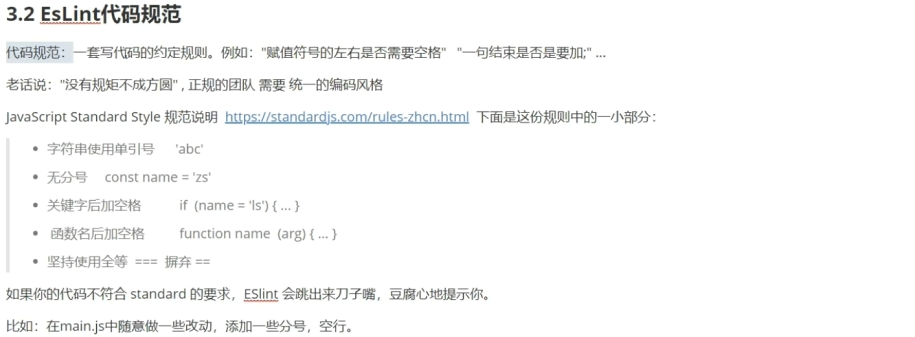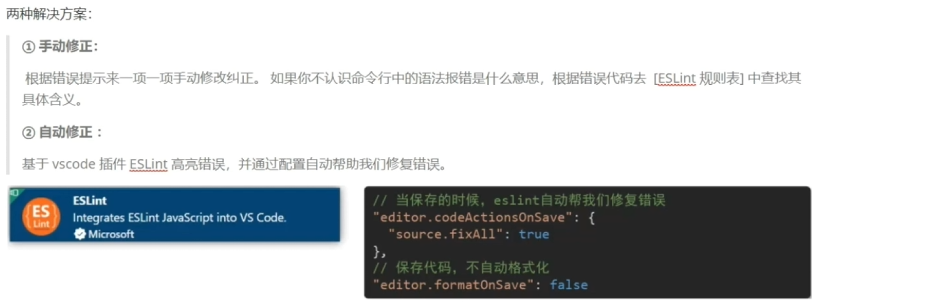
<template>
  <div>
    <div>
      <a href="#/find">发现音乐</a>
      <a href="#/mymusic">我的音乐</a>
      <a href="#/myfriend">我的朋友</a>
    </div>
    <div>
      <router-view></router-view>
    </div>
  </div>
</template>

<script>
import FindMusicVue from './views/FindMusic.vue'
import MyFriendVue from './views/MyFriend.vue'
import MyMusicVue from './views/MyMusic.vue'
export default {
FindMusicVue,
MyFriendVue,
MyMusicVue
}
</script>

<style>

</style>

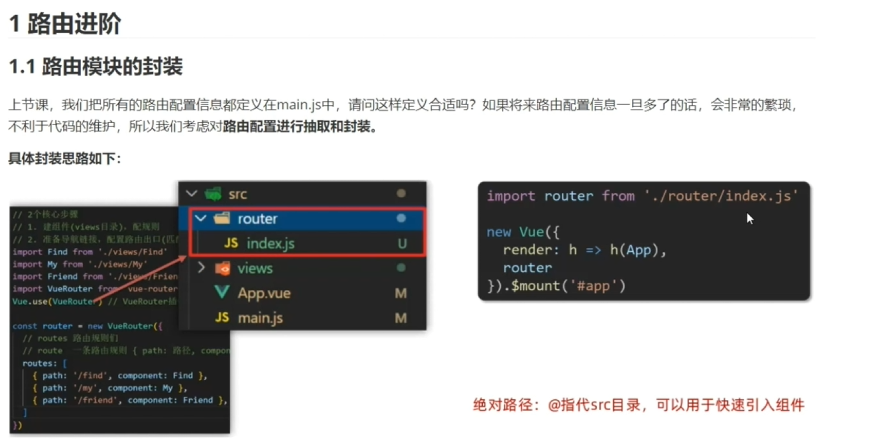
import Vue from 'vue';
//引入vueRouter的插件
import VueRouter from 'vue-router';
//在项目中进行插件的初始化
Vue.use(VueRouter);
//创建路由对象
Vue.config.productionTip = false

//要做的两个核心步骤:
//1.创建vues目录定义子组件,并在main.js里面进行导入
// import FindMusic from '../views/FindMusic.vue';
// import MyFriend from '../views/MyFriend.vue';
// import MyMusic from '../views/MyMusic.vue';

//绝对路径写法: @相对于src
import FindMusic from '@/views/FindMusic.vue'
import MyMusic from '@/views/MyMusic.vue'
import MyFriend from '@/views/MyFriend.vue'

//2.创建路由对象
let router = new VueRouter({
// 定义路由关系,就是资源路径和子组件的映射关系
// path:描述路径资源,component:组件
routes:[
  {path:'/find',component:FindMusic},
  {path:'/mymusic',component:MyMusic},
  {path:'/myfriend',component:MyFriend},
]
})
//对外暴露路由对象
export default router;

import Vue from 'vue'
import App from './App.vue'
import router from './routes'
new Vue({
  render: h => h(App),
  router,
}).$mount('#app')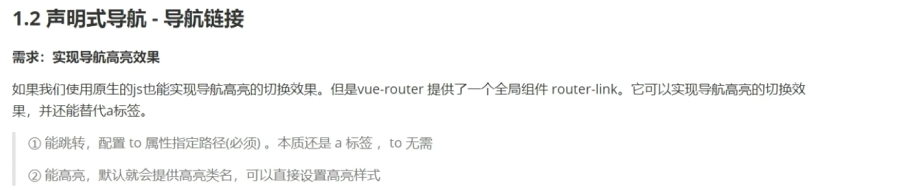
被选中的组件会多一个router-link-exact-active类,可以通过操作这个类来对被选中的效果进行操作
<template>
  <div>
    <div>
      <router-link to="/find">发现音乐</router-link>
      <router-link to="/mymusic">我的音乐</router-link>
      <router-link to="/myfriend">我的朋友</router-link>
    </div>
    <div>
      <router-view></router-view>
    </div>
  </div>
</template>

<script>
import FindMusicVue from './views/FindMusic.vue'
import MyFriendVue from './views/MyFriend.vue'
import MyMusicVue from './views/MyMusic.vue'
export default {
FindMusicVue,
MyFriendVue,
MyMusicVue
}
</script>

<style>
.router-link-exact-active{
  background-color: skyblue;
}
</style>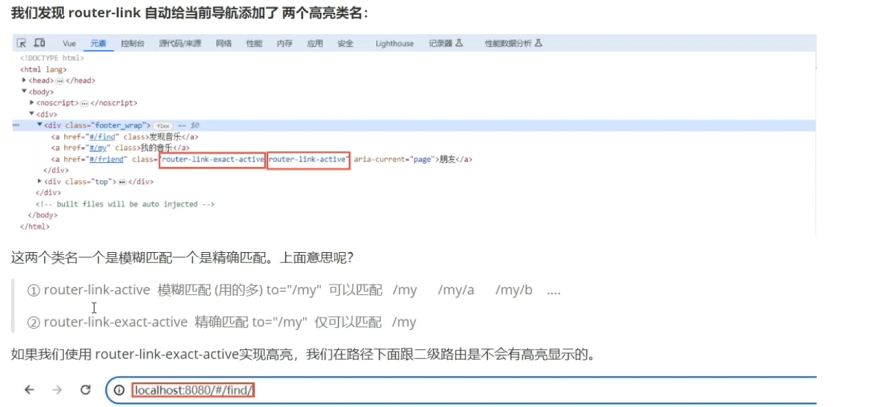
<template>
  <div class="home">
    <div class="logo-box"></div>
    <div class="search-box">
      <input type="text">
      <button>搜索一下</button>
    </div>
    <div class="hot-link">
      热门搜索:
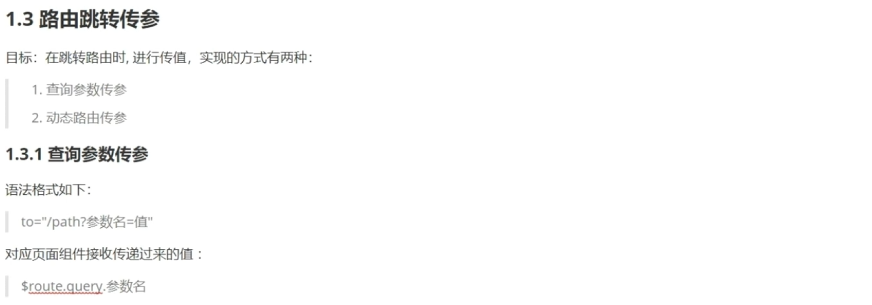
      <router-link to="/search?key=Vue从入门到放弃">Vue从入门到放弃</router-link>
      <router-link to="/search?key=react从入门到放弃">react从入门到放弃</router-link>
      <router-link to="/search?key=精通前端">精通前端</router-link>
    </div>
  </div>
</template>

<script>
export default {
  name: 'FindMusic'
}
</script>

<style>
.logo-box {
  height: 150px;
  background: url('@/assets/logo.jpeg') no-repeat center;
}
.search-box {
  display: flex;
  justify-content: center;
}
.search-box input {
  width: 400px;
  height: 30px;
  line-height: 30px;
  border: 2px solid #c4c7ce;
  border-radius: 4px 0 0 4px;
  outline: none;
}
.search-box input:focus {
  border: 2px solid #ad2a26;
}
.search-box button {
  width: 100px;
  height: 36px;
  border: none;
  background-color: #ad2a26;
  color: #fff;
  position: relative;
  left: -2px;
  border-radius: 0 4px 4px 0;
}
.hot-link {
  width: 508px;
  height: 60px;
  line-height: 60px;
  margin: 0 auto;
}
.hot-link a {
  margin: 0 5px;
}
</style>

<template>
  <div class="search">
    <p>搜索关键字: {{ $route.query.key }} </p>
    <p>搜索结果: </p>
    <ul>
      <li>.............</li>
      <li>.............</li>
      <li>.............</li>
      <li>.............</li>
    </ul>
  </div>
</template>

<script>
export default {
  name: 'MyFriend',
  created () {
    // 在created中,获取路由参数
    // this.$route.query.参数名 获取
    console.log(this.$route.query.key);
  }
}
</script>

<style>
.search {
  width: 400px;
  height: 240px;
  padding: 0 20px;
  margin: 0 auto;
  border: 2px solid #c4c7ce;
  border-radius: 5px;
}
</style>

<template>
  <div id="app">
    <div class="link">
      <router-link to="/home">首页</router-link>
      <router-link to="/search">搜索页</router-link>
    </div>

    <router-view></router-view>
  </div>
</template>

<script>
export default {};
</script>

<style scoped>
.link {
  height: 50px;
  line-height: 50px;
  background-color: #495150;
  display: flex;
  margin: -8px -8px 0 -8px;
  margin-bottom: 50px;
}
.link a {
  display: block;
  text-decoration: none;
  background-color: #ad2a26;
  width: 100px;
  text-align: center;
  margin-right: 5px;
  color: #fff;
  border-radius: 5px;
}
</style>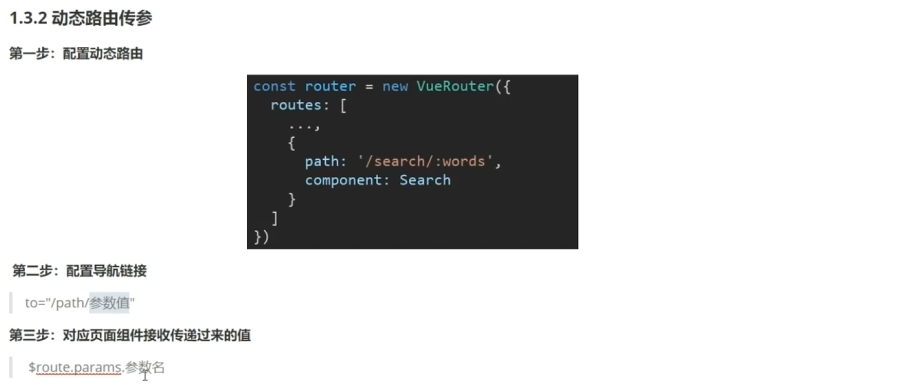
import Home from '@/views/Home'
import Search from '@/views/Search'
import Vue from 'vue'
import VueRouter from 'vue-router'
Vue.use(VueRouter) // VueRouter插件初始化

// 创建了一个路由对象
const router = new VueRouter({
  routes: [
    { path: '/home', component: Home },
    { path: '/search/:words', component: Search }
  ]
})

export default router

<template>
  <div class="home">
    <div class="logo-box"></div>
    <div class="search-box">
      <input type="text">
      <button>搜索一下</button>
    </div>
    <div class="hot-link">
      热门搜索:
      <!-- 使用路径拼接方式进行传参
      <router-link to="/search?key=Vue从入门到放弃">Vue从入门到放弃</router-link>
      <router-link to="/search?key=react从入门到放弃">react从入门到放弃</router-link>
      <router-link to="/search?key=精通前端">精通前端</router-link> -->
      <!-- 动态传参 -->
      <router-link to="/search/Vue从入门到放弃">Vue从入门到放弃</router-link>
      <router-link to="/search/react从入门到放弃">react从入门到放弃</router-link>
      <router-link to="/search/精通前端">精通前端</router-link>
    </div>
  </div>
</template>

<script>
export default {
  name: 'FindMusic'
}
</script>

<style>
.logo-box {
  height: 150px;
  background: url('@/assets/logo.jpeg') no-repeat center;
}
.search-box {
  display: flex;
  justify-content: center;
}
.search-box input {
  width: 400px;
  height: 30px;
  line-height: 30px;
  border: 2px solid #c4c7ce;
  border-radius: 4px 0 0 4px;
  outline: none;
}
.search-box input:focus {
  border: 2px solid #ad2a26;
}
.search-box button {
  width: 100px;
  height: 36px;
  border: none;
  background-color: #ad2a26;
  color: #fff;
  position: relative;
  left: -2px;
  border-radius: 0 4px 4px 0;
}
.hot-link {
  width: 508px;
  height: 60px;
  line-height: 60px;
  margin: 0 auto;
}
.hot-link a {
  margin: 0 5px;
}
</style>

<template>
  <div class="search">
    <!--
    如果我们使用路径拼接参数,在目标组件内部,可以使用$route.query.参数名称获取路径上携带的参数

    如果我们使用动态路由方式,在vue实例内部,可以使用$route.params.参数名称获取路径上携带的参数

     -->
    <p>搜索关键字: {{ $route.params.words }} </p>
    <p>搜索结果: </p>
    <ul>
      <li>.............</li>
      <li>.............</li>
      <li>.............</li>
      <li>.............</li>
    </ul>
  </div>
</template>

<script>
export default {
  name: 'MyFriend',
  created () {
    // 在created中,获取路由参数
    // this.$route.query.参数名 获取
    console.log(this.$route.query.key);
  }
}
</script>

<style>
.search {
  width: 400px;
  height: 240px;
  padding: 0 20px;
  margin: 0 auto;
  border: 2px solid #c4c7ce;
  border-radius: 5px;
}
</style>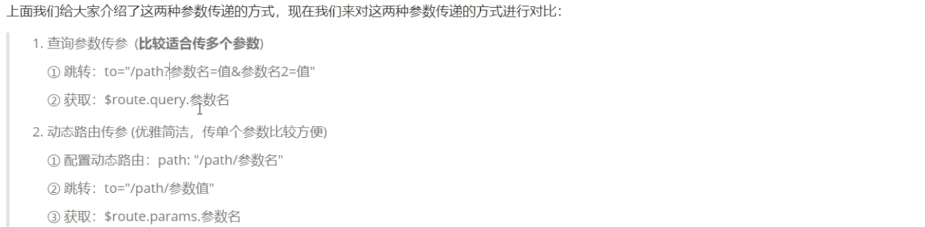
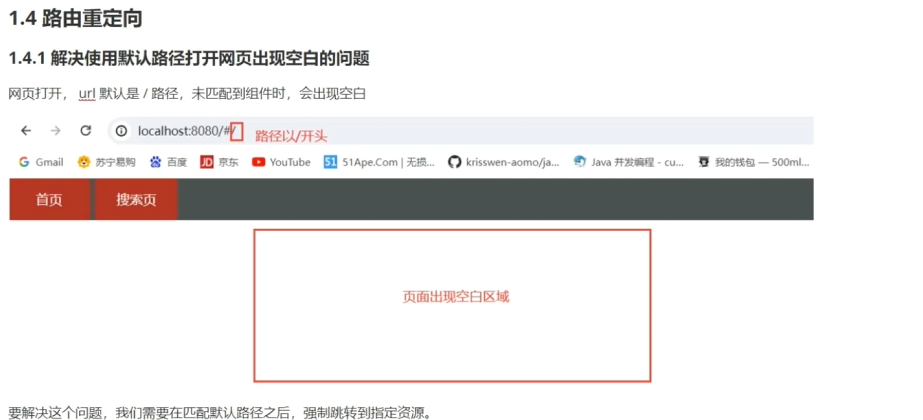
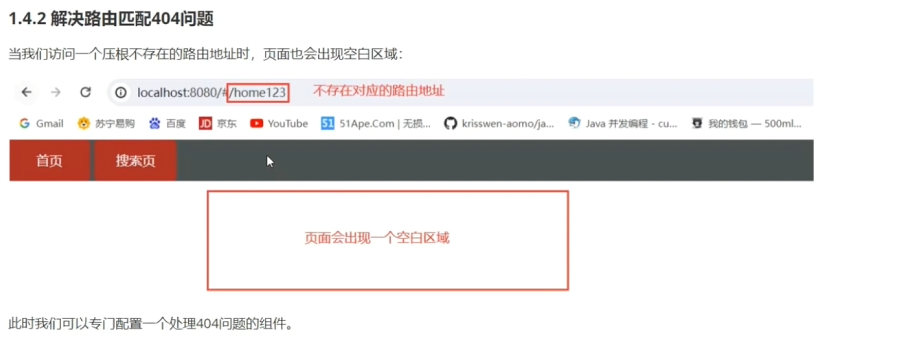

import Home from '@/views/Home'
import Search from '@/views/Search'
import Vue from 'vue'
import NotFound from '@/views/NotFound'
import VueRouter from 'vue-router'
Vue.use(VueRouter) // VueRouter插件初始化

// 创建了一个路由对象
const router = new VueRouter({
  routes: [
    // redirect:如果我们请求的资源路径以/开头,那么就重定向到home组件
    { path:'/',redirect: '/home' },
    { path: '/home', component: Home },
    { path: '/search/:words?', component: Search },
    // ?表示当前参数是可选的,也就是说可以传空白参数
    { path:'/*',component:NotFound}
    // 匹配任意的路径都没有组件映射
  ],
  mode:'history',
  //默认是hash,代表资源路径上会有#的标识,可以使用history模式
  //这样资源路径上就不会有#标识
})

export default router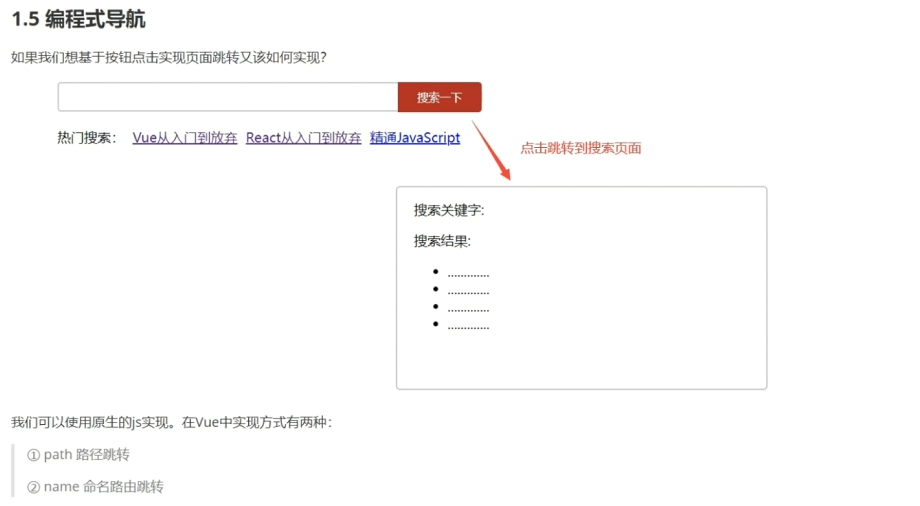
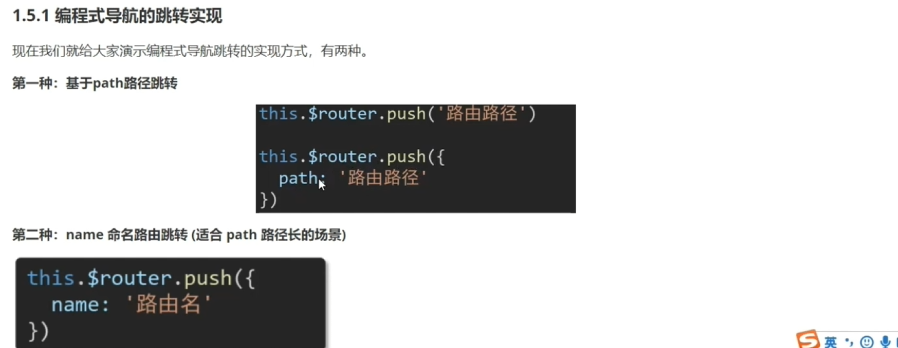
{ name:'search',path: '/search/:words?', component: Search //对路径取名字
<template>
  <div class="home">
    <div class="logo-box"></div>
    <div class="search-box">
      <input type="text">
      <button @click="goSearch()">搜索一下</button>
    </div>
    <div class="hot-link">
      热门搜索:
      <!-- 使用路径拼接方式进行传参
      <router-link to="/search?key=Vue从入门到放弃">Vue从入门到放弃</router-link>
      <router-link to="/search?key=react从入门到放弃">react从入门到放弃</router-link>
      <router-link to="/search?key=精通前端">精通前端</router-link> -->
      <!-- 动态传参 -->
      <router-link to="/search/Vue从入门到放弃">Vue从入门到放弃</router-link>
      <router-link to="/search/react从入门到放弃">react从入门到放弃</router-link>
      <router-link to="/search/精通前端">精通前端</router-link>
    </div>
  </div>
</template>

<script>
export default {
  name: 'FindMusic',
  methods:{
    //基于path路径进行跳转
    //1.1 this.$router.push(路径名),简写
    //1.2 基于路由命名的方式,给path起名字,适合path路径特别长的场景
    goSearch(){
      // this.$router.push({
      //   path: '/search',
      // });
      this.$router.push({
        name:'search'
      });
    }
  }
}
</script>

<style>
.logo-box {
  height: 150px;
  background: url('@/assets/logo.jpeg') no-repeat center;
}
.search-box {
  display: flex;
  justify-content: center;
}
.search-box input {
  width: 400px;
  height: 30px;
  line-height: 30px;
  border: 2px solid #c4c7ce;
  border-radius: 4px 0 0 4px;
  outline: none;
}
.search-box input:focus {
  border: 2px solid #ad2a26;
}
.search-box button {
  width: 100px;
  height: 36px;
  border: none;
  background-color: #ad2a26;
  color: #fff;
  position: relative;
  left: -2px;
  border-radius: 0 4px 4px 0;
}
.hot-link {
  width: 508px;
  height: 60px;
  line-height: 60px;
  margin: 0 auto;
}
.hot-link a {
  margin: 0 5px;
}
</style>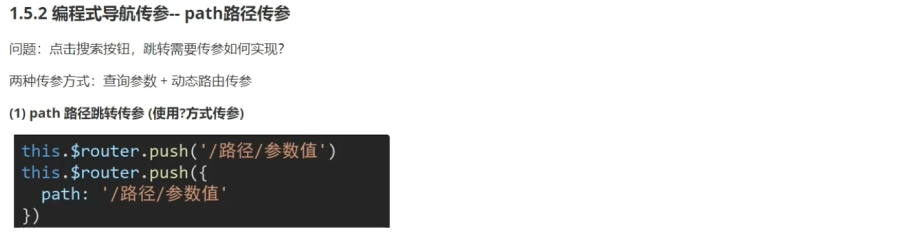
<template>
  <div class="home">
    <div class="logo-box"></div>
    <div class="search-box">
      <input type="text" v-model="inputValue">
      <button @click="goSearch()">搜索一下</button>
    </div>
    <div class="hot-link">
      热门搜索:
      <!-- 使用路径拼接方式进行传参
      <router-link to="/search?key=Vue从入门到放弃">Vue从入门到放弃</router-link>
      <router-link to="/search?key=react从入门到放弃">react从入门到放弃</router-link>
      <router-link to="/search?key=精通前端">精通前端</router-link> -->
      <!-- 动态传参 -->
      <router-link to="/search/Vue从入门到放弃">Vue从入门到放弃</router-link>
      <router-link to="/search/react从入门到放弃">react从入门到放弃</router-link>
      <router-link to="/search/精通前端">精通前端</router-link>
    </div>
  </div>
</template>

<script>
export default {
  name: 'FindMusic',
  methods:{
    //基于path路径进行跳转
    //1.1 this.$router.push(路径名),简写
    //1.2 基于路由命名的方式,给path起名字,适合path路径特别长的场景
    goSearch(){
      // this.$router.push({
      //   path: '/search',
      // });

      // this.$router.push({
      //   name:'search'
      // });

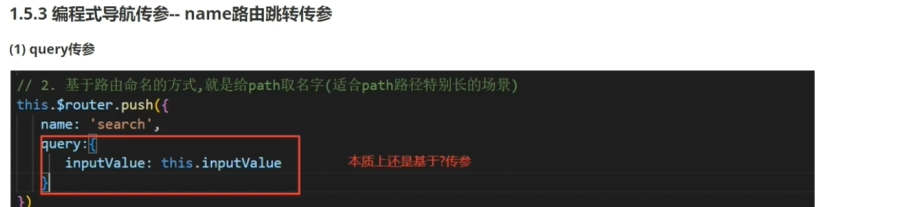
      // this.$router.push(`/search?val=${this.inputValue}`);

      // this.$router.push({
      //   name: 'search',
      //   query:{
      //   val: this.inputValue,
      //   }
      //   })

      // 用/传参
      this.$router.push({
        name:'search',//只能使用name
        params:{
          val:this.inputValue,
        }
      })

      // this.$router.push({
      //   path:`search/${this.inputValue}`
      // })
      //只有这两个用params


    }
  },
  data(){
    return{
      inputValue:"",
    }
  }
}
</script>

<style>
.logo-box {
  height: 150px;
  background: url('@/assets/logo.jpeg') no-repeat center;
}
.search-box {
  display: flex;
  justify-content: center;
}
.search-box input {
  width: 400px;
  height: 30px;
  line-height: 30px;
  border: 2px solid #c4c7ce;
  border-radius: 4px 0 0 4px;
  outline: none;
}
.search-box input:focus {
  border: 2px solid #ad2a26;
}
.search-box button {
  width: 100px;
  height: 36px;
  border: none;
  background-color: #ad2a26;
  color: #fff;
  position: relative;
  left: -2px;
  border-radius: 0 4px 4px 0;
}
.hot-link {
  width: 508px;
  height: 60px;
  line-height: 60px;
  margin: 0 auto;
}
.hot-link a {
  margin: 0 5px;
}
</style>