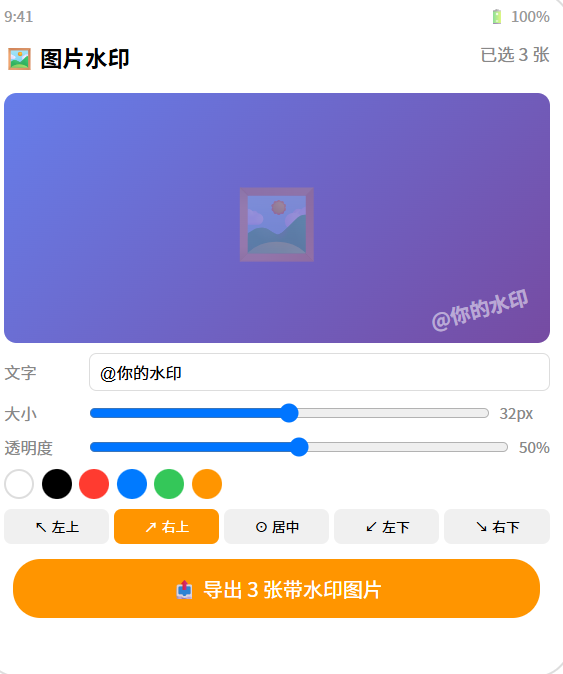
// pages/Index.ets --- 图片水印工具
import image from '@ohos.multimedia.image';
import picker from '@ohos.file.picker';
import fileIo from '@ohos.file.fs';

@Entry
@Component
struct WatermarkTool {
  @State selectedImages: string[] = [];
  @State watermarkText: string = '@你的水印';
  @State fontSize: number = 32;
  @State opacity: number = 0.5;
  @State position: string = 'bottomRight';
  @State color: string = '#FFFFFF';
  @State rotation: number = 0;
  @State previewUri: string = '';
  @State isProcessing: boolean = false;
  @State progress: number = 0;

  private ctx!: CanvasRenderingContext2D;

  private positions = [
    { key: 'topLeft', label: '↖ 左上' },
    { key: 'topRight', label: '↗ 右上' },
    { key: 'center', label: '⊙ 居中' },
    { key: 'bottomLeft', label: '↙ 左下' },
    { key: 'bottomRight', label: '↘ 右下' },
  ];

  // ======== 选择图片 ========
  async selectImages() {
    try {
      const photoPicker = new picker.PhotoViewPicker();
      const result = await photoPicker.select({
        MIMEType: picker.PhotoViewMIMETypes.IMAGE_TYPE,
        maxSelectNumber: 10
      });
      this.selectedImages = result.photoUris;
      if (this.selectedImages.length > 0) {
        this.previewUri = this.selectedImages[0];
        this.renderPreview();
      }
    } catch {}
  }

  // ======== 渲染预览 ========
  async renderPreview() {
    if (!this.ctx || !this.previewUri) return;
    const ctx = this.ctx;
    const w = 320, h = 320;
    ctx.clearRect(0, 0, w, h);

    // 绘制原图
    const imgSource = image.createImageSource(this.previewUri);
    const pixelMap = await imgSource.createPixelMap();
    const info = await imgSource.getImageInfo();
    const scale = Math.min(w / info.size.width, h / info.size.height);
    const drawW = info.size.width * scale;
    const drawH = info.size.height * scale;
    const dx = (w - drawW) / 2, dy = (h - drawH) / 2;

    const source = image.createImageSource(this.previewUri);
    // 简化:直接用 Canvas 绘制
    ctx.drawImage(this.previewUri, dx, dy, drawW, drawH);

    // 叠加水印
    this.drawWatermark(ctx, w, h);
  }

  // ======== 绘制水印 ========
  drawWatermark(ctx: CanvasRenderingContext2D, canvasW: number, canvasH: number) {
    ctx.save();
    ctx.globalAlpha = this.opacity;
    ctx.font = `${this.fontSize}px sans-serif`;
    ctx.fillStyle = this.color;

    // 计算位置
    const textWidth = ctx.measureText(this.watermarkText).width;
    const textHeight = this.fontSize;
    const margin = 20;
    let x = margin, y = margin + textHeight;

    switch (this.position) {
      case 'topLeft': x = margin; y = margin + textHeight; break;
      case 'topRight': x = canvasW - textWidth - margin; y = margin + textHeight; break;
      case 'center': x = (canvasW - textWidth) / 2; y = (canvasH + textHeight) / 2; break;
      case 'bottomLeft': x = margin; y = canvasH - margin; break;
      case 'bottomRight': x = canvasW - textWidth - margin; y = canvasH - margin; break;
    }

    // 旋转
    if (this.rotation !== 0) {
      ctx.translate(x + textWidth / 2, y - textHeight / 2);
      ctx.rotate(this.rotation * Math.PI / 180);
      ctx.translate(-(x + textWidth / 2), -(y - textHeight / 2));
    }

    // 描边增强可读性
    ctx.strokeStyle = 'rgba(0,0,0,0.5)';
    ctx.lineWidth = 2;
    ctx.strokeText(this.watermarkText, x, y);
    ctx.fillText(this.watermarkText, x, y);
    ctx.restore();
  }

  // ======== 导出单张 ========
  async exportSingle(uri: string) {
    try {
      // 读取原图
      const src = image.createImageSource(uri);
      const pixelMap = await src.createPixelMap();

      // 在 Canvas 上绘制原图 + 水印
      // 省略具体 Canvas 导出代码...

      // 保存
      const fileName = `watermark_${Date.now()}.jpg`;
      const outPath = getContext(this).filesDir + '/' + fileName;

      const packer = image.createImagePacker();
      const packed = await packer.packing(pixelMap, { format: 'image/jpeg', quality: 95 });
      const file = fileIo.openSync(outPath, fileIo.OpenMode.CREATE | fileIo.OpenMode.READ_WRITE);
      fileIo.writeSync(file.fd, packed.data);
      fileIo.closeSync(file);

      return outPath;
    } catch (err) {
      console.error('导出失败:', JSON.stringify(err));
      return null;
    }
  }

  // ======== 批量导出 ========
  async batchExport() {
    if (this.selectedImages.length === 0) return;
    this.isProcessing = true;
    this.progress = 0;

    for (let i = 0; i < this.selectedImages.length; i++) {
      await this.exportSingle(this.selectedImages[i]);
      this.progress = Math.round(((i + 1) / this.selectedImages.length) * 100);
    }

    this.isProcessing = false;
    AlertDialog.show({ message: `✅ 已处理 ${this.selectedImages.length} 张图片` });
  }

  build() {
    Column() {
      // 标题
      Text('🖼️ 图片水印工具').fontSize(24).fontWeight(FontWeight.Bold).margin({ top: 12 })

      // 选择图片
      Button('📁 选择图片').width('90%').height(44).backgroundColor('#007AFF').fontColor('#fff')
        .borderRadius(22).margin({ top: 8 })
        .onClick(() => { this.selectImages(); })

      if (this.selectedImages.length > 0) {
        Text(`已选 ${this.selectedImages.length} 张`).fontSize(14).fontColor('#888').margin({ top: 4 })

        // 预览
        Canvas(this.ctx).width(320).height(320).backgroundColor('#F0F0F0')
          .borderRadius(12).margin({ top: 8 })

        // 水印设置
        Scroll() {
          Column() {
            // 水印文字
            Text('✏️ 水印文字').fontSize(14).fontWeight(FontWeight.Bold).margin({ top: 12 })
            TextInput({ text: this.watermarkText }).width('100%').height(40)
              .backgroundColor('#F8F8F8').borderRadius(8).padding({ left: 12 })
              .onChange((v) => { this.watermarkText = v; setTimeout(() => this.renderPreview(), 200); })

            // 字号
            Row() {
              Text('字号:').fontSize(14).fontColor('#333').width(60)
              Slider({ value: this.fontSize, min: 12, max: 72, step: 2 }).width(200)
                .onChange((v) => { this.fontSize = v; this.renderPreview(); })
              Text(`${this.fontSize}px`).fontSize(14).fontColor('#007AFF').width(50)
            }.margin({ top: 8 })

            // 透明度
            Row() {
              Text('透明度:').fontSize(14).fontColor('#333').width(60)
              Slider({ value: this.opacity * 100, min: 0, max: 100, step: 5 }).width(200)
                .onChange((v) => { this.opacity = v / 100; this.renderPreview(); })
              Text(`${Math.round(this.opacity * 100)}%`).fontSize(14).fontColor('#007AFF').width(50)
            }

            // 位置
            Text('📍 位置').fontSize(14).fontWeight(FontWeight.Bold).margin({ top: 8 })
            Row() {
              ForEach(this.positions, (pos) => {
                Button(pos.label).fontSize(12).height(32)
                  .backgroundColor(this.position === pos.key ? '#007AFF' : '#F0F0F0')
                  .fontColor(this.position === pos.key ? '#fff' : '#333')
                  .borderRadius(16)
                  .onClick(() => { this.position = pos.key; this.renderPreview(); })
              })
            }.width('100%').gap(4)

            // 颜色
            Text('🎨 颜色').fontSize(14).fontWeight(FontWeight.Bold).margin({ top: 8 })
            Row() {
              ForEach(['#FFFFFF','#000000','#FF3B30','#007AFF','#34C759','#FF9500'], (c: string) => {
                Circle().width(28).height(28).fill(c)
                  .stroke(this.color === c ? '#333' : 'transparent').strokeWidth(3)
                  .onClick(() => { this.color = c; this.renderPreview(); })
              })
            }.width('100%').gap(6).justifyContent(FlexAlign.Center)
          }.width('94%').alignItems(HorizontalAlign.Start)
        }.layoutWeight(1).width('100%')

        // 导出按钮
        if (this.isProcessing) {
          Row() {
            LoadingProgress().width(20).height(20).color('#007AFF')
            Text(`处理中 ${this.progress}%`).fontSize(14).fontColor('#007AFF').margin({ left: 8 })
          }.padding(12)
        } else {
          Button(`📤 导出 ${this.selectedImages.length} 张带水印图片`)
            .width('90%').height(48).backgroundColor('#FF9500').fontColor('#fff')
            .borderRadius(24).fontSize(16).margin({ bottom: 12 })
            .onClick(() => { this.batchExport(); })
        }
      } else {
        Column() {
          Text('🖼️').fontSize(64)
          Text('选择要添加水印的图片').fontSize(16).fontColor('#999').margin({ top: 8 })
          Text('支持文字水印 + 图片水印').fontSize(14).fontColor('#bbb')
        }.layoutWeight(1).justifyContent(FlexAlign.Center).width('100%')
      }
    }
    .width('100%').height('100%').backgroundColor('#F8F9FA')
    .alignItems(HorizontalAlign.Center)
  }
}