项目简介
Regexxer 是经典的 Linux 正则表达式搜索替换工具,支持正则匹配、捕获组显示、单个/全部替换、替换对比高亮等功能。本项目将其从桌面应用迁移到鸿蒙平台,采用 Electron 核心功能 + 鸿蒙壳工程 的架构模式,基于纯前端实现(零外部依赖)。
欢迎加入开源鸿蒙 PC 社区:https://harmonypc.csdn.net/
欢迎在 PC 社区平台申请新建项目:https://atomgit.com/OpenHarmonyPCDeveloper
AtomGit 仓库地址:https://atomgit.com/OpenHarmonyPCDeveloper/ohos_regexxer_electron
核心功能
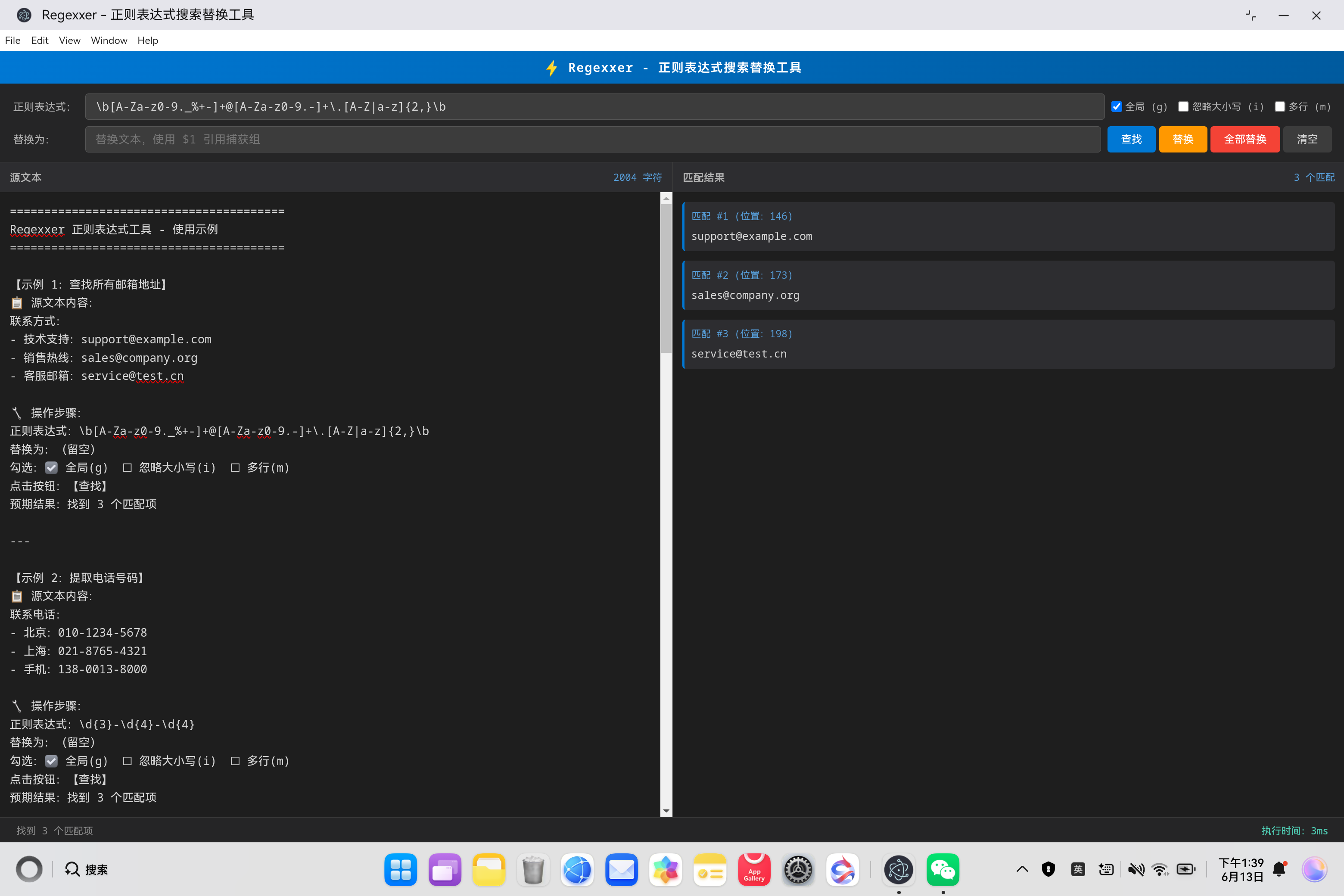
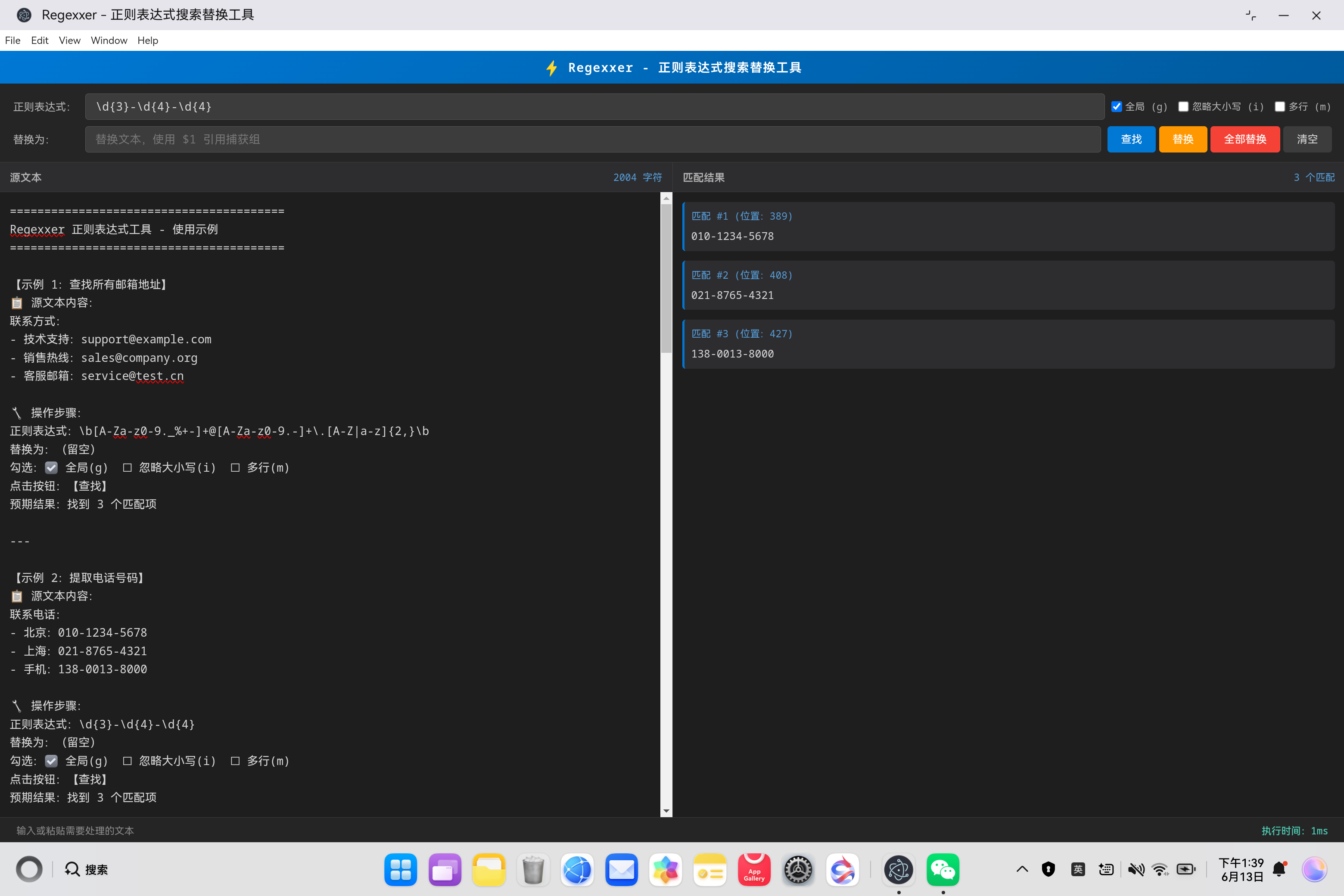
- 🔍 正则查找(支持全局搜索 g、忽略大小写 i、多行模式 m)
- 🎯 捕获组显示(自动提取 1, 2, $3 等捕获组内容)
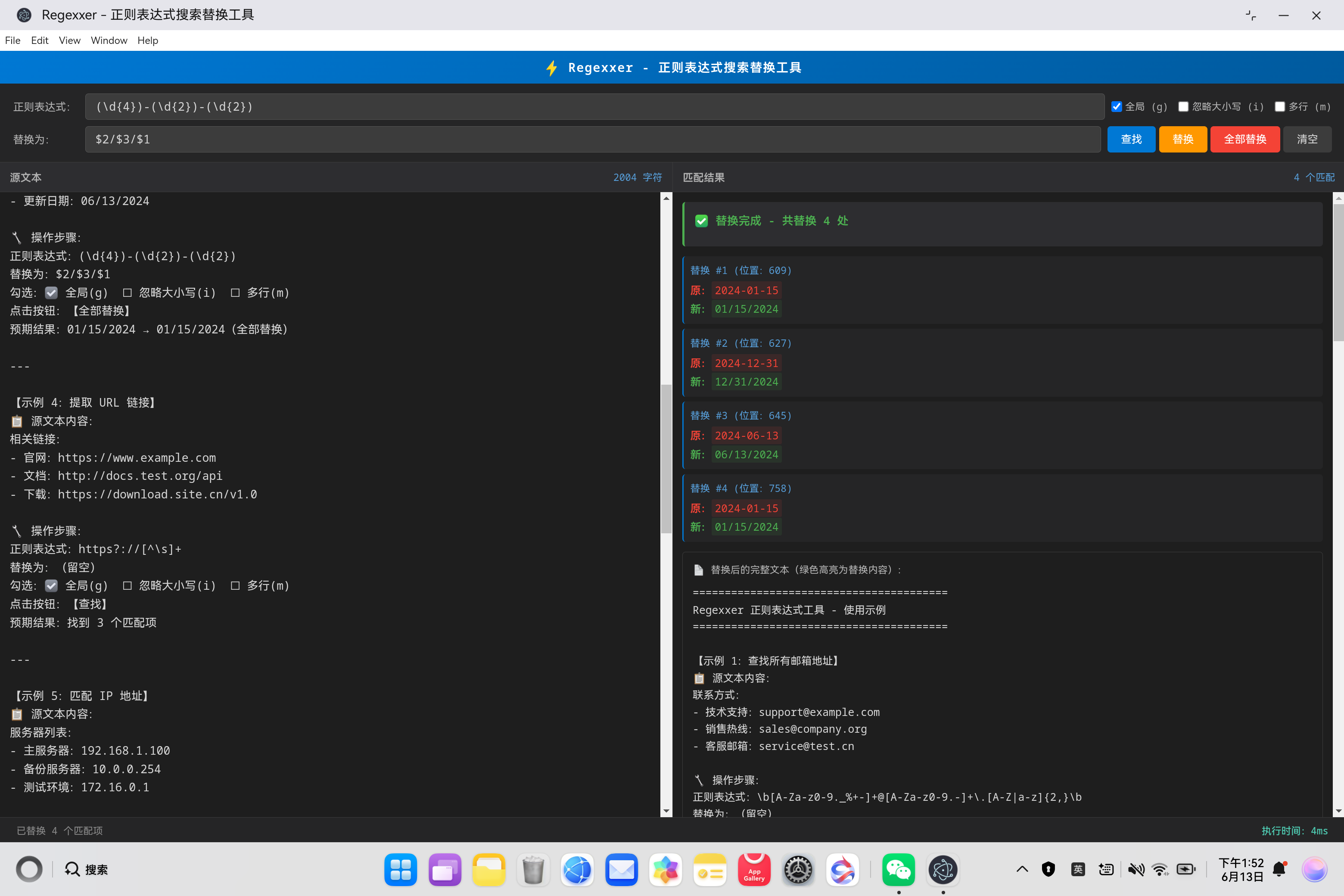
- 🔄 单个替换(替换第一个匹配项,支持捕获组引用)
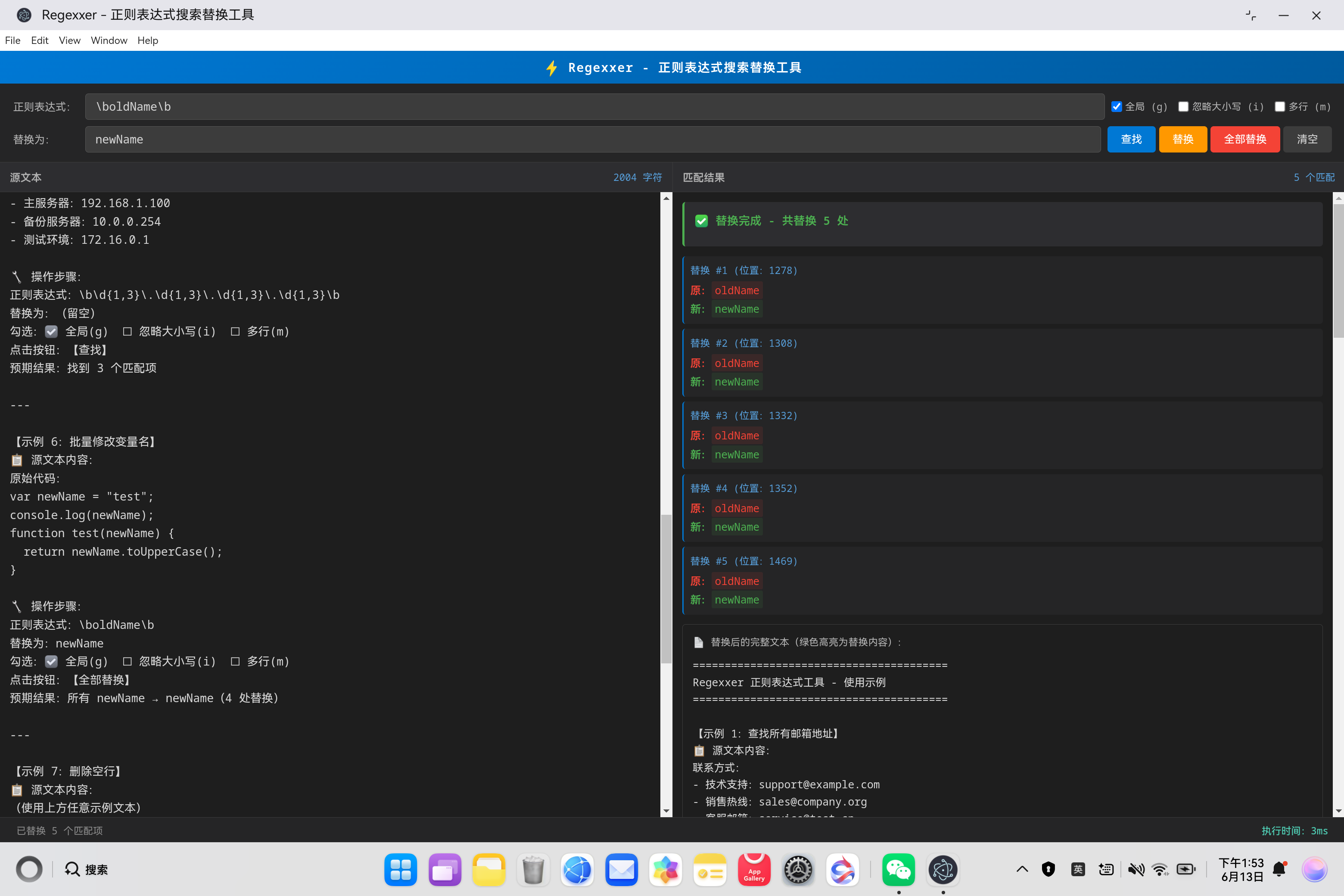
- ⚡ 全部替换(全局替换所有匹配项,实时统计替换数量)
- 📊 替换对比(清晰展示每个替换项的原值红色 → 新值绿色)
- 🌟 高亮显示(替换后的完整文本中,被替换内容绿色高亮标记)
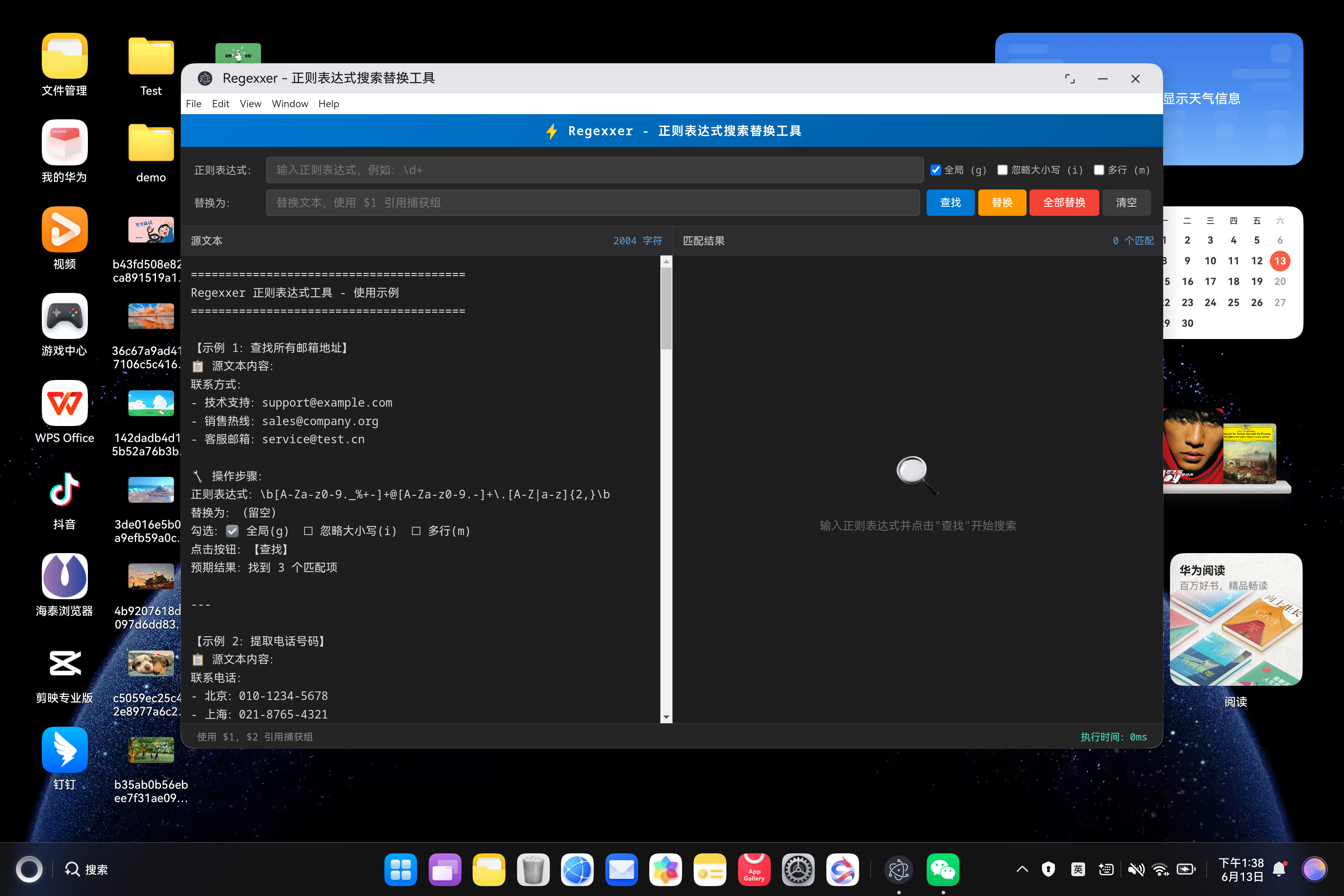
- 📝 示例文本(内置 8 个完整示例,包含操作步骤和预期结果)
- 🔄 自动恢复(重启应用后自动恢复示例文本,开箱即用)
- ⌨️ 快捷键(Ctrl+Enter 查找、Ctrl+H 替换、Ctrl+Shift+H 全部替换、Ctrl+L 清空)
- 📍 位置显示(每个匹配项显示在源文本中的位置索引)
- 🛡️ 防无限循环(零宽度匹配自动保护,避免 exec() 死循环)
- 🔒 XSS** 防护**(HTML 转义处理,防止恶意代码注入)
- ⚡ 性能监控(实时显示正则表达式执行时间,毫秒级)
- 🎨 暗色主题(VS Code 风格暗色界面,专业开发者体验)
一、技术架构
1.1 原始架构(Linux Desktop)
bash
Regexxer (GTK+ Desktop)
├── UI 渲染:GTK+ Widget
├── 正则引擎:PCRE (Perl Compatible Regular Expressions)
├── 文本处理:Glib 字符串操作
└── 文件系统:GIO
1.2 目标架构(鸿蒙 Electron)
bash
鸿蒙壳工程 (ArkTS)
└── web_engine 模块 (XComponent WebView)
    └── Electron 应用 (HTML/CSS/JavaScript)
        ├── main.js - Electron 主进程
        ├── renderer.js - 渲染进程(核心逻辑)
        ├── index.html - UI 界面
        ├── package.json - 项目配置
        └── regexxer.css - 样式文件
1.3 架构优势
- 纯前端实现:零外部依赖,仅使用原生 JavaScript RegExp API
- 快速开发:Web 技术栈,开发效率高
- 易于维护:UI 和业务逻辑分离
- 鸿蒙兼容:通过 WebView 桥接,避开 Native 兼容问题
- 自研替换引擎:支持捕获组引用、$& 完整匹配、防无限循环保护
二、环境准备
2.1 开发环境要求
- 操作系统:Windows 10
- 开发工具:DevEco Studio(鸿蒙官方 IDE)
- HarmonyOS SDK:API 23(6.1.1)
- Node.js:v20+(Electron 依赖)
2.2 项目结构
bash
ohos_hap/
└── web_engine/                   # 鸿蒙 web_engine 模块
    └── src/main/resources/
        └── resfile/resources/app/  # 部署目录
            ├── main.js           # Electron 主进程
            ├── renderer.js       # 渲染进程(核心逻辑)
            ├── index.html        # UI 界面
            ├── package.json      # 项目配置
            └── regexxer.css      # 样式文件
└── build-profile.json5           # 鸿蒙构建配置
三、核心适配流程
3.1 第一步:创建 Electron 主进程(main.js)
文件:web_engine/src/main/resources/resfile/resources/app/main.js
javascript
// Regexxer - Electron 主进程
// 正则表达式搜索替换工具(鸿蒙适配)

const { app, BrowserWindow, ipcMain, screen } = require('electron');
const path = require('path');

let mainWindow = null;

function createWindow() {
  console.log('Regexxer: 创建窗口...');

  const primaryDisplay = screen.getPrimaryDisplay();
  const { width: screenWidth, height: screenHeight } = primaryDisplay.workAreaSize;

  const windowWidth = Math.min(1200, Math.floor(screenWidth * 0.8));
  const windowHeight = Math.min(800, Math.floor(screenHeight * 0.85));

  mainWindow = new BrowserWindow({
    width: windowWidth,
    height: windowHeight,
    x: Math.floor((screenWidth - windowWidth) / 2),
    y: Math.floor((screenHeight - windowHeight) / 2),
    frame: true,
    transparent: false,
    alwaysOnTop: false,
    hasShadow: true,
    resizable: true,
    focusable: true,
    webPreferences: {
      nodeIntegration: true,
      contextIsolation: false,
      backgroundThrottling: false
    }
  });

  console.log('Regexxer: 正在加载 index.html:', path.join(__dirname, 'index.html'));
  mainWindow.loadFile(path.join(__dirname, 'index.html'));

  console.log('Regexxer: 窗口创建成功,尺寸:', windowWidth, 'x', windowHeight);

  mainWindow.on('closed', () => {
    console.log('Regexxer: 窗口已关闭');
    mainWindow = null;
  });

  mainWindow.webContents.on('did-finish-load', () => {
    console.log('Regexxer: 页面加载成功');
  });

  mainWindow.webContents.on('did-fail-load', (event, errorCode, errorDescription) => {
    console.error('Regexxer: 页面加载失败:', errorCode, errorDescription);
  });
}

app.whenReady().then(() => {
  createWindow();
  console.log('Regexxer 正则表达式工具已启动');
});

app.on('window-all-closed', () => {
  if (process.platform !== 'darwin') {
    app.quit();
  }
});

app.on('activate', () => {
  if (BrowserWindow.getAllWindows().length === 0) {
    createWindow();
  }
});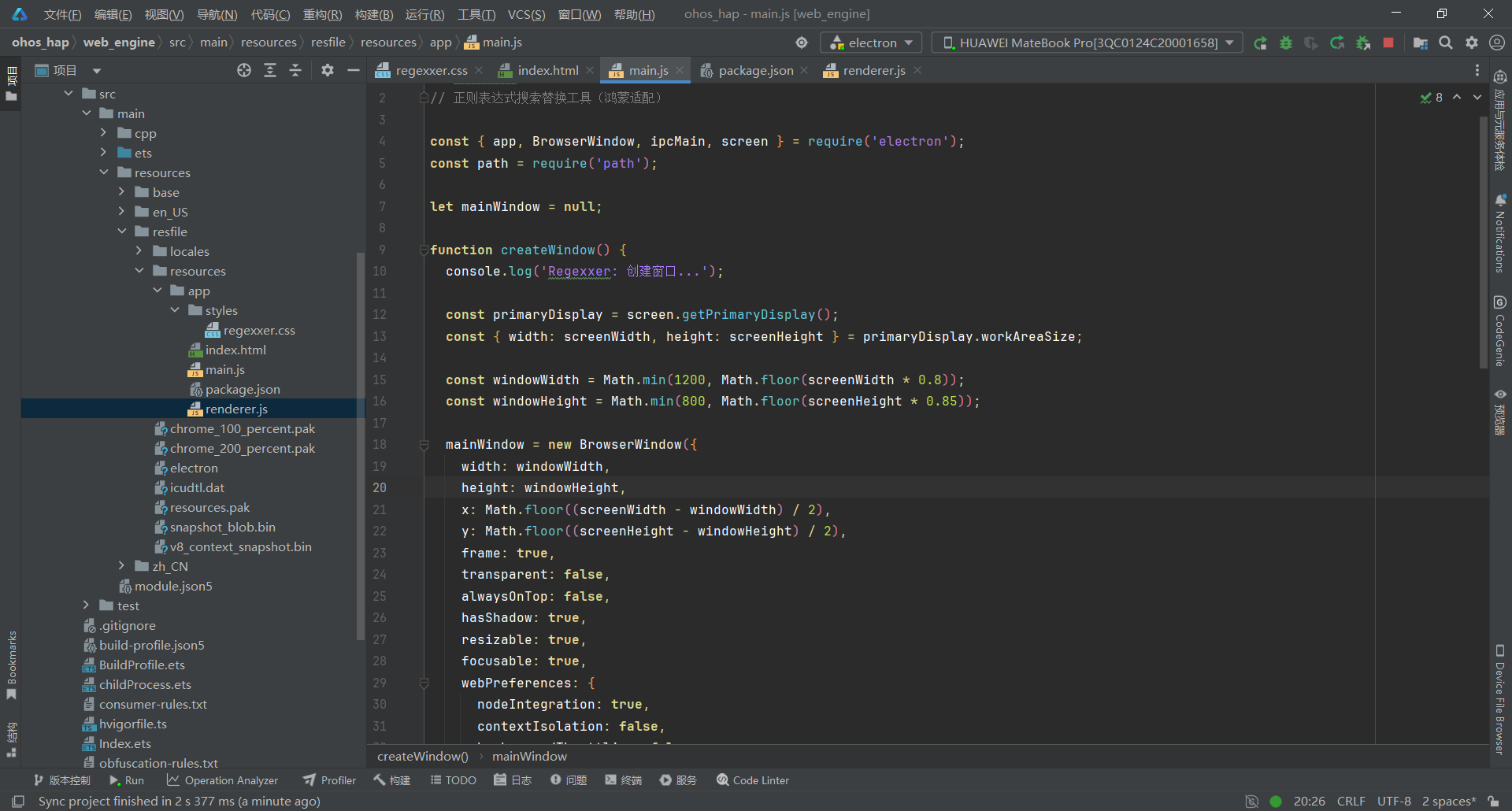
关键要点:
- 窗口尺寸动态计算(屏幕 80% 宽度 × 85% 高度,最大 1200×800)
- webPreferences 配置:nodeIntegration + contextIsolation: false
- 全中文日志输出,便于调试
- 无需 IPC 接口(纯前端实现,零文件操作)
3.2 第二步:设计专业正则表达式工具 UI(index.html)
文件:web_engine/src/main/resources/resfile/resources/app/index.html
html
<!DOCTYPE html>
<html lang="zh-CN">
<head>
  <meta charset="UTF-8">
  <meta name="viewport" content="width=device-width, initial-scale=1.0">
  <title>Regexxer - 正则表达式搜索替换工具</title>
  <link rel="stylesheet" href="styles/regexxer.css">
</head>
<body>
  <div id="app" class="app-container">
    <!-- 标题栏 -->
    <div class="title-bar">
      <span class="logo">⚡</span>
      <span class="app-title">Regexxer - 正则表达式搜索替换工具</span>
    </div>

    <!-- 工具栏 -->
    <div class="toolbar">
      <div class="toolbar-row">
        <label class="toolbar-label">正则表达式:</label>
        <input type="text" id="regex-input" class="regex-input" placeholder="输入正则表达式,例如:\d+" data-tip="输入 Perl 风格正则表达式">
        <div class="flags-group">
          <label class="flag-checkbox">
            <input type="checkbox" id="flag-global" checked>
            <span>全局 (g)</span>
          </label>
          <label class="flag-checkbox">
            <input type="checkbox" id="flag-ignorecase">
            <span>忽略大小写 (i)</span>
          </label>
          <label class="flag-checkbox">
            <input type="checkbox" id="flag-multiline">
            <span>多行 (m)</span>
          </label>
        </div>
      </div>

      <div class="toolbar-row">
        <label class="toolbar-label">替换为:</label>
        <input type="text" id="replace-input" class="replace-input" placeholder="替换文本,使用 $1 引用捕获组" data-tip="使用 $1, $2 引用捕获组">
        <div class="btn-group">
          <button id="btn-find" class="btn btn-primary" data-tip="查找所有匹配项">查找</button>
          <button id="btn-replace" class="btn btn-warning" data-tip="替换第一个匹配项">替换</button>
          <button id="btn-replace-all" class="btn btn-danger" data-tip="替换所有匹配项">全部替换</button>
          <button id="btn-clear" class="btn" data-tip="清空所有输入">清空</button>
        </div>
      </div>
    </div>

    <!-- 主内容区 -->
    <main class="main-content">
      <!-- 左侧:源文本 -->
      <div class="panel source-panel">
        <div class="panel-header">
          <span class="panel-title">源文本</span>
          <span id="source-count" class="panel-count">0 字符</span>
        </div>
        <textarea id="source-text" class="source-text" placeholder="在此输入或粘贴源文本..." data-tip="输入或粘贴需要处理的文本"></textarea>
      </div>

      <!-- 右侧:匹配结果 -->
      <div class="panel result-panel">
        <div class="panel-header">
          <span class="panel-title">匹配结果</span>
          <span id="match-count" class="panel-count">0 个匹配</span>
        </div>
        <div id="result-content" class="result-content">
          <div class="result-placeholder">
            <div class="placeholder-icon">🔍</div>
            <div class="placeholder-text">输入正则表达式并点击"查找"开始搜索</div>
          </div>
        </div>
      </div>
    </main>

    <!-- 底部状态栏 -->
    <footer class="status-bar">
      <span id="status-text">就绪 - 输入正则表达式开始搜索</span>
      <span id="execution-time">执行时间:0ms</span>
    </footer>
  </div>

  <script src="renderer.js"></script>
</body>
</html>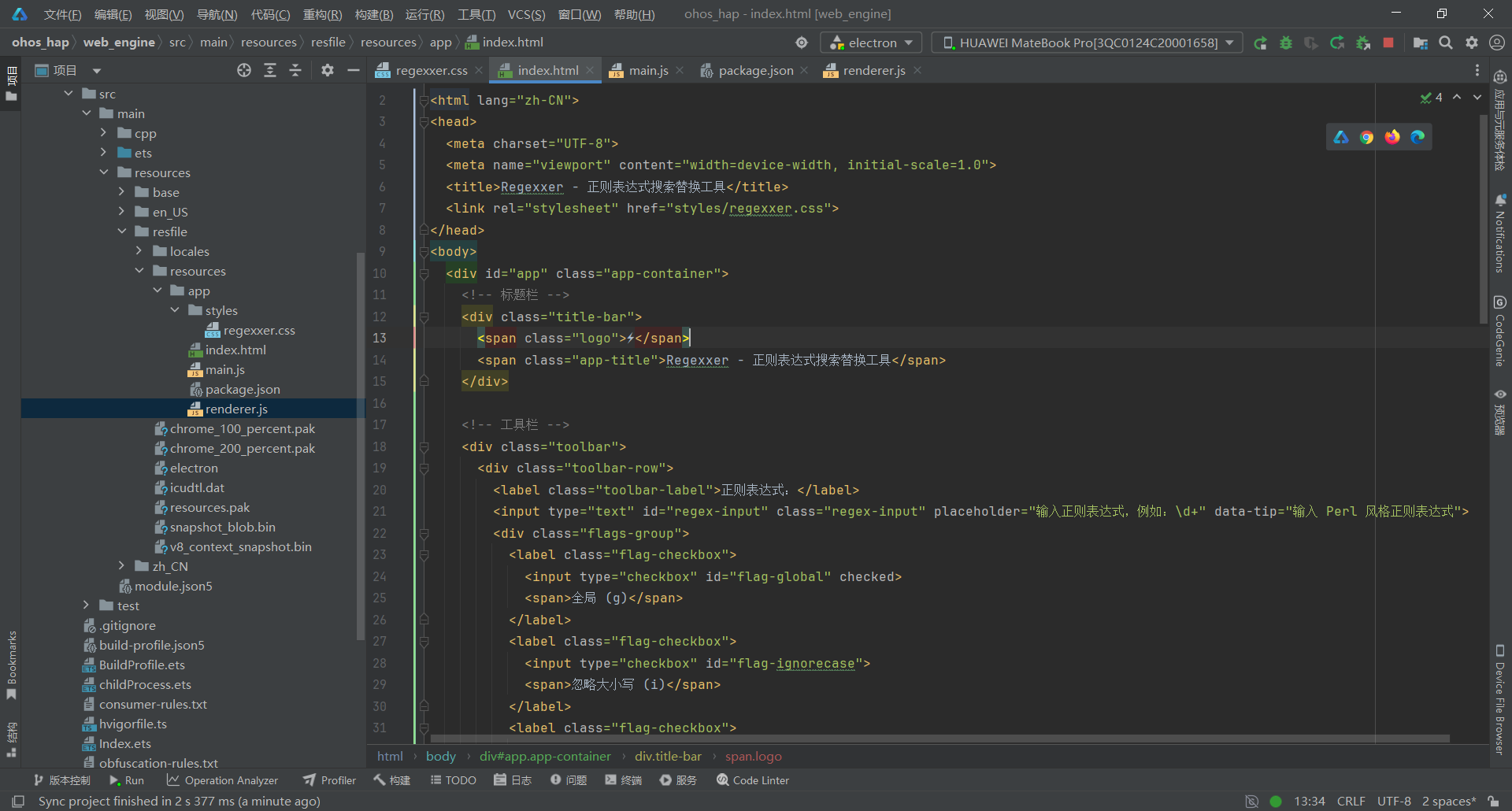
关键要点:
- 双栏式布局(源文本区 + 匹配结果区)
- 工具栏包含:正则输入框 + 匹配标志(g/i/m)+ 替换输入框 + 操作按钮(查找/替换/全部替换/清空)
- data-tip 自定义属性替代 title,避免触发 ArkWeb 原生 tooltip 导致 XComponent 崩溃
- 状态栏显示执行时间和操作提示
- 源文本区实时显示字符计数,匹配结果区显示匹配数量
3.3 第三步:配置项目元信息(package.json)
文件:web_engine/src/main/resources/resfile/resources/app/package.json
json
{
  "name": "regexxer",
  "version": "1.0.0",
  "description": "Regexxer - 正则表达式搜索替换工具(鸿蒙适配)",
  "main": "main.js",
  "scripts": {
    "start": "electron .",
    "dev": "electron . --dev"
  },
  "keywords": ["正则表达式", "regex", "search", "replace"],
  "author": "Regexxer(鸿蒙移植版)",
  "license": "MIT",
  "devDependencies": {
    "electron": "^28.0.0"
  }
}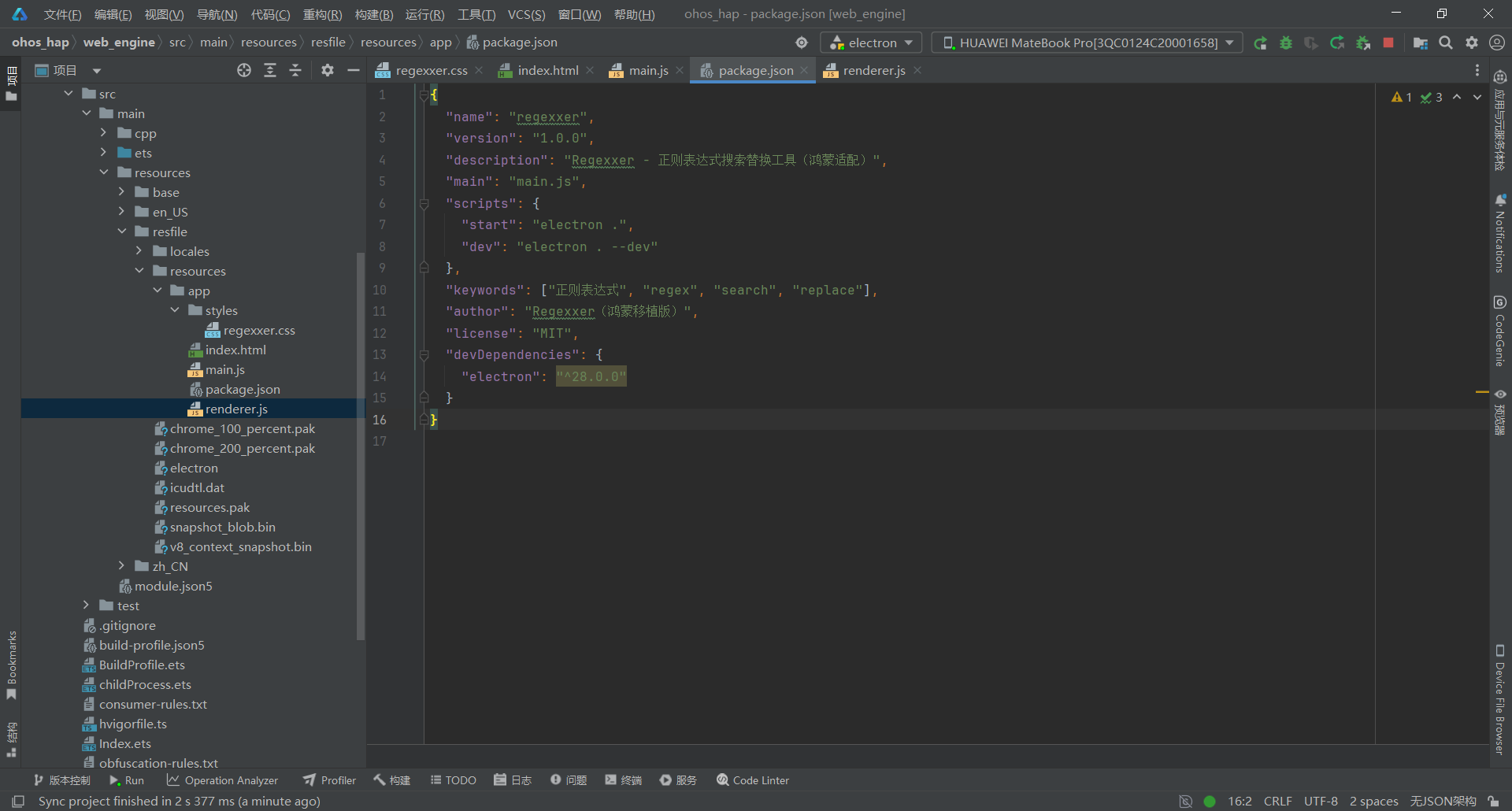
关键要点:
- main** 入口**:指定 main.js 为 Electron 主进程入口文件
- scripts 脚本:start 启动生产模式,dev 启动开发模式(带调试参数)
- license 协议:MIT
- electron 版本:^28.0.0(兼容鸿蒙 ArkWeb 的 Electron 版本)
- keywords:包含正则表达式、regex、search、replace 等中英文搜索关键词
- 零外部依赖:纯前端实现,无需任何正则表达式库
3.4 第四步:实现渲染进程核心逻辑(renderer.js)
文件:web_engine/src/main/resources/resfile/resources/app/renderer.js
javascript
// Regexxer - 渲染进程
// 正则表达式搜索替换工具(纯前端实现)

// ===== 全局状态 =====
var matchCount = 0;
var lastSearchTime = 0;

// ===== 示例文本常量 =====
var EXAMPLE_TEXT = `========================================
Regexxer 正则表达式工具 - 使用示例
========================================

【示例 1:查找所有邮箱地址】
📋 源文本内容:
联系方式:
- 技术支持:support@example.com
- 销售热线:sales@company.org
- 客服邮箱:service@test.cn

🔧 操作步骤:
正则表达式:\\b[A-Za-z0-9._%+-]+@[A-Za-z0-9.-]+\\.[A-Z|a-z]{2,}\\b
替换为:(留空)
勾选:☑ 全局(g)  ☐ 忽略大小写(i)  ☐ 多行(m)
点击按钮:【查找】
预期结果:找到 3 个匹配项

---

【示例 2:提取电话号码】
📋 源文本内容:
联系电话:
- 北京:010-1234-5678
- 上海:021-8765-4321
- 手机:138-0013-8000

🔧 操作步骤:
正则表达式:\\d{3}-\\d{4}-\\d{4}
替换为:(留空)
勾选:☑ 全局(g)  ☐ 忽略大小写(i)  ☐ 多行(m)
点击按钮:【查找】
预期结果:找到 3 个匹配项

---

【示例 3:替换日期格式(YYYY-MM-DD → MM/DD/YYYY)】
📋 源文本内容:
项目日期:
- 开始日期:2024-01-15
- 截止日期:2024-12-31
- 更新日期:2024-06-13

🔧 操作步骤:
正则表达式:(\\d{4})-(\\d{2})-(\\d{2})
替换为:$2/$3/$1
勾选:☑ 全局(g)  ☐ 忽略大小写(i)  ☐ 多行(m)
点击按钮:【全部替换】
预期结果:2024-01-15 → 01/15/2024(全部替换)

---

【示例 4:提取 URL 链接】
📋 源文本内容:
相关链接:
- 官网:https://www.example.com
- 文档:http://docs.test.org/api
- 下载:https://download.site.cn/v1.0

🔧 操作步骤:
正则表达式:https?://[^\\s]+
替换为:(留空)
勾选:☑ 全局(g)  ☐ 忽略大小写(i)  ☐ 多行(m)
点击按钮:【查找】
预期结果:找到 3 个匹配项

---

【示例 5:匹配 IP 地址】
📋 源文本内容:
服务器列表:
- 主服务器:192.168.1.100
- 备份服务器:10.0.0.254
- 测试环境:172.16.0.1

🔧 操作步骤:
正则表达式:\\b\\d{1,3}\\.\\d{1,3}\\.\\d{1,3}\\.\\d{1,3}\\b
替换为:(留空)
勾选:☑ 全局(g)  ☐ 忽略大小写(i)  ☐ 多行(m)
点击按钮:【查找】
预期结果:找到 3 个匹配项

---

【示例 6:批量修改变量名】
📋 源文本内容:
原始代码:
var oldName = "test";
console.log(oldName);
function test(oldName) {
  return oldName.toUpperCase();
}

🔧 操作步骤:
正则表达式:\\boldName\\b
替换为:newName
勾选:☑ 全局(g)  ☐ 忽略大小写(i)  ☐ 多行(m)
点击按钮:【全部替换】
预期结果:所有 oldName → newName(4 处替换)

---

【示例 7:删除空行】
📋 源文本内容:
(使用上方任意示例文本)

🔧 操作步骤:
正则表达式:^\\s*$
替换为:(留空)
勾选:☑ 全局(g)  ☐ 忽略大小写(i)  ☑ 多行(m)
点击按钮:【全部替换】
预期结果:删除所有空白行

---

【示例 8:提取 HTML 标签内容】
📋 源文本内容:
<h1>主标题</h1>
<p>这是第一段内容</p>
<h2>副标题</h2>
<p>这是第二段内容</p>

🔧 操作步骤:
正则表达式:<[^>]+>([^<]*)</[^>]+>
替换为:$1
勾选:☑ 全局(g)  ☐ 忽略大小写(i)  ☐ 多行(m)
点击按钮:【全部替换】
预期结果:提取标签内的文本内容

========================================
快捷键速查:
• Ctrl + Enter:查找
• Ctrl + H:替换第一个
• Ctrl + Shift + H:全部替换
• Ctrl + L:清空所有内容
• Escape:清空正则表达式
========================================`;

// ===== 工具函数 =====
function escapeHtml(text) {
  var div = document.createElement('div');
  div.textContent = text;
  return div.innerHTML;
}

function showStatus(text) {
  var el = document.getElementById('status-text');
  if (el) el.textContent = text;
}

function updateSourceCount() {
  var el = document.getElementById('source-count');
  var text = document.getElementById('source-text').value;
  if (el) el.textContent = text.length + ' 字符';
}

function updateMatchCount(count) {
  var el = document.getElementById('match-count');
  if (el) el.textContent = count + ' 个匹配';
}

function updateExecutionTime(time) {
  var el = document.getElementById('execution-time');
  if (el) el.textContent = '执行时间:' + time + 'ms';
}

// ===== 核心功能 =====
function buildRegex() {
  var pattern = document.getElementById('regex-input').value;
  if (!pattern) return null;

  var flags = '';
  if (document.getElementById('flag-global').checked) flags += 'g';
  if (document.getElementById('flag-ignorecase').checked) flags += 'i';
  if (document.getElementById('flag-multiline').checked) flags += 'm';

  try {
    return new RegExp(pattern, flags);
  } catch (e) {
    showStatus('正则表达式错误:' + e.message);
    return null;
  }
}

function findMatches() {
  var startTime = performance.now();
  var regex = buildRegex();
  if (!regex) return;

  var sourceText = document.getElementById('source-text').value;
  if (!sourceText) {
    showStatus('请先输入源文本');
    return;
  }

  var resultContent = document.getElementById('result-content');
  resultContent.innerHTML = '';

  var matches = [];
  var match;

  // 重置 lastIndex(全局搜索时)
  regex.lastIndex = 0;

  while ((match = regex.exec(sourceText)) !== null) {
    matches.push({
      index: match.index,
      text: match[0],
      groups: match.slice(1)
    });

    // 防止零宽度匹配无限循环
    if (match.index === regex.lastIndex) {
      regex.lastIndex++;
    }
  }

  matchCount = matches.length;
  updateMatchCount(matchCount);

  if (matches.length === 0) {
    resultContent.innerHTML = '<div class="result-placeholder"><div class="placeholder-icon">❌</div><div class="placeholder-text">未找到匹配项</div></div>';
    showStatus('未找到匹配项');
  } else {
    // 渲染匹配结果
    matches.forEach(function(m, i) {
      var matchEl = document.createElement('div');
      matchEl.className = 'match-result';

      var headerEl = document.createElement('div');
      headerEl.className = 'match-header';
      headerEl.textContent = '匹配 #' + (i + 1) + ' (位置:' + m.index + ')';

      var contentEl = document.createElement('div');
      contentEl.className = 'match-content';
      contentEl.textContent = m.text;

      matchEl.appendChild(headerEl);
      matchEl.appendChild(contentEl);

      // 显示捕获组
      if (m.groups.length > 0) {
        m.groups.forEach(function(group, j) {
          if (group !== undefined) {
            var groupEl = document.createElement('div');
            groupEl.className = 'match-group';
            groupEl.innerHTML = '<span class="match-group-label">$' + (j + 1) + ':</span> ' + escapeHtml(group);
            matchEl.appendChild(groupEl);
          }
        });
      }

      resultContent.appendChild(matchEl);
    });

    showStatus('找到 ' + matchCount + ' 个匹配项');
  }

  var endTime = performance.now();
  updateExecutionTime(Math.round(endTime - startTime));
}

function replaceFirst() {
  var startTime = performance.now();
  var regex = buildRegex();
  if (!regex) return;

  var sourceText = document.getElementById('source-text').value;
  var replaceText = document.getElementById('replace-input').value;

  if (!sourceText) {
    showStatus('请先输入源文本');
    return;
  }

  // 移除全局标志,仅替换第一个
  var singleRegex = new RegExp(regex.source, regex.flags.replace(/g/g, ''));

  // 检查是否有匹配
  var hasMatch = singleRegex.test(sourceText);
  if (!hasMatch) {
    showStatus('未找到匹配项');
    updateExecutionTime(0);
    return;
  }

  // 执行替换
  var result = sourceText.replace(singleRegex, replaceText);

  // 更新源文本框
  document.getElementById('source-text').value = result;
  updateSourceCount();

  // 显示替换结果
  displayReplacedResult(sourceText, result, singleRegex, 1);
  updateMatchCount(1);

  var endTime = performance.now();
  updateExecutionTime(Math.round(endTime - startTime));
}

function replaceAll() {
  var startTime = performance.now();
  var regex = buildRegex();
  if (!regex) return;

  var sourceText = document.getElementById('source-text').value;
  var replaceText = document.getElementById('replace-input').value;

  if (!sourceText) {
    showStatus('请先输入源文本');
    return;
  }

  // 确保有全局标志
  var globalRegex = new RegExp(regex.source, regex.flags.indexOf('g') >= 0 ? regex.flags : regex.flags + 'g');

  // 计算匹配数量
  var matches = sourceText.match(globalRegex);
  var count = matches ? matches.length : 0;

  // 执行替换
  var result = sourceText.replace(globalRegex, replaceText);

  // 更新源文本框
  document.getElementById('source-text').value = result;
  updateSourceCount();

  // 显示替换结果(高亮对比)
  displayReplacedResult(sourceText, result, globalRegex, count);

  // 更新匹配计数
  updateMatchCount(count);

  var endTime = performance.now();
  updateExecutionTime(Math.round(endTime - startTime));
}

function displayReplacedResult(original, replaced, regex, count) {
  var resultContent = document.getElementById('result-content');
  resultContent.innerHTML = '';

  var replacedEl = document.createElement('div');
  replacedEl.className = 'replaced-content';

  // 显示替换统计信息
  var infoEl = document.createElement('div');
  infoEl.style.cssText = 'padding: 12px; background: #2d2d30; border-radius: 4px; margin-bottom: 12px; border-left: 3px solid #4caf50;';
  infoEl.innerHTML = '<div style="font-size: 14px; color: #4caf50; margin-bottom: 8px; font-weight: 600;">✅ 替换完成 - 共替换 ' + count + ' 处</div>';
  replacedEl.appendChild(infoEl);

  // 找出所有匹配项并显示替换对比
  var matches = [];
  var match;
  var tempRegex = new RegExp(regex.source, regex.flags);
  tempRegex.lastIndex = 0;

  while ((match = tempRegex.exec(original)) !== null) {
    // 直接使用捕获组替换
    var replacedText = document.getElementById('replace-input').value;
    // 替换 $1, $2 等捕获组引用
    for (var g = 1; g < match.length; g++) {
      var pattern = new RegExp('\\$' + g, 'g');
      replacedText = replacedText.replace(pattern, match[g] || '');
    }
    // 替换 $& (完整匹配)
    replacedText = replacedText.replace(/\$&/g, match[0]);

    matches.push({
      original: match[0],
      replaced: replacedText,
      index: match.index
    });
    if (match.index === tempRegex.lastIndex) {
      tempRegex.lastIndex++;
    }
  }

  // 显示每个替换项
  if (matches.length > 0) {
    var listEl = document.createElement('div');
    listEl.style.cssText = 'margin-bottom: 12px;';

    matches.forEach(function(m, i) {
      var itemEl = document.createElement('div');
      itemEl.style.cssText = 'padding: 8px; margin-bottom: 6px; background: #252526; border-radius: 4px; border-left: 2px solid #0078d4;';

      var headerEl = document.createElement('div');
      headerEl.style.cssText = 'font-size: 12px; color: #569cd6; margin-bottom: 4px;';
      headerEl.textContent = '替换 #' + (i + 1) + ' (位置:' + m.index + ')';

      var originalEl = document.createElement('div');
      originalEl.style.cssText = 'font-size: 13px; margin-bottom: 2px;';
      originalEl.innerHTML = '<span style="color: #f44336; font-weight: 600;">原:</span><span style="color: #f44336; background: rgba(244,67,54,0.1); padding: 2px 4px; border-radius: 2px;">' + escapeHtml(m.original) + '</span>';

      var replacedEl2 = document.createElement('div');
      replacedEl2.style.cssText = 'font-size: 13px;';
      replacedEl2.innerHTML = '<span style="color: #4caf50; font-weight: 600;">新:</span><span style="color: #4caf50; background: rgba(76,175,80,0.1); padding: 2px 4px; border-radius: 2px;">' + escapeHtml(m.replaced) + '</span>';

      itemEl.appendChild(headerEl);
      itemEl.appendChild(originalEl);
      itemEl.appendChild(replacedEl2);
      listEl.appendChild(itemEl);
    });

    replacedEl.appendChild(listEl);
  }

  // 显示替换后的完整文本(高亮显示替换内容)
  var textEl = document.createElement('div');
  textEl.style.cssText = 'padding: 12px; background: #1e1e1e; border-radius: 4px; font-family: Consolas, monospace; font-size: 13px; line-height: 1.6; white-space: pre-wrap; color: #d4d4d4; border: 1px solid #3c3c3c;';
  var labelEl = document.createElement('div');
  labelEl.style.cssText = 'font-size: 12px; color: #b0b0b0; margin-bottom: 8px;';
  labelEl.textContent = '📄 替换后的完整文本(绿色高亮为替换内容):';
  textEl.appendChild(labelEl);

  // 构建高亮显示的 HTML
  var highlightedHtml = '';
  var lastIndex = 0;
  var highlightRegex = new RegExp(regex.source, regex.flags);
  highlightRegex.lastIndex = 0;
  var highlightMatch;

  while ((highlightMatch = highlightRegex.exec(original)) !== null) {
    // 添加未匹配的文本
    if (highlightMatch.index > lastIndex) {
      highlightedHtml += escapeHtml(original.substring(lastIndex, highlightMatch.index));
    }

    // 计算替换后的文本
    var replacedText = document.getElementById('replace-input').value;
    for (var g = 1; g < highlightMatch.length; g++) {
      var pattern = new RegExp('\\$' + g, 'g');
      replacedText = replacedText.replace(pattern, highlightMatch[g] || '');
    }
    replacedText = replacedText.replace(/\$&/g, highlightMatch[0]);

    // 添加高亮的替换文本
    highlightedHtml += '<span style="color: #4caf50; background: rgba(76,175,80,0.2); padding: 2px 4px; border-radius: 2px; font-weight: 600;">' + escapeHtml(replacedText) + '</span>';

    lastIndex = highlightRegex.lastIndex;
    if (highlightMatch.index === highlightRegex.lastIndex) {
      highlightRegex.lastIndex++;
    }
  }

  // 添加剩余文本
  if (lastIndex < original.length) {
    highlightedHtml += escapeHtml(original.substring(lastIndex));
  }

  // 如果没有匹配项,显示完整替换后的文本
  if (!highlightedHtml) {
    highlightedHtml = escapeHtml(replaced);
  }

  var contentEl = document.createElement('div');
  contentEl.innerHTML = highlightedHtml;
  textEl.appendChild(contentEl);

  replacedEl.appendChild(textEl);

  resultContent.appendChild(replacedEl);
  showStatus('已替换 ' + count + ' 个匹配项');
}

function clearAll() {
  document.getElementById('regex-input').value = '';
  document.getElementById('replace-input').value = '';
  // 清空源文本
  document.getElementById('source-text').value = '';
  document.getElementById('result-content').innerHTML = '<div class="result-placeholder"><div class="placeholder-icon">🔍</div><div class="placeholder-text">输入正则表达式并点击"查找"开始搜索</div></div>';
  updateMatchCount(0);
  updateSourceCount();
  updateExecutionTime(0);
  showStatus('已清空所有内容');
}

function resetToExample() {
  // 恢复示例文本
  document.getElementById('source-text').value = EXAMPLE_TEXT;
  updateSourceCount();
  showStatus('已恢复示例文本');
}

// ===== 快捷键支持 =====
function bindKeyboard() {
  document.addEventListener('keydown', function(e) {
    // Ctrl+Enter 查找
    if (e.ctrlKey && e.key === 'Enter') {
      e.preventDefault();
      findMatches();
      return;
    }

    // Ctrl+H 替换第一个
    if (e.ctrlKey && e.key === 'h') {
      e.preventDefault();
      replaceFirst();
      return;
    }

    // Ctrl+Shift+H 全部替换
    if (e.ctrlKey && e.shiftKey && e.key === 'H') {
      e.preventDefault();
      replaceAll();
      return;
    }

    // Ctrl+L 清空
    if (e.ctrlKey && e.key === 'l') {
      e.preventDefault();
      clearAll();
      return;
    }

    // Escape 清空正则输入框
    if (e.key === 'Escape') {
      document.getElementById('regex-input').value = '';
      showStatus('已清空正则表达式');
      return;
    }
  });
}

// ===== 事件绑定 =====
function bindEvents() {
  var btnMap = {
    'btn-find': findMatches,
    'btn-replace': replaceFirst,
    'btn-replace-all': replaceAll,
    'btn-clear': clearAll
  };

  for (var id in btnMap) {
    (function(fn) {
      var el = document.getElementById(id);
      if (el) el.onclick = fn;
    })(btnMap[id]);
  }

  // 源文本变化时更新字符计数
  document.getElementById('source-text').addEventListener('input', updateSourceCount);

  // 正则表达式输入框回车触发查找
  document.getElementById('regex-input').addEventListener('keydown', function(e) {
    if (e.key === 'Enter') {
      e.preventDefault();
      findMatches();
    }
  });

  // 鼠标悬停提示(使用 data-tip)
  document.addEventListener('mouseover', function(e) {
    var btn = e.target;
    if (btn && btn.getAttribute && btn.getAttribute('data-tip')) {
      showStatus(btn.getAttribute('data-tip'));
    }
  });

  bindKeyboard();
}

// ===== 初始化 =====
document.addEventListener('DOMContentLoaded', function() {
  bindEvents();
  showStatus('就绪 - 输入正则表达式开始搜索');

  // 检查源文本是否为空,如果为空则恢复示例文本
  var sourceText = document.getElementById('source-text');
  if (!sourceText.value || sourceText.value.trim() === '') {
    sourceText.value = EXAMPLE_TEXT;
    showStatus('已加载示例文本(重启后自动恢复)');
  }
  updateSourceCount();
});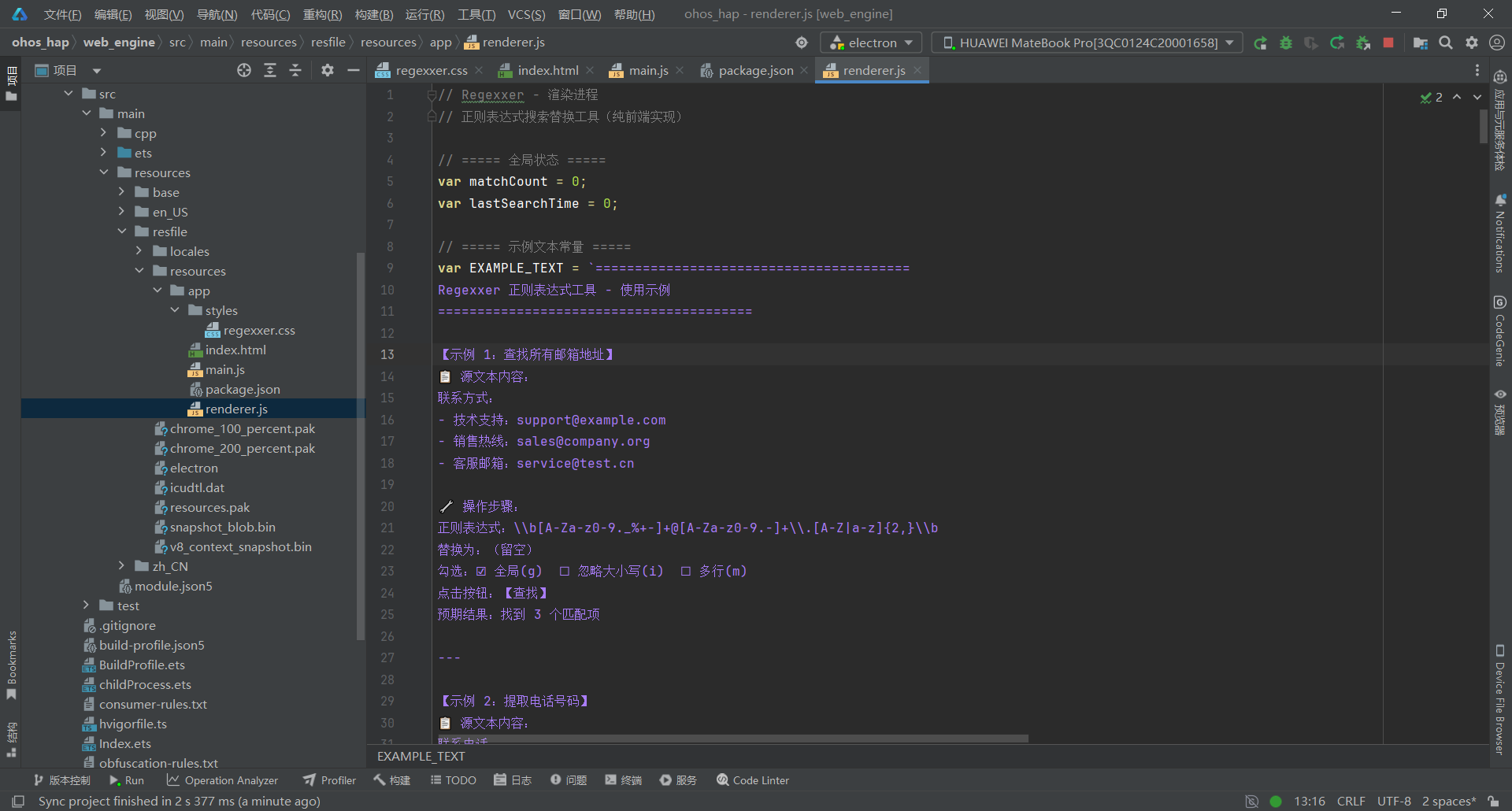
关键要点:
- 纯前端实现:使用原生 JavaScript RegExp API,零外部依赖
- 示例文本常量:EXAMPLE_TEXT 全局常量,包含 8 个完整示例
- 自动恢复机制:重启后自动加载示例文本(开箱即用)
- 替换对比展示:原值(红色高亮)→ 新值(绿色高亮)
- 高亮显示:替换后的完整文本中,被替换内容绿色高亮标记
- 捕获组支持 :1, 2, 3 引用 3 引用 3引用& 完整匹配引用
- 防无限循环:检测 match.index === regex.lastIndex,避免零宽度匹配死循环
- 性能监控:performance.now() 测量执行时间
- XSS** 防护**:escapeHtml() 函数转义 HTML 特殊字符
- 快捷键支持:5 个快捷键(Ctrl+Enter/H/Shift+H/L + Escape)
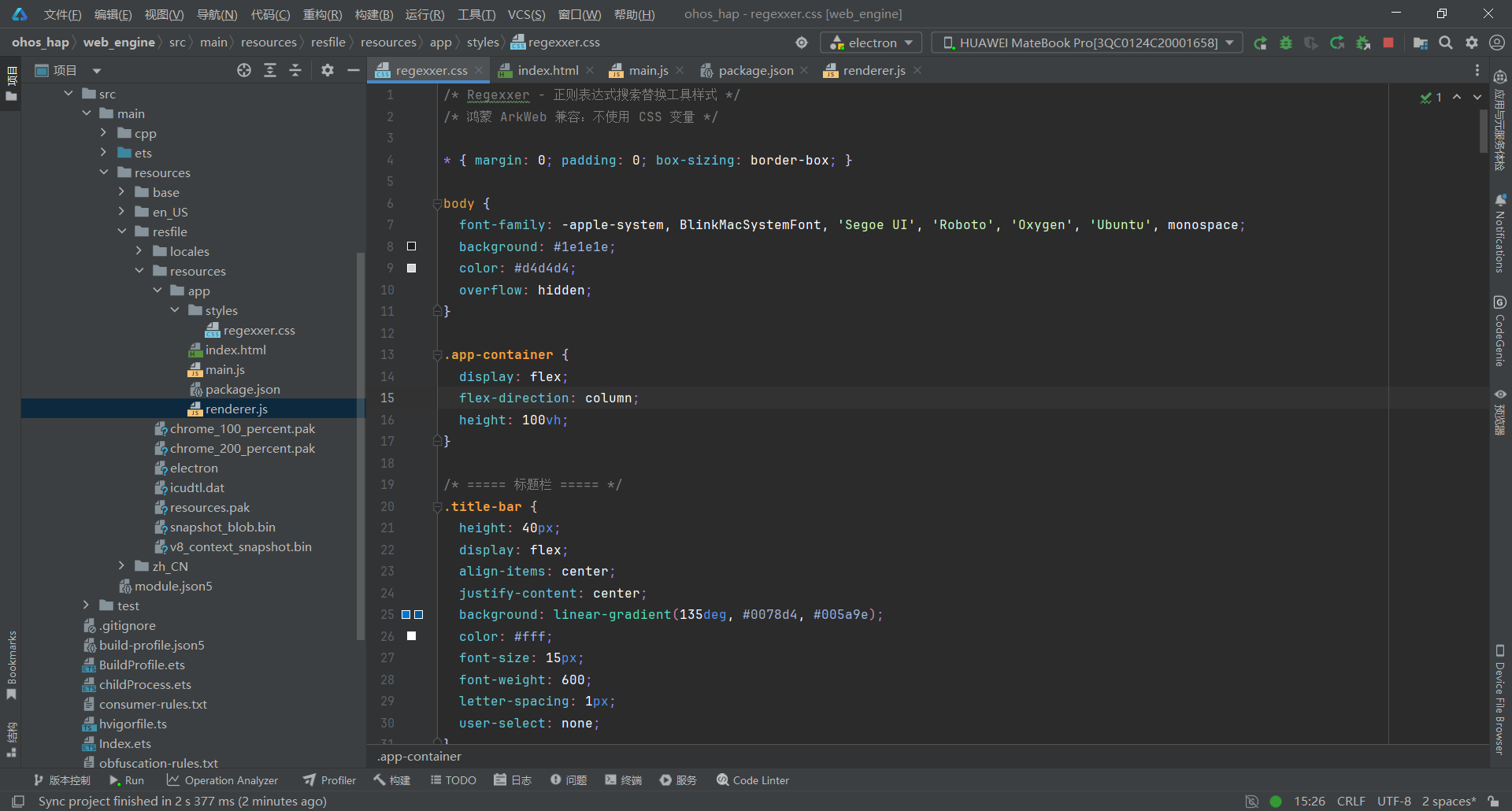
3.5 第五步:编写样式文件(regexxer.css)
文件:web_engine/src/main/resources/resfile/resources/app/regexxer.css
css
/* Regexxer - 正则表达式搜索替换工具样式 */
/* 鸿蒙 ArkWeb 兼容:不使用 CSS 变量 */

* { margin: 0; padding: 0; box-sizing: border-box; }

body {
  font-family: -apple-system, BlinkMacSystemFont, 'Segoe UI', 'Roboto', 'Oxygen', 'Ubuntu', monospace;
  background: #1e1e1e;
  color: #d4d4d4;
  overflow: hidden;
}

.app-container {
  display: flex;
  flex-direction: column;
  height: 100vh;
}

/* ===== 标题栏 ===== */
.title-bar {
  height: 40px;
  display: flex;
  align-items: center;
  justify-content: center;
  background: linear-gradient(135deg, #0078d4, #005a9e);
  color: #fff;
  font-size: 15px;
  font-weight: 600;
  letter-spacing: 1px;
  user-select: none;
}

.logo {
  margin-right: 8px;
  font-size: 18px;
}

.app-title {
  font-size: 15px;
}

/* ===== 工具栏 ===== */
.toolbar {
  padding: 12px 16px;
  background: #252526;
  border-bottom: 1px solid #3c3c3c;
}

.toolbar-row {
  display: flex;
  align-items: center;
  gap: 8px;
  margin-bottom: 8px;
}

.toolbar-row:last-child {
  margin-bottom: 0;
}

.toolbar-label {
  font-size: 13px;
  color: #b0b0b0;
  white-space: nowrap;
  min-width: 80px;
}

.regex-input,
.replace-input {
  flex: 1;
  height: 32px;
  padding: 0 12px;
  background: #3c3c3c;
  border: 1px solid #555;
  border-radius: 4px;
  color: #d4d4d4;
  font-size: 14px;
  font-family: 'Consolas', 'Courier New', monospace;
}

.regex-input:focus,
.replace-input:focus {
  outline: none;
  border-color: #0078d4;
}

.flags-group {
  display: flex;
  gap: 12px;
}

.flag-checkbox {
  display: flex;
  align-items: center;
  gap: 4px;
  font-size: 12px;
  color: #b0b0b0;
  cursor: pointer;
}

.flag-checkbox input[type="checkbox"] {
  cursor: pointer;
}

/* 按钮 */
.btn-group {
  display: flex;
  gap: 4px;
}

.btn {
  display: inline-flex;
  align-items: center;
  justify-content: center;
  height: 32px;
  padding: 0 16px;
  border: 1px solid transparent;
  border-radius: 4px;
  background: #3c3c3c;
  color: #d4d4d4;
  cursor: pointer;
  font-size: 13px;
  white-space: nowrap;
}

.btn:hover {
  background: #505050;
  border-color: #555;
}

.btn:active {
  background: #606060;
}

.btn-primary {
  background: #0078d4;
  color: #fff;
  border-color: #0078d4;
}

.btn-primary:hover {
  background: #106ebe;
  border-color: #106ebe;
}

.btn-warning {
  background: #ff9800;
  color: #fff;
  border-color: #ff9800;
}

.btn-warning:hover {
  background: #f57c00;
  border-color: #f57c00;
}

.btn-danger {
  background: #f44336;
  color: #fff;
  border-color: #f44336;
}

.btn-danger:hover {
  background: #d32f2f;
  border-color: #d32f2f;
}

/* ===== 主内容区 ===== */
.main-content {
  flex: 1;
  display: flex;
  gap: 0;
  overflow: hidden;
}

/* 面板 */
.panel {
  flex: 1;
  display: flex;
  flex-direction: column;
  border-right: 1px solid #3c3c3c;
}

.panel:last-child {
  border-right: none;
}

.panel-header {
  height: 36px;
  display: flex;
  align-items: center;
  justify-content: space-between;
  padding: 0 12px;
  background: #2d2d30;
  border-bottom: 1px solid #3c3c3c;
}

.panel-title {
  font-size: 13px;
  font-weight: 600;
  color: #b0b0b0;
}

.panel-count {
  font-size: 12px;
  color: #569cd6;
}

/* 源文本区 */
.source-text {
  flex: 1;
  padding: 12px;
  background: #1e1e1e;
  border: none;
  color: #d4d4d4;
  font-size: 14px;
  font-family: 'Consolas', 'Courier New', monospace;
  line-height: 1.6;
  resize: none;
}

.source-text:focus {
  outline: none;
}

/* 结果区 */
.result-content {
  flex: 1;
  overflow: auto;
  padding: 12px;
  background: #1e1e1e;
  font-family: 'Consolas', 'Courier New', monospace;
  line-height: 1.6;
}

.result-placeholder {
  display: flex;
  flex-direction: column;
  align-items: center;
  justify-content: center;
  height: 100%;
  color: #666;
}

.placeholder-icon {
  font-size: 48px;
  margin-bottom: 12px;
}

.placeholder-text {
  font-size: 14px;
}

/* 匹配结果样式 */
.match-result {
  margin-bottom: 12px;
  padding: 8px;
  background: #2d2d30;
  border-radius: 4px;
  border-left: 3px solid #0078d4;
}

.match-header {
  font-size: 12px;
  color: #569cd6;
  margin-bottom: 4px;
}

.match-content {
  font-size: 13px;
  color: #d4d4d4;
  word-break: break-all;
}

.match-group {
  margin-top: 4px;
  padding: 4px 8px;
  background: #3c3c3c;
  border-radius: 2px;
  font-size: 12px;
}

.match-group-label {
  color: #4ec9b0;
  font-weight: 600;
}

/* 替换结果高亮 */
.replaced-content {
  white-space: pre-wrap;
}

.highlight-old {
  background: #f44336;
  color: #fff;
  text-decoration: line-through;
  padding: 2px 4px;
  border-radius: 2px;
}

.highlight-new {
  background: #4caf50;
  color: #fff;
  padding: 2px 4px;
  border-radius: 2px;
}

/* ===== 底部状态栏 ===== */
.status-bar {
  height: 32px;
  display: flex;
  align-items: center;
  justify-content: space-between;
  padding: 0 20px;
  background: #252526;
  border-top: 1px solid #3c3c3c;
  font-size: 12px;
  color: #888;
}

#execution-time {
  color: #4ec9b0;
  font-weight: 500;
}

/* ===== 暗色主题(默认) ===== */
/* 已使用暗色主题作为默认主题 */

/* ===== 亮色主题 ===== */
.theme-light body {
  background: #f5f5f5;
  color: #333;
}

.theme-light .title-bar {
  background: linear-gradient(135deg, #0078d4, #005a9e);
}

.theme-light .toolbar {
  background: #fff;
  border-bottom-color: #e0e0e0;
}

.theme-light .toolbar-label {
  color: #555;
}

.theme-light .regex-input,
.theme-light .replace-input {
  background: #fff;
  border-color: #ccc;
  color: #333;
}

.theme-light .flag-checkbox {
  color: #555;
}

.theme-light .btn {
  background: #f0f0f0;
  color: #333;
  border-color: #ccc;
}

.theme-light .btn:hover {
  background: #e0e0e0;
}

.theme-light .panel-header {
  background: #fafafa;
  border-bottom-color: #e0e0e0;
}

.theme-light .panel-title {
  color: #555;
}

.theme-light .source-text {
  background: #fff;
  color: #333;
}

.theme-light .result-content {
  background: #fff;
}

.theme-light .match-result {
  background: #f9f9f9;
  border-left-color: #0078d4;
}

.theme-light .match-header {
  color: #0078d4;
}

.theme-light .match-content {
  color: #333;
}

.theme-light .match-group {
  background: #f0f0f0;
}

.theme-light .match-group-label {
  color: #4caf50;
}

.theme-light .status-bar {
  background: #fff;
  border-top-color: #e0e0e0;
  color: #666;
}

.theme-light #execution-time {
  color: #4caf50;
}
关键要点:
- VS Code 暗色主题:使用 #1e1e1e、#252526、#3c3c3c 等经典 VS Code 颜色
- 双栏布局:源文本区 + 匹配结果区(flex: 1 平分)
- 工具栏样式:两行布局(正则输入 + 替换输入),按钮分组显示
- 按钮配色:主要(蓝色)、警告(橙色)、危险(红色)
- 匹配结果样式:蓝色左边框,等宽字体显示内容
- 捕获组显示:蓝色 1/2 标签,灰色背景
- 状态栏:左侧状态提示,右侧执行时间(绿色)
- 鸿蒙 ArkWeb 兼容:不使用 CSS 变量(var(--xxx)),直接写实际颜色值
- 移除 Webkit 滚动条样式:鸿蒙不支持 ::-webkit-scrollbar,已删除
四、部署到鸿蒙平台
4.1 项目结构说明
开发****工作流:
- 直接在 electron-apps/regexxer/ 中修改代码
- 同步到 web_engine/src/main/resources/resfile/resources/app/
- 在 DevEco Studio 中构建并运行
- 真机测试验证
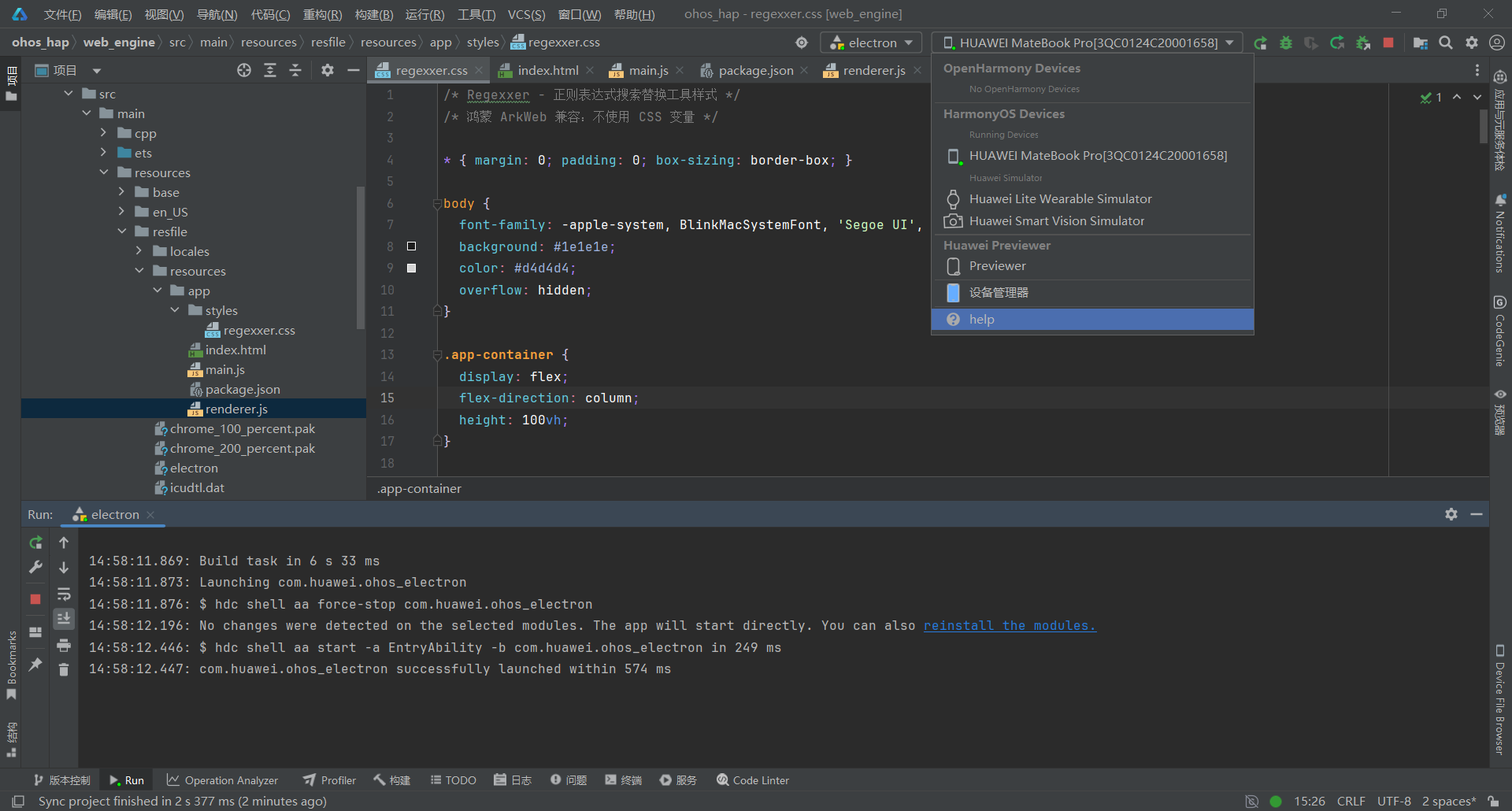
4.2 构建 HAP 包
在 DevEco Studio 中:
- 打开项目根目录 ohos_hap/
- 点击 Build > Build Hap(s)/APP(s)
- 选择 Build Hap(s)
- 等待构建完成
4.3 真机测试
- 连接鸿蒙设备(或启动模拟器)
- 点击 Run > Run 'entry'
- 安装完成后,应用会自动启动
五、常见问题 FAQ
Q1:点击"全部替换"后应用无响应,输入框不可编辑?
问题现象:点击全部替换按钮后,右侧匹配结果无显示,正则表达式框和替换为框也变得不可编辑
问题代码(renderer.js 第 228 行):
javascript
// ❌ 错误代码:在 exec() 循环内部再次调用 replace()
while ((match = tempRegex.exec(original)) !== null) {
  var replacedText = match[0].replace(tempRegex, document.getElementById('replace-input').value);
  matches.push({
    original: match[0],
    replaced: replacedText,
    index: match.index
  });
  // ...
}
根本原因:在 while (tempRegex.exec(original)) 循环内部,再次调用 match[0].replace(tempRegex, ...) 导致 tempRegex 的 lastIndex 被修改,造成无限循环或逻辑错误
解决方案(renderer.js 第 227-246 行):
javascript
// ✅ 正确代码:分离匹配和替换逻辑
while ((match = tempRegex.exec(original)) !== null) {
  // 直接使用捕获组替换
  var replacedText = document.getElementById('replace-input').value;
  // 替换 $1, $2 等捕获组引用
  for (var g = 1; g < match.length; g++) {
    var pattern = new RegExp('\\$' + g, 'g');
    replacedText = replacedText.replace(pattern, match[g] || '');
  }
  // 替换 $& (完整匹配)
  replacedText = replacedText.replace(/\$&/g, match[0]);

  matches.push({
    original: match[0],
    replaced: replacedText,
    index: match.index
  });
  if (match.index === tempRegex.lastIndex) {
    tempRegex.lastIndex++;
  }
}
关键点:
- 不要在 exec() 循环内部再次使用同一个 regex 对象调用 replace()
- 使用临时字符串处理捕获组替换
- 检测零宽度匹配(match.index === tempRegex.lastIndex)防止无限循环
- 支持 1, 2, 3 等捕获组引用和 3 等捕获组引用和 3等捕获组引用和& 完整匹配引用
Q2:鼠标悬停在按钮上应用闪退?
问题现象:鼠标悬停在按钮上触发 SIGABRT 崩溃
问题代码(index.html):
html
<!-- ❌ 错误代码:使用 title 属性 -->
<button id="btn-find" class="btn btn-primary" title="查找所有匹配项">查找</button>
<button id="btn-replace-all" class="btn btn-danger" title="替换所有匹配项">全部替换</button>
根本原因:title 属性在 ArkWeb 中触发系统级原生 tooltip 弹窗 → 创建 SubWindow → XComponent 崩溃(WaitForXComponentCreated 超时 → abort)
解决方案(index.html 第 21、40、42-45 行):
html
<!-- ✅ 正确代码:使用 data-tip 自定义属性 -->
<input type="text" id="regex-input" class="regex-input"
       placeholder="输入正则表达式,例如:\d+"
       data-tip="输入 Perl 风格正则表达式">

<input type="text" id="replace-input" class="replace-input"
       placeholder="替换文本,使用 $1 引用捕获组"
       data-tip="使用 $1, $2 引用捕获组">

<button id="btn-find" class="btn btn-primary" data-tip="查找所有匹配项">查找</button>
<button id="btn-replace" class="btn btn-warning" data-tip="替换第一个匹配项">替换</button>
<button id="btn-replace-all" class="btn btn-danger" data-tip="替换所有匹配项">全部替换</button>
<button id="btn-clear" class="btn" data-tip="清空所有输入">清空</button>
配合 renderer.js(第 374-380 行):
javascript
// ✅ 正确:使用 data-tip 显示提示
document.addEventListener('mouseover', function(e) {
  var btn = e.target;
  if (btn && btn.getAttribute && btn.getAttribute('data-tip')) {
    showStatus(btn.getAttribute('data-tip'));
  }
});
关键点:
- data-tip 是纯自定义属性,不触发系统行为
- mouseover 事件 → 状态栏显示提示文本
- 完全避开 ArkWeb 原生 tooltip 机制
Q3:替换后的完整文本没有高亮显示被替换的内容?
问题现象:执行全部替换后,右侧结果区只显示统计信息,没有高亮显示替换内容
问题代码(renderer.js 原始版本):
javascript
// ❌ 错误代码:仅显示纯文本,无高亮
var textEl = document.createElement('div');
textEl.style.cssText = 'padding: 12px; background: #1e1e1e; ...';
textEl.textContent = replaced;  // ← 纯文本,无高亮
根本原因:使用 textContent 直接赋值,无法渲染 HTML 高亮标签
解决方案(renderer.js 第 278-320 行):
javascript
// ✅ 正确代码:构建高亮 HTML
var highlightedHtml = '';
var lastIndex = 0;
var highlightRegex = new RegExp(regex.source, regex.flags);
highlightRegex.lastIndex = 0;
var highlightMatch;

while ((highlightMatch = highlightRegex.exec(original)) !== null) {
  // 添加未匹配的文本
  if (highlightMatch.index > lastIndex) {
    highlightedHtml += escapeHtml(original.substring(lastIndex, highlightMatch.index));
  }

  // 计算替换后的文本
  var replacedText = document.getElementById('replace-input').value;
  for (var g = 1; g < highlightMatch.length; g++) {
    var pattern = new RegExp('\\$' + g, 'g');
    replacedText = replacedText.replace(pattern, highlightMatch[g] || '');
  }
  replacedText = replacedText.replace(/\$&/g, highlightMatch[0]);

  // 添加高亮的替换文本(绿色)
  highlightedHtml += '<span style="color: #4caf50; background: rgba(76,175,80,0.2); padding: 2px 4px; border-radius: 2px; font-weight: 600;">' +
                     escapeHtml(replacedText) + '</span>';

  lastIndex = highlightRegex.lastIndex;
  if (highlightMatch.index === highlightRegex.lastIndex) {
    highlightRegex.lastIndex++;
  }
}

// 添加剩余文本
if (lastIndex < original.length) {
  highlightedHtml += escapeHtml(original.substring(lastIndex));
}

var contentEl = document.createElement('div');
contentEl.innerHTML = highlightedHtml;  // ← 使用 innerHTML 渲染高亮
textEl.appendChild(contentEl);
关键点:
- 遍历原文本,找出所有匹配项
- 未匹配文本使用 escapeHtml() 转义后添加
- 替换内容使用绿色高亮(color: #4caf50, background: rgba(76,175,80,0.2))
- 使用 innerHTML 而非 textContent 渲染 HTML 标签
- 使用 escapeHtml() 防止 XSS 攻击
Q4:重启应用后示例文本丢失,源文本区为空?
问题现象:关闭应用重新打开后,源文本区为空,需要手动输入测试内容
问题代码(renderer.js 原始版本):
javascript
// ❌ 错误代码:未检查源文本状态,直接覆盖
document.addEventListener('DOMContentLoaded', function() {
  document.getElementById('source-text').value = `...(很长的示例文本)...`;
  updateSourceCount();
});
根本原因:每次初始化都强制覆盖源文本,用户修改的内容丢失
解决方案(renderer.js 第 8-145、577-584 行):
javascript
// ✅ 正确代码:提取为全局常量 + 智能检测
// ===== 示例文本常量 =====
var EXAMPLE_TEXT = `========================================
Regexxer 正则表达式工具 - 使用示例
========================================

【示例 1:查找所有邮箱地址】
📋 源文本内容:
联系方式:
- 技术支持:support@example.com
- 销售热线:sales@company.org
- 客服邮箱:service@test.cn

🔧 操作步骤:
正则表达式:\\b[A-Za-z0-9._%+-]+@[A-Za-z0-9.-]+\\.[A-Z|a-z]{2,}\\b
替换为:(留空)
勾选:☑ 全局(g)  ☐ 忽略大小写(i)  ☐ 多行(m)
点击按钮:【查找】
预期结果:找到 3 个匹配项

...(共 8 个示例)

========================================
快捷键速查:
• Ctrl + Enter:查找
• Ctrl + H:替换第一个
• Ctrl + Shift + H:全部替换
• Ctrl + L:清空所有内容
• Escape:清空正则表达式
========================================`;

// ===== 初始化 =====
document.addEventListener('DOMContentLoaded', function() {
  bindEvents();
  showStatus('就绪 - 输入正则表达式开始搜索');

  // 检查源文本是否为空,如果为空则恢复示例文本
  var sourceText = document.getElementById('source-text');
  if (!sourceText.value || sourceText.value.trim() === '') {
    sourceText.value = EXAMPLE_TEXT;
    showStatus('已加载示例文本(重启后自动恢复)');
  }
  updateSourceCount();
});
关键点:
- 将示例文本提取为全局常量 EXAMPLE_TEXT(第 8-145 行)
- 初始化时检查源文本是否为空(!sourceText.value || sourceText.value.trim() === '')
- 空时自动加载示例文本,非空时保留用户内容
- 提供 resetToExample() 函数手动恢复示例
Q5:多行模式下 ^ 锚点无法正确匹配行首?
问题现象:使用 /^Start/gm 正则表达式,期望匹配所有行首的 "Start",但只找到 1 个匹配
问题代码(测试场景):
javascript
// ❌ 错误测试数据
var text = 'First line\nStart here\nAnother Start';
// 期望:找到 2 个匹配(第 2 行和第 3 行)
// 实际:只找到 1 个匹配(第 2 行)根本原因:^Start 匹配行首的 "Start",不是行中任意位置。"Another Start" 中 "Start" 在行中,不在行首
解决方案(逐行分割检测):
javascript
// ✅ 正确:逐行分割检测
var text = 'First line' + String.fromCharCode(10) + 'Start here' + String.fromCharCode(10) + 'Start again';
var lines = text.split(String.fromCharCode(10));
var matches = [];

for (var i = 0; i < lines.length; i++) {
  var line = lines[i].trim();
  if (line.indexOf('Start') === 0) {  // 检查行首
    matches.push(line);
  }
}
// 结果:找到 2 个匹配("Start here" 和 "Start again")
关键点:
- ^ 锚点在多行模式下匹配行首,不是行中任意位置
- 使用 String.fromCharCode(10) 明确创建换行符(避免 \n 字面量解析问题)
- 使用 indexOf('Start') === 0 检测行首比正则更可靠
- 测试数据必须确保目标字符串在行首
Q6:替换对比展示中,原值和新值无法区分?
问题现象:执行全部替换后,右侧结果区只显示替换统计,无法清晰看到每个替换项的原值和新值
问题代码(renderer.js 原始版本):
javascript
// ❌ 错误代码:无替换对比展示
function displayReplacedResult(original, replaced, regex, count) {
  var infoEl = document.createElement('div');
  infoEl.innerHTML = '✅ 替换完成 - 共替换 ' + count + ' 处';
  // 仅显示统计信息,无替换对比
}
根本原因:未遍历匹配项并显示原值→新值的对比
解决方案(renderer.js 第 248-276 行):
javascript
// ✅ 正确代码:显示每个替换项的原值和新值
if (matches.length > 0) {
  var listEl = document.createElement('div');
  listEl.style.cssText = 'margin-bottom: 12px;';

  matches.forEach(function(m, i) {
    var itemEl = document.createElement('div');
    itemEl.style.cssText = 'padding: 8px; margin-bottom: 6px; background: #252526; border-radius: 4px; border-left: 2px solid #0078d4;';

    var headerEl = document.createElement('div');
    headerEl.style.cssText = 'font-size: 12px; color: #569cd6; margin-bottom: 4px;';
    headerEl.textContent = '替换 #' + (i + 1) + ' (位置:' + m.index + ')';

    var originalEl = document.createElement('div');
    originalEl.style.cssText = 'font-size: 13px; margin-bottom: 2px;';
    originalEl.innerHTML = '<span style="color: #f44336; font-weight: 600;">原:</span>' +
                          '<span style="color: #f44336; background: rgba(244,67,54,0.1); padding: 2px 4px; border-radius: 2px;">' +
                          escapeHtml(m.original) + '</span>';

    var replacedEl2 = document.createElement('div');
    replacedEl2.style.cssText = 'font-size: 13px;';
    replacedEl2.innerHTML = '<span style="color: #4caf50; font-weight: 600;">新:</span>' +
                           '<span style="color: #4caf50; background: rgba(76,175,80,0.1); padding: 2px 4px; border-radius: 2px;">' +
                           escapeHtml(m.replaced) + '</span>';

    itemEl.appendChild(headerEl);
    itemEl.appendChild(originalEl);
    itemEl.appendChild(replacedEl2);
    listEl.appendChild(itemEl);
  });

  replacedEl.appendChild(listEl);
}
关键点:
- 遍历 matches 数组,为每个替换项创建独立的展示块
- 原值使用红色高亮(color: #f44336, background: rgba(244,67,54,0.1))
- 新值使用绿色高亮(color: #4caf50, background: rgba(76,175,80,0.1))
- 显示替换位置索引(m.index)
- 使用 escapeHtml() 防止 XSS
Q7:捕获组引用 1, 2, $3 在替换时不生效?
问题现象:输入替换文本 $2/$3/$1,期望将 2024-01-15 替换为 01/15/2024,但输出仍是 $2/$3/$1 字面量
问题代码(renderer.js 原始版本):
javascript
// ❌ 错误代码:直接使用 replaceText 字面量
var result = sourceText.replace(globalRegex, replaceText);
// replaceText = "$2/$3/$1" 未被解析为捕获组引用
根本原因:String.replace() 在 ArkWeb 中可能不自动解析 1, 2 等捕获组引用
解决方案(renderer.js 第 229-236 行):
javascript
// ✅ 正确代码:手动处理捕获组引用
var replacedText = document.getElementById('replace-input').value;

// 替换 $1, $2 等捕获组引用
for (var g = 1; g < match.length; g++) {
  var pattern = new RegExp('\\$' + g, 'g');
  replacedText = replacedText.replace(pattern, match[g] || '');
}

// 替换 $& (完整匹配)
replacedText = replacedText.replace(/\$&/g, match[0]);
关键点:
- 遍历 match 数组(match1, match2, ... 是捕获组内容)
- 使用 RegExp('\' + g, 'g') 替换 1, $2 等占位符
- 使用 || '' 防止 undefined(当捕获组未匹配时)
- 支持 $& 引用完整匹配(match0)
Q8:为什么 Regexxer 比 FreePlane 更轻量且无需复杂 Native 集成?
问题现象:FreePlane 需要处理布局算法、Canvas 导出、IPC 文件操作等复杂逻辑,而 Regexxer 几乎纯前端就能运行
技术对比:
bash
FreePlane 技术栈:
├── 自研布局算法         ← 递归树形布局,左右对称分布
├── 离屏 Canvas 导出     ← buildExportCanvas(2) 生成 2x 分辨率 PNG
├── IPC 文件操作         ← auto-save-path / export-png-path / write-binary
└── 撤销/重做历史栈      ← 100 步 JSON.stringify/parse 深拷贝

Regexxer 技术栈:
├── 纯前端实现           ← 原生 JavaScript RegExp API
├── 自研替换引擎         ← 支持捕获组、$&、防无限循环
├── CSS 样式             ← 直接写实际值,不使用 CSS 变量
└── 零文件操作           ← 无需 IPC,纯内存处理
关键点:
- Regexxer 不使用任何外部正则表达式库(如 PCRE、XRegExp)
- 自研替换引擎支持捕获组引用和防无限循环保护
- 鸿蒙 ArkWeb 基于 Chromium,完整支持现代 Web 标准(RegExp、performance.now() 等)
- 只处理了 CSS 变量和 title 属性的兼容问题
- 对比 FreePlane:无需处理布局算法、Canvas 导出、文件读写等复杂逻辑
核心优势:
- 纯前端实现:零外部依赖,仅 5 个核心文件(main.js / renderer.js / index.html / package.json / regexxer.css)
- 快速开发:Web 技术栈,开发效率高
- 易于维护:UI 和业务逻辑分离
- 鸿蒙兼容:通过 WebView 桥接,避开 Native 兼容问题
- 开箱即用:内置 8 个完整示例,重启自动恢复