HarmonyOS 广州旅游住宿 App ------ 分层模块化架构设计与工程搭建实战
系列导读 :本系列文章围绕一个基于 HarmonyOS 6.1 的广州旅游住宿应用,系统讲解如何使用 ArkTS + ArkUI 进行模块化工程开发。项目采用 common + features + phone 三层分层架构,全面使用状态管理 V2 (@ComponentV2、@ObservedV2、@Trace、@Local、@Param、@Event、@Computed、@Provider、@Consumer)以及 HdsNavigation + HdsTabs 沉浸光感设计组件。系列共 8 篇,从架构总纲到各模块实现逐层展开,适合希望深入掌握 HarmonyOS 应用开发的开发者参考学习。
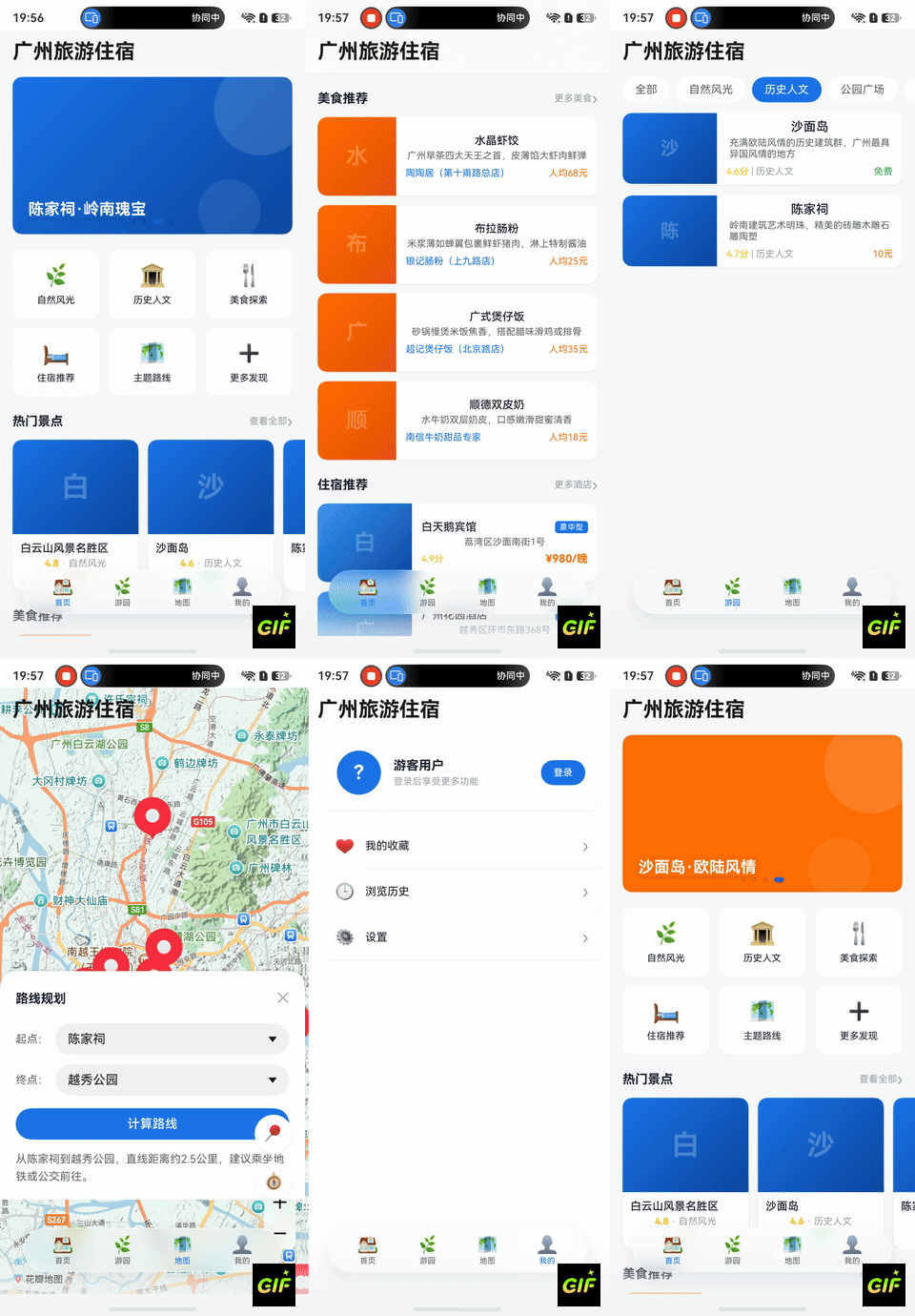
效果
一、项目背景
1.1 技术选型
本项目基于 HarmonyOS 6.1 (API 23)平台,使用 ArkTS 声明式开发语言与 ArkUI 框架进行构建。HarmonyOS 6.1 带来了更加成熟的状态管理 V2 体系和沉浸光感设计系统(HdsDesignKit),使得大型应用的开发体验和 UI 一致性有了质的提升。
核心技术栈如下:
| 技术点 | 选型 | 说明 |
|---|---|---|
| 开发语言 | ArkTS | TypeScript 超集,支持声明式 UI |
| UI 框架 | ArkUI | HarmonyOS 原生声明式 UI 框架 |
| 状态管理 | V2 体系 | @ComponentV2 + @ObservedV2 + @Trace 等 |
| 设计系统 | HdsDesignKit | HdsNavigation / HdsTabs 沉浸光感组件 |
| 数据持久化 | RDB(关系型数据库) | @kit.ArkData relationalStore |
| 网络请求 | HTTP | @kit.NetworkKit http |
| 定位服务 | LocationKit | @kit.LocationKit geoLocationManager |
| 构建工具 | Hvigor | HarmonyOS 专用构建系统 |
1.2 应用功能概览
广州旅游住宿是一款面向广州旅游用户的一站式信息服务应用,包含四个核心 Tab 页面:
- 首页:轮播 Banner、分类导航、热门景点推荐、美食推荐、住宿推荐
- 游园:景点列表展示、分类筛选、景点详情、收藏功能
- 地图:MapKit 地图展示、景点标记打点、路线规划
- 我的:用户信息、登录注册、收藏管理、浏览历史、设置
1.3 项目目录结构
TouristParkSample/
├── common/                    # 公共基础层(HAR shared)
│   └── src/main/ets/
│       ├── models/            # 数据模型(ScenicSpot, UserInfo, FoodItem...)
│       ├── constants/         # 常量定义(RouteConstants, ThemeConstants...)
│       ├── services/          # 服务封装(RouterService, HttpService, RdbService...)
│       └── components/        # 通用 UI 组件(ScenicCard, FoodCard, HotelCard...)
├── features/                  # 业务功能层(HAR shared)
│   ├── home/                  # 首页模块
│   ├── ParkService/           # 景区服务模块
│   ├── MapService/            # 地图服务模块
│   ├── AccountCenter/         # 账户中心模块
│   └── PersonalCenter/        # 个人中心模块
├── phone/                     # 壳工程(HAP entry)
│   └── src/main/ets/
│       ├── entryability/      # EntryAbility 入口
│       ├── pages/             # MainPage 主页面
│       └── router/            # RouterConfig 路由注册
├── build-profile.json5        # 工程级构建配置
└── oh-package.json5           # 工程级包配置
二、三层架构设计
2.1 架构总览
项目采用经典的分层模块化架构,将工程拆分为三个层级:
phone (HAP 壳工程) → features (HAR 业务模块) → common (HAR 公共层)依赖规则:
- 上层依赖下层:phone 依赖所有 features 和 common;features 各模块仅依赖 common
- features 之间不直接依赖:home 不能 import ParkService,反之亦然
- features 间通过 RouterService 间接通信:模块间跳转统一走 common 层的路由服务
- common 层无业务逻辑:仅提供数据模型、常量定义、工具服务、通用 UI 组件
2.2 模块依赖关系图
#mermaid-svg-NAwRrRuLu9b0MJri{font-family:"trebuchet ms",verdana,arial,sans-serif;font-size:16px;fill:#333;}@keyframes edge-animation-frame{from{stroke-dashoffset:0;}}@keyframes dash{to{stroke-dashoffset:0;}}#mermaid-svg-NAwRrRuLu9b0MJri .edge-animation-slow{stroke-dasharray:9,5!important;stroke-dashoffset:900;animation:dash 50s linear infinite;stroke-linecap:round;}#mermaid-svg-NAwRrRuLu9b0MJri .edge-animation-fast{stroke-dasharray:9,5!important;stroke-dashoffset:900;animation:dash 20s linear infinite;stroke-linecap:round;}#mermaid-svg-NAwRrRuLu9b0MJri .error-icon{fill:#552222;}#mermaid-svg-NAwRrRuLu9b0MJri .error-text{fill:#552222;stroke:#552222;}#mermaid-svg-NAwRrRuLu9b0MJri .edge-thickness-normal{stroke-width:1px;}#mermaid-svg-NAwRrRuLu9b0MJri .edge-thickness-thick{stroke-width:3.5px;}#mermaid-svg-NAwRrRuLu9b0MJri .edge-pattern-solid{stroke-dasharray:0;}#mermaid-svg-NAwRrRuLu9b0MJri .edge-thickness-invisible{stroke-width:0;fill:none;}#mermaid-svg-NAwRrRuLu9b0MJri .edge-pattern-dashed{stroke-dasharray:3;}#mermaid-svg-NAwRrRuLu9b0MJri .edge-pattern-dotted{stroke-dasharray:2;}#mermaid-svg-NAwRrRuLu9b0MJri .marker{fill:#333333;stroke:#333333;}#mermaid-svg-NAwRrRuLu9b0MJri .marker.cross{stroke:#333333;}#mermaid-svg-NAwRrRuLu9b0MJri svg{font-family:"trebuchet ms",verdana,arial,sans-serif;font-size:16px;}#mermaid-svg-NAwRrRuLu9b0MJri p{margin:0;}#mermaid-svg-NAwRrRuLu9b0MJri .label{font-family:"trebuchet ms",verdana,arial,sans-serif;color:#333;}#mermaid-svg-NAwRrRuLu9b0MJri .cluster-label text{fill:#333;}#mermaid-svg-NAwRrRuLu9b0MJri .cluster-label span{color:#333;}#mermaid-svg-NAwRrRuLu9b0MJri .cluster-label span p{background-color:transparent;}#mermaid-svg-NAwRrRuLu9b0MJri .label text,#mermaid-svg-NAwRrRuLu9b0MJri span{fill:#333;color:#333;}#mermaid-svg-NAwRrRuLu9b0MJri .node rect,#mermaid-svg-NAwRrRuLu9b0MJri .node circle,#mermaid-svg-NAwRrRuLu9b0MJri .node ellipse,#mermaid-svg-NAwRrRuLu9b0MJri .node polygon,#mermaid-svg-NAwRrRuLu9b0MJri .node path{fill:#ECECFF;stroke:#9370DB;stroke-width:1px;}#mermaid-svg-NAwRrRuLu9b0MJri .rough-node .label text,#mermaid-svg-NAwRrRuLu9b0MJri .node .label text,#mermaid-svg-NAwRrRuLu9b0MJri .image-shape .label,#mermaid-svg-NAwRrRuLu9b0MJri .icon-shape .label{text-anchor:middle;}#mermaid-svg-NAwRrRuLu9b0MJri .node .katex path{fill:#000;stroke:#000;stroke-width:1px;}#mermaid-svg-NAwRrRuLu9b0MJri .rough-node .label,#mermaid-svg-NAwRrRuLu9b0MJri .node .label,#mermaid-svg-NAwRrRuLu9b0MJri .image-shape .label,#mermaid-svg-NAwRrRuLu9b0MJri .icon-shape .label{text-align:center;}#mermaid-svg-NAwRrRuLu9b0MJri .node.clickable{cursor:pointer;}#mermaid-svg-NAwRrRuLu9b0MJri .root .anchor path{fill:#333333!important;stroke-width:0;stroke:#333333;}#mermaid-svg-NAwRrRuLu9b0MJri .arrowheadPath{fill:#333333;}#mermaid-svg-NAwRrRuLu9b0MJri .edgePath .path{stroke:#333333;stroke-width:2.0px;}#mermaid-svg-NAwRrRuLu9b0MJri .flowchart-link{stroke:#333333;fill:none;}#mermaid-svg-NAwRrRuLu9b0MJri .edgeLabel{background-color:rgba(232,232,232, 0.8);text-align:center;}#mermaid-svg-NAwRrRuLu9b0MJri .edgeLabel p{background-color:rgba(232,232,232, 0.8);}#mermaid-svg-NAwRrRuLu9b0MJri .edgeLabel rect{opacity:0.5;background-color:rgba(232,232,232, 0.8);fill:rgba(232,232,232, 0.8);}#mermaid-svg-NAwRrRuLu9b0MJri .labelBkg{background-color:rgba(232, 232, 232, 0.5);}#mermaid-svg-NAwRrRuLu9b0MJri .cluster rect{fill:#ffffde;stroke:#aaaa33;stroke-width:1px;}#mermaid-svg-NAwRrRuLu9b0MJri .cluster text{fill:#333;}#mermaid-svg-NAwRrRuLu9b0MJri .cluster span{color:#333;}#mermaid-svg-NAwRrRuLu9b0MJri div.mermaidTooltip{position:absolute;text-align:center;max-width:200px;padding:2px;font-family:"trebuchet ms",verdana,arial,sans-serif;font-size:12px;background:hsl(80, 100%, 96.2745098039%);border:1px solid #aaaa33;border-radius:2px;pointer-events:none;z-index:100;}#mermaid-svg-NAwRrRuLu9b0MJri .flowchartTitleText{text-anchor:middle;font-size:18px;fill:#333;}#mermaid-svg-NAwRrRuLu9b0MJri rect.text{fill:none;stroke-width:0;}#mermaid-svg-NAwRrRuLu9b0MJri .icon-shape,#mermaid-svg-NAwRrRuLu9b0MJri .image-shape{background-color:rgba(232,232,232, 0.8);text-align:center;}#mermaid-svg-NAwRrRuLu9b0MJri .icon-shape p,#mermaid-svg-NAwRrRuLu9b0MJri .image-shape p{background-color:rgba(232,232,232, 0.8);padding:2px;}#mermaid-svg-NAwRrRuLu9b0MJri .icon-shape .label rect,#mermaid-svg-NAwRrRuLu9b0MJri .image-shape .label rect{opacity:0.5;background-color:rgba(232,232,232, 0.8);fill:rgba(232,232,232, 0.8);}#mermaid-svg-NAwRrRuLu9b0MJri .label-icon{display:inline-block;height:1em;overflow:visible;vertical-align:-0.125em;}#mermaid-svg-NAwRrRuLu9b0MJri .node .label-icon path{fill:currentColor;stroke:revert;stroke-width:revert;}#mermaid-svg-NAwRrRuLu9b0MJri :root{--mermaid-font-family:"trebuchet ms",verdana,arial,sans-serif;} phone - HAP Entry
common - HAR Shared
home - HAR Shared
ParkService - HAR Shared
MapService - HAR Shared
AccountCenter - HAR Shared
PersonalCenter - HAR Shared
这种设计的好处在于:各业务模块高度内聚,互不耦合;common 层提供统一的基础能力;phone 层作为壳工程负责组装和路由注册,实现了关注点分离。
三、模块划分与职责
| 模块 | 类型 | 路径 | 职责 |
|---|---|---|---|
| common | HAR (shared) | ./common |
数据模型(ScenicSpot/UserInfo/FoodItem/HotelItem)、常量管理(RouteConstants/ThemeConstants/AppConstants)、服务封装(RouterService/HttpService/RdbService/LocationService)、通用 UI 组件(ScenicCard/FoodCard/HotelCard/SectionHeader/LoadingView/EmptyView) |
| home | HAR (shared) | ./features/home |
首页模块:Banner 轮播(BannerSwiper)、分类宫格(CategoryGrid)、热门景点推荐(HotRecommendSection)、美食推荐(FoodRecommendSection)、住宿推荐(HotelRecommendSection) |
| ParkService | HAR (shared) | ./features/ParkService |
景区服务模块:景点列表展示(ParkListPage)、分类筛选栏(SpotFilterBar)、景点详情页(ParkDetailPage)、收藏与浏览记录 |
| MapService | HAR (shared) | ./features/MapService |
地图服务模块:地图展示(MapPage)、景点标记弹窗(SpotMarkerPopup)、路线规划面板(RoutePlanPanel) |
| AccountCenter | HAR (shared) | ./features/AccountCenter |
账户中心模块:登录页(LoginPage)、注册页(RegisterPage)、资料编辑页(ProfileEditPage) |
| PersonalCenter | HAR (shared) | ./features/PersonalCenter |
个人中心模块:用户主页(PersonalCenterPage)、个人信息区(ProfileSection)、收藏页(FavoritesPage)、历史页(HistoryPage)、设置页(SettingsPage)、WebView 页(WebViewPage) |
| phone | HAP (entry) | ./phone |
壳工程:EntryAbility 入口、MainPage 主页面(HdsNavigation + HdsTabs)、RouterConfig 路由注册、NavDestination 路由分发 |
3.1 各模块导出清单(Index.ets)
每个 HAR 模块都通过 Index.ets 暴露其公共 API:
typescript
// common/Index.ets --- 导出所有公共能力
export { ScenicSpot } from './src/main/ets/models/ScenicSpot';
export { FoodItem } from './src/main/ets/models/FoodItem';
export { HotelItem } from './src/main/ets/models/HotelItem';
export { UserInfo } from './src/main/ets/models/UserInfo';
export { CategoryItem, BannerItem, SpotMarker } from './src/main/ets/models/CategoryItem';
export { AppConstants } from './src/main/ets/constants/AppConstants';
export { RouteConstants } from './src/main/ets/constants/RouteConstants';
export { ThemeConstants } from './src/main/ets/constants/ThemeConstants';
export { HttpService } from './src/main/ets/services/HttpService';
export { RdbService, FavoriteRecord, HistoryRecord } from './src/main/ets/services/RdbService';
export { LocationService, LocationData } from './src/main/ets/services/LocationService';
export { RouterService } from './src/main/ets/services/RouterService';
export { SectionHeader } from './src/main/ets/components/SectionHeader';
export { ScenicCard } from './src/main/ets/components/ScenicCard';
export { FoodCard } from './src/main/ets/components/FoodCard';
export { HotelCard } from './src/main/ets/components/HotelCard';
export { LoadingView } from './src/main/ets/components/LoadingView';
export { EmptyView } from './src/main/ets/components/EmptyView';
export { ImageView } from './src/main/ets/components/ImageView';
typescript
// features/home/Index.ets
export { HomePage } from './src/main/ets/views/HomePage';

// features/ParkService/Index.ets
export { ParkListPage } from './src/main/ets/views/ParkListPage';
export { ParkDetailPage } from './src/main/ets/views/ParkDetailPage';

// features/AccountCenter/Index.ets
export { LoginPage } from './src/main/ets/views/LoginPage';
export { RegisterPage } from './src/main/ets/views/RegisterPage';
export { ProfileEditPage } from './src/main/ets/views/ProfileEditPage';
四、工程搭建详解
4.1 build-profile.json5 --- 注册所有模块
工程根目录的 build-profile.json5 声明了所有子模块及其 srcPath:
json5
{
  "app": {
    "products": [
      {
        "name": "default",
        "signingConfig": "default",
        "targetSdkVersion": "6.1.0(23)",
        "compatibleSdkVersion": "6.1.0(23)",
        "runtimeOS": "HarmonyOS"
      }
    ]
  },
  "modules": [
    { "name": "phone",         "srcPath": "./phone" },
    { "name": "home",          "srcPath": "./features/home" },
    { "name": "AccountCenter", "srcPath": "./features/AccountCenter" },
    { "name": "MapService",    "srcPath": "./features/MapService" },
    { "name": "ParkService",   "srcPath": "./features/ParkService" },
    { "name": "PersonalCenter","srcPath": "./features/PersonalCenter" },
    { "name": "common",        "srcPath": "./common" }
  ]
}
4.2 oh-package.json5 --- 模块依赖配置
各模块通过 file: 协议引用本地依赖。phone 壳工程需要依赖所有模块:
json5
// phone/oh-package.json5
{
  "name": "phone",
  "version": "1.0.0",
  "description": "手机端壳模块",
  "dependencies": {
    "common": "file:../common",
    "home": "file:../features/home",
    "ParkService": "file:../features/ParkService",
    "MapService": "file:../features/MapService",
    "AccountCenter": "file:../features/AccountCenter",
    "PersonalCenter": "file:../features/PersonalCenter"
  }
}
features 各模块仅依赖 common:
json5
// features/home/oh-package.json5(其他 feature 模块结构相同)
{
  "name": "home",
  "version": "1.0.0",
  "description": "首页信息流模块",
  "main": "Index.ets",
  "dependencies": {
    "common": "file:../../common"
  }
}
common 公共层无外部依赖:
json5
// common/oh-package.json5
{
  "name": "common",
  "version": "1.0.0",
  "description": "公共基础模块",
  "main": "Index.ets",
  "dependencies": {}
}
4.3 module.json5 --- 模块类型声明
common 和 features 模块的类型均为 shared,phone 模块为 entry:
json5
// common/src/main/module.json5(features 各模块结构相同)
{
  "module": {
    "name": "common",
    "type": "shared",
    "deviceTypes": ["phone"],
    "deliveryWithInstall": true,
    "installationFree": false
  }
}
json5
// phone/src/main/module.json5
{
  "module": {
    "name": "phone",
    "type": "entry",
    "mainElement": "EntryAbility",
    "deviceTypes": ["phone"],
    "pages": "$profile:main_pages",
    "abilities": [{ "name": "EntryAbility", "srcEntry": "./ets/entryability/EntryAbility.ets" }],
    "requestPermissions": [
      { "name": "ohos.permission.GET_NETWORK_INFO" },
      { "name": "ohos.permission.INTERNET" },
      { "name": "ohos.permission.APPROXIMATELY_LOCATION" },
      { "name": "ohos.permission.LOCATION" }
    ]
  }
}
4.4 hvigorfile.ts --- 构建任务对应关系
HAR (shared) 模块使用 hspTasks,HAP (entry) 模块使用 hapTasks:
typescript
// common/hvigorfile.ts 及所有 features 模块
import { hspTasks } from '@ohos/hvigor-ohos-plugin';
export default {
  system: hspTasks,
  plugins: []
}
typescript
// phone/hvigorfile.ts
import { hapTasks } from '@ohos/hvigor-ohos-plugin';
export default {
  system: hapTasks,
  plugins: []
}| 模块类型 | module.json5 type | hvigorfile.ts | 产物格式 |
|---|---|---|---|
| HAR (shared) | "shared" |
hspTasks |
.hsp |
| HAP (entry) | "entry" |
hapTasks |
.hap |
五、状态管理 V2 架构
5.1 V1 与 V2 装饰器对照表
HarmonyOS 6.1 推荐使用状态管理 V2,以下是 V1 和 V2 的完整对照:
| V1 装饰器 | V2 装饰器 | 说明 |
|---|---|---|
@Component |
@ComponentV2 |
自定义组件声明 |
@Observed |
@ObservedV2 |
可观察类装饰器 |
@State |
@Local |
组件内部状态 |
@Prop |
@Param |
父→子单向数据传递 |
@Link |
--- | V2 中已移除,用 @Param + @Event 替代 |
@Provide |
@Provider |
祖先组件提供状态 |
@Consume |
@Consumer |
后代组件消费状态 |
| --- | @Trace |
细粒度属性级响应式追踪 |
| --- | @Computed |
计算属性(getter) |
| --- | @Event |
子→父事件回调 |
5.2 @Trace 细粒度响应式 + @Computed 计算属性
@ObservedV2 配合 @Trace 实现了属性级别 的细粒度响应式更新。只有被 @Trace 标注的属性变化时,才会触发引用该属性的组件重新渲染。@Computed 装饰 getter 方法,当其依赖的 @Trace 属性变化时自动重新计算。
以 ScenicSpot 数据模型为例:
typescript
@ObservedV2
export class ScenicSpot {
  @Trace id: string = '';
  @Trace name: string = '';
  @Trace description: string = '';
  @Trace coverImage: string = '';
  @Trace category: string = '';
  @Trace address: string = '';
  @Trace latitude: number = 0;
  @Trace longitude: number = 0;
  @Trace ticketPrice: string = '';
  @Trace openTime: string = '';
  @Trace rating: number = 0;
  @Trace visitDuration: string = '';
  @Trace isFavorite: boolean = false;
  @Trace detailUrl: string = '';

  // 计算属性:是否需要购票
  @Computed
  get hasTicket(): boolean {
    return this.ticketPrice.length > 0 && this.ticketPrice !== '免费';
  }

  // 计算属性:坐标是否有效
  @Computed
  get coordinateValid(): boolean {
    return this.latitude !== 0 && this.longitude !== 0;
  }

  // 计算属性:评分文案
  @Computed
  get ratingText(): string {
    if (this.rating >= 4.5) return '极力推荐';
    if (this.rating >= 4.0) return '值得一去';
    if (this.rating >= 3.5) return '还不错';
    return '一般';
  }
}
在 UI 中使用时,spot.hasTicket 和 spot.ratingText 会随着 ticketPrice 或 rating 的变化自动更新,无需手动维护中间状态。
5.3 @Provider / @Consumer 跨层级状态共享
@Provider 和 @Consumer 实现了不依赖组件层级关系 的状态共享。本项目中,用户信息 UserInfo 通过此机制在整个应用内共享。
定义可观察的用户信息模型:
typescript
@ObservedV2
export class UserInfo {
  @Trace userId: string = '';
  @Trace nickname: string = '';
  @Trace avatar: string = '';
  @Trace phone: string = '';
  @Trace email: string = '';
  @Trace isLoggedIn: boolean = false;

  @Computed
  get displayNickname(): string {
    return this.isLoggedIn ? this.nickname : '游客用户';
  }

  @Computed
  get maskedPhone(): string {
    if (this.phone.length === 11) {
      return this.phone.substring(0, 3) + '****' + this.phone.substring(7);
    }
    return this.phone;
  }
}
在 MainPage 中通过 @Provider 注入:
typescript
@ComponentV2
struct MainPage {
  @Provider(UserInfo) userInfo: UserInfo = new UserInfo();
  // ...
}
在任意后代组件中通过 @Consumer 获取:
typescript
// LoginPage 中修改用户登录状态
@ComponentV2
export struct LoginPage {
  @Consumer(UserInfo) userInfo: UserInfo = new UserInfo();

  // 登录成功后:
  // this.userInfo.userId = user.userId;
  // this.userInfo.isLoggedIn = true;
}

// PersonalCenterPage 中展示用户信息
@ComponentV2
export struct PersonalCenterPage {
  @Consumer(UserInfo) userInfo: UserInfo = new UserInfo();
  // this.userInfo.displayNickname → '游客用户' 或 真实昵称
}
这样,登录页面修改 userInfo.isLoggedIn = true 后,个人中心页面会自动更新显示------无需任何手动通知或回调。
六、路由架构设计
6.1 RouterService --- 路由核心服务
RouterService 位于 common 层,封装了 NavPathStack 的操作,使所有模块都能通过统一接口进行页面跳转:
typescript
export class RouterService {
  private static builderMap: Map<string, WrappedBuilder<[object]>> = new Map();
  private static navPathStack: NavPathStack | null = null;

  // 注册 NavPathStack(由 MainPage 调用)
  static registerNavPathStack(stack: NavPathStack): void {
    RouterService.navPathStack = stack;
  }

  // 注册页面 Builder(由 RouterConfig 调用)
  static registerBuilder(name: string, builder: WrappedBuilder<[object]>): void {
    RouterService.builderMap.set(name, builder);
  }

  // 页面跳转
  static push(name: string, param?: object): void {
    if (RouterService.navPathStack) {
      RouterService.navPathStack.pushPath({
        name: name,
        param: param ?? {}
      });
    }
  }

  // 返回上一页
  static pop(): void {
    RouterService.navPathStack?.pop();
  }

  // 替换当前页面
  static replace(name: string, param?: object): void {
    RouterService.navPathStack?.replacePath({ name: name, param: param ?? {} });
  }

  // 返回根页面
  static popToRoot(): void {
    RouterService.navPathStack?.clear();
  }
}
6.2 RouteConstants --- 路由名称集中管理
typescript
export class RouteConstants {
  static readonly HOME_PAGE: string = 'HomePage';
  static readonly PARK_LIST_PAGE: string = 'ParkListPage';
  static readonly PARK_DETAIL_PAGE: string = 'ParkDetailPage';
  static readonly MAP_PAGE: string = 'MapPage';
  static readonly PERSONAL_CENTER_PAGE: string = 'PersonalCenterPage';
  static readonly FAVORITES_PAGE: string = 'FavoritesPage';
  static readonly HISTORY_PAGE: string = 'HistoryPage';
  static readonly LOGIN_PAGE: string = 'LoginPage';
  static readonly REGISTER_PAGE: string = 'RegisterPage';
  static readonly SETTINGS_PAGE: string = 'SettingsPage';
  static readonly WEB_VIEW_PAGE: string = 'WebViewPage';
  static readonly FOOD_DETAIL_PAGE: string = 'FoodDetailPage';
  static readonly HOTEL_DETAIL_PAGE: string = 'HotelDetailPage';
  static readonly PROFILE_EDIT_PAGE: string = 'ProfileEditPage';
}
6.3 RouterConfig --- phone 层路由注册
RouterConfig 位于 phone 壳工程,集中注册所有二级页面的 Builder 函数:
typescript
export class RouterConfig {
  static registerAllRoutes(): void {
    // 路由注册入口,页面通过 navDestination Builder 构建
  }

  @Builder
  static buildParkDetail(param: object) {
    ParkDetailPage({ spotId: (param as Record<string, string>)['spotId'] ?? '' })
  }

  @Builder
  static buildLogin(param: object) { LoginPage() }

  @Builder
  static buildRegister(param: object) { RegisterPage() }

  @Builder
  static buildFavorites(param: object) {
    FavoritesPage({ filterType: (param as Record<string, string>)['filterType'] ?? '' })
  }

  @Builder
  static buildHistory(param: object) { HistoryPage() }

  @Builder
  static buildSettings(param: object) { SettingsPage() }

  @Builder
  static buildWebView(param: object) {
    WebViewPage({
      url: (param as Record<string, string>)['url'] ?? '',
      title: (param as Record<string, string>)['title'] ?? ''
    })
  }

  @Builder
  static buildProfileEdit(param: object) { ProfileEditPage() }
}
6.4 MainPage --- navDestination 路由分发
MainPage 的 routeMapBuilder 方法根据路由名称分发到对应的 Builder:
typescript
@Builder
routeMapBuilder(name: string, param: object) {
  if (name === RouteConstants.PARK_DETAIL_PAGE) {
    RouterConfig.buildParkDetail(param);
  } else if (name === RouteConstants.LOGIN_PAGE) {
    RouterConfig.buildLogin(param);
  } else if (name === RouteConstants.REGISTER_PAGE) {
    RouterConfig.buildRegister(param);
  } else if (name === RouteConstants.FAVORITES_PAGE) {
    RouterConfig.buildFavorites(param);
  } else if (name === RouteConstants.HISTORY_PAGE) {
    RouterConfig.buildHistory(param);
  } else if (name === RouteConstants.SETTINGS_PAGE) {
    RouterConfig.buildSettings(param);
  } else if (name === RouteConstants.WEB_VIEW_PAGE) {
    RouterConfig.buildWebView(param);
  } else if (name === RouteConstants.PROFILE_EDIT_PAGE) {
    RouterConfig.buildProfileEdit(param);
  }
}
6.5 features 模块间的路由通信
由于 features 模块之间不直接 import ,页面跳转统一通过 RouterService 完成:
typescript
// ParkListPage 中跳转到景点详情(ParkService 模块内部)
RouterService.push(RouteConstants.PARK_DETAIL_PAGE, { 'spotId': spot.id });

// PersonalCenterPage 中跳转到收藏页(PersonalCenter 模块内部)
RouterService.push(RouteConstants.FAVORITES_PAGE);

// ParkDetailPage 中跳转到 WebView(跨模块跳转)
RouterService.push(RouteConstants.WEB_VIEW_PAGE, {
  'url': this.spot.detailUrl,
  'title': this.spot.name
});

// LoginPage 中跳转到注册页(AccountCenter 模块内部)
RouterService.replace(RouteConstants.REGISTER_PAGE);
6.6 路由跳转流程
#mermaid-svg-iqu3sNs2RW9YOWzA{font-family:"trebuchet ms",verdana,arial,sans-serif;font-size:16px;fill:#333;}@keyframes edge-animation-frame{from{stroke-dashoffset:0;}}@keyframes dash{to{stroke-dashoffset:0;}}#mermaid-svg-iqu3sNs2RW9YOWzA .edge-animation-slow{stroke-dasharray:9,5!important;stroke-dashoffset:900;animation:dash 50s linear infinite;stroke-linecap:round;}#mermaid-svg-iqu3sNs2RW9YOWzA .edge-animation-fast{stroke-dasharray:9,5!important;stroke-dashoffset:900;animation:dash 20s linear infinite;stroke-linecap:round;}#mermaid-svg-iqu3sNs2RW9YOWzA .error-icon{fill:#552222;}#mermaid-svg-iqu3sNs2RW9YOWzA .error-text{fill:#552222;stroke:#552222;}#mermaid-svg-iqu3sNs2RW9YOWzA .edge-thickness-normal{stroke-width:1px;}#mermaid-svg-iqu3sNs2RW9YOWzA .edge-thickness-thick{stroke-width:3.5px;}#mermaid-svg-iqu3sNs2RW9YOWzA .edge-pattern-solid{stroke-dasharray:0;}#mermaid-svg-iqu3sNs2RW9YOWzA .edge-thickness-invisible{stroke-width:0;fill:none;}#mermaid-svg-iqu3sNs2RW9YOWzA .edge-pattern-dashed{stroke-dasharray:3;}#mermaid-svg-iqu3sNs2RW9YOWzA .edge-pattern-dotted{stroke-dasharray:2;}#mermaid-svg-iqu3sNs2RW9YOWzA .marker{fill:#333333;stroke:#333333;}#mermaid-svg-iqu3sNs2RW9YOWzA .marker.cross{stroke:#333333;}#mermaid-svg-iqu3sNs2RW9YOWzA svg{font-family:"trebuchet ms",verdana,arial,sans-serif;font-size:16px;}#mermaid-svg-iqu3sNs2RW9YOWzA p{margin:0;}#mermaid-svg-iqu3sNs2RW9YOWzA .label{font-family:"trebuchet ms",verdana,arial,sans-serif;color:#333;}#mermaid-svg-iqu3sNs2RW9YOWzA .cluster-label text{fill:#333;}#mermaid-svg-iqu3sNs2RW9YOWzA .cluster-label span{color:#333;}#mermaid-svg-iqu3sNs2RW9YOWzA .cluster-label span p{background-color:transparent;}#mermaid-svg-iqu3sNs2RW9YOWzA .label text,#mermaid-svg-iqu3sNs2RW9YOWzA span{fill:#333;color:#333;}#mermaid-svg-iqu3sNs2RW9YOWzA .node rect,#mermaid-svg-iqu3sNs2RW9YOWzA .node circle,#mermaid-svg-iqu3sNs2RW9YOWzA .node ellipse,#mermaid-svg-iqu3sNs2RW9YOWzA .node polygon,#mermaid-svg-iqu3sNs2RW9YOWzA .node path{fill:#ECECFF;stroke:#9370DB;stroke-width:1px;}#mermaid-svg-iqu3sNs2RW9YOWzA .rough-node .label text,#mermaid-svg-iqu3sNs2RW9YOWzA .node .label text,#mermaid-svg-iqu3sNs2RW9YOWzA .image-shape .label,#mermaid-svg-iqu3sNs2RW9YOWzA .icon-shape .label{text-anchor:middle;}#mermaid-svg-iqu3sNs2RW9YOWzA .node .katex path{fill:#000;stroke:#000;stroke-width:1px;}#mermaid-svg-iqu3sNs2RW9YOWzA .rough-node .label,#mermaid-svg-iqu3sNs2RW9YOWzA .node .label,#mermaid-svg-iqu3sNs2RW9YOWzA .image-shape .label,#mermaid-svg-iqu3sNs2RW9YOWzA .icon-shape .label{text-align:center;}#mermaid-svg-iqu3sNs2RW9YOWzA .node.clickable{cursor:pointer;}#mermaid-svg-iqu3sNs2RW9YOWzA .root .anchor path{fill:#333333!important;stroke-width:0;stroke:#333333;}#mermaid-svg-iqu3sNs2RW9YOWzA .arrowheadPath{fill:#333333;}#mermaid-svg-iqu3sNs2RW9YOWzA .edgePath .path{stroke:#333333;stroke-width:2.0px;}#mermaid-svg-iqu3sNs2RW9YOWzA .flowchart-link{stroke:#333333;fill:none;}#mermaid-svg-iqu3sNs2RW9YOWzA .edgeLabel{background-color:rgba(232,232,232, 0.8);text-align:center;}#mermaid-svg-iqu3sNs2RW9YOWzA .edgeLabel p{background-color:rgba(232,232,232, 0.8);}#mermaid-svg-iqu3sNs2RW9YOWzA .edgeLabel rect{opacity:0.5;background-color:rgba(232,232,232, 0.8);fill:rgba(232,232,232, 0.8);}#mermaid-svg-iqu3sNs2RW9YOWzA .labelBkg{background-color:rgba(232, 232, 232, 0.5);}#mermaid-svg-iqu3sNs2RW9YOWzA .cluster rect{fill:#ffffde;stroke:#aaaa33;stroke-width:1px;}#mermaid-svg-iqu3sNs2RW9YOWzA .cluster text{fill:#333;}#mermaid-svg-iqu3sNs2RW9YOWzA .cluster span{color:#333;}#mermaid-svg-iqu3sNs2RW9YOWzA div.mermaidTooltip{position:absolute;text-align:center;max-width:200px;padding:2px;font-family:"trebuchet ms",verdana,arial,sans-serif;font-size:12px;background:hsl(80, 100%, 96.2745098039%);border:1px solid #aaaa33;border-radius:2px;pointer-events:none;z-index:100;}#mermaid-svg-iqu3sNs2RW9YOWzA .flowchartTitleText{text-anchor:middle;font-size:18px;fill:#333;}#mermaid-svg-iqu3sNs2RW9YOWzA rect.text{fill:none;stroke-width:0;}#mermaid-svg-iqu3sNs2RW9YOWzA .icon-shape,#mermaid-svg-iqu3sNs2RW9YOWzA .image-shape{background-color:rgba(232,232,232, 0.8);text-align:center;}#mermaid-svg-iqu3sNs2RW9YOWzA .icon-shape p,#mermaid-svg-iqu3sNs2RW9YOWzA .image-shape p{background-color:rgba(232,232,232, 0.8);padding:2px;}#mermaid-svg-iqu3sNs2RW9YOWzA .icon-shape .label rect,#mermaid-svg-iqu3sNs2RW9YOWzA .image-shape .label rect{opacity:0.5;background-color:rgba(232,232,232, 0.8);fill:rgba(232,232,232, 0.8);}#mermaid-svg-iqu3sNs2RW9YOWzA .label-icon{display:inline-block;height:1em;overflow:visible;vertical-align:-0.125em;}#mermaid-svg-iqu3sNs2RW9YOWzA .node .label-icon path{fill:currentColor;stroke:revert;stroke-width:revert;}#mermaid-svg-iqu3sNs2RW9YOWzA :root{--mermaid-font-family:"trebuchet ms",verdana,arial,sans-serif;} RouterService.push(name, param)
Feature Page
NavPathStack.pushPath
HdsNavigation navDestination
routeMapBuilder
RouterConfig.buildXxx
Target Page
七、HdsNavigation + HdsTabs 主页面框架
MainPage 使用 HarmonyOS 6.1 的沉浸光感设计组件构建主框架:
typescript
@Entry
@ComponentV2
struct MainPage {
  @Local currentTabIndex: number = 0;
  @Local navPathStack: NavPathStack = new NavPathStack();
  @Provider(UserInfo) userInfo: UserInfo = new UserInfo();
  private tabsController: HdsTabsController = new HdsTabsController();

  aboutToAppear(): void {
    // 从 AppStorage 读取安全区域高度
    const topHeight = AppStorage.get<number>('topRectHeight');
    if (topHeight !== undefined) this.topRectHeight = topHeight;
    const bottomHeight = AppStorage.get<number>('bottomRectHeight');
    if (bottomHeight !== undefined) this.bottomRectHeight = bottomHeight;

    // 注册路由栈 & 路由配置
    RouterService.registerNavPathStack(this.navPathStack);
    RouterConfig.registerAllRoutes();
  }

  build() {
    Column() {
      HdsNavigation() {
        HdsTabs({ controller: this.tabsController }) {
          TabContent() {
            HomePage()
          }
          .tabBar(this.tabBarBuilder('首页', 'sys.symbol.house', 'sys.symbol.house_fill', 0))

          TabContent() {
            ParkListPage()
          }
          .tabBar(this.tabBarBuilder('游园', 'sys.symbol.leaf', 'sys.symbol.leaf_fill', 1))

          TabContent() {
            MapPage()
          }
          .tabBar(this.tabBarBuilder('地图', 'sys.symbol.map', 'sys.symbol.map_fill', 2))

          TabContent() {
            PersonalCenterPage()
          }
          .tabBar(this.tabBarBuilder('我的', 'sys.symbol.person', 'sys.symbol.person_fill', 3))
        }
        .barOverlap(true)
        .barPosition(BarPosition.End)
        .barFloatingStyle({
          barBottomMargin: 28,
          systemMaterialEffect: {
            materialType: hdsMaterial.MaterialType.ADAPTIVE,
            materialLevel: hdsMaterial.MaterialLevel.ADAPTIVE
          }
        })
      }
      .mode(NavigationMode.Stack)
      .navDestination(this.routeMapBuilder)
      .titleBar({
        content: { title: { mainTitle: '广州旅游住宿' } },
        style: {
          systemMaterialEffect: {
            materialType: hdsMaterial.MaterialType.ADAPTIVE,
            materialLevel: hdsMaterial.MaterialLevel.ADAPTIVE
          }
        }
      })
      .titleMode(HdsNavigationTitleMode.MINI)
    }
  }
}关键设计要点:
HdsNavigation采用NavigationMode.Stack模式,配合navDestination实现二级页面栈式导航HdsTabs设置barOverlap(true)使 Tab 栏悬浮在内容之上,配合barFloatingStyle实现底部浮动效果- Tab 栏使用
hdsMaterial自适应材质效果,实现沉浸光感风格 - 标题栏使用
HdsNavigationTitleMode.MINI迷你模式,简洁大方
八、EntryAbility 与系统初始化
EntryAbility 是应用的入口 Ability,负责系统级初始化:
typescript
export default class EntryAbility extends UIAbility {
  onWindowStageCreate(windowStage: window.WindowStage): void {
    windowStage.getMainWindow().then((windowClass: window.Window) => {
      // 设置全屏模式
      windowClass.setWindowLayoutFullScreen(true);

      // 获取安全区域并存储到 AppStorage
      const navArea = windowClass.getWindowAvoidArea(
        window.AvoidAreaType.TYPE_NAVIGATION_INDICATOR);
      AppStorage.setOrCreate('bottomRectHeight', navArea.bottomRect.height);

      const sysArea = windowClass.getWindowAvoidArea(
        window.AvoidAreaType.TYPE_SYSTEM);
      AppStorage.setOrCreate('topRectHeight', sysArea.topRect.height);
    });

    // 初始化 RDB 数据库
    RdbService.getInstance().initStore(this.context);

    // 加载主页面
    windowStage.loadContent('pages/MainPage');
  }
}
九、注意事项与踩坑总结
9.1 @StorageProp 不兼容 @ComponentV2
状态管理 V2 中 @StorageProp 和 @StorageLink 不支持 @ComponentV2。替代方案是使用 @Local + AppStorage.get() 在 aboutToAppear 中手动读取:
typescript
@ComponentV2
struct MainPage {
  @Local topRectHeight: number = 0;

  aboutToAppear(): void {
    const topHeight = AppStorage.get<number>('topRectHeight');
    if (topHeight !== undefined) {
      this.topRectHeight = topHeight;
    }
  }
}
9.2 @Reusable 不兼容 @ComponentV2
当前版本 @Reusable 复用装饰器与 @ComponentV2 不兼容。长列表优化建议使用 LazyForEach 配合 IDataSource 实现懒加载。
9.3 feature 模块间禁止直接 import
features 下的各业务模块之间不允许直接引用 。如果一个 feature 需要跳转到另一个 feature 的页面,必须通过 RouterService.push(RouteConstants.XXX, param) 间接完成。例如:
typescript
// 错误做法 ❌ ------ home 模块直接引用 ParkService
import { ParkDetailPage } from 'ParkService';

// 正确做法 ✅ ------ 通过路由服务间接跳转
import { RouterService, RouteConstants } from 'common';
RouterService.push(RouteConstants.PARK_DETAIL_PAGE, { 'spotId': spot.id });
9.4 HAR 依赖使用 file: 协议
本地 HAR 模块依赖必须使用 file: 协议,路径相对于当前模块的 oh-package.json5 所在目录:
json5
// phone 层引用 common(向上一层)
"common": "file:../common"

// features 层引用 common(向上两层)
"common": "file:../../common"
9.5 ArkTS 泛型推断限制
ArkTS 对泛型的类型推断比标准 TypeScript 更严格。在使用 Array.from、Array.map、Array.fill 等方法时,必须显式声明泛型参数:
typescript
// 错误 ❌ ------ 编译报错,无法推断类型
const items = Array.from({ length: 5 }, (_, i) => new ScenicSpot());

// 正确 ✅ ------ 显式声明泛型
const items = Array.from<ScenicSpot>({ length: 5 }, (_, i): ScenicSpot => new ScenicSpot());
9.6 @ComponentV2 组件参数传递
@ComponentV2 中子组件接收父组件传入的数据使用 @Param,事件回调使用 @Event:
typescript
@ComponentV2
export struct ScenicCard {
  @Param spot: ScenicSpot = new ScenicSpot();              // 数据输入
  @Event onCardClick: (spot: ScenicSpot) => void = () => {}; // 事件回调
}
十、系列文章导航
| 序号 | 文章标题 | 核心内容 |
|---|---|---|
| 01 | 分层模块化架构设计与工程搭建实战(本文) | 三层架构、模块划分、工程配置、状态管理 V2、路由设计 |
| 02 | Common 层:数据模型与服务封装 | @ObservedV2 模型、HttpService、RdbService、LocationService |
| 03 | Common 层:通用 UI 组件开发 | ScenicCard、FoodCard、HotelCard、SectionHeader 等组件设计 |
| 04 | Phone 壳工程:HdsTabs 框架与路由分发 | HdsNavigation、HdsTabs、MainPage、RouterConfig |
| 05 | Home 首页:多区块信息流布局 | Banner 轮播、分类宫格、景点/美食/住宿推荐 |
| 06 | ParkService:景点列表与详情 | 列表筛选、详情展示、收藏/浏览记录 |
| 07 | MapService:地图与路线规划 | MapKit 地图、标记打点、路线计算 |
| 08 | AccountCenter & PersonalCenter | 登录注册、用户信息、收藏历史、设置页 |
m,事件回调使用 @Event`:
typescript
@ComponentV2
export struct ScenicCard {
  @Param spot: ScenicSpot = new ScenicSpot();              // 数据输入
  @Event onCardClick: (spot: ScenicSpot) => void = () => {}; // 事件回调
}
十、系列文章导航
| 序号 | 文章标题 | 核心内容 |
|---|---|---|
| 01 | 分层模块化架构设计与工程搭建实战(本文) | 三层架构、模块划分、工程配置、状态管理 V2、路由设计 |
| 02 | Common 层:数据模型与服务封装 | @ObservedV2 模型、HttpService、RdbService、LocationService |
| 03 | Common 层:通用 UI 组件开发 | ScenicCard、FoodCard、HotelCard、SectionHeader 等组件设计 |
| 04 | Phone 壳工程:HdsTabs 框架与路由分发 | HdsNavigation、HdsTabs、MainPage、RouterConfig |
| 05 | Home 首页:多区块信息流布局 | Banner 轮播、分类宫格、景点/美食/住宿推荐 |
| 06 | ParkService:景点列表与详情 | 列表筛选、详情展示、收藏/浏览记录 |
| 07 | MapService:地图与路线规划 | MapKit 地图、标记打点、路线计算 |
| 08 | AccountCenter & PersonalCenter | 登录注册、用户信息、收藏历史、设置页 |