交互实体
大模型Deepseek(简称:LLM)
Java 实现LLM Client服务(简称:Client)
MCP Server 服务
交互图
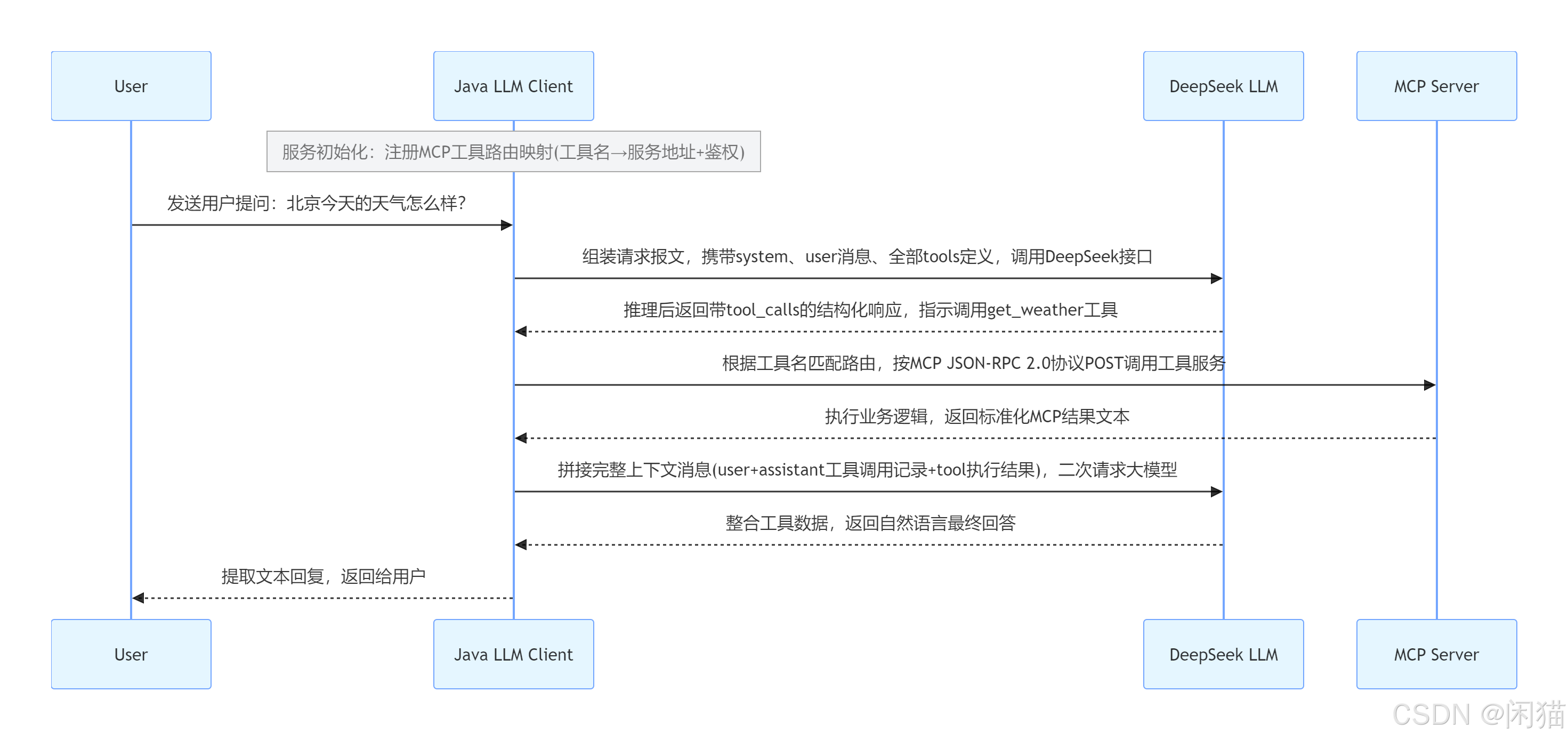
流程文字简述
- Client 启动预加载所有 MCP 工具路由配置
- 用户向 Client 提交问题
- Client 携带工具列表首次请求 DeepSeek
- DeepSeek 返回需要调用工具的指令
- Client 匹配路由,通过 MCP 协议调用对应 MCP 服务
- MCP 服务返回工具查询结果
- Client 补齐完整对话上下文再次请求 DeepSeek
- DeepSeek 生成最终口语化答案返回 Client
- Client 将答案输出给用户
交互过程
第一步:在Client注册MCP server的方法和地址
需要注册信息如下
方法名称
URL地址
token
因为MCP是有固定协议,所以接口参数是固定的。协议详细参考:规范(2024-11-05)
// 客户端内部维护的路由映射
const toolRouter = {
  "get_weather": {
    mcpServerUrl: "https://weather-mcp.example.com/mcp",
    authToken: "Bearer xxx"
  },
  "get_stock_price": {
    mcpServerUrl: "https://stock-mcp.example.com/mcp",
    authToken: "Bearer yyy"
  }
};
第二步:Client 访问Deepseek接口,并携带Tool参数
{
  "model": "deepseek-chat",
  "messages": [
    {
      "role": "system",
      "content": "你是一个智能助手,可以根据用户问题调用合适的工具。"
    },
    {
      "role": "user",
      "content": "北京今天的天气怎么样?"
    }
  ],
  "tools": [
    {
      "type": "function",
      "function": {
        "name": "get_weather",
        "description": "查询指定城市的实时天气信息,支持中国主要城市",
        "parameters": {
          "type": "object",
          "properties": {
            "city": {
              "type": "string",
              "description": "城市名称,如:北京、上海、深圳"
            },
            "unit": {
              "type": "string",
              "enum": ["celsius", "fahrenheit"],
              "description": "温度单位,默认为摄氏"
            }
          },
          "required": ["city"]
        }
      }
    },
    {
      "type": "function",
      "function": {
        "name": "get_stock_price",
        "description": "查询指定股票代码的实时价格",
        "parameters": {
          "type": "object",
          "properties": {
            "code": {
              "type": "string",
              "description": "股票代码,如:AAPL、000001"
            }
          },
          "required": ["code"]
        }
      }
    }
  ],
  "tool_choice": "auto"
}
第三步:DeepSeek返回信息给Client
DeepSeek 模型经过推理,决定调用 get_weather 工具,并返回结构化的 JSON 指令:
{
  "id": "chatcmpl-xxx",
  "object": "chat.completion",
  "choices": [
    {
      "index": 0,
      "message": {
        "role": "assistant",
        "content": null,
        "tool_calls": [
          {
            "id": "call_abc123",
            "type": "function",
            "function": {
              "name": "get_weather",
              "arguments": "{\"city\": \"北京\", \"unit\": \"celsius\"}"
            }
          }
        ]
      },
      "finish_reason": "tool_calls"
    }
  ]
}
第四步:Client根据get_weather方法查询MCP Server地址,并传参{"city": "北京", "unit": "celsius"}调用
MCP Server调用接口返回如:
传输方式:HTTP POST(Streamable HTTP) 或 stdio
// HTTP POST https://weather-mcp.example.com/mcp
// Headers: Content-Type: application/json, Authorization: Bearer xxx
{
  "jsonrpc": "2.0",
  "id": 1,
  "method": "tools/call",
  "params": {
    "name": "get_weather",
    "arguments": {
      "city": "北京",
      "unit": "celsius"
    }
  }
}
关键字段说明:
|------------------|----------------------------------------------|
| 字段 | 说明 |
| jsonrpc | 固定为 "2.0",表明使用 JSON-RPC 2.0 协议 |
| id | 请求唯一标识,用于匹配响应 |
| method | 固定为 "tools/call",表示要调用一个工具 |
| params.name | 工具名称,必须与模型返回的 function.name 一致 |
| params.arguments | 参数,来自模型返回的 function.arguments(JSON字符串已解析为对象) |
MCP Server返回:
MCP Server 执行完业务逻辑(查询天气 API)后,返回标准 MCP 响应:
{
  "jsonrpc": "2.0",
  "id": 1,
  "result": {
    "content": [
      {
        "type": "text",
        "text": "北京今日天气:晴,气温 25°C,湿度 45%,西南风 3-4 级。空气质量:良。"
      }
    ],
    "isError": false
  }
}
如果发生错误,响应格式如下:
{
  "jsonrpc": "2.0",
  "id": 1,
  "result": {
    "content": [
      {
        "type": "text",
        "text": "错误:城市 '北京' 未找到,请检查城市名称是否正确。"
      }
    ],
    "isError": true
  }
}
第五步:Client将MCP Server返回的结果发送给Deepseek,让Deepseek进行处理
客户端收到 MCP Server 的成功响应后,需要将工具执行结果提交给 DeepSeek,让模型基于结果生成最终的自然语言回复。
客户端 → DeepSeek API (请求报文)
这次请求包含三部分消息:
-
原始用户问题
-
模型的 tool_calls 指令(即上一步模型要求调用的内容)
-
工具执行结果(
tool角色消息){
"model": "deepseek-chat",
"messages": [
{
"role": "user",
"content": "北京今天的天气怎么样?"
},
{
"role": "assistant",
"content": null,
"tool_calls": [
{
"id": "call_abc123",
"type": "function",
"function": {
"name": "get_weather",
"arguments": "{"city": "北京", "unit": "celsius"}"
}
}
]
},
{
"role": "tool",
"tool_call_id": "call_abc123",
"content": "北京今日天气:晴,气温 25°C,湿度 45%,西南风 3-4 级。空气质量:良。"
}
],
"tools": [
{
"type": "function",
"function": {
"name": "get_weather",
"description": "查询指定城市的实时天气信息,支持中国主要城市",
"parameters": {
"type": "object",
"properties": {
"city": { "type": "string", "description": "城市名称" },
"unit": { "type": "string", "enum": ["celsius", "fahrenheit"] }
},
"required": ["city"]
}
}
}
],
"tool_choice": "auto"
}
关键字段说明:
|--------------------------|--------------------------------------------------------|
| 消息角色 | 含义 |
| user | 原始用户问题 |
| assistant (带 tool_calls) | 模型之前作出的工具调用决策,需原样返回 |
| tool | 工具执行的实际结果,必须附带 tool_call_id 与对应的 tool_calls0.id 匹配 |
DeepSeek API → 客户端(最终回复)
{
  "id": "chatcmpl-yyy",
  "object": "chat.completion",
  "choices": [
    {
      "index": 0,
      "message": {
        "role": "assistant",
        "content": "北京今天天气晴朗,气温 25°C,湿度 45%,西南风 3-4 级,空气质量为良。适合户外活动。"
      },
      "finish_reason": "stop"
    }
  ],
  "usage": {
    "prompt_tokens": 210,
    "completion_tokens": 38,
    "total_tokens": 248
  }
}
客户端 → 用户
客户端解析 DeepSeek 的最终回复,将 choices[0].message.content 展示给用户。
补充说明
LLM 全程没有调用外部接口,只是一次次回答Client请求的问题
都是Client自己根据LLM提供的Tool Calling匹配机制进行协调调用
Java Spring AI有内部方法和外部方法区别,内部就是Client服务的方法,外部方法一般是遵循MCP协议的服务