目录
[2.1. 创建Oracle安装相关用户与组](#2.1. 创建Oracle安装相关用户与组)
[2.2. 创建Oracle安装相关目录](#2.2. 创建Oracle安装相关目录)
[2.3. 修改权限(所属组和读写执行)](#2.3. 修改权限(所属组和读写执行))
[2.4. 配置优化内核参数(视情况进行修改)](#2.4. 配置优化内核参数(视情况进行修改))
[2.5. 配置用户资源限制(软硬件资源限制)](#2.5. 配置用户资源限制(软硬件资源限制))
[3.1. 解压Oracle 12c安装包](#3.1. 解压Oracle 12c安装包)
[3.2. 创建静默安装响应文件](#3.2. 创建静默安装响应文件)
3.2.2.修改以下关键参数(其他参数保持默认或根据需求调整)
3.3.3.执行root脚本并安装数据库实例(安装完成后,root用户操作)
[5.1. 检查监听状态](#5.1. 检查监听状态)
[5.2. 连接数据库验证](#5.2. 连接数据库验证)
一、前置操作:检查本地配置
官网安装指导链接:
Checking Server Hardware and Memory Configuration
1.1.查看当前操作系统版本及内核版本
bash
[root@single_oracle opt]# cat /etc/redhat-release
Red Hat Enterprise Linux Server release 7.6 (Maipo)
[root@single_oracle opt]#
[root@single_oracle opt]#
[root@single_oracle opt]# uname -m
x86_64
[root@single_oracle opt]# uname -r
4.14.35-1818.3.3.el7uek.x86_64
[root@single_oracle opt]#
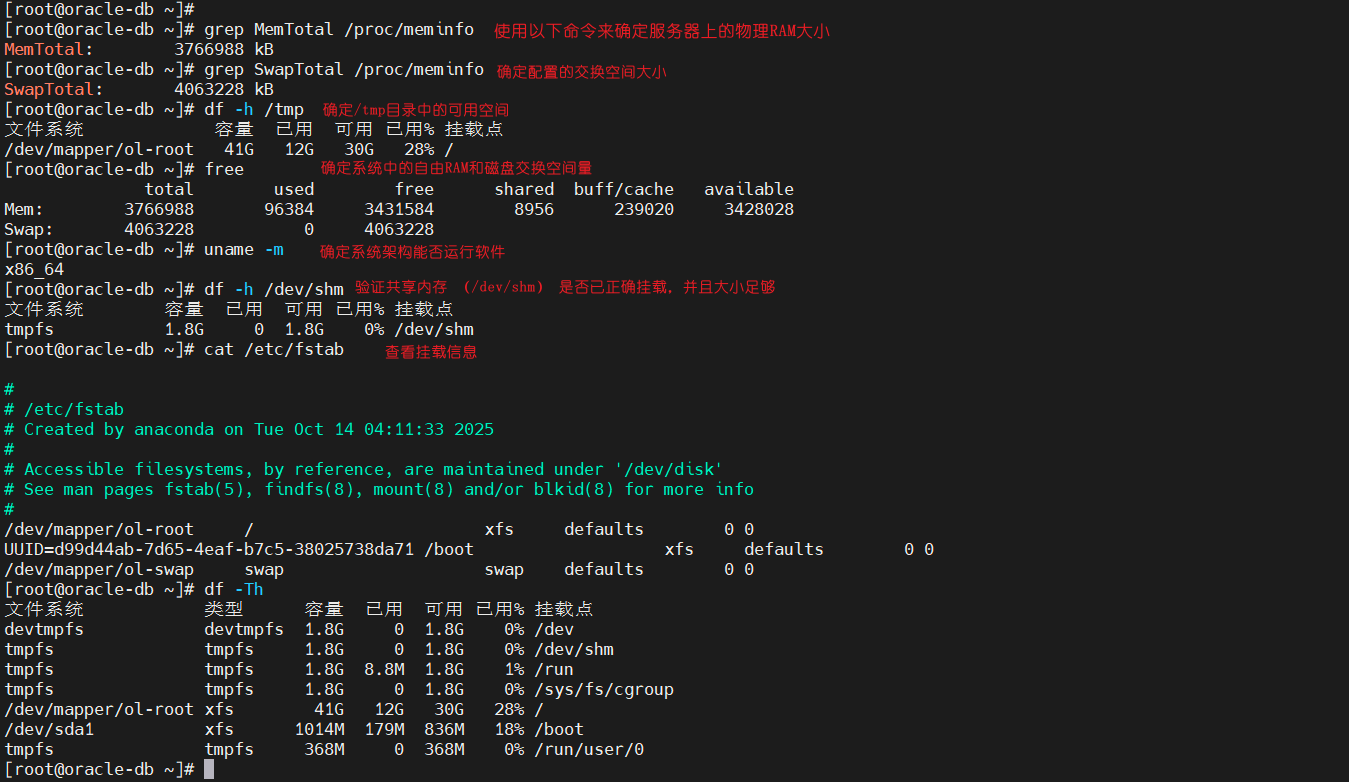
1.2.查看本地配置
使用此程序收集有关您的服务器配置的信息。
grep MemTotal /proc/meminfo
grep SwapTotal /proc/meminfo
df -h /tmp
free
uname -m
df -h /dev/shm
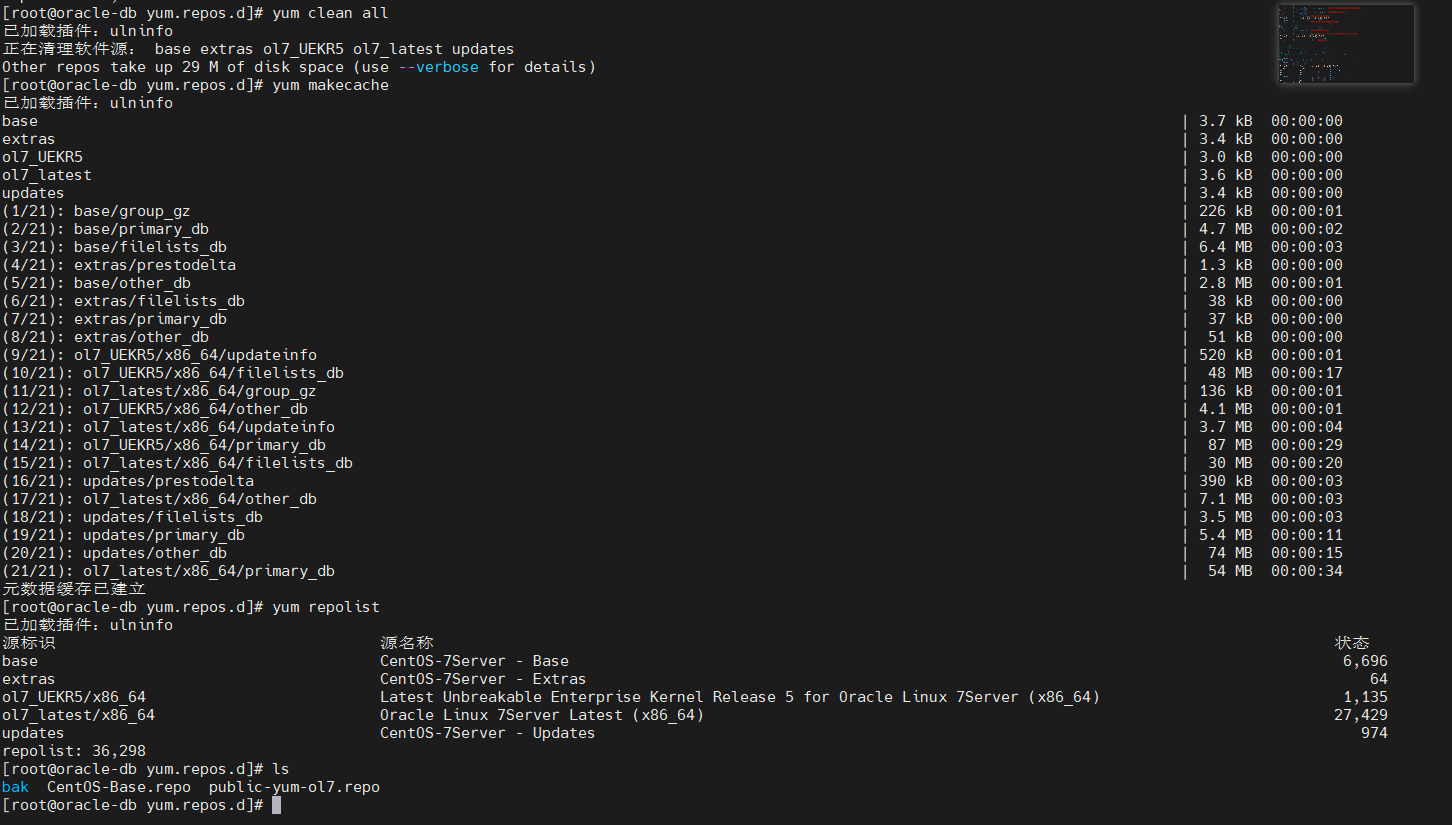
1.3.配置oracle官方yum源/本地源
wget https://yum.oracle.com/public-yum-ol7.repo -O /etc/yum.repos.d/public-yum-ol7.repo
配置本地源:本地搭建本地源
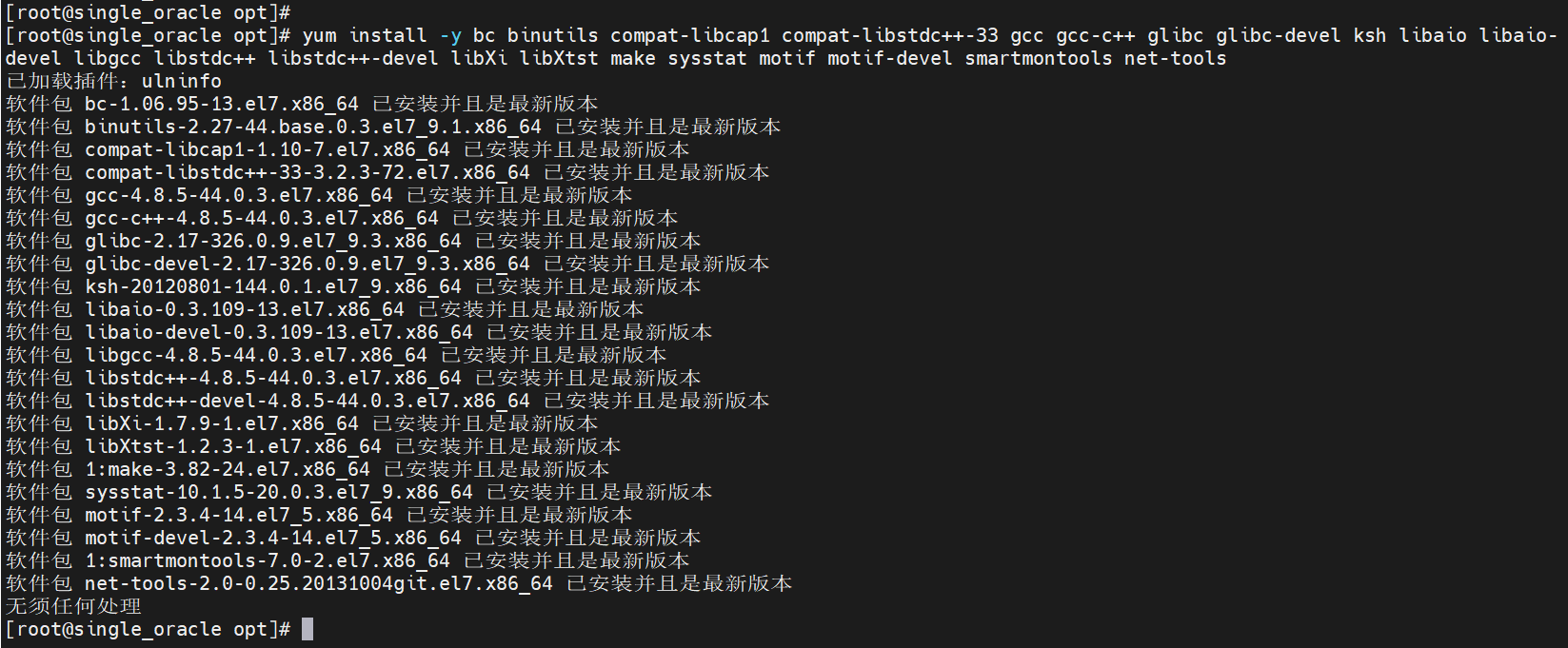
1.4.安装依赖及程序
如果安装oracle linux的预安装包,此操作会预先安装所需依赖和安装程序。如果没有预安装程序,则依次对下边的安装包进行安装:
官方明确必须要安装的包:
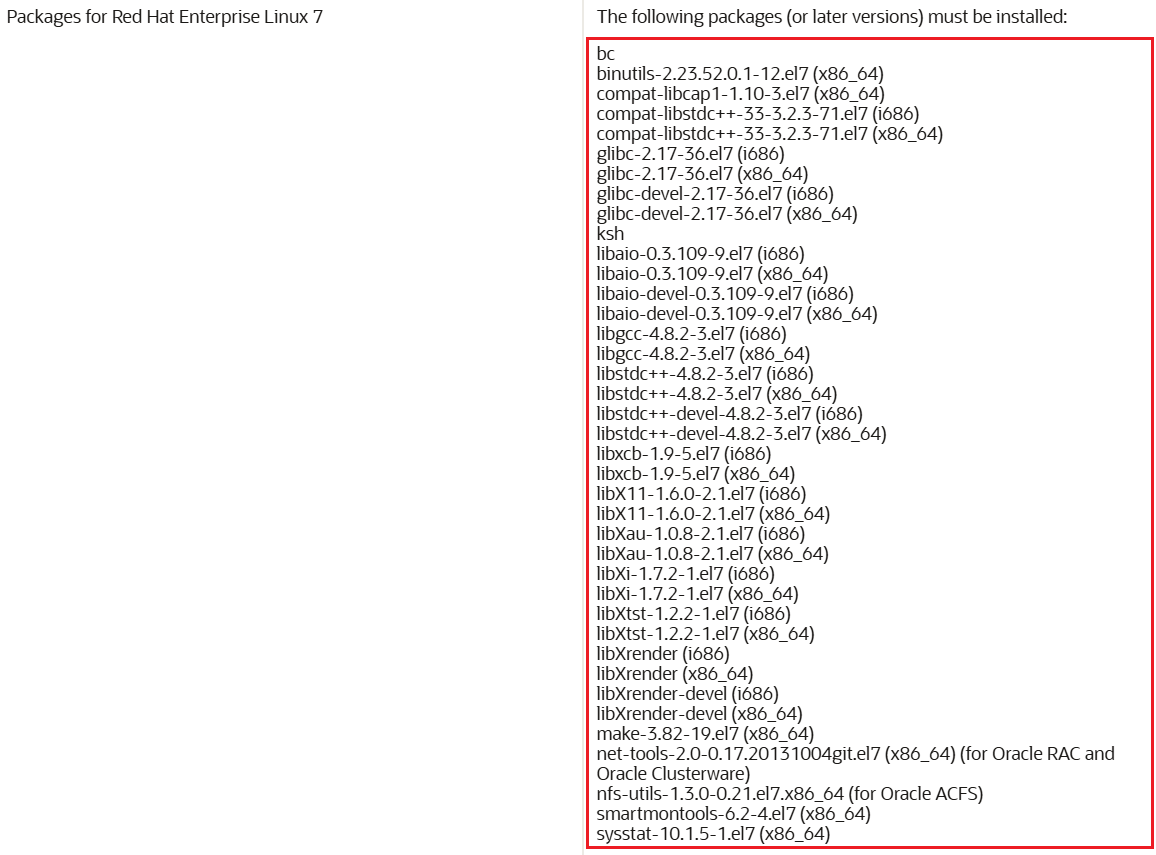
yum install -y bc binutils compat-libcap1 compat-libstdc++-33 gcc gcc-c++ glibc glibc-devel ksh libaio libaio-devel libgcc libstdc++ libstdc++-devel libXi libXtst make sysstat motif motif-devel smartmontools net-tools
1.5.配置标准大页和透明大页
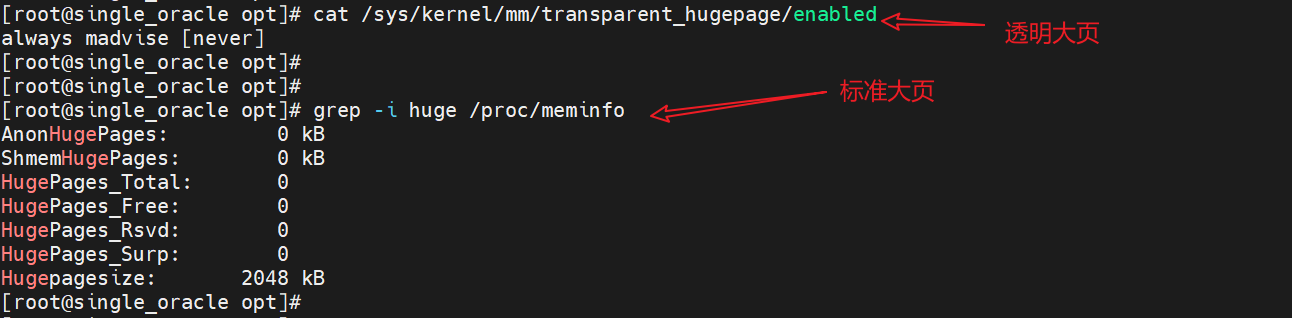
官方解释:Disabling Transparent HugePages
总的就是需要关闭透明大页,至于标准大页可以按照实际进行修改,如果不知道怎么修改,保持默认就行。
透明大页配置文件路径:vi /etc/default/grub,在grub_cmdline_linux配置后边进行追加transparent_hugepage=never

修改完成之后运行:grub2-mkconfig -o /boot/grub2/grub.cfg --->重新生成grub.cfg文件的命令。
1.6.上传安装包
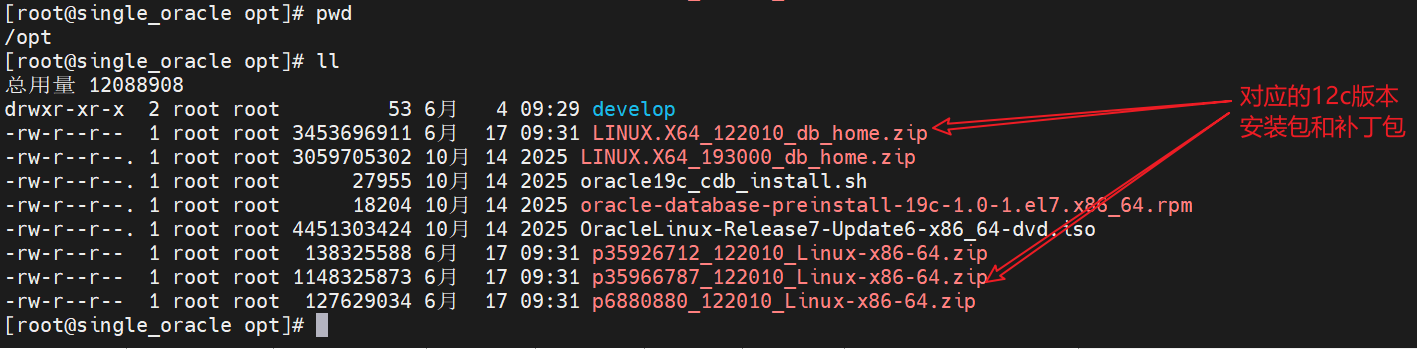
将准备好的安装包和补丁包上传到服务器端。
二、系统配置(root用户操作)
2.1. 创建Oracle安装相关用户与组
Oracle安装前提中,必需的两个操作系统组是:oinstall和 aba 。如果要在多个用户帐户间实施职责分离,则还应另外创建以下几个组:oper、asmdba、asmoper 和asmadmin。**至少需要有一个操作系统用户作为 Oracle 安装的所有者。大多情况下,配置 oracle 用户就是为了此目的。**如果想实现真正的职责分离可以为每个 Oracle 产品设置不同的所有者。
官方对每个组的详细解释:Oracle Installations with Standard and Job Role Separation Groups and Users
Oracle安装需专用用户和组(避免使用root直接操作):
创建必需的操作系统用户和组:
-- oinstall:系统安装组
-- dba:数据库管理员组
可选组(如果要在多个用户间划分职责):
-- oper:OSOPER/SYSOPER权限(受限管理),用于职责分离
-- asmdba:ASM数据库管理员组(OSDBA)
-- asmoper:ASM实例管理员组(OSPER)
-- asmadmin:ASM实例管理员组(OSASM)
用户:
-- 软件所有者,通常为 oracle
-- 可以为多个产品安装创建多个用户
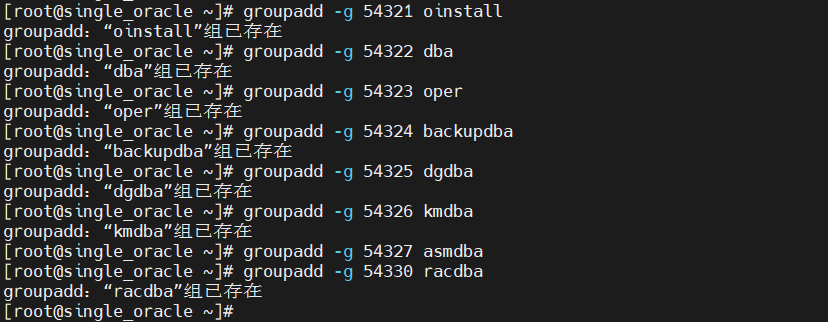
2.1.1.创建组
创建组
groupadd -g 54321 oinstall # 主组,Oracle Inventory 组
groupadd -g 54322 dba # 数据库管理员组
groupadd -g 54323 oper # 数据库操作员组
groupadd -g 54324 backupdba # 备份管理员组
groupadd -g 54325 dgdba # Data Guard 管理员组
groupadd -g 54326 kmdba # 密钥管理管理员组
groupadd -g 54327 asmdba # ASM 管理员组
groupadd -g 54330 racdba # RAC 管理员组
复制下边命令:
groupadd -g 54321 oinstall
groupadd -g 54322 dba
groupadd -g 54323 oper
groupadd -g 54324 backupdba
groupadd -g 54325 dgdba
groupadd -g 54326 kmdba
groupadd -g 54327 asmdba
groupadd -g 54330 racdba
2.1.2.创建用户
创建oracle用户并添加对应的操作组成员
useradd -u 54321 -g oinstall -G dba,oper,backupdba,dgdba,kmdba,asmdba,racdba oracle

注意:这里非常容易出问题,后边如果遇到用户组归属不对,但可通过usermod来进行修改
设置oracle用户密码(可选)
passwd oracle # 输入密码(如Oracle123)
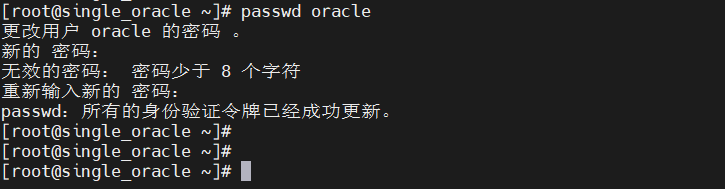
一般如果执行预安装程序的话,用户及用户组之间的所属关系都会提前建立好。
2.2. 创建Oracle安装相关目录
指定Oracle软件和数据存储路径(需oracle用户有读写权限):
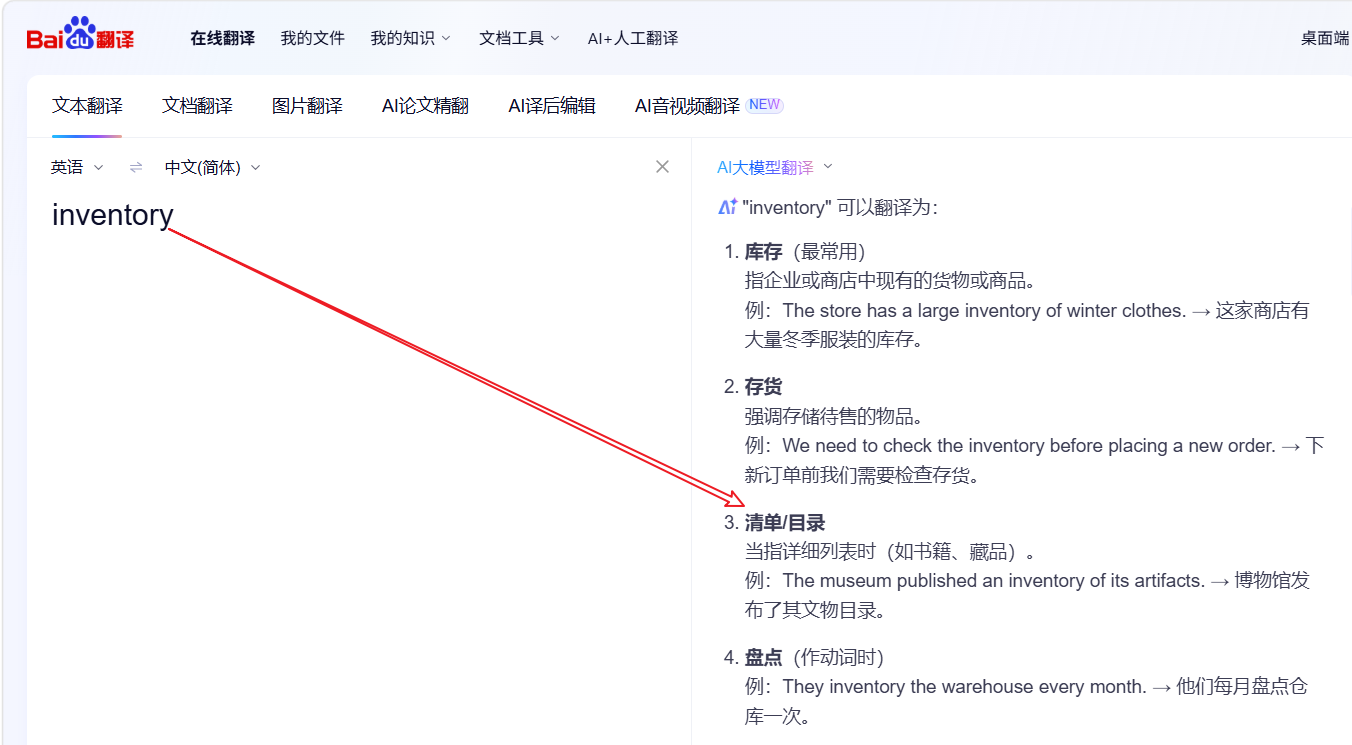
inventory:翻译为库存;(商店的)存货,这里指安装目录信息
mkdir -p /u01/app/oracle/product/12.2.0/dbhome_1 # ORACLE_HOME,通常需要指定具体的版本号,比如12.2.0
mkdir -p /u01/app/oracle/oraData # 数据文件目录(专门用于存放后边数据库数据的目录)
mkdir -p /u01/app/oraInventory # inventory目录(安装目录信息,oracle官方推荐不要把数据库安装目录和数据库基目录放在一起)
mkdir -p /u01/app/oracle/fast_recovery_area # 闪回区(可选)
bash
[root@single_oracle opt]# mkdir -p /u01/app/oracle/product/12.2.0/dbhome_1
[root@single_oracle opt]#
[root@single_oracle opt]# mkdir -p /u01/app/oracle/oraData
[root@single_oracle opt]#
[root@single_oracle opt]# mkdir -p /u01/app/oraInventory
[root@single_oracle opt]#
[root@single_oracle opt]# mkdir -p /u01/app/oracle/fast_recovery_area
[root@single_oracle opt]#
[root@single_oracle opt]#
[root@single_oracle opt]# yum install tree -y
已加载插件:ulninfo
正在解决依赖关系
--> 正在检查事务
---> 软件包 tree.x86_64.0.1.6.0-10.el7 将被 安装
--> 解决依赖关系完成

依赖关系解决

========================================================================================================================================
 Package                      架构                           版本                                    源                            大小
========================================================================================================================================
正在安装:
 tree                         x86_64                         1.6.0-10.el7                            base                          46 k

事务概要
========================================================================================================================================
安装  1 软件包

总下载量:46 k
安装大小:87 k
Downloading packages:
tree-1.6.0-10.el7.x86_64.rpm                                                                                     |  46 kB  00:00:01
Running transaction check
Running transaction test
Transaction test succeeded
Running transaction
  正在安装    : tree-1.6.0-10.el7.x86_64                                                                                            1/1
  验证中      : tree-1.6.0-10.el7.x86_64                                                                                            1/1

已安装:
  tree.x86_64 0:1.6.0-10.el7

完毕!
[root@single_oracle opt]#
[root@single_oracle opt]# tree /u01
/u01
└── app
    ├── oracle
    │   ├── fast_recovery_area
    │   ├── oradata
    │   └── product
    │       └── 12.2.0
    │           └── dbhome_1
    └── oraInventory

8 directories, 0 files
[root@single_oracle ~]#
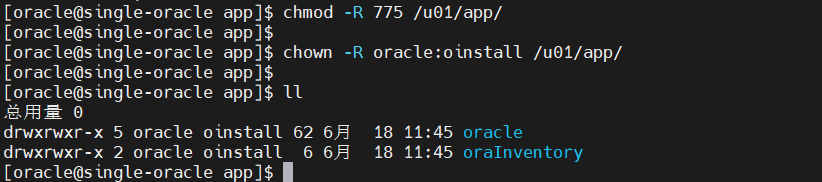
2.3. 修改权限(所属组和读写执行)
chown -R oracle:oinstall /u01/app/oracle
chmod -R 775 /u01/app/oracle
2.4. 配置优化内核参数(视情况进行修改)
配置文件目录:/etc/sysctl.conf
Oracle依赖内核参数优化,编辑/etc/sysctl.conf添加:
fs.aio-max-nr = 1048576
fs.file-max = 6815744
kernel.shmall = 2097152 # 物理内存/页大小(例:4GB内存=4*1024*1024/4=1048576,默认页大小可通过getconf PAGE_SIZE查看)
kernel.shmmax = 4294967296 # 最大共享内存段(建议为物理内存的50%,单位字节,4GB=4*1024^3=4294967296)
kernel.shmmni = 4096
kernel.sem = 250 32000 100 128
net.ipv4.ip_local_port_range = 9000 65500
net.core.rmem_default = 262144
net.core.rmem_max = 4194304
net.core.wmem_default = 262144
net.core.wmem_max = 1048576
配置生效:sysctl -p
cat /proc/sys/kernel/sem
cat /proc/sys/kernel/shmall
cat /proc/sys/kernel/shmmax
cat /proc/sys/kernel/shmmni
cat /proc/sys/fs/file-max
cat /proc/sys/net/ipv4/ip_local_port_range
cat /proc/sys/net/core/rmem_default
cat /proc/sys/net/core/rmem_max
cat /proc/sys/net/core/wmem_default
cat /proc/sys/net/core/wmem_max
bash
[root@single_oracle kernel]# cat /etc/sysctl.conf
# sysctl settings are defined through files in
# /usr/lib/sysctl.d/, /run/sysctl.d/, and /etc/sysctl.d/.
#
# Vendors settings live in /usr/lib/sysctl.d/.
# To override a whole file, create a new file with the same in
# /etc/sysctl.d/ and put new settings there. To override
# only specific settings, add a file with a lexically later
# name in /etc/sysctl.d/ and put new settings there.
#
# For more information, see sysctl.conf(5) and sysctl.d(5).

# setting for fs.file-max is 6815744
fs.file-max = 6815744

# setting for kernel.sem is '250 32000 100 128'
kernel.sem = 250 32000 100 128

# setting for kernel.shmmni is 4096
kernel.shmmni = 4096

# setting for kernel.shmall is 1073741824 on x86_64
kernel.shmall = 1073741824

# setting for kernel.shmmax is 4398046511104 on x86_64
kernel.shmmax = 4398046511104

# setting for kernel.panic_on_oops is 1 per Orabug 19212317
kernel.panic_on_oops = 1

# setting for net.core.rmem_default is 262144
net.core.rmem_default = 262144

# setting for net.core.rmem_max is 4194304
net.core.rmem_max = 4194304

# setting for net.core.wmem_default is 262144
net.core.wmem_default = 262144

# setting for net.core.wmem_max is 1048576
net.core.wmem_max = 1048576

# setting for net.ipv4.conf.all.rp_filter is 2
net.ipv4.conf.all.rp_filter = 2

# setting for net.ipv4.conf.default.rp_filter is 2
net.ipv4.conf.default.rp_filter = 2

# setting for fs.aio-max-nr is 1048576
fs.aio-max-nr = 1048576

# setting for net.ipv4.ip_local_port_range is 9000 65500
net.ipv4.ip_local_port_range = 9000 65500

[root@single_oracle kernel]#
[root@single_oracle kernel]# cat /proc/sys/kernel/sem
cat /proc/sys/kernel/shmall
cat /proc/sys/kernel/shmmax
cat /proc/sys/kernel/shmmni
cat /proc/sys/fs/file-max
cat /proc/sys/net/ipv4/ip_local_port_range
cat /proc/sys/net/core/rmem_default
cat /proc/sys/net/core/rmem_max
cat /proc/sys/net/core/wmem_default
cat /proc/sys/net/core/wmem_max250      32000   100     128
[root@single_oracle kernel]# cat /proc/sys/kernel/shmall
1073741824
[root@single_oracle kernel]# cat /proc/sys/kernel/shmmax
4398046511104
[root@single_oracle kernel]# cat /proc/sys/kernel/shmmni
4096
[root@single_oracle kernel]# cat /proc/sys/fs/file-max
6815744
[root@single_oracle kernel]# cat /proc/sys/net/ipv4/ip_local_port_range
9000    65500
[root@single_oracle kernel]# cat /proc/sys/net/core/rmem_default
262144
[root@single_oracle kernel]# cat /proc/sys/net/core/rmem_max
4194304
[root@single_oracle kernel]# cat /proc/sys/net/core/wmem_default
262144
[root@single_oracle kernel]# cat /proc/sys/net/core/wmem_max
1048576
[root@single_oracle kernel]#
2.5. 配置用户资源限制(软硬件资源限制)
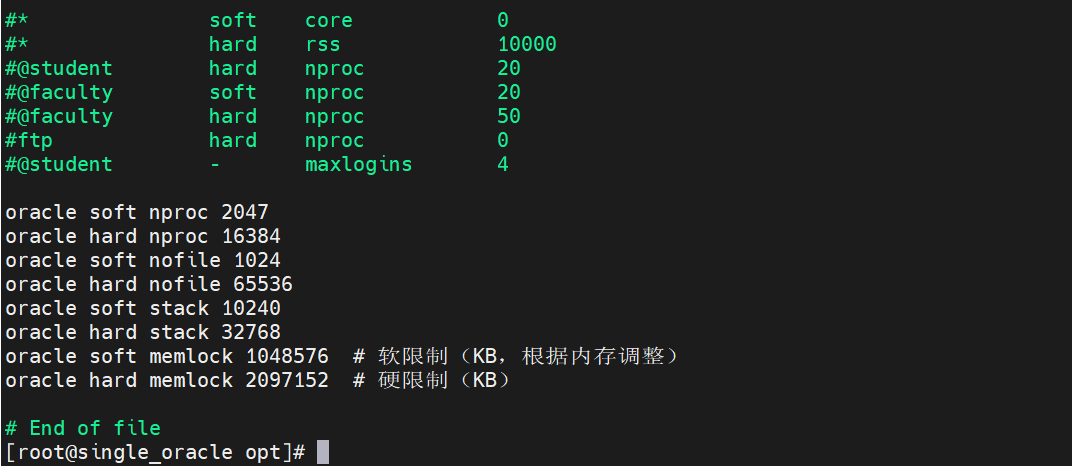
配置文件目录:/etc/security/limits.conf
编辑/etc/security/limits.conf,添加oracle用户限制:
oracle soft nproc 2047
oracle hard nproc 16384
oracle soft nofile 1024
oracle hard nofile 65536
oracle soft stack 10240
oracle hard stack 32768
oracle soft memlock 1048576 # 软限制(KB,根据内存调整)
oracle hard memlock 2097152 # 硬限制(KB)
生效配置:重启系统或执行ulimit -a(需重新登录oracle用户)。
三、安装Oracle数据库环境
3.1. 解压Oracle 12c安装包
切换到oracle用户
su - oracle
解压安装包(确保ORACLE_HOME为空目录)
如:unzip LINUX.X64_122010_db_home.zip -d /home/oracle/
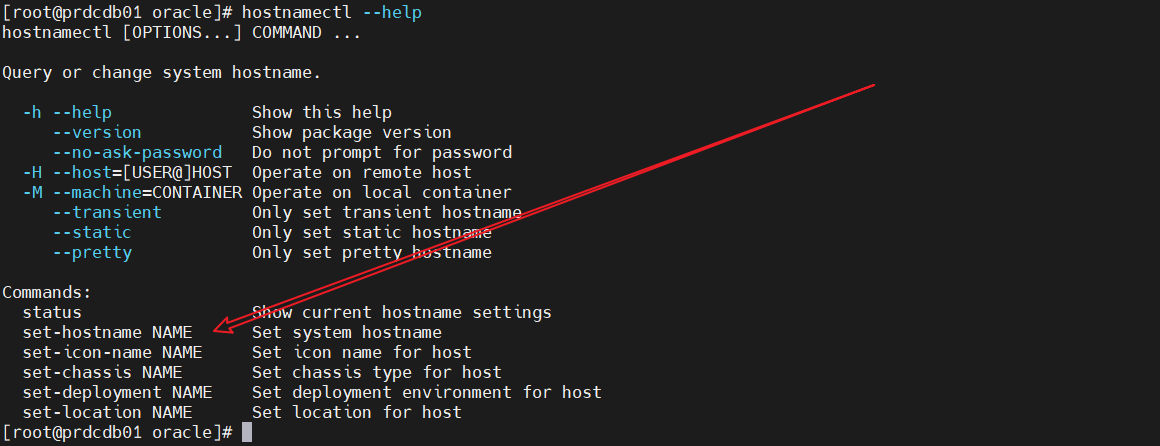
注意这里的可以适用hostnamectl set-hostname更改主机名
3.2. 创建静默安装响应文件
Oracle静默安装需通过响应文件指定参数,模板位于解压的目录中,可参考如下:

3.2.1.复制模板静默响应文件并修改
cp /home/oracle/database/response /home/oracle/db_install.rsp
这里我已经复制过了
vi /home/oracle/db_install.rsp
3.2.2.修改以下关键参数(其他参数保持默认或根据需求调整)
oracle.install.option=INSTALL_DB_SWONLY # 仅安装数据库软件(后续手动建库)也可以一步到位,就在配置文件中顺便对CDB的相关配置进行指定
UNIX_GROUP_NAME=oinstall
INVENTORY_LOCATION=/u01/app/oracle/inventory # 与之前创建的inventory目录一致
ORACLE_BASE=/u01/app/oracle
ORACLE_HOME=/u01/app/oracle/product/19c/dbhome_1 # 必须与环境变量一致
oracle.install.db.InstallEdition=EE # 企业版(EE)或标准版(SE2)
oracle.install.db.OSDBA_GROUP=dba
oracle.install.db.OSOPER_GROUP=oper
++oracle.install.db.OSBACKUPDBA_GROUP=backupdba # 备份管理员组(使用backupdba)
oracle.install.db.OSDGDBA_GROUP=dgdba # 数据卫士组(使用dgdba)
oracle.install.db.OSKMDBA_GROUP=kmdba # 加密管理员组(使用kmdba)
oracle.install.db.OSRACDBA_GROUP=racdba # 恢复目录组(使用racdba)++
DECLINE_SECURITY_UPDATES=true # 拒绝安全更新(无Oracle账号时)
上边划线的这些配置只为保持完整性,单机情况下不是太能用上!!
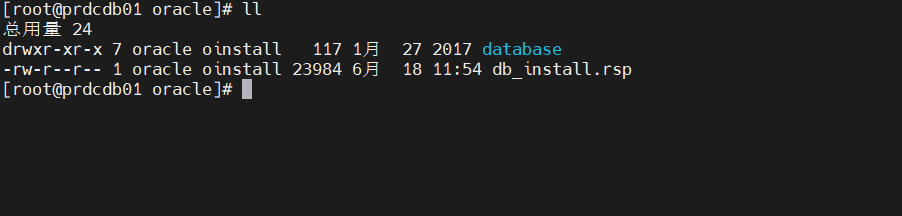
[oracle@prdcdb01 database]$ cd ..
[oracle@prdcdb01 ~]$ ll
总用量 24
drwxr-xr-x 7 oracle oinstall   117 1月  27 2017 database
-rw-r--r-- 1 oracle oinstall 23984 6月  18 11:54 db_install.rsp
[oracle@prdcdb01 ~]$ cat db_install.rsp
####################################################################
## Copyright(c) Oracle Corporation 1998,2017. All rights reserved.##
##                                                                ##
## Specify values for the variables listed below to customize     ##
## your installation.                                             ##
##                                                                ##
## Each variable is associated with a comment. The comment        ##
## can help to populate the variables with the appropriate        ##
## values.                                                        ##
##                                                                ##
## IMPORTANT NOTE: This file contains plain text passwords and    ##
## should be secured to have read permission only by oracle user  ##
## or db administrator who owns this installation.                ##
##                                                                ##
####################################################################


#-------------------------------------------------------------------------------
# Do not change the following system generated value.
#-------------------------------------------------------------------------------
oracle.install.responseFileVersion=/oracle/install/rspfmt_dbinstall_response_schema_v12.2.0

#-------------------------------------------------------------------------------
# Specify the installation option.
# It can be one of the following:
#   - INSTALL_DB_SWONLY
#   - INSTALL_DB_AND_CONFIG
#   - UPGRADE_DB
#-------------------------------------------------------------------------------
# 安装程序会在软件安装完成后,自动调用数据库配置助手(DBCA)来创建数据库
oracle.install.option=INSTALL_DB_AND_CONFIG

#-------------------------------------------------------------------------------
# Specify the Unix group to be set for the inventory directory.
#-------------------------------------------------------------------------------
UNIX_GROUP_NAME=oinstall

#-------------------------------------------------------------------------------
# Specify the location which holds the inventory files.
# This is an optional parameter if installing on
# Windows based Operating System.
#-------------------------------------------------------------------------------
INVENTORY_LOCATION=/u01/app/oraInventory
#-------------------------------------------------------------------------------
# Specify the complete path of the Oracle Home.
#-------------------------------------------------------------------------------
ORACLE_HOME=/u01/app/oracle/product/12.2.0/dbhome_1

#-------------------------------------------------------------------------------
# Specify the complete path of the Oracle Base.
#-------------------------------------------------------------------------------
ORACLE_BASE=/u01/app/oracle

#-------------------------------------------------------------------------------
# Specify the installation edition of the component.
#
# The value should contain only one of these choices.
#   - EE     : Enterprise Edition
#   - SE2     : Standard Edition 2


#-------------------------------------------------------------------------------

oracle.install.db.InstallEdition=EE
###############################################################################
#                                                                             #
# PRIVILEGED OPERATING SYSTEM GROUPS                                          #
# ------------------------------------------                                  #
# Provide values for the OS groups to which SYSDBA and SYSOPER privileges     #
# needs to be granted. If the install is being performed as a member of the   #
# group "dba", then that will be used unless specified otherwise below.       #
#                                                                             #
# The value to be specified for OSDBA and OSOPER group is only for UNIX based #
# Operating System.                                                           #
#                                                                             #
###############################################################################

#------------------------------------------------------------------------------
# The OSDBA_GROUP is the OS group which is to be granted SYSDBA privileges.
#-------------------------------------------------------------------------------
oracle.install.db.OSDBA_GROUP=dba

#------------------------------------------------------------------------------
# The OSOPER_GROUP is the OS group which is to be granted SYSOPER privileges.
# The value to be specified for OSOPER group is optional.
#------------------------------------------------------------------------------
oracle.install.db.OSOPER_GROUP=oper

#------------------------------------------------------------------------------
# The OSBACKUPDBA_GROUP is the OS group which is to be granted SYSBACKUP privileges.
#------------------------------------------------------------------------------
oracle.install.db.OSBACKUPDBA_GROUP=backupdba

#------------------------------------------------------------------------------
# The OSDGDBA_GROUP is the OS group which is to be granted SYSDG privileges.
#------------------------------------------------------------------------------
oracle.install.db.OSDGDBA_GROUP=dgdba

#------------------------------------------------------------------------------
# The OSKMDBA_GROUP is the OS group which is to be granted SYSKM privileges.
#------------------------------------------------------------------------------
oracle.install.db.OSKMDBA_GROUP=kmdba

#------------------------------------------------------------------------------
# The OSRACDBA_GROUP is the OS group which is to be granted SYSRAC privileges.
#------------------------------------------------------------------------------
oracle.install.db.OSRACDBA_GROUP=racdba

###############################################################################
#                                                                             #
#                               Grid Options                                  #
#                                                                             #
###############################################################################
#------------------------------------------------------------------------------
# Specify the type of Real Application Cluster Database
#
#   - ADMIN_MANAGED: Admin-Managed
#   - POLICY_MANAGED: Policy-Managed
#
# If left unspecified, default will be ADMIN_MANAGED
#------------------------------------------------------------------------------
# 不涉及到grid,不做操作
oracle.install.db.rac.configurationType=

#------------------------------------------------------------------------------
# Value is required only if RAC database type is ADMIN_MANAGED
#
# Specify the cluster node names selected during the installation.
# Leaving it blank will result in install on local server only (Single Instance)
#
# Example : oracle.install.db.CLUSTER_NODES=node1,node2
#------------------------------------------------------------------------------
oracle.install.db.CLUSTER_NODES=

#------------------------------------------------------------------------------
# This variable is used to enable or disable RAC One Node install.
#
#   - true  : Value of RAC One Node service name is used.
#   - false : Value of RAC One Node service name is not used.
#
# If left blank, it will be assumed to be false.
#------------------------------------------------------------------------------
oracle.install.db.isRACOneInstall=

#------------------------------------------------------------------------------
# Value is required only if oracle.install.db.isRACOneInstall is true.
#
# Specify the name for RAC One Node Service
#------------------------------------------------------------------------------
oracle.install.db.racOneServiceName=

#------------------------------------------------------------------------------
# Value is required only if RAC database type is POLICY_MANAGED
#
# Specify a name for the new Server pool that will be configured
# Example : oracle.install.db.rac.serverpoolName=pool1
#------------------------------------------------------------------------------
oracle.install.db.rac.serverpoolName=

#------------------------------------------------------------------------------
# Value is required only if RAC database type is POLICY_MANAGED
#
# Specify a number as cardinality for the new Server pool that will be configured
# Example : oracle.install.db.rac.serverpoolCardinality=2
#------------------------------------------------------------------------------
oracle.install.db.rac.serverpoolCardinality=

###############################################################################
#                                                                             #
#                        Database Configuration Options                       #
#                                                                             #
###############################################################################

#-------------------------------------------------------------------------------
# Specify the type of database to create.
# It can be one of the following:
#   - GENERAL_PURPOSE
#   - DATA_WAREHOUSE
# GENERAL_PURPOSE: A starter database designed for general purpose use or transaction-heavy applications.
# DATA_WAREHOUSE : A starter database optimized for data warehousing applications.
#-------------------------------------------------------------------------------
# 配置数据库相关配置,指定为通用类型
oracle.install.db.config.starterdb.type=GENERAL_PURPOSE

#-------------------------------------------------------------------------------
# Specify the Starter Database Global Database Name.
#-------------------------------------------------------------------------------
# 配置全局数据库名,通常为"数据库名.域名"
oracle.install.db.config.starterdb.globalDBName=prdcdb.example.com

#-------------------------------------------------------------------------------
# Specify the Starter Database SID.
#-------------------------------------------------------------------------------
# 设置数据库系统标识符
oracle.install.db.config.starterdb.SID=prdcdb

#-------------------------------------------------------------------------------
# Specify whether the database should be configured as a Container database.
# The value can be either "true" or "false". If left blank it will be assumed
# to be "false".
#-------------------------------------------------------------------------------
# 选择创建容器型数据库,即CDB + PDB
oracle.install.db.ConfigureAsContainerDB=true

#-------------------------------------------------------------------------------
# Specify the  Pluggable Database name for the pluggable database in Container Database.
#-------------------------------------------------------------------------------
# 指定默认PDB名称
oracle.install.db.config.PDBName=prdpdb01

#-------------------------------------------------------------------------------
# Specify the Starter Database character set.
#
#  One of the following
#  AL32UTF8, WE8ISO8859P15, WE8MSWIN1252, EE8ISO8859P2,
#  EE8MSWIN1250, NE8ISO8859P10, NEE8ISO8859P4, BLT8MSWIN1257,
#  BLT8ISO8859P13, CL8ISO8859P5, CL8MSWIN1251, AR8ISO8859P6,
#  AR8MSWIN1256, EL8ISO8859P7, EL8MSWIN1253, IW8ISO8859P8,
#  IW8MSWIN1255, JA16EUC, JA16EUCTILDE, JA16SJIS, JA16SJISTILDE,
#  KO16MSWIN949, ZHS16GBK, TH8TISASCII, ZHT32EUC, ZHT16MSWIN950,
#  ZHT16HKSCS, WE8ISO8859P9, TR8MSWIN1254, VN8MSWIN1258
#-------------------------------------------------------------------------------
# 选数据库字符集
oracle.install.db.config.starterdb.characterSet=AL32UTF8

#------------------------------------------------------------------------------
# This variable should be set to true if Automatic Memory Management
# in Database is desired.
# If Automatic Memory Management is not desired, and memory allocation
# is to be done manually, then set it to false.
#------------------------------------------------------------------------------
# 开启自动内存管理
oracle.install.db.config.starterdb.memoryOption=true

#-------------------------------------------------------------------------------
# Specify the total memory allocation for the database. Value(in MB) should be
# at least 256 MB, and should not exceed the total physical memory available
# on the system.
# Example: oracle.install.db.config.starterdb.memoryLimit=512
#-------------------------------------------------------------------------------
# 内存限制
oracle.install.db.config.starterdb.memoryLimit=1024

#-------------------------------------------------------------------------------
# This variable controls whether to load Example Schemas onto
# the starter database or not.
# The value can be either "true" or "false". If left blank it will be assumed
# to be "false".
#-------------------------------------------------------------------------------
# 不安装系统自带示例
oracle.install.db.config.starterdb.installExampleSchemas=false

###############################################################################
#                                                                             #
# Passwords can be supplied for the following four schemas in the             #
# starter database:                                                           #
#   SYS                                                                       #
#   SYSTEM                                                                    #
#   DBSNMP (used by Enterprise Manager)                                       #
#                                                                             #
# Same password can be used for all accounts (not recommended)                #
# or different passwords for each account can be provided (recommended)       #
#                                                                             #
###############################################################################

#------------------------------------------------------------------------------
# This variable holds the password that is to be used for all schemas in the
# starter database.
#-------------------------------------------------------------------------------
# 统一设置所有管理账户的密码
oracle.install.db.config.starterdb.password.ALL=oraclePdb#

#-------------------------------------------------------------------------------
# Specify the SYS password for the starter database.
#-------------------------------------------------------------------------------
oracle.install.db.config.starterdb.password.SYS=oraclePdb#

#-------------------------------------------------------------------------------
# Specify the SYSTEM password for the starter database.
#-------------------------------------------------------------------------------
oracle.install.db.config.starterdb.password.SYSTEM=oraclePdb#

#-------------------------------------------------------------------------------
# Specify the DBSNMP password for the starter database.
# Applicable only when oracle.install.db.config.starterdb.managementOption=CLOUD_CONTROL
#-------------------------------------------------------------------------------
oracle.install.db.config.starterdb.password.DBSNMP=

#-------------------------------------------------------------------------------
# Specify the PDBADMIN password required for creation of Pluggable Database in the Container Database.
#-------------------------------------------------------------------------------
oracle.install.db.config.starterdb.password.PDBADMIN=oraclePdb#

#-------------------------------------------------------------------------------
# Specify the management option to use for managing the database.
# Options are:
# 1. CLOUD_CONTROL - If you want to manage your database with Enterprise Manager Cloud Control along with Database Express.
# 2. DEFAULT   -If you want to manage your database using the default Database Express option.
#-------------------------------------------------------------------------------
# 选择以OEM作为web管理(本地)
oracle.install.db.config.starterdb.managementOption=DEFAULT


# 以下这些是CLOUD_CONTROL相关的配置
#-------------------------------------------------------------------------------
# Specify the OMS host to connect to Cloud Control.
# Applicable only when oracle.install.db.config.starterdb.managementOption=CLOUD_CONTROL
#-------------------------------------------------------------------------------
oracle.install.db.config.starterdb.omsHost=

#-------------------------------------------------------------------------------
# Specify the OMS port to connect to Cloud Control.
# Applicable only when oracle.install.db.config.starterdb.managementOption=CLOUD_CONTROL
#-------------------------------------------------------------------------------
oracle.install.db.config.starterdb.omsPort=

#-------------------------------------------------------------------------------
# Specify the EM Admin user name to use to connect to Cloud Control.
# Applicable only when oracle.install.db.config.starterdb.managementOption=CLOUD_CONTROL
#-------------------------------------------------------------------------------
oracle.install.db.config.starterdb.emAdminUser=

#-------------------------------------------------------------------------------
# Specify the EM Admin password to use to connect to Cloud Control.
# Applicable only when oracle.install.db.config.starterdb.managementOption=CLOUD_CONTROL
#-------------------------------------------------------------------------------
oracle.install.db.config.starterdb.emAdminPassword=

###############################################################################
#                                                                             #
# SPECIFY RECOVERY OPTIONS                                                    #
# ------------------------------------                                        #
# Recovery options for the database can be mentioned using the entries below  #
#                                                                             #
###############################################################################

#------------------------------------------------------------------------------
# This variable is to be set to false if database recovery is not required. Else
# this can be set to true.
#-------------------------------------------------------------------------------
# 是否开启快速恢复区
oracle.install.db.config.starterdb.enableRecovery=true

#-------------------------------------------------------------------------------
# Specify the type of storage to use for the database.
# It can be one of the following:
#   - FILE_SYSTEM_STORAGE
#   - ASM_STORAGE
#-------------------------------------------------------------------------------
# 选择存储的类型,这里我们选择文件系统存储
oracle.install.db.config.starterdb.storageType=FILE_SYSTEM_STORAGE

#-------------------------------------------------------------------------------
# Specify the database file location which is a directory for datafiles, control
# files, redo logs.
#
# Applicable only when oracle.install.db.config.starterdb.storage=FILE_SYSTEM_STORAGE
#-------------------------------------------------------------------------------
oracle.install.db.config.starterdb.fileSystemStorage.dataLocation=/u01/app/oracle/oradata

#-------------------------------------------------------------------------------
# Specify the recovery location.
#
# Applicable only when oracle.install.db.config.starterdb.storage=FILE_SYSTEM_STORAGE
#-------------------------------------------------------------------------------
oracle.install.db.config.starterdb.fileSystemStorage.recoveryLocation=/u01/app/oracle/fast_recovery_area

#-------------------------------------------------------------------------------
# Specify the existing ASM disk groups to be used for storage.
#
# Applicable only when oracle.install.db.config.starterdb.storageType=ASM_STORAGE
#-------------------------------------------------------------------------------
oracle.install.db.config.asm.diskGroup=

#-------------------------------------------------------------------------------
# Specify the password for ASMSNMP user of the ASM instance.
#
# Applicable only when oracle.install.db.config.starterdb.storage=ASM_STORAGE
#-------------------------------------------------------------------------------
oracle.install.db.config.asm.ASMSNMPPassword=

#------------------------------------------------------------------------------
# Specify the My Oracle Support Account Username.
#
#  Example   : MYORACLESUPPORT_USERNAME=abc@oracle.com
#------------------------------------------------------------------------------
MYORACLESUPPORT_USERNAME=

#------------------------------------------------------------------------------
# Specify the My Oracle Support Account Username password.
#
# Example    : MYORACLESUPPORT_PASSWORD=password
#------------------------------------------------------------------------------
MYORACLESUPPORT_PASSWORD=

#------------------------------------------------------------------------------
# Specify whether to enable the user to set the password for
# My Oracle Support credentials. The value can be either true or false.
# If left blank it will be assumed to be false.
#
# Example    : SECURITY_UPDATES_VIA_MYORACLESUPPORT=true
#------------------------------------------------------------------------------
SECURITY_UPDATES_VIA_MYORACLESUPPORT=false

#------------------------------------------------------------------------------
# Specify whether user doesn't want to configure Security Updates.
# The value for this variable should be true if you don't want to configure
# Security Updates, false otherwise.
#
# The value can be either true or false. If left blank it will be assumed
# to be true.
#
# Example    : DECLINE_SECURITY_UPDATES=false
#------------------------------------------------------------------------------
# 明确拒绝安全更新通知
DECLINE_SECURITY_UPDATES=true

#------------------------------------------------------------------------------
# Specify the Proxy server name. Length should be greater than zero.
#
# Example    : PROXY_HOST=proxy.domain.com
#------------------------------------------------------------------------------
PROXY_HOST=

#------------------------------------------------------------------------------
# Specify the proxy port number. Should be Numeric and at least 2 chars.
#
# Example    : PROXY_PORT=25
#------------------------------------------------------------------------------
PROXY_PORT=

#------------------------------------------------------------------------------
# Specify the proxy user name. Leave PROXY_USER and PROXY_PWD
# blank if your proxy server requires no authentication.
#
# Example    : PROXY_USER=username
#------------------------------------------------------------------------------
PROXY_USER=

#------------------------------------------------------------------------------
# Specify the proxy password. Leave PROXY_USER and PROXY_PWD
# blank if your proxy server requires no authentication.
#
# Example    : PROXY_PWD=password
#------------------------------------------------------------------------------
PROXY_PWD=

#------------------------------------------------------------------------------
# Specify the Oracle Support Hub URL.
#
# Example    : COLLECTOR_SUPPORTHUB_URL=https://orasupporthub.company.com:8080/
#------------------------------------------------------------------------------
COLLECTOR_SUPPORTHUB_URL=
[oracle@prdcdb01 ~]$
3.3.静默安装Oracle软件(oracle用户下)
3.3.1.执行runInstaller静默安装
解压的目录下,找到 runInstaller 执行静默安装
./runInstaller -silent -responseFile /home/oracle/db_install.rsp
bash
[oracle@prdcdb01 database]$ ./runInstaller -silent -responseFile /home/oracle/db_install.rsp
正在启动 Oracle Universal Installer...

检查临时空间: 必须大于 500 MB。   实际为 30859 MB    通过
检查交换空间: 必须大于 150 MB。   实际为 3967 MB    通过
准备从以下地址启动 Oracle Universal Installer /tmp/OraInstall2026-06-18_11-56-21AM. 请稍候...[oracle@prdcdb01 database]$ [WARNING] [INS-32056] 指定的 Oracle 基目录包含现有主产品清单位置: /u01/app/oracle/inventory。
   操作: Oracle 建议将主产品清单位置放在 Oracle 基目录之外。请为 Oracle 基目录指定其他位置。
[WARNING] [INS-30011] 输入的 ADMIN 口令不符合 Oracle 建议的标准。
   原因: Oracle 建议输入的口令应该至少长为 8 个字符, 至少包含 1 个大写字符, 1 个小写字符和 1 个数字 [0-9]。
   操作: 提供符合 Oracle 建议标准的口令。
可以在以下位置找到本次安装会话的日志:
 /u01/app/oracle/inventory/logs/installActions2026-06-18_11-56-21AM.log
[oracle@prdcdb01 database]$ Oracle Database 12c 的 安装 已成功。
请查看 '/u01/app/oracle/inventory/logs/silentInstall2026-06-18_11-56-21AM.log' 以获取详细资料。

以 root 用户的身份执行以下脚本:
        1. /u01/app/oracle/product/12.2.0/dbhome_1/root.sh


Successfully Setup Software.
安装用户可以执行以下命令来完成配置。
        /home/oracle/database/runInstaller -executeConfigTools -responseFile /home/oracle/db_install.rsp [-silent]


[oracle@prdcdb01 database]$
安装完成后(进度到 90% 左右),以 root 执行脚本
/u01/app/oraInventory/orainstRoot.sh
/u01/app/oracle/product/12.1.0/dbhome_1/root.sh
指定响应文件:
-silent:静默模式(无图形界面);
-responseFile:指定响应文件路径;
-ignorePrereq:忽略部分先决条件检查(可选:如系统配置不完全符合时)。
3.3.2.监控安装过程
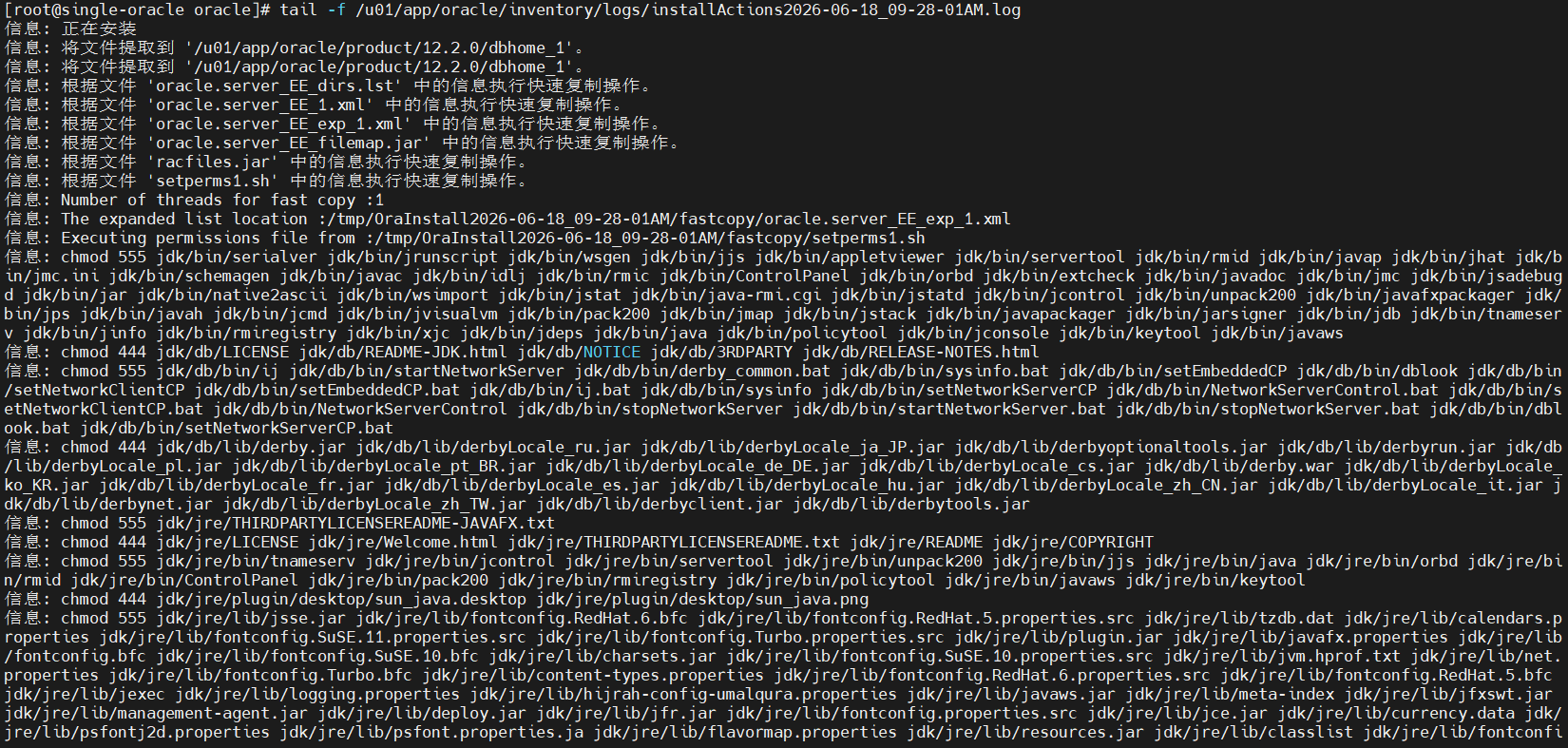
安装日志默认位于/u01/app/oracle/inventory/logs/installActions<时间戳>.log,可通过日志查看进度:
tail -f /u01/app/oracle/inventory/logs/installActions*.log
3.3.3.执行root脚本并安装数据库实例(安装完成后,root用户操作)
安装成功后,日志会提示执行以下脚本(路径以实际日志为准):
切换到root用户
su - root

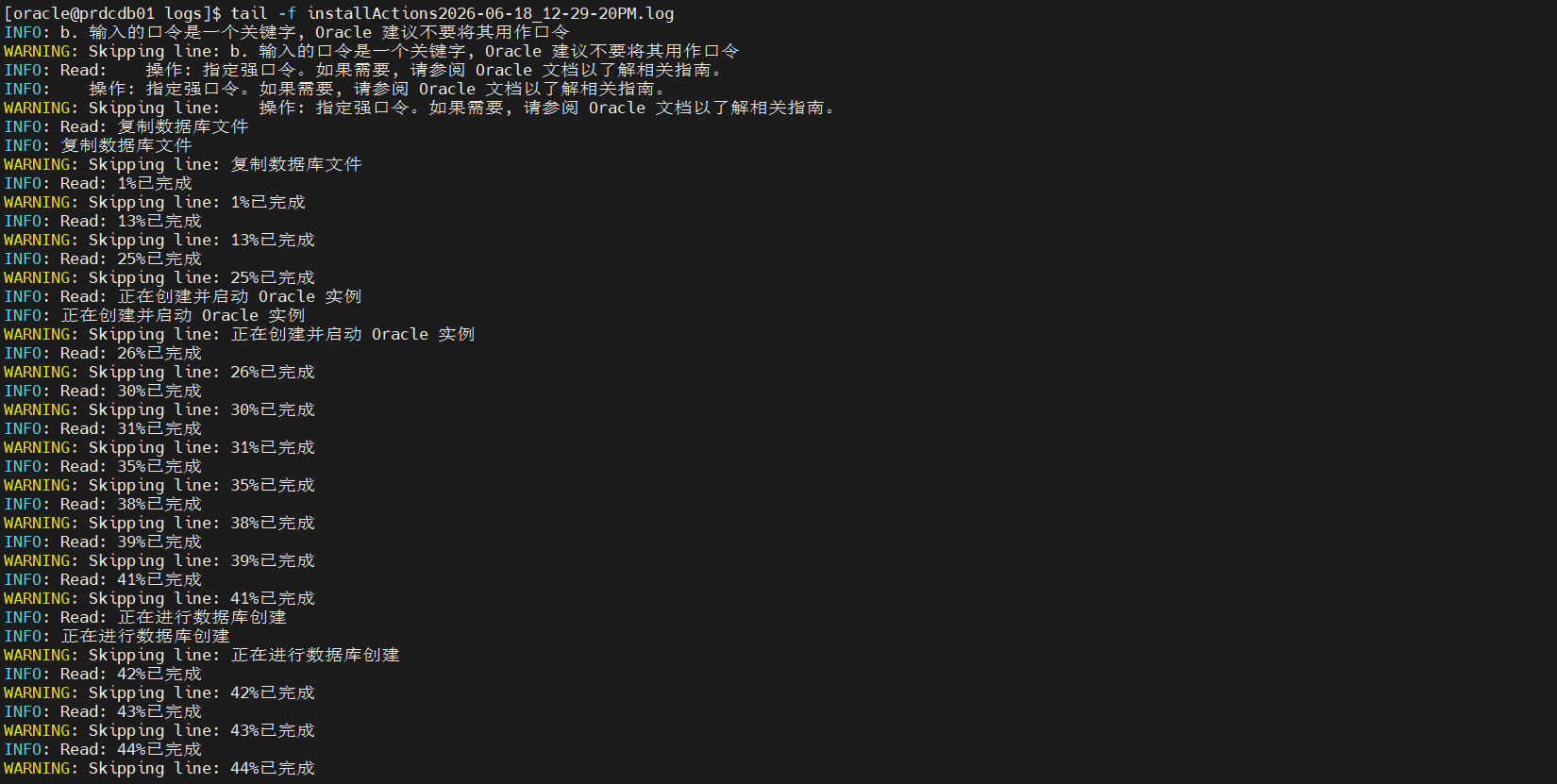
监控过程:
五、验证安装结果
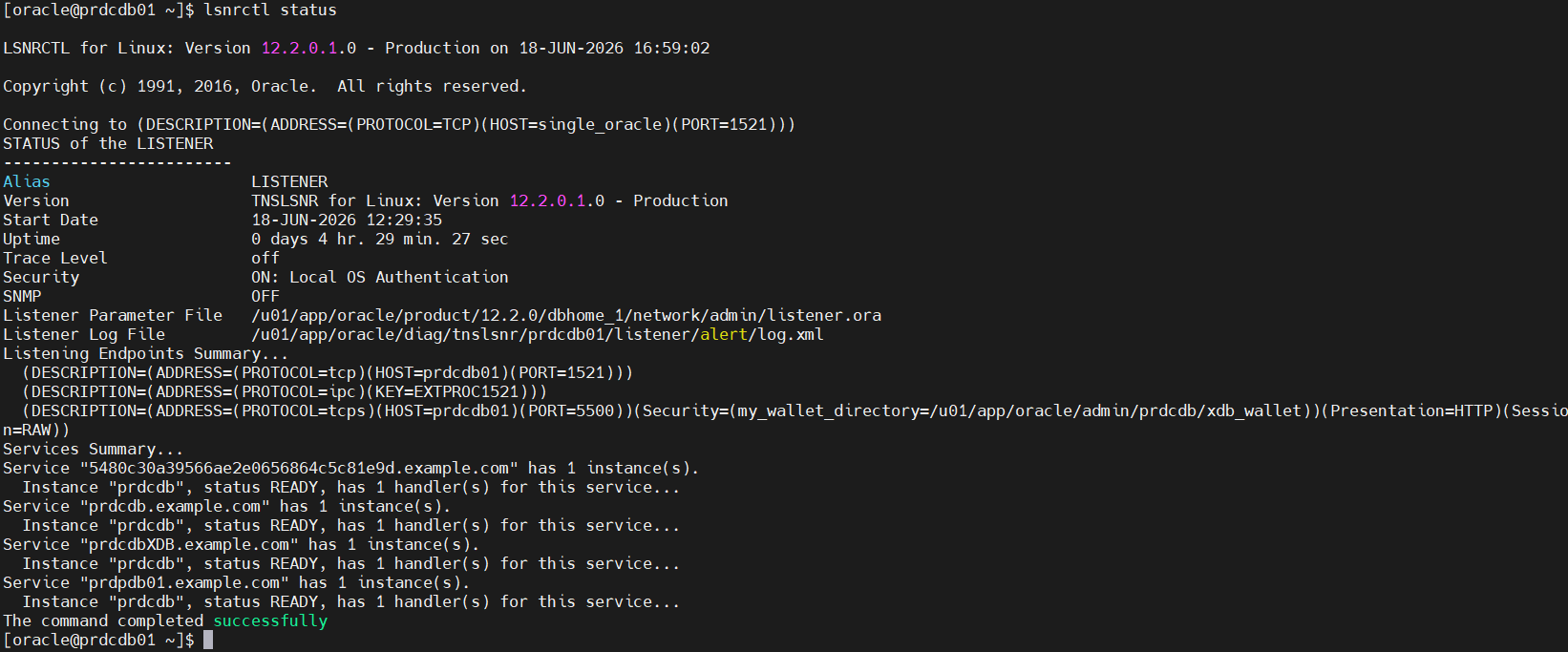
5.1. 检查监听状态
lsnrctl status # 若未启动,执行lsnrctl start
输出应包含LISTENER状态为READY,端口1521。
5.2. 连接数据库验证
通过sqlplus连接数据库实例:
sqlplus / as sysdba # 以sysdba身份登录
执行以下命令检查实例状态:
SQL> select status from v$instance; # 输出应为OPEN
SQL> select name from v$database; # 输出数据库名
SQL> exit
示例:
bash
[oracle@prdcdb01 ~]$ sqlplus / as sysdba

SQL*Plus: Release 12.2.0.1.0 Production on Thu Jun 18 14:15:11 2026

Copyright (c) 1982, 2016, Oracle.  All rights reserved.


Connected to:
Oracle Database 12c Enterprise Edition Release 12.2.0.1.0 - 64bit Production

SQL> select status from v$instance;

STATUS
------------
OPEN

SQL>
SQL>
SQL> show pdbs

    CON_ID CON_NAME                       OPEN MODE  RESTRICTED
---------- ------------------------------ ---------- ----------
         2 PDB$SEED                       READ ONLY  NO
         3 PRDPDB01                       READ WRITE NO
SQL>
SQL>
SQL> select name from v$database;

NAME
---------
PRDCDB

SQL>
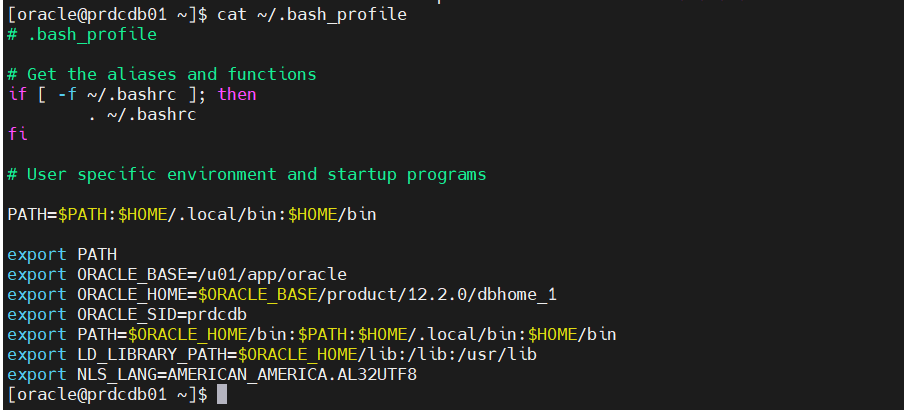
六、Oracle用户环境变量配置
**每个 Oracle 环境中都有很多 Oracle 环境变量。**若想成功安装和使用Oracle DB,需要重点关注环境变量。环境变量都不一定要进行设置,但是对其进行重要的变量设置可避免将来出现问题。
1)ORACLE BASE:
按照 Oracle 技术支持部门所建议的最佳灵活体系结构(OFA),指定Oracle 目录结构的基本目录。此变量可选,使用此变量可加快将来的安装和升级。它是一个目录路径,如下面的示例所示:/u01/app/oracle;
2)ORACLE HOME:Oracle 产品运行环境。如果ORACLE BASE已设置,安装之前不一定要设置此项。OUI可在安装过程中根据 ORACLE BASE 的设置来确定并建议ORACLE HOME 的设置。设置此环境变量,可以更轻松地维护和管理 Oracle 软件。它是一个目录路径,如下面的示例所示:/u01/app/oracle/product/12.2.0/dbhome_1;
3)ORACLE SID:Oracle 实例的系统标识符,例如 procdb 来标识数据库,+ASM 标识ASM 实例。安装之前不一定要设置此项,但对简化以后与特定实例的交互很有用;
4)NLS LANG:可选环境变量,用于控制语言、地区和客户机字符集设置,如下面的示例所示:AMERICAN DENMARK.WE8MSWIN1252。
切换到oracle用户,编辑用户级环境变量:.bash_profile(/home/oracle/.bash_profile):
su - oracle
vi .bash_profile 或 vi ~/.bash_profile
添加以下内容(根据实际路径调整):
export ORACLE_BASE=/u01/app/oracle
export ORACLE_HOME=$ORACLE_BASE/product/12.2.0/dbhome_1
export ORACLE_SID=procdb # 数据库实例名(自定义,如orcl、prod)
export PATH=ORACLE_HOME/bin:PATH:HOME/.local/bin:HOME/bin
export LD_LIBRARY_PATH=$ORACLE_HOME/lib:/lib:/usr/lib
export NLS_LANG=AMERICAN_AMERICA.AL32UTF8 # 字符集(或ZHS16GBK)
环境变量生效:source .bash_profile/source ~/.bash_profile