一、前言
在ROS开发中,参数服务器 、YAML配置文件 、Launch启动文件是三大核心基础配置工具,几乎所有机器人项目都会用到。
很多新手疑惑:
YAML文件到底有什么用?
Launch如何加载YAML参数?
Python节点如何读取参数服务器配置?
三者如何配合实现解耦开发?
本文通过实战案例:读取YAML参数,批量生成3只自定义位置小乌龟,手把手带你吃透ROS参数服务器完整工作流程,全程无冗余代码,可直接落地运行。
运行环境:Ubuntu20.04 + ROS Noetic
功能包名称:turtle_test(适配个人实战环境)
逻辑比喻(公司例子)
**
yaml:【登记表】**三份坦克入职登记表(位置、名称)**
python脚本:【牛马】**人事专员,自动读取登记表,批量安排三只坦克上岗
launch:【主管】,先打开办公大厅 (turtlesim),下发登记表 (yaml),再叫人事专员 (python) 批量招人
二、核心概念通俗讲解(新手必看)
1. 什么是参数服务器?
ROS参数服务器是一个全局公共参数仓库,可以存储机器人的所有配置参数(坐标、速度、PID、设备参数等),所有节点都可以读取、修改仓库中的参数。
核心优势:参数与代码分离,修改配置无需修改源码、无需重新编译,重启launch即可生效。
2. 三大文件分工(极简比喻)
YAML文件(.yaml):参数配置手册,存放所有自定义参数(小乌龟坐标、名称)
Launch文件(.launch):开工指令,启动仿真窗口、加载YAML参数、运行Python节点
Python节点:业务执行器,读取参数服务器中的YAML配置,自动生成小乌龟
三、项目整体目录结构
在catkin_ws/src/turtle_test下创建如下结构,严格对应路径,避免路径报错:
turtle_test/
├── config/
│   └── turtle_config.yaml   # YAML参数配置文件
├── scripts/
│   └── spawn_three_turtle.py # 核心python执行脚本
├── launch/
│   └── spawn_turtle.launch  # 启动文件
├── CMakeLists.txt
└── package.xml
四、完整代码实现
1. YAML参数配置文件(config/turtle_config.yaml)
存储3只小乌龟的名称、坐标、旋转角度,后续增减乌龟、修改位置只需改此文件,不动代码:
bash
# 三只小乌龟参数配置
turtle_info:
  turtle1:
    x: 2.0
    y: 2.0
    theta: 0
    name: little_turtle_1
  turtle2:
    x: 8.0
    y: 2.0
    theta: 1.57
    name: little_turtle_2
  turtle3:
    x: 5.0
    y: 8.0
    theta: 3.14
    name: little_turtle_3
✅ 语法注意:YAML只能用空格缩进、冒号后必须加空格、禁止Tab键
2. Python读取参数脚本(scripts/spawn_three_turtle.py)
核心功能:读取参数服务器中加载的YAML参数,循环调用spawn服务生成3只小乌龟:
python#!/usr/bin/env python3 # -*- coding: utf-8 -*- import rospy import rosparam from turtlesim.srv import Spawn, SpawnRequest def spawn_turtle(): # 初始化节点 rospy.init_node("spawn_turtle_node") rospy.sleep(0.5) # 等待乌龟生成服务启动 rospy.wait_for_service("/spawn") spawn_client = rospy.ServiceProxy("/spawn", Spawn) # 核心:从参数服务器读取YAML加载的所有乌龟参数 turtle_data = rosparam.get_param("turtle_info") # 循环遍历参数,批量生成小乌龟 for key, turtle in turtle_data.items(): req = SpawnRequest() req.x = turtle["x"] req.y = turtle["y"] req.theta = turtle["theta"] req.name = turtle["name"] res = spawn_client.call(req) rospy.loginfo(f"成功生成小乌龟:{res.name}") if __name__ == "__main__": spawn_turtle()
3. Launch启动文件(launch/spawn_turtle.launch)
核心流程:启动仿真界面 → 加载YAML到参数服务器 → 启动Python执行节点:
bash<launch> <!-- 1. 启动turtlesim仿真窗口 --> <node pkg="turtlesim" type="turtlesim_node" name="turtle_sim" output="screen"/> <!-- 2. 核心操作:加载YAML参数到ROS参数服务器 --> <rosparam file="$(find turtle_test)/config/turtle_config.yaml" command="load"/> <!-- 3. 启动Python节点,读取参数生成小乌龟 --> <node pkg="turtle_test" type="spawn_three_turtle.py" name="spawn_turtle_node" output="screen"/> </launch>💡 关键标签解析:
$(find turtle_test):自动查找turtle_test功能包根目录,避免绝对路径报错
command="load":将YAML文件所有参数加载到全局参数服务器
output="screen":打印节点日志到终端,方便调试
五、环境配置与运行步骤
bash
chmod +x ~/homework/catkin_ws/src/turtle_test/scripts/spawn_three_turtle.py

cd ~/homework/catkin_ws
catkin_make
source devel/setup.bash


roslaunch turtle_test spawn_turtle.launch
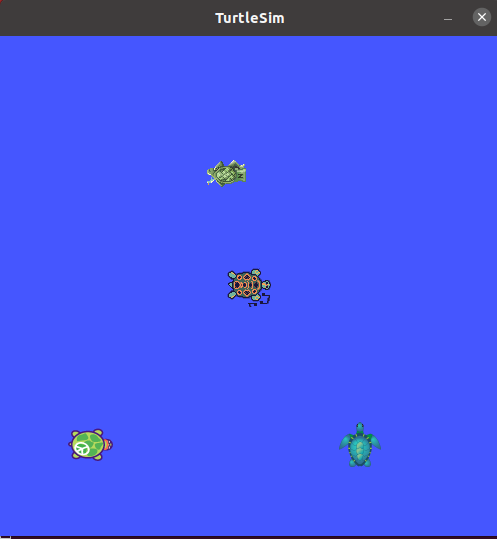
六、运行效果
-
自动弹出turtlesim仿真窗口;
-
终端打印3条成功日志,依次生成3只不同位置、不同名称的小乌龟;