【 声明:版权所有,欢迎转载,请勿用于商业用途。 联系信箱:feixiaoxing @163.com】
大家知道,esp32本身比较擅长wifi和蓝牙。但是,现实中有一些需求是依赖于有线网络的。比如说工厂里面的设备,一般wifi都是不太好的。这里面有保密的原因,也有机器运作的原因。所以,很多时候是需要设备走有线网络的。esp32虽然自身带mac ip,但是如果需要有线网络的话,还需要外挂一个eth phy,不是很方便,这种情况下应该如何处理?
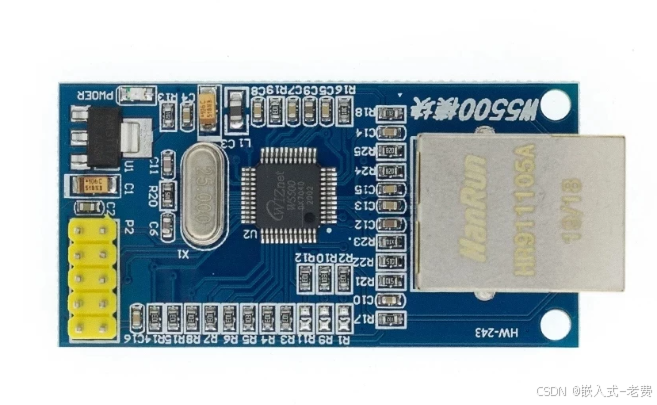
1、选用spi的w5500模块
w5500模块是一个spi接口的以太网模块,内部集成了tcp/ip协议,它使得我们可以不做很大硬件改动的前提下,就可以使用wire eth功能。
2、可能的影响
因为本身esp32的spi数量有限,比如屏幕、触摸、tf卡、ad/da等都有可能用到spi,所以这里面就存在一个权衡的问题。
3、更新idf_component.yml
本身esp32社区有对应的w5500模块,所以添加一下即可,
## IDF Component Manager Manifest File
dependencies:
  ## Required IDF version
  idf:
    version: '>=4.1.0'
  # # Put list of dependencies here
  # # For components maintained by Espressif:
  # component: "~1.0.0"
  # # For 3rd party components:
  # username/component: ">=1.0.0,<2.0.0"
  # username2/component2:
  #   version: "~1.0.0"
  #   # For transient dependencies `public` flag can be set.
  #   # `public` flag doesn't have an effect dependencies of the `main` component.
  #   # All dependencies of `main` are public by default.
  #   public: true
  lvgl/lvgl:
    version: ^8.3.11
  espressif/esp_lvgl_port:
    version: ^2.3.0
  espressif/w5500: ^1.0.0
4、继续更新CMakeLists.txt
w5500更新到本地之后,同样需要更新一下cmake文件,这样下载的库才能用起来,编译的时候才不会出错。
idf_component_register(SRCS "main.c"
                    INCLUDE_DIRS "."
                    REQUIRES w5500 esp_eth esp_wifi esp_event esp_netif esp_http_server nvs_flash driver)
5、让ai完成w5500模块编程
至于编程部分,让ai完成就好。注意,需要完成的其实是两部分,一部分是客户端,也就是这里的w5500。还有一部分是服务器端,这部分可以回头继续让ai用python来完成,这样方便我们继续测试,难度不大,就由用户自己完成。我们自己,还是专注在esp32这边,看看怎么把w5500模块用起来。为了方便,我们提示ai,需要本地配置静态ip,这是一个常用的做法。
#include <stdio.h>
#include <string.h>
#include <sys/socket.h>
#include <netdb.h>
#include <errno.h>
#include <unistd.h>
#include "freertos/FreeRTOS.h"
#include "freertos/task.h"
#include "freertos/event_groups.h"
#include "esp_wifi.h"
#include "esp_event.h"
#include "esp_log.h"
#include "nvs_flash.h"
#include "driver/gpio.h"
#include "driver/spi_master.h"
#include "esp_eth.h"
#include "esp_eth_phy_w5500.h"
#include "esp_eth_mac_w5500.h"
#include "esp_netif.h"
static const char *TAG = "W5500_TCP_CLIENT";
// Server configuration - modify according to your network
#define EXAMPLE_SERVER_IP "192.168.0.240" // Target server IP
#define EXAMPLE_SERVER_PORT 8080 // Target server port
// Static IP configuration for ESP32
#define ESP_IP_ADDR "192.168.0.97" // ESP32 static IP
#define ESP_GATEWAY "192.168.0.1" // Gateway
#define ESP_NETMASK "255.255.255.0" // Netmask
// SPI pin configuration - modify according to your wiring
#define PIN_SPI_MOSI GPIO_NUM_23
#define PIN_SPI_MISO GPIO_NUM_19
#define PIN_SPI_SCLK GPIO_NUM_18
#define PIN_SPI_CS GPIO_NUM_5
#define PIN_SPI_INT GPIO_NUM_4
#define SPI_HOST SPI2_HOST
// Ethernet event flags
#define ETH_CONNECT_BIT BIT0
#define ETH_GOT_IP_BIT BIT1
static EventGroupHandle_t s_eth_event_group = NULL;
// Ethernet event handler
static void eth_event_handler(void *arg, esp_event_base_t event_base,
int32_t event_id, void *event_data)
{
switch (event_id) {
case ETHERNET_EVENT_CONNECTED:
ESP_LOGI(TAG, "Ethernet Link Up");
xEventGroupSetBits(s_eth_event_group, ETH_CONNECT_BIT);
break;
case ETHERNET_EVENT_DISCONNECTED:
ESP_LOGI(TAG, "Ethernet Link Down");
xEventGroupClearBits(s_eth_event_group, ETH_CONNECT_BIT);
break;
default:
break;
}
}
// IP event handler
static void got_ip_event_handler(void *arg, esp_event_base_t event_base,
int32_t event_id, void *event_data)
{
ip_event_got_ip_t *event = (ip_event_got_ip_t *)event_data;
esp_netif_ip_info_t ip_info;
esp_netif_get_ip_info(event->esp_netif, &ip_info);
ESP_LOGI(TAG, "Got IP: " IPSTR, IP2STR(&ip_info.ip));
ESP_LOGI(TAG, "Netmask: " IPSTR, IP2STR(&ip_info.netmask));
ESP_LOGI(TAG, "Gateway: " IPSTR, IP2STR(&ip_info.gw));
xEventGroupSetBits(s_eth_event_group, ETH_GOT_IP_BIT);
}
// Initialize Ethernet (W5500)
static void ethernet_init(void)
{
// 1. Initialize SPI bus
spi_bus_config_t buscfg = {
.miso_io_num = PIN_SPI_MISO,
.mosi_io_num = PIN_SPI_MOSI,
.sclk_io_num = PIN_SPI_SCLK,
.quadwp_io_num = -1,
.quadhd_io_num = -1,
.max_transfer_sz = 4096,
};
ESP_ERROR_CHECK(spi_bus_initialize(SPI_HOST, &buscfg, SPI_DMA_CH_AUTO));
// 2. Configure SPI device interface (W5500 slave parameters)
spi_device_interface_config_t devcfg = {
.mode = 0,
.clock_speed_hz = 80000000,
.spics_io_num = PIN_SPI_CS,
.queue_size = 16,
.flags = SPI_DEVICE_HALFDUPLEX,
};
// 3. Create W5500 MAC instance
eth_w5500_config_t w5500_config = ETH_W5500_DEFAULT_CONFIG(SPI_HOST, &devcfg);
w5500_config.int_gpio_num = PIN_SPI_INT;
eth_mac_config_t mac_config = ETH_MAC_DEFAULT_CONFIG();
mac_config.rx_task_stack_size = 4096;
esp_eth_mac_t *mac = esp_eth_mac_new_w5500(&w5500_config, &mac_config);
// 4. Create W5500 PHY instance
eth_phy_config_t phy_config = ETH_PHY_DEFAULT_CONFIG();
esp_eth_phy_t *phy = esp_eth_phy_new_w5500(&phy_config);
// 5. Install Ethernet driver
esp_eth_config_t eth_config = ETH_DEFAULT_CONFIG(mac, phy);
esp_eth_handle_t eth_handle = NULL;
ESP_ERROR_CHECK(esp_eth_driver_install(ð_config, ð_handle));
// 6. Create network interface
esp_netif_config_t netif_config = ESP_NETIF_DEFAULT_ETH();
esp_netif_t *eth_netif = esp_netif_new(&netif_config);
assert(eth_netif);
// 7. Attach Ethernet driver to network interface
esp_netif_attach(eth_netif, esp_eth_new_netif_glue(eth_handle));
// =====================================================
// 8. Set static IP configuration for ESP32
// =====================================================
esp_netif_ip_info_t ip_info;
// Convert string IP addresses to binary format
inet_pton(AF_INET, ESP_IP_ADDR, &ip_info.ip);
inet_pton(AF_INET, ESP_GATEWAY, &ip_info.gw);
inet_pton(AF_INET, ESP_NETMASK, &ip_info.netmask);
// Disable DHCP client on this interface
ESP_ERROR_CHECK(esp_netif_dhcpc_stop(eth_netif));
// Apply static IP configuration
ESP_ERROR_CHECK(esp_netif_set_ip_info(eth_netif, &ip_info));
ESP_LOGI(TAG, "Static IP configured: %s", ESP_IP_ADDR);
ESP_LOGI(TAG, "Gateway: %s", ESP_GATEWAY);
ESP_LOGI(TAG, "Netmask: %s", ESP_NETMASK);
// 9. Register event handlers
ESP_ERROR_CHECK(esp_event_handler_register(ETH_EVENT, ESP_EVENT_ANY_ID,
ð_event_handler, NULL));
ESP_ERROR_CHECK(esp_event_handler_register(IP_EVENT, IP_EVENT_ETH_GOT_IP,
&got_ip_event_handler, NULL));
// 10. Start Ethernet
ESP_ERROR_CHECK(esp_eth_start(eth_handle));
// 11. Wait for link up and IP address (10 second timeout)
EventBits_t bits = xEventGroupWaitBits(s_eth_event_group,
ETH_CONNECT_BIT | ETH_GOT_IP_BIT,
pdFALSE, pdTRUE, pdMS_TO_TICKS(10000));
if (bits & ETH_GOT_IP_BIT) {
ESP_LOGI(TAG, "Ethernet ready with static IP!");
} else {
ESP_LOGE(TAG, "Ethernet initialization failed!");
}
}
// TCP Client task
static void tcp_client_task(void *pvParameters)
{
const char *payload = "Hello from ESP32 W5500!";
char rx_buffer[128];
int addr_family = AF_INET;
int ip_protocol = IPPROTO_IP;
while (1) {
// Create socket
int sock = socket(addr_family, SOCK_STREAM, ip_protocol);
if (sock < 0) {
ESP_LOGE(TAG, "Unable to create socket: errno %d", errno);
vTaskDelay(pdMS_TO_TICKS(5000));
continue;
}
ESP_LOGI(TAG, "Socket created");
// Configure server address
struct sockaddr_in dest_addr;
dest_addr.sin_addr.s_addr = inet_addr(EXAMPLE_SERVER_IP);
dest_addr.sin_family = AF_INET;
dest_addr.sin_port = htons(EXAMPLE_SERVER_PORT);
// Connect to server
ESP_LOGI(TAG, "Connecting to %s:%d", EXAMPLE_SERVER_IP, EXAMPLE_SERVER_PORT);
int err = connect(sock, (struct sockaddr *)&dest_addr, sizeof(dest_addr));
if (err != 0) {
ESP_LOGE(TAG, "Socket unable to connect: errno %d", errno);
close(sock);
vTaskDelay(pdMS_TO_TICKS(5000));
continue;
}
ESP_LOGI(TAG, "Successfully connected");
// Send and receive loop
while (1) {
// Send message
int err = send(sock, payload, strlen(payload), 0);
if (err < 0) {
ESP_LOGE(TAG, "Error occurred during sending: errno %d", errno);
break;
}
ESP_LOGI(TAG, "Message sent, %d bytes", err);
// Receive response
int len = recv(sock, rx_buffer, sizeof(rx_buffer) - 1, 0);
if (len < 0) {
ESP_LOGE(TAG, "Error occurred during receiving: errno %d", errno);
break;
} else if (len == 0) {
ESP_LOGI(TAG, "Connection closed by server");
break;
} else {
rx_buffer[len] = 0;
ESP_LOGI(TAG, "Received %d bytes: %s", len, rx_buffer);
}
vTaskDelay(pdMS_TO_TICKS(5000)); // Send every 5 seconds
}
// Close socket and reconnect
if (sock != -1) {
close(sock);
}
ESP_LOGI(TAG, "Disconnected, reconnecting in 5 seconds...");
vTaskDelay(pdMS_TO_TICKS(5000));
}
}
void app_main(void)
{
// Initialize NVS (required for network stack)
esp_err_t ret = nvs_flash_init();
if (ret == ESP_ERR_NVS_NO_FREE_PAGES || ret == ESP_ERR_NVS_NEW_VERSION_FOUND) {
ESP_ERROR_CHECK(nvs_flash_erase());
ret = nvs_flash_init();
}
ESP_ERROR_CHECK(ret);
// Initialize network interface and event loop
ESP_ERROR_CHECK(esp_netif_init());
ESP_ERROR_CHECK(esp_event_loop_create_default());
// Create event group
s_eth_event_group = xEventGroupCreate();
// Initialize Ethernet
ethernet_init();
// Start TCP Client task
xTaskCreate(tcp_client_task, "tcp_client", 4096, NULL, 5, NULL);
}6、测试和验证
测试之前先把环境搭建好。等ai代码ok,继续编译、下载和测试。当然,这里涉及到服务器部分,所以也需要提前把python启动起来。为了测试,可以板子和esp32直接用网线直连。所有都准备好之后,就可以借助于运行日志,看看w5500模块是不是真的可以为我们所用。