概述
* 处理http协议的过程
- 连接器Connector创建request和response对象
连接器调用StandardContext实例的invoke()方法
- 接着,StandardContext实例的invoke()方能调用其管道对象的invoke()方法,StandardContext中管道对象的基础阀是StandardContextValve类的实例,
因此, StandardContext的管道对象会调用StandardContextValve实例的invoke()方法
StandardContextValve实例的invoke()方法获取相应的Wrapper实例处理HTTP请求,调用Wrapper实例的invoke()方法
StandardWrapper类是Wrapper接口的标准实现,StandardWrapper实例的invoke()方法会调用其管道对象的invoke()方法
Standard Wrapper的管道对象中的基础阀是StandardWrapperValve类的实例, 因此, 会调用StandardWrapperValve的invoke()方法,
- 最终StandardWrapperValve的invoke()方法调用Wrapper实例的allocate()方法获取servlet实例
allocate()方法调用load()方法载人相应的servlet类, 若已经载人, 则无需重复载入
load()方法调用servlet实例的init()方法
StandardWrapperValve调用servlet实例的service()方法
Container
概述
对于Catalina中的servlet容器, 首先需要注意的是,共有4种类型的容器, 分别对应不同的概念层次。一次为一对多的关系
• Engine: 表示整个Catalina servlet引擎;
• Host: 表示包含有一个或多个Context容器的虚拟主机;
• Context: 表示一个Web 应用程序。一个Context可以有多个Wrapper:
• Wrapper: 表示一个独立的servlet。
上述的每个概念层级都由org. apache.catalina包内的一个接口表示, 这些接口分别是Engine、Host、Context和Wrapper , 它们都继承自Container接口。
这4个接口的标准实现分别是StandardEngine类、StandardHost类、StandardContext类和StandardWrapper类, 它们都在apacbe.catalina.core包内。
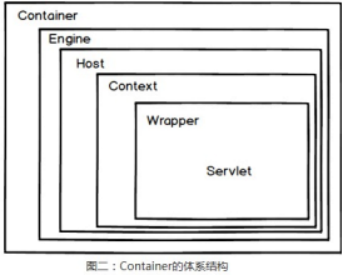
* 容器的组件关系
<? xml version ='1.0' encoding ='utf-8' ?>
<Server port ="8005" shutdown ="SHUTDOWN" >
<Service name ="Catalina" >
<Connector port ="8080" protocol ="HTTP/1.1" connectionTimeout ="20000" redirectPort ="8443" URIEncoding ="UTF-8" />
<Engine name ="Catalina" defaultHost ="loc********alhost" >
<Host name ="localhost" appBase ="webapps" unpackWARs ="true" autoDeploy ="true" >
<Context path ="" docBase ="WORKDIR" reloadable ="true" />
</Host >
</Engine >
</Service >
</Server >
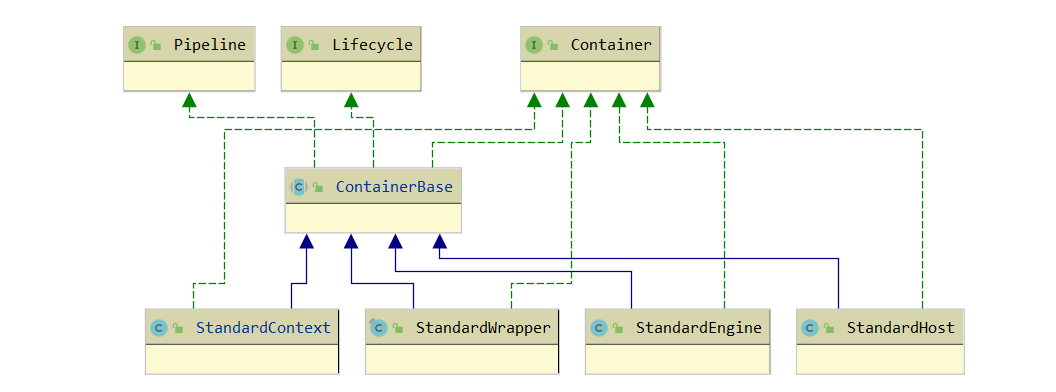
Container接口
public interface Container {
// 基本信息
public String getInfo();
public String getName();
public void setName(String name);
// 关联组件
public Loader getLoader();
public void setLoader(Loader loader);
public void setLogger(Logger logger);
public Manager getManager();
public void setManager(Manager manager);
public Cluster getCluster();
public void setCluster(Cluster cluster);
public ClassLoader getParentClassLoader();
public void setParentClassLoader(ClassLoader parent);
public Realm getRealm();
public void setRealm(Realm realm);
public DirContext getResources();
public void setResources(DirContext resources);
//Mappe 相关
public void addMapper(Mapper mapper);
public void removeMapper(Mapper mapper);
public Mapper findMapper(String protocol);
public Mapper\[\] findMappers();
// 子父容器相关
public Container getParent();
public void setParent(Container container);
public void addChild(Container child);
public Container findChild(String name);
public Container\[\] findChildren();
public void removeChild(Container child);
// 核心方法
public void invoke(Request request, Response response) throws IOException, ServletException;
public Container map(Request request, boolean update);
// 监听器
public void addContainerListener(ContainerListener listener);
public void addPropertyChangeListener(PropertyChangeListener listener);
public ContainerListener\[\] findContainerListeners();
public void removeContainerListener(ContainerListener listener);
public void removePropertyChangeListener(PropertyChangeListener listener);
// 事件常量
public static final String ADD_CHILD_EVENT = "addChild" ;
public static final String ADD_MAPPER_EVENT = "addMapper" ;
public static final String ADD_VALVE_EVENT = "addValve" ;
public static final String REMOVE_CHILD_EVENT = "removeChild" ;
public static final String REMOVE_MAPPER_EVENT = "removeMapper" ;
public static final String REMOVE_VALVE_EVENT = "removeValve" ;
}
ContainerBase抽象类
此抽象父类基本实现接口的方法
* 提供了一些属性变量的公共功能,如Loader、Mapper、Child、Listener的添加和移除
- docBase应用目录上下文DirContext的设置:属于JNDI的标志接口,提供通过某些字符串就可以获取文件资源,例如war包对应的就是WARDirContext
lookup(Name name)就会返回一个org.apache.naming.resources.Resource类型的对象表示资源,可获取文件流或者自己数组
- Mapper请求的协议对应的处理
* 主要是提供了Pipeline与Valve相关的处理,基于Pipeline实现invoke方法
* 主要提供了Lifecycle接口的start方法和stop方法的实现
public abstract class ContainerBase implements Container, Lifecycle, Pipeline {
protected HashMap children = new HashMap();
protected Container parent = null ;
protected ArrayList listeners = new ArrayList();
protected Loader loader = null ;
protected ClassLoader parentClassLoader = null ;
protected Logger logger = null ;
protected Manager manager = null ;
protected Cluster cluster = null ;
protected Mapper mapper = null ;
protected HashMap mappers = new HashMap();// 与此 url 协议关联的 Mapper 表
protected String mapperClass = null ;
protected String name = null ;
protected Pipeline pipeline = new StandardPipeline(this );
protected Realm realm = null ;
protected DirContext resources = null ; // 容器对应文档路径的上下文资源
protected static StringManager sm = StringManager.getManager (Constants.Package );
protected boolean started = false ;
protected LifecycleSupport lifecycle = new LifecycleSupport(this );
protected PropertyChangeSupport support = new PropertyChangeSupport(this );
// ------------------------------------------------------------- Properties
// 属性的 setter 和 getter
public int get/setDebug/XXXX() {
//....
}
// 设置容器对应文档路径的上下文资源,返回类型 DirContext 时一个基于 JNDI 实现的,可以查到一个目录下的文件和属性
public synchronized void setResources(DirContext resources) {
DirContext oldResources = this .resources ;
if (oldResources == resources) return ;
Hashtable env = new Hashtable();
if (getParent() != null ) env.put(ProxyDirContext.HOST, getParent().getName());
env.put(ProxyDirContext.CONTEXT, getName()); //getName() 为 context 对应的根目录
this .resources = new ProxyDirContext(env, resources);
support .firePropertyChange("resources" , oldResources, this .resources );
}
// 基于 pipeline.invoke 实现,责任链模式
public void invoke(Request request, Response response)
throws IOException, ServletException {
pipeline .invoke(request, response);
}
// ---------Lifecycle 生命周期方法 -------------------------
//start 方法,主要去触发相关对象的 start() 方法
public synchronized void start() throws LifecycleException {
// 触发事件
lifecycle .fireLifecycleEvent(BEFORE_START_EVENT, null );
addDefaultMapper(this .mapperClass );
started = true ;
// 触发内部关联组件的 start()
if ((loader != null ) && (loader instanceof Lifecycle))
((Lifecycle) loader ).start();
if ((logger != null ) && (logger instanceof Lifecycle))
((Lifecycle) logger ).start();
if ((manager != null ) && (manager instanceof Lifecycle))
((Lifecycle) manager ).start();
if ((cluster != null ) && (cluster instanceof Lifecycle))
((Lifecycle) cluster ).start();
if ((realm != null ) && (realm instanceof Lifecycle))
((Lifecycle) realm ).start();
if ((resources != null ) && (resources instanceof Lifecycle))
((Lifecycle) resources ).start();
Mapper mappers\[\] = findMappers();
for (int i = 0; i < mappers.length ; i++) {
if (mappersi instanceof Lifecycle)
((Lifecycle) mappersi).start();
}
//// 触发子容器的 start()
Container children\[\] = findChildren();
for (int i = 0; i < children.length ; i++) {
if (childreni instanceof Lifecycle)
((Lifecycle) childreni).start();
}
// 触发 pipeline 的 start()
if (pipeline instanceof Lifecycle)
((Lifecycle) pipeline ).start();
// 触发事件
lifecycle .fireLifecycleEvent(START_EVENT, null );
lifecycle .fireLifecycleEvent(AFTER_START_EVENT, null );
}
}
Pipeline与Valve
概述
管道包含该servlet容器(4种类型的容器)将要调用的任务。每一种每一个容器都有自己的Pipeline
一个阀表示一个具体的执行任务。在servlet容器的管道中, 有一个基础阀, 但是, 可以添加任意数量的阀。阀的数量指的是额外添加的阀数量,即, 不包括基础阀。
可以通过编辑Tomcat的配置文件(server.xrnl)来动态地添加阀。图5-2显示了一条管道及其阀。
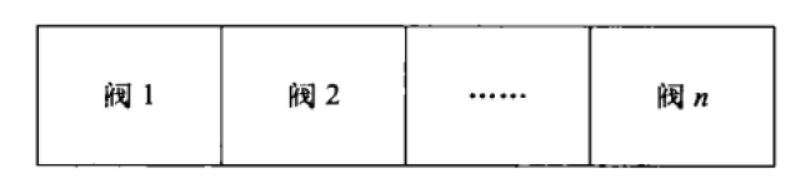
Pipeline
* Pipeline接口:
对了基于Valve关联对象的增删改查方法。分为普通Valve和最基础的Valve(用于获取下一层的容器)
核心方法invoke(Request request, Response response),用于执行管道上的Valve
public interface Pipeline {
// 设置基础阀
public Valve getBasic();
public void setBasic(Valve valve);
public void addValve(Valve valve);
public Valve\[\] getValves();
public void removeValve(Valve valve);
// 触发
public void invoke(Request request, Response response) throws IOException, ServletException;
}
I* 实现类SimplePipeline
- 基于Valve valves\[\]数组处理增删改查
如果添加进来Valve实现了Contained接口,说明是用于获取下一层的容器的基础的Valve,这就需要把Pileline所属的Container container对象传递过去给此基础Valve
- invoke方法:调用一个内部实现类对象ValveContext.invokeNext。这个方法可以执行当前下一个位置的Valve。
public class SimplePipeline implements Pipeline {
public SimplePipeline(Container container) {
setContainer(container);
}
protected Valve basic = null ;
protected Container container = null ;
protected Valve valves \[\] = new Valve0;
public void setContainer(Container container) { this .container = container;}
public Valve getBasic() { return basic ;}
public void setBasic(Valve valve) {
this .basic = valve;
((Contained) valve).setContainer(container );
}
public void addValve(Valve valve) {
if (valve instanceof Contained)// 处理容器关系的 Valve
((Contained) valve).setContainer(this .container );
synchronized (valves ) {
Valve results\[\] = new Valve****valves**** .****length**** +1;
System.arraycopy (valves , 0, results, 0, valves .length );
results****valves**** .****length**** = valve;
valves = results;
}
}
public Valve\[\] getValves() { return valves ;}
public void removeValve(Valve valve) {}
public void invoke(Request request, Response response)
throws IOException, ServletException {
(new SimplePipelineValveContext()).invokeNext(request, response);
}
// 责任链处理
protected class SimplePipelineValveContext implements ValveContext {
protected int stage = 0;
public String getInfo() {return null ;}
public void invokeNext(Request request, Response response)throws IOException, ServletException {
int subscript = stage ;
stage = stage + 1;
if (subscript < valves .length ) {
valves subscript.invoke(request, response, this );
}
else if ((subscript == valves .length ) && (basic != null )) {
basic .invoke(request, response, this );
}
else {
throw new ServletException("No valve" );
}
}
}
}
Valve
* Valve接口
只有一个主要方法invoke(Request request, Response response,ValveContext context)以处理请求和响应对象
需要传递多一个ValveContext 代表Valve链,可调用下一个Valve
public interface Valve {
public String getInfo();
public void invoke(Request request, Response response,ValveContext context)throws IOException, ServletException;
}
* 实现类(举例)
Container container用于调用当前容器对象的一些方法,一般处理子容器的获取
// 自己实现一个有基础阀功能的 Valve
public class SimpleContextValve implements Valve, Contained {
protected Container container ;
public Container set/getContainer() { return container ;}
public void invoke(Request request, Response response, ValveContext valveContext)
throws IOException, ServletException {
if (!(request.getRequest() instanceof HttpServletRequest) ||
!(response.getResponse() instanceof HttpServletResponse)) {
return ; // NOTE - Not much else we can do generically
}
// 调用容器提供的方法获取 wrapper ( servlet )
Context context = (Context) getContainer();
Wrapper wrapper = null ;
try {
wrapper = (Wrapper) context.map(request, true );
}
catch (IllegalArgumentException e) {
// 异常处理,如 servlet 找不到,包 404
response.sendError(HttpServletResponse.SC_BAD_REQUEST/SC_NOT_FOUND, requestURI);
}
response.setContext(context);
// 调用下个容器的 invoke 方法
wrapper.invoke(request, response);
}
}
Engine
概述
* 如果使用了Engine容器, 那么它总是处于容器层级的最顶层。
* 添加到Engine容器中的子容器通常是Host的实现或者Context的实现
还可以与一个服务实例(Service类)对象相关联,这是上层抽象,Service不是容器
* 默认情况下, Tomcat 会使用Engine容器的, 并且有一个Host容器作为其子容器。
Engine接口
public interface Engine extends Container {
// 关联的子容器相关: Host 和 Context
public String getDefaultHost();
public void setDefaultHost(String defaultHost);
public void addDefaultContext(DefaultContext defaultContext);
public DefaultContext getDefaultContext();
public void importDefaultContext(Context context);
// 集群 HOST 的 JvmRouteId
public String getJvmRoute();
public void setJvmRoute(String jvmRouteId);
// 服务实例
public Service getService();
public void setService(Service service);
}
StandardEngine
主要处理:
* 关联的子容器属性defaultHost、DefaultContext 变量的setter和getter
* 构造方法里设置了一个基础阀StandardEngineValve
* start方法只是简单的调用了基类的start方法
* 添加默认的mapper,即StandardEngineMapper
* invoke方法直接继承父类的,即会依次调用自己的Piple的所有任务
public void invoke(Request request, Response response) throws IOException, ServletException {
pipeline.invoke(request, response);
}
StandardEngineValve
主要作用:
* 校验下当前的请求:如HTTP/1.1的话必须包含key为"host"的请求头,否则报错
* 找到url匹配的Host,调用host的invoke处理请求
在基类保存的Mappers中找到当前请求的协议对应的Mapper对象,StandardEngine里默认设置了StandardEngineMapper作为HTTP协议的Mapper对象
final class StandardEngineValve extends ValveBase {
private static final String info = "org.apache.catalina.core.StandardEngineValve/1.0" ;
private static final StringManager sm = StringManager.getManager (Constants.Package );
public String getInfo() { return (info ); }
// ------------------- 核心方法 invoke--------------------------------------
public void invoke(Request request, Response response,ValveContext valveContext)
throws IOException, ServletException {
// 只处理 HttpServletRequest 和 HttpServletResponse
if (!(request.getRequest() instanceof HttpServletRequest) ||
!(response.getResponse() instanceof HttpServletResponse)) {
return ; // NOTE - Not much else we can do generically
}
//HTTP/1.1 的话必须包含 key 为 "host" 的请求头,否则错
HttpServletRequest hrequest = (HttpServletRequest) request;
if ("HTTP/1.1" .equals(hrequest.getProtocol()) &&
(hrequest.getServerName() == null )) {
((HttpServletResponse) response.getResponse()).sendError(XX));
return ;
}
// 找到 url 匹配的 Host
StandardEngine engine = (StandardEngine) getContainer();
// 在基类保存的 Mappers 中找到当前请求的协议对应的 Mapper 对象, StandardEngine 里默认设置了 StandardEngineMapper 作为 HTTP 协议的 Mapper 对象
// Mapper mapper = findMapper(request.getRequest().getProtocol());(mapper.map(request, update));
Host host = (Host) engine.map(request, true );
if (host == null ) {
(HttpServletResponse) response.getResponse()).sendExx)
}
// 调用 host 的 invoke 处理请求
host.invoke(request, response);
}
}
//StandardEngineMapper
public Container map(Request request, boolean update) {
//1 、如果请求头 host 没有指定目标服务器名,则使用默认的 Host 名作为的 request 的 ServerName
String server = request.getRequest().getServerName();
if (server == null ) {
server = engine.getDefaultHost();
if (update) request.setServerName(server);
}
if (server == null ) return (null );
server = server.toLowerCase();
//2 、找到匹配 server 名的 Host
Host host = (Host) engine.findChild(server);
//3 、如果找不到,尝试使用 HOST 设置的别名来匹配
if (host == null ) {
Container children\[\] = engine.findChildren();
for (int i = 0; i < children.length ; i++) {
String aliases\[\] = ((Host) childreni).findAliases();
for (int j = 0; j < aliases.length ; j++) {
if (server.equals(aliasesj)) {
host = (Host) childreni;
break ;
}
}
if (host != null ) break ;
}
}
// 4 、使用默认 HOST
if (host == null ) {
host = (Host) engine.findChild(engine.getDefaultHost());
}
return (host);
}
Host
概述
* 如果你想在同一个Tomcat部署上运行多个Context容器的话, 你就需要使用Host容器。理论上, 当你只有一个Context实例时, 不需要使用Host实例。
但是在Tomcat的实际部署中, 总是会使用一个Host容器。
* 为什么必须要有一个Host 容器 在Tomcat 4和5的实际部署中, 若一个Context实例使用ContextConfig对象进行设置, 就 必须使用一个Host对象。
原因如下:使用ContextConfig对象需要知道应用程序web.xml文件的位置时必须有一个Host实例作为其父容器
Host接口
主要几部分:
-
当前Host的路径及名称
-
自动部署Context的标志
-
默认的Context设置
-
根据请求的URI匹配对应的Context方法,即map
public interface Host extends Container {
// 容器的 根路径,它可以是 绝对路径、相对路径、或者 URL
public String getAppBase();
public void setAppBase(String appBase);
// 返回此容器表示的虚拟主机的规范、完全限定的名称
public String getName();
public void setName(String name);
// 别名修改相关的时机
public static final String ADD_ALIAS_EVENT = "addAlias" ;
public static final String REMOVE_ALIAS_EVENT = "removeAlias" ;
// 添加应该映射到同一主机的别名
public void addAlias(String alias);
public String\[\] findAliases();
public void removeAlias(String alias);
// 自动部署标志,为 true 表示当前 Host 下的 Context 会被发现且自动部署
public boolean getAutoDeploy();
public void setAutoDeploy(boolean autoDeploy);
//DefaultContext 相关
public void addDefaultContext(DefaultContext defaultContext);
public DefaultContext getDefaultContext();
public void importDefaultContext(Context context);
// 根据请求的 URI 匹配对应的 Context
public Context map(String uri);
}
StandardHost
主要实现如下
-
映射方法map:根据url返回对应的context,这个方法会被StandardHostValve的invoke使用StandardHostMapper中的map方法调用
-
start方法:设置两个阀errorreportvalve和errordispatchervalve、调用通用的start方法
调用通用的start方法,主要调用mappers、children(Context)和pipeline的start
- 部署器的相关方法:委托为StandardHostDeployer去实现,例如
public void install(String contextPath, URL war) throws IOException {
deployer .install(contextPath, war);
}
public class StandardHost extends ContainerBase implements Deployer, Host {
// Host 目录
private String appBase = "." ;// 代表主机的根目录,此目录下的子目录将自动作为 APP 应用程序部署 , 例如 webapps
private static final String info = "org.apache.catalina.core.StandardHost/1.0" ;
// 默认的类
private String configClass = "org.apache.catalina.startup.ContextConfig" ;
private String contextClass = "org.apache.catalina.core.StandardContext" ;
private DefaultContext defaultContext ;
private String errorReportValveClass = "org.apache.catalina.valves.ErrorReportValve" ;
private String mapperClass = "org.apache.catalina.core.StandardHostMapper" ;
// 部署相关
private boolean autoDeploy = true ;
private Deployer deployer = new StandardHostDeployer(this );
private boolean deployXML = true ;
private boolean liveDeploy = true ;
// 其他
private String\[\] aliases = new String0;
private boolean unpackWARs = true ;
private String workDir = null ;
//========================== 构造方法 ==========================
// 设置基础阀
public StandardHost() {
super ();
pipeline.setBasic(new StandardHostValve());
}
//========================== 属性 setter 、 getter 方法 ==========================
public void get/setAppBase/AutoDeploy/ConfigClass/DefaultContext/ContextClass/...(String appBase) {
String oldAppBase = this .appBase ;
this .appBase = appBase ;
support.firePropertyChange("appBase" , oldAppBase, this .appBase );
}
public void importDefaultContext(Context context) {
if ( this .defaultContext != null )
this .defaultContext .importDefaultContext(context);
}
public void addChild(Container child) {
if (!(child instanceof Context)) {
throw new IllegalArgumentException
(sm.getString("standardHost.notContext" ));
}
super .addChild(child);
}
//==========================map 方法 ==========================
// 根据 url 返回对应的 context
public Context map(String uri) {
if (uri == null ) return (null );
// 对 url 从左往右进行一次匹配,最长匹配原则
Context context = null ;
String mapuri = uri;
while (true ) {
context = (Context) findChild(mapuri);
if (context != null )
break ;
int slash = mapuri.lastIndexOf('/' );
if (slash < 0)
break ;
mapuri = mapuri.substring(0, slash);
}
// 选择默认的 Context
if (context == null ) {
context = (Context) findChild("" );
}
// 返回 null
if (context == null ) {
return (null );
}
return (context);
}
//==========================start 方法 ==========================
public synchronized void start() throws LifecycleException {
// 设置两个阀 errorreportvalve 和 errordispatchervalve
if ((errorReportValveClass != null )
&& (!errorReportValveClass .equals("" ))) {
try {
Valve valve = (Valve) Class.forName (errorReportValveClass )
.newInstance();
addValve(valve);
} catch (Throwable t) {
}
}
addValve(new ErrorDispatcherValve());
// 调用通用的 start 方法,主要调用 mappers 、 children ( Context )和 pipeline 的 start
super .start();
}
//========================== 部署器的相关方法 ==========================
// 委托为 StandardHostDeployer 去实现
public void install(String contextPath, URL war) throws IOException {
deployer .install(contextPath, war);
}
public synchronized void install(URL config, URL war) throws IOException {
deployer .install(config, war);
}
public Context findDeployedApp(String contextPath) {
return (deployer .findDeployedApp(contextPath));
}
public String\[\] findDeployedApps() {
return (deployer .findDeployedApps());
}
public void remove(String contextPath) throws IOException {
deployer .remove(contextPath);
}
public void start(String contextPath) throws IOException {
deployer .start(contextPath);
}
public void stop(String contextPath) throws IOException {
deployer .stop(contextPath);
}
}
StandardHostValve
invoke主要作用:
- 借助StandardHost的map方法来找到url匹配的Context
是直接继承父类的map方法:在保存的Mappers中找到当前请求的协议对应的Mapper对象,StandardHost里默认设置了StandardHostMapper作为HTTP协议的Mapper对象
StandardHostMapper的map方法主要借助了StandardHost中map方法实现的:请求url从左到右匹配此Host里设置的Context对应的Path值
-
把当前的线程类加载器修改为Context的加载器,即WebappClassLoader
-
调用context.invoke处理请求
final class StandardHostValve extends ValveBase {
private static final String info = "org.apache.catalina.core.StandardHostValve/1.0" ;
private static final StringManager sm = StringManager.getManager (Constants.Package );
public String getInfo() {return (info ); }
// --------------------------------------------------------- Public Methods/
public void invoke(Request request, Response response, ValveContext valveContext)
throws IOException, ServletException {
// Validate the request and response object types
if (!(request.getRequest() instanceof HttpServletRequest) ||
!(response.getResponse() instanceof HttpServletResponse)) {
return ; // NOTE - Not much else we can do generically
}
// 借助 Host 的 map 来找到匹配的 Context
StandardHost host = (StandardHost) getContainer();
Context context = (Context) host.map(request, true );
if (context == null ) {
(HttpServletResponse) response.getResponse()).sendError(XX);
return ;
}
// 把当前的线程类加载器修改为 Context 的加载器
Thread.currentThread ().setContextClassLoader(context.getLoader().getClassLoader());
// 会话处理
HttpServletRequest hreq = (HttpServletRequest) request.getRequest();
String sessionId = hreq.getRequestedSessionId();
if (sessionId != null ) {
Manager manager = context.getManager();
if (manager != null ) {
Session session = manager.findSession(sessionId);
if ((session != null ) && session.isValid())
session.access();
}
}
// 调用 context.invoke 处理请求
context.invoke(request, response);
}
}
//StandardHostMapper 的 map 方法,有回调了 StandardHos 自己自定义的 map(url) 找到最终的 Context
public Container map(Request request, boolean update) {
// Has this request already been mapped?
if (update && (request.getContext() != null ))
return (request.getContext());
// Perform mapping on our request URI
String uri = ((HttpRequest) request).getDecodedRequestURI();
Context context = host.map(uri);
// Update the request (if requested) and return the selected Context
if (update) {
request.setContext(context);
if (context != null )
((HttpRequest) request).setContextPath(context.getPath());
else
((HttpRequest) request).setContextPath(null );
}
return (context);
}
HOST默认配置
<Host name ="localhost" appBase ="webapps"
unpackWARs ="true" autoDeploy ="true"
xmlValidation ="false" xmlNamespaceAware ="false" >
</Host >
name:代表主机的域名
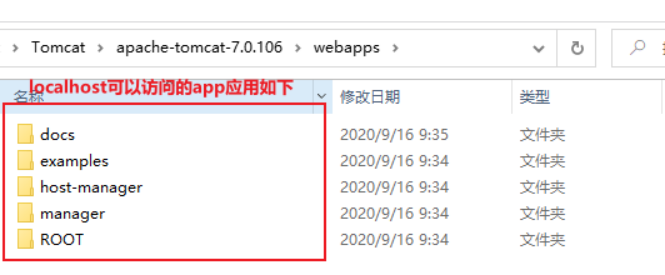
appBase :代表主机的根目录,此目录下的子目录将自动作为APP应用程序部署,war文件将自动解压缩并作为APP应用程序部署。 默认值为tomcat下的webapps目录。 如果您不想访问默认根目录,请更改此处。 同样,如果配置目录下的APP应用程序是默认APP应用程序,请在此目录下添加根目录文件夹。
Context
概述
* 一个Context表示了一个Web应用程序application运行在特定的虚拟主机中。
* 什么是Web应用程序呢?在Sun公司发布的Java Servlet规范中,对Web应用程序做出了如下的定义:
一个Web应用程序是由一组Servlet、HTML页面、类,以及其他的资源组成的运行在Web服务器上的完整的应用程序。
它可以在多个供应商提供的实现了Servlet规范的Web容器中运行"。一个Host可以包含多个Context(代表Web应用程序),每一个Context都有一个唯一的路径。
用户通常不需要创建自定义的Context,因为Tomcat给出的Context接口的实现(类StandardContext)提供了重要的附加功能。
* Context 代表 Servlet 的 Context,它具备了 Servlet 运行的基本环境,理论上只要有 Context 就能运行 Servlet 了。简单的 Tomcat 可以没有 Engine 和 Host。
Context 最重要的功能就是管理它里面的 Servlet 实例,Servlet 实例在 Context 中是以 Wrapper 出现的,还有一点就是 Context 如何才能找到正确的 Servlet 来执行它呢?
Tomcat5 以前是通过一个 Mapper 类来管理的,Tomcat5 以后这个功能被移到了 request 中
* 不同Web应用程序的类加载是相互隔离的
* Context文件描述符
<Context >
<WatchedResource >WEB-INF/web.xml</WatchedResource >
<Manager pathname ="" />
<Valve className ="org.apache.catalina.valves.CometConnectionManagerValve" />
。。。
</Context >
Context接口
public interface Context extends Container {
public static final String RELOAD_EVENT = "reload" ;// 生命周期事件
// 一些 Application Context 的标识
public void get/setAvailable(boolean available);// 是否可用
public void get/setCharsetMapper(CharsetMapper mapper);
public void get/setConfigured(boolean configured);// 是否正确配置了
public void get/setCookies(boolean cookies);// 使用 cookies 作为会话 id
public void get/setCrossContext(boolean crossContext);// 是否允许传递 contexts
public void get/setDisplayName(String displayName);// 展示名称
public void get/setDistributable(boolean distributable);// 是否为分布式
public void get/setReloadable(boolean reloadable);// 是否支持组件的重新加载
public void get/setOverride(boolean override);
public void get/setPrivileged(boolean privileged);
//application 初始化监听器
public void get/setApplicationListeners(Object listeners\[\]);
public void addApplicationListener(String listener);
// 参数相关
public void addApplicationParameter(ApplicationParameter parameter);
public void addEnvironment(ContextEnvironment environment);
public void addParameter(String name, String value);
// 安全相关
public LoginConfig get/setLoginConfig(LoginConfig config);// 登录配置
public void setPublicId(String publicId);
public void addConstraint(SecurityConstraint constraint);// 安全对象
public void addRoleMapping(String role, String link);
public void addSecurityRole(String role);
//Wrapper 相关
public void addWrapperListener(String listener);// 监听 Wrapper
public void addInstanceListener(String listener);// 监听 Wrapper
public void addServletMapping(String pattern, String name);
public Wrapper createWrapper();// 创建或返回一个新的 Wrapper 实例
public void addWrapperLifecycle(String listener);
public void setWrapperClass(String wrapperClass);// 指定 servlet 的包装类
//Resources 相
public void setNamingResources(NamingResources namingResources);//JNDI Resources 配置
public void addResource(ContextResource resource);
public void addResourceEnvRef(String name, String type);
public void addResourceLink(ContextResourceLink resourceLink);// 安全
// 其他
public void setPath(String path);//application 路径
public ServletContext getServletContext();// 本对象的 facade
public void setSessionTimeout(int timeout);
public void addEjb/LocalEjb(ContextEjb ejb);// 添加关联的 EJB resource
public void addErrorPage(ErrorPage errorPage);
public void addWelcomeFile(String name);
public void addFilterDef(FilterDef filterDef);
public void addFilterMap(FilterMap filterMap);
public void addTaglib(String uri, String location);// 对指定 url 添加 JSP tag
public void get/setDocBase(String docBase);// 文档路径
public void addMimeMapping(String extension, String mimeType);
// 对应的 find/removeXXX(XXX);
//..
}
StandardContext
概述
* 若要是start()方法正确执行,则会设置available为true, 表明StandardContext对象配置正确。在Tomcat的实际部署中, 配置StandardContext对象需要一系列操作。
正确设置后, StandardContext对象才能读取并解析默认的web.xml文件, 该文件位于%CATALINA_ HOME%/conf目录下, 该文件的内容会应用到所有部署到Tomcat中的应用程序中。
这也保证了StandardContext实例可以处理应用程序级的web.xml文件。此外, 还会配置验证器阀和许可阀。
* StandardContext类的configured属性是一个布尔变量, 表明StandardContext实例是否正确设置
StandardContext类使用一个事件监听器作为其配置器。当调用StandardContext实例的start()方法时, 其中要做的一件事是, 触发一个生命周期事件。
该事件调用监昕器, 对StandardContext实例进行配置。若配置成功, 监听器会将configured属性设置为true。
否则, StandardContext实例会拒绝启动, 也就无法为HTTP请求提供服务。
* 设置Context的名称和文档根目录
-
context.setPath("/app1");//Context对应的名称,
-
getName context.setDocBase("app1");//Context对应文件系统下的根目录目录(父目录为HOST的appBase指定的)
* 使用ApplicationContext封装当前this以实现
主要流程实现
* start()方法需要完成以下工作
-
触发BEFORE_START事件
-
将availability属性设置为false
-
将configured属性设置为false
-
配置资源
如果context对应的目录上下文DirContext不存在,就新建一个WARDirContext或者FileDirContext
-
为空就设置载入器WebappLoader
-
设置Session 管理器
-
初始化字符集映射器
-
创建工作目录
默认使用hostName、engineName、hostWorkDir拼接为一个目录在环境变量catalina.base指定目录下创建一个工作目录
设置到ApplicationContext context中setAttribute(Globals.WORK_DIR_ATTR, dir);
其作用是缓存编译后的jsp对应的class文件
-
添加一个NamingContextListener
-
绑定线程
先Thread.currentThread().setContextClassLoader (getLoader().getClassLoader());
再把getLoader().getClassLoader()作为key,value为当前DirContext(当前应用目录的上下文)插入到DirContextURLStreamHandler的clBindings表中,
这样通过URL对象(jndi协议时)可以获取到这个当前DirContext作为目标资源,URL对象相关的内容见其他文档(D:\Notes\Java\源码\URL)
同样当前线程作为key,当前DirContext作为value绑定到JNDI ContextBindings,让让其他地方get到
- 启动与该Context容器相关联的组件,调用start方法
Loader、cluster、DirContext 、resources、Mapper、子容器children、管道对象pipeline、
-
触发START事件, 在这里监听器( ContextConfig实例), 若设置成功, ContextConflg实例会将configured变量设置为true
-
启动Session管理器
-
实例化监听器、过滤器
-
检查configured属性的值,若为true,则调用postWelcomePages()方法,载人那些需要在启动时loadOnStartup就载人的子容器,即调用Wrapper实例的load方法,
将availability属性设置为true。若configured变量为false, 则调用stop()方法
- 触发AFTER_START事件
* invoke()方法
在Tomcat 4中, StandardConte类的invoke方法由与其相关联的连接器调用, 或者当StandardContext实例是Host容器的一个子容器时, 由Host实例的invoke()方法调用。 StandardContext 类的invoke()方法首先会检查应用程序是否正在重载过程中, 若是, 则等待应用程序重载完成。 然后, 立调用其父类ConatinerBase的invoke方法。
* 在Webapploader类中有/一个后台线程不断循环的监听classLoader.modified(),
如果返回true,就新起线程调用容器的reload()方法,即如下的操作:stop一些组件、然后再重启start一些组件
public class StandardContext extends ContainerBase implements Context {
public StandardContext() {
super ();
pipeline.setBasic(new StandardContextValve());
namingResources .setContainer(this );
}
// 监听器,生命周期
private String applicationListeners \[\] = new String0;
private Object applicationListenersObjects \[\] = new Object0;
private String instanceListeners \[\] = new String0;// 作用于创建新的 wrapper,createWrapper()
private String wrapperLifecycles \[\] = new String0;
private String wrapperListeners \[\] = new String0;
// 过滤器
private HashMap filterConfigs = new HashMap();//keyed by filter name
private HashMap filterDefs = new HashMap();
private FilterMap filterMaps \[\] = new FilterMap0;
// 对应资源
private ApplicationContext context = null ;
private String docBase = null ;// 此 Context 对应项目在主机存放的路径
private String workDir = null ;
private NamingContextListener namingContextListener = null ;
private NamingResources namingResources = new NamingResources();
private String namingContextName = null ;
// 映射
private CharsetMapper charsetMapper = null ; // 默认为 charsetMapperClass 指定的类
private String charsetMapperClass = "org.apache.catalina.util.CharsetMapper" ;
private String mapperClass = "org.apache.catalina.core.StandardContextMapper" ;
private HashMap mimeMappings = new HashMap();
private String wrapperClass = "org.apache.catalina.core.StandardWrapper" ;
private HashMap servletMappings = new HashMap();
private HashMap taglibs = new HashMap();//jsp 标签库
// 标识
private boolean available = false ;
private boolean configured = false ;
private boolean cookies = true ;
private boolean crossContext = false ;// 其他 web 应用是否可以通过 ServletContext.getContext() 获取到这个 context
private boolean distributable = false ;
private boolean paused = false ;
private boolean reloadable = false ;
private boolean override = false ;
private boolean privileged = false ;
private boolean replaceWelcomeFiles = false ;
private boolean swallowOutput = false ;// 重定向 system.out and system.err
private boolean useNaming = true ;
private boolean filesystemBased = false ;
protected boolean cachingAllowed = true ;
// 其他
private ApplicationParameter applicationParameters \[\] = new ApplicationParameter0;
private HashMap parameters = new HashMap();
private String displayName = null ;
private static final String info = "org.apache.catalina.core.StandardContext/1.0" ;
private SecurityConstraint constraints \[\] = new SecurityConstraint0;
private LoginConfig loginConfig = null ;
private HashMap roleMappings = new HashMap();
private String securityRoles \[\] = new String0;
private String publicId = null ; // 由于判断开发版本 version 2.2
private int sessionTimeout = 30;
private String welcomeFiles \[\] = new String0;
private HashMap exceptionPages = new HashMap();
private HashMap statusPages = new HashMap();
// 单纯的 getter/setter
public void setCachingAllowed/UseNaming/ApplicationListener/available /DocBase/Info/WrapperClass
/ApplicationListener/ApplicationParamete(boolean cachingAllowed) {
this .cachingAllowed = cachingAllowed;
}
// 修改后需要触发事件
public void setAvailable/CharsetMapper/Configured/Cookies/CrossContext/DisplayName/Distributable
/loginConfig /NamingResources/PublicId/Privileged/Reloadable/Override/ReplaceWelcomeFiles
/SessionTimeout/SwallowOutput/CharsetMapperClass/MapperClass(boolean available) {
boolean oldAvailable = this .available ;
this .available = available;
support.firePropertyChange("available" ,
new Boolean(oldAvailable),
new Boolean(this .available ));
}
//Path 对于 Name
public String getPath() { return (getName()); }
// 使用 ApplicationContext 封装当前 this
public ServletContext getServletContext() {
if (context == null )
context = new ApplicationContext(getBasePath(), this );
return (context );
}
// 设置当前 context 对于的目录上下文,配置中指定设置或者 start() 中
// 通过父类的 super.setResources(resources); 进行设置,最终都是 DirContext ,是一种目录上下文
public synchronized void setResources(DirContext resources) {
if (resources instanceof BaseDirContext) {
((BaseDirContext) resources).setCached(isCachingAllowed());
}
if (resources instanceof FileDirContext) {
filesystemBased = true ;
}
super .setResources(resources);
if (started)
postResources(); // As a servlet context attribute
}
// getResources() 优先自己的 resources ,否则返回父类的
private void postResources() {
getServletContext().setAttribute(Globals.RESOURCES_ATTR, getResources());
}
// 设置工作目录
public void setWorkDir(String workDir) {
this .workDir = workDir;
if (started)
postWorkDirectory();
}
// 生成正确的工作目录
private void postWorkDirectory() {
String workDir = getWorkDir();
if (workDir == null ) {
// Retrieve our parent (normally a host) name
String hostName = null ;
String engineName = null ;
String hostWorkDir = null ;
Container parentHost = getParent();
if (parentHost != null ) {
hostName = parentHost.getName();
if (parentHost instanceof StandardHost) {
hostWorkDir = ((StandardHost)parentHost).getWorkDir();
}
Container parentEngine = parentHost.getParent();
if (parentEngine != null ) {
engineName = parentEngine.getName();
}
}
if ((hostName == null ) || (hostName.length() < 1))
hostName = "_" ;
if ((engineName == null ) || (engineName.length() < 1))
engineName = "_" ;
String temp = getPath();// 如 context.setPath("/myApp");
if (temp.startsWith("/" ))
temp = temp.substring(1);
temp = temp.replace('/' , '_' );
temp = temp.replace(' \\ ' , '_' );
if (temp.length() < 1)
temp = "_" ;
if (hostWorkDir != null ) {
workDir = hostWorkDir + File.separator + temp;
} else {
workDir = "work" + File.separator + engineName +
File.separator + hostName + File.separator + temp;
}
setWorkDir(workDir);
}
// 创建对应的 work 目录
File dir = new File(workDir);
if (!dir.isAbsolute()) {
File catalinaHome = new File(System.getProperty ("catalina.base" ));
String catalinaHomePath = null ;
try {
catalinaHomePath = catalinaHome.getCanonicalPath();
dir = new File(catalinaHomePath, workDir);
} catch (IOException e) {
}
}
dir.mkdirs();
// 设置属性
getServletContext().setAttribute(Globals.WORK_DIR_ATTR, dir);
if (getServletContext() instanceof ApplicationContext)
((ApplicationContext) getServletContext()).setAttributeReadOnly
(Globals.WORK_DIR_ATTR);
}
//namingResources
public void addEjb/Environment/ResourceParams/LocalEjb/Resource/ResourceEnvRef/ResourceLink(ContextEjb ejb) {
namingResources .addEjb(ejb);
fireContainerEvent("addEjb" , ejb.getName());
}
protected File engineBase() {
return (new File(System.getProperty ("catalina.base" )));
}
//====================== 创建 Wrapper 对象,并对此对象设置监听器 ==============================
public Wrapper createWrapper() {
Wrapper wrapper = new StandardWrapper();
// 为每个新建的 Wrapper 添加 instanceListeners 中所有实例相关的事件监听器
// 和 wrapperLifecycles 中所有生命周期相关的监听器
// 和 wrapperListeners 中的所有容器相关的监听器
synchronized (instanceListeners ) {
for (int i = 0; i < instanceListeners .length ; i++) {
try {
Class clazz = Class.forName (instanceListeners i);
InstanceListener listener =(InstanceListener) clazz.newInstance();
wrapper.addInstanceListener(listener);
} catch (Throwable t) {
log("createWrapper" , t);
return (null );
}
}
}
synchronized (wrapperLifecycles ) {
for (int i = 0; i < wrapperLifecycles .length ; i++) {
try {
Class clazz = Class.forName (wrapperLifecycles i);
LifecycleListener listener =(LifecycleListener) clazz.newInstance();
if (wrapper instanceof Lifecycle)
((Lifecycle) wrapper).addLifecycleListener(listener);
} catch (Throwable t) {
log("createWrapper" , t);
return (null );
}
}
}
synchronized (wrapperListeners ) {
for (int i = 0; i < wrapperListeners .length ; i++) {
try {
Class clazz = Class.forName (wrapperListeners i);
ContainerListener listener =
(ContainerListener) clazz.newInstance();
wrapper.addContainerListener(listener);
} catch (Throwable t) {
log("createWrapper" , t);
return (null );
}
}
}
return (wrapper);
}
// ==============================invoke 方法 =================================
// 判断 Paused 状态,再调用父类的 super.invoke
public void invoke(Request request, Response response)throws IOException, ServletException {
// Wait if we are reloading
while (getPaused()) {
try {
Thread.sleep (1000);
} catch (InterruptedException e) {
;
}
}
// Normal request processing
if (swallowOutput ) {
try {
SystemLogHandler.startCapture();
super .invoke(request, response);
} finally {
String log = SystemLogHandler.stopCapture();
if (log != null && log.length() > 0) {
log(log);
}
}
} else {
super .invoke(request, response);
}
}
// ==================== 容器的 start 、 stop 、 reload==================================
// 启动器职代会调用此 start()
public synchronized void start() throws LifecycleException {
if (started) throw new LifecycleException();
// 初始 before_start 事件
lifecycle.fireLifecycleEvent(BEFORE_START_EVENT, null );
setAvailable (false );
setConfigured(false );
boolean ok = true ;
// 如果 context 对应的目录上下文 DirContext 不存在,则新建一个
if (getResources() == null ) {
try {
if ((docBase != null ) && (docBase .endsWith(".war" )))
setResources(new WARDirContext());
else
setResources(new FileDirContext());
} catch (IllegalArgumentException e) {
log("Error initializing resources: " + e.getMessage());
ok = false ;
}
}
if (ok && (resources instanceof ProxyDirContext)) {
DirContext dirContext =
((ProxyDirContext) resources).getDirContext();
if ((dirContext != null )
&& (dirContext instanceof BaseDirContext)) {
((BaseDirContext) dirContext).setDocBase(getBasePath());
((BaseDirContext) dirContext).allocate();
}
}
// 类加载器为空时,就需要创建 WebappLoader 加载器辅助类,此时通过当前 context 是否有权限会指定一个父加载器
if (getLoader() == null ) {
if (getPrivileged()) {
setLoader(new WebappLoader(this .getClass().getClassLoader()));
} else {
setLoader(new WebappLoader(getParentClassLoader()));
}
}
// 会话管理器的设置
if (getManager() == null ) {
setManager(new StandardManager());
}
// 获取字符编码
getCharsetMapper();
// 生成正确的工作 work 目录
postWorkDirectory();
// 通过变量 catalina.useNaming 设置下 useNaming 值
String useNamingProperty = System.getProperty ("catalina.useNaming" );
if ((useNamingProperty != null )
&& (useNamingProperty.equals("false" ))) {
useNaming = false ;
}
if (ok && isUseNaming()) {
if (namingContextListener == null ) {
namingContextListener = new NamingContextListener();
namingContextListener .setDebug(getDebug());
namingContextListener .setName(getNamingContextName());//conetxt 的全路径
addLifecycleListener(namingContextListener );
}
}
//JNDI 绑定线程
// 会把 getLoader().getClassLoader() 作为 key , value 为当前 DirContext (当前应用目录的上下文)插入到 DirContextURLStreamHandler 的 clBindings 表中
// 这样通过 URL(jndi 协议时 ) 可以获取到这个当前 DirContext 作为目标资源
ClassLoader oldCCL = bindThread();
if (ok) {
try {
// 生成默认的 Mapper 实例
addDefaultMapper(this .mapperClass );
started = true ;
// 调用相关组件的 start 方法
// 顺序为 loader 、 logger 、 cluster 、 realm 、 resources 、 mappers 、子容器、 pipeline
if ((loader != null ) && (loader instanceof Lifecycle))
((Lifecycle) loader).start();
if ((logger != null ) && (logger instanceof Lifecycle))
((Lifecycle) logger).start();
// Unbinding thread
unbindThread(oldCCL);
// Binding thread
oldCCL = bindThread();
if ((cluster != null ) && (cluster instanceof Lifecycle))
((Lifecycle) cluster).start();
if ((realm != null ) && (realm instanceof Lifecycle))
((Lifecycle) realm).start();
if ((resources != null ) && (resources instanceof Lifecycle))
((Lifecycle) resources).start();
Mapper mappers\[\] = findMappers();
for (int i = 0; i < mappers.length ; i++) {
if (mappersi instanceof Lifecycle)
((Lifecycle) mappersi).start();
}
Container children\[\] = findChildren();
for (int i = 0; i < children.length ; i++) {
if (childreni instanceof Lifecycle)
((Lifecycle) childreni).start();
}
if (pipeline instanceof Lifecycle)
((Lifecycle) pipeline).start();
// 触发 start 事件,使得 ContextConfig 监听器开始进行配置处理
lifecycle.fireLifecycleEvent(START_EVENT, null );
// 调用 manager 组件的 start 方法
if ((manager != null ) && (manager instanceof Lifecycle))
((Lifecycle) manager).start();
} finally {
// Unbinding thread
unbindThread(oldCCL);
}
}
if (!getConfigured())
ok = false ;
// 做好目录上下文准备好的标志
if (ok)
getServletContext().setAttribute(Globals.RESOURCES_ATTR, getResources());
// Binding thread
oldCCL = bindThread();
// 保存欢迎页面属性
if (ok) {
postWelcomeFiles(); //getServletContext().setAttribute("org.apache.catalina.WELCOME_FILES", welcomeFiles);
}
// 实力化 applicationListeners 里的监听对象,并调用其初始化方法
if (ok) {
if (!listenerStart())
ok = false ;
}
// 把所有的 FilterDef 封装为 ApplicationFilterConfig ,使用 key 为过滤器名称, put 进去 filterConfigs
if (ok) {
if (!filterStart())
ok = false ;
}
//TreeMap 对所有 children 进行排序,再一一加载 wrapper.load()
if (ok)
loadOnStartup(findChildren());
// Unbinding thread
unbindThread(oldCCL);
// 设置当前 context 的可用状态
if (ok) {
setAvailable (true );
} else {
try {
stop();
} catch (Throwable t) {
log(sm.getString("standardContext.startCleanup" ), t);
}
setAvailable (false );
}
// 触发启动成功后 AFTER_START_EVENT 事件
lifecycle.fireLifecycleEvent(AFTER_START_EVENT, null );
}
//stop 相关的组件和触发相关的触发器,其 stop 的顺序不是和 start 相反的
public synchronized void stop() throws LifecycleException {
if (!started)
throw new LifecycleException();
// Notify our interested LifecycleListeners
lifecycle.fireLifecycleEvent(BEFORE_STOP_EVENT, null );
// Mark this application as unavailable while we shut down
setAvailable (false );
// Binding thread
ClassLoader oldCCL = bindThread();
// Stop our filters
filterStop();
// Finalize our character set mapper
setCharsetMapper(null );
if ((manager != null ) && (manager instanceof Lifecycle)) {
((Lifecycle) manager).stop();
}
// Notify our interested LifecycleListeners
lifecycle.fireLifecycleEvent(STOP_EVENT, null );
started = false ;
try {
// Stop the Valves in our pipeline (including the basic), if any
if (pipeline instanceof Lifecycle) {
((Lifecycle) pipeline).stop();
}
// Stop our child containers, if any
Container children\[\] = findChildren();
for (int i = 0; i < children.length ; i++) {
if (childreni instanceof Lifecycle)
((Lifecycle) childreni).stop();
}
// Stop our Mappers, if any
Mapper mappers\[\] = findMappers();
for (int i = 0; i < mappers.length ; i++) {
if (mappers(mappers.****length**** -1)-i instanceof Lifecycle)
((Lifecycle) mappers(mappers.****length**** -1)-i).stop();
}
// Stop our application listeners
listenerStop();
// Stop our subordinate components, if any
if (resources != null ) {
if (resources instanceof Lifecycle) {
((Lifecycle) resources).stop();
} else if (resources instanceof ProxyDirContext) {
DirContext dirContext =
((ProxyDirContext) resources).getDirContext();
if (dirContext != null ) {
if (debug >= 1) {
log("Releasing document base " + docBase );
}
if (dirContext instanceof BaseDirContext) {
((BaseDirContext) dirContext).release();
if ((dirContext instanceof WARDirContext)
|| (dirContext instanceof FileDirContext)) {
resources = null ;
}
} else {
log("Cannot release " + resources);
}
}
}
}
if ((realm != null ) && (realm instanceof Lifecycle)) {
((Lifecycle) realm).stop();
}
if ((cluster != null ) && (cluster instanceof Lifecycle)) {
((Lifecycle) cluster).stop();
}
if ((logger != null ) && (logger instanceof Lifecycle)) {
((Lifecycle) logger).stop();
}
if ((loader != null ) && (loader instanceof Lifecycle)) {
((Lifecycle) loader).stop();
}
} finally {
// Unbinding thread
unbindThread(oldCCL);
}
// Reset application context
context = null ;
// Notify our interested LifecycleListeners
lifecycle.fireLifecycleEvent(AFTER_STOP_EVENT, null );
if (debug >= 1)
log("Stopping complete" );
}
private ClassLoader bindThread() {
ClassLoader oldContextClassLoader =
Thread.currentThread ().getContextClassLoader();
if (getResources() == null )
return oldContextClassLoader;
Thread.currentThread ().setContextClassLoader
(getLoader().getClassLoader());
// 把当前线程加载器和目录上下文绑定
DirContextURLStreamHandler.bind(getResources());
if (isUseNaming()) {
try {
ContextBindings.bindThread(this , this );
} catch (NamingException e) {
// Silent catch, as this is a normal case during the early
// startup stages
}
}
return oldContextClassLoader;
}
private void unbindThread(ClassLoader oldContextClassLoader) {
Thread.currentThread ().setContextClassLoader(oldContextClassLoader);
oldContextClassLoader = null ;
if (isUseNaming()) {
ContextBindings.unbindThread(this , this );
}
DirContextURLStreamHandler.unbind();
}
/**
* Get base path.
*/
private String getBasePath() {
String docBase = null ;
Container container = this ;
while (container != null ) {
if (container instanceof Host)
break ;
container = container.getParent();
}
if (container == null ) {
docBase = (new File(engineBase(), getDocBase())).getPath();
} else {
File file = new File(getDocBase());
if (!file.isAbsolute()) {
// Use the "appBase" property of this container
String appBase = ((Host) container).getAppBase();
file = new File(appBase);
if (!file.isAbsolute())
file = new File(engineBase(), appBase);
docBase = (new File(file, getDocBase())).getPath();
} else {
docBase = file.getPath();
}
}
return docBase;
}
// 获取从 Engine 到 Context 的全目录路径
private String getNamingContextName() {
if (namingContextName == null ) {
Container parent = getParent();
if (parent == null ) {
namingContextName = getName();
} else {
Stack stk = new Stack();
StringBuffer buff = new StringBuffer();
while (parent != null ) {
stk.push(parent.getName());
parent = parent.getParent();
}
while (!stk.empty()) {
buff.append("/" + stk.pop());
}
buff.append(getName());
namingContextName = buff.toString();
}
}
return namingContextName ;
}
//stop 一下午组件,然后重新 start 一些组件
public synchronized void reload() {
// Validate our current component state
if (!started)
throw new IllegalStateException
(sm.getString("containerBase.notStarted" , logName()));
// Make sure reloading is enabled
// if (!reloadable)
// throw new IllegalStateException
// (sm.getString("standardContext.notReloadable"));
log(sm.getString("standardContext.reloadingStarted" ));
// Stop accepting requests temporarily
setPaused(true );
// Binding thread
ClassLoader oldCCL = bindThread();
// Shut down our session manager
if ((manager != null ) && (manager instanceof Lifecycle)) {
try {
((Lifecycle) manager).stop();
} catch (LifecycleException e) {
log(sm.getString("standardContext.stoppingManager" ), e);
}
}
// Shut down the current version of all active servlets
Container children\[\] = findChildren();
for (int i = 0; i < children.length ; i++) {
Wrapper wrapper = (Wrapper) childreni;
if (wrapper instanceof Lifecycle) {
try {
((Lifecycle) wrapper).stop();
} catch (LifecycleException e) {
log(sm.getString("standardContext.stoppingWrapper" ,
wrapper.getName()),
e);
}
}
}
// Shut down application event listeners
listenerStop();
// Clear all application-originated servlet context attributes
if (context != null )
context .clearAttributes();
// Shut down filters
filterStop();
if (isUseNaming()) {
// Start
namingContextListener .lifecycleEvent
(new LifecycleEvent(this , Lifecycle.STOP_EVENT));
}
// Binding thread
unbindThread(oldCCL);
// Shut down our application class loader
if ((loader != null ) && (loader instanceof Lifecycle)) {
try {
((Lifecycle) loader).stop();
} catch (LifecycleException e) {
log(sm.getString("standardContext.stoppingLoader" ), e);
}
}
// Binding thread
oldCCL = bindThread();
// Restart our application class loader
if ((loader != null ) && (loader instanceof Lifecycle)) {
try {
((Lifecycle) loader).start();
} catch (LifecycleException e) {
log(sm.getString("standardContext.startingLoader" ), e);
}
}
// Binding thread
unbindThread(oldCCL);
// Create and register the associated naming context, if internal
// naming is used
boolean ok = true ;
if (isUseNaming()) {
// Start
namingContextListener .lifecycleEvent
(new LifecycleEvent(this , Lifecycle.START_EVENT));
}
// Binding thread
oldCCL = bindThread();
// Restart our application event listeners and filters
if (ok) {
if (!listenerStart()) {
log(sm.getString("standardContext.listenerStartFailed" ));
ok = false ;
}
}
if (ok) {
if (!filterStart()) {
log(sm.getString("standardContext.filterStartFailed" ));
ok = false ;
}
}
// Restore the "Welcome Files" and "Resources" context attributes
postResources();
postWelcomeFiles();
// Restart our currently defined servlets
for (int i = 0; i < children.length ; i++) {
if (!ok)
break ;
Wrapper wrapper = (Wrapper) childreni;
if (wrapper instanceof Lifecycle) {
try {
((Lifecycle) wrapper).start();
} catch (LifecycleException e) {
log(sm.getString("standardContext.startingWrapper" ,
wrapper.getName()),
e);
ok = false ;
}
}
}
// Reinitialize all load on startup servlets
loadOnStartup(children);
// Restart our session manager (AFTER naming context recreated/bound)
if ((manager != null ) && (manager instanceof Lifecycle)) {
try {
((Lifecycle) manager).start();
} catch (LifecycleException e) {
log(sm.getString("standardContext.startingManager" ), e);
}
}
// Unbinding thread
unbindThread(oldCCL);
// Start accepting requests again
if (ok) {
log(sm.getString("standardContext.reloadingCompleted" ));
} else {
setAvailable (false );
log(sm.getString("standardContext.reloadingFailed" ));
}
setPaused(false );
// Notify our interested LifecycleListeners
lifecycle.fireLifecycleEvent(Context.RELOAD_EVENT, null );
}
// 把所有的 FilterDef 封装为 ApplicationFilterConfig ,使用 key 为过滤器名称, put 进去 filterConfigs
public boolean filterStart() {}
// 调用 filterConfigs 中所有 ApplicationFilterConfi 的 release();
public boolean filterStop() { }
// 实力化 applicationListeners 里的监听对象,并调用其初始化方法
public boolean listenerStart() {}
/// 置空 applicationListeners 里的监听对象,并调用其 Destroyed 方法
public boolean listenerStop() {}
//TreeMap 对所有 children 进行排序,再一一加载 wrapper.load()
public void loadOnStartup(Container children\[\]) { }
}
NamingResources JNDI
概述
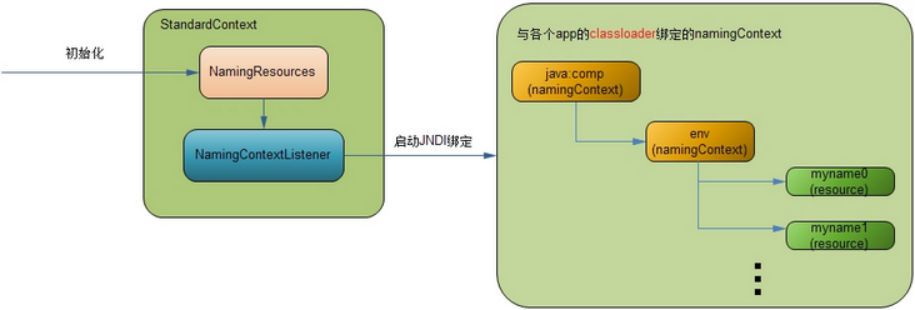
* JNDI体系分为三个部分;
- 在tomcat架构分析 (容器类)中介绍了StandardContext类,它是每个app的一个逻辑封装。当tomcat初始化时,将根据配置文件,对StandardContext中的NamingResources对象进行
赋值,同时,将实例化一个NamingContextListener对象作为这个context作用域内的事件监听器,它会响应一些例如系统启动,系统关闭等事件,作出相应的操作;
- 初始化完成后,tomcat启动,完成启动逻辑,抛出一个系统启动event,由那个NamingContextListener捕获,进行处理,将初始化时的NamingResources对象中的数据,
绑定到相应的JNDI对象树(namingContext)上,即java:comp/env分支,然后将这个根namingContext与这个app的classloader进行绑定,这样每个app只有在自己的JNDI对象树上调用,
互不影响;
- 每个app中的类都由自己app的classloader加载,如果需要用到JNDI绑定对象,也是从自己classloader对应的JNDI对象树上获取资源对象
各个Resource对象则是JNDI对象树上的叶子节点,类似文件系统的具体文件,通过NamingContext对象将整个JNDI对象树组织起来,每个Resource对象才是真正存储数据的地方。
这里需要说明的是,在后面会经常涉及到两类context,一个是作为tomcat内部实现逻辑的容器StandardContext;一个是作为JNDI内部分支对象NamingContext;它们实现不同接口,互相没有任何关系,不要混淆。 开始看看每个部分详细情况吧。
初始化NamingResources
StandardContext默认会创建,然后再解析配置文件时,会解析ResourceWeb ServiceEJB对象等,这里就是拿数据库连接的Resource对象举例。 Resource会被封装为ContextResource,
然后添加进NamingResources对应的Map中
先看看/conf/server.xml 配置
<Server port ="8005" >
<Service >
<Engine >
<Host >
<Context >
<Resource
name ="jdbc/mysql"
type ="javax.sql.DataSource"
username ="root"
password ="root"
driverClassName ="com.mysql.jdbc.Driver"
maxIdle ="200"
maxWait ="5000"
url ="......"
maxActive ="100" />
</Context >
</Host >
</Engine >
</Service >
......
</Server >
* Context标签使用ContextResource进行封装
上面例子中Resource节点配置的所有属性会以键值对的方式存入ContextResource的一个HashMap对象中,这一步只是初始化,不会用到每个属性,它只是为了每个真正处理的资源对象
用到,例如后面会说的缺省的tomcat的数据库连接池对象BasicDataSourceFactory,如果用其他的数据库连接池,例如c3p0,那么其配置的属性对象就应该按照c3p0中需要的属性名称来
配。 但是属性中的name和type是ContextResource必须需要的
* name是JNDI对象树的分支节点,上面配的"jdbc/mysql",那么这个数据库连接池对象就对在"java:comp/env/jdbc/mysql"的位置,"java:comp"是创建的JNDI上下文分支。
type是这个对象的类型,如果是"javax.sql.DataSource",tomcat会有一些特殊的逻辑处理。
* 当tomcat初始化时,StandardContext对象内部会生成一个NamingResources对象,这个对象就是做一些预处理,存储一些Resource对象,
看一下NamingResources存储Resource对象的逻辑;
ContextResource \[\] resources = findResources();
for ( int i = 0; i < resources.length; i++ ) {
context.addResource(resourcesi);
}
public void addResource(ContextResource resource) {
// 确保每一个资源对象的 name 都是唯一的
// 不仅是 Resource 对象之间,包括 Service 等所有的资源对象
if (entries.containsKey(resource.getName())) {
return ;
} else {
entries.put(resource.getName(), resource.getType());
}
// 建立一个 name 和资源对象的 mapping
synchronized (resources) {
resource.setNamingResources(this );
resources.put(resource.getName(), resource);
}
support.firePropertyChange("resource" , null , resource);
}
* 启动JNDI绑定
当tomcat启动时,会创建会抛出一个start event,由StandardContext的NamingContextListener监听对象捕捉到,响应start event。 主流程如下:
- 先赋值下NamingContextListener里的namingResources属性为关联的StandardContext里的namingResources
生成这个StandardContext域的JNDI对象树根NamingContext对象,即JNDI上下文的根目录为getName()值为从Engine到Context的全目录路径
namingContext = new NamingContext(StandardContext, getName());
- 将此StandardContext对象(key)与JNDI对象树根NamingContext对象绑定(value),在ContextBindings中有需要静态的Map对象,存储这个各自映射关系
Hashtable contextNameBindings.put(getName()值,NamingContext)
- 将初始化时的资源对象namingResources里面的资源绑定JNDI对象树NamingContext--重要
例如会在NamingContext上创建子路径,javax.naming.Context envCtx,生成好各个资源对象后bind到此envCtx, envCtx.bind(resource.getName(), value);
- 将此app的classloader(key)与此JNDI对象树根NamingContext对象绑定(value),在ContextBindings中有需要静态的Map对象
clBindings.put(classLoader, context);
public void lifecycleEvent(LifecycleEvent event) {
container = event.getLifecycle();
//1 、先赋值下 NamingContextListener 里的 namingResources 为关联的 StandardContext 里的 namingResources
if (container instanceof Context) {
namingResources = ((Context) container).getNamingResources();
} else if (container instanceof Server) {
namingResources = ((Server) container).getGlobalNamingResources();
} else {
return ;
}
// 响应 start event
if (event.getType() == Lifecycle.START_EVENT) {
if (initialized) return ;
Hashtable contextEnv = new Hashtable();
try {
//2 、生成这个 StandardContext 域的 JNDI 对象树根 NamingContext 对象
// getName() 值为从 Engine 到 Context 的全目录路径
namingContext = new NamingContext(contextEnv, getName());
} catch (NamingException e) {}
//3 、将此 StandardContext 对象( key )与 JNDI 对象树根 NamingContext 对象绑定 (value)
ContextBindings.bindContext(container, namingContext, container);
// Setting the context in read/write mode
ContextAccessController.setWritable(getName(), container);
try {
//4 、将初始化时的资源对象绑定 JNDI 对象树
createNamingContext();
} catch (NamingException e) {
logger.error();
}
// 针对 Context 下配置 Resource 对象而言
if (container instanceof Context) {
// Setting the context in read only mode
ContextAccessController.setReadOnly(getName());
try {
// 同时将此 app 的 classloader ( key )与此 JNDI 对象树根 NamingContext 对象绑定( value )
ContextBindings.bindClassLoader
(container, container,
((Container) container).getLoader().getClassLoader());
} catch (NamingException e) {
logger.error(sm.getString("naming.bindFailed" , e));
}
}
// 针对 global 资源而言,这里不用关注
if (container instanceof Server) {
//...
}
initialized = true ;
}
// 响应 stop event
else if (event.getType() == Lifecycle.STOP_EVENT) {
......
}
}
namingContext的创建
namingContext是实现了Context接口,提供JNID规范的方法,如可以通过lookup找到对象
主要看一下将初始化时的资源对象绑定JNDI对象树的createNamingContext()方法;:在namingContext更上下文中创建comp和env子上下文分支(Context类对象)
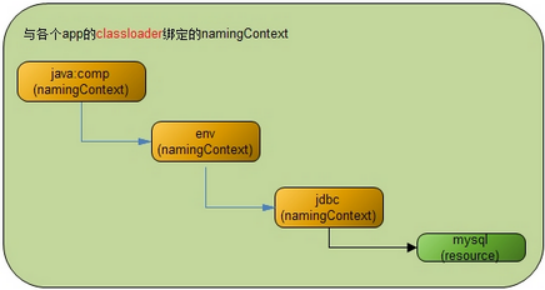
private void createNamingContext() throws NamingException {
// Creating the comp subcontext
if (container instanceof Server) {
compCtx = namingContext;
envCtx = namingContext;
} else {
// 对于 StandardContext 而言,在 JNDI 对象树的根 namingContext 对象上
// 建立 comp 树枝,以及在 comp 树枝上建立 env 树枝 namingContext 对象
compCtx = namingContext.createSubcontext("comp" );
envCtx = compCtx.createSubcontext("env" );
}
......
// 从初始化的 NamingResources 对象中获取 Resource 对象加载到 JNDI 对象树上
ContextResource\[\] resources = namingResources.findResources();
for (i = 0; i < resources.length ; i++) {
addResource(resourcesi);
}
//addResourceLink(resourceLinksi) 、 addEnvironment(contextEnvironmentsi); 等
......
}
看一下NamingContextListener->createNamingContext->addResource的具体加载逻辑;
public void addResource(ContextResource resource) {
//Reference ref 封装了 resource 参数、类型等信息
try {
// 很类似 bean 定义
Reference ref = new ResourceRef
(resource.getType(), resource.getDescription(),
resource.getScope(), resource.getAuth());
// Adding the additional parameters, if any
addAdditionalParameters(resource.getNamingResources(), ref,
resource.getName());
// 在上面创建的 comp/env 树枝节点上,根据 Resource 配置的 name 继续创建新的节点
// 例如配置的 name="jdbc/mysql" ,则在 comp/env 树枝节点下再创建一个 jdbc 树枝节点
createSubcontexts(envCtx, resource.getName());
// 绑定叶子节点,会创建惹搜对应的类型对象,通过 name 进行映射
envCtx.bind(resource.getName(), ref);
} catch (NamingException e) {logger.error(sm.getString("naming.bindFailed" , e)); }
// 这就是上面说的对于配置 type="javax.sql.DataSource" 时的特殊逻辑
// 将数据库连接池类型的资源对象注册到 tomcat 全局的 JMX 中,方便管理及调试
if ("javax.sql.DataSource" .equals(ref.getClassName())) {
//...
}
}
StandardContextValve
invoke方法实现
* ValveBase 实现了Contained, Valve接口
-
实现一些通用的方法getContainer/Debug/Info
-
提供一个抽象子类 invoke(Request request, Response response,ValveContext context)
* invoke方法实现流程
-
只处理HttpServletRequest和HttpServletResponse类型
-
"/META-INF"和"/WEB-INF"下的资源不可以访问
-
在Context中通过StandardContextMapper的map方法获取到url对应的warpper
-
调用对应的子容器wrapper的invoke方法已处理请求
final class StandardContextValve extends ValveBase {
// 其他略,核心方法 invoke
public void invoke(Request request, Response response,ValveContext valveContext)
throws IOException, ServletException {
// 只处理 HttpServletRequest 和 HttpServletResponse 类型
if (!(request.getRequest() instanceof HttpServletRequest) ||
!(response.getResponse() instanceof HttpServletResponse)) {
return ; // NOTE - Not much else we can do generically
}
//"/META-INF" 和 "/WEB-INF" 下的资源不可以访问
HttpServletRequest hreq = (HttpServletRequest) request.getRequest();
String contextPath = hreq.getContextPath();
String requestURI = ((HttpRequest) request).getDecodedRequestURI();
String relativeURI = requestURI.substring(contextPath.length()).toUpperCase();
if (relativeURI.equals("/META-INF" ) ||
relativeURI.equals("/WEB-INF" ) ||
relativeURI.startsWith("/META-INF/" ) ||
relativeURI.startsWith("/WEB-INF/" )) {
notFound(requestURI, (HttpServletResponse) response.getResponse());
return ;
}
// 在 Context 中通过 StandardContextMapper 的 map 方法获取到 url 对应的 warpper,
Context context = (Context) getContainer();
Wrapper wrapper = null ;
try {
wrapper = (Wrapper) context.map(request, true );
} catch (IllegalArgumentException e) {
response.sendError(HttpServletResponse.SC_BAD_REQUEST, requestURI);
return ;
}
if (wrapper == null ) {
response.sendError(HttpServletResponse.SC_NOT_FOUND, requestURI);
return ;
}
// 调用对应的子容器 wrapper 的 invoke 方法已处理请求
response.setContext(context);
wrapper.invoke(request, response);
}
StandardContextMapper
核心方法为通过路径匹配到对应的wapper,即map方法,匹配的规则,如下顺序
-
完整路径匹配;
-
根据路径前缀,进行最长匹配,使用'/'作为路径分隔符;即对路径从右往左依次替换一个路径为*进行匹配
-
使用请求路径中的后缀进行匹配,比如'.jsp';
-
如果以上都没有匹配到合适的Servlet,将使用默认(default)Servlet来处理请求;
注意:路径匹配过程中,区分大小写;
public final class StandardContextMapper
implements Mapper {
// 其他略
// 核心方法
public Container map(Request request, boolean update) {
// Has this request already been mapped?
if (update && (request.getWrapper() != null ))
return (request.getWrapper());
// Identify the context-relative URI to be mapped
String contextPath =
((HttpServletRequest) request.getRequest()).getContextPath();
String requestURI = ((HttpRequest) request).getDecodedRequestURI();
String relativeURI = requestURI.substring(contextPath.length());
// Apply the standard request URI mapping rules from the specification
Wrapper wrapper = null ;
String servletPath = relativeURI;
String pathInfo = null ;
String name = null ;
// Rule 1 -- 完整路径匹配
if (wrapper == null ) {
if (!(relativeURI.equals("/" )))
name = context.findServletMapping(relativeURI);
if (name != null )
wrapper = (Wrapper) context.findChild(name);
if (wrapper != null ) {
servletPath = relativeURI;
pathInfo = null ;
}
}
// Rule 2 -- 根据路径前缀,进行最长匹配,使用 '/' 作为路径分隔符;即对路径从右往左依次替换一个路径为 * 进行匹配,如 /a/b/c/d ==>/a/b/c/*
if (wrapper == null ) {
servletPath = relativeURI;
while (true ) {
name = context.findServletMapping(servletPath + "/*" );
if (name != null )
wrapper = (Wrapper) context.findChild(name);
if (wrapper != null ) {
pathInfo = relativeURI.substring(servletPath.length());
if (pathInfo.length() == 0)
pathInfo = null ;
break ;
}
int slash = servletPath.lastIndexOf('/' );
if (slash < 0)
break ;
servletPath = servletPath.substring(0, slash);
}
}
// Rule 3 -- 使用请求路径中的后缀进行匹配,比如 '.jsp' ;
if (wrapper == null ) {
int slash = relativeURI.lastIndexOf('/' );
if (slash >= 0) {
String last = relativeURI.substring(slash);
int period = last.lastIndexOf('.' );
if (period >= 0) {
String pattern = "*" + last.substring(period);
name = context.findServletMapping(pattern);
if (name != null )
wrapper = (Wrapper) context.findChild(name);
if (wrapper != null ) {
servletPath = relativeURI;
pathInfo = null ;
}
}
}
}
// Rule 4 -- 将使用默认 (default)Servlet 来处理请求
if (wrapper == null ) {
name = context.findServletMapping("/" );
if (name != null )
wrapper = (Wrapper) context.findChild(name);
if (wrapper != null ) {
servletPath = relativeURI;
pathInfo = null ;
}
}
if (update) {
request.setWrapper(wrapper);
((HttpRequest) request).setServletPath(servletPath);
((HttpRequest) request).setPathInfo(pathInfo);
}
return (wrapper);
}
}
ContextConfig 监听器
// 使用
Context context = new StandardContext();
// StandardContext's start method adds a default mapper
context.setPath("/app1" );
context.setDocBase("app1" );
LifecycleListener listener = new ContextConfig();
((Lifecycle) context).addLifecycleListener(listener);
* 作用:把context相关属性的设置交于ContextConfig,对创建的StandarContext进行配置(使用web.xml进行配置)
* 核心方法在start,即监听到StandarContext发出的START_EVENT事件后:
-
把当前Context设置为对应Host和Engine的DefaultContext
-
借助Digester处理默认的web.xml文件(conf/web.xml)和当前应用的web.xml文件(/WEB-INF/web.xml),会读取配置文件的内容,然后调用Context对应的方法,
解析读取和设置的顺序如下:
setPublicId、addParameter、setDisplayName、setDistributable、addLocalEjb、addEjb、addEnvironment、addErrorPage、
addFilterDef(<filter>)、addFilterMap(<filter-mapping>)、addApplicationListener(处理<listener>)、
setLoginConfig、addMimeMapping、addResourceEnvRef、addResource、addCollection、addSecurityRole、
addChild(<servlet>)、addServletMapping(<servlet-mapping>>)、setSessionTimeout、addTaglib、addWelcomeFile
-
处理Context的jsp tld文件、/WEB-INF的tld文件、/WEB-INF/lib/下jar文件下作用tld文件
-
安全相关的配置处理
public final class ContextConfig implements LifecycleListener {
private Context context = null ;
private boolean ok = false ;
// 认证相关
private static ResourceBundle authenticators = null ;
// 处理库文件
private static Digester tldDigester = createTldDigester();
// 处理 web.xml
private static Digester webDigester = createWebDigester ();
private int debug = 0;
private static final StringManager sm = StringManager.getManager (Constants.Package );
// ------------------------------------------------------------- Properties
//
public int getDebug() {
return (this .debug );
}
// --------------------------------------------------------- Public Methods
// 只接收处理 START_EVENT 和 STOP_EVENT 事件
public void lifecycleEvent(LifecycleEvent event) {
try {
context = (Context) event.getLifecycle();
} catch (ClassCastException e) {
return ;
}
if (event.getType().equals(Lifecycle.START_EVENT))
start();
else if (event.getType().equals(Lifecycle.STOP_EVENT))
stop();
}
//
private synchronized void start() {
context .setConfigured(false );
ok = true ;
// 把当前 Context 设置为对应父容器 Host 和 Engine 的 DefaultContext
Container container = context .getParent();
if ( !context .getOverride() ) {
if ( container instanceof Host ) {
((Host)container).importDefaultContext(context );
container = container.getParent();
}
if ( container instanceof Engine ) {
((Engine)container).importDefaultContext(context );
}
}
// 处理默认的 conf/web.xml 的文件流,然后交给 webDigester 去处理, webDigester.parse(is);
defaultConfig();
// 处理当前应用的 web.xml 文件
applicationConfig();
if (ok ) {
// 补充加入的角色, context.addSecurityRole
validateSecurityRoles();
}
// 处理 Context 的 jsp tld 文件、 /WEB-INF 的 tld 文件、 /WEB-INF/lib/ 下 jar 文件下作用 tld 文件,
// 获取这些 tld 文件,交给 tldDigester 处理
if (ok ) {
try {
tldScan();
} catch (Exception e) {
ok = false ;
}
}
// 添加一个 CertificatesValve ,如果此阀不可创建则, ok=false
if (ok )
certificatesConfig();
// 如果当前 context 没有配置 Authenticator ,则新建一个处理 authenticator 的阀,如果如果此阀不可创建则, ok=false
if (ok )
authenticatorConfig();
// Make our application available if no problems were encountered
if (ok )
context .setConfigured(true );
else {
context .setConfigured(false );
}
}
// 创建 webDigester
private static Digester createWebDigester() {
URL url = null ;
Digester webDigester = new Digester();
webDigester.setValidating(true );
//XML 校验文件
url = ContextConfig.class .getResource(Constants.WebDtdResourcePath_22);
webDigester.register(Constants.WebDtdPublicId_22,
url.toString());
url = ContextConfig.class .getResource(Constants.WebDtdResourcePath_23);
webDigester.register(Constants.WebDtdPublicId_23,
url.toString());
webDigester.addRuleSet(new WebRuleSet());
return (webDigester);
}
//context 移除子容器、 ApplicationListener 、 ApplicationParameter 、 Parameter 、 Constraint 、 ErrorPage
//FilterDef/Map 、 InstanceListener 、 MimeMapping 等等
private synchronized void stop() {
int i;
// Removing children
Container\[\] children = context .findChildren();
for (i = 0; i < children.length ; i++) {
context .removeChild(childreni);
}
//....
ok = true ;
}
}
ServletContext (ApplicationContext)
ServletContext是Servlet规范中规定的ServletContext接口,一般servlet都要实现这个接口
大概就是规定了如果要实现一个WEB容器,他的Context里面要有这些东西:获取路径,获取参数,获取当前的filter,获取当前的servlet等
ApplicationContext所实现的方法其实都是调用的this.context中的方法
可以把ServletContext等同于StandardContext
// 使用 ApplicationContext 封装当前 this
public ServletContext getServletContext() {
if (context == null )
context = new ApplicationContext(getBasePath(), this );
return (context);
}
Wrapper
概述
* Wrapper 代表一个 Servlet,它负责管理一个 Servlet,包括的 Servlet 的装载、初始化、执行以及资源回收
* Wrapper 是最底层的容器,它没有子容器了,所以调用它的 addChild 将会报错。
* Wrapper 的实现类是 StandardWrapper,StandardWrapper 还实现了拥有一个 Servlet 初始化信息的 ServletConfig,由此看出 StandardWrapper 将直接和 Servlet 的各种信息打交道。
Wrapper接口
public interface Wrapper extends Container {
// 时间, Wrapper 是否可用
public void setAvailable(long available);
public boolean isUnavailable();
public void unavailable(UnavailableException unavailable);
// 设置 Servlet 类和 JSP 文件
public void setServletClass(String servletClass);
public void setJspFile(String jspFile);
// 添加 Servlet 初始化参数
public void addInitParameter(String name, String value);
public String findInitParameter(String name);
public void removeInitParameter(String name);
//Servlet 实例加载相关
// 分配 servlet 实例,然后处理请求,需要判断 SingleThreadModel (有实例池)
// 如果一个 servlet 实现了 SingleThreadModel 接口(这种模式我觉得应该叫一个线程对一个 servlet 模式),
// 那么当多线程访问(一个 request 一个线程)的路径对应到同一个 servlet 时会创建多个 servlet 实例,也就是一个线程一个 servlet 实例,
// 这样就没有多线程安全问题(不是完全线程安全的,如果多个 servlet 实例需要访问静态类变量或类外的某些资源的话, 就有可能引起同步问题。),
// 但也有数量限制,在 tomcat7 中是 20 个,如果这 20 个在用,再有线程访问时会停住, 知道其他线程用完释放。
// 如果没实现 SingleThreadModel ,多线程只能访问同一个 servlet 实例,这就会有多线程安全问题。
public Servlet allocate() throws ServletException;
// 归还 servlet 实例
public void deallocate(Servlet servlet) throws ServletException;
// 返回一个 servlet 实例,然后处理请求
public void load() throws ServletException;
// 销毁所有创建的实例,调用 destroy 方法
public void unload() throws ServletException;
// 当为正整数是,表示加载,且数字越小代表优先级越高;若为负数,则容器启动时不加载,只有该 servlet 被选中才加载
public void setLoadOnStartup(int value);
// 监听器
public void addInstanceListener(InstanceListener listener);
public void removeInstanceListener(InstanceListener listener);
// 安全相关
public void setRunAs(String runAs);// 允许运行的身份
public void addSecurityReference(String name, String link);
public String\[\] findSecurityReferences();
public void removeSecurityReference(String name);
}
StandardWrapper
* StandardWrapper对象的主要任务是提供载入它所代表的servlet类的方法, 并进行实例化。
但是,StandardWrapper类并不调用servlet的service方法。该任务由StandardWrapperValve对象(其管道对象中的基础阀)完成。
* StandardWrapperValve对象通过调用allocate方法从StandardWrapper实例中获取servlet实例。在得到servlet实例后,StandardWrapperValve实例就会调用servlet实例的service()方法
* 当第一次请求某个servlet类时, StandardWrapper载入servlet类。由于StandardWrapper实例会动态地载入该servlet类, 因此,它必须知道该servlet类的完全限定名。
-
可以调用StandardWrapper的setServlet Class()方法并指定该servlet类的完全限定名, 也可以调用其setName())方法为该servlet类指定一个名字。
-
使用Loader loader = getLoader();配置的加载器(一般为webAppClassLoader)进加载
-
多实例模式下,每一个请求创建一个实例,但是有最大个数限制,超过进行await阻塞,等待其他线程处理完成之后归还
* 至于当StandardWrapperValve实例请求servlet实例时, StandardWrapper实例必须考虑到该servlet类是否实现了SingleThreadModel接口。
对于那些没有实现SingleThreadModel接口的servlet类, StandardWrapper只会载入该servlet类一次, 并对随后的请求都返回该servlet类的同一个实例。
StandardWrapper实倒不需要多个servlet实例, 因为它假设该servlet类的service()方法在多线程环境中是线程安全的。如果必要的话, 由servlet程序员来负责同步对共享资源的访问。
* 而对于一个STM servlet类, 事情有些不同。StandardWrapper实例必须保证每个时刻只能在一个线程在执行STM servlet类的service()方法。即一个请求线程对应一个servlet实例。但是又是回了性能,会创建一个servlet实例,这样多个请求线程可以同时并发的访问多个不同的实例。这时线程不安全的,如果多个servlet实例需要访问静态类变量或类外的某些资源的话, 就有可能引起同步问题。
public final class StandardWrapper extends ContainerBase implements ServletConfig, Wrapper {
// 基本属性
private int loadOnStartup = -1;
private long available = 0L;
private int debug = 0;
private StandardWrapperFacade facade = new StandardWrapperFacade(this );
private static final String info = "org.apache.catalina.core.StandardWrapper/1.0" ;
//servlet 实例相关
private String servletClass = null ;
private int countAllocated = 0;// 已经分配出去的 servlet 实例个数
private Servlet instance = null ;
private boolean singleThreadModel = false ;
private int maxInstances = 20;
//Number of instances currently loaded for a STM servlet.
private int nInstances = 0;
private Stack instancePool = null ;
private InstanceSupport instanceSupport = new InstanceSupport(this );
private boolean unloading = false ;
private HashMap parameters = new HashMap();
private String jspFile = null ;
// 安全相关
private HashMap references = new HashMap();
private String runAs = null ;
//------------------------- 构造方法 -----------------------------------------------
// 设置基础阀 StandardWrapperValve
public StandardWrapper() {
super ();
pipeline.setBasic(new StandardWrapperValve());
}
//-------------------------gettet/setter 方法 -----------------------------------------------
// 修改本类的的自己属性:会触发对应的属性修改监听器
public void set/getxxx(String xxxx) {
String xxx = this .xxxx;
this .servletClass = servletClass ;
support.firePropertyChange("servletClass" , oldServletClass,
this .servletClass );
}
// 修改从父类基础的属性
public void setParent(Container container) {
if ((container != null ) &&
!(container instanceof Context))
throw new IllegalArgumentException
(sm.getString("standardWrapper.notContext" ));
super .setParent(container);
}
//ServletName 就是基类的 name 属性
public void setServletName(String name) {
setName(name);
}
// 父类 Context 的,即 new ApplicationContext(getBasePath(), StandardContext);
public ServletContext getServletContext() {
if (parent == null )
return (null );
else if (!(parent instanceof Context))
return (null );
else
return (((Context) parent).getServletContext());
}
//-------------------------servlet 实施修改方法 -----------------------------------------------
// 基础阀会调用 servlet = allocate() 回去 servlet 实施
public Servlet allocate() throws ServletException {
// 如果正在调用 upload 就抛出异常
if (unloading ) throw new ServletException();
// 非单线程模式,即为单例模式 , 默认是 flase ,即默认为单例模式
// 在首次创建实例时,会通过 loadServlet() 方法哪里获取 singleThreadModel = servlet instanceof SingleThreadModel;
if (!singleThreadModel ) {
if (instance == null ) {
synchronized (this ) {
if (instance == null ) {
try {
instance = loadServlet();
} catch (ServletException e) {
throw e;
} catch (Throwable e) {
throw new ServletException(sm.getString("standardWrapper.allocate" ), e);
}
}
}
}
// 这里可以能会变动 singleThreadModel
if (!singleThreadModel ) {
countAllocated ++;
return (instance );
}
}
// 多实例模式,在实例池中获取,不够就进行创建的处理
synchronized (instancePool ) {
// 如果已经分配的 >= 已经加载的实例数量,说明池不够了
while (countAllocated >= nInstances ) {
// 池不够了就需要重新加载实例,但是需要做上限 maxInstances 判断
if (nInstances < maxInstances ) {
try {
instancePool .push(loadServlet());
nInstances ++;
} catch (ServletException e) {
throw e;
} catch (Throwable e) {
throw new ServletException
(sm.getString("standardWrapper.allocate" ), e);
}
} else {
try {
// 查过上限就进行阻塞
instancePool .wait();
} catch (InterruptedException e) {
;
}
}
}
countAllocated ++;
return (Servlet) instancePool .pop();
}
}
// 回收已经分配的实例, countAllocated--
public void deallocate(Servlet servlet) throws ServletException {
if (!singleThreadModel ) {
countAllocated --;
return ;
}
// 单线程实例模式下,需要 push 进实例池,且唤醒阻塞的线程
synchronized (instancePool ) {
countAllocated --;
instancePool .push(servlet);
instancePool .notify();
}
}
public synchronized void load() throws ServletException {
instance = loadServlet();
}
// 加载类并创建实例,对于单线程模式来说,这里每次调用都会返回一个新的实例
public synchronized Servlet loadServlet() throws ServletException {
// 单例模式下且实例已经创建,直接返回
if (!singleThreadModel && (instance != null )) return instance ;
Servlet servlet = null ;
try {
// 获取 servlet 对于的类名
/*
* wrapper1.setName("Primitive");
wrapper1.setServletClass("PrimitiveServlet");
* */
String actualClass = servletClass ;
if ((actualClass == null ) && (jspFile != null )) {
Wrapper jspWrapper = (Wrapper)
((Context) getParent()).findChild(Constants.JSP_SERVLET_NAME);
if (jspWrapper != null )
actualClass = jspWrapper.getServletClass();
}
// Complain if no servlet class has been specified
if (actualClass == null ) {
unavailable(null );
throw new ServletException();
}
// Acquire an instance of the class loader to be used
Loader loader = getLoader();
if (loader == null ) {
unavailable(null );
throw new ServletException();
}
ClassLoader classLoader = loader.getClassLoader();
// 如果是容器内使用的 servlet ,就使用系统加载器进行加载
if (isContainerProvidedServlet(actualClass)) {
classLoader = this .getClass().getClassLoader();
}
// 开始加载类对象
Class classClass = null ;
try {
if (classLoader != null ) {
classClass = classLoader.loadClass(actualClass);
} else {
// 没有加载器,就使用反射加载,那么此时的加载器就调用者使用的加载器
classClass = Class.forName (actualClass);
}
} catch (ClassNotFoundException e) {
unavailable(null );
throw new ServletException();
}
if (classClass == null ) {
unavailable(null );
throw new ServletException ();
}
// 加载成功就进行创建实例
try {
servlet = (Servlet) classClass.newInstance();
} catch (ClassCastException e) {
unavailable(null );
throw new ServletException();
} catch (Throwable e) {
unavailable(null );
throw new ServletException(e);
}
// 检查是否被允许载入
// 自定义的否默认允许,内部的 servlet 需要判断父类的 privileged 的表示或者 InvokerServlet
if (!isServletAllowed(servlet)) {
throw new SecurityException();
}
// 如果是容器内部的 servlet ,可以把当前 Wrapper 传递过去
if ((servlet instanceof ContainerServlet) && isContainerProvidedServlet(actualClass)) {
((ContainerServlet) servlet).setWrapper(this );
}
// 事件的触发已经调用 servlet.init
try {
instanceSupport .fireInstanceEvent(InstanceEvent.BEFORE_INIT_EVENT,servlet);
servlet.init(facade );
// 如果是 jsp 页面,那么只在调用 servlet.service 响应即可
if ((loadOnStartup > 0) && (jspFile != null )) {
// Invoking jspInit
HttpRequestBase req = new HttpRequestBase();
HttpResponseBase res = new HttpResponseBase();
req.setServletPath(jspFile );
req.setQueryString("jsp_precompile=true" );
servlet.service(req, res);
}
instanceSupport .fireInstanceEvent(InstanceEvent.AFTER_INIT_EVENT,servlet);
} catch (UnavailableException f) {
instanceSupport .fireInstanceEvent(InstanceEvent.AFTER_INIT_EVENT,servlet, f);
unavailable(f);
throw f;
} catch (ServletException f) {
instanceSupport .fireInstanceEvent(InstanceEvent.AFTER_INIT_EVENT,servlet, f);
throw f;
} catch (Throwable f) {
instanceSupport .fireInstanceEvent(InstanceEvent.AFTER_INIT_EVENT,servlet, f);
throw new ServletException();
}
// 通过实例类是否实现了 SingleThreadModel 来重置 singleThreadModel 变量
singleThreadModel = servlet instanceof SingleThreadModel;
if (singleThreadModel ) {
if (instancePool == null ) instancePool = new Stack();
}
fireContainerEvent("load" , this );
} finally {
// 日志 log 输出处理
}
return servlet;
}
// 通过 isAssignableFrom 判断类是否实现了 ContainerServlet 接口,有即为容器内部的 servlet
private boolean isContainerProvidedServlet(String classname) {
if (classname.startsWith("org.apache.catalina." )) {
return (true );
}
try {
Class clazz = this .getClass().getClassLoader().loadClass(classname);
return (ContainerServlet.class .isAssignableFrom(clazz));
} catch (Throwable t) {
return (false );
}
}
//unload 需要调用实例的 destroy() 方法,这里有线程中的加载器置为加载了本类文件的加载器,在调用 destroy() 之后又重置为原线程加载器
public synchronized void unload() throws ServletException {
// 如果是单例模式,直接返回
if (!singleThreadModel && (instance == null )) return ;
// 做个标志
unloading = true ;
// 如果还有已经分配的实例在运行,就进行的等待一段时间
if (countAllocated > 0) {
int nRetries = 0;
while (nRetries < 10) {
try {
Thread.sleep (50);
} catch (InterruptedException e) {
;
}
nRetries++;
}
}
ClassLoader oldCtxClassLoader = Thread.currentThread ().getContextClassLoader();
ClassLoader classLoader = instance .getClass().getClassLoader();
// Call the servlet destroy() method
try {
instanceSupport .fireInstanceEvent(InstanceEvent.BEFORE_DESTROY_EVENT, instance );
Thread.currentThread ().setContextClassLoader(classLoader);
instance .destroy();
instanceSupport .fireInstanceEvent(InstanceEvent.AFTER_DESTROY_EVENT, instance );
} catch (Throwable t) {
instanceSupport .fireInstanceEvent(InstanceEvent.AFTER_DESTROY_EVENT, instance , t);
instance = null ;
instancePool = null ;
nInstances = 0;
fireContainerEvent("unload" , this );
unloading = false ;
throw new ServletException();
} finally {
// restore the context ClassLoader
Thread.currentThread ().setContextClassLoader(oldCtxClassLoader);
//log 记录
}
// Deregister the destroyed instance
instance = null ;
if (singleThreadModel && (instancePool != null )) {
try {
Thread.currentThread ().setContextClassLoader(classLoader);
while (!instancePool .isEmpty()) {
((Servlet) instancePool .pop()).destroy();
}
} catch (Throwable t) {
instancePool = null ;
nInstances = 0;
unloading = false ;
fireContainerEvent("unload" , this );
throw new ServletException();
} finally {
// restore the context ClassLoader
Thread.currentThread ().setContextClassLoader (oldCtxClassLoader);
}
instancePool = null ;
nInstances = 0;
}
unloading = false ;
fireContainerEvent("unload" , this );
}
//-------------------------start 和 stop 方法 -----------------------------------------------
public void start() throws LifecycleException {
super .start();
}
public void stop() throws LifecycleException {
try {
unload();
} catch (ServletException e) {
log(sm.getString("standardWrapper.unloadException" , getName()), e);
}
super .stop();
}
}
StandardWrapperFacade(实现ServletConfig接口)
Standard Wrapper实例会调用它所载人的servlet类的实例的init()方法。该方法需要一个javax.servlet.ServletConfig实例, 而StandardWrapper类本身实现了javax.servlet.ServletConfig接口, 所以, 理论上StandardWrapper对象可以将自己传入init()方法。但是, StandardWrapper需要将其大部分公共方法对servlet程序员隐藏起来。为了实现在这个目的, StandardWraper类将自身实例包装成StandardWrapperFacade类的一个实例。
//StandardWrapper中对应的属性
private StandardWrapperFacade facade = new StandardWrapperFacade(this);
public final class StandardWrapperFacade implements ServletConfig {
private ServletConfig config = null;
public StandardWrapperFacade(StandardWrapper config) {
super();
this.config = (ServletConfig) config;
}
public String getServletName() {
return config.getServletName();
}
public ServletContext getServletContext() {
ServletContext theContext = config.getServletContext();
if ((theContext != null) &&
(theContext instanceof ApplicationContext))
theContext = ((ApplicationContext) theContext).getFacade();
return (theContext);
}
public String getInitParameter(String name) {
return config.getInitParameter(name);
}
public Enumeration getInitParameterNames() {
return config.getInitParameterNames();
}
}
StandardWrapperValve
StandardWrapperValve类是StandardWrapperr实例中的基础阀, 要完成两个操作
-
执行与该servlet实例关联的全部过滤器
-
调用servlet实例的service()方法。
过滤器链
* 过滤器编写举例
<filter >
<filter-name >f1</filter-name >
<filter-class >xxx.filter.fi</filter-class >
</filter >
<filter-mapping >
<filter-name >f1</filter-name >
<servlet-name >myServlet</<servlet-name >
</filter-mapping >
<filter-mapping >
<filter-name >f1</filter-name >
<url-pattern >/kaka*</url-pattern >
</filter-mapping >
public class kakaFilter implements Filter {
// 构造器
public kakaFilter() {}
// 在初始化时调用,通过 FilterConfig 可获取过滤器名字、初始化参数、 servletContext
public void init(FilterConfig fConfig) throws ServletException {
//...
}
// 程序关闭时调用
public void destroy() {}
// 请求匹配正确,进入过滤器时会调用
public void doFilter(ServletRequest request, ServletResponse response, FilterChain chain) throws IOException, ServletException {
// 预处理:处理 request 和 response 对象,可修改请求和响应
chain.doFilter(request, response);// 可放行或拒绝访问 jsp 、 sevlet 或其他 资源
// 后处理:一般处理 response 对象,可修改响应
}
}
* 过滤器链ApplicationFilterChain--责任链模式
-
底层封装了private ArrayList filters = new ArrayList();串联过滤器链,提供了addFilter方法进行添加
-
doFilter方法触发过滤器
以责任链模式依序触发过滤器链的doFilter方法,如果过滤器链没有过滤器了,那么就执行对应的servlet.service
final class ApplicationFilterChain implements FilterChain {
public ApplicationFilterChain() { super (); }
private ArrayList filters = new ArrayList();
private Iterator iterator = null ;
private Servlet servlet = null ;
void addFilter(ApplicationFilterConfig filterConfig) {
this .filters .add(filterConfig);
}
void release() {
this .filters .clear();
this .iterator = iterator ;
this .servlet = null ;
}
// 核心方法,触发过滤器
public void doFilter(ServletRequest request, ServletResponse response)
throws IOException, ServletException {
// 其他处理
internalDoFilter(request,response);
}
private void internalDoFilter(ServletRequest request, ServletResponse response)
throws IOException, ServletException {
// 生成迭代器
if (this .iterator == null )
this .iterator = filters .iterator();
// 如果过滤器链有值这调用元素的 getFilter().doFilter
// 调用具体定义的 doFilter 方法,其内部方法还会调用过滤器链的 doFilter ,则又会接着调用下一个过滤器
if (this .iterator .hasNext()) {
ApplicationFilterConfig filterConfig =
(ApplicationFilterConfig) iterator .next();
Filter filter = null ;
filter = filterConfig.getFilter();
support.fireInstanceEvent(InstanceEvent.BEFORE_FILTER_EVENT,
filter, request, response);
filter.doFilter(request, response, this );
// 异常捕捉和事件触发
return ;
}
// 如果过滤器链没有过滤器了,那么就执行对应的 servlet.service
if ((request instanceof HttpServletRequest) &&
(response instanceof HttpServletResponse)) {
servlet .service((HttpServletRequest) request,
(HttpServletResponse) response);
} else {
servlet .service(request, response);
}
// 异常捕捉和事件触发
}
}
* ApplicationFilterConfig
封装了对应<filter>标签里的信息,FilterName、InitParameter、Context容器,
FilterDef为过滤器的定义,主要封装了filterClass、filterName、以及一些描述信息,会基于此创建过滤器对象
提供了getFilter()创建一个单例的过滤器对象
final class ApplicationFilterConfig implements FilterConfig {
// 保存好 context 和对应的过滤器描述
public ApplicationFilterConfig(Context context, FilterDef filterDef)
throws ClassCastException, ClassNotFoundException,
IllegalAccessException, InstantiationException,
ServletException {
super ();
this .context = context;
setFilterDef(filterDef);// 当修改 filterDef 属性时,需要重新生成下 filter = getFilter()
}
private Context context = null ;
private Filter filter = null ;
private FilterDef filterDef = null ;
public String getFilterName/InitParameter/InitParameterNames() {
// 基于 filterDef 获取
return (filterDef .getFilterName());
}
public ServletContext getServletContext() {return (this .context .getServletContext());}
// 创建一个单例的过滤器对象
Filter getFilter() throws ClassCastException, ClassNotFoundException,
IllegalAccessException, InstantiationException, ServletException {
// 以及存在,就返回
if (this .filter != null ) return (this .filter );
// 使用合适的加载器进行加载过期对象
String filterClass = filterDef .getFilterClass();
ClassLoader classLoader = null ;
if (filterClass.startsWith("org.apache.catalina." ))
classLoader = this .getClass().getClassLoader();
else
classLoader = context .getLoader().getClassLoader();
Class clazz = classLoader.loadClass(filterClass);
this .filter = (Filter) clazz.newInstance();
filter .init(this );
return (this .filter );
}
void release() {
if (this .filter != null )
filter .destroy();
this .filter = null ;
}
}
核心方法invoke
* 调用StandardWrapper实例的allocate()方法获取该StandardWrapper实例所表示的servlet实例
* 调用私有方法createFilterChain()创建过滤器链,每次请求都重新实时动态的创建
* 调用过滤器链的doFilter()方法,其中包括调用servlet实例的service()方法
* 释放过滤器链
* 调用Wrapper实例的deallocate()方法
* 若该servlet类再也不会被使用到,则调用Wrapper实例的unload()方法。
* 各个操作如有异常,只需在response设置异常即可,当回到HttpCnnector时会进行异常码的处理
final class StandardWrapperValve extends ValveBase {
private FilterDef filterDef = null ;
// 核心方法
public void invoke(Request request, Response response,
ValveContext valveContext)
throws IOException, ServletException {
boolean unavailable = false ;
Throwable throwable = null ;
StandardWrapper wrapper = (StandardWrapper) getContainer();
ServletRequest sreq = request.getRequest();
ServletResponse sres = response.getResponse();
Servlet servlet = null ;
HttpServletRequest hreq = null ;
if (sreq instanceof HttpServletRequest) hreq = (HttpServletRequest) sreq;
HttpServletResponse hres = null ;
if (sres instanceof HttpServletResponse) hres = (HttpServletResponse) sres;
// 检查父容器 context 是否可用
if (!((Context) wrapper.getParent()).getAvailable()) {
hres.sendError("503" );
unavailable = true ;
}
// 检查本 wrapper 是否可用
if (!unavailable && wrapper.isUnavailable()) {
if (hres == null ) {
} else {
long available = wrapper.getAvailable();
if ((available > 0L) && (available < Long.MAX_VALUE ))
hres.setDateHeader("Retry-After" , available);
hres.sendError("503" );
}
unavailable = true ;
}
// 可用的,获取 servlets 实例。异常的话在 response 里设置异常
try {
if (!unavailable) {
servlet = wrapper.allocate();
}
} catch (ServletException\Throwable e) {
throwable = e;
exception(request, response, e);
servlet = null ;
}
// 对 request 做承认标志
try {
response.sendAcknowledgement();
} catch (IOException e) {
sreq.removeAttribute(Globals.JSP_FILE_ATTR);
throwable = e;
exception(request, response, e);
} catch (Throwable e) {
throwable = e;
exception(request, response, e);
servlet = null ;
}
// 创建过滤器链(此时只是收集 request 相关的过滤器定义集合)
ApplicationFilterChain filterChain = createFilterChain(request, servlet);
// 设置对应 jsp 文件路径、执行过滤器链(最后会执行 servlet 的 service 方法)
try {
String jspFile = wrapper.getJspFile();
if (jspFile != null )
sreq.setAttribute(Globals.JSP_FILE_ATTR, jspFile);
else
sreq.removeAttribute(Globals.JSP_FILE_ATTR);
if ((servlet != null ) && (filterChain != null )) {
filterChain.doFilter(sreq, sres);
}
sreq.removeAttribute(Globals.JSP_FILE_ATTR);
} catch (IOException e) {
sreq.removeAttribute(Globals.JSP_FILE_ATTR);
throwable = e;
exception(request, response, e);
} catch (UnavailableException e) {
sreq.removeAttribute(Globals.JSP_FILE_ATTR);
wrapper.unavailable(e);
long available = wrapper.getAvailable();
if ((available > 0L) && (available < Long.MAX_VALUE ))
hres.setDateHeader("Retry-After" , available);
hres.sendError("503" );
} catch (ServletException\Throwable e) {
sreq.removeAttribute(Globals.JSP_FILE_ATTR);
throwable = e;
exception(request, response, e);
}
// 过滤器链需要释放
try {
if (filterChain != null )
filterChain.release();
} catch (Throwable e) {
if (throwable == null ) {
throwable = e;
exception(request, response, e);
}
}
// 归还 servlets 实例
try {
if (servlet != null ) {
wrapper.deallocate(servlet);
}
} catch (Throwable e) {
if (throwable == null ) {
throwable = e;
exception(request, response, e);
}
}
// 如果当前 servlet 用不可用,就需要对 wrapper.unload()
try {
if ((servlet != null ) &&
(wrapper.getAvailable() == Long.MAX_VALUE )) {
wrapper.unload();
}
} catch (Throwable e) {
if (throwable == null ) {
throwable = e;
exception(request, response, e);
}
}
}
// 抛出 500 异常
private void exception(Request request, Response response,
Throwable exception) {
ServletRequest sreq = request.getRequest();
sreq.setAttribute(Globals.EXCEPTION_ATTR, exception);
ServletResponse sresponse = response.getResponse();
if (sresponse instanceof HttpServletResponse)
((HttpServletResponse) sresponse).setStatus
(HttpServletResponse.SC_INTERNAL_SERVER_ERROR);
}
// 创建过滤器链集合
private ApplicationFilterChain createFilterChain(Request request,Servlet servlet) {
if (servlet == null ) return (null );
// 创建过滤器链并添加关联的过滤器
ApplicationFilterChain filterChain = new ApplicationFilterChain();
filterChain.setServlet(servlet);
StandardWrapper wrapper = (StandardWrapper) getContainer();
filterChain.setSupport(wrapper.getInstanceSupport());
// 在 contex 中找到所有的 filter-mapping
StandardContext context = (StandardContext) wrapper.getParent();
FilterMap filterMaps\[\] = context.findFilterMaps();// 对应 web.xml 文件的 filter-mapping 标签
if ((filterMaps == null ) || (filterMaps.length == 0))
return (filterChain);
String requestPath = null ;
if (request instanceof HttpRequest) {
HttpServletRequest hreq =
(HttpServletRequest) request.getRequest();
String contextPath = hreq.getContextPath();// 项目名称
if (contextPath == null )
contextPath = "" ;
String requestURI = ((HttpRequest) request).getDecodedRequestURI();// 除了域名外的请求数据
if (requestURI.length() >= contextPath.length())
requestPath = requestURI.substring(contextPath.length());// 除了域名 / 项目名的的路径
}
String servletName = wrapper.getName();
int n = 0;
// 找到所有匹配的 ApplicationFilterConfig
for (int i = 0; i < filterMaps.length ; i++) {
if (!matchFiltersURL(filterMapsi, requestPath))
continue ;
ApplicationFilterConfig filterConfig = (ApplicationFilterConfig)
context.findFilterConfig(filterMapsi.getFilterName());
if (filterConfig == null ) {
continue ;
}
filterChain.addFilter(filterConfig);
n++;
}
// Add filters that match on servlet name second
for (int i = 0; i < filterMaps.length ; i++) {
if (!matchFiltersServlet(filterMapsi, servletName))
continue ;
ApplicationFilterConfig filterConfig = (ApplicationFilterConfig)
context.findFilterConfig(filterMapsi.getFilterName());
if (filterConfig == null ) {
continue ;
}
filterChain.addFilter(filterConfig);
n++;
}
return (filterChain);
}
}
S ervlet接口
Serlvet实例可以动态的http情况,通过把http请求对象传递给Serlvet实例,以处理具体的业务,最后返回响应结果
* 主要作用
-
init():当第一次调用某个servlet肘, 要载入该servlet类, 并调用其init()方法(仅此一次),以做一些预备工作,如配置数据库连接
-
service():用于处理具体的业务逻辑,会传入封装好的ServletRequest、ServletResponse
-
destroy():一般当servlet容器关闭或servlet容器要释放内存时,才会将servlet实例移除,而且只有当servtet实例的service()中的所有线程都退出或执行超时后,才会调用destroy()。
让servlet对象有机会去清理自身持有的资源,如内存、文件句柄和线程等
- getServletConfig()/getServletInfo():获取当前servlet的配置信息和上下文
public interface Servlet {
void init(ServletConfig var1) throws ServletException;
void service(ServletRequest var1, ServletResponse var2) throws ServletException, IOException;
void destroy();
ServletConfig getServletConfig();
String getServletInfo();
}
public interface ServletConfig {
public String getServletName();
public ServletContext getServletContext();
public String getInitParameter(String name);
public Enumeration<String> getInitParameterNames();
}
* 实现类
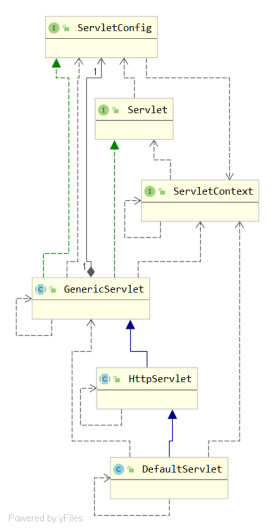
- GenericServlet抽象类类
主要实现了init(ServletConfig config)接口方法以接受上层传递过来的ServletConfig对象,进而实现getServletConfig()方法
其余方法均交给子类去实现,包括一个无参的init()
基本没具体的的实现,主要时整合了Servlet和ServletConfig接口
- HttpServlet
是用HTTP协议实现的Servlet的基类,主要重写了service方法。在service方法之中首先将ServletRequest和ServletResponse转换为HttpServletRequest和HttpServletResponse,
然后根据Http请求的类型不同将请求路由到不同的处理方法
public abstract class HttpServlet extends GenericServlet implements Serializable {
//...
public HttpServlet() {
}
// 一般交于子类去覆盖
protected void doPost(HttpServletRequest req, HttpServletResponse resp) throws ServletException, IOException {
String protocol = req.getProtocol();
String msg = lStrings.getString("http.method_post_not_supported" );
if (protocol.endsWith("1.1" )) {
resp.sendError(405, msg);
} else {
resp.sendError(400, msg);
}
}
protected void service(HttpServletRequest req, HttpServletResponse resp) throws ServletException, IOException {
String method = req.getMethod();
long lastModified;
if (method.equals("POST" )) {
this .doPost(req, resp);
} else if (method.equals("PUT" )) {
this .doPut(req, resp);
} else if (method.equals("DELETE" )) {
this .doDelete(req, resp);
} else if (method.equals("OPTIONS" )) {
//...
}
}
public void service(ServletRequest req, ServletResponse res) throws ServletException, IOException {
HttpServletRequest request;
HttpServletResponse response;
try {
request = (HttpServletRequest)req;
response = (HttpServletResponse)res;
} catch (ClassCastException var6) {
throw new ServletException("non-HTTP request or response" );
}
this .service(request, response);
}
}