QQ Bot 接入测试:用浏览器就能调试你的机器人
基于 QQ Bot WebSocket 协议,通过一个单文件 Node.js 服务即可在浏览器中完成机器人的连接、收发消息全流程测试。
1. 前言
QQ Bot 开发过程中,最繁琐的环节就是调试------传统的命令行脚本需要不断敲命令,消息收发不可视化,多人测试时 OpenID 难以管理。
qq_bot_client.js 是一个零配置、内嵌 UI 的调试客户端,启动后在浏览器中就能完成所有操作。
2. 如何启动
前提条件
- Node.js 18+
- 已在 QQ 开放平台 创建机器人,获取
APP_ID和APP_SECRET
启动步骤
bash
# 1. 进入项目目录(您的实际项目的目录)
cd test_qq_bot

# 2. 安装依赖(仅需 ws,浏览器端无需安装)
npm install ws

# 3. 启动服务
node qq_bot_client.js
启动后会输出:
浏览器打开: http://localhost:3000用浏览器访问 http://localhost:3000 即可看到调试面板。
3. 面板UI 介绍
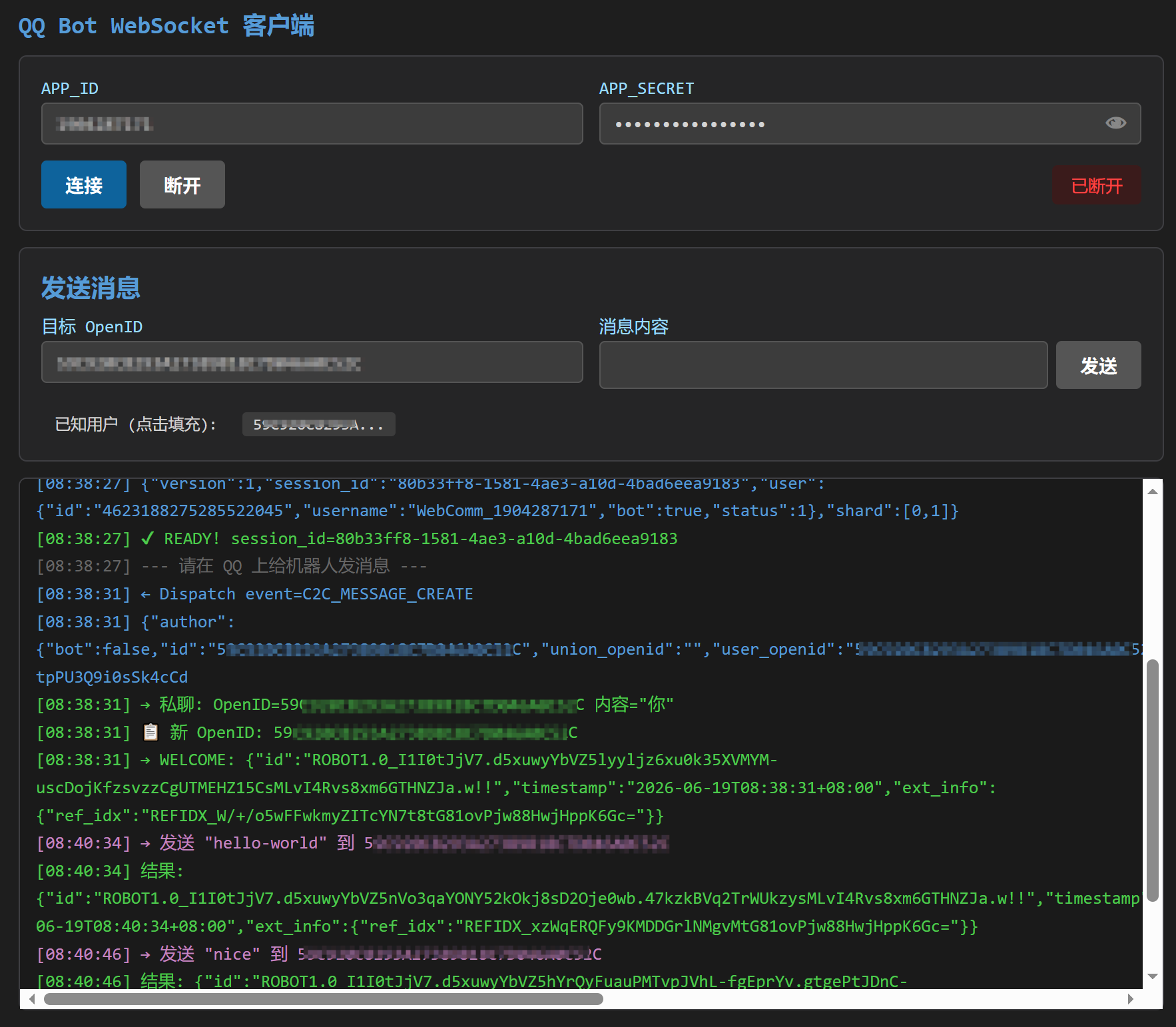
整个面板分为三个区域:
3.1 连接配置区(顶部)
| 字段 | 说明 |
|---|---|
| APP_ID | QQ 开放平台分配的机器人 AppID |
| APP_SECRET | 机器人秘钥,默认隐藏,点击 👁 按钮可切换明文/密文 |
操作按钮:
- 连接:点击后依次完成 获取 Access Token → 获取网关地址 → 建立 WebSocket 连接
- 断开:手动断开 WebSocket 连接
- 右侧状态标识:
未连接/连接中.../已连接/已断开
3.2 消息收发区(中部)
| 字段 | 说明 |
|---|---|
| 目标 OpenID | 发送消息的目标用户。收到消息后会自动填充,也可以从下方「已知用户」点击选取 |
| 消息内容 | 要发送的消息文本,右侧的 发送 按钮直接点击或按回车键快捷键发送 |
发送成功后,消息内容输入框会自动恢复为 $ 符号,方便快速输入下一条消息。
下方 已知用户 栏会显示所有给机器人发过消息的用户,点击即可填充到目标 OpenID。
3.3 实时日志区(底部)
采用暗色终端风格,以不同颜色区分日志类型:
| 颜色 | 含义 |
|---|---|
| 🟢 绿色 | 一般信息(连接成功、消息收发摘要) |
| 🟡 黄色 | 警告(连接断开等) |
| 🔴 红色 | 错误(Token 失败、Invalid Session 等) |
| 🔵 蓝色 | 服务端下发的数据 |
| 🟣 紫色 | 客户端发出的数据 |
每条日志带时间戳,完整记录 WebSocket 协议的 op 码交互过程。
4. 核心工作流程
  浏览器                          Node.js 服务端                    QQ 服务器
    │                                  │                              │
    │── 点击"连接" ──────────────────→ │                              │
    │                                  │── POST /getAppAccessToken ──→│
    │                                  │←── access_token ─────────────│
    │                                  │── GET /gateway/bot ─────────→│
    │                                  │←── wsUrl ────────────────────│
    │←── 页面直连 WebSocket ───────────│                              │
    │═══ WebSocket(浏览器直连网关)═══════════════════════════════════│
    │ ← op=10 Hello / → op=2 Identify                                │
    │ ← op=0 Dispatch (C2C_MESSAGE_CREATE)                           │
│ → op=1 Heartbeat (每 40s+) │关键设计:
- 浏览器无法直接调用 QQ API(CORS 限制),因此 Node.js 服务端充当 API 代理
- 但 WebSocket 连接是浏览器直连 QQ 网关,不经过 Node.js 中转
- 所有消息收发、协议交互在浏览器端实时可见
5. 自动回复功能
当 QQ 用户首次给机器人发消息时,机器人会自动回复带时间戳的欢迎消息:
[08:36]++++++WELCOME++++++此功能可以方便地验证端到端消息通道是否正常工作。
6. 代码(qq_bot_client.js)
bash
const http = require('http');
const https = require('https');
const url = require('url');

const PORT = 3000;

// ── HTTPS 代理 ──
function proxyHttps(method, hostname, reqPath, headers, body) {
  return new Promise((resolve, reject) => {
    const req = https.request({ hostname, port: 443, path: reqPath, method, headers, timeout: 10000 }, (res) => {
      let data = '';
      res.on('data', c => data += c);
      res.on('end', () => resolve({ status: res.statusCode, body: data }));
    });
    req.on('error', reject);
    if (body) req.write(body);
    req.end();
  });
}

// ── 内嵌 HTML ──
const HTML = `<!DOCTYPE html>
<html lang="zh-CN">
<head>
<meta charset="UTF-8">
<meta name="viewport" content="width=device-width, initial-scale=1.0">
<title>QQ Bot WebSocket</title>
<style>
*{box-sizing:border-box;margin:0;padding:0}
body{font-family:Consolas,"Microsoft YaHei",monospace;background:#1e1e1e;color:#d4d4d4;padding:20px;max-width:900px;margin:0 auto}
h2{color:#569cd6;margin-bottom:12px;font-size:18px}
.box{background:#252526;border:1px solid #3e3e42;border-radius:6px;padding:16px;margin-bottom:12px}
label{font-size:13px;color:#9cdcfe;margin-bottom:3px;display:block}
input{width:100%;padding:7px 10px;background:#3c3c3c;color:#d4d4d4;border:1px solid #555;border-radius:4px;font-family:Consolas,monospace;font-size:13px;outline:none}
input:focus{border-color:#569cd6}
.row{display:flex;gap:12px}
.row>div{flex:1}
.btns{margin:12px 0 0;display:flex;gap:10px;align-items:center}
button{padding:8px 18px;border:none;border-radius:4px;cursor:pointer;font-size:14px;font-weight:bold}
.btn-connect{background:#0e639c;color:#fff}.btn-connect:hover{background:#1177bb}.btn-connect:disabled{background:#555;cursor:not-allowed}
.btn-disconnect{background:#a33;color:#fff}.btn-disconnect:hover{background:#c44}.btn-disconnect:disabled{background:#555;cursor:not-allowed}
.btn-send{background:#0e639c;color:#fff}.btn-send:hover{background:#1177bb}.btn-send:disabled{background:#555;cursor:not-allowed}
.status{display:inline-block;padding:6px 14px;border-radius:4px;font-size:13px;margin-left:auto}
.status.connected{background:#1b3a1b;color:#4ec94e}
.status.disconnected{background:#3a1b1b;color:#f44}
.status.connecting{background:#3a3a1b;color:#cc0}
.log{background:#1a1a1a;border:1px solid #3e3e42;border-radius:6px;padding:12px;height:400px;overflow-y:auto;font-size:13px;line-height:1.6}
.log .info{color:#4ec94e}.log .warn{color:#cca700}.log .error{color:#f44747}.log .recv{color:#569cd6}.log .send{color:#c586c0}.log .divider{color:#666}
.users{margin-top:6px;font-size:12px}
.users span{display:inline-block;background:#3c3c3c;padding:2px 8px;border-radius:3px;margin:2px;cursor:pointer}
.users span:hover{background:#0e639c}
.users .label{background:transparent;cursor:default}
</style>
</head>
<body>
<h2>QQ Bot WebSocket 客户端</h2>
<div class="box">
  <div class="row">
    <div><label>APP_ID</label><input id="appId" value="1904287171"></div>
    <div style="position:relative"><label>APP_SECRET</label><input id="clientSecret" value="OjsnUyEH6h5FDxUn" type="password" style="padding-right:40px"><button id="eyeBtn" onclick="toggleSecret()" style="position:absolute;right:2px;bottom:2px;background:none;border:none;color:#888;font-size:18px;cursor:pointer;padding:4px 8px" title="显示/隐藏秘钥">👁</button></div>
  </div>
  <div class="btns">
    <button class="btn-connect" id="btnConnect" onclick="connect()">连接</button>
    <button class="btn-disconnect" id="btnDisconnect" onclick="disconnect()" disabled>断开</button>
    <span id="statusBar" class="status disconnected">未连接</span>
  </div>
</div>
<div class="box">
  <h3 style="color:#569cd6;margin-bottom:8px">发送消息</h3>
  <div class="row">
    <div><label>目标 OpenID</label><input id="targetOpenId" placeholder="收到消息后自动获取"></div>
    <div>
      <label>消息内容</label>
      <div style="display:flex;gap:6px">
        <input id="msgContent" value="hello-world" style="flex:1">
        <button class="btn-send" id="btnSend" onclick="sendMsg()" disabled>发送</button>
      </div>
    </div>
  </div>
  <div class="btns" style="margin-top:8px">
    <div class="users" id="knownUsers"><span class="label">已知用户 (点击填充):</span></div>
  </div>
</div>
<div class="log" id="log">[页面就绪] 填入凭证后点"连接",具体查看:https://bot.q.qq.com/wiki/ <br><br></div>
<script>
let ws=null,token=null,seq=null,ht=null,knownOpenIds={};
const INTENTS=1107296256;
function log(m,c='info'){let t=new Date().toLocaleTimeString(),el=document.getElementById('log');el.innerHTML+='<div class="'+c+'">['+t+'] '+m+'</div>';el.scrollTop=el.scrollHeight}
function setStatus(t,c){let b=document.getElementById('statusBar');b.textContent=t;b.className='status '+c}
function setConnected(o){document.getElementById('btnConnect').disabled=o;document.getElementById('btnDisconnect').disabled=!o;document.getElementById('btnSend').disabled=!o}
async function api(p,b){let r=await fetch(p,{method:'POST',headers:{'Content-Type':'application/json'},body:JSON.stringify(b)});return r.json()}
function updateUsers(){let i=Object.keys(knownOpenIds),h='<span class="label">已知用户 (点击填充):</span> ';i.forEach(id=>h+='<span onclick="document.getElementById(\\'targetOpenId\\').value=\\''+id+'\\'">'+id.substring(0,12)+'...</span>');document.getElementById('knownUsers').innerHTML=h}
async function connect(){
  let appId=document.getElementById('appId').value.trim(),secret=document.getElementById('clientSecret').value.trim();
  if(!appId||!secret){log('请填写 APP_ID 和 CLIENT_SECRET','warn');return}
  setStatus('获取 Token...','connecting');log('获取 Access Token...','info');
  let data=await api('/api/token',{appId,clientSecret:secret});
  if(!data.access_token){log('Token 失败: '+JSON.stringify(data),'error');setStatus('Token 失败','disconnected');return}
  token=data.access_token;log('✔ Token: '+token.substring(0,20)+'...','info');
  log('获取网关地址...','info');
  data=await api('/api/gateway',{token});
  if(!data.url){log('网关失败: '+JSON.stringify(data),'error');setStatus('网关失败','disconnected');return}
  let wsUrl=data.url;log('✔ 网关: '+wsUrl,'info');
  setStatus('连接中...','connecting');log('连接 WebSocket: '+wsUrl,'info');
  ws=new WebSocket(wsUrl);
  ws.onopen=()=>log('✔ WebSocket 已连接,等待 Hello...','info');
  ws.onmessage=e=>{
    let p;try{p=JSON.parse(e.data)}catch{return}
    let{op,d,s,t}=p;if(s!=null)seq=s;
    switch(op){
    case 10:
      log('← Hello (op=10) 心跳: '+d.heartbeat_interval+'ms','recv');
      ws.send(JSON.stringify({op:2,d:{token:'QQBot '+token,intents:INTENTS,shard:[0,1],properties:{}}}));
      log('→ Identify (op=2)','send');
      ht=setInterval(()=>{if(ws&&ws.readyState===WebSocket.OPEN)ws.send(JSON.stringify({op:1,d:seq}))},d.heartbeat_interval);
      break;
    case 0:
      log('← Dispatch event='+t,'recv');
      log('  '+JSON.stringify(d).substring(0,250),'recv');
      if(t==='C2C_MESSAGE_CREATE'){
        let oid=d?.author?.id||d?.author?.user_openid,content=d?.content;
        log('  → 私聊: OpenID='+oid+' 内容="'+content+'"','info');
        let isNew=oid&&!knownOpenIds[oid];
        if(isNew){knownOpenIds[oid]=true;document.getElementById('targetOpenId').value=oid;updateUsers();log('  📋 新 OpenID: '+oid,'info');api('/api/send',{openId:oid,content:(()=>{let d=new Date();return'['+('0'+d.getHours()).slice(-2)+':'+('0'+d.getMinutes()).slice(-2)+']++++++WELCOME++++++'})(),token}).then(r=>log('  → WELCOME: '+JSON.stringify(r),'info'));}
      }
      if(t==='READY'){log('✔ READY! session_id='+d?.session_id,'info');log('--- 请在 QQ 上给机器人发消息 ---','divider');setStatus('已连接','connected');setConnected(true)}
      break;
    case 9:log('← Invalid Session: '+JSON.stringify(d),'error');break;
    case 7:log('← Reconnect (op=7)','warn');break;
    }
  };
  ws.onclose=e=>{log('WebSocket 断开: code='+e.code,'warn');clearInterval(ht);setStatus('已断开','disconnected');setConnected(false);ws=null};
  ws.onerror=()=>log('WebSocket 错误','error');
}
function disconnect(){clearInterval(ht);if(ws){ws.close(1000);ws=null}setStatus('手动断开','disconnected');setConnected(false);log('已断开','warn')}
async function sendMsg(){
  let oid=document.getElementById('targetOpenId').value.trim(),content=document.getElementById('msgContent').value.trim();
  if(!oid||!content){log('请填写 OpenID 和消息内容','warn');return}
  log('→ 发送 "'+content+'" 到 '+oid,'send');
  let r=await api('/api/send',{openId:oid,content,token});
  log('  结果: '+JSON.stringify(r),r.id||r.ret===0?'info':'error');
  document.getElementById('msgContent').value='$';
}
document.getElementById('msgContent').addEventListener('keydown',e=>{if(e.key==='Enter')sendMsg()});
function toggleSecret(){let i=document.getElementById('clientSecret'),b=document.getElementById('eyeBtn');if(i.type==='password'){i.type='text';b.textContent='🙈'}else{i.type='password';b.textContent='👁'}}
</script>
</body>
</html>`;

// ── HTTP 服务器 ──
const server = http.createServer(async (req, res) => {
  const reqPath = url.parse(req.url).pathname;

  // 首页 → 返回内嵌 HTML
  if (req.method === 'GET' && reqPath === '/') {
    res.writeHead(200, { 'Content-Type': 'text/html; charset=utf-8' });
    res.end(HTML);
    return;
  }

  // API 代理
  if (req.method === 'POST' && reqPath.startsWith('/api/')) {
    let body = '';
    req.on('data', c => body += c);
    req.on('end', async () => {
      let result;
      try {
        const params = JSON.parse(body);
        if (reqPath === '/api/token') {
          result = await proxyHttps('POST', 'bots.qq.com', '/app/getAppAccessToken',
            { 'Content-Type': 'application/json' },
            JSON.stringify({ appId: params.appId, clientSecret: params.clientSecret }));
        } else if (reqPath === '/api/gateway') {
          result = await proxyHttps('GET', 'api.sgroup.qq.com', '/gateway/bot',
            { 'Authorization': `QQBot ${params.token}` });
        } else if (reqPath === '/api/send') {
          result = await proxyHttps('POST', 'api.sgroup.qq.com', `/v2/users/${params.openId}/messages`,
            { 'Content-Type': 'application/json', 'Authorization': `QQBot ${params.token}` },
            JSON.stringify({ msg_type: 0, content: params.content, msg_seq: Math.floor(Math.random() * 100000) + 1 }));
        } else { res.writeHead(404); res.end('Not found'); return; }
      } catch (e) { result = { status: 500, body: JSON.stringify({ error: e.message }) }; }
      res.writeHead(result.status, { 'Content-Type': 'application/json' });
      res.end(result.body);
    });
    return;
  }

  res.writeHead(404); res.end('Not found');
});

server.listen(PORT, () => console.log(`浏览器打开: http://localhost:${PORT}`));
7. 总结
qq_bot_client.js 用不到 200 行代码实现了一个完整的 QQ Bot 调试面板,核心亮点:
- 单文件,无需任何前端构建
- API 代理 解决浏览器 CORS 问题
- 实时日志 完整记录 WebSocket 协议交互
- 快捷键 支持回车发送
- 眼睛按钮 方便查看/隐藏秘钥
适合 Bot 开发初期的联调测试,也可以作为 QQ Bot WebSocket 协议的学习参考。